 Mineforgian
Star
Star is the experience that aims at providing quality-of-life changes and features, optimizing your game for better performance and not deviating from the vanilla game.
- Загрузки
- 2K
- Подписчики
- 2
- Обновлён
- 19 марта 2026 г.
- Лицензия
- MIT
Опубликован 3 марта 2024 г.
Please read through the whole description, it has useful information about performance and requirements.
Star
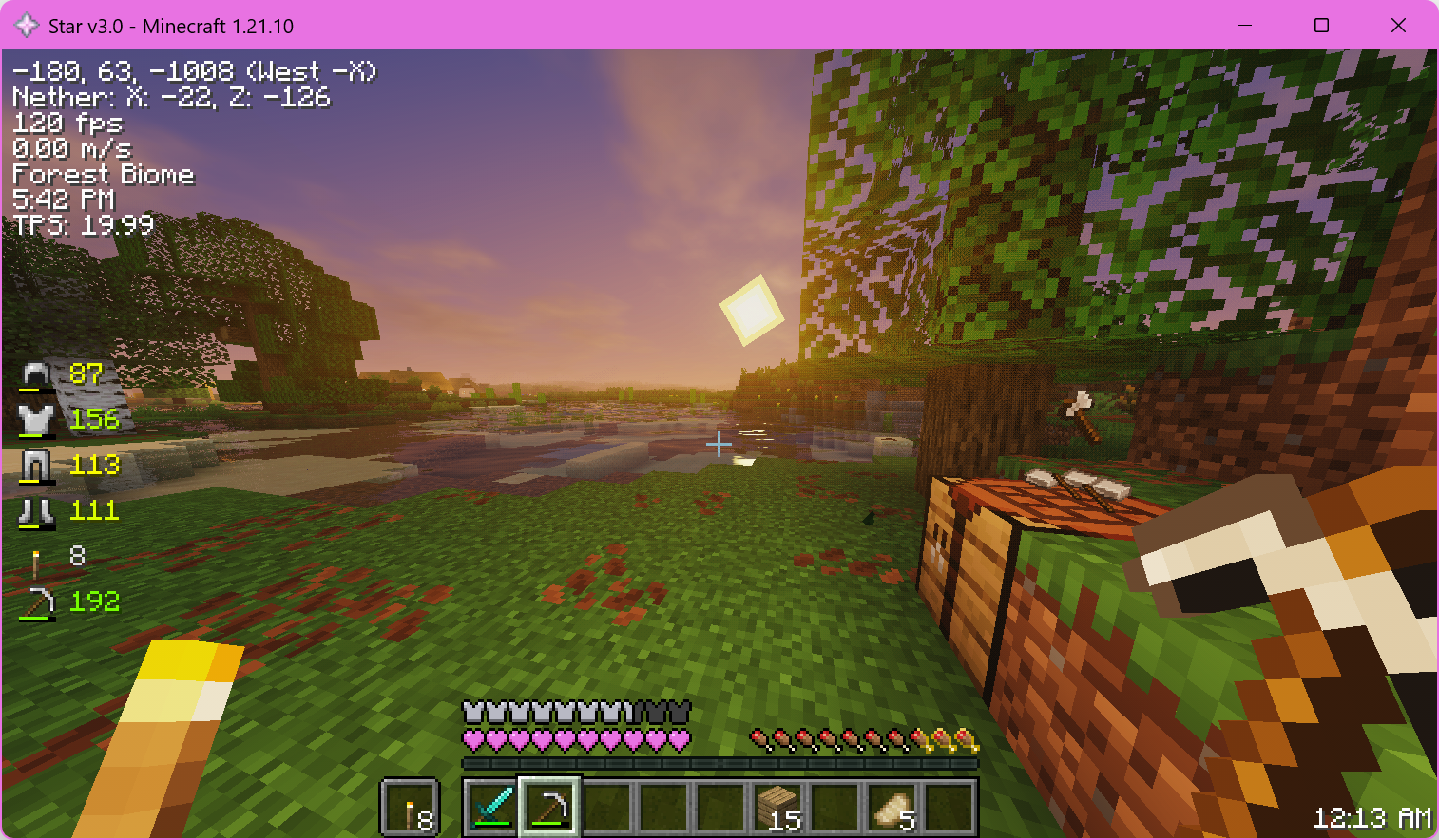
This is Star. It's designed to not intrude into the vanilla Minecraft experience, so it focuses on making your experience better rather than adding new content.
Performance
Star is very performant out of the box, and achieves higher framerates than modpacks like Fabulously Optimized*.
*Performance comparisons for Star 3.0 pending, it runs good though trust me
Quality of life changes
Faster launch speed
Star can start up faster than other modpacks thanks to resource caching, and it also loads into worlds faster. This helps make sure that you're not left waiting for the game to catch up while still giving you the freedom to use even the fanciest of resource packs.
Improved in-game HUD
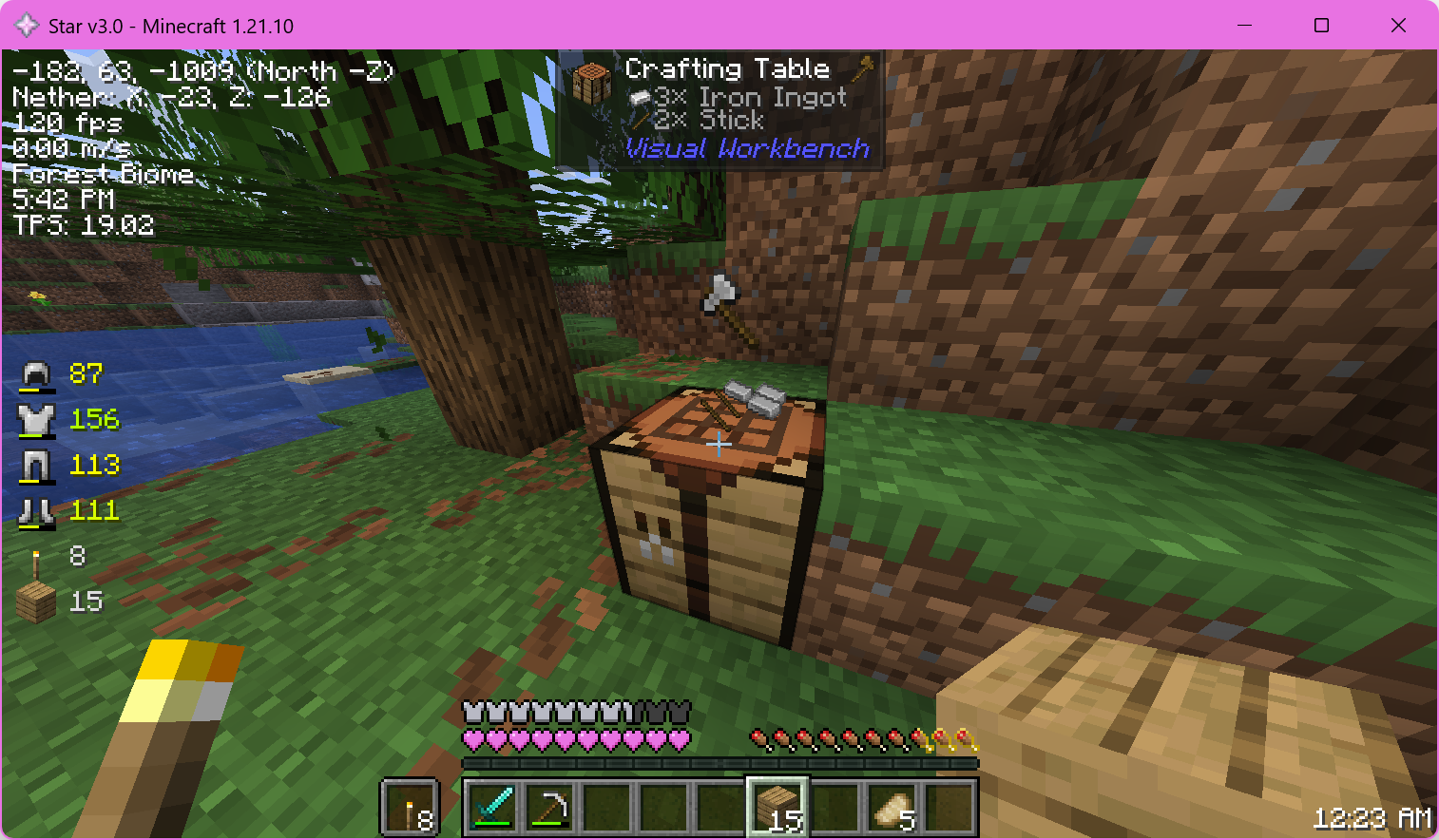 Star adds a few different things to your game HUD, all intended to improve your gameplay.
It adds some info on the top left including coordinates, framerate, your movement speed, the current biome, in-game world time, ping and server TPS.
On the middle left you get a minimal HUD with a display for armor and held-item durability. Hopefully you can repair your armor before it breaks!
On the top middle you get information about what you are looking at, down to mob health and effects or block information. This info is from Jade.
Finally, on the bottom middle and right you can see your saturation in your hunger bar and also a clock showing real-life time so you don't lose track of time.
Preconfigured Mellow Shader
Star includes Mellow Shader custom-configured for a balance of great performance and graphics quality. You can toggle it on or off at any time by pressing K.
Better block GUIs (crafting, cooking, etc)
Star has some nice touches for when you're crafting, cooking, enchanting, or even when the game is just paused.
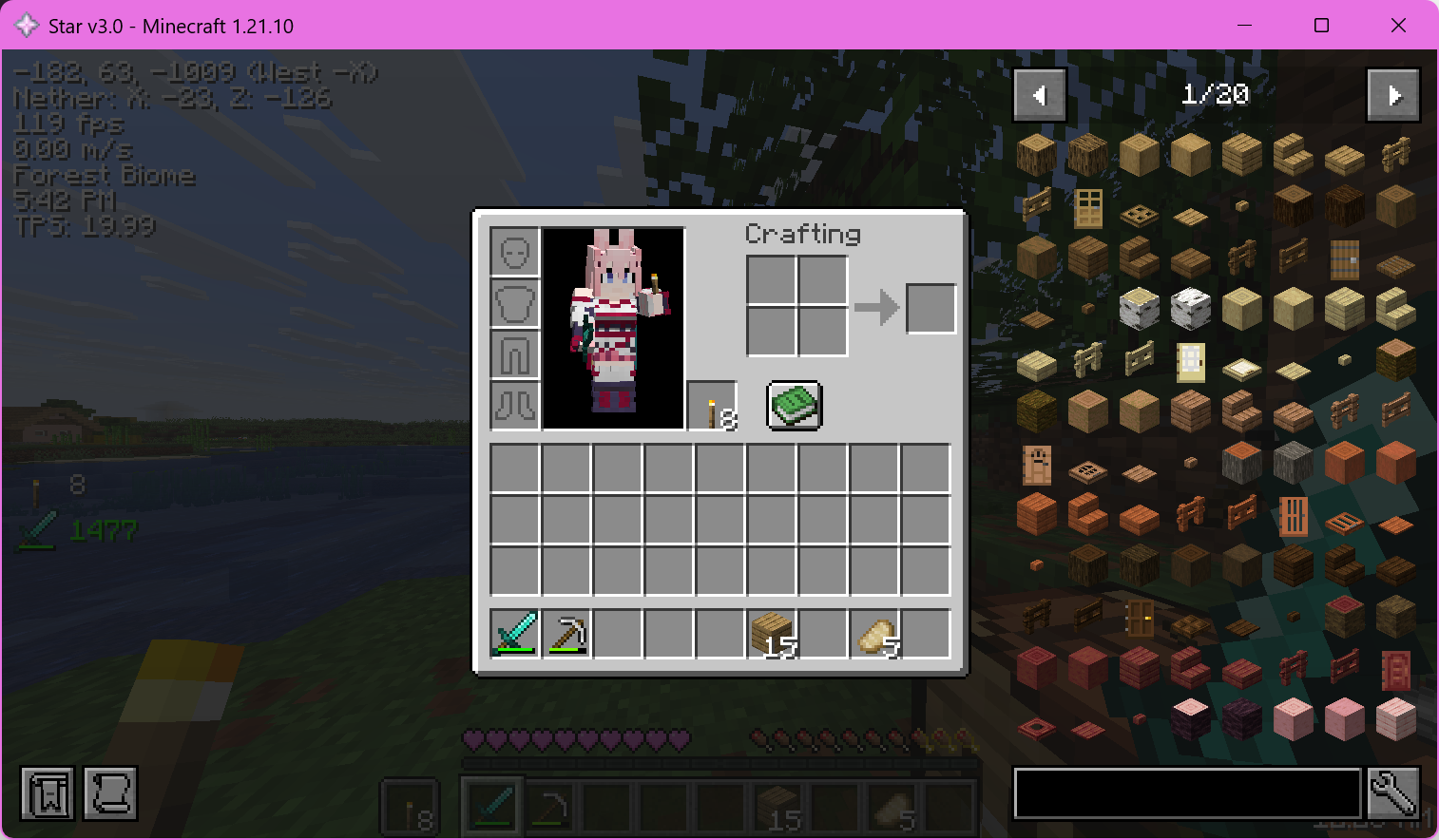 Star adds JustEnoughItems so you can easily search for items, find crafting recipes, lookup brewing ingredients and more, all without having to leave your game.
Unintrusive improvements to some game functions
- Adds satisfying camera movement for strafing, turning, jumping, falling, flying, and more, with Camera Overhaul
- Adds dynamic lights, so you can put things like torches in your offhand to light the way
- Adds tooltips to Shulker boxes so you can see what's inside (with Shulker Box Tooltips)
- Adds tasteful extra particles (with Visuality)
- Adds wavy capes (with WaveyCapes)
- Adds a zoom function similar to Optifine (with OK Zoomer)
- Adds Client Tweaks to do things like preventing placing your last torch from your offhand
- Adds Controlify to support any controller via SDL3
- Adds connected texture support with Continuity
Better multiplayer
When you're playing with others, Star adds an extra level of polish.
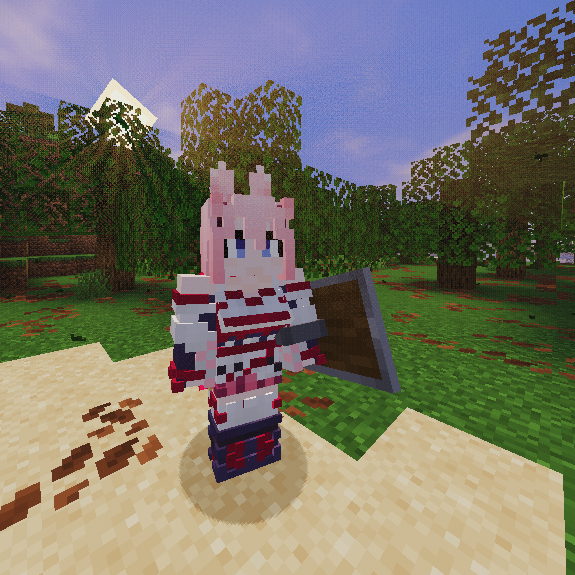
Player skins are brought to life with 3D Skin Layers and support additional customization via Ears!
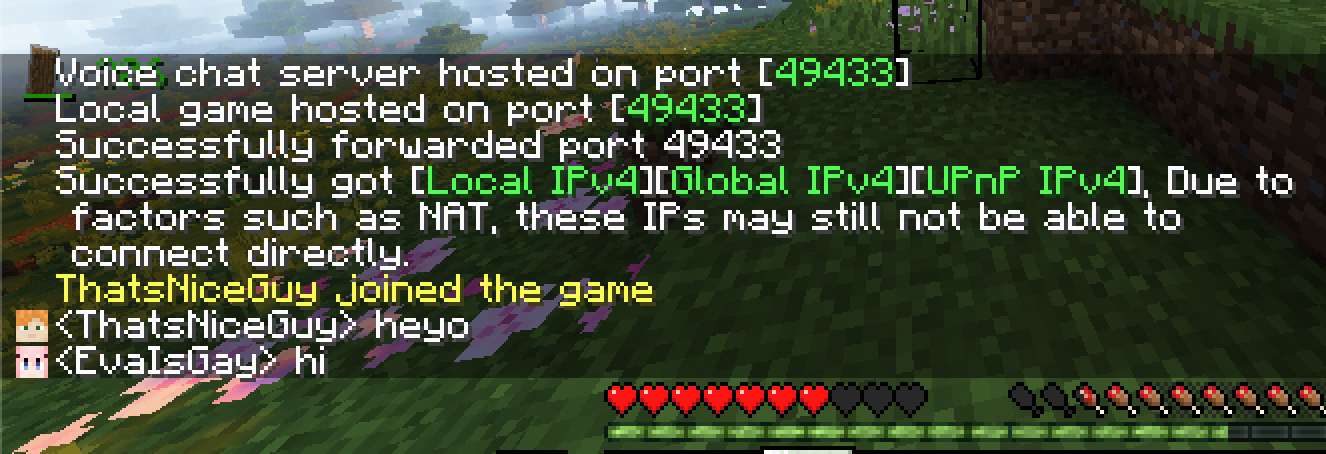
No server hosting? No problem! Just open the Open To LAN screen, and you can forward the game port with one click, thanks to UPnP!
Requires UPnP to be supported & enabled on your machine, router and ISP.
Once your friends join, chat messages will have player heads displayed next to them so you know who is who, at a glance.
Even more technical changes
In addition to making your gaming experience better, Star also does the following:
- Keeps a small memory profile, which lets me give Star its 768MB memory allocation requirement
- Adds autocomplete for NBT tags when writing commands in chat and in command blocks
- Fixes known bugs in the game with Debugify
- Optimizes aggressively with BadOptimizations
and much more for you to find...
(or you can check the mods list here in Modrinth, that works too)
Requirements
Software
Modern versions of desktop Windows or Linux with Java 21 are recommended.
macOS also works well but OpenGL support is not ideal so I don't expressly recommend it.
Mobile launchers like Amethyst or Fold Craft Launcher are not supported because Star includes Sodium.
Compute
8th generation quad core Intel CPU recommended
You can play the game on much weaker hardware like a 6th generation dual core Intel CPU, but singleplayer especially can be a toss up on how nice it will be to play.
On ARM64 machines, 4x Cortex-A78 cores are pretty playable as long as your graphics device is up to par.
1GB+ RAM allocation recommended
You'll need a minimum of 768MB RAM allocated to play using Star, and 1GB or more is recommended for the best experience.
Graphics
OpenGL 4.6 required
Star includes the Sodium mod, so a graphics device supporting OpenGL 4.6 is required.
If you're having trouble figuring out what OpenGL you have, check out this part of Sodium's description:
Most graphics cards released in the past 12 years are compatible. This includes the following hardware:
- Intel HD Graphics 500 Series (Skylake) or newer
- Nvidia GeForce 400 Series (Fermi) or newer
- AMD Radeon HD 7000 Series (GCN 1) or newer
Translation layers may work on a "your mileage may vary" basis but are not recommended by myself or Sodium's developer in lieu of a proper driver natively supporting OpenGL 4.6. This includes Macs running macOS as well as Windows ARM64 computers with chips older than the Snapdragon X-series (see below).
Note for Windows ARM64 users
The game works perfectly if you play on a machine with the Snapdragon X-series chips or newer, like the X Plus, X Elite or the upcoming X2 Elite. Shaders and all.
However, if you are playing on a machine with anything older than the Snapdragon X-series like the Snapdragon 8cx series or Microsoft SQ-series, turning on Iris shaders will crash the game. This is because Qualcomm didn't ship a native OpenGL driver for these older chips and Microsoft had to include a translator driver in Windows for OpenGL apps like Minecraft. Unfortunately, this translator driver is not as good as native OpenGL and it makes the game crash when it tries to compile the shaderpack's shaders. Please don't turn on shaders and especially do not report crashes on these platforms to Sodium's developer.
There is currently no solution except for switching to a machine with an Intel/NVIDIA/AMD GPU, or buying a newer Snapdragon machine with the X-series or newer.
VR
VR is not a supported usecase
Star is not tested for or on VR. If it works for you, it works. Otherwise, I likely will not apply fixes just to support VR.
Mod list
This is the full mod list for Star 3.0.1
- 3d-Skin-Layers by tr7zw
- AppleSkin by squeek502
- Architectury by shedaniel
- BadOptimizations by Thosea
- Balm by BlayTheNinth
- Better Animations Collection by KodaichiZero, Fuzs
- Better Beds by Motschen, TeamMidnightDust
- Better Mount HUD by Lortseam
- Blåhaj of Undying by enjarai
- CICADA by enjarai
- CameraOverhaul by Mirsario
- Chat Heads by dzwdz, Fourmisain
- Client Tweaks by BlayTheNinth
- Cloth Config v20 by shedaniel
- Continuity by PepperCode1
- Controlify by isXander
- Custom Window Title (Multiloader) by chylex
- Debugify by isXander
- Ears by unascribed
- EnchantmentDescriptions by Darkhax
- Enhanced Attack Indicator by Minenash
- Entity Model Features by Traben
- Entity Texture Features by Traben
- Explosive Enhancement by Superkat32
- Fabric API by FabricMC
- Fabric Language Kotlin by FabricMC
- Falling Leaves by Fourmisain, BrekiTomasson, RandomMcSomethin
- FancyMenu by Keksuccino
- Fast IP Ping by Fallen_Breath
- FerriteCore by malte0811
- Forge Config API Port by Fuzs
- Freecam by hashalite, Matt Sturgeon
- Held Item Info by A5b84
- ImmediatelyFast by RK_01
- Indium by comp500
- Iris by coderbot, IMS212, Justsnoopy30, FoundationGames
- Jade by Snownee
- Just Enough Items by mezz
- Konkrete by Keksuccino
- Krypton by tuxed
- LAN World Plug-n-Play by Satxm, Rikka0w0
- LambDynamicLights by LambdAurora
- Lithium by JellySquid, 2No2Name
- MaLiLib by masa
- Melody by Keksuccino
- MidnightLib by Motschen
- Mod Menu by Prospector, haykam821, TerraformersMC
- Model Gap Fix by MehVahdJukaar
- ModernFix by embeddedt
- More Culling by FX - PR0CESS, 1Foxy2
- NBT Autocomplete by mt1006
- No Chat Reports by Aizistral
- Not Enough Crashes by Fourmisain, Fudge, Liach, Madis0, Runemoro, Siuolplex, WuzgXY, the456gamer, wafflecoffee
- NotEnoughAnimations by tr7zw
- Ok Zoomer by Ennui Langeweile, Up
- PrickleMC by Darkhax
- Puzzles Lib by Fuzs
- Reese's Sodium Options by FlashyReese
- Resourcify by DeDiamondPro
- ScalableLux by Spottedleaf, ishland
- Shulker Box Tooltip by MisterPeModder
- Simple Hud Enhanced by SoRadGaming
- Skyboxify by lowercasebtw, FlashyReese, AMereBagatelle
- Sodium by JellySquid (jellysquid3)
- Sodium Extra by FlashyReese
- Star Icon Provider by Badstagram, ThatStella7922
- Visual Workbench by Fuzs
- Visuality by PinkGoosik
- WaveyCapes by tr7zw
- YetAnotherConfigLib by isXander
- green background by Masiha128
- oωo by glisco
Ченджлог
3.2.1Релиз1.21.11 · 19 марта 2026 г.
This minor update to Star includes the following changes:
- Update all included mods
- Provides general improvements with all included mods from minor performance boosts to bugfixes
- Remove OK Zoomer and replace it with Zoomify
- This fixes a bug where your crosshair would disappear after zooming
Note for Windows ARM64 users
The game works perfectly if you play on a machine with the Snapdragon X-series chips or newer, like the X Plus, X Elite, or X2 Elite. Shaders and all.
However, if you are playing on a machine with anything older than the Snapdragon X-series like the Snapdragon 8cx series or Microsoft SQ-series, turning on Iris shaders will crash the game. This is because Qualcomm didn't ship a native OpenGL driver for these older chips and Microsoft had to include a translator driver in Windows for OpenGL apps like Minecraft. Unfortunately, this translator driver is not as good as native OpenGL and it makes the game crash when it tries to compile the shaderpack's shaders. Please don't turn on shaders and especially do not report crashes on these platforms to Sodium's developer.
There is currently no solution except for switching to a machine with an Intel/NVIDIA/AMD GPU, or buying a newer Snapdragon machine with the X-series or newer.
Full mod list
- 3d-Skin-Layers [1.10.2] by tr7zw
- AppleSkin [3.0.8+mc1.21.11] by squeek502
- Architectury [19.0.1] by shedaniel
- BadOptimizations [2.4.1] by Thosea
- Better Animations Collection [21.11.0] by KodaichiZero, Fuzs
- Better Beds [1.4.1] by Motschen, TeamMidnightDust
- Better Mount HUD [1.2.6] by Lortseam
- Blåhaj of Undying [1.7.4+1.21.11] by enjarai
- CICADA [0.14.3+1.21.9-1.21.10] by enjarai
- CameraOverhaul [2.0.6-fabric+mc.1.21.11-plus] by Mirsario
- Chat Heads [1.2.1] by dzwdz, Fourmisain
- Cloth Config v20 [21.11.153] by shedaniel
- Continuity [3.0.1-beta.1+1.21.11] by PepperCode1
- Controlify [2.5.2+1.21.11-fabric] by isXander
- Custom Window Title (Multiloader) [1.4.3] by chylex
- Debugify [1.21.11+1.0] by isXander
- Ears [1.4.7_01] by unascribed
- EnchantmentDescriptions [21.11.1] by Darkhax
- Entity Model Features [3.0.12] by Traben
- Entity Texture Features [7.0.9] by Traben
- Explosive Enhancement [1.4.1-1.21.11] by Superkat32
- Fabric API [0.141.3+1.21.11] by FabricMC
- Fabric Language Kotlin [1.13.9+kotlin.2.3.10] by FabricMC
- Falling Leaves [2.0.3] by Fourmisain, BrekiTomasson, RandomMcSomethin
- FancyMenu [3.8.4] by Keksuccino
- Fast IP Ping [1.0.8] by Fallen_Breath
- FerriteCore [8.2.0] by malte0811
- Forge Config API Port [21.11.1] by Fuzs
- Freecam [1.3.6+mc1.21.11] by hashalite, Matt Sturgeon
- Held Item Info [1.9.0] by A5b84
- ImmediatelyFast [1.14.2+1.21.11] by RK_01
- Inventory Blur [1.2.1] by Enchanted_Games
- Iris [1.10.6+mc1.21.11] by coderbot, IMS212, Justsnoopy30, FoundationGames
- Jade [21.1.4+fabric] by Snownee
- Konkrete [1.9.18] by Keksuccino
- Krypton [0.2.10] by tuxed
- LAN World Plug-n-Play [1.9.8] by Satxm, Rikka0w0
- LambDynamicLights [4.9.1+1.21.11] by LambdAurora
- Lithium [0.21.4+mc1.21.11] by JellySquid, 2No2Name
- Melody [1.0.15] by Keksuccino
- MidnightLib [1.9.2] by Motschen
- Mod Menu [17.0.0-beta.2] by Prospector, haykam821, TerraformersMC
- ModernFix [5.26.2-build.1] by embeddedt
- More Culling [1.6.2] by FX - PR0CESS, 1Foxy2
- NBT Autocomplete [1.3.14] by mt1006
- No Chat Reports [1.21.11-v2.18.0] by Aizistral
- Not Enough Crashes [4.4.9+1.21.11] by Fudge, Runemoro
- NotEnoughAnimations [1.11.3] by tr7zw
- PrickleMC [21.11.1] by Darkhax
- Puzzles Lib [21.11.11] by Fuzs
- Reese's Sodium Options [2.0.3+mc1.21.11] by FlashyReese
- Resourcify [1.8.1] by DeDiamondPro
- Roughly Enough Items [21.11.814] by shedaniel
- ScalableLux [0.1.6+fabric.c25518a] by Spottedleaf, ishland
- Shulker Box Tooltip [5.2.16+1.21.11] by MisterPeModder
- Simple Hud Enhanced [4.7.5] by SoRadGaming
- Skyboxify [2.6] by lowercasebtw, FlashyReese, AMereBagatelle
- Sodium [0.8.6+mc1.21.11] by JellySquid (jellysquid3)
- Sodium Extra [0.8.3+mc1.21.11] by FlashyReese
- Star Icon Provider [1.0.1-Star1.21v2.0] by Badstagram, ThatStella7922
- Visual Workbench [21.11.1] by Fuzs
- Visuality [0.7.13+1.21.11] by PinkGoosik
- WaveyCapes [1.8.2] by tr7zw
- YetAnotherConfigLib [3.8.2+1.21.11-fabric] by isXander
- Zoomify [2.15.2+1.21.11] by isXander
- green background [1.0.0] by Masiha128
3.2Релиз1.21.11 · 20 февраля 2026 г.
This update to Star includes the following changes:
- Update Minecraft to 1.21.11
- Update all included mods
- Ears fixed a bug where having the chest feature enabled on your skin would make the chestplate render incorrectly on the chest area and be partially visible from first person
- Sodium has a new config screen and even more performance improvements
- General improvements and fixes elsewhere
- Update the Fabric Loader to 0.18.4
- Added the Inventory Blur
- This mod brings back the background blurs that Star 1.x had, while performing much better than that did
- Added Roughly Enough Items
- This mod replaces Just Enough Items, due to it running slightly better and (personally) being nicer to use
- Remove MaLiLib as it is not used anymore
- Remove Indium, Model Gap Fix and Enhanced Attack Indicator because they are no longer compatible
Note for Windows ARM64 users
The game works perfectly if you play on a machine with the Snapdragon X-series chips or newer, like the X Plus, X Elite or the upcoming X2 Elite. Shaders and all.
However, if you are playing on a machine with anything older than the Snapdragon X-series like the Snapdragon 8cx series or Microsoft SQ-series, turning on Iris shaders will crash the game. This is because Qualcomm didn't ship a native OpenGL driver for these older chips and Microsoft had to include a translator driver in Windows for OpenGL apps like Minecraft. Unfortunately, this translator driver is not as good as native OpenGL and it makes the game crash when it tries to compile the shaderpack's shaders. Please don't turn on shaders and especially do not report crashes on these platforms to Sodium's developer.
There is currently no solution except for switching to a machine with an Intel/NVIDIA/AMD GPU, or buying a newer Snapdragon machine with the X-series or newer.
Full mod list
- 3d-Skin-Layers [1.10.1] by tr7zw
- AppleSkin [3.0.8+mc1.21.11] by squeek502
- Architectury [19.0.1] by shedaniel
- BadOptimizations [2.4.1] by Thosea
- Balm [21.11.6] by BlayTheNinth
- Better Animations Collection [21.11.0] by KodaichiZero, Fuzs
- Better Beds [1.4.1] by Motschen, TeamMidnightDust
- Better Mount HUD [1.2.6] by Lortseam
- Blåhaj of Undying [1.7.4+1.21.11] by enjarai
- CICADA [0.14.3+1.21.9-1.21.10] by enjarai
- CameraOverhaul [2.0.6-fabric+mc.1.21.11-plus] by Mirsario
- Chat Heads [1.2.1] by dzwdz, Fourmisain
- Client Tweaks [21.11.4] by BlayTheNinth
- Cloth Config v20 [21.11.153] by shedaniel
- Continuity [3.0.1-beta.1+1.21.11] by PepperCode1
- Controlify [2.5.2+1.21.11-fabric] by isXander
- Custom Window Title (Multiloader) [1.4.3] by chylex
- Debugify [1.21.11+1.0] by isXander
- Ears [1.4.7_01] by unascribed
- EnchantmentDescriptions [21.11.1] by Darkhax
- Entity Model Features [3.0.12] by Traben
- Entity Texture Features [7.0.9] by Traben
- Explosive Enhancement [1.4.1-1.21.11] by Superkat32
- Fabric API [0.141.3+1.21.11] by FabricMC
- Fabric Language Kotlin [1.13.9+kotlin.2.3.10] by FabricMC
- Falling Leaves [2.0.3] by Fourmisain, BrekiTomasson, RandomMcSomethin
- FancyMenu [3.8.4] by Keksuccino
- Fast IP Ping [1.0.8] by Fallen_Breath
- FerriteCore [8.2.0] by malte0811
- Forge Config API Port [21.11.1] by Fuzs
- Freecam [1.3.6+mc1.21.11] by hashalite, Matt Sturgeon
- Held Item Info [1.9.0] by A5b84
- ImmediatelyFast [1.14.2+1.21.11] by RK_01
- Inventory Blur [1.2.1] by Enchanted_Games
- Iris [1.10.5+mc1.21.11] by coderbot, IMS212, Justsnoopy30, FoundationGames
- Jade [21.1.1+fabric] by Snownee
- Konkrete [1.9.18] by Keksuccino
- Krypton [0.2.10] by tuxed
- LAN World Plug-n-Play [1.9.8] by Satxm, Rikka0w0
- LambDynamicLights [4.9.1+1.21.11] by LambdAurora
- Lithium [0.21.3+mc1.21.11] by JellySquid, 2No2Name
- Melody [1.0.15] by Keksuccino
- MidnightLib [1.9.2] by Motschen
- Mod Menu [17.0.0-beta.2] by Prospector, haykam821, TerraformersMC
- ModernFix [5.25.2-build.4] by embeddedt
- More Culling [1.6.2] by FX - PR0CESS, 1Foxy2
- NBT Autocomplete [1.3.14] by mt1006
- No Chat Reports [1.21.11-v2.18.0] by Aizistral
- Not Enough Crashes [4.4.9+1.21.11] by Fudge, Runemoro
- NotEnoughAnimations [1.11.3] by tr7zw
- Ok Zoomer [16.0.0-beta.2] by Ennui Langeweile, Up
- PrickleMC [21.11.1] by Darkhax
- Puzzles Lib [21.11.11] by Fuzs
- Reese's Sodium Options [2.0.3+mc1.21.11] by FlashyReese
- Resourcify [1.8.0] by DeDiamondPro
- Roughly Enough Items [21.11.814] by shedaniel
- ScalableLux [0.1.6+fabric.c25518a] by Spottedleaf, ishland
- Shulker Box Tooltip [5.2.15+1.21.11] by MisterPeModder
- Simple Hud Enhanced [4.7.5] by SoRadGaming
- Skyboxify [2.5] by lowercasebtw, FlashyReese, AMereBagatelle
- Sodium [0.8.4+mc1.21.11] by JellySquid (jellysquid3)
- Sodium Extra [0.8.3+mc1.21.11] by FlashyReese
- Star Icon Provider [1.0.1-Star1.21v2.0] by Badstagram, ThatStella7922
- Visual Workbench [21.11.1] by Fuzs
- Visuality [0.7.12+1.21.11] by PinkGoosik
- WaveyCapes [1.8.2] by tr7zw
- YetAnotherConfigLib [3.8.2+1.21.11-fabric] by isXander
- green background [1.0.0] by Masiha128
- oωo [0.13.0+1.21.11] by glisco
3.0.1Релиз1.21.10 · 20 декабря 2025 г.
This minor update to Star includes the following features:
- Update all included mods
- Fixes a crash when rendering lightning (Camera Overhaul)
- General improvements and fixes elsewhere
Note for Ears mod users
If you use Ears features on your Minecraft skin and you have enabled the chest feature on your skin, wearing any chestplate will render incorrectly on the chest area and be partially visible from first person near your hand. This issue exists on the latest version of Ears which is 1.4.7+fabric-1.21.10.
I've opened an issue for this on the Ears GitHub repo to bring it to unascribed's attention.
Note for Windows ARM64 users
The game works perfectly if you play on a machine with the Snapdragon X-series chips or newer, like the X Plus, X Elite or the upcoming X2 Elite. Shaders and all.
However, if you are playing on a machine with anything older than the Snapdragon X-series like the Snapdragon 8cx series or Microsoft SQ-series, turning on Iris shaders will crash the game. This is because Qualcomm didn't ship a native OpenGL driver for these older chips and Microsoft had to include a translator driver in Windows for OpenGL apps like Minecraft. Unfortunately, this translator driver is not as good as native OpenGL and it makes the game crash when it tries to compile the shaderpack's shaders. Please don't turn on shaders and especially do not report crashes on these platforms to Sodium's developer.
There is currently no solution except for switching to a machine with an Intel/NVIDIA/AMD GPU, or buying a newer Snapdragon machine with the X-series or newer.
Full mod list
- 3d-Skin-Layers [1.10.1] by tr7zw
- AppleSkin [3.0.7+mc1.21.9] by squeek502
- Architectury [18.0.8] by shedaniel
- BadOptimizations [2.4.1] by Thosea
- Balm [21.10.8] by BlayTheNinth
- Better Animations Collection [21.10.0] by KodaichiZero, Fuzs
- Better Beds [1.4.1] by Motschen, TeamMidnightDust
- Better Mount HUD [1.2.6] by Lortseam
- Blåhaj of Undying [1.7.3+1.21.10] by enjarai
- CICADA [0.14.3+1.21.9-1.21.10] by enjarai
- CameraOverhaul [2.0.5-fabric+mc.1.21.9-plus] by Mirsario
- Chat Heads [1.1.7] by dzwdz, Fourmisain
- Client Tweaks [21.10.2] by BlayTheNinth
- Cloth Config v20 [20.0.149] by shedaniel
- Continuity [3.0.1-beta.2+1.21.10] by PepperCode1
- Controlify [2.5.0+1.21.10-fabric] by isXander
- Custom Window Title (Multiloader) [1.4.3] by chylex
- Debugify [1.21.10+1.1] by isXander
- Ears [1.4.7] by unascribed
- EnchantmentDescriptions [21.10.2] by Darkhax
- Enhanced Attack Indicator [1.2.0+1.21.6] by Minenash
- Entity Model Features [3.0.7] by Traben
- Entity Texture Features [7.0.6] by Traben
- Explosive Enhancement [1.4.0-1.21.10] by Superkat32
- Fabric API [0.138.4+1.21.10] by FabricMC
- Fabric Language Kotlin [1.13.8+kotlin.2.3.0] by FabricMC
- Falling Leaves [2.0.2] by Fourmisain, BrekiTomasson, RandomMcSomethin
- FancyMenu [3.8.2] by Keksuccino
- Fast IP Ping [1.0.8] by Fallen_Breath
- FerriteCore [8.0.2] by malte0811
- Forge Config API Port [21.10.1] by Fuzs
- Freecam [1.3.5+mc1.21.10] by hashalite, Matt Sturgeon
- Held Item Info [1.9.0] by A5b84
- ImmediatelyFast [1.13.4+1.21.10] by RK_01
- Indium [1.0.35+mc1.21] by comp500
- Iris [1.9.7+mc1.21.10] by coderbot, IMS212, Justsnoopy30, FoundationGames
- Jade [20.1.0+fabric] by Snownee
- Just Enough Items [26.2.0.28] by mezz
- Konkrete [1.9.13] by Keksuccino
- Krypton [0.2.10] by tuxed
- LAN World Plug-n-Play [1.9.8] by Satxm, Rikka0w0
- LambDynamicLights [4.8.7+1.21.10] by LambdAurora
- Lithium [0.20.1+mc1.21.10] by JellySquid, 2No2Name
- MaLiLib [0.26.7] by masa
- Melody [1.0.14] by Keksuccino
- MidnightLib [1.9.2] by Motschen
- Mod Menu [16.0.0-rc.1] by Prospector, haykam821, TerraformersMC
- Model Gap Fix [1.21.10-1.12] by MehVahdJukaar
- ModernFix [5.20.6] by embeddedt
- More Culling [1.5.0-beta.2] by FX - PR0CESS, 1Foxy2
- NBT Autocomplete [1.3.14] by mt1006
- No Chat Reports [1.21.10-v2.16.0] by Aizistral
- Not Enough Crashes [4.4.9+1.21.10] by Fourmisain, Fudge, Liach, Madis0, Runemoro, Siuolplex, WuzgXY, the456gamer, wafflecoffee
- NotEnoughAnimations [1.11.1] by tr7zw
- Ok Zoomer [15.0.0-beta.5] by Ennui Langeweile, Up
- PrickleMC [21.10.2] by Darkhax
- Puzzles Lib [21.10.8] by Fuzs
- Reese's Sodium Options [1.8.6+mc1.21.10] by FlashyReese
- Resourcify [1.7.5] by DeDiamondPro
- ScalableLux [0.1.6+fabric.c25518a] by Spottedleaf, ishland
- Shulker Box Tooltip [5.2.13+1.21.10] by MisterPeModder
- Simple Hud Enhanced [4.7.5] by SoRadGaming
- Skyboxify [2.1] by lowercasebtw, FlashyReese, AMereBagatelle
- Sodium [0.7.3+mc1.21.10] by JellySquid (jellysquid3)
- Sodium Extra [0.7.1+mc1.21.10] by FlashyReese
- Star Icon Provider [1.0.1-Star1.21v2.0] by Badstagram, ThatStella7922
- Visual Workbench [21.10.0] by Fuzs
- Visuality [0.7.11+1.21.9] by PinkGoosik
- WaveyCapes [1.8.1] by tr7zw
- YetAnotherConfigLib [3.8.1+1.21.10-fabric] by isXander
- green background [1.0.0] by Masiha128
- oωo [0.12.24+1.21.9] by glisco
3.0Релиз1.21.10 · 30 ноября 2025 г.
This major update to Star includes the following features:
- Update Minecraft to 1.21.10
- Update the included Star resource pack
- Switch from Complementary Shaders to Mellow Shader 2.2 for better performance
- 60-71 FPS at 2880x1800 in performance mode on Intel Iris(R) Xe graphics on the Surface Pro 9
- 120 FPS at 4K an RTX 2070 Super on my desktop PC with a Core i5-12600K
- These numbers are with shaders enabled, V-Sync off
- Update all included optimization mods, and add some more
- Sodium in particular had a large update, 0.7.0, with improvements to complex transparency and translucency
- Up to 800 FPS at 4K an RTX 2070 Super on my desktop PC with a Core i5-12600K (shaders off, V-Sync off)
- Enable Continuity's default connected textures
- Enable Controlify's "legacy console" style controller glyphs/icons
Note for Ears mod users
If you use Ears features on your Minecraft skin and you have enabled the chest feature on your skin, wearing any chestplate will render incorrectly on the chest area and be partially visible from first person near your hand. This issue exists on the latest version of Ears which is 1.4.7+fabric-1.21.10.
I've opened an issue for this on the Ears GitHub repo to bring it to unascribed's attention.
Note for Windows ARM64 users
The game works perfectly if you play on a machine with the Snapdragon X-series chips or newer, like the X Plus, X Elite or the upcoming X2 Elite. Shaders and all.
However, if you are playing on a machine with anything older than the Snapdragon X-series like the Snapdragon 8cx series or Microsoft SQ-series, turning on Iris shaders will crash the game. This is because Qualcomm didn't ship a native OpenGL driver for these older chips and Microsoft had to include a translator driver in Windows for OpenGL apps like Minecraft. Unfortunately, this translator driver is not as good as native OpenGL and it makes the game crash when it tries to compile the shaderpack's shaders. Please don't turn on shaders and especially do not report crashes on these platforms to Sodium's developer.
There is currently no solution except for switching to a machine with an Intel/NVIDIA/AMD GPU, or buying a newer Snapdragon machine with the X-series or newer.
Mod additions
- JustEnoughItems
- Replaces RoughlyEnoughItems which isn't available on 1.21.10
- Enchantment Descriptions
- Visual Workbench
- Controlify
- Replaces MidnightControls to offer better controller support thanks to SDL3)
- Optiboxes
- Replaces FabricSkyboxes which isn't available on 1.21.10
- Entity Model Features and Entity Texture Features (Was unavailable in Star 3.0 betas)
- Debugify
- Krypton
- ScalableLux
- FerriteCore (Was unavailable in Star 3.0 betas)
- ModernFix-mVUS
- A fork of ModernFix to add support for 1.21.10, hopefully it is good
- Not Enough Crashes
Mod removals
- FabricSkyBoxes (replaced with Optiboxes)
- EatingAnimation (unavailable on 1.21.10)
- DynamicFPS (equivalent is built into the game now)
- Enhanced Block Entities (unavailable on 1.21.10)
- AuthMe (not needed)
- Memory Leak Fix (unavailable on 1.21.10)
Complete mod list
- 3d-Skin-Layers [1.9.2] by tr7zw
- AppleSkin [3.0.7+mc1.21.9] by squeek502
- Architectury [18.0.6] by shedaniel
- BadOptimizations [2.4.0] by Thosea
- Balm [21.10.8] by BlayTheNinth
- Better Animations Collection [21.10.0] by KodaichiZero, Fuzs
- Better Beds [1.4.1] by Motschen, TeamMidnightDust
- Better Mount HUD [1.2.6] by Lortseam
- Blåhaj of Undying [1.7.3+1.21.10] by enjarai
- CICADA [0.14.3+1.21.9-1.21.10] by enjarai
- CameraOverhaul [2.0.5-fabric+mc.1.21.9-plus] by Mirsario
- Chat Heads [1.1.7] by dzwdz, Fourmisain
- Client Tweaks [21.10.2] by BlayTheNinth
- Cloth Config v20 [20.0.149] by shedaniel
- Continuity [3.0.1-beta.2+1.21.10] by PepperCode1
- Controlify [2.4.2+1.21.10-fabric] by isXander
- Custom Window Title (Multiloader) [1.4.3] by chylex
- Debugify [1.21.10+1.1] by isXander
- Ears [1.4.7] by unascribed
- EnchantmentDescriptions [21.10.1] by Darkhax
- Enhanced Attack Indicator [1.2.0+1.21.6] by Minenash
- Entity Model Features [3.0.7] by Traben
- Entity Texture Features [7.0.6] by Traben
- Explosive Enhancement [1.4.0-1.21.10] by Superkat32
- Fabric API [0.138.3+1.21.10] by FabricMC
- Fabric Language Kotlin [1.13.7+kotlin.2.2.21] by FabricMC
- Falling Leaves [2.0.2] by Fourmisain, BrekiTomasson, RandomMcSomethin
- FancyMenu [3.8.1] by Keksuccino
- Fast IP Ping [1.0.7] by Fallen_Breath
- FerriteCore [8.0.2] by malte0811
- Forge Config API Port [21.10.1] by Fuzs
- Freecam [1.3.5+mc1.21.10] by hashalite, Matt Sturgeon
- Held Item Info [1.9.0] by A5b84
- ImmediatelyFast [1.13.2+1.21.10] by RK_01
- Indium [1.0.35+mc1.21] by comp500
- Iris [1.9.6+mc1.21.9] by coderbot, IMS212, Justsnoopy30, FoundationGames
- Jade [20.1.0+fabric] by Snownee
- Just Enough Items [26.2.0.27] by mezz
- Konkrete [1.9.13] by Keksuccino
- Krypton [0.2.10] by tuxed
- LAN World Plug-n-Play [1.9.7] by Satxm, Rikka0w0
- LambDynamicLights [4.8.6+1.21.10] by LambdAurora
- Lithium [0.20.1+mc1.21.10] by JellySquid, 2No2Name
- MaLiLib [0.26.6] by masa
- Melody [1.0.14] by Keksuccino
- MidnightLib [1.9.1] by Motschen
- Mod Menu [16.0.0-rc.1] by Prospector, haykam821, TerraformersMC
- Model Gap Fix [1.21.10-1.12] by MehVahdJukaar
- ModernFix [5.20.6] by embeddedt
- More Culling [1.5.0-beta.2] by FX - PR0CESS, 1Foxy2
- NBT Autocomplete [1.3.13] by mt1006
- No Chat Reports [1.21.10-v2.16.0] by Aizistral
- Not Enough Crashes [4.4.9+1.21.10] by Fourmisain, Fudge, Liach, Madis0, Runemoro, Siuolplex, WuzgXY, the456gamer, wafflecoffee
- NotEnoughAnimations [1.10.6] by tr7zw
- Ok Zoomer [15.0.0-beta.5] by Ennui Langeweile, Up
- Optiboxes [1.7] by lowercasebtw, FlashyReese, AMereBagatelle
- PrickleMC [21.10.2] by Darkhax
- Puzzles Lib [21.10.8] by Fuzs
- Reese's Sodium Options [1.8.6+mc1.21.10] by FlashyReese
- Resourcify [1.7.5] by DeDiamondPro
- ScalableLux [0.1.6+fabric.c25518a] by Spottedleaf, ishland
- Shulker Box Tooltip [5.2.12+1.21.9] by MisterPeModder
- Simple Hud Enhanced [4.7.5] by SoRadGaming
- Sodium [0.7.3+mc1.21.10] by JellySquid (jellysquid3)
- Sodium Extra [0.7.1+mc1.21.10] by FlashyReese
- Star Icon Provider [1.0.1-Star1.21v2.0] by Badstagram, ThatStella7922
- Visual Workbench [21.10.0] by Fuzs
- Visuality [0.7.11+1.21.9] by PinkGoosik
- WaveyCapes [1.8.0] by tr7zw
- YetAnotherConfigLib [3.8.0+1.21.9-fabric] by isXander
- green background [1.0.0] by Masiha128
- oωo [0.12.24+1.21.9] by glisco
otherwise works fine idk bro
3.0B2Бета1.21.8 · 3 октября 2025 г.
This is a beta version of Star.
It is not finished, but should be mostly stable. This particular build SHOULD be good for release, pending more testing of course. However, I am waiting to see if 1.21.9 becomes widely adopted quickly, as it'd be nice to launch Star 3.0 on that new version of the game.
Regular release notes
This major update to Star includes the following features:
- Update MC to Minecraft 1.21.8
- Update the included Star resource pack
- Move to Mellow Shader for better performance with a special configuration
- Currently achieves around 40fps at 2880x1800 on Intel(R) Iris(R) Xe(TM) graphics on the Surface Pro 9
- Update all included optimization mods.
- Sodium specifically got a large update with 0.7.0 with improvements to complex transparency and translucency
- Achieves around 110fps at 2880x1800 on Intel(R) Iris(R) Xe(TM) graphics on the Surface Pro 9
- Slightly reduce modpack size, again
Mod additions
- FerriteCore
- RoughlyEnoughItems
- Optiboxes (to replace FabricSkyboxes being lost in the last beta)
- Controlify (to replace MidnightControls for better controller support with SDL)
Current mod list:
- 3D Skin Layers (star classic)
- AppleSkin (useful)
- Architectury (dependency)
- BadOptimizations (optimization)
- Balm (dependency)
- Better Animations Collection (star classic)
- Better Beds (star classic)
- Better Mount HUD (star classic)
- Blahaj of Undying (star classic)
- Camera Overhaul (star classic)
- Chat Heads (star classic)
- CICADA (dependency)
- Client Tweaks (useful)
- Cloth Config (dependency)
- Continuity (useful)
- Controlify (useful)
- Custom Window Title (branding)
- Ears (star classic)
- Enhanced Attack Indicator (star classic)
- Explosive Enhancement (star classic)
- Fabric API (dependency)
- Fabric Language Kotlin (dependency)
- Falling Leaves (star classic, adds more leaves than vanilla)
- FancyMenu (branding)
- FerriteCore (optimization)
- Forge Config API Port (dependency)
- Freecam (useful)
- green background (branding)
- Held Item Info (useful)
- ImmediatelyFast (optimization)
- Indium (optimization)
- Iris (shader)
- Jade (useful)
- Konkrete (dependency)
- LambDynamicLights (useful)
- LAN World Plug-n-Play (useful)
- Lithium (optimization)
- MaLiLib (dependency)
- Melody (dependency)
- MidnightLib (dependency)
- Mod Menu (dependency) (useful)
- Model Gap Fix (useful)
- More Culling (optimization)
- NBT Autocomplete (star classic)
- No Chat Reports (useful)
- NotEnoughAnimations (star classic)
- Ok Zoomer (star classic)
- Optiboxes (useful)
- owo (dependency)
- Puzzles Lib (dependency)
- Reese's Sodium Options (useful)
- Resourcify (useful)
- Roughly Enough Items (star classic)
- Shulker Box Tooltip (star classic)
- Simple Hud Enhanced (star classic)
- Sodium (optimization)
- Sodium Extra (optimization)
- Star Icon Provider (branding)
- Visuality (star classic)
- WaveyCapes (star classic)
- YetAnotherConfigLib (dependency)
3.0B1Бета1.21.7 · 5 июля 2025 г.
This is a beta version of Star.
It is not finished and has bugs, some of which I am aware of and have listed below.
- Ears will crash the game if you have implemented Ears' chest feature onto your Minecraft skin and you wear an Elytra
- Ears does not have a 1.21.7 release yet, it is included as PoC, do not send issue reports to the developer over this.
- Blåhaj of Undying always has the "holding blahaj" arms, even when you are not actually holding one. The shark itself, and the colored variants work fine however.
- Blåhaj of Undying does not have a 1.21.7 release. It is included as PoC, do not send issue reports to the developer over this.
- Chunks Fade In is intended to be in this version, and it works at this time but it causes the majority of shaders to fail to load since it requires them to provide a shader for the chunk fade object. Investigating a solution.
- Chunks Fade In also does not have a 1.21.7 release yet. It's included as PoC, do not send issue reports to the developer at this time.
- Client Tweaks erroneously recognizes volume mouse buttons as 'hide offhand item' even when there's no key bound to it in Minecraft's options. Investigating a solution.
- Probably more that I'm not aware of.
I plan to release Star 3.0 once I can get these fixed. Ideally, I also want to wait for ModernFix and Continuity to be ported to 1.21.7.
Regular release notes
This major update to Star includes the following features:
- Update MC to Minecraft 1.21.7
- Update all included optimization mods.
- Remove some unneeded mods, reduce startup time
- Slightly reduce modpack size, again
Mods unavailable/removed with the move to 1.21.7:
- FabricSkyBoxes
- EatingAnimation
- Just Enough Items
- Animatica
- DynamicFPS
- Enhanced Block Entities
- Enhanced Model Features
- Enhanced Texture Features
- AuthMe
- Memory Leak Fix
- FerriteCore
- ModernFix
This list is here for people who want to know every little detail. The removal of these mods doesn't really affect experience compared to Star v2.2.
2.1Релиз1.21 · 19 февраля 2025 г.
November 30th, 2025 Update: The description for Star v2.1 is available at this page, in case you need it after the description has been updated.
This minor update to Star includes the following features:
- Update all included optimization mods
- Performance improvements specifically with Intel GPUs, thanks to improvements in Sodium
- Better support dual-GPU laptops with NVIDIA GPUs thanks to improvements in Sodium
- FRAPI support thanks to Sodium
- Many more improvements in Sodium in mod compatibility and bug fixes
- Remove some unneeded mods, reduce startup time
The mods that were removed are:
- BetterF3
- Debugify
- EntityCulling
These mods were removed from Star's base modlist due their improvements and benefits being implemented into other mods within Star.
Windows ARM64 note
This release should be compatible with Windows ARM64 but I have not tested yet. If you encounter issues with Star 2.1 on ARM64 Windows, please contact me!
1.2Релиз1.20.1 · 18 октября 2024 г.
Star v1.2 is a minor maintenance/LTS update for users of Star v1.1 who need Minecraft 1.20.1. All included mods are updated and Fabric Loader itself is updated as well.
ARM64 Windows note
- This version of Star will crash on ARM64 Windows computers using a translation layer to render OpenGL due to a Sodium quirk.
- Specifically, the crash is seen on Windows ARM64 computers that need "OpenCL, OpenGL and Vulkan Compatibility Pack". This should not include Snapdragon X Plus/Elite computers, or VMs with OpenGL support like VMWare Fusion.
- If you are using an affected system, please stay on Star v1.1 or update to v2.x.
All of the other mods that Star includes have been updated as well to keep providing a nice experience.
Комментарии
Загружаем…