 Mineforgian
Sodium
A high-performance rendering engine replacement for Minecraft, which greatly improves frame rates and reduces micro-stutter.
- Загрузки
- 210.5M
- Подписчики
- 40K
- Обновлён
- 7 августа 2026 г.
- Лицензия
- Polyform-Shield-1.0.0
Опубликован 3 января 2021 г.
Latest News (June 16, 2026) - Sodium 0.9.x is now available for Minecraft 26.2, with early support for Vulkan! The performance of the Vulkan backend is already in a good place (even faster than before on many devices), and we expect to be able to improve it even further with future updates.
This mod is the result of thousands of hours of development, and is made possible thanks to players like you. If you would like to show a token of your appreciation for my work, and help support the development of Sodium in the process, then consider buying me a coffee.


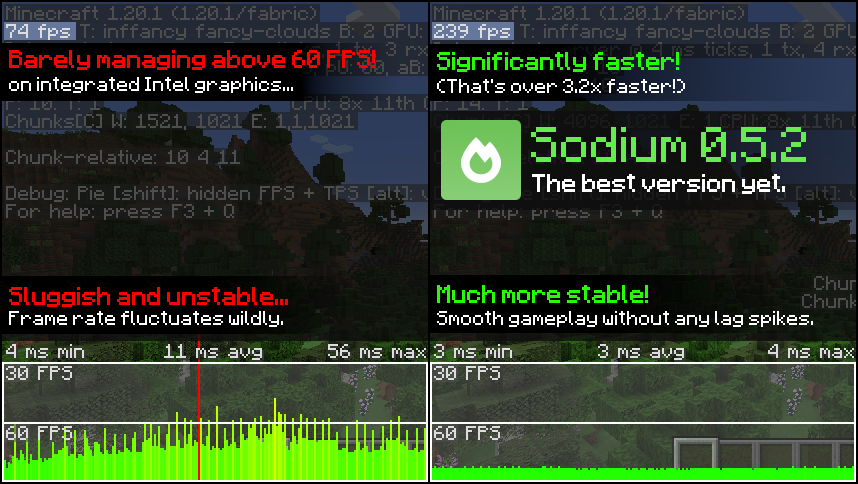
Sodium is a powerful optimization mod for the Minecraft client, which greatly improves frame rates and micro-stutter, while fixing many graphical issues in Minecraft.
Unlike other rendering-focused mods, it boasts wide compatibility with the wider modding ecosystem. And it does so without compromising on how the game looks, giving you that authentic block game feel.


📥 Installation Guide
Sodium is available for multiple mod loaders, but we recommend using Fabric Loader for the most simple and lightweight experience. If you are using a third-party launcher, it probably has built-in functionality to automatically install mod loaders. Once you have installed your mod loader, you can simply place Sodium into your mods folder like anything else.
Not sure if you installed the mod correctly? Check your Video Settings screen in Minecraft, which should show our new and improved user interface for changing settings.
Not sure how to configure the mod? Don't worry, you probably don't need to. By default, Sodium will enable all optimizations which are supported on your system, giving you the best experience possible. You should generally only change video settings related to performance and other advanced features if you are experiencing issues.
Need even more performance? By design, Sodium only optimizes the rendering code of Minecraft. You should also install our other mods, such as Lithium (for MC 1.15+) and Phosphor (for MC <1.19), to optimize the other parts of your game. This is done so that players can pick and choose which mods they want to use, but we generally recommend using our entire collection.
✅ Hardware Compatibility
Android devices (and some Windows-on-ARM devices) which use OpenGL translation layers (such as GL4ES, ANGLE, GLonD3D12 etc) are not supported and will have severe performance issues.
We only provide official support for desktop graphics cards which have up-to-date drivers compatible with OpenGL 4.5 or newer. Most graphics cards released in the past 12 years will meet these requirements, including the following:
- INTEL HD Graphics 500 Series (Skylake) or newer
- NVIDIA GeForce 400 Series (Fermi) or newer
- AMD Radeon HD 7000 Series (GCN 1) or newer
Nearly all desktop graphics cards that are already compatible with Minecraft (which requires OpenGL 3.3) should also work with Sodium. But our team cannot ensure compatibility or provide support for older graphics cards, and they may not work with future versions of Sodium.
If you are running into problems, you should make sure that your graphics drivers are up-to-date. Out-of-date graphics drivers are often the reason for most crashes, rendering bugs, and performance issues.
🐛 How to Report Issues
Please use the issue tracker linked at the top of the page to report bugs, crashes, and other issues. Make sure you include information about the mods you are using, and attach any crash/log files you have.
Note: The level of performance you see while using the Sodium mod will vary depending on exact hardware and software configuration. For all performance comparisons provided on this page, we used a computer with integrated graphics which we believe to be representative of the casual player.
Hardware configuration: Intel Core i7-1165G7 (4c/8t, up to 4.70 GHz) with Intel Xe Graphics (96 EUs, up to 1.30 GHz), 2x16 GB DDR4-3200. Software configuration: Fedora 41, Linux 6.12.4, Mesa 24.3.4, Prism Launcher 9.1, OpenJDK 21.0.7 runtime (as packaged by distribution), Fabric Loader 0.16.10.
Ченджлог
mc1.21.11-0.8.14-beta.2-neoforgeБета1.21.11 · 7 августа 2026 г.
Sodium 0.8.14-beta.2 fixes potential minor bugs.
- Fix buffer overflow in Kernel32.getModuleFileName
- Use the correct atomic operations on NativeBuffer.ALLOCATED
- Use clearenv() to delete environment variables
- Implement override/overlay priority in the graphics options Config API (#3866)
mc1.21.11-0.8.14-beta.2-fabricБета1.21.11 · 7 августа 2026 г.
Sodium 0.8.14-beta.2 fixes potential minor bugs.
- Fix buffer overflow in Kernel32.getModuleFileName
- Use the correct atomic operations on NativeBuffer.ALLOCATED
- Use clearenv() to delete environment variables
- Implement override/overlay priority in the graphics options Config API (#3866)
mc1.21.1-0.8.13-beta.2-neoforgeБета1.21.1 · 7 августа 2026 г.
Sodium 0.8.13-beta.2 fixes potential minor bugs and improves the crash log message to avoid misattribution of unrelated errors when NeoForge continues loading despite severe errors.
- Clarify crash log error message when crashing due to missing mod config, which basically only happens when neoforge loads the game despite it having encountered a severe error.
- Fix buffer overflow in Kernel32.getModuleFileName
- Use the correct atomic operations on NativeBuffer.ALLOCATED
- Use clearenv() to delete environment variable
- Implement override/overlay priority in the graphics options Config API (#3866)
mc1.21.1-0.8.13-beta.2-fabricБета1.21.1 · 7 августа 2026 г.
Sodium 0.8.13-beta.2 fixes potential minor bugs and improves the crash log message to avoid misattribution of unrelated errors when NeoForge continues loading despite severe errors.
- Clarify crash log error message when crashing due to missing mod config, which basically only happens when neoforge loads the game despite it having encountered a severe error.
- Fix buffer overflow in Kernel32.getModuleFileName
- Use the correct atomic operations on NativeBuffer.ALLOCATED
- Use clearenv() to delete environment variable
- Implement override/overlay priority in the graphics options Config API (#3866)
mc26.1.2-0.9.2-alpha.4-neoforgeАльфа26.1.2 · 7 августа 2026 г.
Sodium 0.9.2-alpha.4 includes a new terrain buffer allocation system designed to reduce the number of buffers that get allocated and resized as chunks are loaded and unloaded. Please help us by testing this version in various scenarios, comparing frame rate stability, and reporting any issues that may arise. Feedback and testing results are welcome in the testing channel on our discord server.
Other changes include improvements to our item meshing, optimizations for item rendering, and numerous bug fixes. This release also adds support for FRAPI on NeoForge.
- Prevent misalignment in item models by removing UV_SHRINK where necessary (#3831)
- Offset overlay layers of optimized item models to prevent z-fighting
- Optimize the dried ghast model (#3815)
- Implementation of a Incrementally Defragmenting Auto-Sizing Multi-Arena Allocator (#3634)
- Support FRAPI on NeoForge (#3818)
- Fix buffer overflow in Kernel32.getModuleFileName
- Use the correct atomic operations on NativeBuffer.ALLOCATED
- Use clearenv() to delete environment variables
- Cleanup code around checking the IME status on Windows
- Handle resizing the section time buffer to fix #3809
Thank you to all the contributors who added to this release!
Alpha series changelog:
- Disabled automatic enabling of the arena buffer debug widget
- Implement override/overlay priority in the graphics options Config API (#3866)
mc26.1.2-0.9.2-alpha.4-fabricАльфа26.1.2 · 7 августа 2026 г.
Sodium 0.9.2-alpha.4 includes a new terrain buffer allocation system designed to reduce the number of buffers that get allocated and resized as chunks are loaded and unloaded. Please help us by testing this version in various scenarios, comparing frame rate stability, and reporting any issues that may arise. Feedback and testing results are welcome in the testing channel on our discord server.
Other changes include improvements to our item meshing, optimizations for item rendering, and numerous bug fixes. This release also adds support for FRAPI on NeoForge.
- Prevent misalignment in item models by removing UV_SHRINK where necessary (#3831)
- Offset overlay layers of optimized item models to prevent z-fighting
- Optimize the dried ghast model (#3815)
- Implementation of a Incrementally Defragmenting Auto-Sizing Multi-Arena Allocator (#3634)
- Support FRAPI on NeoForge (#3818)
- Fix buffer overflow in Kernel32.getModuleFileName
- Use the correct atomic operations on NativeBuffer.ALLOCATED
- Use clearenv() to delete environment variables
- Cleanup code around checking the IME status on Windows
- Handle resizing the section time buffer to fix #3809
Thank you to all the contributors who added to this release!
Alpha series changelog:
- Disabled automatic enabling of the arena buffer debug widget
- Implement override/overlay priority in the graphics options Config API (#3866)
mc26.2-0.9.2-alpha.4-fabricАльфа26.2 · 7 августа 2026 г.
Sodium 0.9.2-alpha.4 includes a new terrain buffer allocation system designed to reduce the number of buffers that get allocated and resized as chunks are loaded and unloaded. Please help us by testing this version in various scenarios, comparing frame rate stability, and reporting any issues that may arise. Feedback and testing results are welcome in the testing channel on our discord server.
Other changes include improvements to our item meshing, optimizations for item rendering, and numerous bug fixes. This release also adds support for FRAPI on NeoForge.
- Prevent misalignedment in item models by removing UV_SHRINK where necessary (#3831)
- Offset overlay layers of optimized item models to prevent z-fighting
- Optimize the dried ghast model (#3815)
- Implementation of a Incrementally Defragmenting Auto-Sizing Multi-Arena Allocator (#3634)
- Support FRAPI on NeoForge (#3818)
- Fix buffer overflow in Kernel32.getModuleFileName
- Use the correct atomic operations on NativeBuffer.ALLOCATED
- Ensure that VKIndirectContext.addCommand allocates enough memory
- Use clearenv() to delete environment variables
- Cleanup code around checking the IME status on Windows
- Restore the fast quad encoder for entity-format buffers (#3848)
- Handle resizing the section time buffer to fix #3809
- Backport fix from 26.3 Snapshot 6 for buffer recycling to restore inventory item rendering performance
Thank you to all the contributors who added to this release!
Alpha series changelog:
- Fixed crash when opening video settings
- Disabled automatic enabling of the arena buffer debug widget
- Implement override/overlay priority in the graphics options Config API (#3866)
mc26.2-0.9.2-alpha.4-neoforgeАльфа26.2 · 7 августа 2026 г.
Sodium 0.9.2-alpha.4 includes a new terrain buffer allocation system designed to reduce the number of buffers that get allocated and resized as chunks are loaded and unloaded. Please help us by testing this version in various scenarios, comparing frame rate stability, and reporting any issues that may arise. Feedback and testing results are welcome in the testing channel on our discord server.
Other changes include improvements to our item meshing, optimizations for item rendering, and numerous bug fixes. This release also adds support for FRAPI on NeoForge.
- Prevent misalignedment in item models by removing UV_SHRINK where necessary (#3831)
- Offset overlay layers of optimized item models to prevent z-fighting
- Optimize the dried ghast model (#3815)
- Implementation of a Incrementally Defragmenting Auto-Sizing Multi-Arena Allocator (#3634)
- Support FRAPI on NeoForge (#3818)
- Fix buffer overflow in Kernel32.getModuleFileName
- Use the correct atomic operations on NativeBuffer.ALLOCATED
- Ensure that VKIndirectContext.addCommand allocates enough memory
- Use clearenv() to delete environment variables
- Cleanup code around checking the IME status on Windows
- Restore the fast quad encoder for entity-format buffers (#3848)
- Handle resizing the section time buffer to fix #3809
- Backport fix from 26.3 Snapshot 6 for buffer recycling to restore inventory item rendering performance
Thank you to all the contributors who added to this release!
Alpha series changelog:
- Fixed crash when opening video settings
- Disabled automatic enabling of the arena buffer debug widget
- Implement override/overlay priority in the graphics options Config API (#3866)
Комментарии
Загружаем…