 Mineforgian
Controlify (Controller support)
Adds the best controller support to Minecraft Java edition!
- Загрузки
- 21.6M
- Подписчики
- 2K
- Обновлён
- 8 августа 2026 г.
- Лицензия
- LGPL-3.0-or-later
Опубликован 5 февраля 2023 г.







A mod that adds the best controller support for Minecraft: Java Edition.
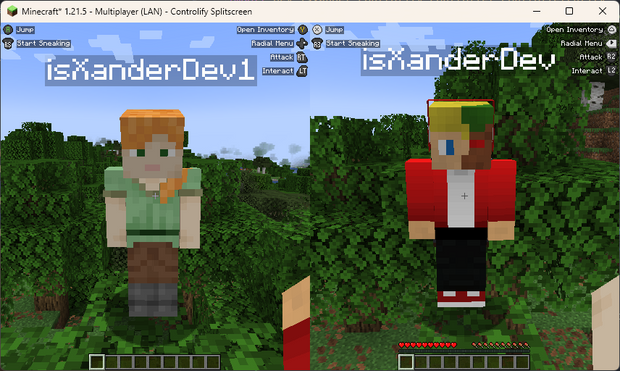
SPLITSCREEN!
(Advertisement)
Controlify Splitscreen is a separate mod in development that adds splitscreen support to the game! JARs are currently only available on Patreon!

Wiki
Read up on the Controlify Wiki for more information on how to use Controlify, how to configure it, and how to develop for it.
What is Controlify?
Controlify is the best controller support mod for Minecraft: Java Edition. It exceeds the first-party Bedrock Edition controller support in every way possible. It is feature-complete, with support for vibration, gyroscope, HD haptics, and more.
Controlify supports all controllers, thanks to its usage of the SDL3 library, which is the most advanced cross-platform input library available.
Controlify is designed to be both user-friendly and feature-rich. It has sensible defaults, with default sensitivity matched to Bedrock Edition for easy transition, and a simple yet informative settings screen that allows you to tweak your experience to your liking.
Feature overview
- Vibration support; Controlify vibrates your controller upon events such as taking damage, breaking blocks, lightning strikes.
- Gyroscope support; Controlify can use the gyroscope in your controller for precise aiming.
- Vendor-specific input support; Controlify supports reading paddles, mute buttons (and their LEDs), touchpads, and more, on some controllers including Xbox, DualSense and Steam Deck.
- GUI operation: Controlify allows you to navigate all Minecraft GUIs with your controller, without needing a mouse or keyboard. This includes the inventory, out-of-game menus, and modded GUIs. It features cursor snapping in inventory screens, allowing you to use your controller without needing to be precise with your cursor movements.
- DualSense/DualShock support; Controlify does not require any additional software for PlayStation controllers, even on Windows.
- Controller identification; Controlify has bespoke button glyphs for many controller models, including Xbox, Playstation, Nintendo Switch, Steam Deck, and more.
- On-screen keyboard; Controlify includes a fully functional on-screen keyboard that allows you to type with your controller - truly no keyboard needed!
- Radial menu; Controlify features a configurable menu that allows you to bind less-used actions to a radial menu, saving up buttons.
- DualSense HD haptics support; Controlify allows for advanced vibration effects on DualSense controllers.
- DualSense adaptive triggers support; Controlify allows for advanced trigger effects on DualSense controllers.
- Data-driven design; Controlify allows resource packs to change default bindings, theme button glyphs, on-screen button guides, on-screen keyboard layouts, add more controller models, and more.
- Steam Deck support
- Mod compatibility; Controlify has led the efforts to make controller support work seamlessly with mods like Sodium, Iris, Simple Voice Chat, Do A Barrel Roll, and more.
- Cross-platform and multi-version; Controlify works on Fabric and NeoForge, and actively supports and updates for Minecraft versions 1.21.1 and above.
- Quick to update; Controlify is updated even for Minecraft snapshots, although snapshot builds are only available to patreon members.
- Joystick support; Controlify supports flight sticks, racing wheels, and other non-standard joysticks. Users of such devices have the option between mapping the joystick to a standard gamepad, or creating their own custom bindings and defaults and glyphs for the joystick, allowing for a fully-featured experience.
Who uses Controlify?
The following is actual feedback I have received from users of Controlify, and I'm very proud to have been able to help them enjoy Minecraft in a way they couldn't before:
- Couch gamers who want to sit back and relax playing their favourite edition of Minecraft.
- First-time modded players who have previously played Minecraft on a console and don't want to learn how to use a keyboard and mouse.
- People with accessibility requirements who cannot use a keyboard and mouse and/or requires an adaptive controller.
- Parents who want to expose their kids to modded Minecraft in an accessible manner.
- People who just prefer using a controller over a keyboard and mouse.
- People who want to play local multiplayer with their friends and family using the companion Splitscreen Mod
- Hopefully you!
Features
Controller vibration
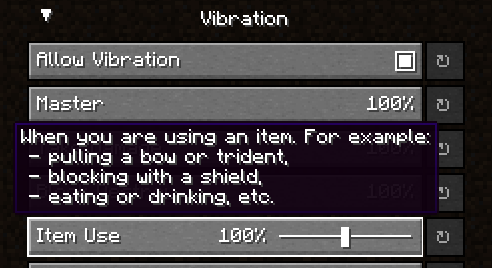
Controlify supports controller vibration, which has not been seen before for PC versions of Minecraft, including Bedrock Windows 10 Edition. Configure the intensity of each vibration source, with complex vibration patterns for lots of aspects of the game (e.g. when you take damage).
Radial menu

To save up some buttons on your controller, dedicate some less-used actions to the radial menu. It is fully customizable through the settings and intuitive to use. Any modded keybind is compatible with this menu.
Gyro support
Controlify has built-in support for controller gyroscopes, allowing you to make fine movements in-game with your controller. This can be combined with flick stick to be able to use a controller without the compromise.
Container cursor
Just like in bedrock edition, you can move a cursor across your inventory, and interact with it in a controller-friendly way. With dedicated buttons for quick move, dropping etc. Controlify also comes with cursor snapping, so you don't need to be so precise with cursor movements.
Controller identification
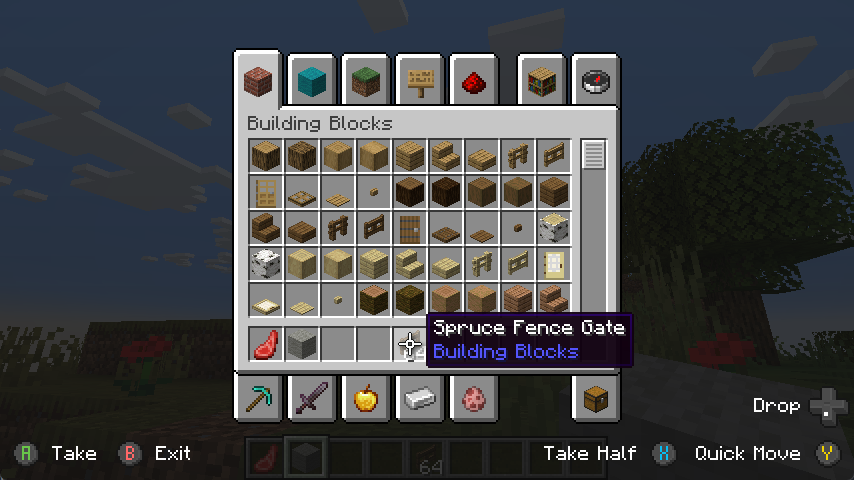
Controlify has the ability to identify the make and model of your controller automatically, and displays relevant button textures for your controller. This is also extendable by resource packs, changing up the button textures in a different style and adding some of your own, more niche controller identifiers.
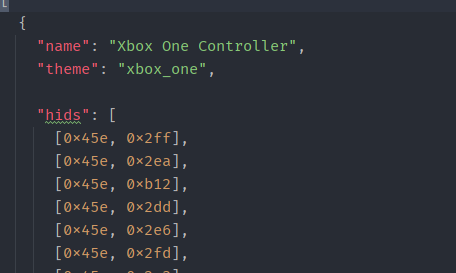
Joystick support
You can connect any joystick to the mod and map it with your own names and textures, with an unlimited amount of inputs per controller.
Button guide
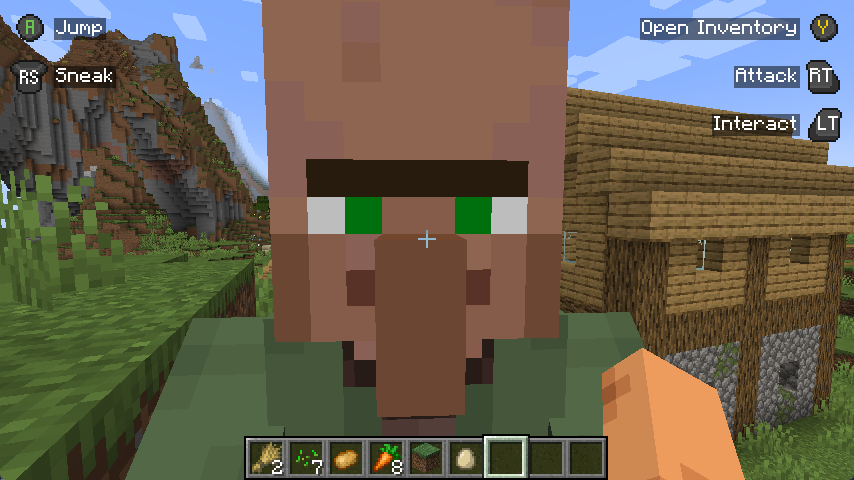
There is a simple overlay in-game that displays the buttons you can press based on your player's state and look direction. This is useful for new players, who have not yet memorised the controls.

Also, some GUIs display controller buttons on elements that have a controller shortcut, to easily navigate with a controller like you should be able to.
Containerised Controllers
This mod is built around the fact that each controller is completely separate, with it's own configuration, bindings etc. This means it will be trivial to add support for split-screen play in the future.
Built for mod compatibility
GUI operation has been abstracted into a simple API, which allows other mods to easily add support for their own GUIs, without convoluted support throughout the whole mod's codebase, making it difficult for third parties to integrate.
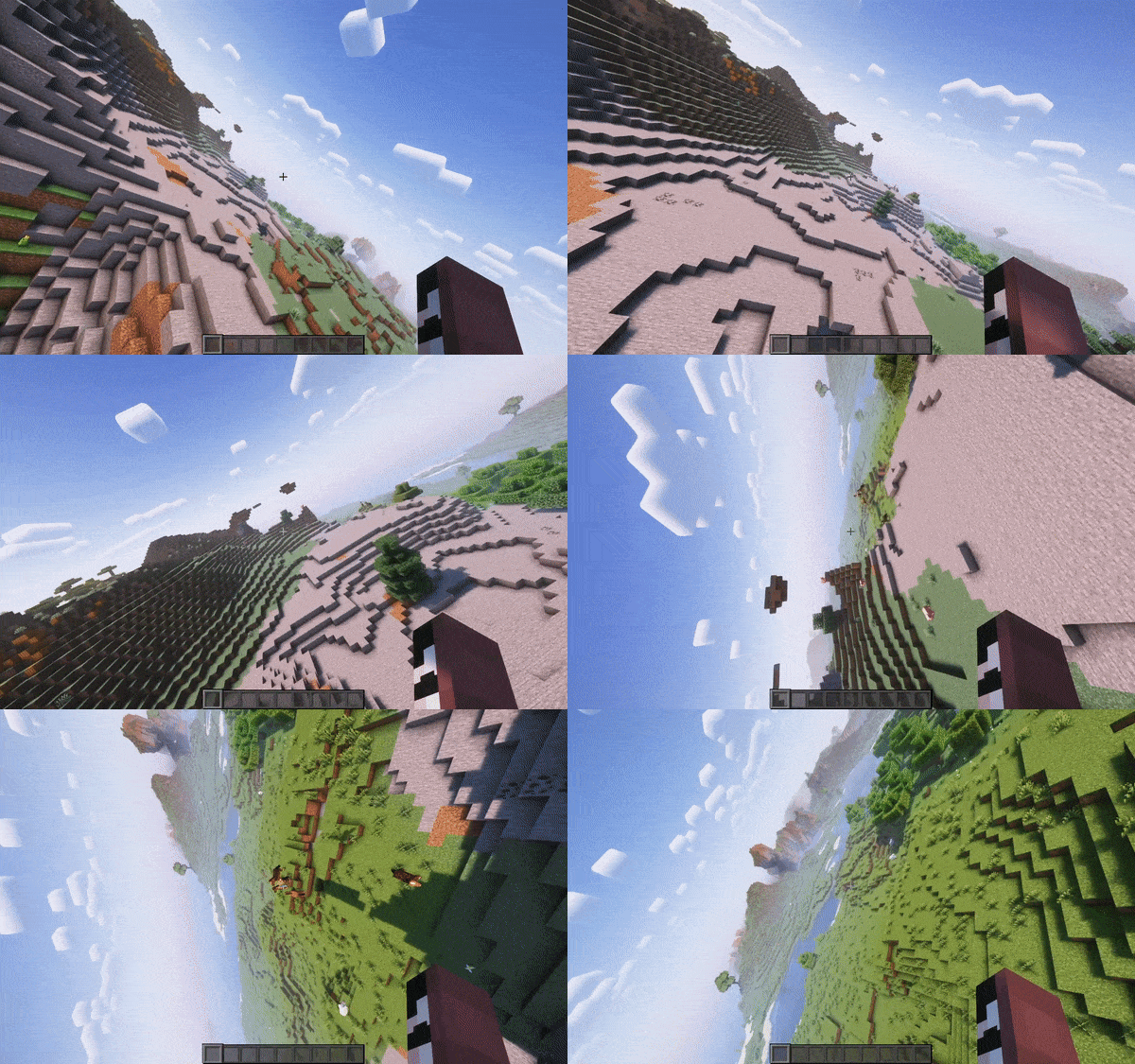
Video recorded using do-a-barrel-roll with a Thrustmaster HOTAS flightstick
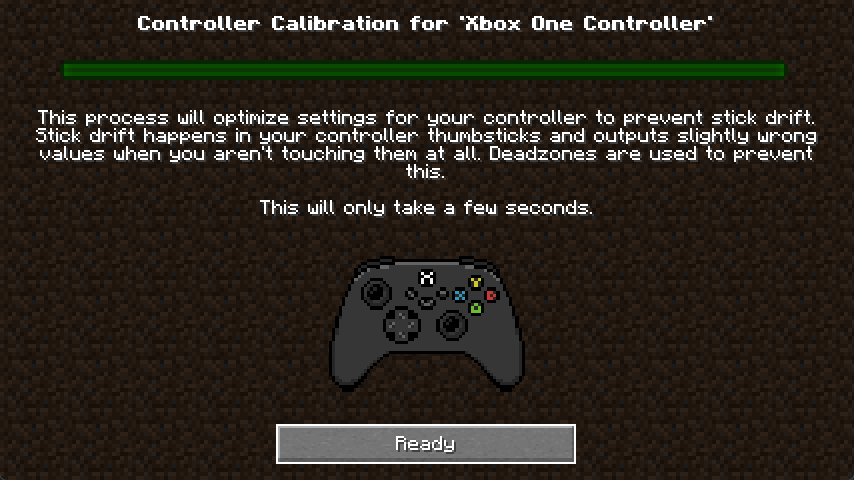
Automatic controller deadzone calibration
The deadzone values of your controller are automatically calibrated, meaning you don't have to worry about it.
Backports?
This mod is only and will only be available for 1.19.4 and above, this is because in 1.19.4, Mojang introduced arrow key navigation which was easily ported to controller, below 1.19.4, this is not possible.
Ченджлог
3.4.1+mc26.2Релиз26.2 · 8 августа 2026 г.
Controlify 3.4.1
This version has the following targets:
- 26.1
- 26.2
By donating on my Patreon, you will gain access to builds of Controlify for splitscreen support and snapshot versions
Changes
- Re-add and deprecate old code-based radial candidate api
- Make the hotbar select radial page show the name of the item instead of the slot number
- Fix item models that use range_dispatch on damage from using the fallback model
- Fix binding categories being untranslated keys
3.4.1+mc26.1Релиз26.1, 26.1.1, 26.1.2 · 8 августа 2026 г.
Controlify 3.4.1
This version has the following targets:
- 26.1
- 26.2
By donating on my Patreon, you will gain access to builds of Controlify for splitscreen support and snapshot versions
Changes
- Re-add and deprecate old code-based radial candidate api
- Make the hotbar select radial page show the name of the item instead of the slot number
- Fix item models that use range_dispatch on damage from using the fallback model
- Fix binding categories being untranslated keys
3.4.0+mc26.2Релиз26.2 · 5 августа 2026 г.
Controlify 3.4.0
This version has the following targets:
- 26.1
- 26.2
By donating on my Patreon, you will gain access to builds of Controlify for splitscreen support and snapshot versions
Overhauled Radial Menu
The Radial Menu now has tabs!
You can add an infinite amount of items to the Radial Menu on the all-new edit screen. Each page has maximum 8 items, adding more than 8 automatically creates more pages.
Data-driven Radial Icons
The icons for each Radial Candidate are now data-driven. Specify either an item model or a texture.
- Mods can use this to add custom icons without depending on Controlify in any way.
- Resource pack creators can add custom icons to their favourite mods.
Game Mode Switcher
This was already a feature, but it was a separate radial menu you had to bind to another button on your controller.
The Game Mode Switcher will automatically appear as a tab to the left of the main tab if you have the necessary permissions.
Rumble Improvements
- Added new outgoing damage rumble
- Small rumble when you apply damage to other entities directly
- This works on vanilla servers, but not servers with proprietary protocol translation like Hypixel 1.8
- Adjusted the nearby explosion rumble effect
- Intensity falloff is much quicker; distant explosions cause less rumble
- The power (radius) of the explosion is now taken into account for its rumble intensity
Adaptive Trigger Effect Improvements
- Check client-sided tags on Fabric;
- Mods that provide tags (like Fabric API tag-conventions-v2) work in predicates, regardless of whether you are connecting to a vanilla server
- This allows you to target convention tags (
c:tags), such asc:tools/bow, to gain better compatibility with modded bows for example.
- Added a plethora of new trigger effects
- Subtle vibration with the Brush (any item with tag
#c:tools/brush) - Feedback when using the Spyglass (item
minecraft:spyglass) - Feedback when using Trident-like items (any item with tag
#c:tools/trident) - Feedback when throwing eggs (any item with tag
#minecraft:eggs), snowballs, splash potions, lingering potions, experience bottles - Feedback when deploying Fishing Rod (any item with tag
#c:tools/fishing_rod) - Feedback when emptying a Bundle (any item with non-empty
minecraft:bundle_contents) - Feedback when using Ender Pearls and Wind Charges (any item with
minecraft:use_cooldown)
- Subtle vibration with the Brush (any item with tag
- Updated Bow effect to target
#c:tools/bowinstead ofminecraft:bow
3.4.0+mc26.1Релиз26.1, 26.1.1, 26.1.2 · 5 августа 2026 г.
Controlify 3.4.0
This version has the following targets:
- 26.1
- 26.2
By donating on my Patreon, you will gain access to builds of Controlify for splitscreen support and snapshot versions
Overhauled Radial Menu
The Radial Menu now has tabs!
You can add an infinite amount of items to the Radial Menu on the all-new edit screen. Each page has maximum 8 items, adding more than 8 automatically creates more pages.
Data-driven Radial Icons
The icons for each Radial Candidate are now data-driven. Specify either an item model or a texture.
- Mods can use this to add custom icons without depending on Controlify in any way.
- Resource pack creators can add custom icons to their favourite mods.
Game Mode Switcher
This was already a feature, but it was a separate radial menu you had to bind to another button on your controller.
The Game Mode Switcher will automatically appear as a tab to the left of the main tab if you have the necessary permissions.
Rumble Improvements
- Added new outgoing damage rumble
- Small rumble when you apply damage to other entities directly
- This works on vanilla servers, but not servers with proprietary protocol translation like Hypixel 1.8
- Adjusted the nearby explosion rumble effect
- Intensity falloff is much quicker; distant explosions cause less rumble
- The power (radius) of the explosion is now taken into account for its rumble intensity
Adaptive Trigger Effect Improvements
- Check client-sided tags on Fabric;
- Mods that provide tags (like Fabric API tag-conventions-v2) work in predicates, regardless of whether you are connecting to a vanilla server
- This allows you to target convention tags (
c:tags), such asc:tools/bow, to gain better compatibility with modded bows for example.
- Added a plethora of new trigger effects
- Subtle vibration with the Brush (any item with tag
#c:tools/brush) - Feedback when using the Spyglass (item
minecraft:spyglass) - Feedback when using Trident-like items (any item with tag
#c:tools/trident) - Feedback when throwing eggs (any item with tag
#minecraft:eggs), snowballs, splash potions, lingering potions, experience bottles - Feedback when deploying Fishing Rod (any item with tag
#c:tools/fishing_rod) - Feedback when emptying a Bundle (any item with non-empty
minecraft:bundle_contents) - Feedback when using Ender Pearls and Wind Charges (any item with
minecraft:use_cooldown)
- Subtle vibration with the Brush (any item with tag
- Updated Bow effect to target
#c:tools/bowinstead ofminecraft:bow
3.3.3+mc26.1Релиз26.1, 26.1.1, 26.1.2 · 4 августа 2026 г.
Controlify 3.3.3
This version has the following targets:
- 26.1
- 26.2
By donating on my Patreon, you will gain access to builds of Controlify for splitscreen support and snapshot versions
Changes
- Fallback to default glyph set if the typed glyph set does not have that glyph
- Implement packet networking for NeoForge (/vibratecontroller) works now
- Add paddle textures to xbox glyph set for Elite controllers
- Only apply gamepad inputs to state if the controller actually has the input
3.3.3+mc26.2Релиз26.2 · 4 августа 2026 г.
Controlify 3.3.3
This version has the following targets:
- 26.1
- 26.2
By donating on my Patreon, you will gain access to builds of Controlify for splitscreen support and snapshot versions
Changes
- Fallback to default glyph set if the typed glyph set does not have that glyph
- Implement packet networking for NeoForge (/vibratecontroller) works now
- Add paddle textures to xbox glyph set for Elite controllers
- Only apply gamepad inputs to state if the controller actually has the input
3.3.2+mc26.1Релиз26.1, 26.1.1, 26.1.2 · 3 августа 2026 г.
Controlify 3.3.2
This version has the following targets:
- 26.1
- 26.2
By donating on my Patreon, you will gain access to builds of Controlify for splitscreen support and snapshot versions
Bug Fixes
- Fix crash on startup when SDL returns null for the controller name
3.3.2+mc26.2Релиз26.2 · 3 августа 2026 г.
Controlify 3.3.2
This version has the following targets:
- 26.1
- 26.2
By donating on my Patreon, you will gain access to builds of Controlify for splitscreen support and snapshot versions
Bug Fixes
- Fix crash on startup when SDL returns null for the controller name
Комментарии
Загружаем…