 Mineforgian
Miner's Compass
The Miner's Compass is an innovative tool designed for the savvy Minecraft miner. With its unique functionality, this compass is not just a direction finder but a game-changer in your mining adventures.
- Загрузки
- 4K
- Подписчики
- 28
- Обновлён
- 17 августа 2025 г.
- Лицензия
- MIT
Опубликован 28 января 2024 г.
The Ultimate Mining Companion! 🧭⛏️
The Miner's Compass is a revolutionary tool that transforms how you mine in Minecraft. Whether you're playing vanilla or with 100+ mods, this compass intelligently detects and guides you to the ores you need most.
Perfect for modded servers, large modpacks, and vanilla players alike!
🚀 What's New in Version 2.0
Automatic Modded Ore Detection
No more manual configuration! The compass automatically detects ores from ANY mod:
- ✅ Create - Zinc ore
- ✅ Mythic Metals - All 20+ ores (Adamantite, Mythril, Orichalcum, etc.)
- ✅ Immersive Engineering - Aluminum, Lead, Nickel, Silver, Uranium
- ✅ SoulsWeapons - Moonstone, Verglas
- ✅ Blue Skies - Charoite, Diopside, Pyrope, and more
- ✅ Many more other mods supported automatically
Intelligent Ore Grouping
Smart grouping system that combines ore variants:
- "Iron Ore" includes both
iron_oreanddeepslate_iron_ore - "Moonstone Ore" groups all moonstone variants
- Proper names - No more "Moon Ore" or "Deepslate Ore"
Modern GUI System
- Right-click to open sleek ore selection screen
- Visual ore list with proper colors and names
- Multi-select your favorite ores
- Search and find exactly what you need
Powerful Configuration
Complete control over ore detection:
- Exclude entire ore types (
"coal", "zinc") - Exclude specific blocks (
"minecraft:coal_ore") - Add custom ores from any mod
- Performance tuning for large modpacks
🎯 Key Features
Universal Mod Compatibility
Works with ANY modpack out of the box:
- Automatic detection of 80+ common modded ores
- Fallback patterns for unknown mods
- Custom ore support for edge cases
- Future-proof design for new mods
Intelligent Navigation
- Dynamic targeting - Always points to the closest ore
- Multi-ore tracking - Search for up to 20 ore types simultaneously
- Chunk-based scanning - Configurable search radius
- Cross-dimension support - Works in Nether, End, and modded dimensions
Advanced Filtering
- Hardness filtering - Excludes decorative blocks
- Mod exclusions - Ignore problematic mods
- Smart grouping - Related ores grouped together
- Custom categories - Create your own ore types
Performance Optimized
- Efficient scanning - Minimal impact on game performance
- Configurable radius - Balance between coverage and performance
- Smart caching - Remembers previous searches
- Async processing - Doesn't block gameplay
🎮 How to Use
Getting Started
- Craft the compass with the recipe below
- Right-click to open the ore selection GUI
- Select ores you want to find
- Click "Done" and start mining!
Advanced Usage
- Shift-right-click on ore blocks to quickly add/remove them
- Shift-right-click air to clear all selections
- Configure in
.minecraft/config/miners-compass.json5
Crafting Recipe
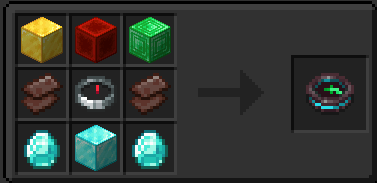
⚙️ Complete Configuration Guide
Full Configuration Example
{
  // How many chunks around player to search (0-100)
  // Higher values = larger area but more performance impact
  "chunkRadius": 2,

  // Maximum ore types selectable at once (0-20)
  // Balance between flexibility and performance
  "maxBlocks": 3,

  // Enable automatic detection of modded ores
  // Set false to only use custom definitions
  "enableAutoDiscovery": true,

  // Group ore variants together (coal_ore + deepslate_coal_ore = "Coal Ore")
  // Set false to treat each block separately
  "groupSimilarOres": true,

  // Minimum block hardness for ore detection (0.0-50.0)
  // Higher values filter out soft decorative blocks
  "minimumHardness": 1.0,

  // Additional keywords to help detect missed ores
  // Add terms commonly used in mod ore names
  "additionalOreKeywords": [
    "gem",
    "crystal",
    "ingot",
    "core",
    "debris"
  ],

  // Exclude entire mods from ore detection
  // Add mod IDs that cause false positives
  "excludedMods": [
    "decorative_blocks",
    "chisel"
  ],

  // Add custom ore types not detected automatically
  // Format: "oreName:COLOR:blockId1,blockId2"
  "customOreTypes": [
    "exquisite:BLACK:arphex:exquisite_ore"
  ],

  // Force include specific blocks as ores
  // For blocks that should be detected but aren't
  "forceIncludeBlocks": [],

  // Exclude entire ore types (removes all variants)
  // Hide ore categories you don't want
  "excludedOreTypes": [],

  // Exclude specific ore blocks while keeping the type
  // Fine-grained control over individual blocks
  "excludedBlocks": []
}
Configuration Options Explained
Basic Settings
chunkRadius- Search area around player (larger = more lag)maxBlocks- How many ore types you can select simultaneouslyenableAutoDiscovery- Automatically find modded ores vs manual onlygroupSimilarOres- Combine variants vs separate entriesminimumHardness- Filter out soft decorative blocks
Detection Enhancement
additionalOreKeywords- Help detect ores with unusual namescustomOreTypes- Add ores that aren't detected automaticallyforceIncludeBlocks- Force specific blocks to be treated as ores
Exclusion Controls
excludedMods- Ignore entire mods that cause problemsexcludedOreTypes- Hide entire ore categories (all coal, all zinc, etc.)excludedBlocks- Hide specific blocks while keeping the ore type
Common Configuration Examples
Performance-Optimized
{
  "chunkRadius": 2,
  "maxBlocks": 3,
  "minimumHardness": 2.0,
  "excludedOreTypes": ["coal", "iron", "copper"]
}
Rare Ores Only
{
  "excludedOreTypes": ["coal", "iron", "copper", "zinc", "tin", "lead", "aluminum"]
}
Vanilla-Only Setup
{
  "excludedMods": ["create", "mythicmetals", "immersiveengineering", "soulsweapons"]
}
No Deepslate Variants
{
  "excludedBlocks": [
    "minecraft:deepslate_coal_ore",
    "minecraft:deepslate_iron_ore",
    "minecraft:deepslate_gold_ore",
    "create:deepslate_zinc_ore"
  ]
}
Available Colors for Custom Ores
WHITE, YELLOW, GOLD, RED, DARK_RED, GREEN, DARK_GREEN, AQUA, DARK_AQUA, BLUE, DARK_BLUE, LIGHT_PURPLE, DARK_PURPLE, GRAY, DARK_GRAY, BLACK
🔄 Migration from v1.x
v1.x users: Your old config will work, but consider upgrading:
Old Config (v1.x)
{
  "chunkRadius": 2,
  "maxBlocks": 3
}
New Config (v2.0)
{
  // Basic settings (compatible)
  "chunkRadius": 2,
  "maxBlocks": 3,

  // New features
  "enableAutoDiscovery": true,
  "excludedOreTypes": ["coal", "iron"],
  "customOreTypes": ["mythril:AQUA:modname:mythril_ore"]
}
Migration is automatic - your old config continues working while new features become available!
Q&A
Forge/Backport?
For forge support, Sinytra Connector, Connector Extras, Forgified Fabric API combination tested and works as expected.
Y-Axis Direction?
For those interested in knowing the Y-axis direction, I highly recommend using Compass3D, developed by AdamRaichu. My gratitude goes out to him for integrating support for this feature into the mod.
Ченджлог
2.0.0+1.20.1Релиз1.20.4, 1.20.5, 1.20.6 · 17 августа 2025 г.
Changelog
[2.0.0] - 2025-08-17
🚀 Major Release - Complete System Overhaul
This release represents a complete rewrite of the Miner's Compass with massive improvements to modded ore support, user experience, and configuration options.
✨ New Features
Automatic Modded Ore Detection
- Universal mod compatibility - Automatically detects ores from ANY mod
- 80+ built-in ore patterns covering popular mods:
- Create - Zinc ore
- Mythic Metals - All 20+ ores (Adamantite, Mythril, Orichalcum, etc.)
- Immersive Engineering - Aluminum, Lead, Nickel, Silver, Uranium
- SoulsWeapons - Moonstone, Verglas
- Blue Skies - Charoite, Diopside, Pyrope, Aquite, Falsite, Horizonite, Ventium
- Amethyst Imbuement - Tiger's Eye, Crystalline Core
- Better End - Ender, Amber, Thallasium
- And more mods supported automatically
- Intelligent fallback patterns for unknown mods
- Future-proof design that adapts to new mods
Smart Ore Grouping System
- Intelligent ore variant grouping (e.g.,
iron_ore+deepslate_iron_ore= "Iron Ore") - Proper ore names instead of confusing technical names
- Separate handling for different materials (e.g., SoulsWeapons vs Blue Skies moonstone)
- Color-coded ore types for easy identification
Modern GUI System
- Right-click interface replacing old shift-right-click method
- Visual ore selection screen with clean, organized layout
- Multi-select capability with visual feedback
- "Done" button for confirming selections
- Clear All option for quick reset
Advanced Configuration System
- Ore type exclusions - Hide entire ore categories (
"excludedOreTypes": ["coal", "zinc"]) - Specific block exclusions - Fine-grained control (
"excludedBlocks": ["minecraft:coal_ore"]) - Custom ore definitions - Add any missing ores with custom colors
- Mod exclusions - Ignore problematic mods entirely
- Force inclusions - Manually include specific blocks
Client-Server Synchronization
- Proper networking - Ore selections sync correctly between client and server
- Survival mode support - Now works perfectly in survival (fixed major bug)
- Multiplayer compatibility - Reliable operation on servers
🔧 Improvements
Performance Enhancements
- Optimized ore detection algorithm
- Configurable hardness filtering to exclude decorative blocks
- Async ore discovery process
- Smart caching of ore data
- Reduced memory usage with efficient data structures
Enhanced User Experience
- Intuitive controls - Right-click for GUI, shift-right-click for quick add/remove
- Better tooltips with detailed information
- Clear feedback when adding/removing ore types
- Informative error messages for troubleshooting
Configuration Improvements
- Self-documenting config with comments explaining each option
- Clean array format - No more comment strings cluttering arrays
- Comprehensive examples and documentation
- Backward compatibility with v1.x configs
🐛 Bug Fixes
Critical Fixes
- Fixed survival mode ore finding - Compass now works correctly in survival
- Fixed client-server desync - Ore selections properly synchronize
- Fixed ore name extraction - No more "Moon Ore" or "Deepslate Ore" confusion
- Fixed decorative block detection - Properly filters out non-ore blocks
Quality of Life Fixes
- Improved ore grouping - Related ores properly grouped together
- Better pattern matching - More reliable ore name extraction
- Fixed config generation - Clean config files without clutter
- Enhanced error handling - Graceful handling of invalid configurations
⚡ Technical Changes
Architecture Overhaul
- New Ore Patterns - Whitelist-based ore detection system
- Enhanced Dynamic Ore Detection - Improved scanning algorithm
- Rewritten Dynamic Ore Type - Better ore type management
- New networking system - Reliable client-server communication
Data Structures
- Efficient ore mapping with exact block ID matching
- Smart caching of discovery results
- Optimized chunk scanning with configurable radius
- Proper NBT synchronization between client and server
Compatibility
- Maintained datapack support - Old datapacks still work
- Backward compatible configs - v1.x configs continue working
- Future-proof design - Easy to add new mods and ore types
🔄 Migration Guide
From v1.x to v2.0
- Automatic migration - Your existing config continues working
- New features available - Add new config options as desired
- GUI changes - Right-click instead of shift-right-click for main interface
- Enhanced functionality - All old features work better with new improvements
Config Migration
// Old v1.x config (still works)
{
  "chunkRadius": 2,
  "maxBlocks": 3
}

// Enhanced v2.0 config (optional upgrades)
{
  "chunkRadius": 2,
  "maxBlocks": 3,
  "enableAutoDiscovery": true,
  "excludedOreTypes": ["coal", "iron"],
  "customOreTypes": ["mythril:AQUA:modname:mythril_ore"]
}
📋 Supported Mods (New in v2.0)
Vanilla: All standard ores + deepslate variants
Create: Zinc
Immersive Engineering: Aluminum, Lead, Nickel, Silver, Uranium, Copper
Mythic Metals: All 20+ ores with full variant support
SoulsWeapons: Moonstone, Verglas
Blue Skies: Aquite, Charoite, Diopside, Pyrope, Falsite, Horizonite, Ventium, Blue Skies Moonstone
Amethyst Imbuement: Tiger's Eye, Crystalline Core
BetterEnd: Ender, Amber, Thallasium
Clutter: Silver, Sulfur, Onyx
Butchery: Sulfur (including non-standard naming)
Expanded Delight: Salt
Things: Gleaming
Werewolves: Silver
Deep Dark Regrowth: Grimstone variants
NetherExp: Fossil, Fossil Fuel
And many more...
[1.0.0] - Previous Release
Features
- Basic ore detection for vanilla ores
- Shift-right-click ore selection
- Configurable chunk radius and max blocks
- Datapack support for custom ore addition
- Basic compass functionality
Limitations (Fixed in v2.0)
- Manual ore configuration required for modded ores
- Limited modded ore support
- Survival mode issues
- Complex datapack setup for new ores
- No GUI interface
Note: This changelog covers the major v2.0 overhaul. For detailed technical changes and implementation notes, see the commit history and documentation files.
1.0.0+1.20.1Релиз1.20.2, 1.20.3, 1.20.4 · 28 января 2024 г.
First initial release
Комментарии
Загружаем…