 Mineforgian
Igrium's Replay Exporter
An addon to the Replay Mod that allows it to export into Blender and other 3D software.
- Загрузки
- 22K
- Подписчики
- 235
- Обновлён
- 19 августа 2026 г.
- Лицензия
- GPL-3.0-or-later
Опубликован 1 декабря 2022 г.
An addon for the Replay Mod that allows you to export your replays into Blender.
This mod is designed for experienced Blender users! It is designed to export your Minecraft scene, and nothing more.
Example:
Usage
Exporting
To begin, open Minecraft and record the replay you wish to export. If you don't know how to do that, this mod is not for you. Then, open the replay editor and add at least two time and camera keyframes. These will determine the start and end points of your animation.
Warning: nether portals and other forms of cross-dimension travel are not supported. Use multiple exports you intend on doing that.
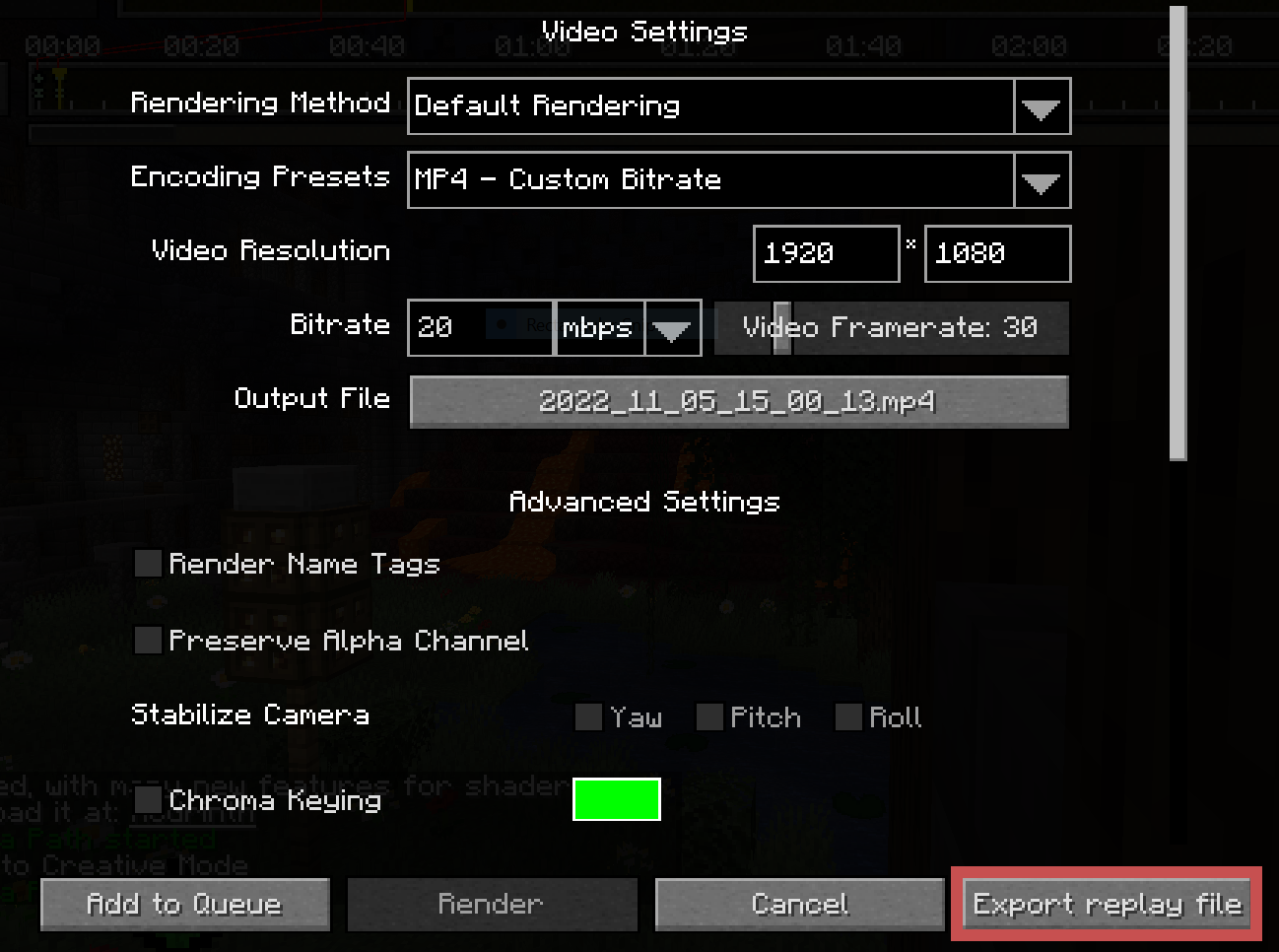
Once you're happy with your replay, open the render screen and click "Export Replay File":
This will open a screen for you to select an output file and configure some replay settings. Adjust your bounds to be as tight as possible. Raise the lower depth as high as it will go before it cuts off the visible landscape, and reduce the perimeter depending on your planned shot.
The "Block Updates" and "Entities" regions add significantly more overhead than the "World" region, so it's recommended to tighten those even further.
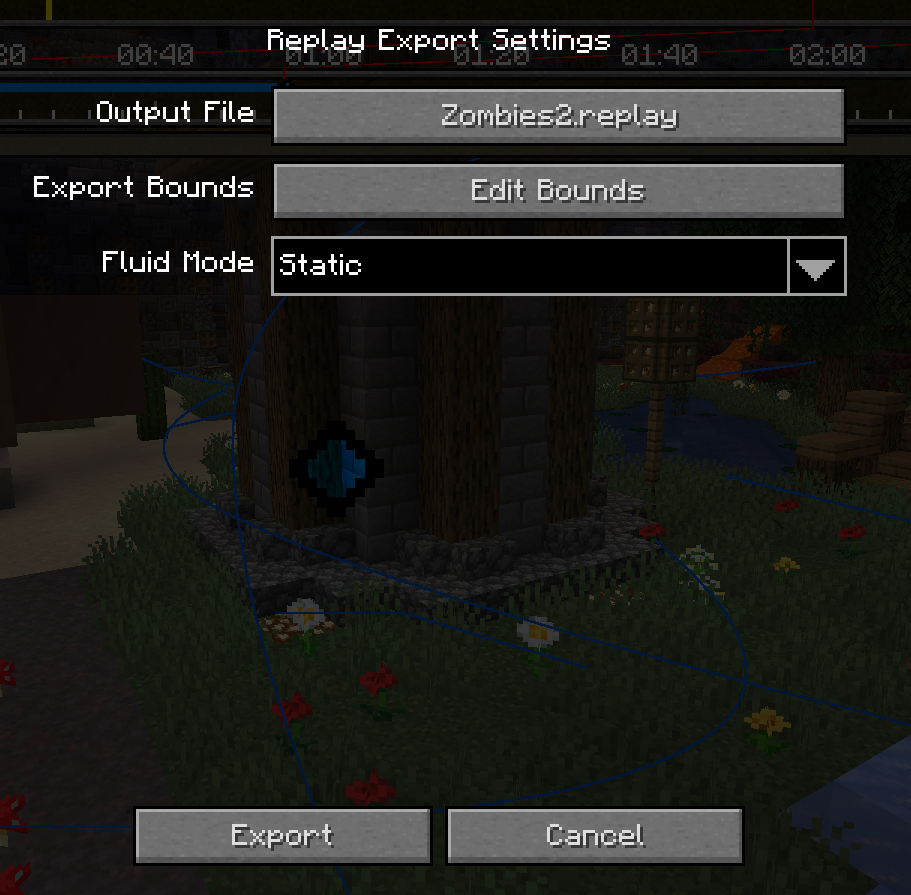

Once you're ready, click the "Export" button at the bottom left and wait for it to complete. It is common for the window to appear frozen while the initial block world is captured.
Importing
After exporting from Minecraft, you should be left with a .replay file, which can be imported into Blender using the provided addon.
Once you've ensured the addon is installed, create a new project and go to File > Import > Minecraft Replay File (.replay). Navigate to your file, but before you import it, note the settings on the right:
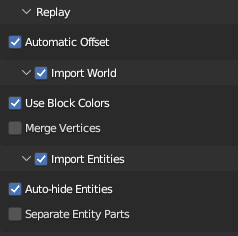
The main two you need to worry about are World and Entities. While you usually want to import both, they each can take quite a bit of time, so it may be useful to disable one or the other.
Everything else can be left as default.
Once you're ready, click "Import Minecraft Replay" at the bottom. Blender will appear to hang for a few minutes. Don't worry; this is because the contents of a Minecraft world is quite large, and Blender provides no (reliable) way to update the UI while it is processing. (It might do to enable the system console to monitor progress.)
Once it is finished importing, you should have a Minecraft world and most of its entities in your scene! If something goes wrong, make sure to submit a bug report!
Ченджлог
1.2.0Релиз26.2 · 19 августа 2026 г.
This update has a few minor quality-of-life changes which didn't make it into the initial release. You will need to update the Blender addon to see some of them, but nothing should break if you don't.
General
- Automatic enchantment glint shader
- Wrote official "specification" for replay files (doc/ReplayFormat.md)
- Certain materials (water, stained glass, etc) now use a "blended" alpha mode rather than "dithered"
Minecraft
- Player skins now export properly
- Options to selectively disable exporting blocks, block updates, and entities
- Optimized block tessellator when it comes to blocks with multiple materials
- Added "saving to disk" stage label to export screen
Blender
- Warning when attempting to import a replay version greater than what the addon supports
1.1.0Релиз26.2 · 12 августа 2026 г.
Guess what: I'm not dead! I guess this is what having ADHD and your interest swinging around like crazy gets you...
In recent months my interest has swung back in the direction of Replay Exporter. Now, it's no secret that the original codebase was a complete mess. The export format was terrible and hard to maintain; entities always came in broken, and it was unnecessarily slow. Therefore, with 26.2, comes a complete rewrite! The replay format has been revamped to properly store meshed terrain, entity exporting has been generalized to support more entities by default, and the importer better relies on Blender's internal systems to improve performance.
Due to this, replays exported from older versions of the mod are not compatible with the latest addon, and new replays are not compatible with old versions of the addon. Make sure to download the new version in the release page. It requires Blender 4.4 or newer.
Happy animating!
0.9.1Бета1.20.3, 1.20.4 · 26 мая 2024 г.
1.20.4 Update
This patch is pretty straightforward -- a simple update to 1.20.4 MrNavaStar. I've also cleaned up some of the base build code.
Not much has changed in the main repo for this update because I've been focused on re-writing the world exporter in a separate repository.
0.9.0Бета1.20.1 · 8 декабря 2023 г.
Bugfixes and Stability
There aren't many user-facing features in this update, but it contains numerous critical fixes and backend improvements. The most prominent is the major rewrite of some of the base model adapters, greatly improving entity renderer compatibility.
Changes
Update to 1.20.1
Special shoutout to MrNavaStar for pulling the heavy lifting for this update! As with most Minecraft updates, there were a variety of underlying changes to address, and he did a superb job.
Base model adapters were improved, leading to much better compatibility with complex models.
Moved shared logic from
AnimalModelAdapterandSinglePartModelAdapterinto single parent class.Fixed mathematical mistakes regarding the coordinate space of child model parts. As a result, many previously broken entities (such as horses) are now fixed.
Exporter now respects model part visibility.
Proper fix for y-offset issue.
Re-organized model adapter files in the repo.
Fixed a critical issue where block colors would appear black when imported into Blender 3.5+.
A Critical Bug
There is currently an issue in some versions of Blender where updated blocks will appear in the wrong place. As far as I can tell, this is an issue with Blender itself, and I'm still unable to determine how to fix it.
If this happens, simply save your file and re-open it. This is a problem with the render cache, therefore reloading the file is a reliable resolution.
0.8.0Бета1.19.3 · 20 апреля 2023 г.
The Anti-Jank Update (Part 2)
This update builds on the groundwork released in 0.7.0 to make a better overall user experience. This includes a complete re-write of the export UI, and various quality of life improvements. The exporter is no-longer reliant on single "radius" and "lower depth" sliders. Instead, a new Bounds Editor allows the user to customize their export region with chunk-level precision.
Additionally, the replay export screen now saves the export settings to disk for re-use, just like the video export screen.
Changes
- UI Overhaul
- Re-wrote the export settings screen from scratch.
- Added new Bounds Editor for easy export region selection.
- Export screen is now an actual screen rather than a popup.
- Export settings now get saved to file.
- Re-organized all UI code.
- Bug Fixes
- Fixed crash when exporting replays containing shulkers.
- Bullshit workaround for issue regarding player skin loading.
- Fixed incorrect shield texture in export.
- Fixed crash when previous replay export directory is no longer valid.
- Misc
- Updated world exporter to use bounding box rather than radius/lower depth internally.
- Replaced (broken) fluid exporter with a prototype one that works with multithreading.
- Made vcap exporter use section coordinates all the way through the export pipeline.
- Living model adapters can now write custom material behavior.
- Naming scheme for unknown bones in animal model adapter is now somewhat deterministic. It no longer calls Java's native
toStringmethod, which uses the object's internal location in memory. - Properly marked incompatibility with Sodium.
0.7.0Бета1.19.3 · 16 февраля 2023 г.
The Anti-Jank Update (Part 1)
This update is quite ambitious, so I had to pull a Caves and Cliffs and split it into two. 0.7.0 lays the technical groundwork for 0.8.0, which will be focused on the UI and making a better user experience.
In this update, the world exporter has been almost completely re-written. If you've been following the GitHub repo, this is what's been happening in the async_world_capture branch.
The new exporter is written in a way such that it can be executed off of the main thread, with all block updates during the export being properly accounted for. This works using a proxy, "snapshot" object, which uses a client-side block update detector to create a thread-safe view of the world at a given time, without any overhead upon creation. This means that, along with some internal optimizations, the initial world exporter can now operate concurrently with the frame exporter to improve export times and make the UI more responsive.
Additionally, the export pipeline has been re-written as to not piggyback off of the Replay Mod's render pipeline. A custom pipeline that's built for the unique needs of the replay exporter rather than a video exporter significantly improves code cleanliness and paves the way for better UI clarity (some of which is already implemented.)
I also updated the mod to 1.19.3 because some people were asking for that.
Changes
Updated to 1.19.3
Removed Joml as a jar-in-jar dependency as that's now provided by Minecraft.
Updated model adapters to use Joml types where relevant.
Overhauled world exporter
Wrote
ChunkViewabstract class which represents a block view that declares which chunks are loaded.All Vcap capture classes now use this
ChunkViewabstraction, allowing them to be used on things other thanWorldinstances.Created
WorldSnapshotclass, a thread-safe view of a world at a specific point in time.World exporter works asynchronously, exporting chunks in parallel to drastically improve export time.
Re-wrote replay export pipeline
Created new
ReplayExporter, an adaption ofVideoRendererdesigned specifically for exporting replays.Removed all the janky workarounds that were in use to get
VideoRendererto export replays.Implemented backend for better UI feedback about export "phases." This replaces the prints to console that were in use before.
Fixed an issue where entities wouldn't export properly if the export region started at the very beginning of the replay.
Fixed an issue where player skins wouldn't export if the playhead was in the middle of the export region.
Moved replay finalization and serialization off of the main thread.
Small UI update
New export progress screen displays world export progress as well as replay export progress.
Added warning about the fluid exporter's memory issues to export screen.
Misc.
- Made the Blender addon camera export start at frame zero, regardless of the starting frame.
0.6.3Бета1.19.1, 1.19.2, 1.19.3 · 28 января 2023 г.
Fixed an issue where updates to the player's crouch state would not get exported.
Made the exporter encode the mod version into the replay metadata.
Added model adapter for arrow entities (model by TheDuckCow)
0.6.2Бета1.19, 1.19.1, 1.19.2 · 21 января 2023 г.
- Added a cache in the vcap context for fluid meshes. In practice, this means that the 1x1 lava pockets in the nether won't spam the file with thousands of identical meshes.
Комментарии
Загружаем…