 Mineforgian
Quick Craft
This mod allows you to craft items from nearby chests without having to collect the items from them.
- Загрузки
- 902
- Подписчики
- 4
- Обновлён
- 17 июля 2026 г.
- Лицензия
- CC-BY-NC-ND-4.0
Опубликован 19 мая 2026 г.
Craft the exact amount you want — new in 1.3.1
You decide how much QuickCraft makes:
- Click a recipe in the recipe book to load enough for one craft. Click again for two, again for three — each click adds one more, so you can stage the exact batch you want without counting items by hand.
- Shift-click a recipe to load everything available at once (up to a full stack).
- Shift-click the crafted result to make the whole batch in one go. It uses only what's in the grid — it won't keep draining your chests or inventory.
- Normal-click the result to craft one at a time, topping up from your chests as you go.
Works at the crafting table and your inventory's 2×2 grid.
Available options:
- Search Distance (slider): choose how far QuickCraft searches for containers (up to 64 blocks).
- Chain Mode (toggle): if enabled, QuickCraft follows touching/connected chests from any chest already in range.
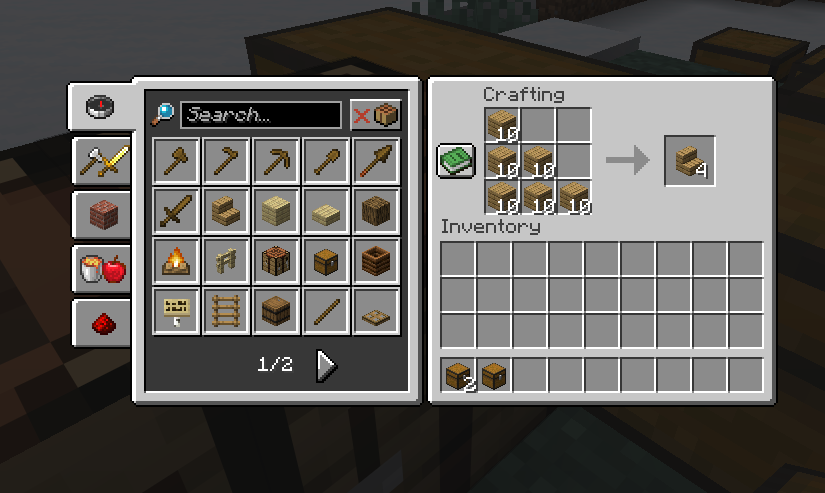
- This example here one of the marked chests contains 64 birch planks and the other 64 oak planks
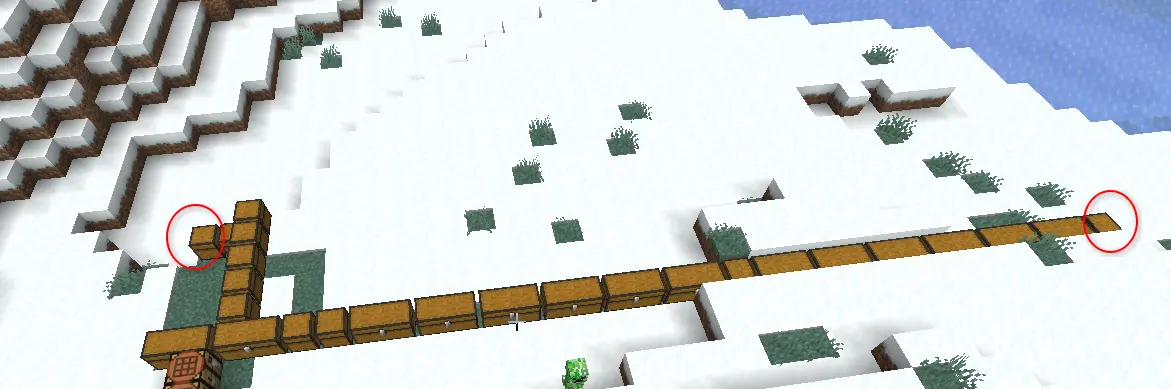 !
! - Resulting in the ability to create oak stairs (or birch) from those linked chests
What's new
- The recipe book now uses your chests. Recipes you can make with items in nearby storage light up as craftable — not just the stuff in your backpack. Works at the crafting table, your inventory grid, and furnaces.
- Recipes show up automatically. If the materials are nearby, the recipe appears in your book — even for things you've never personally held. So if you've got oak planks in a chest, oak stairs are right there ready to make.
- Furnaces, smokers, and blast furnaces. Click a recipe in the furnace's recipe book and QuickCraft loads the item to smelt from your chests and adds fuel for you — using coal and charcoal first so it won't burn your wood unless it has to.
- Tell QuickCraft to leave a chest alone. Rename a chest to include
[ignore]and it'll be skipped (great for decoration or off-limits storage). See below. - Locked chests stay locked. Containers sealed with a lock are left untouched unless you're holding the key.
- Smarter material matching. Interchangeable materials (like any kind of planks) are treated as equal when filling a recipe.
- Optional ender chest support, if you want your ender chest counted too.
Fixes
- The big one: no more freezing. Opening the recipe book, crafting table, or even your inventory could drop the game to a near-frozen crawl for several seconds. That's gone.
- No more furnace lock-up. Using the furnace recipe book could hang the game so badly you couldn't even close it. Fixed.
- No more recipe-book crash. Opening the recipe book could crash the game in certain cases. Fixed.
- No more false "can't craft" recipes. Items in your chests were sometimes shown in red as if you couldn't use them. Now they're correctly shown as available.
- "Show All" shows all again — including recipes you can't currently craft.
- Smoother with big bases. Large connected storage rooms no longer cause lag spikes.
Leaving a chest out
By default QuickCraft uses every chest in range. To skip one, rename the chest in an
anvil so its name includes [ignore] (for example Decorations [ignore]) before you
place it. Want it back in? Just rename it without the tag.
Works with most storage mods
Modded chests and barrels work as long as they act like normal storage. Big network-style systems (like Applied Energistics 2 or Refined Storage) aren't supported automatically yet — that's on the to-do list.
Most of these options can be adjusted in QuickCraft's config file if you want to fine-tune things. Found a bug or have an idea? Let me know your loader and Minecraft version.
Thanks for using QuickCraft 💛
Ченджлог
1.4.0Релиз26.1, 26.1.1, 26.1.2 · 17 июля 2026 г.
Choose where you craft from — and craft smoother
QuickCraft 1.4.0 hands you the controls: decide whether it pulls from your chests, your backpack, or both — and it now keeps up when you craft fast.
A source switch, right on the crafting screen
A small Source button sits next to the crafting grid. Click it to cycle between:
- All Items — pull from your inventory and nearby chests (the classic behaviour).
- Only Backpack — use just what's in your inventory; ignore chests.
- Only Chests — pull from nearby chests only and leave your inventory alone.
The recipe book follows your choice instantly: switch to Only Chests and it shows only
what your chests can make; switch to Only Backpack and it shows only what's in your bag.
You can also set the default in the settings screen (/quickcraft), and the on-screen
switch overrides it for your current session.
Turn QuickCraft off in your inventory grid
Prefer QuickCraft only at the crafting table? There's a new Inventory Crafting toggle in the settings screen. Turn it off and your 2×2 inventory grid goes back to plain vanilla — nothing gets pulled in, so chest items never end up sitting in your inventory. The crafting table is unaffected.
No more stutter when crafting fast
Rapidly taking crafted items used to make the game hitch for a moment while it re-scanned every nearby chest on each craft. QuickCraft now reuses a recent scan for a short window, so crafting a whole stack stays smooth.
Everything works at the crafting table and (when enabled) your inventory's 2×2 grid.
A heads-up on Only Chests: it controls what QuickCraft pulls and what the recipe book shows, but vanilla's recipe book still places matching items from your inventory when you click a recipe. To leave your inventory completely untouched, use the Inventory Crafting toggle, or keep those ingredients out of your bag.
Still requires CodxLib installed alongside QuickCraft (listed under Dependencies).
Found a bug or have an idea? Let me know your loader and Minecraft version. Thanks for using QuickCraft 💛
1.4.0Релиз26.1, 26.1.1, 26.1.2 · 17 июля 2026 г.
Choose where you craft from — and craft smoother
QuickCraft 1.4.0 hands you the controls: decide whether it pulls from your chests, your backpack, or both — and it now keeps up when you craft fast.
A source switch, right on the crafting screen
A small Source button sits next to the crafting grid. Click it to cycle between:
- All Items — pull from your inventory and nearby chests (the classic behaviour).
- Only Backpack — use just what's in your inventory; ignore chests.
- Only Chests — pull from nearby chests only and leave your inventory alone.
The recipe book follows your choice instantly: switch to Only Chests and it shows only
what your chests can make; switch to Only Backpack and it shows only what's in your bag.
You can also set the default in the settings screen (/quickcraft), and the on-screen
switch overrides it for your current session.
Turn QuickCraft off in your inventory grid
Prefer QuickCraft only at the crafting table? There's a new Inventory Crafting toggle in the settings screen. Turn it off and your 2×2 inventory grid goes back to plain vanilla — nothing gets pulled in, so chest items never end up sitting in your inventory. The crafting table is unaffected.
No more stutter when crafting fast
Rapidly taking crafted items used to make the game hitch for a moment while it re-scanned every nearby chest on each craft. QuickCraft now reuses a recent scan for a short window, so crafting a whole stack stays smooth.
Everything works at the crafting table and (when enabled) your inventory's 2×2 grid.
A heads-up on Only Chests: it controls what QuickCraft pulls and what the recipe book shows, but vanilla's recipe book still places matching items from your inventory when you click a recipe. To leave your inventory completely untouched, use the Inventory Crafting toggle, or keep those ingredients out of your bag.
Still requires CodxLib installed alongside QuickCraft (listed under Dependencies).
Found a bug or have an idea? Let me know your loader and Minecraft version. Thanks for using QuickCraft 💛
1.4.0Релиз26.1, 26.1.1, 26.1.2 · 17 июля 2026 г.
Choose where you craft from — and craft smoother
QuickCraft 1.4.0 hands you the controls: decide whether it pulls from your chests, your backpack, or both — and it now keeps up when you craft fast.
A source switch, right on the crafting screen
A small Source button sits next to the crafting grid. Click it to cycle between:
- All Items — pull from your inventory and nearby chests (the classic behaviour).
- Only Backpack — use just what's in your inventory; ignore chests.
- Only Chests — pull from nearby chests only and leave your inventory alone.
The recipe book follows your choice instantly: switch to Only Chests and it shows only
what your chests can make; switch to Only Backpack and it shows only what's in your bag.
You can also set the default in the settings screen (/quickcraft), and the on-screen
switch overrides it for your current session.
Turn QuickCraft off in your inventory grid
Prefer QuickCraft only at the crafting table? There's a new Inventory Crafting toggle in the settings screen. Turn it off and your 2×2 inventory grid goes back to plain vanilla — nothing gets pulled in, so chest items never end up sitting in your inventory. The crafting table is unaffected.
No more stutter when crafting fast
Rapidly taking crafted items used to make the game hitch for a moment while it re-scanned every nearby chest on each craft. QuickCraft now reuses a recent scan for a short window, so crafting a whole stack stays smooth.
Everything works at the crafting table and (when enabled) your inventory's 2×2 grid.
A heads-up on Only Chests: it controls what QuickCraft pulls and what the recipe book shows, but vanilla's recipe book still places matching items from your inventory when you click a recipe. To leave your inventory completely untouched, use the Inventory Crafting toggle, or keep those ingredients out of your bag.
Still requires CodxLib installed alongside QuickCraft (listed under Dependencies).
Found a bug or have an idea? Let me know your loader and Minecraft version. Thanks for using QuickCraft 💛
1.3.1Релиз26.1, 26.1.1, 26.1.2 · 14 июня 2026 г.
Craft exactly as many as you want
QuickCraft now puts you in control of how much you make from the recipe book.
Dial in the amount
- Click a recipe to pull enough materials for one craft. Click it again and it bumps to two, again for three, and so on — so you can set up an exact batch without counting items by hand.
- Shift-click a recipe to grab everything available at once (up to a full stack).
Crafting only uses what's in the grid
- Shift-click the result to craft your whole batch in one go. It makes exactly what's in the crafting grid and won't keep pulling from your chests or inventory — no more accidentally turning three stacks of planks into buttons.
- A normal click on the result still tops the grid back up from nearby chests, so you can keep crafting one at a time the way you're used to.
Works at the crafting table and your inventory's 2×2 grid.
Still requires CodxLib installed alongside QuickCraft (listed under Dependencies).
Found a bug or have an idea? Let me know your loader and Minecraft version. Thanks for using QuickCraft 💛
1.3.1Релиз26.1, 26.1.1, 26.1.2 · 14 июня 2026 г.
Craft exactly as many as you want
QuickCraft now puts you in control of how much you make from the recipe book.
Dial in the amount
- Click a recipe to pull enough materials for one craft. Click it again and it bumps to two, again for three, and so on — so you can set up an exact batch without counting items by hand.
- Shift-click a recipe to grab everything available at once (up to a full stack).
Crafting only uses what's in the grid
- Shift-click the result to craft your whole batch in one go. It makes exactly what's in the crafting grid and won't keep pulling from your chests or inventory — no more accidentally turning three stacks of planks into buttons.
- A normal click on the result still tops the grid back up from nearby chests, so you can keep crafting one at a time the way you're used to.
Works at the crafting table and your inventory's 2×2 grid.
Still requires CodxLib installed alongside QuickCraft (listed under Dependencies).
Found a bug or have an idea? Let me know your loader and Minecraft version. Thanks for using QuickCraft 💛
1.3.1Релиз26.1, 26.1.1, 26.1.2 · 14 июня 2026 г.
Craft exactly as many as you want
QuickCraft now puts you in control of how much you make from the recipe book.
Dial in the amount
- Click a recipe to pull enough materials for one craft. Click it again and it bumps to two, again for three, and so on — so you can set up an exact batch without counting items by hand.
- Shift-click a recipe to grab everything available at once (up to a full stack).
Crafting only uses what's in the grid
- Shift-click the result to craft your whole batch in one go. It makes exactly what's in the crafting grid and won't keep pulling from your chests or inventory — no more accidentally turning three stacks of planks into buttons.
- A normal click on the result still tops the grid back up from nearby chests, so you can keep crafting one at a time the way you're used to.
Works at the crafting table and your inventory's 2×2 grid.
Still requires CodxLib installed alongside QuickCraft (listed under Dependencies).
Found a bug or have an idea? Let me know your loader and Minecraft version. Thanks for using QuickCraft 💛
1.3.0Релиз26.1, 26.1.1, 26.1.2 · 13 июня 2026 г.
QuickCraft 1.3.0
Now powered by CodxLib
QuickCraft now runs on CodxLib, a small companion library shared across my mods. The behind-the-scenes plumbing — checking nearby chests with the server, saving your settings, and update notices — now lives in one shared place, so QuickCraft stays smaller and more reliable.
New required dependency
QuickCraft now needs CodxLib installed alongside it, just like Fabric API. It's listed under Dependencies, so most launchers will install it for you automatically.
Everything works exactly as before — crafting from nearby chests, the recipe-book highlight, and all your settings are unchanged.
1.3.0Релиз26.1, 26.1.1, 26.1.2 · 13 июня 2026 г.
QuickCraft 1.3.0
Now powered by CodxLib
QuickCraft now runs on CodxLib, a small companion library shared across my mods. The behind-the-scenes plumbing — checking nearby chests with the server, saving your settings, and update notices — now lives in one shared place, so QuickCraft stays smaller and more reliable.
New required dependency
QuickCraft now needs CodxLib installed alongside it, just like Fabric API. It's listed under Dependencies, so most launchers will install it for you automatically.
Everything works exactly as before — crafting from nearby chests, the recipe-book highlight, and all your settings are unchanged.
Комментарии
Загружаем…