 Mineforgian
OptiCores
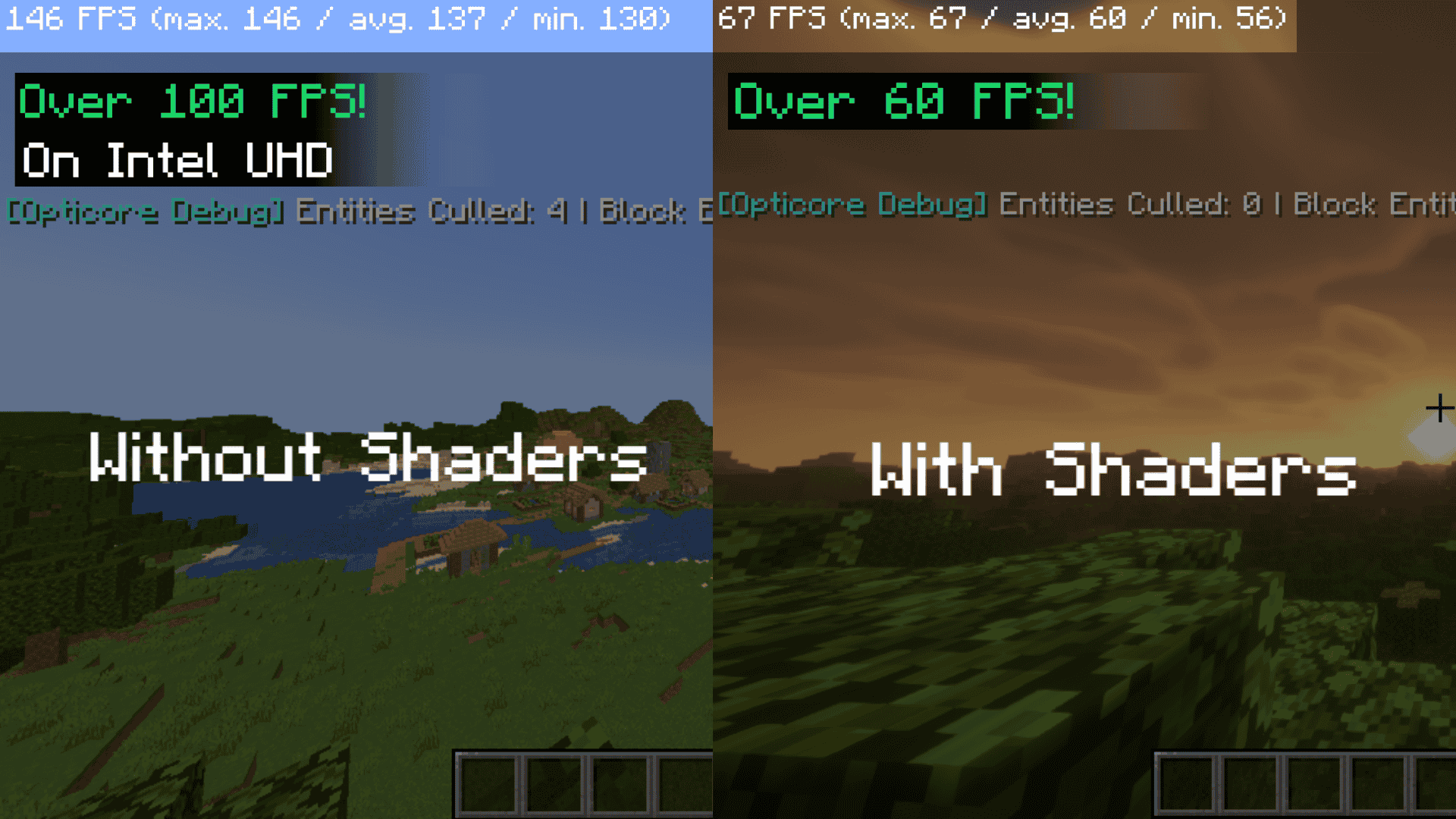
A client-side rendering optimization mod for (Neo)Forge and Fabric, featuring asynchronous culling specifically tuned for integrated graphics (Intel UHD/Iris Xe).
- Загрузки
- 26K
- Подписчики
- 34
- Обновлён
- 10 августа 2026 г.
- Лицензия
- MIT
Опубликован 2 мая 2026 г.

Thank you for the support!, Now i am going to continue working on the Opticores project.
Opticore: Asynchronous Rendering Optimization Opticore is a client-side companion mod for Embeddium and Sodium on NeoForge 1.21.1. It is specifically designed to alleviate the "Main Thread" bottlenecking found on systems using integrated graphics (Intel UHD, Iris Xe, and mobile CPUs).
Core Functionality
Asynchronous Culling Pipeline: Unlike standard culling methods that run on the main render thread, Opticore offloads Euclidean distance and Frustum-intersection math to a background worker thread.
Concurrent Data Management: Rendering visibility results are stored in a thread-safe ConcurrentHashMap, allowing for O(1) lookups during the render cycle with near-zero latency.
Dynamic Load Throttling: The mod monitors getSectionStatistics() to detect heavy chunk-loading periods. During high I/O spikes (e.g., world joining or teleporting), the mod temporarily reduces entity rendering overhead to prioritize terrain generation.
Technical Compatibility: Includes safety bypasses for custom block entity renderers (such as those in the Create Mod) and integrates with Distant Horizons to prevent culling during LOD baking passes.
Performance Impact Opticore is most effective in environments with high entity counts (villages, farms, or modded dimensions). By offloading culling logic, it helps stabilize frame times and reduces "stuttering" during world exploration on 2-core and 4-core processors.
Ченджлог
1.0.9Релиз26.1.1, 26.1.2, 26.2 · 7 августа 2026 г.
Changed the settings screen from a multi-tab layout to a single scrollable page with collapsible section headers (matching your hand-drawn sketch):
Replaced separate ConfigCategory tabs with SubCategoryBuilder sections under one "Settings" tab All sections (Entity Culling, Block Entity Culling, Advanced/Experimental, Chunk Throttling) are expanded by default
1.1.0Релиз1.21.9, 1.21.10, 1.21.11 · 4 августа 2026 г.
Changed the settings screen from a multi-tab layout to a single scrollable page with collapsible section headers (matching your hand-drawn sketch):
- Replaced separate ConfigCategory tabs with SubCategoryBuilder sections under one "Settings" tab
- All sections (Entity Culling, Block Entity Culling, Advanced/Experimental, Chunk Throttling) are expanded by default
Added Automatic Crash Reporting When the game crashes and Opticores is in the stack trace, the user's browser opens with a pre-filled GitHub Issue:
Created
- CrashHandler.java — detects Opticores in the crash stack trace and generates a GitHub "New Issue" URL Injected a printCrashReport hook into MixinMinecraftClient.java that calls the crash handler
1.0.9Релиз1.21.9, 1.21.10, 1.21.11 · 21 июля 2026 г.
- Fixed MixinLevelRenderer — updated the render() injection signature from (MatrixStack, Matrix4f, Matrix4f) to (GameRenderer, LightmapTextureManager, Matrix4f, Matrix4f) to match 1.21.1
- Fixed CullWorker — moved WaterCreatureEntity and AmbientEntity imports to net.minecraft.entity.mob
- Fixed ConfigScreenBuilder — replaced Text.method_43470 → Text.literal, fixed EnumListEntry generic type, corrected Screen/Text import paths
- Fixed fabric.mod.json — lowered fabricloader requirement from >=0.19.2 to >=0.16.5
- Added dependencies — Cloth Config via Shedaniel Maven, ModMenu via direct JAR download
1.0.8Релиз1.21.1 · 26 мая 2026 г.
Chunk Update Optimization: We intercepted the LevelRenderer to reset the chunk budget math, allowing the game to render terrain much more efficiently.
The 2D Item Frame LOD: We designed a system with a configurable distance slider (itemFrame2DDistance). If a player walks away from a massive wall of chests, the game cancels the expensive 3D item rendering and instantly swaps it to a flat, 2D particle sprite to save massive amounts of GPU power. (Currently waiting to be rewritten for 1.21.11!)
1.0.6Релиз1.21.9, 1.21.10, 1.21.11 · 18 мая 2026 г.
Distant Horizons & Voxy Support: Intelligently detects when these massive Level of Detail (LOD) mods are rendering distant fake terrain. Opticores temporarily pauses its strict culling so they don't fight over visibility, completely stabilizing your frame rate.
Sodium Safe-Yielding: Uses a pre-boot IMixinConfigPlugin to scan for Sodium. If Sodium is heavily modifying the rendering engine, Opticores politely disables its conflicting Mixins to prevent InvalidInjectionException crashes before the game even starts.
Sinytra Connector Ready: Engineered with strict require = 0 fallback rules and official Connector metadata in the fabric.mod.json, allowing NeoForge players to run this Fabric JAR seamlessly.
1.0.5Релиз1.21.9, 1.21.10, 1.21.11 · 16 мая 2026 г.
Smart Configuration & UI Integration:
Hardware-Aware Auto-Tuning: Features a new AUTO mode that polls your CPU thread count during client initialization. It dynamically calculates and assigns the optimal culling percentage for your specific hardware footprint.
In-Game Configuration GUI: Fully integrated with the Cloth Config API. Users can now modify performance parameters directly through the in-game Mods menu via a dedicated "Shader Culling Adjustments" category.
Dynamic UI Locking: When AUTO mode is active, the manual configuration slider is automatically disabled and visually snaps to display the precise culling percentage calculated for your hardware, preventing accidental misconfigurations.
Manual Override: Advanced users can easily toggle the configuration button to MANUAL mode to unlock the slider, allowing for precise, customized control over the exact culling rate.
Core Engine & Stabilization Upgrades:
Predictive Frustum Margin: Implemented a 2.0-block mathematical bounding box expansion during frustum intersection checks. This invisible margin pre-renders objects slightly before they enter the screen, entirely eliminating the micro-stutters previously caused by rapid camera panning.
Aggressive Shadow Pass Culling: Integrated a Mixin pipeline to detect shadow rendering passes (compatible with Iris/Oculus). When active, the engine enforces a strict 32-block render limit for entity and block-entity shadows, massively reducing GPU bottlenecking without impacting perceptible visual quality.
Reflection Caching: Replaced slow, per-frame reflection calls with a thread-safe, lazy-initialized caching system. This significantly reduces CPU overhead during dynamic lighting and shadow calculations.
Zero-Overhead Math: All hardware polling and culling calculations are strictly cached upon client boot, ensuring the dynamic configuration logic introduces absolutely zero overhead during gameplay.d
1.0.5Бета1.21.9, 1.21.10, 1.21.11 · 16 мая 2026 г.
The change from Neoforge towards Fabric. Still in Beta testing.
1.0.4Релиз1.21.9, 1.21.10, 1.21.11 · 15 мая 2026 г.
Hardware-Aware Auto-Tuning: The new AUTO mode evaluates your CPU thread count during client initialization. It dynamically assigns an optimal shader culling percentage based on your hardware footprint, balancing performance gains on lower-end systems with visual fidelity on high-end machines.
In-Game Configuration GUI: Fully integrated with the Cloth Config API. Users can now modify performance parameters directly through the in-game mod menu via a dedicated "Shader Culling Adjustments" category.
Dynamic UI Locking: When AUTO mode is active, the manual configuration slider is automatically disabled. The interface will then display the precise culling percentage calculated for your hardware, preventing accidental misconfigurations.
Manual Configuration: Advanced users can toggle to MANUAL mode to unlock the slider, allowing for precise, customized control over the exact culling rate (from 1% to 100%).
Zero-Overhead Caching: All hardware polling and configuration logic is strictly cached during the client boot sequence. This ensures the dynamic adjustments introduce zero performance overhead during active gameplay.
Комментарии
Загружаем…