 Mineforgian
NPC Studio
Be the director of your best thumbnail yet.
- Загрузки
- 266K
- Подписчики
- 420
- Обновлён
- 15 августа 2026 г.
- Лицензия
- All-Rights-Reserved
Опубликован 16 января 2024 г.
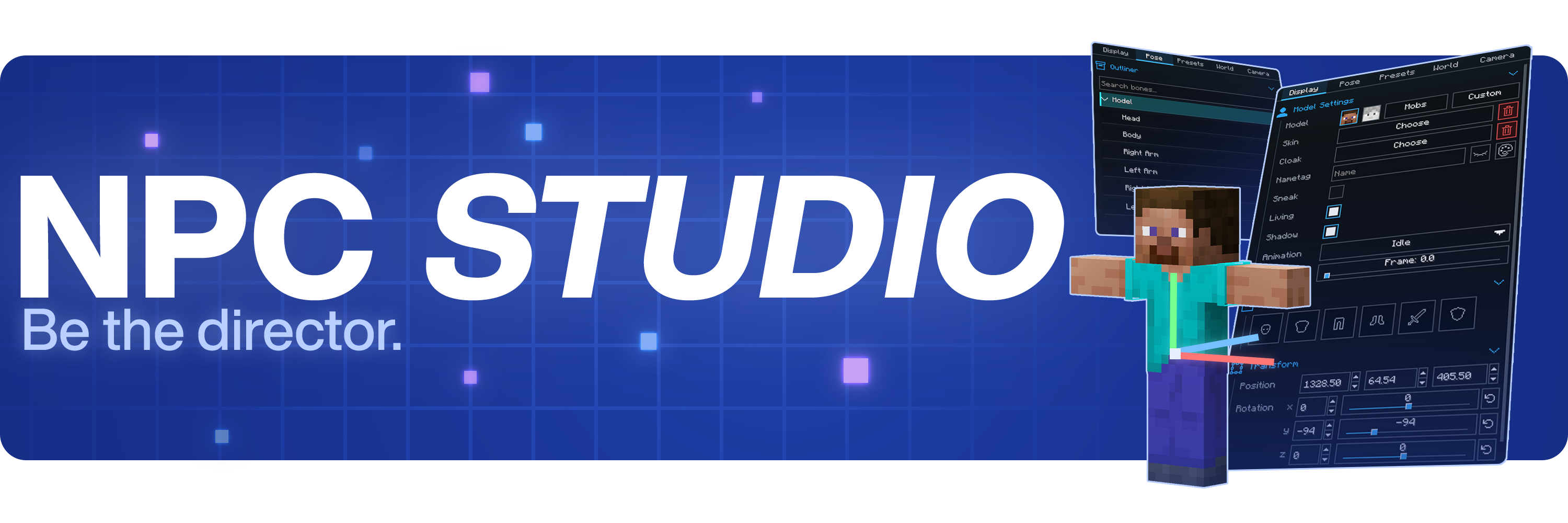


Be the director of your best thumbnail yet.
Stage the shot, pose the characters, control the world, and capture it all inside Minecraft.
Create with control
- Advanced character posing
- Custom mob & item support
- Detailed world and lighting control
- Powerful in-game camera tools
- Pose presets, scene saving, and more
Watch the full showcase
FAQ
Where can I report bugs or suggest features?
Join the Discord at discord.gg/mdh. For bug reports, include your Minecraft version, NPC Studio version, mod loader, what you expected to happen, what actually happened, and any useful logs or screenshots.
How do I import custom models?
Open the model picker, then use the import folder button. NPC Studio supports .bbmodel, .geo.json, and .jar files. For .bbmodel and .geo.json models, place the matching .png texture beside the model file and use the same file name.
How do I share presets?
Open the preset folder from the Presets tab, then share the preset .json file or the folder that contains it. The other person can place it in their config/npcstudio/presets folder and load it from the Presets tab.
How do I make batch screenshots automatically cut out the player?
Install Iris and a WEM cutout-compatible shaderpack, then enable WEM Cutout in the Batch Screenshots screen. If you have more than one compatible shaderpack installed, choose the one you want to use for the cutout pass before running the batch.
Ченджлог
1.3.7Релиз1.21.11 · 15 августа 2026 г.
Added JPG and JPEG support for camera guide overlay images
Fixed Axiom editor tools and viewport rendering breaking while NPC Studio's live camera preview was open, and prevented the NPC Camera item from stealing Axiom interactions
Fixed live camera mouse-look not consistently following Minecraft's captured mouse input
Fixed missing, renamed, or invalid skin files causing repeated loading attempts, folder scans, and log spam
Fixed Bedrock .bbmodel bone and cube rotations using the wrong rotation order
Fixed dragged inventory items appearing behind equipment slots in the NPC editor
1.3.6Релиз1.21.11 · 8 августа 2026 г.
Added Painting props: hang any vanilla painting artwork in your scenes and pick its motif from the Built-in models list
Added color choices for particle props, with potion effect colors, note colors, and dye colors, plus new Wind Charge Gust particles
Armor worn by NPCs can now be selected, moved, rotated, and resized piece by piece in the editor
Any item can now be placed in NPC armor slots as decoration, such as renamed items that carry custom hat models
Added a charge level slider for respawn anchor block props
Added a poseable arrow prop to the object picker
Fixed NPC glow outlines missing from the camera preview window
Camera previews and editor overlays now safely turn off when the game window is too large for the game to handle, instead of causing errors
Fixed the fire effect on NPCs clashing with Iris shaders, where fire pixels could block out parts of the NPC
1.3.5Релиз1.21.11 · 26 июля 2026 г.
Added ImageNPC props: drop PNG files into the ImageNPC folder and use them as flat 2D billboard props that preserve their original aspect ratio
Added skin downloads from NameMC, SkinMC, and direct PNG links through the Download Skin window, with validation before files are saved
Added poseable armor stand props with visible arms, support for any head item, and equipment in both hands
Expanded vanilla mob variant controls with angry bees and wolves, sheep colors and shearing, panda genes, copper golem oxidation, bogged shearing, goat horns, cold striders, slime, magma cube and phantom sizes, and ghast, vex and wither states
Added a configurable F6 keybind to safely cancel active batch screenshot runs after any capture already in progress finishes
Fixed the built-in player idle animation failing to loop smoothly
Fixed enchantment glint effects not rendering on custom items
1.3.4Релиз1.21.11 · 16 июля 2026 г.
Added persistent favorites for skins, cloaks, mobs, blocks, items, particles, custom models, entity and structure props, presets, variant sets, and animations, with favorites-first ordering and favorites-only item filtering
Added configurable colored NPC glow outlines that remain visible through blocks
Added a one-time prompt before applying NPC Studio's recommended gamerules to a world, with options to apply, skip, or cancel
Added manual frame selection for animated custom-model textures using Minecraft .mcmeta frame layouts and ordering
Fixed macOS editor shortcuts and multi-selection controls to use Command instead of Control
Fixed frozen player NPCs disappearing while their skins were still being uploaded to the atlas
Fixed duplication ghost previews remaining suppressed after reopening the editor or disappearing in the Character Variants screen
Fixed skins, cloaks, custom models, custom items, and variant previews failing on filenames or saved texture IDs containing unsupported characters
Fixed non-animated custom-model textures being reduced to their configured frame dimensions instead of preserving the full image
Fixed Flip Pose swapping paired left and right transforms without reflecting their positions and rotations
1.3.3Релиз1.21.11 · 12 июля 2026 г.
Added Shift+D quick duplication and movement
Added customizable particle NPCs with sprites, layouts, lighting, glow, size, and rotation controls
Added Blockbench mesh support for custom models
Added a Puffed Up pufferfish variant to the mob picker
Added TNT minecart fuse animation controls
Fixed the glint strength slider to respect Minecraft's accessibility setting
Fixed blank or incorrect mob previews in menus
Fixed layered textures on imported Blockbench models
1.3.2Релиз1.21.11 · 29 июня 2026 г.
Armor
- Fixed trimmed enchanted armor showing its glint shimmer twice.
- Armor on rigged player NPCs now follows pose parent-bone overrides, keeping it aligned with re-parented limbs.
1.3.1Релиз1.21.11 · 29 июня 2026 г.
NPC Studio 1.3.1 - Changelog
NPCs riding boats
- NPCs riding boats now sit using the boat's real passenger seating positions.
- Two NPCs sharing a boat now use proper side-by-side seat offsets.
- Mounted NPCs no longer get culled (vanish) when viewed at steep camera angles.
Custom models
- Added support for Blockbench Java modded-entity models, which now import and render upright.
- Modded-entity models are now mirrored correctly when converted.
- Fixed upside-down textures on modded-entity model faces.
- Custom items built from modded-entity models now use the same upright base transform.
- Paper-thin (zero-thickness) custom model shapes are now nudged so they still render instead of disappearing.
Structure and schematic import
- Added importing of legacy MCEdit/WorldEdit .schematic files as NPC structures.
- Legacy schematics saved uncompressed can now be imported.
- Old numeric block IDs and data values are converted to modern block states on import.
- Chest, sign, and other block entity contents are now preserved when importing schematics.
- Added support for importing the newer Sponge V3 schematic layout.
Rendering and visual fixes
- Enchanted armor that also has a trim now shows its glint shimmer correctly.
- Trimmed armor glint now renders properly on frozen-block NPCs as well.
- Animated-texture blocks now get proper per-face side shading so their sides are lit like normal blocks.
- Restored normal batched NPC rendering by removing a leftover debug path.
Presets
- Preset thumbnails now render for single-NPC presets, which previously showed a blank preview.
1.3.0Релиз1.21.11 · 19 июня 2026 г.
BlockNPCs / editable blocks
- Added BlockNPCs, allowing real blocks from the world to be converted into editable NPC-style objects.
- Added a dedicated BlockNPC Tool item for quickly converting blocks.
- BlockNPC conversion is now undoable.
- BlockNPCs preserve the original block facing direction when converted.
- BlockNPCs no longer show shadows by default, making them better suited for clean prop work.
- BlockNPC placement previews now show a full 3D box outline instead of only the top face.
- Improved BlockNPC placement accuracy.
- Added editable chest lid controls.
- Chest lids can now rotate through a full 360 degrees.
- Added barrel open controls.
- Added shulker box open controls.
- Added beacon beam controls.
- Added TNT primed state and fuse controls.
- Added campfire lit controls.
- Added smooth piston extension controls.
- Added texture frame controls for animated blocks.
- Added block entity rendering support for BlockNPCs.
- Added better animated fire rendering for fire and soul fire BlockNPCs.
- Added emissive rendering for glowing BlockNPCs such as lava, lanterns, sea lanterns, fire, and similar blocks.
- BlockNPCs now use biome tint colors from their world position, improving grass, leaves, water, and other tinted blocks.
- The editor now hides irrelevant pose and model controls when a BlockNPC is selected.
PropNPCs / structure props
- Added PropNPCs, allowing selected blocks or structures to be converted into a single editable NPC-style prop.
- Added saving for PropNPCs.
- Added support for reapplying saved PropNPCs from disk.
- Added support for larger PropNPC creations.
- Added isometric PropNPC previews in the picker.
- Added isometric PropNPC previews in the save screen.
- Added support for browsing and applying BlockNPCs from the Props picker.
- Added boats as spawnable entity props.
- Added minecarts as spawnable entity props.
- Added end crystals as spawnable entity props.
- Added proper rendering support for boat and end crystal props.
Props picker / asset picker improvements
- Added the new Props picker.
- Added a Custom source to the mob picker.
- Added sorting options to asset pickers.
- Added sorting options to the preset list.
- Improved picker rendering performance and caching.
- Improved mob picker UI and filtering.
- Fixed batch screenshot NPC action buttons so they stay aligned with the layout.
ItemNPCs
- Added ItemNPCs as a new model type.
- Added an editor picker source for ItemNPCs.
Lightning NPCs and extras
- Added lightning-bolt NPCs.
- Lightning-bolt NPCs support randomizable visual patterns.
- Added an Extras tab to the picker.
- Added a Lightning Bolt entry to the Extras tab.
- Added isometric previews for lightning entries.
- Lightning previews now render more reliably in the editor and GUI.
- Lightning NPCs no longer have an unwanted entity hitbox.
- Overhauled the tick speed slider.
Mob variants, animations, and visual modifiers
- Added charged creeper variant support.
- Added a sitting pose toggle for mob NPCs.
- Added ghast shooting animation controls.
- Added ghast angry-face controls.
- Simplified ghast face selection by replacing the separate happy ghast entry with direct face controls.
- Added a burning visual modifier.
- Added an animated fire overlay for burning NPCs.
- NPCs are now fire-immune.
- NPC fire visuals are now controlled through the editor instead of vanilla fire rendering.
Enderman carried block editing
- Added an Enderman carried-block equipment slot.
- Added transform controls for Enderman carried blocks.
- Fixed Enderman carried-block gizmo placement.
- Fixed Enderman carried-block slot behavior.
Rigged player model / bendable limbs
- Added a new rigged player model.
- Added elbow joints to the rigged player model.
- Added knee joints to the rigged player model.
- Added bendable arm rendering.
- Added bendable leg rendering.
- Added rotation constraints for elbows and knees.
- Added hinge behavior for elbow and knee bending.
- Improved transform handling for bendable rigged-player bones.
- Improved armor rendering on bendable arms and legs.
- Fixed armor arm texture alignment and mirroring.
- Added better texture support for bendable cuboids and armor.
- Improved bend positioning for bendable limbs.
Custom models
- Modded entity Blockbench models can now work as local bone rigs.
- Improved transform handling for custom model bones.
- Transparent and cutout custom model textures now render more accurately.
Editor transforms and placement
- Improved transform behavior for non-player NPC targets.
- Fixed unsafe viewport transforms on non-player NPCs.
- Fixed global translate dragging so it uses real world position instead of viewport offset.
- Fixed NPC stamp placement for NPCs with viewport position offsets.
Frozen NPC previews and performance
- Added frozen block previews in the editor.
- Frozen NPC lookup is now faster.
- Frozen previews are now more reliable.
- Frozen preview history tracking is more reliable.
- Frozen preview behavior works better with crowds.
- Adjusted frozen preview block icon sizing.
Environment controls
- Added visual rain override controls.
- Rain visuals can now be adjusted by strength.
- Rain visuals can now be adjusted by tilt.
- Rain visuals can now be adjusted by direction.
Camera tools
- Cameras now spawn with the player's configured FOV.
- Newly created cameras are now automatically selected after spawning.
Wand and editor usability
- Added extended wand reach beyond the vanilla interaction distance.
- Added inventory slot hints for enchantment and trim workflows.
Batch screenshots
- The batch screenshot panel now shows the output path field in panel mode.
- Improved shader settle behavior for batch screenshots.
- Batch screenshots now handle shader synchronization more consistently.
Комментарии
Загружаем…