 Mineforgian
EasyArmorStands
Armor stand and display entity editor
- Загрузки
- 6K
- Подписчики
- 41
- Обновлён
- 7 августа 2026 г.
- Лицензия
- GPL-3.0-only
Опубликован 11 декабря 2024 г.
EasyArmorStands
Armor stand and display entity editor.
Installation
Download the .jar file and place it in your plugins folder.
Usage
Use /eas give and follow the instructions.
If you get stuck, refer to the detailed instructions below.
Editing entities
Hold the tool and right-click an entity to select it.
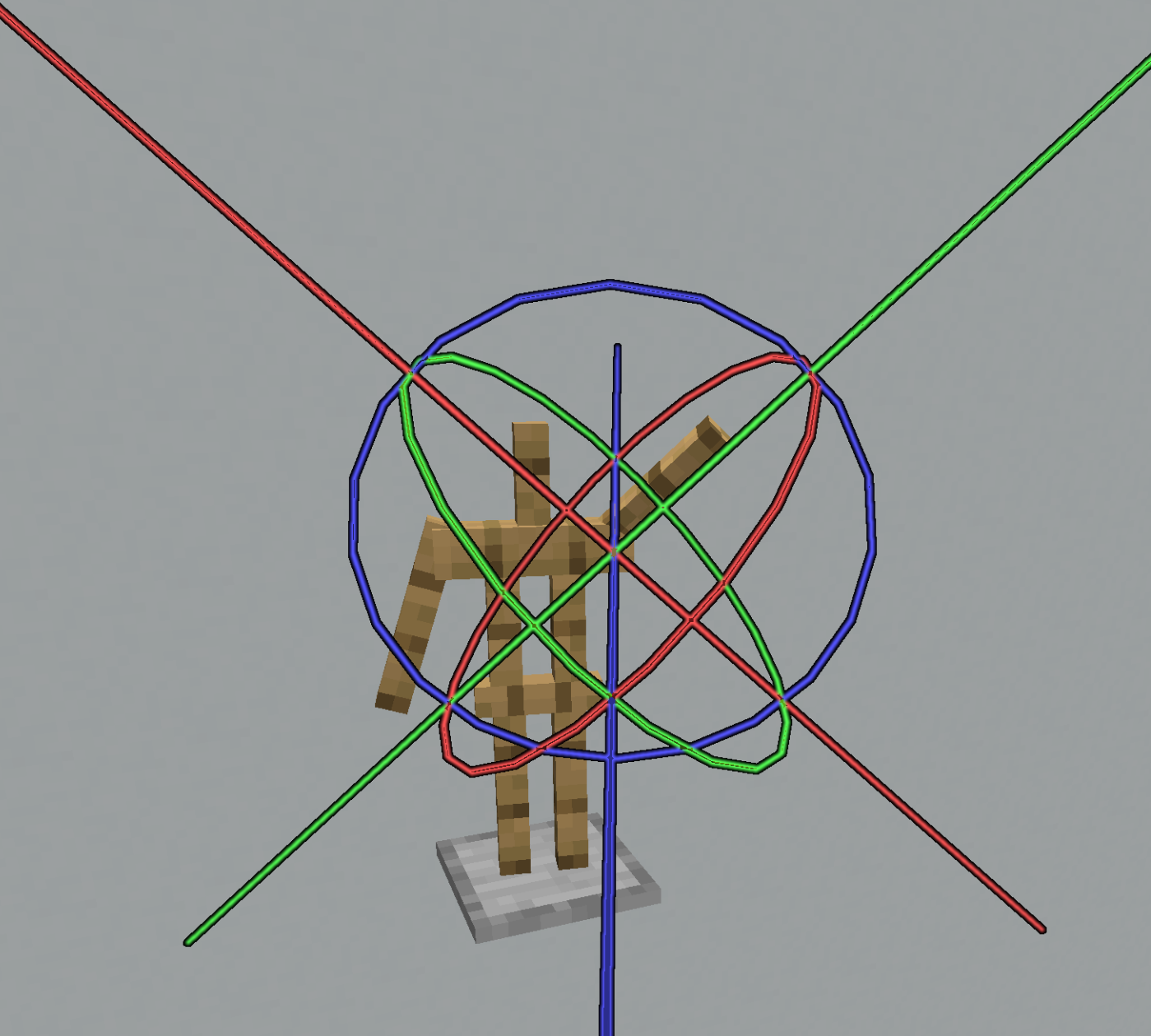
Right-click a line to use the Move tool. Move your cursor by walking or looking around, then right-click to confirm your changes. You can abort your changes and restore the previous position by left-clicking instead.
Right-click a circle to use the Rotate tool. This works just like the Move tool.
Some entities let you switch between local and global mode. Local mode is affected by the rotation, for example, you can use it to move an armor stand along its arms. Global mode uses global coordinates.
Use /eas undo and /eas redo to undo/redo your changes.
You can undo any operation performed using EasyArmorStands, as well as manually placing or destroying armor stands.
Armor stands
Armor stands have 7 bones:
- Head
- Body
- Left arm
- Right arm
- Left leg
- Right leg
- Position
After selecting an armor stand, you will also have to select which bone you want to edit. The Position bone is the yellow point in the middle (below the head), the other bones are the white lines.
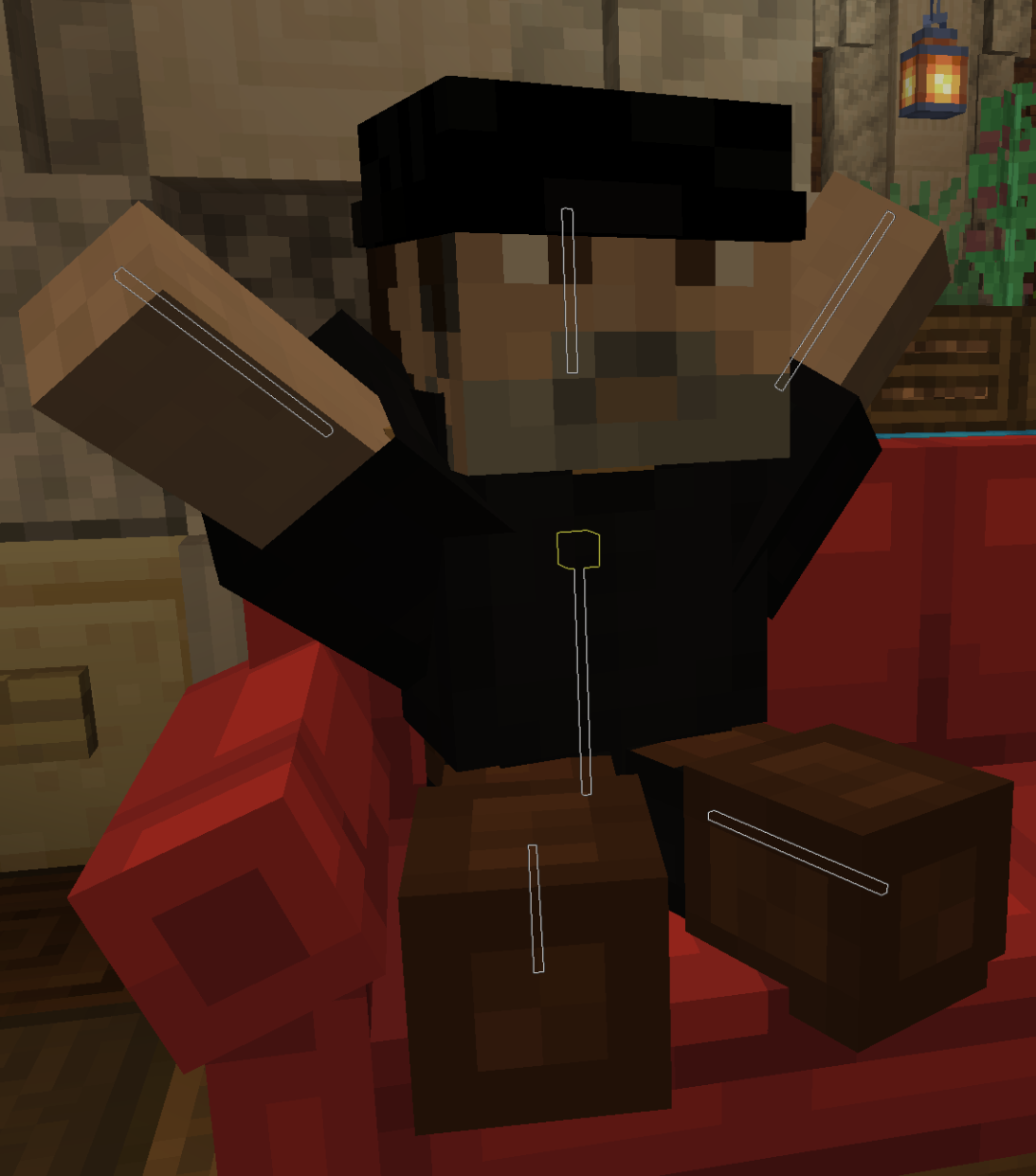
You can pick up and carry the armor stand by selecting the position bone and then selecting the Pick up tool in the middle (where the lines meet).
Use /eas name to edit the custom name of an armor stand.
This is often used for holograms.
Format the name using MiniMessage.
Hint: If you are on 1.19.4+, you should use text displays for holograms, see below.
Display entities
Display entities can be moved, rotated and scaled.
Use the menu to place an item into an item display.
Use /eas text to edit the text of a text display.
Format the text using MiniMessage.
This command also has some subcommands such as /eas text background, which can be used to change the background color.
Hint: Set the billboard mode to center in the menu and reset the rotation
(/eas reset) to create a hologram which always looks at the player.
Place a block in a block display by holding Shift and left-clicking it, or use /eas block.
This command also supports block states like minecraft:birch_stairs[facing=east].
Use /eas box to resize or move the bounding box.
Setting up a bounding box is important for client-side rendering performance.
The client will not render display entities if the bounding box is not visible on the screen.
By default, display entities do not have a bounding box, so they are always rendered.
Use /eas brightness to set a custom brightness (light level) of a display entity.
FancyHolograms integration
FancyHolograms holograms can be moved and scaled using EasyArmorStands.
Group selection
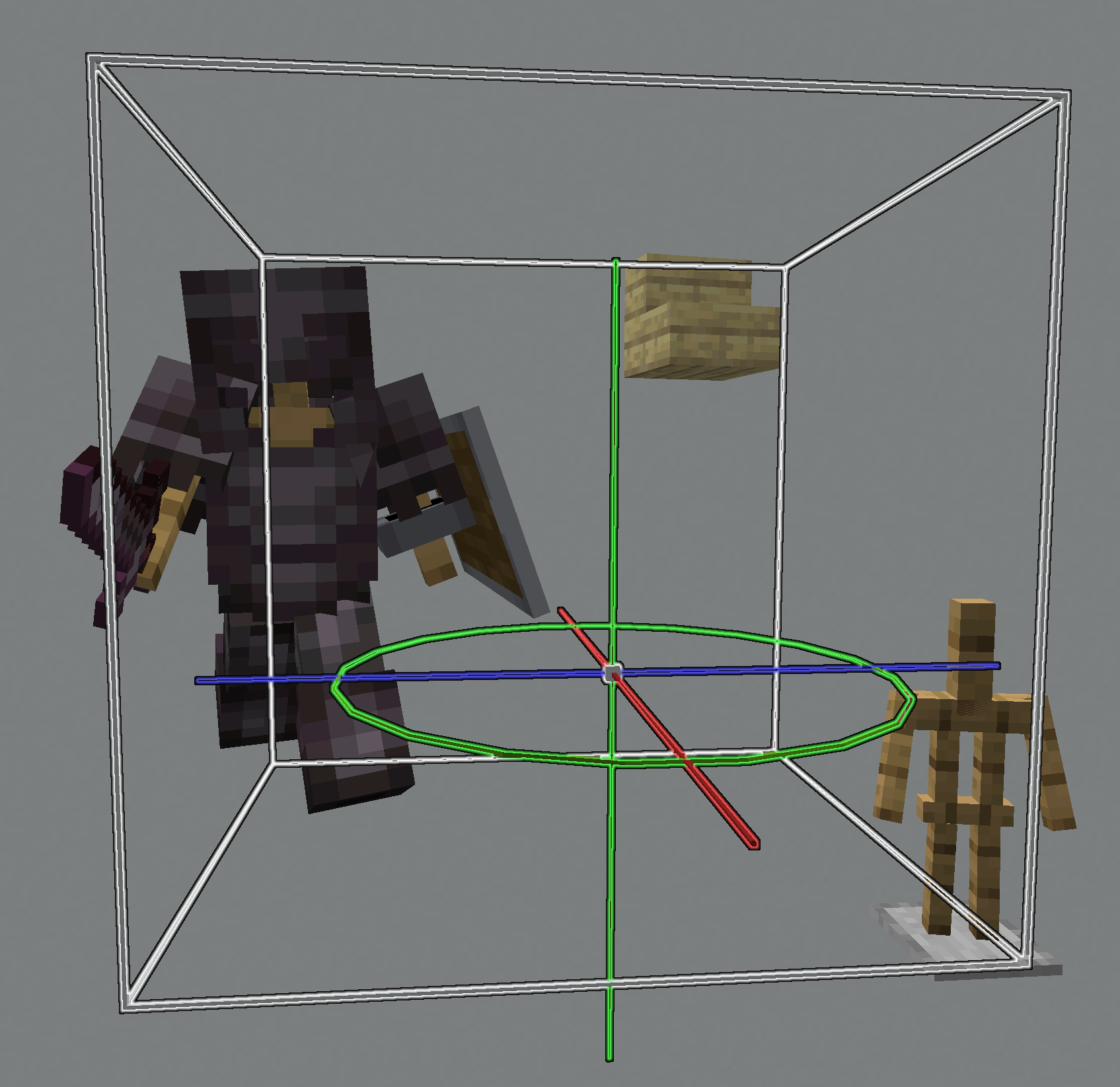
Hold Shift while right-clicking an entity to add it to your group selection. After selecting the entities you want to edit, right-click anywhere without holding Shift to begin editing the group.
Menu
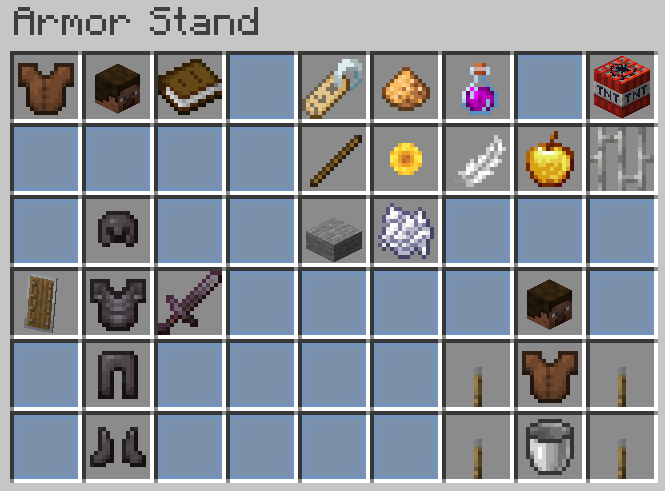
The menu can be accessed by pressing F. Group selections do not support the menu.
On the bottom left, you can edit the entity equipment slots (armor, held items).
The bottom right contains shortcut buttons to quickly select a certain bone.
Armor stand settings such as visibility can be changed using the buttons in the top right.
Head Database integration
If Head Database is installed and you have permission to use it, you can click the button in the top left to open its menu. After selecting a head, you are returned to the EasyArmorStands menu and can quickly place it into an equipment slot.
Permission: headdb.open
TrainCarts integration
If TrainCarts is installed, a button to open the TrainCarts model browser is added to the top left.
Permission: easyarmorstands.traincarts.model
Commands
This list contains some important commands for features which cannot be accessed using the menu.
Use /eas help to see the full list of commands and their full usage.
/eas give: Give yourself the editor tool/eas align: Move the selected entity to the middle of its block/eas clone: Duplicate the selected entity/eas snap angle: Toggle angle snapping (or specify an increment)/eas snap move: Toggle position snapping (or specify an increment)/eas reset <property>: Reset a property
Permissions
There are two permission packs which contain permissions which are recommended for survival or creative mode servers.
| Permission | Description |
|---|---|
easyarmorstands.survival |
Allow editing armor stands and their basic properties |
easyarmorstands.creative |
Allow spawning and editing armor stands and display entities |
For example, to allow players to use EasyArmorStands on a creative server, simply give them
the easyarmorstands.creative permission.
The full list of permissions is located in the wiki.
PlotSquared integration
If PlotSquared v6/v7 is installed, players can only edit entities on plots where they are allowed to build.
Players with the easyarmorstands.plotsquared.bypass permission bypass this restriction.
WorldGuard integration
If WorldGuard is installed, players can only edit entities if they are allowed to build.
Players with the easyarmorstands.worldguard.bypass permission bypass this restriction.
GriefDefender integration
If GriefDefender is installed, only trusted builders can edit entities in a claim.
Players with the easyarmorstands.griefdefender.bypass permission bypass this restriction.
GriefPrevention integration
If GriefPrevention is installed, players can only edit entities if they are allowed to build.
Players with the easyarmorstands.griefprevention.bypass permission bypass this restriction.
HuskClaims integration
If HuskClaims is installed, players can only edit entities if they are allowed to perform the easyarmorstands:edit
operation.
The easyarmorstands:edit operation (flag) should be configured in the
HuskClaims config.
- Add it to
wilderness_rulesinconfig.ymlto allow using EasyArmorStands in the wilderness. - Add it to
allowed_owner_operationsintrust_levels.ymlto allow players ot use EasyArmorStands in their own plots. - Add it to
flagsof certaintrust_levelsintrust_levels.ymlto configure which trust levels can use EasyArmorStands in claims.
Players with the easyarmorstands.huskclaims.bypass permission bypass this restriction.
Towny integration
If Towny is installed, only trusted residents can edit entities in a claim.
Players with the easyarmorstands.towny.bypass permission bypass this restriction.
Residence integration
If Residence is installed, only players with the build flag can edit entities in a claim.
Players with the easyarmorstands.residence.bypass permission bypass this restriction.
Lands integration
If Lands is installed, the role flag easyarmorstands_edit (in the menu: Edit entities)
can be used to restrict editing entities.
Add the flag to land.display in plugins/Lands/roles.yml to show it in the menu.
Players with the easyarmorstands.lands.bypass permission bypass this restriction.
BentoBox integration
If BentoBox is installed, the flag ARMOR_STAND is required to edit entities.
Players with the easyarmorstands.bentobox.bypass permission bypass this restriction.
Configuration
The configuration file is automatically generated in the plugin folder.
The most important options are documented in the wiki.
Use /eas reload to reload the configuration file.
Localization

Please submit translations on Weblate. If you would like to start translating to a new language, please ask on Discord.
Use your own translations
- Copy the
default messages
into
plugins/EasyArmorStands/lang/XX_YY.json. - Replace
XX_YYwith the in-game locale code listed in https://minecraft.wiki/w/Language#Languages. This makes the file only apply to players with that language.
Use /eas reload to reload all messages.
Ченджлог
3.3.0Релиз26.1.1, 26.1.2, 26.2 · 7 августа 2026 г.
Improvements
- Make
/easgive the tool- Replaces
/eas give /eas givestill works, but additionally shows a hint to use/easinstead/eas give <player>still works like before
- Replaces
- Disallow editing non-persistent entities
- Non-persistent entities are usually temporary entities created by other plugins
- Editing them can be allowed using
editor.allow-non-persistentinconfig.yml
- Allow using
/eas position/yaw/pitchand/eas scale x/y/zwith groups
Fixes
- Fixed no longer being able to use
/eas blockwith groups - Fixed the "Into Fire" advancement being awarded when obtaining the tool
3.2.1Релиз26.1.1, 26.1.2, 26.2 · 24 июля 2026 г.
Improvements
- Added item frame "item", "fixed" and "visible" properties
- Added
/eas give <player>- Gives the tool to another player
- Requires the
easyarmorstands.give.otherpermission - Always creates a new item instead of attempting to select an existing item (useful with shop plugins)
Fixes
- Fixes being able to duplicate items on survival mode servers
3.2.0Релиз26.1.1, 26.1.2, 26.2 · 30 июня 2026 г.
Improvements
- Updated to 26.2
- Simplified tool mode display
- Allow disabling centered block display pivots in the config
- Set
centered-pivotstofalseto restore the old behavior
- Set
Fixes
- Prevent using the tool in crafter blocks
API changes
- Added tools to NodeProvider
3.1.0Релиз26.1, 26.1.1, 26.1.2 · 14 июня 2026 г.
Improvements
- Move block display pivot to the center
Fixes
- Fix being able to edit unloaded entities
2.7.0Релиз26.1, 26.1.1, 26.1.2 · 14 июня 2026 г.
Improvements
- Changed control to switch modes to Q (dropping item).
- Previously Shift + Right-click.
/eas giveselects the tool if you already have it in your inventory.- Move block display pivot to the center
Fixes
- Fix being able to edit unloaded entities
3.0.1Релиз26.1, 26.1.1, 26.1.2 · 2 мая 2026 г.
Fixes
- Fix cursor not being passed to tools
- Fixes the scale tool being very sensitive
3.0.0Релиз26.1, 26.1.1, 26.1.2 · 1 мая 2026 г.
Changes
EasyArmorStands v3 requires Paper 1.21.11 or later.
Bukkit and Spigot servers, as well as older server versions, are no longer supported. This significantly reduces the maintenance effort and makes it easier to use features introduced in new versions.
EasyArmorStands v2 can still be used on Bukkit/Spigot/Paper 1.8.8 to 1.21.11. It will still receive bug fixes and some new features. However, most new features will only be added to EasyArmorStands v3.
Improvements
- Added Mannequin pose property
- Added
editor.allow-entitiesto config- If true (default), any entity can be edited (as long as you have permission to edit the entity type)
- If false, only entities created using EasyArmorStands can be edited
- Entities created before EasyArmorStands v3 must be registered using
/eas register ...
- Added
/eas register ...and/eas unregister ...- Allows marking (or unmarking) entities as created by EasyArmorStands
- Using
/eas cloneor/eas undo/redouses full entity data- Requires the
easyarmorstands.copy.entitypermission - The whole entity is cloned, including properties not supported by EasyArmorStands
- Requires the
- Restructured menu
- Added names to equipment slots in the menu
- Group selection uses a different color for selected entities
- Text inputs use dialogs instead of suggesting commands
- MiniMessage tags such as
<rainbow>or<gradient>are preserved when saved in an entity
Changes
- Removed menus from configuration
- Menus can no longer be customized
- Menus are built dynamically instead
- This allows other plugins to add menu buttons without requiring config changes
- Armor stand parts can be selected immediately
- Previously, the armor stand had to be selected before a part could be selected.
- Now, buttons for all parts are added to the element selection.
- The old behavior can be restored by disabling
editor.flatten-armor-standsin the config. - If you use armor stands to display items/models, consider converting them to item displays using
/eas convertinstead of disabling this.
API changes
- Adventure and JOML are no longer relocated
- They are already part of Paper.
- Renamed
NodetoLayer- The editor consists of a stack of layers.
- Only the top layer is considered active.
- Introduced a new concept called
Node- Nodes can be added to layers.
- Nodes can contain buttons.
- For example, a
SelectableElementprovides a node which is added to the element selection layer.
- Added
InputProvider
2.6.2Релиз26.1, 26.1.1, 26.1.2 · 12 апреля 2026 г.
Improvements
- Added 26.1 support
- Allow opening menu while an armor stand bone is selected
Fixes
- Made component capability detection more robust
- Immediately react to other plugins showing/hiding entities
- Fixed
/eas textnot working with text which contains newlines
Комментарии
Загружаем…