 Mineforgian
TrainCarts
Trains in Minecraft, a full simulator for your train network or theme park
- Загрузки
- 14K
- Подписчики
- 86
- Обновлён
- 1 июля 2026 г.
- Лицензия
- MIT
Опубликован 30 октября 2022 г.
〚 ⤓ Modrinth / ⤓ Spigot / ⤓ Jenkins Dev Builds / Source on GitHub / Javadocs / Discord 〛
About TrainCarts
Trains in Minecraft! Automated metro networks, rollercoasters, gondolas, ski-lifts or amusement park rides. TrainCarts does it all with support for custom models, animations, automation with signs and a large API that supports add-ons that can do even more!
This plugin requires BKCommonLib
Join our discord server for help: https://discord.gg/wvU2rFgSnw
Please do not use very old versions with older versions of Minecraft. The latest release of TrainCarts and BKCommonLib are backwards-compatible with older Minecraft versions.
WIKI
Discover how to use this plugin over at https://wiki.traincarts.net/p/TrainCarts
Custom Trains
With the Attachment Editor you can customize the appearance of your trains. Create custom cart models in Blockbench and ride inside them in-game. Large models are possible by adding multiple sections of a model as separate (Armorstand) item models. TrainCarts will do the animating for you and move the parts as a whole.
Recommended reading before going into this: Custom Item Models in 1.9 and Up
Ingame Map Editor
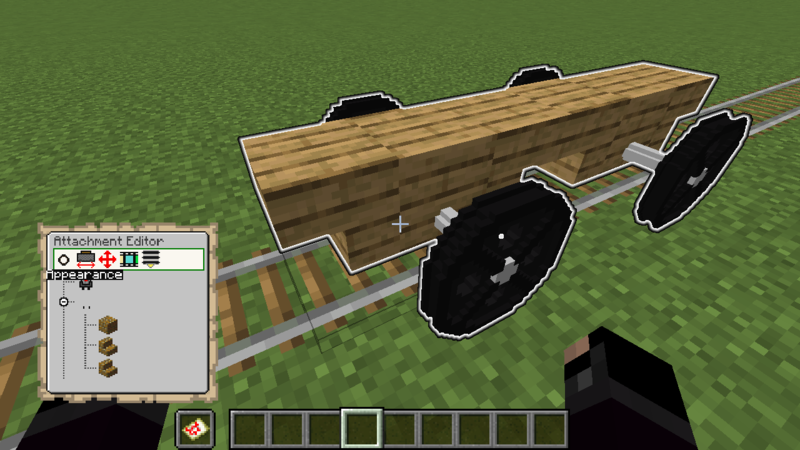
Animations
For custom ride enthusiasts, trains can be fully animated. This means you can have doors that open and close, carts that spin around, or even create theme park rides like Ferris wheels, spinners and merry-go-rounds!
Demo Resource Pack
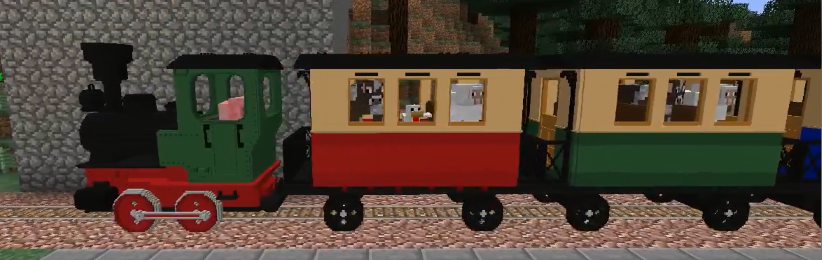
TrainCarts has a demo resource pack that you can download that includes a couple of train and rollercoaster cart models. You can already play around with these without having to delve into Blockbench yourself
The locomotive and carriages were made by Nullblox. Maxi made the different color rollercoaster carts.
You can download the zip file from here or use the server.properties configuration shown on the webpage: packs.traincarts.net
Usage Instructions
Spawn the trains
The new models are bound to durability values of the golden pickaxe. You can spawn these trains using:
- Spawn Sign
- Train Spawn Chest Item:
/train chest [name] - Create it in the attachment editor. You can find the items to use with
/train model search
The following train names can be spawned
- loco - Spawns locomotive without animations
- carr / carg / carb - Spawns red/green/blue carriages without animations
- loco_anim - Spawns locomotive with animated wheels and pistons
- carr_anim / carg_anim / carb_anim - Spawns red/green/blue carriages with animated wheels
- ferris - Animated Ferris wheel, use animation 'spin' to control it (WARNING: VERY LAGGY)
- spinner - Animated spinning ride with 3 controllable animations ('spin', 'turn' and 'arm')
- rolr / rolg / rolb - Rollercoaster carts with 4 seats
Saved Train Configurations
Extracting
The pack zip file includes saved train configurations at assets/traincarts/saved_train_properties/tcdemo.yml. When the resource pack is configured in server.properties this file is automatically detected by TrainCarts and the trains inside are made available under /savedtrain list and such.
If for some reason this mechanism doesn't work (because you are merging resource packs or such):
- Extract this tcdemo.yml yourself and place it at
plugins/Train_Carts/savedTrainModules/tcdemo.yml - Run
/train globalconfig reload --savedtrainproperties
Normally you don't have to do this.
Physics
Trains don't just follow a line or are limited by Minecraft's own Minecart physics. They are simulated in real-time with gravity physics, rail switching and wheels that track the rails.
New Speed Limits
It is possible to make trains move much faster than the usual 0.4 blocks per tick. Zoom! The default (configurable) maximum speed limit is 5 blocks per tick (300kph!).
Keep Chunks Loaded
Trains can be set to keep chunks loaded. Then they act as moving chunk loaders, keeping themselves and a small area around them loaded and animated. This way they can run autonomously, no matter if no players are nearby.
Waiter
Make trains automatically slow down or stop completely when another train or occupied mutex zone is up ahead. An acceleration and/or deceleration can be set to make trains stop and start realistically to avoid obstacles.
➦Wiki
Properties
There are lots of other properties to change the train's behavior, and more are added all the time.
- Banking, gravity and friction: create realistic rollercoaster rides, or turn it off entirely
- Collision: change whether mobs enter automatically, or what happens when a player collides with a train
- Player enter and exit: Whether players can get in or out of your train
- Change view distance of the occupants (Paper server only)
- Tags: tag a train and route it through the train network, or do special things to it along the way
Sign Actions
Signs placed along the rails are used to make the trains do things. Change train properties, launch trains, create stations or automatically switch junctions. With an extendable API anything is possible.
➦Wiki
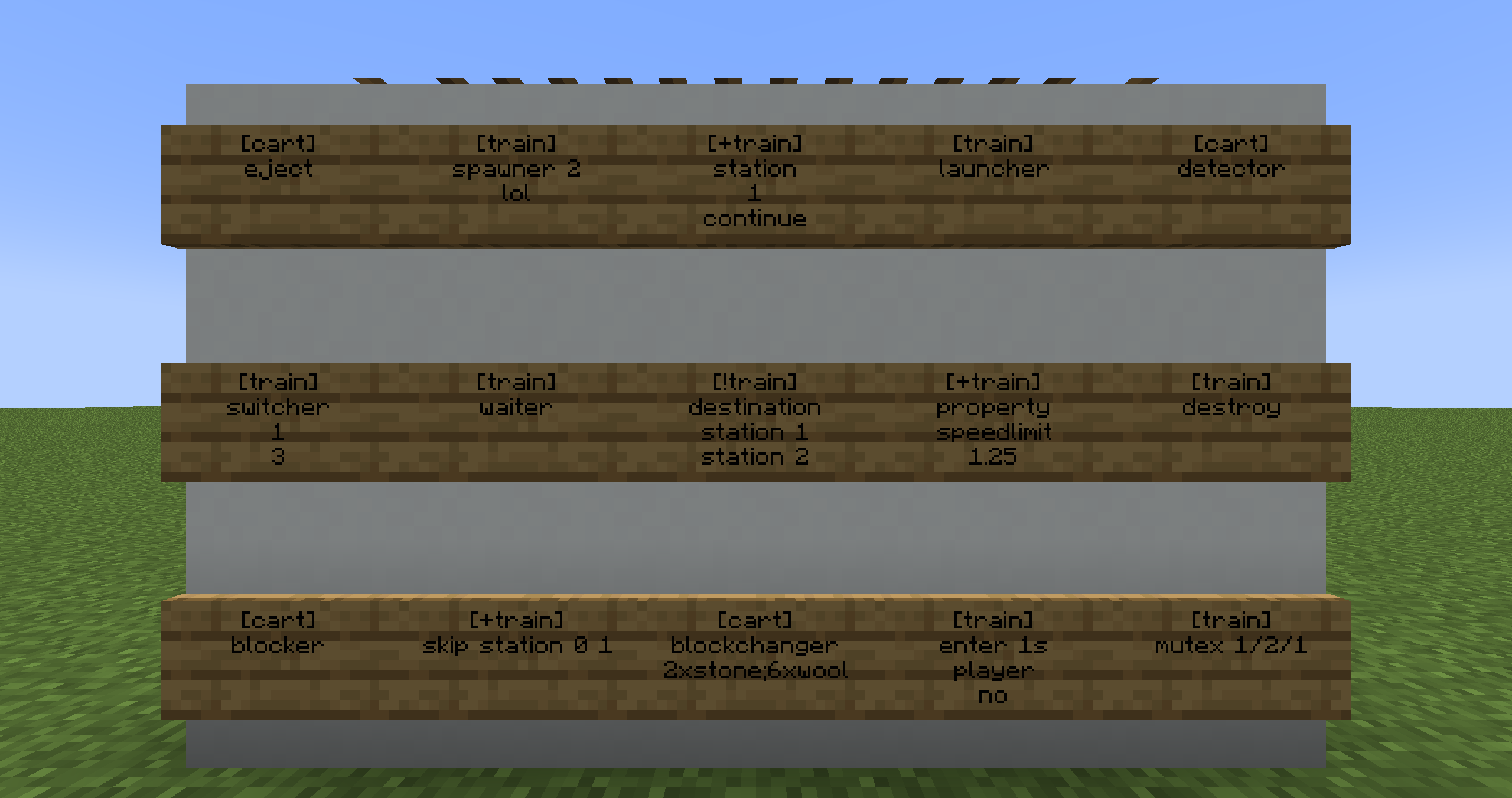
Path Finding
Make your train network come alive with trains that automatically travel to destinations all over your Minecraft world.
➦Wiki
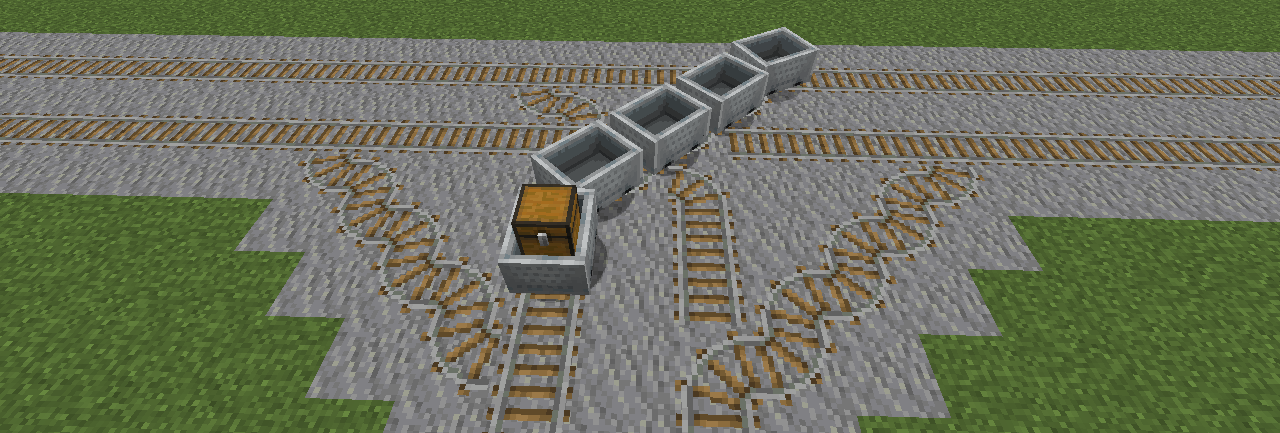
Commands
Everything that can be done with sign actions, and more, can also be done using commands.
➦Wiki
Selector Support
Use the @ptrain selector to use the player passengers of a train as an argument in other (non-TrainCarts) commands. Or use @train to perform actions on multiple trains at once. Trains can be selected by cuboid, distance, set properties and many more.
➦Wiki
Featured

This plugin uses the Cloud Command Framework for handling commands
If you're impressed by the quality of TrainCarts' command auto-completions, suggestions and help menu and want this in your plugin, check out Cloud by Incendo!
Addons
TrainCarts exposes an API that allows third parties to extend the plugin. Primarily it adds support for new rail types, new attachment types and custom action signs.
- TC-Hangrail: Trains floating below iron fences and also below/above other kinds of blocks (by TeamBergerhealer)
- TC-Coasters: Rails in the air without requiring actual rails blocks (by TeamBergerhealer)
- SmoothCoasters: Minecraft Client Fabric mod that, if installed, smoothens armor stand animations and improves the first-person camera view
- TCTicketShop: Use sign interaction to buy train tickets (by DefinitlyEvil)
- LightAPI: Powers the built-in Light attachment. (Use this fork for MC 1.17.1 and below)
- TCJukebox: Plays music for players inside the train using MCJukebox (by melerpe)
- TC-Portals: Teleport trains between servers in a realistic way (by J0schlZ)
- TC-Destinations: Cross-server train destination pagination and helpful clickable commands (by J0schlZ)
- TrainCartsDestinationSelector: Adds clickable signs so players can select train destinations
- Traincarts AdvancedSigns: Adds additional sign types, particularly useful for rollercoaster rides
- TCAnimatronics: Play Animatronics animations with a TrainCarts sign
FAQ
When some players ride a train, the train glitches out and the player's cart gets stuck in position
NoCheatPlus thinks the player is cheating, because the cart is moving in unintended ways. The cart is teleported back to a valid state causing these strange glitches. To fix this, set the following to false in the NoCheatPlus configuration:
checks:
  moving:
    vehicle:
        enforcelocation: false
I'm on Minecraft 1.16 and players can get out of my playerexit=false train by pressing shift
Sadly, the Minecraft client had a bug in it where the server could not cancel players exiting from vehicles. Updating to Minecraft 1.17+ will fix this again. See also: SPIGOT-5891
When players are near, trains reach their destinations. With no one near, they don't.
Enable the keep chunks loaded property of the train.
I created an auto-spawner but trains are piling up somewhere closeby
Enable the keep chunks loaded property of the train. Trains will otherwise unload in the same spot when no player is near.
When I exit a train, the train disappears
If you have CraftBook installed on the server, this plugin can actually do exactly that. Turn it off in the CraftBook Configuration.
Donate
If you really like my work and want to give something in return, feel free to donate something small to me over PayPal using the button down below. Thank you! :)

Ченджлог
2.0.0Релиз26.1.1, 26.1.2, 26.2 · 1 июля 2026 г.
- [+] Added support for Minecraft 26.1 + 26.2
- [+] Added support for BKCommonLib/TrainCarts 2.0.0 (parity)
- [+] Added commands to modify the displayed item or text of attachments
- [+] Added a forward-movement only attachment animation mode
- [ ! ] Fixed custom namespace models not listed in resource packs
- [ ! ] Fixed schematic attachment clipping mode not applied on spawn
- [ ! ] Fixed an error when an unknown attachment type was edited
- [ ! ] Fixed piston interaction not disabled when block collision was turned off
- [ ! ] Fixed support for multiverse-portals for train teleportation
- [ ! ] Fixed warnings about unloaded chunks when teleporting trains
- [ ! ] Fixed a bug with vertical rails (ladders) activating the wrong signs
1.21.11-v2Релиз1.21.9, 1.21.10, 1.21.11 · 17 января 2026 г.
Added train attachment animation import and export commands. You can use this with Silacide's interpolation tool to create smoother train animations: https://fantasiecraft.be/EXPOT/Interpolation-Tool-Lite/
1.21.11-v1Релиз1.21.9, 1.21.10, 1.21.11 · 25 декабря 2025 г.
- [+] Added support for Minecraft/BKCL 1.21.11
- [+] Added configuration option to disable vanilla minecraft sign handling for performance reasons
- [ ! ] Fixed the view locking modes of the seat attachment
- [ ! ] Fixed an issue on 1.8 - 1.10 where minecart sound was messed up due to a bukkit task scheduler bug
- [+] Added compatibility for a fix of allowing the rootvehicle nbt tag to work
- [+] Added a from-destination option to the reroute command
- [+] Added a seat selector for trains, to select players that are in particular named seats
- [+] Added ingame debug display where levers can be placed to be used with action signs
- [ ! ] Fixed an issue when third-party plugins register signs in onEnable instead of onLoad
1.21.10-v1Релиз1.21.8, 1.21.9, 1.21.10 · 15 октября 2025 г.
- [+] Added support for Minecraft 1.21.6 - 1.21.10 (bkcl api changes)
- [+] Added LOD (level of detail) support for track objects
- [+] Added light level option for display entity track objects
- [ ! ] Fixed track objects being deleted when splitting / joining tracks
- [ ! ] Fixed power channels being reset when editing a tcc-sign
- [ ˄ ] Improved the tcc-animate sign so it toggles levers down while its animation is being played
1.21.5-v1Релиз1.21.3, 1.21.4, 1.21.5 · 27 апреля 2025 г.
- [+] Added support for the new resource pack format for the model listing dialog
- [+] Added support for the experimental new minecart changes datapack feature
- [+] Added support for [+portal] with myworlds portal signs to teleport trains
- [+] Added per-cart configurable coupler length (cart spacing) to physical menu
- [ ! ] Fixed issue with broken fishing line particles on spigot 1.20
- [ ! ] Fixed an issue on spigot of trains not seeing signs
- [ ! ] Fixed middle-click placed signs with back text not being properly detected
- [ ! ] Fixed ticket edit command not accepting ticket names with spaces
1.21.1-v1Релиз1.20.6, 1.21, 1.21.1 · 21 сентября 2024 г.
- Improvements to Spawning trains:
- [+] Added new random selection pattern: 4[50%m 50%s]
- [+] Added new /savedtrain [name] spawn [pattern] to create saved and reusable spawn patterns
- [ ˄ ] Improved the train spawning chest to automatically connect with and extend existing nearby trains
- [ ˄ ] Improved path finding to take fixed enter-direction based routes into account
- [ ! ] Fixed a path finding bug that caused it to take longer than normal routes with tc-coasters track
- [+] Added support for skip signs skipping signs in the same vertical stack below a rail
- [+] Added an optional seat name argument for the train and cart enter commands
- [ ! ] Fixed a problem with the acceleration property sign also setting a wait delay
- [ ! ] Fixed an issue with the switcher not always toggling left and right due to disconnected track
- [ ! ] Fixed attachment editor collapsed state no longer persisting
- [+] Added option for the model search dialog to not compact folders automatically
- [ ! ] Fixed import commands not accepting urls without quotes
- [ ! ] Fixed certain train names not working as clickable items in train list command
- [+] Added option to turn off the glowing effect for the debug mutex command
- [ ! ] Fixed an error in the elytra seat mode
1.20.6-v1Релиз1.20.4, 1.20.5, 1.20.6 · 13 июня 2024 г.
- [+] Added support for Minecraft 1.20.5 and 1.20.6 (BKCL must be updated too)
- [ ∗] Changed train name property so it works as a default too
- [ ∗] Changed to cloud v2, supporting quoted arguments in more places
- [ ! ] Fixed pathing mutex sign not toggling the lever when trains are using it
- [+] Added a debug destination teleport command
1.20.4-v2Релиз1.20.2, 1.20.3, 1.20.4 · 24 апреля 2024 г.
- [ ˄ ] Improved persistence of trains, now also preserving current (launch) actions, activated signs, mutex states and more
- [ ˄ ] Improved seats so entities are actually positioned where the seats are server-sided, useful for @e effects
- [+] Added radius and simulation state to the keep chunks loaded feature, which can help performance tweaking
- [ ! ] Fixed sign post not activated when put on top of block assigned rail with tc-coasters, causing confusion
- [ ! ] Fixed a sound bug with the sequencer attachment and just-spawned carts
- [+] Added a max-destinations option for the debug stick to limit chat spam
- [+] Added support for more properties in the (sound) effect sequencer functions
- [+] Added color selection for the shulker box entity
- [+] Added support for use of * in the train name n@ statement
- [+] Added reload globalconfig command for the model store and tickets
- [ ! ] Fixed claims not set when creating a new model store configuration sometimes
- [ ! ] Fixed a bug that can occur with model attachments having an un-expandable root node
- [ ! ] Fixed an issue since 1.20 that players get teleported to the cart before entering a seat
Комментарии
Загружаем…