 Mineforgian
BuildPrint
Ghost your blueprints into the world. Buildprint loads any schematic or litematic, shows exactly what to place next, tracks the material list, and can build it for you — a modern, Axiom-inspired take on Litematica.
- Загрузки
- 590
- Подписчики
- 4
- Обновлён
- 24 августа 2026 г.
- Лицензия
- All-Rights-Reserved
Опубликован 3 июля 2026 г.
Buildprint
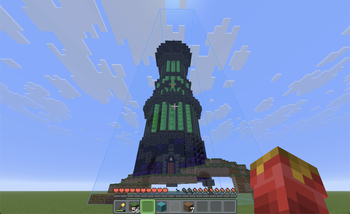
See your build before you place a single block.
Buildprint ghosts any schematic into your world, tells you exactly what's missing, and can place it for you — block by block, survival-legal. A modern take on Litematica and Schematica, inspired by Axiom.
Why builders use it
- A real preview, not coloured boxes. Actual block models and states — glass, leaves, water, signs with their text, chests, mobs, modded blocks.
- Huge builds stay smooth. GPU-cached meshes draw several big schematics at full render distance, and quietly scale back instead of freezing.
- A live shopping list. What's placed, what's left, what's wrong — updating as you build.
- Colour-coded progress. Green = right, amber = wrong rotation, red = wrong block, purple = something that shouldn't be there.
- Swap any material. Don't like the wood? Click it in the list and build it out of something else. The ghost, the checklist and easy place all follow — your file is never touched.
- Fair in survival. It won't flag a half-grown crop or a lit furnace as a mistake you have to fix.
Let it build for you
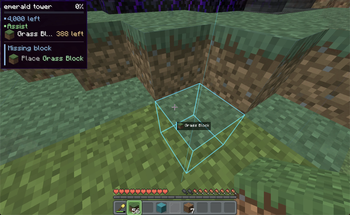
Turn on easy place and right-click near the ghost — the exact block goes down, facing the right way. Normal placement, so it works in survival and never breaks what you've already built.
Hold right-click to sweep across cells. Middle-click to pick a block into your hand.
Everything easy place gets right for you
- The fiddly stuff — repeater ticks, candle counts, double slabs, open doors, sign text.
- Your tools — shovel, hoe, axe, flint & steel, borrowed from your inventory as needed.
- Things you can't hold — tall grass gets bone-mealed, crops planted from seed onto tilled soil.
- Crafters — slot locks and contents, without a screen ever popping open.
- Nether portals — lit the moment the frame is finished.
- Your inventory — blocks swap into your hand, stacks refill mid-build.
- Your build — it places past chests, never litters, never re-edits a block that's already right.
Easy place is off by default — bind a key or flip it in settings.
Make your own
Press B for the selection editor. Built for survival, where you can't just fly:
- Freecam — the camera flies, your body stays safe where it is.
- Select — click two blocks for a box; Shift-click for more regions.
- Resize, move, rotate, flip — drag colour-coded gizmos, snapped to blocks.
- Auto align — one click drops a loaded build onto the matching spot in your world.
- Save — blocks, block entities and entities to a
.litematic, ghosted in place instantly.
Builds to start from
The Marketplace tab browses VoxelSprout schematics without leaving the game. Search, filter, open a listing for previews and block counts, then Download — or hit Place and have it ghosted into your world in one click. No account needed.
Browse the same catalogue on the web at voxelsprout.com → voxelsprout.com/marketplace.
Shortcuts
Rebind anything in Options → Controls, under the Buildprint heading.
| Key | Action |
|---|---|
| M | Open the Buildprint menu |
| N | Toggle easy place |
| B | Open the selection editor |
| . / , | Layer view up / down |
| unbound | Toggle printer mode |
| unbound | Cycle view filter — all / unbuilt / wrong / extra |
With easy place on
| Input | Action |
|---|---|
| Right-click | Place the block the schematic wants |
| Hold right-click | Sweep across cells |
| Middle-click | Pick that block into your hand |
In the selection editor — number keys or the scroll wheel pick a tool
| Key | Tool |
|---|---|
| 1 / 2 / 3 | Select · Resize · Save (make a blueprint) |
| 4 / 5 / 6 / 7 | Place · Move · Rotate · Auto align (position one) |
| [ / ] | Previous / next region |
| Delete | Delete the active region |
| H | Show or hide the controls card |
Opens anything
| Format | Extension | Import | Export |
|---|---|---|---|
| Litematica | .litematic |
✅ | ✅ |
| Sponge schematic | .schem |
✅ | Planned |
| Classic schematic | .schematic |
✅ | Planned |
| Vanilla structure | .nbt |
✅ | Planned |
| Axiom blueprint | .bp |
✅ | Planned |
Drop a file on the window, pick it from your files, or drop it in schematics/ — it shows up on its
own.
Already use Litematica?
On first launch Buildprint offers to import your placements and put your builds back where they were. Your files are left untouched.
Managing your builds
- Local — your
schematics/folder with folders, search, Recent and ★ Favourites, plus a spinnable 3D preview of whatever you select. - Loaded — everything you've placed: toggle, rename, move, rotate, flip, slice to a layer, all updating live.
- Remembered — per world and per server. Your builds are waiting where you left them.
Build it together
Start a sync session and share the code. Everyone who joins sees the same builds ghosted in the same place — same position, rotation and flip, in the right dimension — and watches the progress move as the others work.
- A code and a link. Join from the mod, or from the link in your browser.
- Live progress. Placed, missing, wrong, extra, and what's still to gather — per build, with who reported it.
- Nobody needs the file. Turn on file sharing and the schematic travels with the session — anyone who doesn't have it gets it automatically.
- Your call who can move things. Guests can be allowed to add and reposition builds, or just watch.
- Join whenever. The session lives on the server, not on the host's client — turn up while everyone's offline and you'll still see the plan. Drops reconnect on their own.
No account needed. Still client-side, too: it works on any server, with no plugin and nothing for the server owner to install.
Find your materials — with Sorted
Sorted is an optional companion. Install it and the material list gains a Chests column — how much of each material is sitting in the containers Sorted has indexed for this world — and a magnifier button on every row that lights those chests up through walls. While they're lit the ghost and every overlay step aside for 20 seconds, so you're looking for a glowing chest instead of hunting for one behind a translucent building.
Chest counts stay in their own column rather than being folded into what you're carrying — the index is what Sorted last saw, so on a server it's a memory, not a guarantee, and the list says so.
Without Sorted the column simply doesn't exist. Nothing else changes.
Requirements
- Minecraft 26.2+, Fabric Loader 0.16+
- Fabric API and YACL
- Mod Menu (optional) — to reach the settings screen in-game
- Sorted (optional) — chest locating and an In chests count in the material list
Client-side only. Works on any server you can join.
Ченджлог
0.1.3+26.xРелиз26.2 · 24 августа 2026 г.
- New logo. Buildprint has a proper icon now — it shows up in the mod list, in Mod Menu, and on the Modrinth page. Nothing else changed in this release.
0.1.2+26.xРелиз26.2 · 17 августа 2026 г.
Shaders
- The selection editor no longer crashes the game with a shader pack loaded, or with Voxy installed.
- Builds show up under a shader pack, and switching a pack on or off mid-session no longer leaves skewed geometry behind.
- Mistake marks show under a shader pack too.
- Not every pack works yet: Complementary and vanilla-style packs are fine, Photon doesn't draw the ghost.
- Big builds cost a little more performance while a pack is loaded.
Overlay
- The opacity slider now stops at 5%. Fading the status overlay to nothing just looked broken — turn it off instead.
0.1.1+26.xРелиз26.2 · 12 августа 2026 г.
Build it together
- Share a build with a code. Pick a build in Loaded and hit Build this together — it starts a session named after the build and shares it in one click. Everyone who joins with the code (or the link that wraps it) sees the same build ghosted in the same spot.
- A session is a group around one build, with its own code, and you can be in as many at once as you like — the people helping with spawn aren't the people on the farm. Shared builds are marked in the Loaded list, so you always know which ones other people are watching.
- Progress moves for everyone. Whoever is standing next to a build reports what's actually built, so the material list keeps making sense for people nowhere near it — instead of decaying into "everything is missing" the moment the chunks unload.
- The owner doesn't have to be online. Placements live on the backend, so joining an hour later still ghosts everything in place. The connection reconnects on its own after a blip and takes a fresh snapshot, so nothing is missed by being away.
- Nothing large moves. A shared build is matched by the hash of its file: if you already have the schematic, nothing is uploaded or downloaded. Hosting the file for people who don't is a visible toggle — with it off, nothing of your build ever leaves your machine.
- No account needed. Guests join under their Minecraft name; unverified names are marked with a
~so you can tell who's signed in. No plugin, no server owner involved. - The build's position is locked to the session while it's shared — one person nudging it a block can't quietly ruin everyone else's alignment. How you look at it (visibility, layers, slices) stays entirely yours.
- Builds only ghost where they belong. A build shared on one server no longer follows you to another; changing world, dimension or dropping into single player loads and unloads to match.
- Sharing takes a picture of the build, so a pasted invite link unfurls to what you're building.
- When something goes wrong — a session that won't start, a code that doesn't resolve, a session its owner ended — it says so, instead of the button appearing to do nothing.
Marketplace accounts
- Sign in to VoxelSprout from the Marketplace tab — the account button in the bottom-left. A couple of clicks in your browser and you're in; no password is ever typed in Minecraft. Signing in lets you vote and manage your own listings.
- Sign out from the same place, or from Account settings on voxelsprout.com.
- Browsing and downloading still need no account at all.
Materials
- The material list has been rebuilt. A search box; materials grouped under to gather, done
and extras; every row carrying its own progress behind the text; and columns that say what they
are — Placed (
128 / 512) and Held, which now counts what's inside the shulker boxes in your bag and shows that part in brackets. Each row has a hairline progress bar along its bottom, and hovering one shows the full breakdown —279 (4 × 64 + 23), placed, left, held, in chests. - Progress no longer takes a panel of its own — the counts, bar and percentage sit on the title line.
- Swap blocks. Each row has a swap button — build that material out of any other block in the game, or out of nothing at all. The ghost, print assist and the checklist all follow the swap.
- Once swapped, the row shows the block it came from and its swap button becomes a revert arrow; Undo N swaps in the bottom bar clears the lot.
- Swaps live on the placement, not the file, and survive a relog.
Sorted integration
- With Sorted installed, the material list gains an In chests column — how much of each material is in the chests Sorted has indexed — and a magnifier button on each row that lights those chests up through walls.
- While they're lit, the ghost and every overlay get out of the way for 20 seconds — including the wrong-block, wrong-state and extra markers — so you're looking for a glowing chest instead of hunting for one behind a translucent building.
- Chest counts are kept separate from what you're carrying on purpose: on a server they're what Sorted last saw, so the list says so rather than quietly folding them into a number you can trust.
Mistake overlay
- The overlay has an opacity slider. It used to be all-or-nothing — full-strength tint or outlines, or off — which on a build with a lot of mistakes is a wall of colour you have to switch off to see past. Now it can sit at a hint. It scales the tint and the outlines alike.
- The outline border width slider actually works. It moved and nothing happened; the borders now follow it, and keep their thickness relative to the block rather than to the screen.
Menus
- Opening and closing menus no longer flickers.
- The settings gear has moved to the top-right corner, where it stays put whichever tab is open — and it's drawn big enough to read as a gear.
Editor
- Saving a selection just saves it. It used to drop the result in as a ghost straight away, so you had to delete the thing you'd only just saved. Now the file is written, the selection is cleared, and you load it from the browser when you actually want to build it.
- The toolbar is split by job — Create and Place — instead of one flat row.
- New rotate gizmo; flip replaces mirror.
- Auto align lines a build up with the world in one click — and now finds pixel art, murals and small builds too, not just big ones. It searches a wide area whatever the build's size, anchors on natural blocks when that's all the palette has (sand, snow, deepslate — the pixel-art staples), and no longer lets a mirrored guess crowd the right one out before it's checked. A build one block thin is reported the plain way round instead of as an equivalent rotate-and-flip.
- When several spots match — a repeated motif, a row of identical panels — it now takes the one nearest you or nearest where the build already is, rather than whichever copy scored a shade higher on the other side of the valley.
- Copies that are already finished are skipped. Putting up a second panel next to the first no longer snaps you onto the first; align goes to the copy with something left to build.
- Leaner Loaded panel; the Visibility tool is gone, since the view filters cover it.
Print assist
- Crafters keep their slot layout and contents.
- Nether portals light themselves once the frame is done.
- Containers open while printing and while you're inside a build.
Notes
- YACL is now a required dependency instead of a suggestion, so launchers install it for you.
Комментарии
Загружаем…