 Mineforgian
Sorted
Smart inventory sorting with zone-aware layout, persistent chest memory, and quick stack to nearby containers. Fully client-side, vanilla UI that follows resource packs.
- Загрузки
- 4K
- Подписчики
- 17
- Обновлён
- 24 августа 2026 г.
- Лицензия
- All-Rights-Reserved
Опубликован 31 мая 2026 г.
Sorted
Client-side inventory sorting with chest memory and quick stack.
Fabric · Client-only · 1.21.x · 26.x
Your inventory gets messy. You open chests looking for things you put somewhere. You manually move stacks around you already have in a nearby barrel.
Sorted handles all of that. It sorts your inventory with a real layout in mind, remembers what's in every chest you've opened, and lets you push/pull items across nearby containers in one button press.
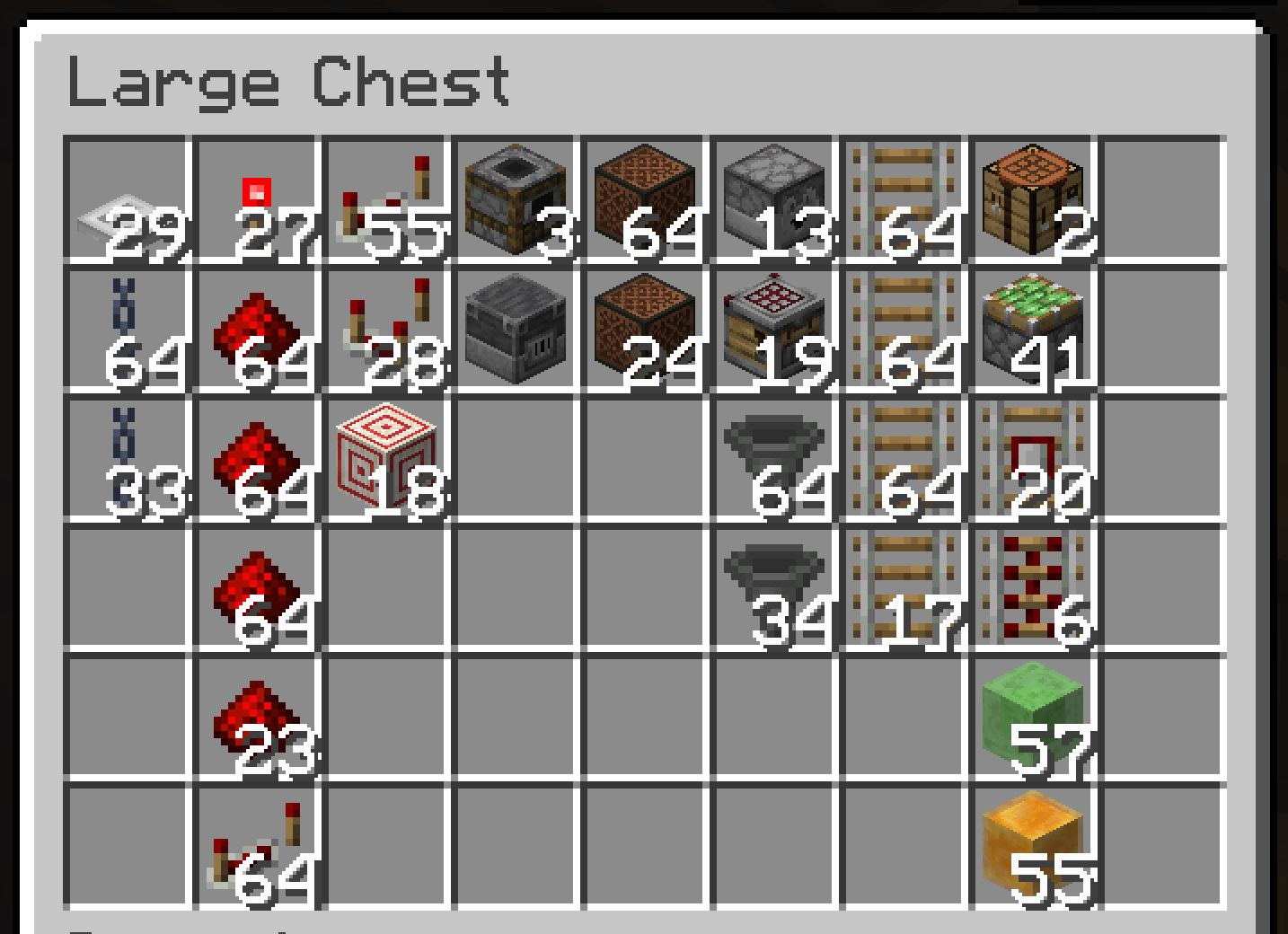
- Auto-sort on pickup — items land in the right place the moment you pick them up
- Zone layout — gear and tools first, then food, then building blocks, then everything else — same order every time
- Hotbar stays put — sorting only rearranges your main inventory; your hotbar gear is never touched
- Sort buttons — sort your inventory or any open chest with one click
- Quick Stack — deposit matching items into nearby containers in one keybind (Terraria players, this one's for you)
- Quick Empty / Fill / Pull — dump your bags, top up partial stacks, or pull a whole chest to your inventory
- Chest knowledge — remembers what's in every chest you've opened, persists across restarts
- Container search — find any item across all cached containers near you, with count and position
- Find it in the world — click a result and the chest holding it lights up, visible through walls
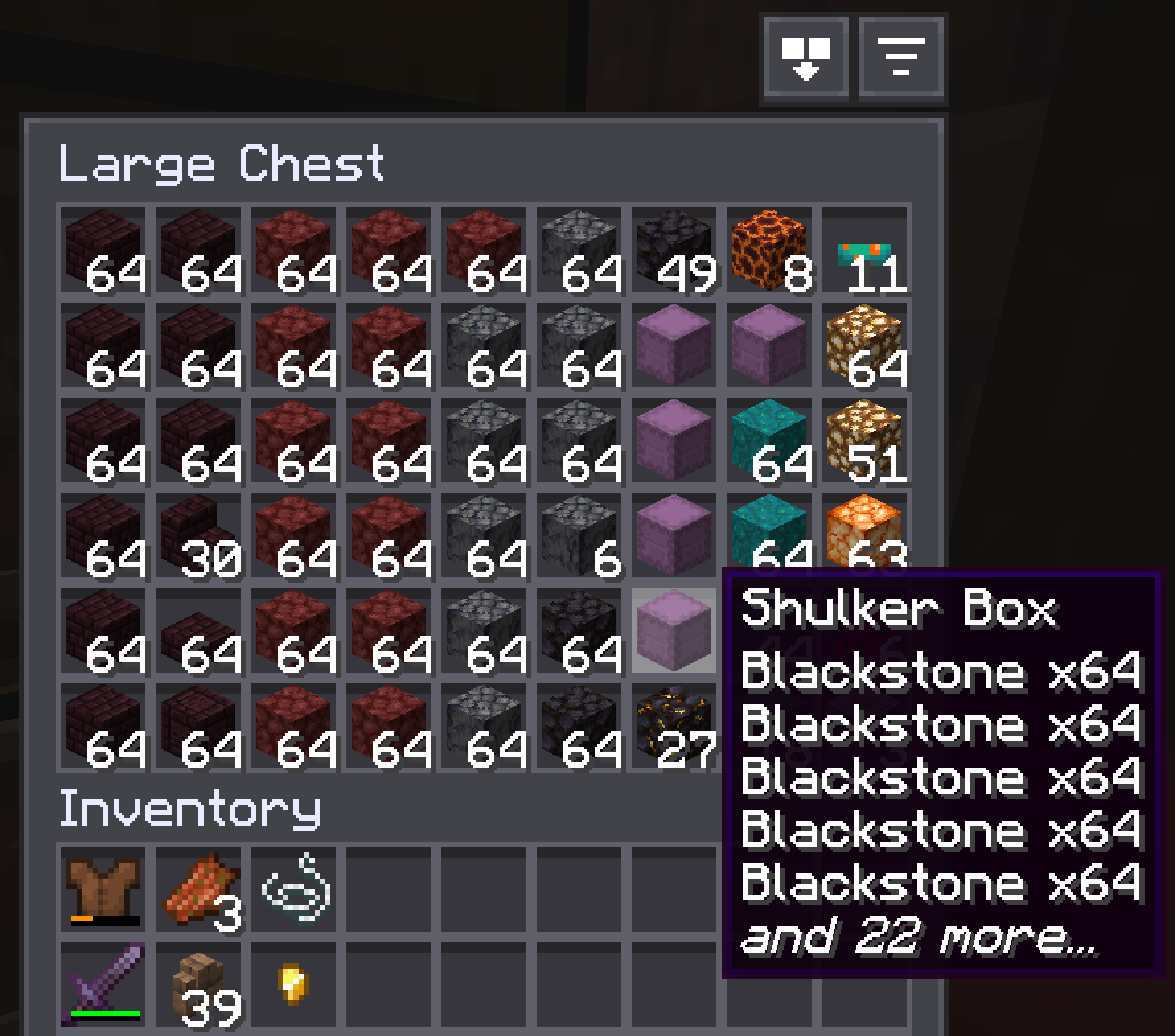
- Container labels — nearby chests, barrels, and shulker boxes show their contents (and custom name) floating right on top — see inside without opening
- Vanilla button frames — buttons sit in vanilla widget frames, so any resource pack that restyles buttons restyles these too
- Server-friendly — a built-in block list that disables the mod entirely on servers that ban automation, plus an adaptive throttle that lowers its action rate per server if a kick lands mid-sort
- Client-only — no server mod needed; works on vanilla servers, Realms, and most modpacks
Chest knowledge
Open a chest once and Sorted records its contents — persistently, in a local database per world/server. That data survives restarts. When you want to find something, open the container search screen and type the item name. It shows you every container that has it, with count, position, and dimension.
The cache invalidates itself. Broken container? Entry dropped. Chunk loads? It re-checks. Data reflects the last time you opened each container — it updates the moment you open one again.
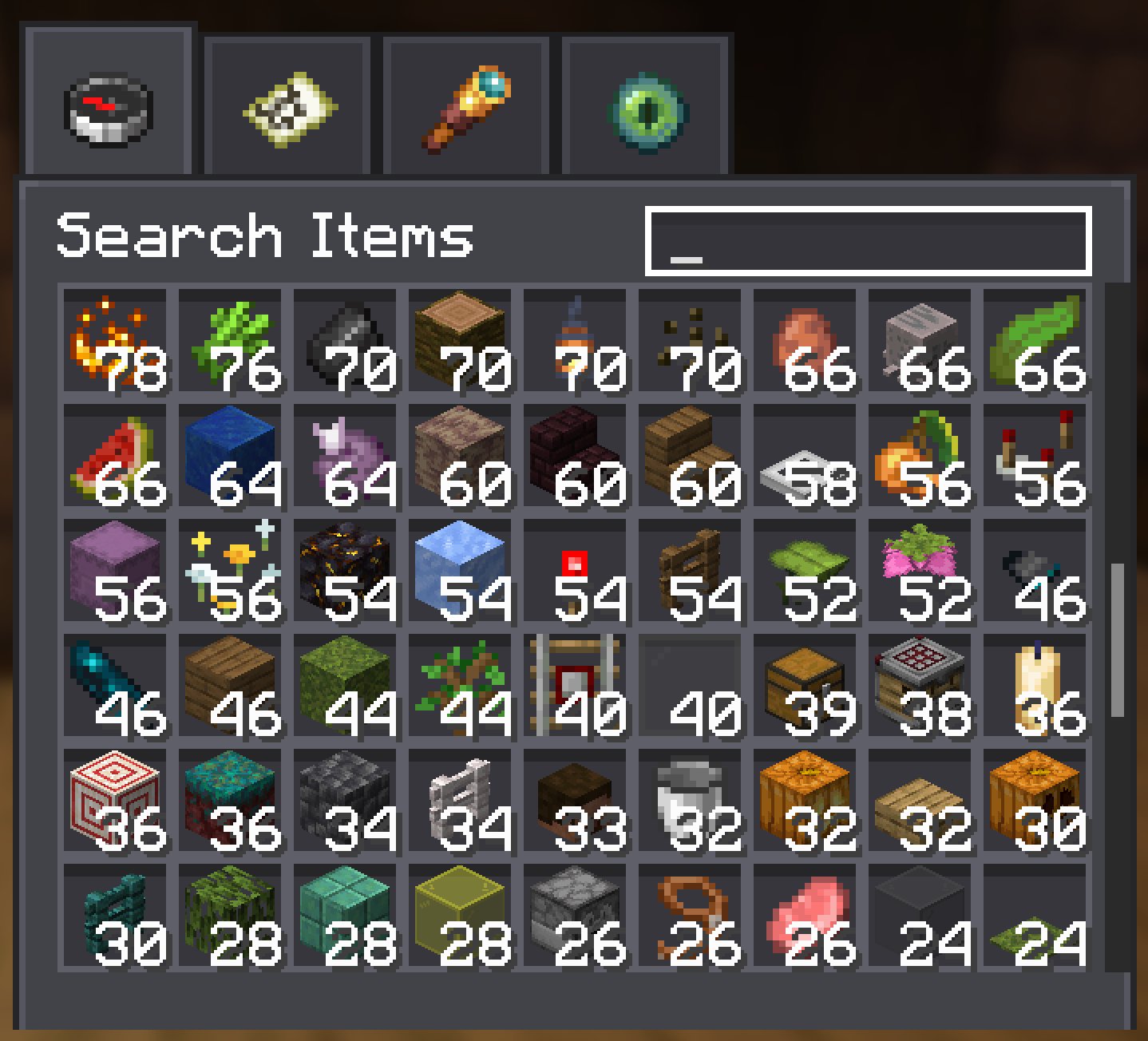
Click a search result and Sorted highlights the chest in the world — even through walls — so you walk straight to it.
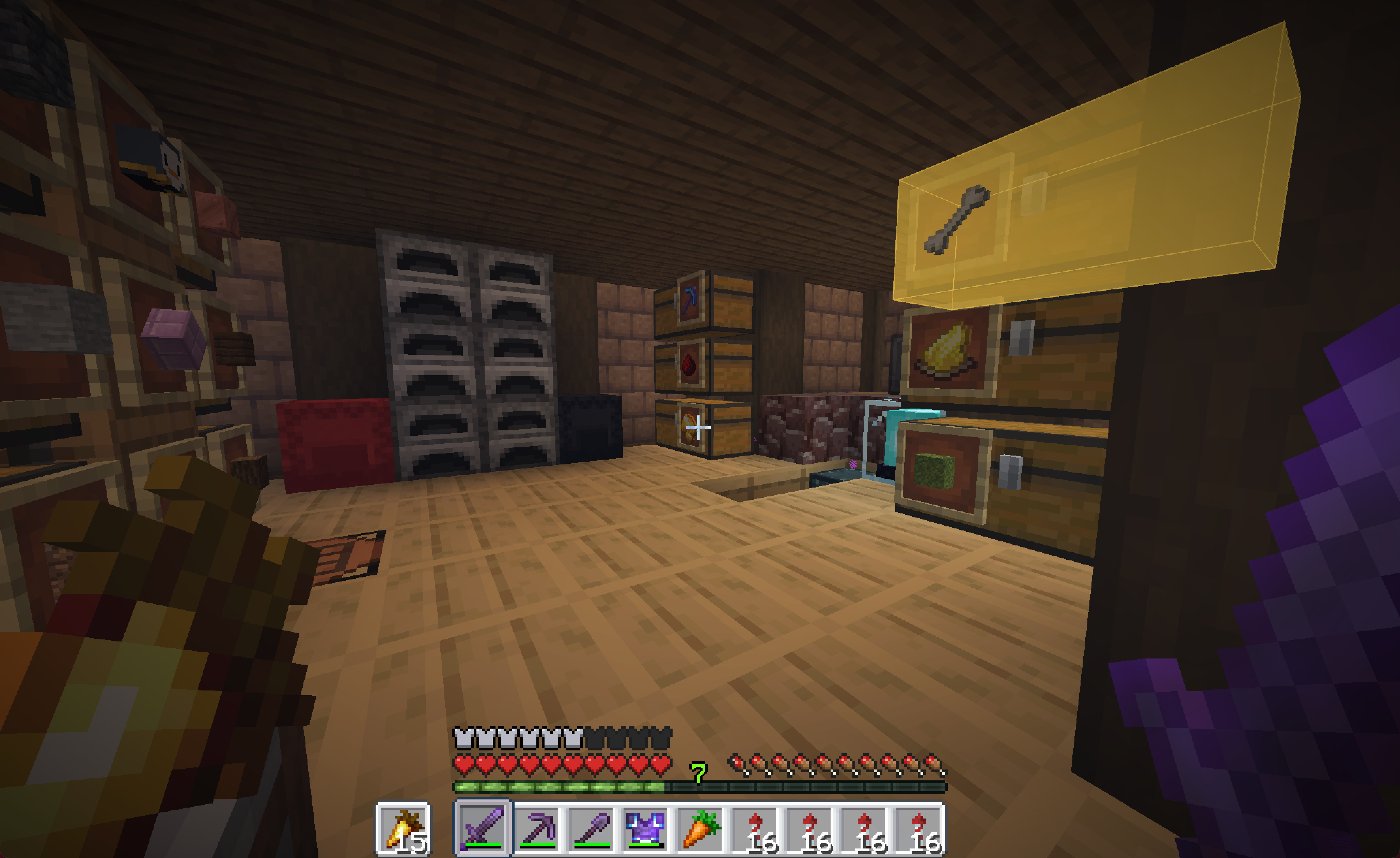
See inside without opening
Glance at a shulker box, barrel, or chest and its contents sit right on the lid — a small grid of the items inside, plus the container's custom name if you've renamed one. No opening, no hovering, no menus.
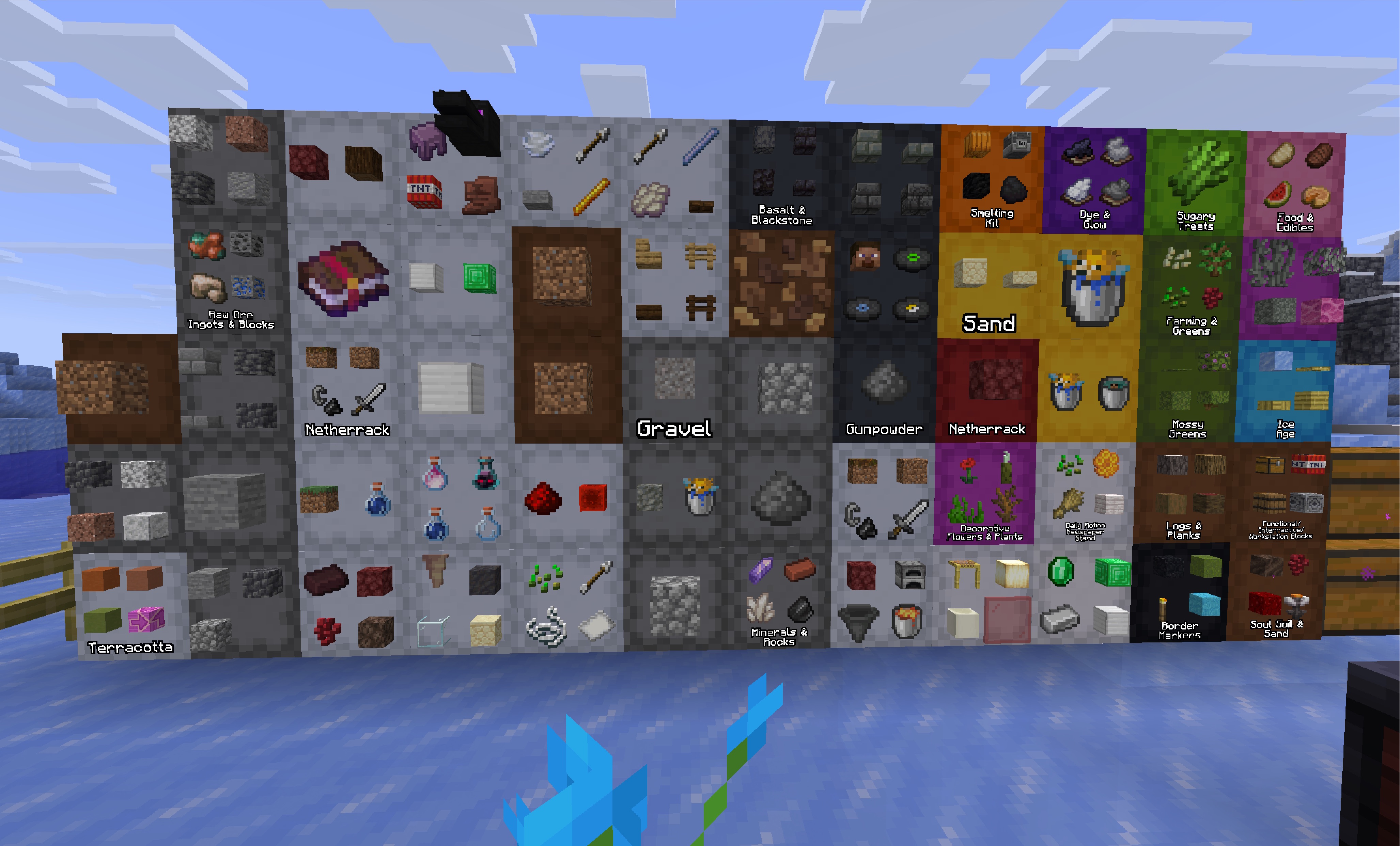
The label lies flat on the face the lid opens from, so it reads right whether a shulker sits on the floor, hangs from the ceiling, or is stuck to a wall — and on top/bottom lids it turns to face you. You choose what shows — just the items, just the name, both, or the name only when a container is empty — plus how many items, how far away labels appear, and which container types get them (shulker boxes on by default; chests and barrels opt-in).
In singleplayer the contents are read live. On servers they come from what Sorted has already recorded, so a container fills in the first time you open it (or let auto-scan read it for you).
Sorting with a real layout
Not alphabetical. Not random. There's a consistent layout, applied top-to-bottom across your main inventory:
- Weapons, tools, and armor sort to the top
- Food and consumables come next
- Building blocks fill the middle, grouped by material and dimension
- Everything else lands at the bottom
Your hotbar is left alone — sorting only rearranges the main inventory, so your active gear and quick-slots stay exactly where you put them. Pick something up — it sorts itself in. Open a chest — sort button's right there. Same rules everywhere.
Shulker boxes get sorted too — each one slots in next to its primary item, so a box of redstone lands with your redstone.
Quick Stack
One keybind. Every item in your inventory that already has a matching stack in a nearby container gets deposited there. If you've played Terraria you know exactly what this button does. Quick Empty, Quick Fill, and Pull All round out the set — dump your bags, top up partial stacks, or pull a chest into your inventory.
UI that belongs in the game
Every button — sort, quick stack, quick empty, quick fill, search — appears directly inside inventory and container screens. Each one sits in a vanilla button frame (the same widget/button sprite the game uses everywhere), so any resource pack that restyles buttons restyles these automatically. The icons on top are simple white glyphs in the mod's own sprite atlas, so resource packs can override those too if they want to.
Safe on servers
Sorts and transfers run as a queue of slot-clicks rather than all in one burst — by default ~80 actions/sec.
If a server kicks you while a sort or transfer is running, Sorted takes the hint: it steps that server's action rate down a notch (80 → 40 → 20 → 10 → 5 per second) and remembers it, so next time it starts slower and keeps adjusting until the kicks stop. Only server-initiated disconnects that land mid-sort count — a normal "Disconnect", an AFK kick, or a ban won't drag your rate down. Learned rates are per-server, persist across sessions, shown on rejoin, and resettable in the config. You can also pin a manual rate yourself if you'd rather not rely on the learning.
Some servers prohibit inventory automation outright. Sorted ships with a built-in block list covering servers where it fully disables itself on connect — no buttons, no keybinds, no cache updates, nothing. Same as not having the mod installed, just on those specific servers.
Installation
- Fabric
- Fabric API
- YACL
- ModMenu (optional — adds a config button to the mods list)
Client-side only. No server component. Works on vanilla servers, Realms, and modpacks.
Click a search result and Sorted highlights the chest in the world — even through walls — so you walk straight to it.
Sorting with a real layout
Not alphabetical. Not random. There's a consistent layout, applied top-to-bottom across your main inventory:
- Weapons, tools, and armor sort to the top
- Food and consumables come next
- Building blocks fill the middle, grouped by material and dimension
- Everything else lands at the bottom
Your hotbar is left alone — sorting only rearranges the main inventory, so your active gear and quick-slots stay exactly where you put them. Pick something up — it sorts itself in. Open a chest — sort button's right there. Same rules everywhere.
Shulker boxes get sorted too — each one slots in next to its primary item, so a box of redstone lands with your redstone.
Quick Stack
One keybind. Every item in your inventory that already has a matching stack in a nearby container gets deposited there. If you've played Terraria you know exactly what this button does. Quick Empty, Quick Fill, and Pull All round out the set — dump your bags, top up partial stacks, or pull a chest into your inventory.
UI that belongs in the game
Every button — sort, quick stack, quick empty, quick fill, search — appears directly inside inventory and container screens. Each one sits in a vanilla button frame (the same widget/button sprite the game uses everywhere), so any resource pack that restyles buttons restyles these automatically. The icons on top are simple white glyphs in the mod's own sprite atlas, so resource packs can override those too if they want to.
Safe on servers
Sorts and transfers run as a queue of slot-clicks rather than all in one burst — by default ~80 actions/sec.
If a server kicks you while a sort or transfer is running, Sorted takes the hint: it steps that server's action rate down a notch (80 → 40 → 20 → 10 → 5 per second) and remembers it, so next time it starts slower and keeps adjusting until the kicks stop. Only server-initiated disconnects that land mid-sort count — a normal "Disconnect", an AFK kick, or a ban won't drag your rate down. Learned rates are per-server, persist across sessions, shown on rejoin, and resettable in the config. You can also pin a manual rate yourself if you'd rather not rely on the learning.
Some servers prohibit inventory automation outright. Sorted ships with a built-in block list covering servers where it fully disables itself on connect — no buttons, no keybinds, no cache updates, nothing. Same as not having the mod installed, just on those specific servers.
Installation
- Fabric
- Fabric API
- YACL
- ModMenu (optional — adds a config button to the mods list)
Client-side only. No server component. Works on vanilla servers, Realms, and modpacks.
Ченджлог
0.1.12Релиз26.1.2 · 24 августа 2026 г.
Changed
- New mod icon. Sorted now carries a chest logo in the mod list and on Modrinth, replacing the old placeholder. Cosmetic only. All versions.
Fixed
- A container's cached contents can no longer be attributed to the wrong chest. Sorted remembers the container you are looking at so it knows which one a screen belongs to when it opens. That memory was only updated while you looked at a chest, barrel or shulker box and only cleared by an ender chest — look at anything else and it kept pointing at the last chest you saw. A screen opened after that, most likely a server's own chest-shaped menu, had its contents recorded against that chest, which then showed items it never held in search and on its label. The remembered container is now dropped as soon as you look away from one, and checked again — still a container, still in reach — at the moment a screen opens. All versions.
0.1.12Релиз26.1.1, 26.1.2, 26.2 · 24 августа 2026 г.
Changed
- New mod icon. Sorted now carries a chest logo in the mod list and on Modrinth, replacing the old placeholder. Cosmetic only. All versions.
Fixed
- A container's cached contents can no longer be attributed to the wrong chest. Sorted remembers the container you are looking at so it knows which one a screen belongs to when it opens. That memory was only updated while you looked at a chest, barrel or shulker box and only cleared by an ender chest — look at anything else and it kept pointing at the last chest you saw. A screen opened after that, most likely a server's own chest-shaped menu, had its contents recorded against that chest, which then showed items it never held in search and on its label. The remembered container is now dropped as soon as you look away from one, and checked again — still a container, still in reach — at the moment a screen opens. All versions.
0.1.12Релиз1.21.10, 1.21.11 · 24 августа 2026 г.
Changed
- New mod icon. Sorted now carries a chest logo in the mod list and on Modrinth, replacing the old placeholder. Cosmetic only. All versions.
Fixed
- A container's cached contents can no longer be attributed to the wrong chest. Sorted remembers the container you are looking at so it knows which one a screen belongs to when it opens. That memory was only updated while you looked at a chest, barrel or shulker box and only cleared by an ender chest — look at anything else and it kept pointing at the last chest you saw. A screen opened after that, most likely a server's own chest-shaped menu, had its contents recorded against that chest, which then showed items it never held in search and on its label. The remembered container is now dropped as soon as you look away from one, and checked again — still a container, still in reach — at the moment a screen opens. All versions.
0.1.12Релиз1.21, 1.21.1 · 24 августа 2026 г.
Changed
- New mod icon. Sorted now carries a chest logo in the mod list and on Modrinth, replacing the old placeholder. Cosmetic only. All versions.
Fixed
- A container's cached contents can no longer be attributed to the wrong chest. Sorted remembers the container you are looking at so it knows which one a screen belongs to when it opens. That memory was only updated while you looked at a chest, barrel or shulker box and only cleared by an ender chest — look at anything else and it kept pointing at the last chest you saw. A screen opened after that, most likely a server's own chest-shaped menu, had its contents recorded against that chest, which then showed items it never held in search and on its label. The remembered container is now dropped as soon as you look away from one, and checked again — still a container, still in reach — at the moment a screen opens. All versions.
0.1.12Релиз1.21.1, 1.21.2, 1.21.3 · 24 августа 2026 г.
Changed
- New mod icon. Sorted now carries a chest logo in the mod list and on Modrinth, replacing the old placeholder. Cosmetic only. All versions.
Fixed
- A container's cached contents can no longer be attributed to the wrong chest. Sorted remembers the container you are looking at so it knows which one a screen belongs to when it opens. That memory was only updated while you looked at a chest, barrel or shulker box and only cleared by an ender chest — look at anything else and it kept pointing at the last chest you saw. A screen opened after that, most likely a server's own chest-shaped menu, had its contents recorded against that chest, which then showed items it never held in search and on its label. The remembered container is now dropped as soon as you look away from one, and checked again — still a container, still in reach — at the moment a screen opens. All versions.
0.1.11Релиз26.1.2 · 12 августа 2026 г.
Fixed
- Ender chests no longer turn up in container search. An ender chest holds the same items wherever you stand in front of it, but a nearby Quick Stack recorded it like any other chest — so every ender chest you used became its own entry and one stash got counted once per chest in a search total. They're still perfectly good transfer targets; they're just no longer indexed by position. All versions.
- Turning the container cache off no longer loses cached containers. The chunk sweep that drops entries for chests that have been broken kept running with the cache switched off, and what it dropped was written to the file when you logged out. Switching the cache off now leaves it exactly as it was. All versions.
Changed
- Joining a world with a large cache is faster. Checking a chunk's containers used to search the whole cache once per chunk, so the cost grew with both the size of your cache and the number of chunks loading — worst at the moment you join. Containers are now looked up by chunk directly. No visible change beyond the speed. All versions.
0.1.11Релиз26.1.1, 26.1.2, 26.2 · 12 августа 2026 г.
Fixed
- Ender chests no longer turn up in container search. An ender chest holds the same items wherever you stand in front of it, but a nearby Quick Stack recorded it like any other chest — so every ender chest you used became its own entry and one stash got counted once per chest in a search total. They're still perfectly good transfer targets; they're just no longer indexed by position. All versions.
- Turning the container cache off no longer loses cached containers. The chunk sweep that drops entries for chests that have been broken kept running with the cache switched off, and what it dropped was written to the file when you logged out. Switching the cache off now leaves it exactly as it was. All versions.
Changed
- Joining a world with a large cache is faster. Checking a chunk's containers used to search the whole cache once per chunk, so the cost grew with both the size of your cache and the number of chunks loading — worst at the moment you join. Containers are now looked up by chunk directly. No visible change beyond the speed. All versions.
0.1.11Релиз1.21.10, 1.21.11 · 12 августа 2026 г.
Fixed
- Ender chests no longer turn up in container search. An ender chest holds the same items wherever you stand in front of it, but a nearby Quick Stack recorded it like any other chest — so every ender chest you used became its own entry and one stash got counted once per chest in a search total. They're still perfectly good transfer targets; they're just no longer indexed by position. All versions.
- Turning the container cache off no longer loses cached containers. The chunk sweep that drops entries for chests that have been broken kept running with the cache switched off, and what it dropped was written to the file when you logged out. Switching the cache off now leaves it exactly as it was. All versions.
Changed
- Joining a world with a large cache is faster. Checking a chunk's containers used to search the whole cache once per chunk, so the cost grew with both the size of your cache and the number of chunks loading — worst at the moment you join. Containers are now looked up by chunk directly. No visible change beyond the speed. All versions.
Комментарии
Загружаем…