 Mineforgian
BBS FS
BBS mod's faithful successor (fork)
- Загрузки
- 41K
- Подписчики
- 85
- Обновлён
- 25 июля 2026 г.
- Лицензия
- MIT
Опубликован 24 февраля 2026 г.
BBS FS
BBS FS (Faithful Succesor) is a fork (modified version) of an open-source, and discountinued, Minecraft mod called BBS mod, for creating animations within Minecraft. Just as BBS mod, it's made to work with Fabric 1.20.1, 1.20.4 and 1.21.1 (it can work on Forge 1.20.1 or NeoForge 1.21.1 with Sinytra Connector and Forgefied Fabric API).
The distinction between BBS FS, and other forks, is that it has a narrow focus of improving the process and experience of creating animation. BBS FS completely overhauled the film editor, making it more powerful, and also added new systems, expanding the animation capabilities even further!
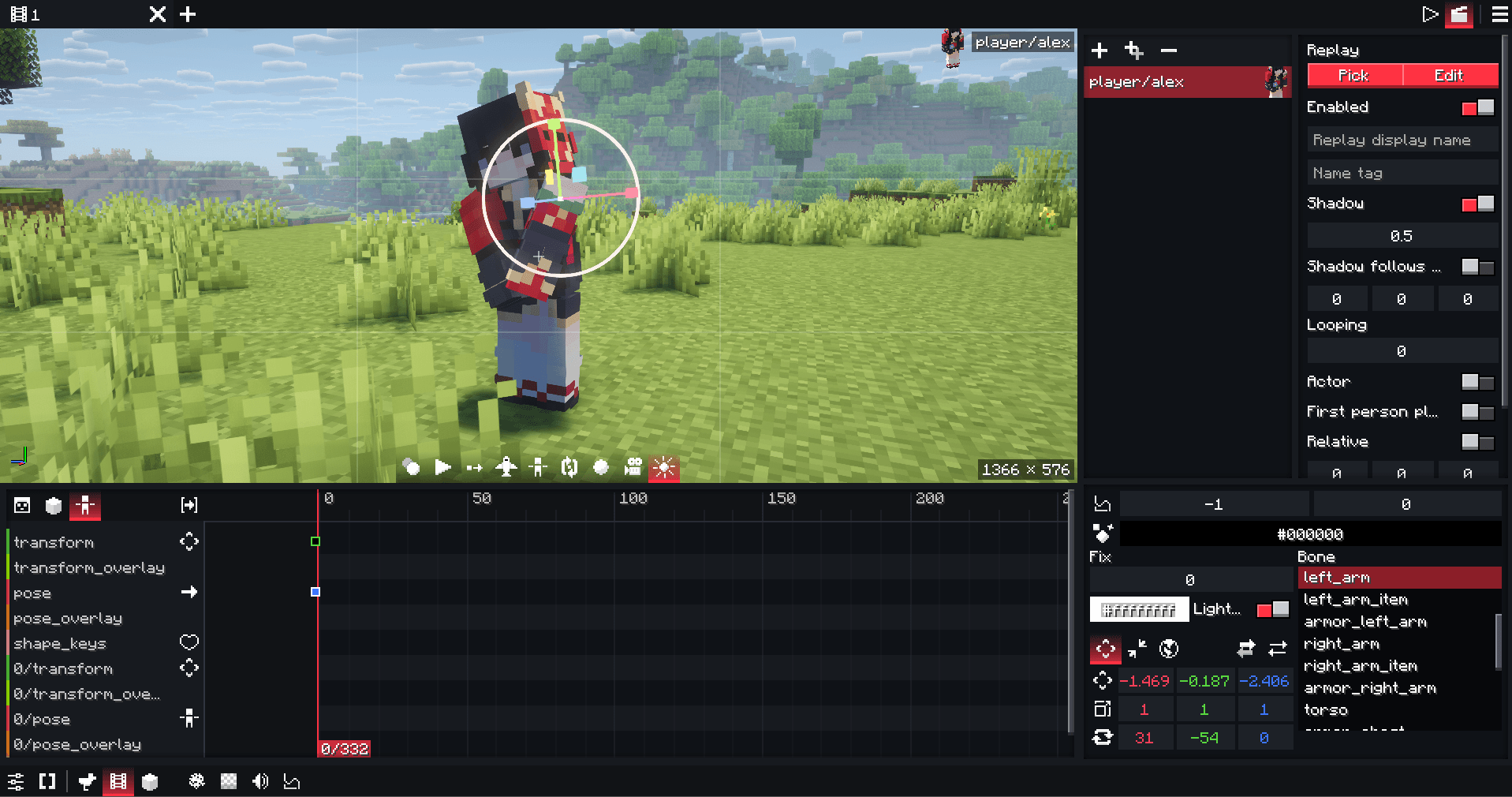
Features
BBS FS offers following features:
- Per-limb animations.
- Redesign of the entire BBS mod
- Layout system
- UX tweaks that focus on creating animations.
- Better gizmos
- Inverse Kinematics system
- Physics implementation
- New texture editor
- And more to come in the future!
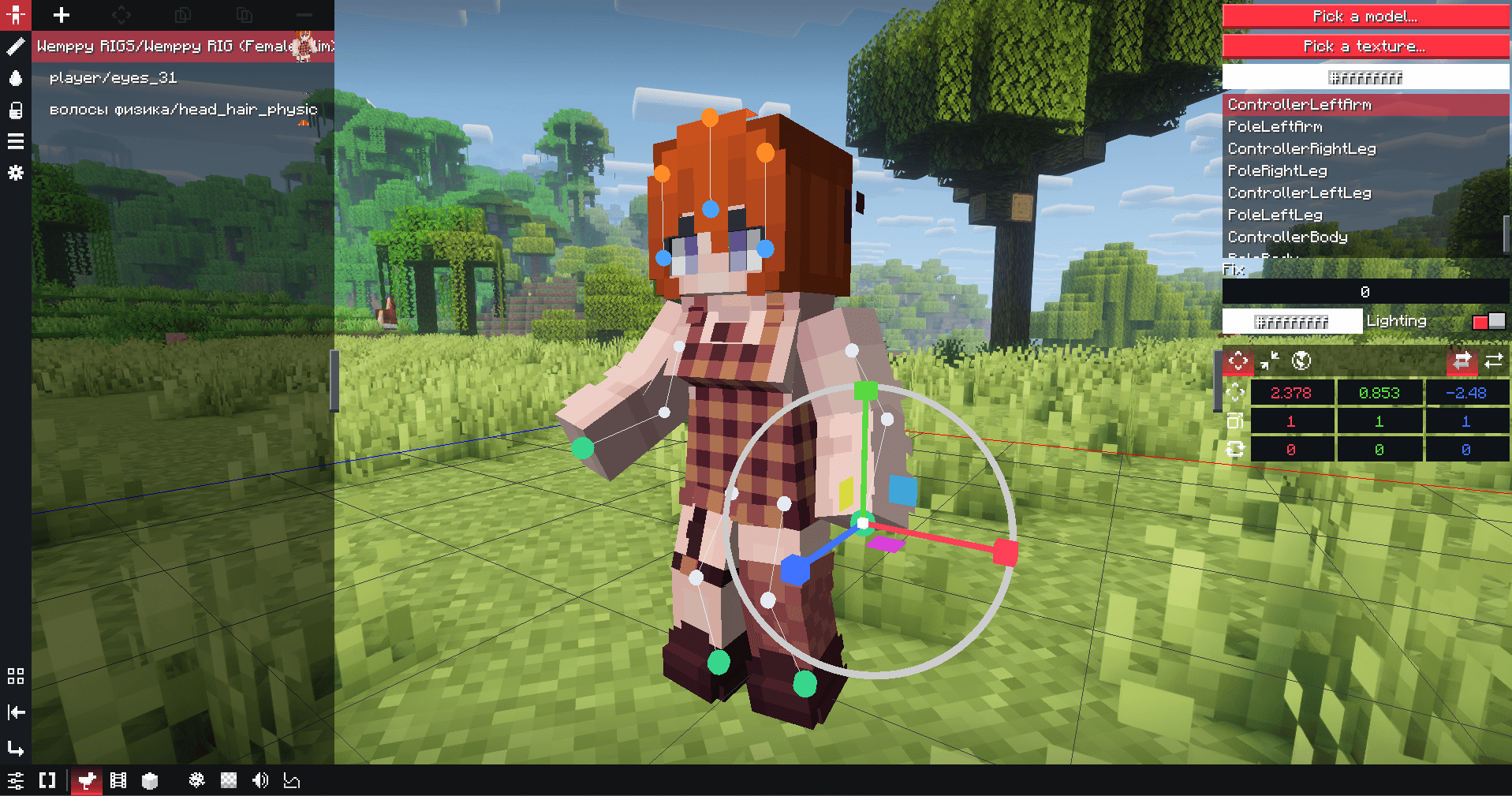
What BBS FS doesn't offer is a swiss-army knife solution for content creation. The main focus is specifically enhancing the animation experience. While this could have a net positive effect for those who use it for 1st person RPs, or machinimas, it's created for animation first!
Tutorial
As long as you know how to use BBS mod, you're fine! If you don't, see the Ultimate BBS mod Guide. Otherwise:
Ченджлог
2.4-1.20.4Релиз1.20.4 · 25 июля 2026 г.
🧩 Model editor
A brand new model editor — you can now edit the model's config right in the UI.
- Added a weld system for model bones
- Added undo/redo (
Ctrl + Z,Ctrl + Y)
✌️ Pose
- The bone list in the form editor is now taller
- Fixed bone search in the pose — the search field is now available everywhere
- Added multi-bone selection with
Ctrl + Click - Brought back the mirror editing and alternative invert icons
- The bone list now stretches to fill the available height
- Fixed
Ctrl + Zbugs while editing a pose (and elsewhere)
🎬 Movie editor
- Added a motion path system (press
Mto toggle) - Added motion path snapping (
Shift + M) - Added presets for the replay list
- Added a "Teleport to player" action (right click the replay icon in the preview)
- Added the
Shift + ~shortcut to switch to the action editor - Added an "All tracks" mode to track categories
- Enlarged the command input field in the action clip
⏱ Timeline and clips
- Brought back the trackpads for changing a clip's duration, layer and tick
- Added clip layer changing with
Alt + ↑/Alt + ↓ - Added envelope value editing with
Shift + drag on the clip's edges - Added interpolation support when drawing envelopes
- Added a hover outline for clips
- Added an option for the default interpolation of manually created keyframes
- Fixed snapping in the clip editor
🎯 Gizmo and transforms
- Redesigned the gizmo
- Added a value readout next to the gizmo while dragging
- Gizmo rings are now hidden behind the sphere
- Added a gizmo opacity option
- Added a "Handle hover tolerance" option
- Brought back the "Local transform by default" option
🦴 Physics and IK
- Added a wind system for bone physics
- Added a "Local direction" option for wind
- Added IK chain stretching towards the controller
- Added customization for the physics and IK debug overlay
- Fixed a bug with a straightened IK chain
- Fixed a bug with constraints and physics
- Fixed twitching of physics body parts attached to a form with a scale other than 1.0
🎥 Capture and export
- Added an option to export vanilla Minecraft sounds in a movie
- Video exported in the world with
F6now includes audio as well - Added an option to customize the output file name format
- Fixed the "Change window resolution when rendering" option
- Fixed various
F6bugs
🖥 Interface
- The UI scale is now a float value
- The UI scale can be changed with
Ctrl + =andCtrl + - - Added a section system to the UI
- Labels and their elements are now placed on a single row
- Added a "Model preview in lists" option that disables 3D model previews
- Texture editor tabs now lead straight to the texture manager instead of the editor
- Fixed a visual bug in the color picker panel
- Fixed bugs in the item/block picker panel
- Fixed a bug where the whole UI broke after adding a mob form's body part to a model
🔧 Miscellaneous
- The name tag is now hidden together with the model when
visibleis off - Fixed category filtering in morphing
- Fixed many other bugs
2.4-1.21.1Релиз1.21.1 · 25 июля 2026 г.
🧩 Model editor
A brand new model editor — you can now edit the model's config right in the UI.
- Added a weld system for model bones
- Added undo/redo (
Ctrl + Z,Ctrl + Y)
✌️ Pose
- The bone list in the form editor is now taller
- Fixed bone search in the pose — the search field is now available everywhere
- Added multi-bone selection with
Ctrl + Click - Brought back the mirror editing and alternative invert icons
- The bone list now stretches to fill the available height
- Fixed
Ctrl + Zbugs while editing a pose (and elsewhere)
🎬 Movie editor
- Added a motion path system (press
Mto toggle) - Added motion path snapping (
Shift + M) - Added presets for the replay list
- Added a "Teleport to player" action (right click the replay icon in the preview)
- Added the
Shift + ~shortcut to switch to the action editor - Added an "All tracks" mode to track categories
- Enlarged the command input field in the action clip
⏱ Timeline and clips
- Brought back the trackpads for changing a clip's duration, layer and tick
- Added clip layer changing with
Alt + ↑/Alt + ↓ - Added envelope value editing with
Shift + drag on the clip's edges - Added interpolation support when drawing envelopes
- Added a hover outline for clips
- Added an option for the default interpolation of manually created keyframes
- Fixed snapping in the clip editor
🎯 Gizmo and transforms
- Redesigned the gizmo
- Added a value readout next to the gizmo while dragging
- Gizmo rings are now hidden behind the sphere
- Added a gizmo opacity option
- Added a "Handle hover tolerance" option
- Brought back the "Local transform by default" option
🦴 Physics and IK
- Added a wind system for bone physics
- Added a "Local direction" option for wind
- Added IK chain stretching towards the controller
- Added customization for the physics and IK debug overlay
- Fixed a bug with a straightened IK chain
- Fixed a bug with constraints and physics
- Fixed twitching of physics body parts attached to a form with a scale other than 1.0
🎥 Capture and export
- Added an option to export vanilla Minecraft sounds in a movie
- Video exported in the world with
F6now includes audio as well - Added an option to customize the output file name format
- Fixed the "Change window resolution when rendering" option
- Fixed various
F6bugs
🖥 Interface
- The UI scale is now a float value
- The UI scale can be changed with
Ctrl + =andCtrl + - - Added a section system to the UI
- Labels and their elements are now placed on a single row
- Added a "Model preview in lists" option that disables 3D model previews
- Texture editor tabs now lead straight to the texture manager instead of the editor
- Fixed a visual bug in the color picker panel
- Fixed bugs in the item/block picker panel
- Fixed a bug where the whole UI broke after adding a mob form's body part to a model
🔧 Miscellaneous
- The name tag is now hidden together with the model when
visibleis off - Fixed category filtering in morphing
- Fixed many other bugs
2.4-1.20.1Релиз1.20.1 · 25 июля 2026 г.
🧩 Model editor
A brand new model editor — you can now edit the model's config right in the UI.
- Added a weld system for model bones
- Added undo/redo (
Ctrl + Z,Ctrl + Y)
✌️ Pose
- The bone list in the form editor is now taller
- Fixed bone search in the pose — the search field is now available everywhere
- Added multi-bone selection with
Ctrl + Click - Brought back the mirror editing and alternative invert icons
- The bone list now stretches to fill the available height
- Fixed
Ctrl + Zbugs while editing a pose (and elsewhere)
🎬 Movie editor
- Added a motion path system (press
Mto toggle) - Added motion path snapping (
Shift + M) - Added presets for the replay list
- Added a "Teleport to player" action (right click the replay icon in the preview)
- Added the
Shift + ~shortcut to switch to the action editor - Added an "All tracks" mode to track categories
- Enlarged the command input field in the action clip
⏱ Timeline and clips
- Brought back the trackpads for changing a clip's duration, layer and tick
- Added clip layer changing with
Alt + ↑/Alt + ↓ - Added envelope value editing with
Shift + drag on the clip's edges - Added interpolation support when drawing envelopes
- Added a hover outline for clips
- Added an option for the default interpolation of manually created keyframes
- Fixed snapping in the clip editor
🎯 Gizmo and transforms
- Redesigned the gizmo
- Added a value readout next to the gizmo while dragging
- Gizmo rings are now hidden behind the sphere
- Added a gizmo opacity option
- Added a "Handle hover tolerance" option
- Brought back the "Local transform by default" option
🦴 Physics and IK
- Added a wind system for bone physics
- Added a "Local direction" option for wind
- Added IK chain stretching towards the controller
- Added customization for the physics and IK debug overlay
- Fixed a bug with a straightened IK chain
- Fixed a bug with constraints and physics
- Fixed twitching of physics body parts attached to a form with a scale other than 1.0
🎥 Capture and export
- Added an option to export vanilla Minecraft sounds in a movie
- Video exported in the world with
F6now includes audio as well - Added an option to customize the output file name format
- Fixed the "Change window resolution when rendering" option
- Fixed various
F6bugs
🖥 Interface
- The UI scale is now a float value
- The UI scale can be changed with
Ctrl + =andCtrl + - - Added a section system to the UI
- Labels and their elements are now placed on a single row
- Added a "Model preview in lists" option that disables 3D model previews
- Texture editor tabs now lead straight to the texture manager instead of the editor
- Fixed a visual bug in the color picker panel
- Fixed bugs in the item/block picker panel
- Fixed a bug where the whole UI broke after adding a mob form's body part to a model
🔧 Miscellaneous
- The name tag is now hidden together with the model when
visibleis off - Fixed category filtering in morphing
- Fixed many other bugs
2.3.1-1.20.1Релиз1.20.1 · 25 июня 2026 г.
- Added hand bobbing (swaying animation) to first-person playback
- Added hiding of the vanilla shadow when the root form isn't visible
- Added Resizable panels option to disable resizing panels when layout is locked
- Changed Gizmo to render in the UI (fixes rendering inconveniences when rendering with shaders)
- Fixed IK controller tremble when moved far away with softness enabled
- Fixed attached FK bones to the IK chain will also follow the chain
- Fixed copied layers in the texture editor weren't pasted in the wrong palce
- Fixed 3rd person editor for other versions
- Fixed single texture models not using the texture set by form
- Fixed model block panel Gizmo with shaders
- Removed the "Layer, tick & duration" section in clip properties
- The Enabled property in clip properties is no longer a separate row, its toggle is now merged with the title element
- Added bone search
- Transformation features (new spaces, dropping rotation2) were reverted due to the large number of bugs they were causing
- Arcball sphere mode is now the default
2.3.1-1.20.4Релиз1.20.4 · 25 июня 2026 г.
- Added hand bobbing (swaying animation) to first-person playback
- Added hiding of the vanilla shadow when the root form isn't visible
- Added Resizable panels option to disable resizing panels when layout is locked
- Changed Gizmo to render in the UI (fixes rendering inconveniences when rendering with shaders)
- Fixed IK controller tremble when moved far away with softness enabled
- Fixed attached FK bones to the IK chain will also follow the chain
- Fixed copied layers in the texture editor weren't pasted in the wrong palce
- Fixed 3rd person editor for other versions
- Fixed single texture models not using the texture set by form
- Fixed model block panel Gizmo with shaders
- Removed the "Layer, tick & duration" section in clip properties
- The Enabled property in clip properties is no longer a separate row, its toggle is now merged with the title element
- Added bone search
- Transformation features (new spaces, dropping rotation2) were reverted due to the large number of bugs they were causing
- Arcball sphere mode is now the default
2.3.1-1.21.1Релиз1.21.1 · 25 июня 2026 г.
- Added hand bobbing (swaying animation) to first-person playback
- Added hiding of the vanilla shadow when the root form isn't visible
- Added Resizable panels option to disable resizing panels when layout is locked
- Changed Gizmo to render in the UI (fixes rendering inconveniences when rendering with shaders)
- Fixed IK controller tremble when moved far away with softness enabled
- Fixed attached FK bones to the IK chain will also follow the chain
- Fixed copied layers in the texture editor weren't pasted in the wrong palce
- Fixed 3rd person editor for other versions
- Fixed single texture models not using the texture set by form
- Fixed model block panel Gizmo with shaders
- Removed the "Layer, tick & duration" section in clip properties
- The Enabled property in clip properties is no longer a separate row, its toggle is now merged with the title element
- Added bone search
- Transformation features (new spaces, dropping rotation2) were reverted due to the large number of bugs they were causing
- Arcball sphere mode is now the default
2.3-1.21.1Релиз1.21.1 · 20 июня 2026 г.
IK (Inverse Kinematics)
- Added Pole target to IK
- Added Bone constraints to BOBJ models
- Added IK track and separate tab
- Added Tip follows target, an option that automatically aligns the last bone in the IK chain
- Added new preset for bended models for default IK setup
- Moved IK influence transition to IK track
- Fixed long IK chains
- Rewrite the IK system (full rewrite). It now works correctly and predictably (just like in Blender)
Physics
- Added physics track and separate tab
- Added Stiffness option to the physics settings
- Improved handling of collisions with the physical bone chain limiter
Texture editor
- Added copy, copy merged, cut and paste layers (both as context options and keybinds)
- Improved selection preview performance
- Fixed Select bounds... not accounting layer offset
Models
- Added multiple texture support to OBJ (
.mtlonly) and BOBJ - Added texture tracks in Model properties for individual material
- Added Show disabled bones option that allows disabling model’s
disabledBonesfeature - Changed Pick texture... to offer materials when present
Particle editor
- Added layout system
- Added multiple panels (viewport, MoLang, general, emitter, particle and appearance) with layout preset system
- Added
Ctrl + Tabto cycle panels - Added direction XYZ rotation modes
- Added camera facing modes
- Added preview for specific MoLang expressions (replaced buttons)
- Added icon switches (replaced buttons)
- Fixed parametric and dynamic to be separate for rotation component
Gizmo and transformations
- Added arcball sphere mode to gizmos
- Added detailed display to transform element
- Added settings to change order of operations for GSR keybinds
- Added gizmo spaces: parent, local and world
- Added snapping to gizmo when holding
Ctrl(and setting to change snapping) - Added
Shiftmodifier to weaken change - Added inverted editor (for flipped body parts)
- Added Gizmo to:
anchortrack editing transform- Body part’s transform (
Ctrl + Qto toggle)
- Added keybind to hide Gizmo when held (
Altby default) - Added a mirror editing feature (
Shift + F) - Added Copy/Paste world transform (
Ctrl + Shift + Alt + C/V) that allows you to copy/paste exact transformation in world space (imagine you need to fixate a bone at exact position, but move anchor) - Fixed bug with elements not being clickable due to Gizmo sphere
- Fixed gizmo’s sphere overlaying transparent objects in the world
- Removed second rotate fields
Video settings
- Added Limit framerate option that allows limiting speed of recording for live reaction
- Added Mute film audio while rendering option to disable audio playback when recording video
- Moved Swap width and height context option as a button
Replay
- Added Shadow follow form film replay option that attaches vanilla shadow to model’s transform and model’s anchor (with configurable offset)
- Fixed Axes preview rendering gizmo control instead of just axes
Film editor
- Added orbit binding to replay (RMB > Attach orbit to replay)
- Added Fill offset context menu options in Move film overlay panel (right-click on the coordinate trackpads) to fill in the coordinates difference between current player’s position and current replay’s first keyframe
- Added preview of the last clip tick when editing
- Changed Teleport to orbit keybind from
ZtoC - Fixed
Ctrl + Z/Ctrl + Yteleporting the orbit camera - Moved action editor to replay editor's tab
Keyframes
- Added Camera editor > Timeline grid option to enable vertical tick markers
- Added Auto-bezier (
Akeybind) and Clamped auto-bezier (Dkeybind) interpolations - Added
Ctrl + Fto flip keyframes in the keyframes - Changed track names to lowercase (
Physics/tophysics/) - Fixed timeline ruler in the keyframe editor
Forms
- Added Filter tracks in the form settings to filter out specific properties
- Fixed scroll to currently selected form not working in the form picker
- Removed Animatable option (replaced by Filter tracks)
Misc
- Fixed general crash when UI changes hierarchy
- Fixed screen freeze when using
YorRight Altkeybinds the first time entering the world due to missing film - Fixed error spam due to missing data on the server (server requests a sync update when missing data is encountered)
- Fixed BOBJ loader model log spam (by checking existence of the file)
1.21.1 Fixes
- Fixed billboard option in billboard, extruded and label forms
- Fixed camera in 3rd person item editor
- Fixed vanilla particle form's block and item
- Fixed crash with some items that incorrectly translate in BBS’ data
2.3-1.20.4Релиз1.20.4 · 20 июня 2026 г.
IK (Inverse Kinematics)
- Added Pole target to IK
- Added Bone constraints to BOBJ models
- Added IK track and separate tab
- Added Tip follows target, an option that automatically aligns the last bone in the IK chain
- Added new preset for bended models for default IK setup
- Moved IK influence transition to IK track
- Fixed long IK chains
- Rewrite the IK system (full rewrite). It now works correctly and predictably (just like in Blender)
Physics
- Added physics track and separate tab
- Added Stiffness option to the physics settings
- Improved handling of collisions with the physical bone chain limiter
Texture editor
- Added copy, copy merged, cut and paste layers (both as context options and keybinds)
- Improved selection preview performance
- Fixed Select bounds... not accounting layer offset
Models
- Added multiple texture support to OBJ (
.mtlonly) and BOBJ - Added texture tracks in Model properties for individual material
- Added Show disabled bones option that allows disabling model’s
disabledBonesfeature - Changed Pick texture... to offer materials when present
Particle editor
- Added layout system
- Added multiple panels (viewport, MoLang, general, emitter, particle and appearance) with layout preset system
- Added
Ctrl + Tabto cycle panels - Added direction XYZ rotation modes
- Added camera facing modes
- Added preview for specific MoLang expressions (replaced buttons)
- Added icon switches (replaced buttons)
- Fixed parametric and dynamic to be separate for rotation component
Gizmo and transformations
- Added arcball sphere mode to gizmos
- Added detailed display to transform element
- Added settings to change order of operations for GSR keybinds
- Added gizmo spaces: parent, local and world
- Added snapping to gizmo when holding
Ctrl(and setting to change snapping) - Added
Shiftmodifier to weaken change - Added inverted editor (for flipped body parts)
- Added Gizmo to:
anchortrack editing transform- Body part’s transform (
Ctrl + Qto toggle)
- Added keybind to hide Gizmo when held (
Altby default) - Added a mirror editing feature (
Shift + F) - Added Copy/Paste world transform (
Ctrl + Shift + Alt + C/V) that allows you to copy/paste exact transformation in world space (imagine you need to fixate a bone at exact position, but move anchor) - Fixed bug with elements not being clickable due to Gizmo sphere
- Fixed gizmo’s sphere overlaying transparent objects in the world
- Removed second rotate fields
Video settings
- Added Limit framerate option that allows limiting speed of recording for live reaction
- Added Mute film audio while rendering option to disable audio playback when recording video
- Moved Swap width and height context option as a button
Replay
- Added Shadow follow form film replay option that attaches vanilla shadow to model’s transform and model’s anchor (with configurable offset)
- Fixed Axes preview rendering gizmo control instead of just axes
Film editor
- Added orbit binding to replay (RMB > Attach orbit to replay)
- Added Fill offset context menu options in Move film overlay panel (right-click on the coordinate trackpads) to fill in the coordinates difference between current player’s position and current replay’s first keyframe
- Added preview of the last clip tick when editing
- Changed Teleport to orbit keybind from
ZtoC - Fixed
Ctrl + Z/Ctrl + Yteleporting the orbit camera - Moved action editor to replay editor's tab
Keyframes
- Added Camera editor > Timeline grid option to enable vertical tick markers
- Added Auto-bezier (
Akeybind) and Clamped auto-bezier (Dkeybind) interpolations - Added
Ctrl + Fto flip keyframes in the keyframes - Changed track names to lowercase (
Physics/tophysics/) - Fixed timeline ruler in the keyframe editor
Forms
- Added Filter tracks in the form settings to filter out specific properties
- Fixed scroll to currently selected form not working in the form picker
- Removed Animatable option (replaced by Filter tracks)
Misc
- Fixed general crash when UI changes hierarchy
- Fixed screen freeze when using
YorRight Altkeybinds the first time entering the world due to missing film - Fixed error spam due to missing data on the server (server requests a sync update when missing data is encountered)
- Fixed BOBJ loader model log spam (by checking existence of the file)
1.21.1 Fixes
- Fixed billboard option in billboard, extruded and label forms
- Fixed camera in 3rd person item editor
- Fixed vanilla particle form's block and item
- Fixed crash with some items that incorrectly translate in BBS’ data
Комментарии
Загружаем…