 Mineforgian
GreenVoid
Simple Green Screen in Minecraft
- Загрузки
- 333
- Подписчики
- 1
- Обновлён
- 5 июля 2026 г.
- Лицензия
- MIT
Опубликован 28 июня 2026 г.
GreenVoid
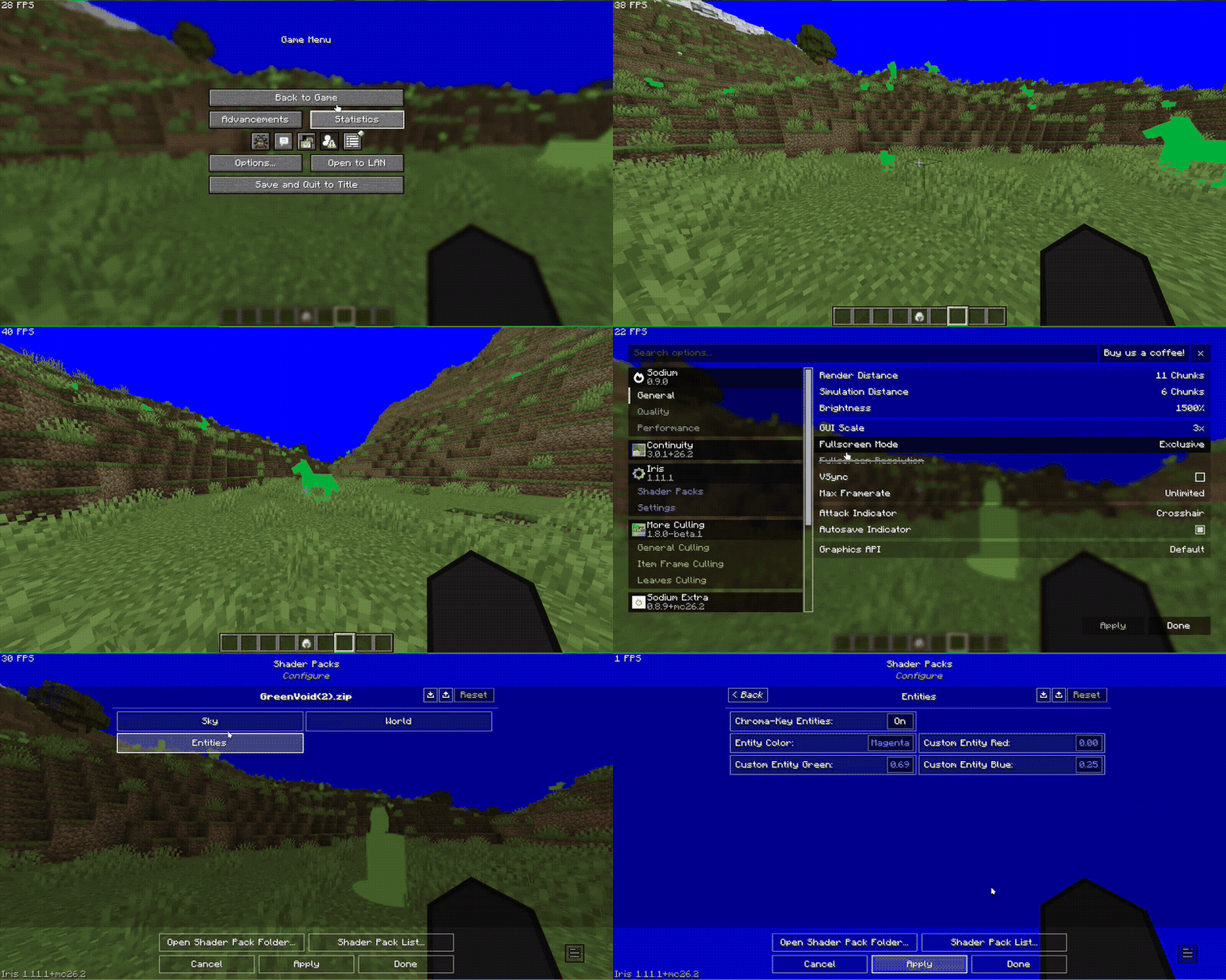


A minimal Minecraft shaderpack built for creators who want a clean greenscreen straight out of the game. It turns the sky, terrain, water, clouds, and mobs into a flat, solid color so they key out perfectly in your editing software — while you and anything in your hands stay fully textured and visible.
Features
- Full color control — pick any color for the sky, the world, and entities, independently of each other. Not stuck with just green.
- Ready-made key colors — quick presets (green, magenta, cyan, blue, red, yellow, white, black) so you can key out different parts of your footage separately, or pick whichever works best if green is hard for you to see.
- Turn each part on or off — toggle sky, world, and entity keying independently, so you can key out just the background and keep everything else looking normal.
- You're always visible — your character and whatever you're holding always render normally, no matter what settings you use.
- Friendly settings menu — every option is clearly labeled with its own description, right in the in-game shader options screen.
Installation
- Copy the
GreenVoidfile/zip into.minecraft/shaderpacks/ - Launch Minecraft with OptiFine or Iris
- Go to Options > Video Settings > Shader Packs and select GreenVoid
- Click Shader Options to customize your colors and toggles
Compatibility
Minecraft 1.7.10+ with OptiFine or Iris.
Disclaimer
For the cleanest possible keying, disable stars, moon, and sun before taking a screenshot or recording — a fully solid sky keys out best.
Ченджлог
GreenVoid+1.1Бета26.1.1, 26.1.2, 26.2 · 5 июля 2026 г.
New Features
- Full color control — pick any color for the sky, the world, and entities, independently of each other. Not stuck with just green.
- Ready-made key colors — quick presets (green, magenta, cyan, blue, red, yellow, white, black) so you can key out different parts of your footage separately, or pick whichever works best if green is hard for you to see.
- Turn each part on or off — toggle sky, world, and entity keying independently, so you can key out just the background and keep everything else looking normal.
- You're always visible — your character and whatever you're holding always render normally, no matter what settings you use.
- Friendly settings menu — every option is clearly labeled with its own description, right in the in-game shader options screen.
GreenVoid+1.0Бета26.1.1, 26.1.2, 26.2 · 28 июня 2026 г.
GreenVoid
.gif)
A minimal Minecraft shaderpack that overrides all environment rendering to a flat custom green (#00b140). The player model retains normal textures; all other entities, terrain, sky, water, clouds, celestial objects, and held items turn solid green.
Комментарии
Загружаем…