 Mineforgian
Dithering3D
Pixelated, retro, Dark Fantasy, gradient, B&W, RGB and more
- Загрузки
- 10K
- Подписчики
- 27
- Обновлён
- 15 мая 2026 г.
- Лицензия
- MPL-2.0
Опубликован 7 января 2026 г.
🎨 Dithering3D - Surface-Stable Fractal Dithering




🖼️ Screenshots
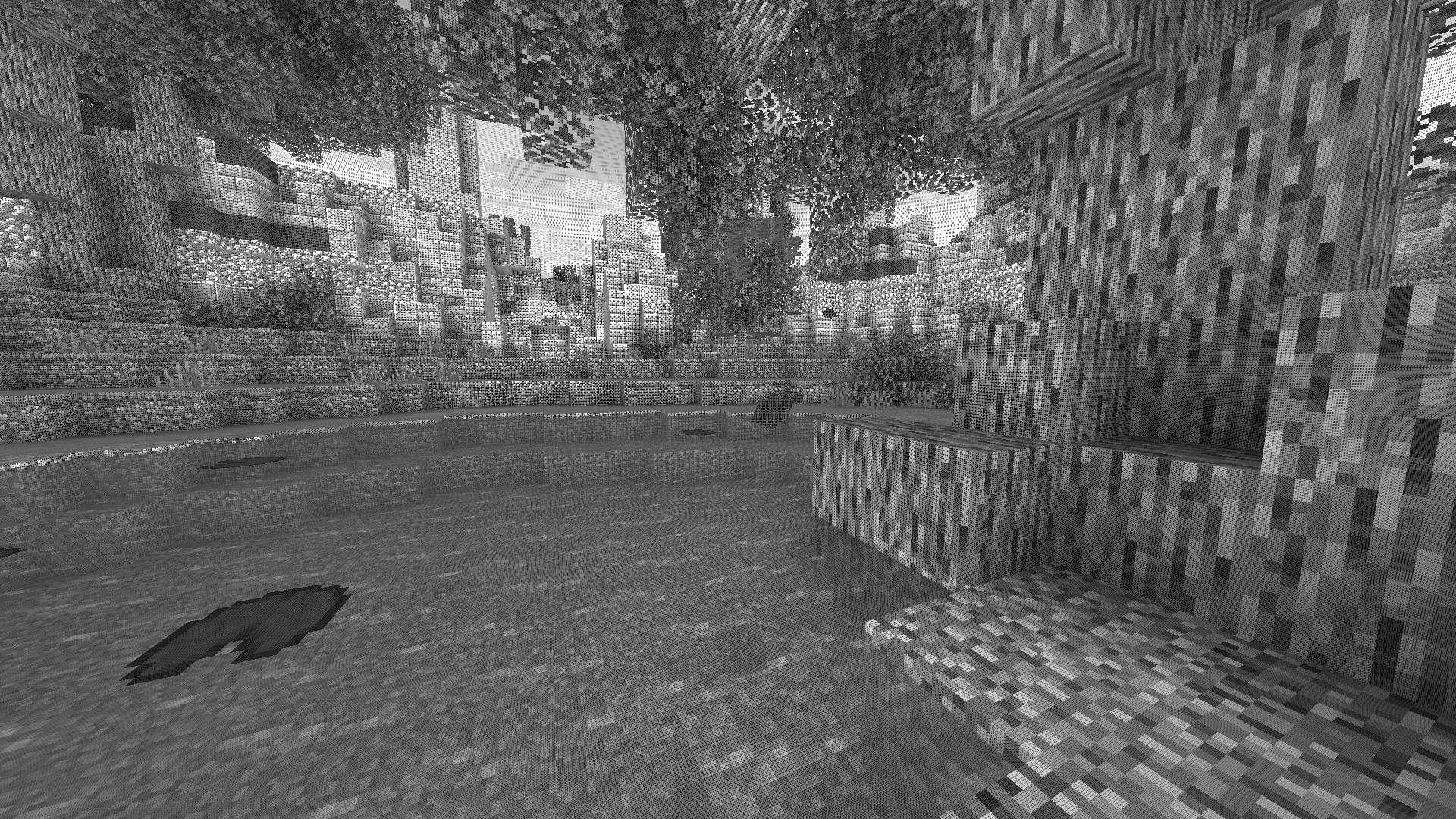
✨ A Revolutionary Visual Experience
Transform your Minecraft world with Surface-Stable Fractal Dithering — a groundbreaking rendering technique where dither dots stick to 3D surfaces instead of the screen, creating a unique manga/comic book aesthetic that feels alive.
🎬 Based on the innovative work by Rune Skovbo Johansen — Watch the explainer video
🖼️ What Makes This Shader Special?
📌 Surface-Stable Dots
Unlike traditional dithering where patterns "swim" on screen, Dither3D anchors each dot to the actual 3D surface. Walk around blocks, and the dots stay perfectly attached!
🔄 Fractal Scaling Magic
As you move closer or farther from surfaces, dots dynamically split or merge to maintain constant screen-space density. It's mesmerizing to watch!
🎨 Three Color Modes
| Mode | Description |
|---|---|
| Grayscale | Classic black & white dithering — clean, minimalist, timeless |
| RGB | Each color channel gets its own dot layer — vibrant and unique |
| CMYK Halftone | Authentic newspaper/comic print simulation with rotated dot angles |
⚡ Features at a Glance
| Feature | Description |
|---|---|
| 🎯 Precision Dithering | SVD-based frequency analysis for mathematically perfect dot placement |
| 🌀 Anti-Stretch Technology | Anisotropic smoothing keeps dots circular even on oblique surfaces |
| 🎥 Camera Stable | Radial compensation prevents dot swimming during camera rotation |
| ⚙️ Highly Configurable | 10+ parameters to fine-tune your perfect look |
| 🚀 Performance Optimized | Efficient 3D texture sampling for smooth gameplay |
| 📱 Universal Compatibility | Works with OptiFine AND Iris on virtually any Minecraft version |
🎛️ Customization Options
Fine-tune every aspect of the dithering effect with our intuitive in-game sliders:
🔧 Dither Settings
| Parameter | Range | Effect |
|---|---|---|
| Dot Scale | 2 - 10 | Control overall dot size (exponential) |
| Size Variability | 0 - 1 | 0 = Bayer pattern, 1 = Halftone style |
| Dot Contrast | 0 - 2 | Sharpen or soften dot edges |
| Stretch Smooth | 0 - 2 | Combat stretched dots on angled surfaces |
💡 Input Controls
| Parameter | Range | Effect |
|---|---|---|
| Exposure | 0 - 5 | Brightness multiplier |
| Offset | -1 to 1 | Brightness offset adjustment |
🎮 Additional Options
- Inverse Dots — Flip dot colors for a negative effect
- Radial Compensation — Stabilize during camera rotation (recommended!)
- Quantize Layers — Prevent dot morphing for a more "classic" look
- Debug Mode — Visualize fractal layers for development
📦 Installation
For OptiFine Users
- Download and extract the shader pack
- Place the
shadersfolder in.minecraft/shaderpacks/ - Launch Minecraft → Options → Video Settings → Shaders
- Select Dithering3D and enjoy!
For Iris Users (Fabric/Quilt)
- Install Iris Shaders mod (1.2.0+)
- Download and extract the shader pack
- Place the
shadersfolder in.minecraft/shaderpacks/ - Press O in-game to open shader menu
- Select Dithering3D
💡 Tip: Press
F3 + Tto quickly reload shaders after making changes!
🎨 Preset Profiles
Choose from pre-configured profiles for instant results:
| Profile | Color Mode | Dot Scale | Best For |
|---|---|---|---|
| 🟢 LOW | Grayscale | 4.0 | Performance, retro feel |
| 🟡 MEDIUM | Grayscale | 5.0 | Balanced experience |
| 🟠 HIGH | RGB | 5.0 | Colorful, artistic |
| 🔴 ULTRA | CMYK | 6.0 | Maximum visual impact |
🌟 Perfect For
| 📸 Screenshot enthusiasts | Create unique, artistic captures |
|---|---|
| 🎬 Content creators | Stand out with a distinctive visual style |
| 🎮 Retro lovers | Relive the charm of 1-bit graphics |
| 🎨 Artists | Manga, comic book, and newspaper aesthetics |
| 🧪 Tech enthusiasts | Experience cutting-edge rendering techniques |
❓ FAQ
Q: Does this work with other shaders?
Dithering3D is a standalone shader pack. Combining with other shaders may cause conflicts.
Q: Why do some surfaces look different?
The sky and some special effects may appear different as surface-stable dithering reveals flat geometry.
Q: Performance impact?
Moderate. The 3D texture sampling is optimized but more demanding than vanilla rendering. Most GPUs handle it smoothly.
Q: Can I use this in my modpack?
Yes! Under MPL-2.0 license. Credit appreciated.
🔬 The Science Behind It
Dithering3D uses Singular Value Decomposition (SVD) to analyze UV coordinate derivatives in real-time, determining the exact frequency and direction of surface textures. This mathematical approach enables:
✅ Perfectly uniform dot density regardless of distance
✅ Seamless fractal transitions between detail levels
✅ Circular dots even on extremely angled surfaces
✅ Rotation-stable patterns that don't "swim"
📚 Credits & Resources
| Resource | Link |
|---|---|
| 🔗 Original Algorithm | Rune Skovbo Johansen |
| 🎥 Technique Explanation | YouTube Video |
| 💬 Technical Discussion | FAQ Thread |
📄 License
Mozilla Public License 2.0 (MPL-2.0)
🎨 Transform your world. Experience Dithering3D. 🎨
If you enjoy this shader, consider leaving a ⭐ and sharing this shader page !
Ченджлог
0.5Релиз26.2-snapshot-5, 26.2-snapshot-6, 26.2-snapshot-7 · 15 мая 2026 г.
Dither3D Shader — Audit & Fix Report
Date: 2026-05-15
Scope: Full codebase integrity review against original Dither3DInclude.cginc
1. BUG FIXES
1.1 — CRITICAL: Sky double exposure/offset
File: shaders/gbuffers_skybasic.fsh:37
Severity: High — visual blowout at any non-default exposure/offset
applyDither3DColor() already applies DITHER_EXPOSURE * color + DITHER_OFFSET internally (line 53 of dither3d_color.glsl). The sky shader was pre-applying the same transform:
// BEFORE (bug):
vec3 skyColor = clamp(glcolor.rgb * DITHER_EXPOSURE + DITHER_OFFSET, 0.0, 1.0);
vec3 result = applyDither3DColor(skyUV, screenPos, dx, dy, skyColor);
// Result: exposure and offset squared (over-exposed sky)

// AFTER (fix):
vec3 result = applyDither3DColor(skyUV, screenPos, dx, dy, glcolor.rgb);
All other gbuffer fragment shaders pass raw colors — only gbuffers_skybasic.fsh had this issue.
1.2 — MEDIUM: Invalid SVD frequency test
File: tests/test_math.py:15-30
Severity: Medium — test was validating a different algorithm than the shader uses
The Python compute_uv_frequency() computed sqrt(sqrt(lambda1 * lambda2)) — a geometric mean of eigenvalue square roots — instead of the SVD singular values the shader actually computes. The shader's algorithm:
float Q = dot(dx,dx) + dot(dy,dy);          // Frobenius norm squared
float R = dx.x*dy.y - dx.y*dy.x;            // determinant
float disc = sqrt(Q*Q - 4.0*R*R);
vec2 freq = sqrt(vec2(Q + disc, Q - disc) * 0.5);  // singular values (sigma_1, sigma_2)
The test now matches this exactly with three validated cases:
- Isotropic (uniform UV scale): both singular values equal scale ✓
- Anisotropic (stretched UV): singular values equal individual axis scales ✓
- Rotated (45°): singular values invariant under rotation ✓
Also fixed: Unicode characters (checkmarks, arrows) replaced with ASCII for Windows console compatibility.
2. CODE QUALITY IMPROVEMENTS
2.1 — Clarified dotRadius formula
File: shaders/lib/dither3d_core.glsl:98
// BEFORE (confusing):
float dotRadius = 0.25 / sqrt(activeDots * 0.25);

// AFTER (clear):
float dotRadius = 0.5 / sqrt(activeDots);
Both expressions are mathematically identical. The new form directly shows the relationship: radius scales as 0.5 / sqrt(N), giving 0.125 for 16 dots and 0.25 for 4 dots.
2.2 — PALETTE_COLOR_MATCH default changed to Color-Aware
Files: shaders/lib/dither3d_options.glsl:41, shaders/lib/dither3d_config.glsl:63
#define PALETTE_COLOR_MATCH 1 // was 0
Color-aware palette matching preserves hues by finding the two closest palette colors and dithering between them. This gives better results for colored palettes (CGA, Pico-8, Nord, Eldritch). The GAMEBOY profile explicitly overrides to 0 (luminance-based) for authentic retro look.
3. ARCHITECTURE VERIFICATION
3.1 — Include chain (correct)
Fragment shader
  -> dither3d_options.glsl     (defines all macros first)
  -> dither3d_color.glsl
       -> dither3d_core.glsl
            -> dither3d_config.glsl   (fallback defaults via #ifndef)
       -> dither3d_utils.glsl
       -> dither3d_palettes.glsl
            -> dither3d_utils.glsl    (guard prevents double include)
All 6 modules have unique, consistent include guards:
| Module | Guard |
|---|---|
dither3d_options.glsl |
DITHER3D_OPTIONS_GLSL |
dither3d_config.glsl |
DITHER3D_CONFIG_GLSL |
dither3d_core.glsl |
DITHER3D_CORE_GLSL |
dither3d_utils.glsl |
DITHER3D_UTILS_GLSL |
dither3d_palettes.glsl |
DITHER3D_PALETTES_GLSL |
dither3d_color.glsl |
DITHER3D_COLOR_GLSL |
3.2 — Vertex shaders (all 14 pairs verified)
All vertex shaders correctly compute and pass screenPos = gl_Position for radial compensation. World position and normal calculations are consistent across all geometry types:
- Terrain, Entities, Block, Hand, Water: triplanar UV with world normal
- Basic, Clouds, Weather, Armor Glint, Spider Eyes: simple world UV (no normal available)
- Sky Basic: cylindrical UV with view direction and alternate UV seam handling
- Sky Textured: texture atlas UV (scaled x4 for dithering)
- Beacon Beam: XZ plane with vertical offset
3.3 — Fragment shaders (all 14 pairs verified)
All fragment shaders follow the same pattern:
- Include
dither3d_options.glsl(first, defines macros) - Include
dither3d_color.glsl(pulls in everything) - Sample textures, compute color
- Call
applyDither3DColorSimple()orapplyDither3DColor() - Output to
gl_FragData[0]with proper alpha preservation
3.4 — Shader properties (validated)
shaders.properties: 14RENDER_STYLEvalues, 8 profiles, proper slider ranges, nested submenu structurelang/en_US.lang: all options, values, profiles, and screen names have labels- Custom palette sliders (colors 1-8, 24 RGB sliders) all wired through
shaders.properties→dither3d_options.glsl→dither3d_config.glsl
3.5 — Palette system (validated)
- 9 built-in palettes: 1-Bit(2), GameBoy(4), CGA(4), VirtualBoy(4), Sepia(4), Nord(8), Solarized(8), Pico-8(16), Eldritch(16)
- 3 custom modes: 2-color, 4-color, 8-color via user-adjustable RGB sliders
- Dual matching: luminance-based (fast, crisp) and color-aware (preserves hues)
- All palettes sorted by luminance for correct dithering gradient
getPaletteColor()centralizes all access withclamp()bounds safety
3.6 — CMYK halftone (validated)
- 4 plates with correct traditional screen angles (15°, 75°, 0°, 45°)
- Slight scale variation per plate breaks up moire patterns
- Round-trip conversion matches original HLSL (validated by test)
4. ORIGINAL PORT FIDELITY
| Original (HLSL) | Port (GLSL) | Status |
|---|---|---|
| SVD frequency analysis | Identical math (Q, R, discriminant) | Match |
| Fractal level selection | log2(spacing) + floor() |
Match |
| Sublayer calculation | lerp(0.25*dotsTotal, dotsTotal, 1-f) |
Match |
| Dither pattern generation | Procedural circular dots (replaces 3D texture) | Adapted |
| Contrast application | Same formula with adjusted multiplier (0.15 vs 0.1) | Calibrated |
| Brightness ramp | Simplified (no ramp texture lookup) | Adapted |
| Radial compensation | gbufferProjection instead of UNITY_MATRIX_P |
Adapted |
GetDither3DAltUV |
Identical derivative comparison logic | Match |
| CMYK conversion | Identical math | Match |
| UV rotation | Identical | Match |
Known differences (intentional adaptions for Minecraft):
- No 3D texture: replaced with procedural Bayer-pattern circular dots
- No brightness ramp texture: direct clamping used instead
- Contrast multiplier:
0.15vs0.1(compensates for procedural pattern difference) contrastFadeformula:1/(1+c*0.5)vs1.05/(1+c)(recalibrated for procedural dots)- RENDER_STYLE 0 (RGB) uses small UV offsets instead of original's per-channel dithering
5. TEST RESULTS
python tests/test_math.py
======================================================================
Dither3D Mathematical Function Tests
======================================================================

--- SVD Frequency Computation (matches dither3d_core.glsl) ---
PASS Isotropic test:  maxFreq=2.000, minFreq=2.000, stretch=1.000
PASS Anisotropic test: maxFreq=4.000, minFreq=1.000, stretch=0.250
PASS Rotated test:     maxFreq=2.000, minFreq=2.000, stretch=1.000

--- CMYK Color Conversion ---
PASS Red, Green, Blue, Yellow, Magenta, Cyan, White, Black (8/8)

--- Bayer Matrix Generation ---
PASS Bayer 1x1, 2x2, 4x4, 8x8 (4/4)

======================================================================
All tests passed!
======================================================================
6. SUMMARY
| Category | Count |
|---|---|
| Critical bugs fixed | 1 (sky double exposure) |
| Invalid tests fixed | 1 (SVD algorithm mismatch) |
| Code clarity improvements | 1 (dotRadius formula) |
| Default value changes | 1 (PALETTE_COLOR_MATCH 0→1) |
| Files audited | 37 (lib + gbuffers + composite + final + config) |
| Architecture issues found | 0 |
Verdict: Codebase is stable, well-structured, and faithful to the original algorithm.
0.4Бета1.21.11, 26.1-snapshot-1, 26.1-snapshot-2 · 11 января 2026 г.
Test version:
- Addition of a visual style selection system (color palettes)
- Addition of several color palette modes for a more personalized look
- Addition of a system for creating your own color palette up to 8 bits (8 colors)
- Menu improvements
- Performance optimization
- And more...
Комментарии
Загружаем…