 Mineforgian
🚀 WeaponMaker - Custom Weapon v1.5
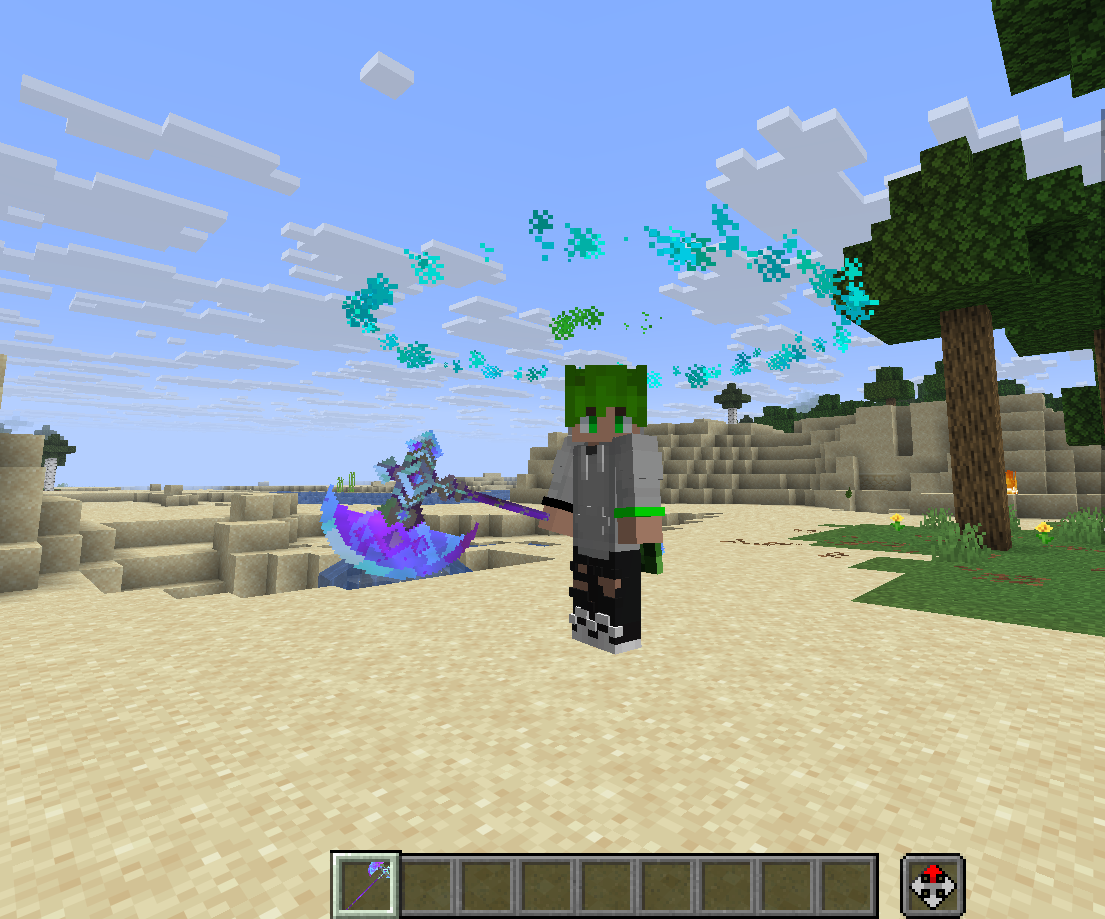
WeaponMaker is a powerful, lightweight, and extremely easy-to-use Spigot plugin that allows you to create, edit, and manage custom weapons with unique physics, projectiles, 3D particle animations (Halos), and special abilities directly from within Minecraft—no configuration files required!
🌟 Why WeaponMaker? (The Simplest Custom Weapon Solution)
- 100% In-Game GUI Editor: Customize damage, fire rate, particles, ammunition, sounds, and upgrade trees through an intuitive inventory interface in real-time.
- Turn Any Item into a Weapon: Bind templates to custom resource pack items using CustomModelData. The plugin remembers the item's texture, custom model, and display name.
- Vanilla Data Preservation: Upgrading a weapon in the Forge preserves all custom names, lore, vanilla enchantments, and persistent NBT tags.
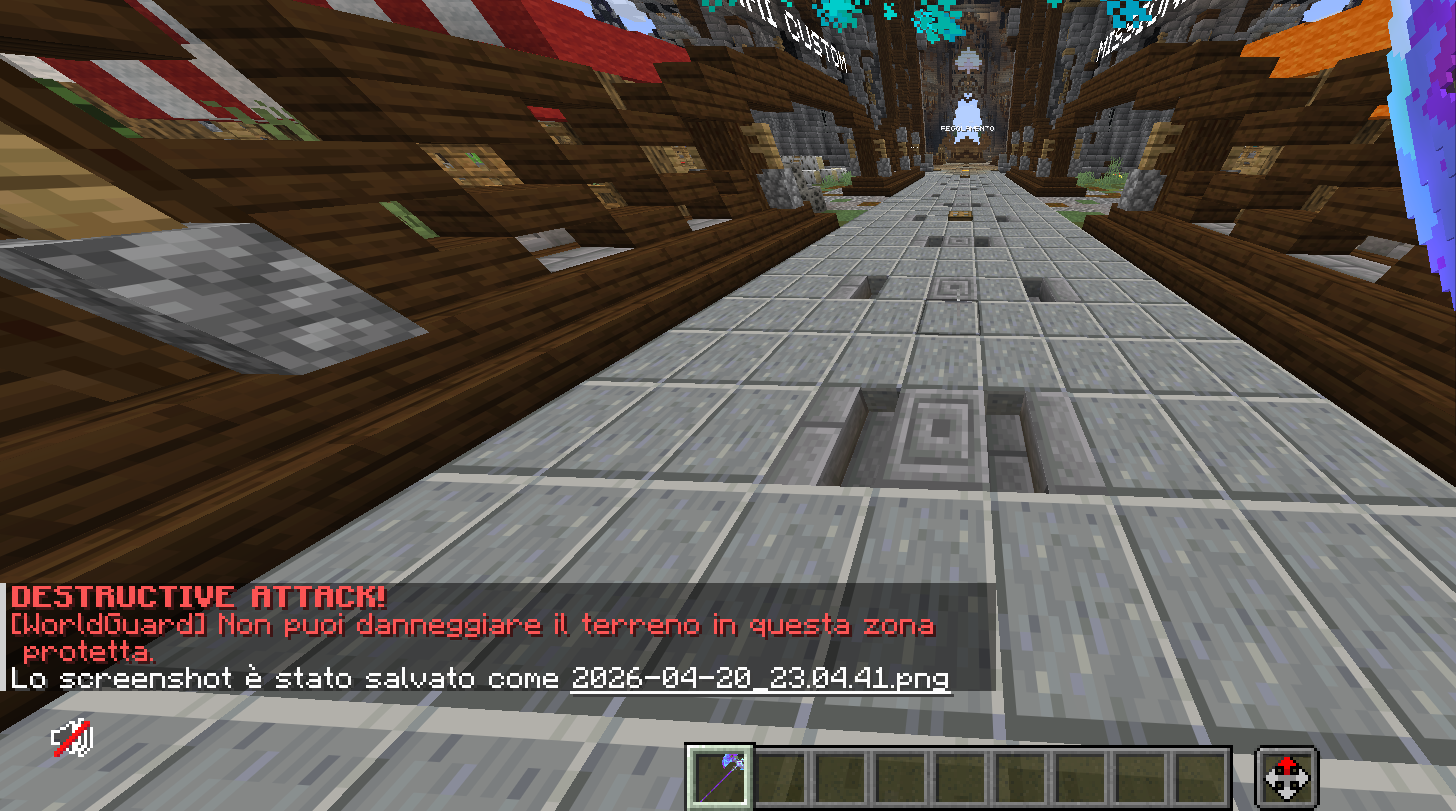
- WorldGuard Grief Prevention: Automatically checks build permissions. Any terrain-deforming ability (like crater explosions) is blocked in protected regions while still allowing players to damage enemies.
📖 Quick Start Guide (Create a Weapon in 4 Simple Steps!)
- Create the Template:
Initialize a blank template in chat:
/weaponmaker create sword_lvl1 - Bind Your Item:
Hold any item (vanilla or custom textured sword/gun) and link it:
/weaponmaker bind sword_lvl1 - Customize stats in real-time:
Open the custom GUI editor for your held item:
/weaponmaker editorhand(Adjust damage, sound, ammunition, particles, and more!) - Clone & Upgrade:
Want a stronger tier? Clone the template:
/weaponmaker clone sword_lvl1 sword_lvl2Now, hold the cloned weapon, open the editor, make it stronger, and link it as an upgrade path in the Forge!
🔥 Key Features
🔨 Special Ability: Super Hammer & Destructive Leap
Trigger catastrophic ground slams using your weapons:
- Super Hammer (Shift + Left Click): Launches the player into the air. Upon landing on the ground, it triggers customizable concentric rings (
super_hammer_circles). Every 3rd ring summons storm clouds and strikes 3 to 10 random lightning bolts, dealing 12 hearts of damage. - Destructive Jump (Shift + Right Click): Slam down, striking 12 lightning bolts in a circle, and leaving a clean crater.
- Note: Block damage is fully protected by WorldGuard, and players do not take damage from their own leap effects.
🛠️ Weapon Forge & Upgrade Tree
Transform any standard Minecraft Anvil into a functional Weapon Forge.
- Upgrades: Set custom upgrade costs (like combining a Level 1 sword + 5 custom gems to get a Level 2 sword).
- Repairs: Define maximum durability and repair costs per weapon.
💫 Cosmetic 3D Halos
Display gorgeous rotating rings of particles above players' heads.
- Shapes:
CIRCLE,SQUARE,TRIANGLE,STAR,STARRY_SKY, and more! - Twinkling Starry Sky: The
STARRY_SKYshape spawns twinkling stars that drift organically within the boundary ring using randomized harmonic physics. - Rainbow RGB: Shifting gradient animations (
halo_rgb).
💬 Configuration & Editing Properties
You can edit any weapon property using the in-game GUI (/wm editorhand) or quickly using /wm edithand <property> <value>.
General Information
name: Display name (supports MiniMessage color gradients like<gradient:red:yellow>Super Sword</gradient>).material: Base item type (e.g.,DIAMOND_SWORD).cmd: CustomModelData texture ID.enchanted:true/falseto toggle the glowing enchantment glint.
Combat & Gunplay
damage: Base damage dealt.firerate: Delay between attacks (lower values = faster speed).bullets: Number of projectiles fired at once (shotgun spread).spread: Attack accuracy deviation.bullet_potion_effect: Apply effects likeSLOWNESSorPOISONon hit.
Projectiles & Physics
projectile: Type of projectile (HITSCANlaser,ARROW,SNOWBALL,FIREBALL,TNT,BLOCK,MOB,ITEM).projectile_speed: Travel velocity.projectile_block/projectile_mob/projectile_item: Define the visual blocks or entities fired.
Special Abilities (Super Hammer / Destructive Jump)
destructive:true/falseto enable the Destructive Jump slam.destructive_jumpy: Customize the upward leap velocity of Destructive Jump.super_hammer:true/false/noneto toggle the Super Hammer ability.super_hammer_jumpy: Upward leap velocity of the Super Hammer jump.super_hammer_circles: Number of shockwave circles (min 1, max 50).super_hammer_delay: Delay in ticks between expanding waves.
⌨️ Command Reference
| Command | Description |
|---|---|
/wm |
Open the Global GUI Weapon List |
/wm create <id> |
Create a blank weapon template |
/wm bind <id> |
Bind the held item to a weapon template |
/wm unbind |
Remove weapon properties from the held item |
/wm editorhand |
Open the GUI editor for the held weapon |
/wm edithand <property> <val> |
Edit a single property on the held weapon |
/wm clone <old_id> <new_id> |
Duplicate a weapon template |
/wm forge |
Open the Weapon Forge directly |
/wm give <player> <id> |
Give a custom weapon to a player |
/wm delete <id> |
Delete a weapon template |
/wm info |
View stats of the held weapon in chat |
⚙️ Technical Requirements
- Minecraft Version: 1.21 to 1.21.1
- Server Software: Paper, Purpur, or Folia
- Java Version: 21+
- Dependencies: WorldGuard (Optional - for claim/spawn protection)
Ченджлог
1.5.9Бета26.1, 26.1.1, 26.1.2 · 1 июня 2026 г.
WeaponMaker v1.5.9 – Power Update Log
New Features
- The Mace: 1‑second random lightning burst (max radius 5 blocks) + earth‑quake blast (10‑block radius) that knocks back entities.
- Evocator Totem: summons random fang heads within configurable radius (default 7 blocks) with instant lightning strikes.
- Custom Power Editor 2.0: new UI for editing all custom powers, including cooldown, radius, damage, sounds.
- OP bypass: operators can disable cooldowns directly from the GUI; toggle options True/False/None without typing.
- Cooldown system revamp: per‑power cooldown fields (theMaceCooldown, evocatorTotemCooldown) with OP bypass logic.
- UI polish: glass‑morphism layout, gradient colors, micro‑animations, smooth transitions.
Known Issues (v1.5.9)
- Minor lag when The Mace is activated with many players nearby.
- WorldGuard compatibility: Evocator Totem may spawn in protected regions.
1.5.7Релиз26.1, 26.1.1, 26.1.2 · 19 мая 2026 г.
🚀 WeaponMaker 1.5.7 - Super Hammer & Sound Update!
This update introduces the devastating Super Hammer capability, expands cosmetic customization in our particle rendering engine with floating/twinkling stars for the STARRY_SKY halo shape, fully populates all sound menu categories, unifies tab completions, and fixes chat prefix formatting.
🔨 Devastating New Ability: "Super Hammer" & "Destructive Jump"
We have added an incredible new custom ability for your custom weapons, triggered via Shift + Left Click (Super Hammer) or Shift + Right Click (Destructive Jump):
- Jump First, Explode on Landing: Initiating the ability launches the player into the air with zero initial damage to surrounding blocks. The explosion/impact is triggered only when the player lands and touches the ground, preserving structures from premature destruction.
- Configurable Leap Heights: Customize the Y-velocity of the jump per weapon using the new properties:
destructive_jumpY(e.g. 0.5, 1.0, 1.2, 1.5)super_hammer_jumpY(e.g. 0.5, 1.0, 1.2, 1.5)
- Dynamic Super Hammer Waves: The Super Hammer impact expands outward in customizable concentric shockwaves:
- Custom Circles Count: Configurable from 1 to 50 rings using the
super_hammer_circlesproperty. - Custom Expansion Speed: Configure the delay between waves in ticks using the
super_hammer_delayproperty. - Dynamic Lightning Strikes: Standard waves spawn shockwaves with explosion particles. Every 3rd wave (circle 3, 6, 9, 12, etc.) summons storm clouds and strikes between 3 and 10 random lightning bolts inside the wave ring, dealing 12 hearts of damage (24 HP) and high knockback.
- Custom Circles Count: Configurable from 1 to 50 rings using the
- Destructive Mode & WorldGuard Protection: If configured with block damage, blocks (excluding bedrock) in the shockwave boundaries are destroyed. This is fully protected by WorldGuard integration—blocks inside protected zones remain entirely unaffected to prevent griefing.
- Config & Commands Support:
- Modify weapon configurations with
/weaponmaker edit <id> <property> <value>or/weaponmaker edithand <property> <value>. - All 4 new properties (
destructive_jumpy,super_hammer_jumpy,super_hammer_circles,super_hammer_delay) are fully supported.
- Modify weapon configurations with
🌟 Cosmetic Halo "STARRY_SKY" Improvements
- Floating/Twinkling Animation: Stars inside the
STARRY_SKYhalo shape now drift randomly and organically within the boundary ring using harmonic sine/cosine offsets. They also feature a twinkling size pulsation, making the halo look like a living night sky.
🎵 Populated Sound GUI Menu
- All Categories Populated: Every sound selector category (BLOCK, ENTITY, MUSIC, ITEM, AMBIENT, UI) is now fully populated with all registered Minecraft sounds. No category is left empty!
- Interactive Audio Previews:
- Left Click: Play preview of the sound at your current location.
- Right Click: Apply the sound to the held weapon.
💬 Command Autocompletion & Chat Fixes
- Unified Property Previews: Fixed in-game autocomplete suggestions for
/wm editand/wm edithand. Instead of suggesting player names for boolean and numeric options, the autocomplete system now correctly returns previews liketrue,false, or example values. - Legacy Color Translation: Solved a bug where raw color codes (e.g.
&7[&6WeaponMaker&7]) were sent in the chat during forge interactions. The plugin now properly translates color prefixes.
1.5.2Релиз1.21.10, 1.21.11, 26.1 · 18 мая 2026 г.
🚀 WeaponMaker 1.5.2 - Teams, Halos e more! Update
This release bumps the plugin version to 1.5.2, introducing three advanced cosmetic halos—including a complex multi-layered Summoning/Magic Circle where nested layers rotate in opposite directions when animated—full command aliases, custom bullet speed and range physics settings, and brand new GUI preview capabilities for particles and sounds!
💥 Custom Bullet Speed & Range Physics (NEW!)
We have expanded the shooting engine to support genuine 3D flying bullet physics and customizable travel ranges:
- Bullet Speed (
bullet_speed):- Real-time Projectile Flying: Allows weapons to shoot real flying projectile particles instead of instant hitscans!
0(Default): Instant hitscan (traditional immediate damage).1to1000: Bullet travel speed.1is extremely slow (1 block/second), while1000is hyper-fast (1000 blocks/second / 50 blocks/tick).- Command:
/weaponmaker edit <id> bullet_speed <0-1000>or/wm edithand bullet_speed <0-1000>
- Bullet Range (
bullet_range):- Max Block Travel Limit: Limits how far a bullet can travel before disappearing (stopping particle trails and preventing far-away hits).
300(Default): Standard range of 300 blocks.0: Infinite range.1to20000blocks limit.- Command:
/weaponmaker edit <id> bullet_range <0-20000>or/wm edithand bullet_range <0-20000>
Both parameters are fully integrated into tab auto-completion and auto-suggestions.
🛠️ Direct Editor Redirection (/weaponmaker editorhand)
- Direct Access: Fixed
/weaponmaker editorhandnot opening the GUI directly on the held weapon. It now skips the main menu and goes straight to the specific weapon's editor interface.
⚒️ Upgrade Chain State Persistence & Visibility Fixes
- Unlinking Fix: Resolved a major state persistence bug in the Upgrade Chain Editor. Right-clicking an upgrade stage to unlink it now correctly resets its
upgradeFromproperty to"NONE". Unlinked weapons will now instantly reappear in the main menu! - Upgrade Chain Protection: In-game direct chat commands like
/weaponmaker edit <id>now explicitly block editing upgrade-chain weapons. This ensures upgrade progression trees cannot be edited or modified out of order. - Improved Auto-suggestions: Tab completion in
/weaponmakercommands continues to dynamically filter out upgrade stages to keep your console completely clutter-free.
⚙️ Redstone Toggle & Reorganized Edit Menu Grid
- Editor Visibility Toggle (Redstone Block): Added a new Redstone Block button in the Weapon Edit Menu (Slot 22). Clicking this button toggles the visibility of the weapon on the main screen of
/weaponmaker editor. This gives you full control over which weapons are displayed in the main selection list! - Compact & Symmetric Layout: Moved the Upgrade Editor (Nether Star) button from slot 42 to slot 31. This aligns it perfectly next to the other edit buttons, creating a perfect rectangular 3x4 layout for clean visual aesthetics.
💫 Rotation Animation Speed (1-50)
- Customizable Speed: The
/weaponmaker halo_rotate_animatecommand has been enhanced. It now accepts an optional rotation speed parameter from 1 to 15:1: Extremely slow rotation.5(Default): The fluid standard speed.15: Hyper-fast rotation.- Usage:
/weaponmaker halo_rotate_animate <id> <true|false> [speed (1-15)]
- In-game Property: You can edit the rotation speed directly using
/weaponmaker edit <id> halo_speed <1-15>or/weaponmaker edithand halo_speed <1-15>with full tab completions. - Full Compatibility: Existing weapons default to speed
5, ensuring zero breakages or config changes.
🖱️ Interactive GUI Picker Menus (New Preview Feature!)
We have revolutionized the User Experience (UX) inside our selection pickers:
- Particle Picker:
- Left Click: Plays an instant particle preview (a burst of 20 particles) around the player so you can test visual effects in real time without closing the menu!
- Right Click: Saves and applies the selected particle to the weapon, returning you to the main menu.
- Lore Tooltip: Clean grey lines are shown on each firework star:
Click Sinistro: AnteprimaClick Destro: Applica
- Sound Picker:
- Left Click: Plays an audio preview of the selected sound at the player's location.
- Right Click: Saves and applies the sound to the weapon.
- Lore Tooltip: Displays the same helpful Left/Right click instructions.
⌨️ Command Aliases registered
- Added complete command aliases! You can now execute any WeaponMaker command using these shortcuts:
/wm <commands>/wpm <commands>/weaponm <commands>/wmkr <commands>
🌀 18 Advanced Cosmetic Halos (3 New Shapes Added!)
We have expanded the geometric particle engine to support 18 distinct shapes, adding:
MOON(The Moon) 🌙 (Deeply Closed & Wrapping!)- Perfect Crescent Moon: Rebuilt the Moon shape to match reference pictures. It now wraps deeply into a gorgeous closed profile (sweeping a wide $246^\circ$ arc) with two thin ends folding inwards beautifully for a realistic, clean, and elegant crescent moon silhouette without overlapping lines.
SUN(The Sun) ☀️- A bright central ring radiating 8 solar rays outwards in a symmetric pattern.
MAGIC_CIRCLE(The Magic Circle) 🔮- Multi-layered Summoning Circle: Features 3 nested layers that rotate dynamically at different speeds and in opposite directions:
- Outer Circle: Rotates clockwise at normal speed (
1.0x). - Middle Star/Octagram: A beautiful 8-pointed star that rotates counter-clockwise (
-1.2x). - Inner Circle: A compact inner ring that rotates clockwise at double speed (
2.0x). - When
halo_animatedis set tofalse, the magic circle remains frozen as a beautifully aligned, symmetric summoning crest.
- Outer Circle: Rotates clockwise at normal speed (
- Multi-layered Summoning Circle: Features 3 nested layers that rotate dynamically at different speeds and in opposite directions:
PENTAGRAM_CIRCLE(The Pentagram Circle combo) 🔯- A gorgeous multi-layered design:
- Outer Ring: Rotating clockwise at normal speed (
1.0x). - Inner Pentagram (5-pointed star): A star pattern rotating counter-clockwise (
-1.2x).
- Outer Ring: Rotating clockwise at normal speed (
- A gorgeous multi-layered design:
RUNIC_SHIELD(The Runic Shield Aura) 🛡️- A complex triple-layered aura:
- Outer Ring: Rotating clockwise at
0.8xspeed. - Middle Diamond/Square: A geometric shield outline rotating counter-clockwise at
-1.2xspeed. - Inner Ring: A fast core rotating clockwise at double speed (
2.0x).
- Outer Ring: Rotating clockwise at
- A complex triple-layered aura:
All shapes can be chosen in-game using /weaponmaker halo_geometric <id> <SHAPE> or /weaponmaker edit <id> halo_shape <SHAPE> with full auto-completion support.
⚡ Extended Halo Animation Speed
- High-Precision Tuning: Raised the limit for halo animation speed (
halo_speedand/weaponmaker halo_rotate_animate) from 1-15 to 1-50! - Granular Control: Speed
1is ultra-slow for peaceful glowing orbs, and50provides lightning-fast mystical frequencies for hyper-charged relics.
🎇 Dynamic & Static Particle Variants (halo_type)
- Dynamic HEX Potion Effects: The dynamic particle options supporting full HEX coloring now include
DUST,DUST_COLOR_TRANSITION, andENTITY_EFFECT(representing Spigot's unified potion particle for 1.21.1). - Universal Static Particles: You can now enter any valid Minecraft Spigot particle name as your
halo_type! The plugin will auto-detect and spawn it as a gorgeous static effect (e.g.FLAME,SOUL_FIRE_FLAME,WITCH,PORTAL,HAPPY_VILLAGER,HEART,GLOW,SNOWFLAKE), falling back gracefully to customized color dust if an invalid name is input.
☠️ Simplified Death Messages
- Shorthand Format: Writing custom death messages is now easier than ever! Instead of writing the full
<victim> has been vaporized by <killer>, you can now just write the central part:" has been vaporized by "or" è stato eliminato da ". - Automatic Wrapping & Spacing: The plugin will automatically place the victim's name at the beginning and the killer's name at the end, ensuring that exactly one single space is placed between the names and the central message to avoid duplicate or lack of spacing!
- Backward Compatibility: Original explicit
<victim>and<killer>tags are still fully supported and replaced as usual.
👥 Custom Team System (/wm teams)
- Teammate Friendly-Fire Prevention: We have introduced a fully persistent, customizable in-house Team System to prevent teammates from damaging each other!
- Projectile Pass-through: When friendly fire is disabled for a team, fired bullets and projectiles (including flying particle physics and hitscans) will pass smoothly through teammates without dealing any damage or wasting ammunition, creating a high-end, competitive combat experience.
- Commands & Configuration:
/wm teams create <team_name>: Create a new team. The creator automatically joins their team upon creation!/wm teams delete <team_name>: Delete an existing team./wm teams invite <player>: Send an invitation to an online player. Invites last exactly 2 minutes (120 seconds) before expiring and notifying both parties./wm teams accept: Accept a pending invitation. Once accepted, a chat broadcast notifies the server that the player has joined the team!/wm teams decline//wm teams deny: Reject a pending invitation./wm teams add <team_name> <player>: Force a player into a team./wm teams remove <player>: Force the removal of a player from any team./wm teams friendlyfire <team_name> <true|false>: Enable or disable friendly fire for the team (default isfalse)./wm teams color <team_name> <color|HEX>: Set a custom team color! Supports standard color names (RED, BLUE, YELLOW, LIME, GREEN, PURPLE, MAGENTA, GOLD, AQUA, WHITE) and custom hex strings (e.g.#FF5555)./wm teams glow <team_name>: Toggle a glowing outline around all team members! The glowing outline dynamically matches the custom team color, mapped using a 3D Euclidean distance algorithm against Vanilla's 16 scoreboard colors!/wm teams join <team_name>: Join a team./wm teams leave: Leave your current team./wm teams list: List all teams, their color, glow state, friendly fire state, and all online/offline members.
- Data Persistence: Teams are fully serialized and saved automatically to
teams.ymlin the plugin data folder. - Tab Completer: Fully integrated with complete command suggestions for team names, subcommands, custom colors, and online players!
🎨 Interactive Color Picker GUI & Dynamic Previews (NEW!)
We have drastically refined the Halo customization experience:
- Interactive Color Picker Menu:
- 17 Color Dyes: Slot 20 in the Halo Config menu now opens a dedicated selettore a icone with 17 beautiful color dyes (RED, ORANGE, YELLOW, LIME, GREEN, AQUA, TEAL, BLUE, NAVY, PURPLE, FUCHSIA, MAROON, OLIVE, WHITE, SILVER, GRAY, BLACK). Clicking any dye instantly applies that color and disables RGB Rainbow for immediate visibility!
- HEX Customizer (Name Tag): Click to type any custom HEX color (e.g.
#FF5555) in chat. - Seamless Back-navigation: Cancelling or completing chat inputs inside the Color Picker now returns you directly to the Color Picker GUI instead of the parent main menus.
- Dynamic Halo-colored Previews:
- In the Particle Picker menu, left-clicking on
DUST,DUST_COLOR_TRANSITION, orENTITY_EFFECT(colored potion bubbles) plays a player-centered preview colored with the weapon's activehaloColoror dynamic HSB Rainbow! This lets you see exactly how the particle will look with your chosen weapon color before applying it!
- In the Particle Picker menu, left-clicking on
- Symmetric Main Menu RGB Integration:
- RGB Rainbow Toggle (Glowstone Dust): Now placed directly on the main "Configura Halo: " menu (Slot 21). Click to instantly toggle the RGB Rainbow on or off!
- Velocità RGB Rainbow (Redstone Lamp): Now placed as a dedicated button directly on the "Configura Halo: " menu (Slot 23). Click to set the custom speed (0-10) in chat!
- This leaves the Color Picker GUI 100% clean and focused purely on choosing static dyes and custom HEX inputs without overlapping.
⚡ Non-linear Quadratic Rotation Speed (1-50) (NEW!)
- Wide Precision Scale: Redesigned the rotation speed algorithm! Instead of simple linear increments, the speed now scales quadratically (
0.1 * hSpeed * hSpeed):- Ultra-peaceful Orbit (
speed = 1): Takes exactly 62.8 seconds to perform a single complete orbit. Perfect for peaceful low-energy shields and slow halos! - Default standard (
speed = 5): Takes exactly 2.5 seconds for a full rotation (exactly matches the classic default speed value). - Hyper-mystical Frequencies (
speed = 50): Orbiting at a hyper-fast rate of 40 rotations per second! Provides a mesmerizing lightning frequency for powerful cosmic relics!
- Ultra-peaceful Orbit (
🥊 Universal Bare-Punch Friendly Fire Block (NEW!)
- Total Protection: The teammate friendly fire block has been extended to all forms of direct player-to-player damage!
- Punch Friendly Fire: If friendly fire is disabled for a team, players can no longer damage or punch their teammates with their bare hands, swords, or tools, ensuring complete team protection during intense skirmishes.
1.5.0Бета1.21.9, 1.21.10, 1.21.11 · 17 мая 2026 г.
🚀 WeaponMaker 1.5.0 - The Weapon Forge Update
This is our biggest update yet, introducing a massive set of new features, an entirely new UI system, and infinite RPG progression mechanics.
🛠️ 100% In-Game GUI Editor
- Added
/weaponmakerto open the Global GUI Editor. - You can now modify every single weapon stat in real-time through an intuitive inventory interface. No more editing
.ymlfiles or reloading the server manually! - Configure damage, fire rate, particles, projectiles, and upgrade paths directly in-game.
⚒️ Weapon Forge & Upgrade System
- Added the Weapon Forge, a custom Anvil GUI that allows a player to repair and upgrade a weapon.
- You can now transform any physical Anvil block into a functional Weapon Forge.
- Infinite Upgrade Trees: Combine a base weapon with a specific "upgrade item" to craft a higher-tier weapon.
- Perfect Data Preservation: Upgrading a weapon now perfectly preserves all vanilla enchantments, custom names, and NBT data!
- Added a full visual Forge Editor inside the main GUI to configure upgrade paths and repair costs.
✨ Adaptive Binding & New Workflow Commands
- Adaptive Bind:
/weaponmaker bindnow instantly adapts the weapon template to match theMaterial,CustomModelData, andDisplay Nameof the item you are holding. - Added
/weaponmaker clone <old_id> <new_id>: Clone an entire weapon configuration instantly to easily create a variant (e.g., a boss drop). - Added
/weaponmaker edithand <property> <value>: Fast command-line editing focused on the specific weapon you are holding. - Added
/weaponmaker editorhand: Opens the GUI Editor focused directly on the weapon you are currently holding.
🌟 Advanced Cosmetic Halos
- Completely rewritten the geometric rendering engine for Halos (now using precise linear interpolation for solid, continuous shapes without corner clustering).
- Added new Shapes:
CIRCLE,SQUARE,TRIANGLE,STAR. - Added RGB Animations: Enable a fluid, shifting rainbow color (
halo_rgb). - Added 3D Rotation: Enable
halo_animatedto make the shape spin dynamically. - Deep Customization: You can now adjust the scale/thickness (
halo_scale), density (halo_particle), and particle type (DUST,ENTITY_EFFECT,DUST_COLOR_TRANSITION).
⚔️ Combat & QoL Improvements
- Potion Bullets: A projectile can now apply a specific potion effect to an enemy on hit (configurable effect type, duration, and amplifier).
- WorldGuard Support: The Destructive Leap attack and block-breaking projectiles now correctly respect WorldGuard region permissions, preventing griefing in a protected area.
- Inventory Interaction Fixes: Fixed a bug where a player could not move an item inside their own inventory while viewing the GUI Editor.
- Cleaned up the
/weaponmakertab-completion list for a much cleaner user experience.
1.4.0Релиз1.21.9, 1.21.10, 1.21.11 · 7 мая 2026 г.
WeaponMaker 1.4.0
Bind: Maintains original name/lore of objects. Fireball: Your fireballs don't hit each other (no premature explosions).
1.3.9Релиз1.21.9, 1.21.10, 1.21.11 · 7 мая 2026 г.
Update 1.3.9
Fixed a bug when doing /weaponmaker bind That mattered the name and "lore" in the item Now only does this when you do /weaponmaker give (player)
1.3.8Бета1.21.9, 1.21.10, 1.21.11 · 7 мая 2026 г.
Weapon Name Fix Fixed a bug where /weaponmaker info displayed generic names. It now fully supports MiniMessage (gradients and custom formatting)
1.3.4Релиз1.21.9, 1.21.10, 1.21.11 · 5 мая 2026 г.
🚀 What's New
Multi-language Support: Added translation files for Italian and English. Switch languages in config.yml.
Unbind Command: Added /weaponmaker unbind to remove the link between an item and a custom weapon.
BreakMode: When enabled, it allows you to break blocks normally while holding the weapon.
Modernized Messaging: Full support for Adventure Components and MiniMessage (gradients, RGB), fixing old API deprecations.
🛠️ Technical Improvements
Fixed bugs in weapon editing commands. Optimized the message loading system.
Комментарии
Загружаем…