 Mineforgian
TumiTranslator
Displays different messages depending on the language of each player
- Загрузки
- 471
- Подписчики
- 5
- Обновлён
- 12 сентября 2025 г.
- Лицензия
- LGPL-3.0-or-later
Опубликован 7 ноября 2023 г.
TumiTranslator
Add rich translations to you Minecraft Server or Proxy
Installation
- Install MiniPlaceholders
- Drag and drop on your plugins folder
- Start the server
Features
- Add the translations you want, and use them anywhere on your server.
- Support for MiniPlaceholders placeholders. (Full support anywhere for global placeholders; for player placeholders, requires plugins compatible with MiniMessage using the latest version)
Placeholders
In addition to providing translations that can be used anywhere on your server, TumiTranslator also provides placeholders for using your translations. This is the recommended way to use translations, usable in plugins compatible with MiniPlaceholders.
<tumi_translation:"tumi.welcome">
Returns a translation in the language of the target/executor. If the translation does not exist in the specified language, it will attempt to use the translation in the configured default language.
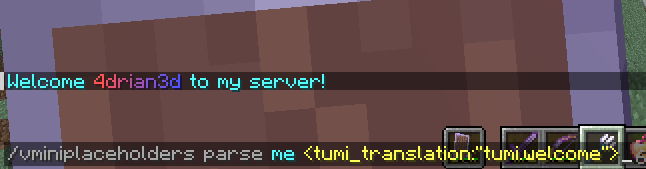
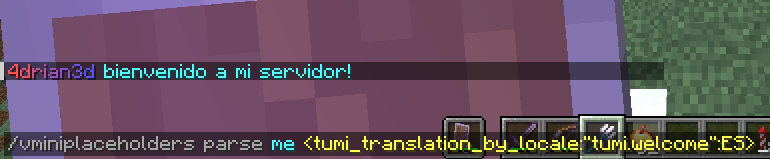
<tumi_translation_by_locale:"tumi.welcome":ES>
Returns a translation in the specified language. If the translation does not exist in the specified language, it will attempt to use the translation in the default language configured.
Usage in General Translations
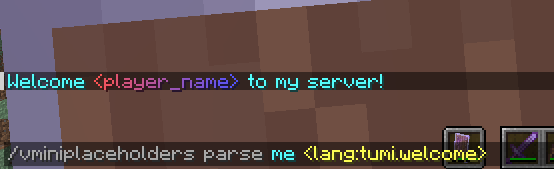
The recommended use of TumiTranslator is through its MiniPlaceholders placeholders. But if you want to use them anywhere else, it is possible. Here are some examples.
Please note that player placeholders are not yet supported in this way of displaying placeholders. This feature will be applied to MiniMessage in future versions.
Lang Tag
<lang:"tumi.welcome":ES>
Videos
TumiTranslator with Velocitab

TumiTranslator with VCustomBrand

Support
Support is exclusively for those who have purchased the plugin from BuiltByBit or Polymart. You will be given a role on my Discord server with access to an exclusive channel.
Ченджлог
2.0.0Релиз1.21.10, 1.21.11, 26.1 · 12 сентября 2025 г.
What's Changed
- Added support for generating global translations. Because of this, translations can be used as a “vanilla” translation that is rendered on the server before being sent to the player.
- Updated to MiniPlaceholders v3
- The way translations are loaded has been refactored. Multiple language variations are now supported with a single translation file. For example, languages such as es_MX, es_ES, and others can now use a unified language file called translations_ES.properties.
2.0.0Релиз1.21.10, 1.21.11, 26.1 · 12 сентября 2025 г.
What's Changed
- Added support for generating global translations. Because of this, translations can be used as a “vanilla” translation that is rendered on the server before being sent to the player.
- Updated to MiniPlaceholders v3
- The way translations are loaded has been refactored. Multiple language variations are now supported with a single translation file. For example, languages such as es_MX, es_ES, and others can now use a unified language file called translations_ES.properties.
1.0.1Релиз1.20.6, 1.21, 1.21.5 · 7 ноября 2023 г.
- Fixed Paper 1.20.2 Support
1.0.1Релиз1.20.2, 1.20.3, 1.20.4 · 7 ноября 2023 г.
- Fixed Paper 1.20.2 support
Комментарии
Загружаем…