 Mineforgian
SkyGridx
Experience the Latest Blocks, Customize Your SkyGrid, and Enjoy Real-Time, Efficient Generation.
- Загрузки
- 6K
- Подписчики
- 19
- Обновлён
- 7 июля 2026 г.
- Лицензия
- LICENSE
Опубликован 17 октября 2023 г.
SkyGridx - Official Support & Downloads
Join our Discord Community for help, support, issues, feedback, and discussions!
Click here to join: Join Our Discord
Download Links:
Overview
The SkyGrid Plugin offers access to the latest blocks (26.1.2) and empowers users to fully customize the grids in the Overworld, Nether, and End dimensions. The initial generation process, which typically takes ~1 minute, adapts to the server's capabilities. Subsequently, all generation activities occur efficiently in real-time.
This plugin also includes a built-in random teleport command for each dimension, ensuring that players can safely explore their chosen realm. Furthermore, it features an ore generator that can modify stone generation to create various blocks of your choice. While currently configured primarily for ores, the possibilities are virtually endless.
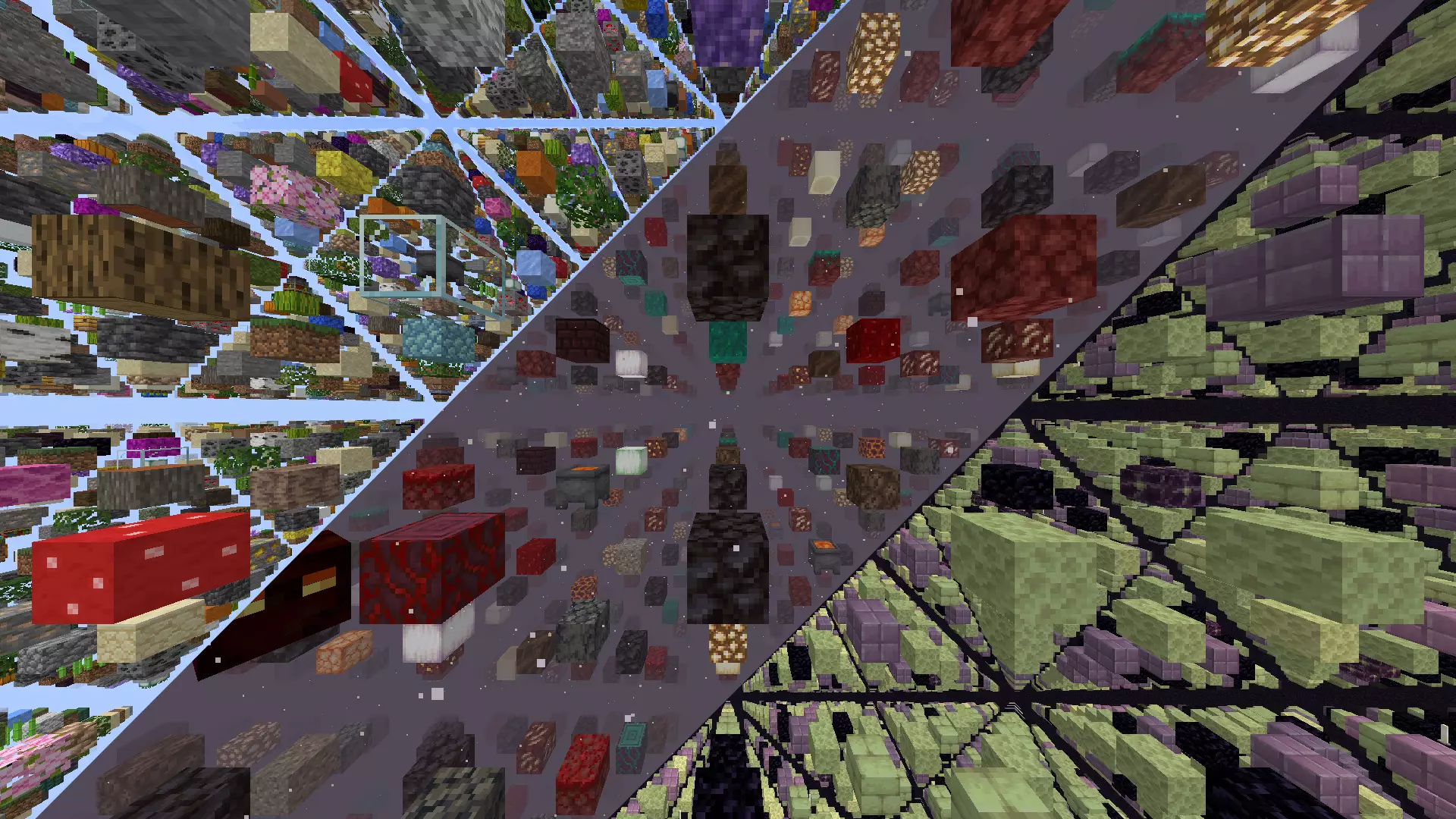
Key Features:
Block Selection:
- Create a unique SkyGrid with a variety of blocks from the Bukkit Material page.
- Customize block types and percentages effortlessly.
Real-time Generation:
- SkyGrid generates in real-time as you explore.
Built-in Fog Feature:
- Fog feature accompanied by a texture pack. Admins can enable it using
/fogonand disable with/fogoff. This feature allows lower render distances without disrupting immersion. - Feature is included in the settings file if you would like to enable it by default, it will come as disabled by default.
Material Distribution:
- Define personalized materials for block placement per world.
- Fine-tune material distribution percentages for a distinct experience.
- Choose parent materials as well as materials for all the sides and ends of said parent block material
Biome-Specific Grids:
- Customize grids in Overworld, Nether, and End with unique blocks at the biome level.
Ore Generation:
- Seamlessly integrated into the gameplay, this feature replaced generated stone, cobblestone or basalt with any blocks you want.
- The block types generated, and their percentages can be effortlessly modified to suit your preferences in the ores.yml file inside the OreGenBlock folder, and work on all worlds where stone, cobblestone or basalt can be generated.
Teleportation Command:
- Securely teleport to random locations in
- Overworld (/tpr overworld) or (/tpro)
- Nether (/tpr nether) or (/tprn)
- End (/tpr end) or (/tpre).
- Range can be customized in the settings
- Settings also include cooldown for per world command reuse
- All have their own individualize permissions
Spawner Settings:
- The available entities for use can be found at here
- Fine-tune spawner settings for entities, delay, max nearby entities, and more.
- Random entity selection based on spawn weights for added unpredictability.
- Customize spawners for specific biomes at the block level, adding a new layer of customization. For example, if you specify the biome as
DEEP_DARK,you can configure spawners to spawnWARDENentities exclusively in that biome.
Chest Loot Customization:
- Tailor chest loot settings with precision, specifying items, percentages, amounts, custom names, Enchantments , lore colors and more.
- Tiered loot distribution for added variety, each tier with its own set of items and probabilities.
- Customize chest loot for specific biomes, allowing for a more immersive and thematic distribution of items based on the environment.
Mini Chunk Regeneration
- Periodically regenerate selected chunks on a timer without touching the surrounding world.
- Configure with
/miniregenorMiniRegen/mini_regen_settings.ymlonce chunks have been chosen. - Supports custom material distributions and grouping for bulk removal.
Enhanced Eye of Ender
- Eyes follow a smooth arc to the nearest registered portal, hover for 5 s with particles, then refund the eye.
- If no portal exists, they pop instantly with a small explosion and refund.
- Portal coordinates stored in an efficient binary file (
portals.dat). - This is only for
END_PORTALmaterials used in the grid, and serves as a replacement for the missing stronghold structure.
Commands:
/tpr [world]: Random teleport in the Overworld, Nether, or End./tpro: Random teleport in the Overworld./tprn: Random teleport in the Nether./tpre: Random teleport in the End./fogon: Enable fog./fogoff: Disable fog./eclogson: Enable Event Control logging./eclogsoff: Disable Event Control logging./patch: Patch files to update materials and entities to the newest version./miniregen add [interval in seconds] [alias] [distribution] [group(optional)]: Schedule mini chunk regeneration for your current chunk./miniregen remove [alias]: Remove a mini chunk regeneration setting by alias./miniregen remove group [groupName]: Remove all mini regeneration settings in a given group.
Permissions:
(Default all)
sg.tpr: Allows teleportation to Overworld, Nether, and End using the/tpr [world]command.sg.tpr.overworld: Grants permission to use the/tprocommand for teleportation in the Overworld.sg.tpr.nether: Grants permission to use the/tprncommand for teleportation in the Nether.sg.tpr.end: Enables usage of the/tprecommand for teleportation in the End.
(Default OP)
sg.tpr.*: Provides access to all teleportation commands.sg.fogon: Allows enabling fog using the/fogoncommand.sg.fogoff: Allows disabling fog with the/fogoffcommand.sg.eclogson: Grants permission to enable Event Control logging using/eclogson.sg.eclogsoff: Grants permission to disable Event Control logging using/eclogsoff.sg.patch: Allows patching files to update materials and entities to another version.sg.regen: Grants permission to regenerate all loaded chunks using the/regencommand.sg.miniregen: Grants permission to manage mini chunk regeneration using the/miniregencommand.sg.*: Provides access to all SkyGrid commands.
Installation Instructions
For detailed installation instructions, click here.
Configuration Files
- Plugin Settings
- Ore Generator Settings
- Mob Spawner Settings
- Chest Settings
- SkyGrid World Block Selection Guide
Additional Mechanisms:
Ченджлог
26.2Релиз26.2 · 7 июля 2026 г.
What's new in SkyGrid 26.2
Updated for Paper and Folia 26.2
Added the new 26.2 blocks to SkyGrid world generation:
- Cinnabar
- Sulfur
- Potent Sulfur
- Sulfur Spike
Cinnabar and Sulfur can now show up as normal SkyGrid blocks
Potent Sulfur and Sulfur Spike were added as rare blocks since they have special behavior
Material lists in the config files were cleaned up and sorted
Config comments were rewritten to be easier to read
Existing config help, examples, and format notes were kept
Fixed a YAML spacing issue that could cause config loading problems
This update mainly keeps SkyGrid ready for Paper and Folia 26.2 and adds the new 26.2 blocks to world generation. Cinnabar and Sulfur should appear more often because they are normal blocks. Potent Sulfur and Sulfur Spike are much rarer because they behave differently from normal blocks. Old config setups should still work. If you already changed your config files, compare them before replacing them.
26.1.2Релиз26.1.2 · 15 июня 2026 г.
What's new in SkyGrid 26.1.2
- Updated for Paper and Folia 26.1.2
- SkyGrid now requires Java 25
- SkyGrid now focuses on Paper and Folia only (removed support for spigot and bukkit)
- Folia has been update to remove the need for Datapack, as well as moved over to using the sql light system for chest
- Better handling for beds, respawn anchors, portals, and SkyGrid world respawns
- New compatibility settings for Multiverse, CMI, and other spawn/world plugins
- Mini regen, fog, custom chests, Eyes of Ender, teleporting, and resource pack handling were updated for the new Paper/Folia scheduler system
- New grid-face material options for more detailed SkyGrid block setups
The biggest config feature is grid-face materials. Server owners can now attach blocks to the top, bottom, or sides of a picked SkyGrid block.
Example:
distributions:
  custom_mushroom_fields:
    GRASS_BLOCK: 25
      top:
        SUGAR_CANE: 20
      east:
        WATER: 10
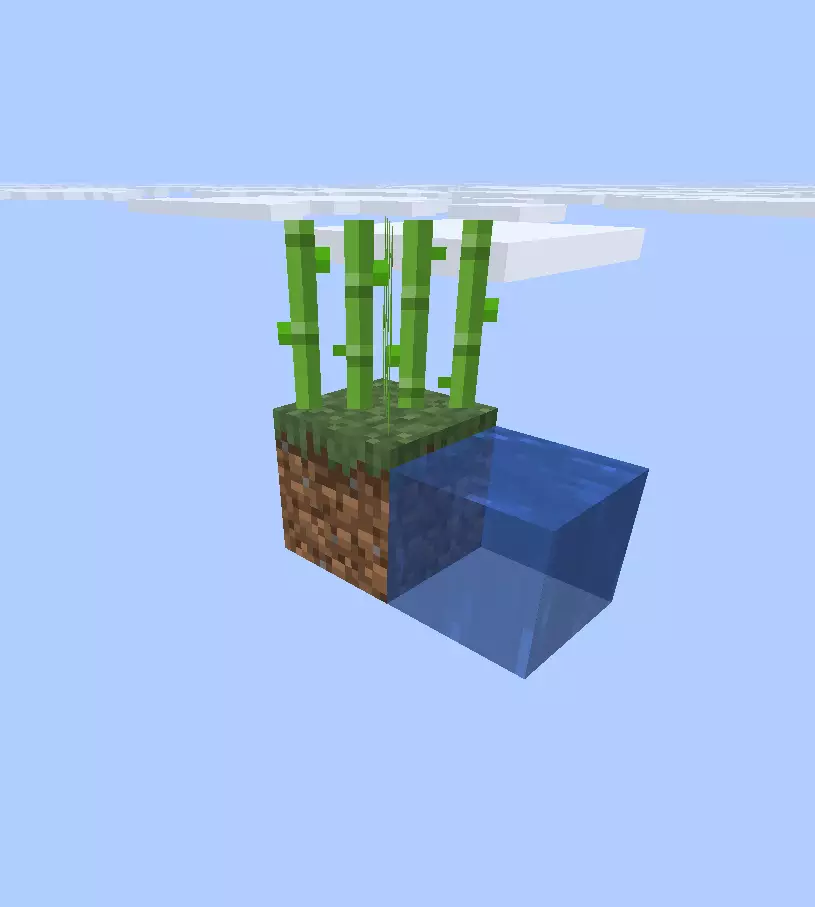
Old block config entries still work, so simple setups do not need to change.
Note: A lot changed in the plugin code for this version. Please report any bugs you run into, especially if your server uses Multiverse, CMI, Folia, or another world/spawn manager.
1.21.11Релиз1.21.11 · 10 января 2026 г.
Spawner biome fix (same kind of bug as the grid one)
- Like the recent grid fix, spawners had a biome matching issue too due to api changes.
- If you set a biome in SpawnerSettings (like Mushroom Fields), it could still fall back to the default mobs (often skeletons). This is now fixed.
If you are interested you can check out the more detailed updated release notes here
1.21.11Релиз1.21.11 · 9 января 2026 г.
What's new
1.21.11 Stuff
- The new entities released in 1.21.11 have been added to the possible selection in the spawner settings.
Bug Fix
- Fixed a bug where the generator was mostly ignoring biome distributions and using the default blocks instead.
- Biome matching is now more reliable (uses the biome key the server gives, with cleanup so YAML matches).
Note: Tested on Paper 1.21.11+. Please report any issues you encounter here or if you are interested you can check out the more detailed updated release notes here
1.21.10Релиз1.21.10 · 25 ноября 2025 г.
What's new
Updated Chest system
- Paper 1.21.10 changed how chunks load and broke our old way of tagging chests. Chest data now lives in a small local database so keys stay reliable even if Paper changes more. Old worlds still work like before.
- This makes the jar a bit larger and adds a small database file for the plugin, but it should feel the same on normal size servers.
- I have not stress tested this on huge servers with massive worlds, so if that is your setup you may want to keep an eye on database size and performance.
New content
- New 1.21.10 blocks and mobs are added into the grid and spawners, so the world matches the new version.
Bug Fix for /tpr and safety
- Fixed a bug where using /tpr in the End could drop you in the wrong dimension. Also added new unsafe blocks like leaf litter and dry grass so random teleports avoid new possible bad locations.
Note: This is a significant update with lots of changes. Tested on Paper 1.21.10 so far. Please report any issues you encounter here.
If you are interested you can check out the more detailed updated release notes here
1.21.7Релиз1.21.7 · 14 июля 2025 г.
Sorry it's taken so long to get the update out on the plugin pages. I've been busy, and even though the update has been done for a while, I just haven't had time to post it.
In this version, a lot has been overhauled to simplify the installation process where possible for all versions except Folia, due to some limitations with their API.
Major Changes
The datapack is no longer required for (Spigot, Bukkit, Paper, Pufferfish, Purpur, Leaf), since a custom generator has been built using the API to strip world chunk data of everything except biomes. This was done to support multi-world setups beyond the default 3 worlds.
⚠️⚠️⚠️ The plugin now creates 3 completely custom worlds and leaves the default ones untouched. So if you're switching from an old version and using (Spigot, Bukkit, Paper, Pufferfish, Purpur, Leaf), you'll need to do a few extra things. Like copying over your saved region data to the new worlds, and so on. ⚠️⚠️⚠️
If you're making a brand new server, you can just proceed as normal. Download the plugin and launch the server—no more extra steps like creating a datapack folder. Use the built-in /tpr command to teleport to the SkyGrid worlds. Portals, beds, and similar stuff are now isolated from the standard worlds. For example, going through a portal in the SkyGrid Overworld takes you to a SkyGrid Nether or End, depending on the type.
New Features
Custom Ender Eye Portal Tracking
Stand-alone end portals have been added to the SkyGrid Overworld. The plugin has custom logic to let Ender Eyes track these portals.
- Eyes follow a smooth arc to the nearest registered portal
- They hover with particles for 5 seconds so players can catch them
- Then they get refunded to the player
- If no portal exists, the eye pops with a small explosion and gets refunded
- Portal data is stored in a fast binary file (
portals.dat) - Only works with
END_PORTALblocks in the grid - Replaces the missing stronghold structure
Auto Mini-Chunk Regen
You can now mark any chunk to auto-regen on a timer. Great for farms, mob grinders, or any spot you want to reset without doing anything. Use easy in-game commands:
/miniregen add to start a regen job/miniregen remove to stop it
You can tab-complete the interval, alias, distribution, or group name.
New 1.21.5–1.21.7 Content
All the new blocks and mobs have been added to the grid. Things like:
- Firefly Bush
- Leaf Litter
- Wildflowers
- Bush
- Short Dry Grass
- Cactus Flowers
- Happy Ghast Spawners
- ... and more
/miniregen Command
/miniregen add [seconds] [alias] [distribution] [group]
/miniregen remove [alias]
/miniregen remove group [groupName]
Examples
# Regen this chunk every 5 minutes
/miniregen add 300 farmZone spring_to_life

# Stop that job
/miniregen remove farmZone

# Remove all jobs in the "farm" group
/miniregen remove group farm
Sample Materials List
Here's a sample mini_regen_materials.<code>yml </code> setup:
distributions:
  spring_to_life:
    FIRELY_BUSH: 1.0
    LEAF_LITTER: 0.5
    WILDFLOWERS: 0.7
    SHORT_DRY_GRASS: 0.4
    TALL_DRY_GRASS: 0.4
    CACTUS_FLOWER: 0.2
    LODESTONE: 0.8
Chest System Updates
The chest system now supports more loot customization:
- Mix Minecraft loot tables and your own custom ones
- Set custom item spawn chances
- See the SkyGridX Chest Settings Guide for full details
New tipped arrow logic adds random potion effects to arrows in chests for more variety.
End Fight Changes
The dragon fight is easier now:
- The End portal was moved to the same Y level as the obsidian platform
- A big dome around the fight area has been cleared of blocks
- Easier to shoot crystals and hit the dragon
- End pillars regenerate but no longer have cages
Bug Fixes
- Fixed enchanted books not combining properly
- Fixed enchantment text only showing in English (now uses server language)
- Lots of smaller bug fixes not listed
There’s been a ton of changes. If you need help with anything or run into issues, let me know on the plugin Discord Or submit issues on GitHub.
Folia version for 1.21.7 will come when they updated their api to 1.21.7
1.21.4Релиз1.21.4 · 9 марта 2025 г.
Has all same features as latest SkyGridx, but is optimized for folia specifically.
What is included in the latest update:
Plugin Update: Enhanced Chest System and Loot Distribution!
What's New?
Updated Loot Tables:
I've refreshed the loot tables to use the newest vanilla loot tables wherever possible. For example, in the jungle you'll now find loot from the updated jungle temple. Custom loot tables have also been improved – there are more items, more food options, more wood, and all the armor trims are now available across every dimension. Additionally, custom chests now include a wider selection of tools with more enchantment variety, and I've even swapped out wooden tools for gold ones for better balance.Increased Distribution:
The probability of finding chests and spawners has been boosted by 2-3 times in all dimensions. This means chests are now easier to locate, and with the updated loot tables, the rewards will be even more enticing.Dynamic Loot & Performance Boost:
Chests now populate their loot when they are opened instead of at the moment they're generated. This change not only improves performance by eliminating the need to calculate loot for every chest during chunk generation but also means that if loot tables are updated later, players will receive the new, updated loot instead of outdated items.
Enhanced Chest Modes
- Two Ways to Populate Chests:
- Custom Loot Tables:
Define exactly which items appear in your chests using either a compact or an expanded format. You can customize item display names (with color codes), set how enchantment levels are shown (either as numbers with a prefix or as Roman numerals), and even use filler items to adjust the rarity of valuable items.
- Custom Loot Tables:
#############################
# [Legacy (Compact) Format] #
#############################
ChestSettings:
  ChestOld:
    Items: [MATERIAL_ENUM:weight:maxAmount]
    Biomes: [BIOME_ENUM]
##########################################
# [Expanded Format / Enchanment Support] #
##########################################
ChestSettings:                                    # ChestSettings (Parent Key) Under this key, create one or more named chest configurations (e.g., "Chest1").
  ChestNew:                                       # Chest key can be anything, really. If you use special characters, make sure to put them inside parentheses like this: "N@me". It is used as a unique identifier for each chest (there should not be two that are the same).
    Items:
      - MATERIAL_ENUM:                            # Use the exact item names from https://hub.spigotmc.org/javadocs/bukkit/org/bukkit/Material.html
        - Weight: <numeric value>                 # The chance (in percent) for the material to be placed in the chest.
        - MaxAmount: <numeric value>              # The max amount of that material that will be allowed chest wide.
        - CustomName: <custom display name>       # Supports use of Minecraft color codes like "§0" for Black and so on.
        - LevelType: <Standard or Roman>          # Item-wide setting for enchantment display
        - Enchantments:
            - ENCHANTMENT_ENUM:                   # Use exact enchantment names from https://hub.spigotmc.org/javadocs/bukkit/org/bukkit/enchantments/Enchantment.html
                - Weight: <numeric chance in percent>
                - MinLevel: <minimum level>
                - MaxLevel: <maximum level>
                - LoreColor: <color>             # (Optional) Valid colors: BLACK, DARK_BLUE, DARK_GREEN,DARK_AQUA, DARK_RED, DARK_PURPLE, GOLD, GRAY,DARK_GRAY, BLUE, GREEN, AQUA, RED, LIGHT_PURPLE,YELLOW, WHITE.
    Biomes:
      - BIOME_ENUM                               # Use the exact biome names from https://hub.spigotmc.org/javadocs/bukkit/org/bukkit/block/Biome.html


- Minecraft-based Loot Tables:
Use vanilla Minecraft’s loot generation with our updated loot table selections. Simply list the loot table names with their weights, and the plugin will automatically handle loot generation.
#########################
# [New Vanilla Support] #
#########################
ChestSettings:                                    # ChestSettings (Parent Key)
  ChestMulti:                                     # Chest key can be anything, really. If you use special characters, make sure to put them inside parentheses like this: "N@me". It is used as a unique identifier for each chest (there should not be two that are the same).
    LootTables:                                   # LootTables (Parent Key)
      - SIMPLE_DUNGEON:                           # Each loot table entry is defined as a map where the key is a loot table enum (from Bukkit’s LootTables, such as SIMPLE_DUNGEON, ABANDONED_MINESHAFT, etc.) Bukkit LootTables: https://hub.spigotmc.org/javadocs/bukkit/org/bukkit/loot/LootTables.html
          - Weight: 80.6                          # The chance (in percent) for the material to be placed in the chest.
      - VILLAGE_ARMORER:
          - Weight: 19.4
    Biomes:                                       # Biomes (Parent Key)
      - DESERT                                    # Use the exact biome names from https://hub.spigotmc.org/javadocs/bukkit/org/bukkit/block/Biome.html


1.21.4Релиз1.21.4 · 9 марта 2025 г.
Plugin Update: Enhanced Chest System and Loot Distribution!
What's New?
Updated Loot Tables:
I've refreshed the loot tables to use the newest vanilla loot tables wherever possible. For example, in the jungle you'll now find loot from the updated jungle temple. Custom loot tables have also been improved – there are more items, more food options, more wood, and all the armor trims are now available across every dimension. Additionally, custom chests now include a wider selection of tools with more enchantment variety, and I've even swapped out wooden tools for gold ones for better balance.Increased Distribution:
The probability of finding chests and spawners has been boosted by 2-3 times in all dimensions. This means chests are now easier to locate, and with the updated loot tables, the rewards will be even more enticing.Dynamic Loot & Performance Boost:
Chests now populate their loot when they are opened instead of at the moment they're generated. This change not only improves performance by eliminating the need to calculate loot for every chest during chunk generation but also means that if loot tables are updated later, players will receive the new, updated loot instead of outdated items.
Enhanced Chest Modes
- Two Ways to Populate Chests:
- Custom Loot Tables:
Define exactly which items appear in your chests using either a compact or an expanded format. You can customize item display names (with color codes), set how enchantment levels are shown (either as numbers with a prefix or as Roman numerals), and even use filler items to adjust the rarity of valuable items.
- Custom Loot Tables:
#############################
# [Legacy (Compact) Format] #
#############################
ChestSettings:
  ChestOld:
    Items: [MATERIAL_ENUM:weight:maxAmount]
    Biomes: [BIOME_ENUM]
##########################################
# [Expanded Format / Enchanment Support] #
##########################################
ChestSettings:                                    # ChestSettings (Parent Key) Under this key, create one or more named chest configurations (e.g., "Chest1").
  ChestNew:                                       # Chest key can be anything, really. If you use special characters, make sure to put them inside parentheses like this: "N@me". It is used as a unique identifier for each chest (there should not be two that are the same).
    Items:
      - MATERIAL_ENUM:                            # Use the exact item names from https://hub.spigotmc.org/javadocs/bukkit/org/bukkit/Material.html
        - Weight: <numeric value>                 # The chance (in percent) for the material to be placed in the chest.
        - MaxAmount: <numeric value>              # The max amount of that material that will be allowed chest wide.
        - CustomName: <custom display name>       # Supports use of Minecraft color codes like "§0" for Black and so on.
        - LevelType: <Standard or Roman>          # Item-wide setting for enchantment display
        - Enchantments:
            - ENCHANTMENT_ENUM:                   # Use exact enchantment names from https://hub.spigotmc.org/javadocs/bukkit/org/bukkit/enchantments/Enchantment.html
                - Weight: <numeric chance in percent>
                - MinLevel: <minimum level>
                - MaxLevel: <maximum level>
                - LoreColor: <color>             # (Optional) Valid colors: BLACK, DARK_BLUE, DARK_GREEN,DARK_AQUA, DARK_RED, DARK_PURPLE, GOLD, GRAY,DARK_GRAY, BLUE, GREEN, AQUA, RED, LIGHT_PURPLE,YELLOW, WHITE.
    Biomes:
      - BIOME_ENUM                               # Use the exact biome names from https://hub.spigotmc.org/javadocs/bukkit/org/bukkit/block/Biome.html
- Minecraft-based Loot Tables:
Use vanilla Minecraft’s loot generation with our updated loot table selections. Simply list the loot table names with their weights, and the plugin will automatically handle loot generation.
#########################
# [New Vanilla Support] #
#########################
ChestSettings:                                    # ChestSettings (Parent Key)
  ChestMulti:                                     # Chest key can be anything, really. If you use special characters, make sure to put them inside parentheses like this: "N@me". It is used as a unique identifier for each chest (there should not be two that are the same).
    LootTables:                                   # LootTables (Parent Key)
      - SIMPLE_DUNGEON:                           # Each loot table entry is defined as a map where the key is a loot table enum (from Bukkit’s LootTables, such as SIMPLE_DUNGEON, ABANDONED_MINESHAFT, etc.) Bukkit LootTables: https://hub.spigotmc.org/javadocs/bukkit/org/bukkit/loot/LootTables.html
          - Weight: 80.6                          # The chance (in percent) for the material to be placed in the chest.
      - VILLAGE_ARMORER:
          - Weight: 19.4
    Biomes:                                       # Biomes (Parent Key)
      - DESERT                                    # Use the exact biome names from https://hub.spigotmc.org/javadocs/bukkit/org/bukkit/block/Biome.html
Комментарии
Загружаем…