 Mineforgian
SignWarp
Allows players to place panels to teleport between them by simply right-clicking on them.
- Загрузки
- 1K
- Подписчики
- 9
- Обновлён
- 8 сентября 2025 г.
- Лицензия
- MIT
Опубликован 14 апреля 2024 г.
SignWarp




A Bukkit plugin for teleportation using signs. (Minecraft Version 1.20 - 1.21.8)
SignWarp allows players to place signs to teleport between them with a simple right-click.
By default, teleportation costs one ender pearl, which must be in the player's hand when interacting with the sign, but this can also be disabled in the configuration.
Permissions
signwarp.create- Allow creation and destruction of warp signs (default: op)signwarp.use- Allow usage of warp signs (default: everyone)signwarp.reload- Allow access to reload (default: op)signwarp.admin- Allows access to the warp management GUI (default: op)signwarp.*- Allow access to all features (default: op)signwarp.limit.unlimited- Allows unlimited warp creation
Commands:
/signwarp reload- Reloads the configuration./signwarp gui- Open the warp management GUI.
How to Use
First, place a sign where you want to teleport with the following content:
- First line: [WarpTarget] or [WPT]
- Second line: The name you want to use
This will create a warp sign that sets the location to which a player teleports.
After creating the warp sign, create one or more warp signs from which you want to teleport to the target sign.
This is done by placing a sign with the following content:
- First line: [Warp] or [WP]
- Second line: The name you want to use
Note: The target sign (WarpTarget) must exist before creating the warp sign!
Bi-Directional Teleportation (New in v1.2.0!)
SignWarp now supports bi-directional teleportation! This enhancement allows players to travel back and forth between paired warp signs seamlessly.
How It Works
- Forward Travel: Right-clicking a [Warp] sign teleports you to the corresponding [WarpTarget] (existing behavior)
- Return Travel: Right-clicking a [WarpTarget] sign now teleports you back to the corresponding [Warp] sign (new feature!)
This creates a true two-way teleportation system between paired signs, perfect for:
- Creating transportation networks between bases
- Setting up quick travel points in adventure maps
- Establishing merchant shop connections
- Building dungeon entrance/exit systems
Technical Details
- Both directions respect the same permissions, cooldowns, and costs
- The plugin tracks sign locations in a database for reliable bi-directional links
- If either sign is broken, the link is automatically cleaned up
- Works with all existing warp configurations (economy costs, item costs, effects, etc.)
Once you have created both signs, you can right-click with the use-item in your hand (by default, it's an ender pearl).
Each teleportation will cost the number of items configured in use-cost (default: 1).
You can remove the use-item option in the config.yml or set it to "none" to allow any item to be used (i.e., each warp is free per use).
Alternatively, you can enable teleport-cost in the config.yml to charge players a set amount of in-game currency for each teleportation. Ensure Vault is installed on your server to use this feature.
Warp Limit System
Control the maximum number of warps players can create using permissions.
Example with LuckPerms:
/lp group default permission set signwarp.limit.3
This allows players in the default group to create up to 3 warps.
Without a limit permission, players can create an unlimited number of warps by default.
Admin GUI

Message Customization
In the config.yml configuration file, you have the option to customize the messages used by the plugin. These messages are defined under the key messages and can be modified according to your preferences.
Preview :
messages:
  create_permission: "&cYou do not have the required permissions to create warp signs!"
  no_warp_name: "&cNo warp name set!\nPlease specify the warp name on the second line."
  warp_created: "&aWarp sign successfully placed."
  warp_name_taken: "&cA warp target with the same name already exists!"
  warp_destroyed: "&aWarp destroyed."
  target_sign_created: "&aTarget sign for warp successfully placed."
  destroy_permission: "&cYou do not have the required permissions to destroy warp signs!"
  invalid_item: "&cYou must use {use-item} for this warp!"
  not_enough_item: "&cYou need {use-cost} {use-item} for this warp!"
  warp_not_found: "&cSpecified warp does not exist!"
  use_permission: "&cYou do not have the required permissions to use the warp sign!"
  teleport: "&eTeleporting to {warp-name} in {time} seconds..."
  teleport-success: "&aSuccessfully teleported to {warp-name}."
  teleport-cancelled: "&cTeleport cancelled."
  notify-cost: "&aYou have been charged {cost} currency for the teleportation."
  not_permission: "&cYou do not have permission!"
  limit_reached: "&cYou have reached your warp creation limit ({limit})."
  warp_sign_removed: "&aWarp sign removed successfully!"
  no_bidirectional_link: "&cNo return point found for this warp!"
{warp-name}: This placeholder is replaced by the name of the warp specified on the sign.{use-item}: Used to represent the name of the item required to use the warp. For example, if the required item is an ender pearl, this placeholder will be replaced by "ENDER_PEARL".{use-cost}: This placeholder is replaced by the number of items needed to use the warp. For example, if the cost to use the warp is 1 ender pearl, this placeholder will be replaced by "1".{cost}: This placeholder is replaced by the amount of currency charged for teleportation.{time}: This placeholder is replaced by the time in seconds before the teleportation is completed.
You have the option to stylize your texts with Minecraft color codes. These codes start with the & character, followed by a letter or number representing a specific color. More informations
Sound and Effect Customization
You can customize the sound and effect played during teleportation in the config.yml configuration file:
List Sound and List Effect
Note : The sound and effect must be in uppercase and replace "." by "_" for the sound.
Preview :
teleport-sound: ENTITY_ENDERMAN_TELEPORT
teleport-effect: ENDER_SIGNAL
Screenshot

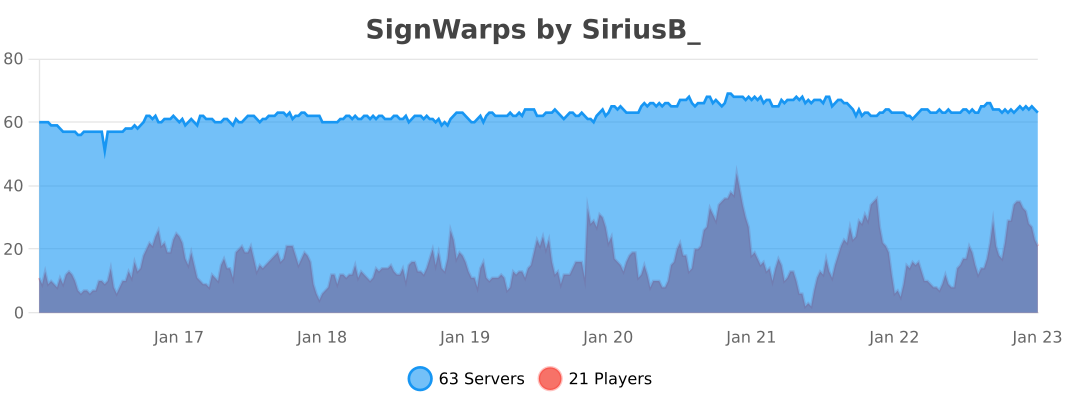
Statistics (bstats.org)
Ченджлог
1.2.1Релиз1.21.6, 1.21.7, 1.21.8 · 8 сентября 2025 г.
🆕 New Features & Enhancements - v1.2.1
✨ Changelog - Version 1.2.1
🚀 New Features
- Folia Compatibility
- ➜ All teleportation and scheduler logic has been updated to fully support Folia’s region threading model.
- ➜ Teleports now use
teleportAsync()for safe async operations. - ➜ Uses Folia’s
EntityScheduler,RegionScheduler, andGlobalRegionScheduler.
🔧 Improvements
- Replaced legacy
BukkitSchedulercalls with Folia-safe scheduling. - Refined teleport cooldown handling for smoother player experience.
- Better error handling when warp locations are invalid or missing.
🐛 Fixes
- Fixed crashes caused by
UnsupportedOperationExceptionwhen using the plugin on Folia. - Fixed teleport tasks not properly canceling on player movement.
- Fixed economy/item cost not being deducted correctly in some scenarios.
✅ Compatibility
- ✅ Fully compatible with Minecraft 1.21.5 and newer builds of Paper/Folia.
- ❌ Legacy Bukkit/Paper scheduler APIs are no longer supported.
💬 Feedback & Support
Thank you for your continued support of SignWarp! 🚀
If you encounter any issues or have suggestions, please reach out on our discord server.
1.2.0Релиз1.21.6, 1.21.7, 1.21.8 · 7 августа 2025 г.
🆕 New Features & Enhancements - v1.2.0
✨ Changelog - Version 1.2.0
🚀 New Features
Bi-Directional Teleportation system between signs.
- ➜ Right-clicking a [Warp] sign teleports to its [WarpTarget].
- ➜ Right-clicking the [WarpTarget] now teleports back to the paired [Warp] sign.
- ➜ Seamless travel in both directions.
Perfect for:
- Base-to-base fast travel
- Shops & merchant areas
- Dungeons (entrance ⇄ exit)
- Adventure map navigation
Fully integrated with:
- Economy system (Vault)
- Item cost system
- Teleportation cooldowns
- Permissions & limits
Automatically removes links when one of the signs is broken.
🔧 Improvements
- Various internal code cleanups and improvements.
- Teleportation logic refactored for consistency and better error handling.
- Improved compatibility with future Minecraft versions.
✅ Compatibility
- ✅ Fully compatible with Minecraft 1.21.4, 1.21.5, and 1.21.8
- ✅ Backward compatible with 1.20.x and earlier builds
💬 Feedback & Support
We hope these new features and improvements enhance your SignWarp experience. As always, thank you for using SignWarp!
If you encounter any issues or have feedback, please reach out on our discord server.
1.1.2Релиз1.21.2, 1.21.3, 1.21.4 · 10 мая 2025 г.
📢 Changelog - Version 1.1.2
✨ New Features
- Added warp creation limit system via permissions.
➔ Example:/lp group default permission set signwarp.limit.3
➔ No limit if the permission is not defined.
🔧 Improvements
- Coordinates are now displayed as integers in the warp GUI.
- Warp limit reached message is now configurable in
config.yml(messages.limit_reached).
🛠 Compatibility
- ✅ Fully compatible with Minecraft 1.21.4 and earlier versions (1.20.x).
1.1.1Релиз1.20.4, 1.21 · 12 августа 2024 г.
Bug Fixes:
- Teleportation Cancellation: Resolved an issue where the
"Teleport cancelled"message was incorrectly displayed after successful teleportation. Now, it only appears if the player moves before teleportation is completed. - Item Usage Error: Fixed a bug causing an
IllegalArgumentExceptionwhen attempting to create anItemStackwith an invalid amount during teleportation. Added checks to ensure valid item quantities are processed. - Teleport Cost Handling: Addressed a
NullPointerExceptionthat occurred when attempting to remove or process teleportation costs or item costs, ensuring proper checks before accessing values.
New Features:
- Folia Support: Added compatibility with Folia, ensuring the plugin functions smoothly on both Paper and Folia server environments.
These fixes and enhancements improve the reliability of teleportation mechanics, ensuring that costs and items are only deducted under appropriate conditions, providing accurate feedback to players, and extending support to Folia servers.
We hope these new features and improvements enhance your SignWarp experience. As always, thank you for using SignWarp! If you encounter any issues or have feedback, please reach out on our discord server.
Update Instructions:
- Stop your server.
- Replace the old SignWarp.jar with the new version.
- Restart your server to apply the changes.
Note: The plugin will automatically handle new configurations. Your existing warp data will remain intact.
1.1.0Релиз1.20, 1.20.4, 1.21 · 2 августа 2024 г.
New Features:
- Teleportation Costs: Introduced teleportation costs that can be configured in the
config.yml. Players are charged a set amount of in-game currency to use warp signs. - Soft Vault Dependency: Vault is now a soft dependency. The plugin will still function without Vault, but economy features will be disabled if Vault is not present.
- Vault Dependency Error Handling: If
teleport-costis enabled and Vault is not installed, players attempting to use a warp sign will receive an error message.
Bug Fixes:
- Resolved an issue where teleportation costs or item costs were deducted even if the teleportation was cancelled.
- Fixed errors related to the absence of Vault when
teleport-costis configured.
Enhancements:
- Improved the handling of player interactions with warp signs, ensuring smoother operation and better error feedback.
- Added messages to
config.ymlfor teleportation cost notifications and Vault dependency errors. - Optimized teleportation logic to ensure costs are only deducted after successful teleportation.
We hope these new features and improvements enhance your SignWarp experience. As always, thank you for using SignWarp! If you encounter any issues or have feedback, please reach out on our discord server.
Update Instructions:
- Stop your server.
- Replace the old SignWarp.jar with the new version.
- Restart your server to apply the changes.
- Ensure Vault is installed if you plan to use teleportation costs.
Note: The plugin will automatically handle new configurations. Your existing warp data will remain intact.
1.0.8Релиз1.20.4, 1.21 · 29 июля 2024 г.
New Features:
- Warp Creation Date: Each warp now records the date and time it was created. This information is displayed in the warp GUI, allowing administrators to see when each warp was set up.
- Date Format: Dates are displayed in the format
MM/dd/yyyy | hh:mm:ss a, providing clear and easy-to-read timestamps. - Database Migration: Existing warp data is automatically migrated to include the new creation date column. This ensures backward compatibility and seamless integration of the new features.
Bug Fixes:
- Resolved issues with warp creation and deletion permissions.
- Improved the handling of player interactions with warp signs.
Enhancements:
- Optimized database operations for better performance.
- Enhanced user messages and feedback for warp creation, deletion, and usage.
We hope you enjoy these new features and improvements. As always, thanks for using SignWarp! If you encounter any issues or have any feedback, please contact us on our discord server.
Update Instructions:
- Stop your server.
- Replace the old SignWarp.jar with the new version.
- Restart your server to apply the changes.
- (Optional) Check the new creation dates of your warps in the warp GUI.
Note: The plugin will automatically handle the database migration, so no manual intervention is required. Your existing warp data will remain intact.
1.0.7Релиз1.20.4, 1.21 · 22 июля 2024 г.
- Fixed a bug on the version & on the update checker
1.0.6Релиз1.20.4, 1.21 · 21 июля 2024 г.
Addition of a GUI for Warp Management: Displays information for each Warp: world and coordinates.
Dynamic Pagination: Warps are managed by pages, with each page able to hold up to 45 Warps "Next Page" and "Previous Page" buttons to navigate between pages
New Commands:
/signwarp gui: Opens the Warps GUI (requiressignwarp.adminpermission)
Admin GUI

Комментарии
Загружаем…