 Mineforgian
ShockAirHeads
A 1.21+ NPC replacement with flair.
- Загрузки
- 588
- Подписчики
- 3
- Обновлён
- 20 апреля 2026 г.
- Лицензия
- GPL-3.0-only
Опубликован 25 марта 2025 г.
Create points of interest for players to interact with, completely themed to match your server & the role the AirHead plays. Create as many as you like, customizing each one down to the letter. It runs completely standalone and is open source.
This plugin requires Packet Events!
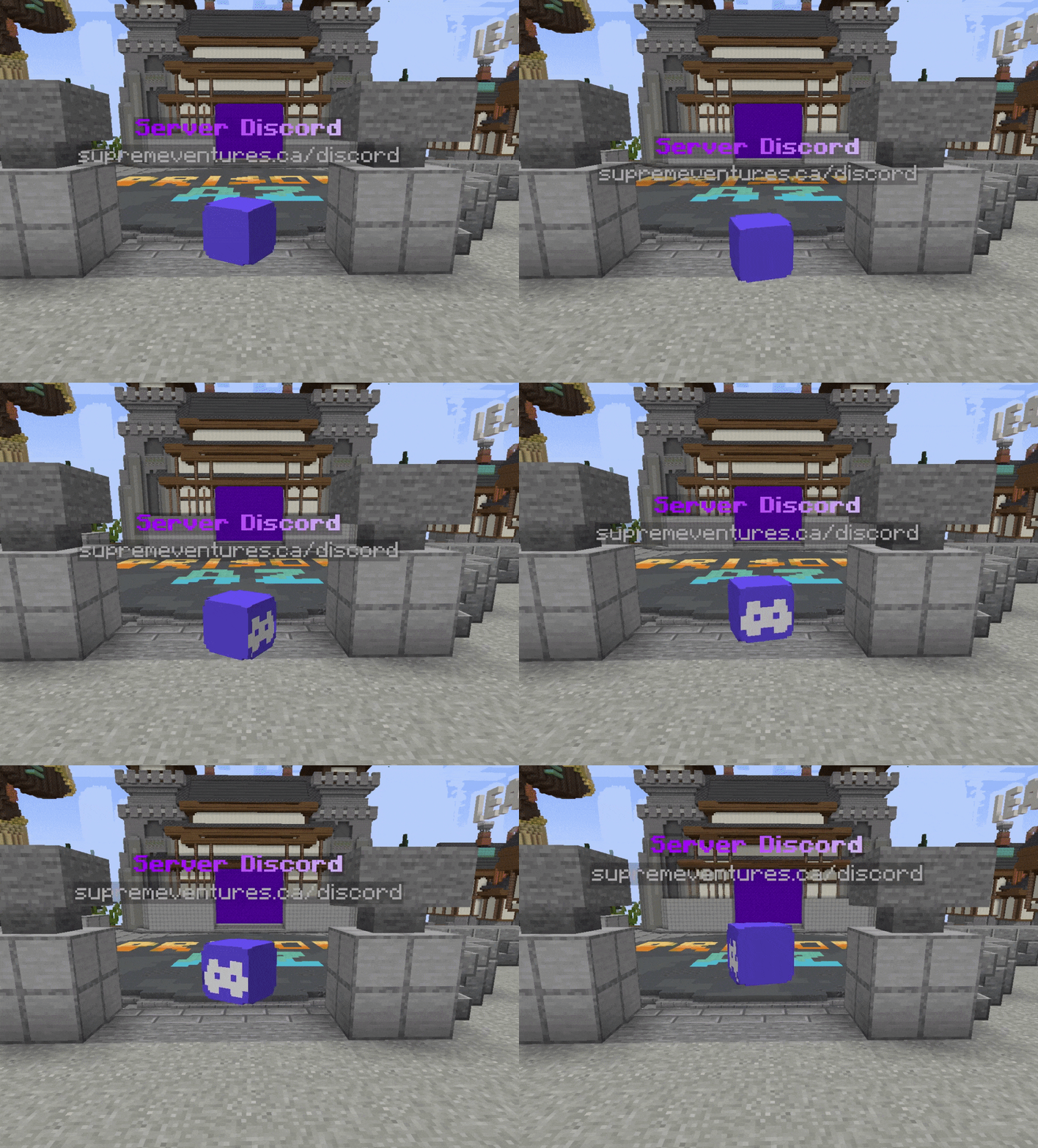
Key Features
- 1.20.5 - 1.21.8 Supported
- Create unlimited unique AirHeads, put them everywhere!
- Configure each AirHeads animation, appearance, and behavior.
- Lightweight & fast. No real entities bogging down your server.
- Powerful developer API for spawning AirHeads wherever & whenever you want.
- Internal Holograms using new 1.20+ TextDisplay entities (Background color, Billboard Display, etc)
- Scale heads up to 10x normal size, and down to 5% of normal size.
- Sends messages, play sounds, dispatch console commands or execute commands as the player.
- Add block-overlays to the AirHead, to add another layer of depth to your AirHeads.
- Velocity Send-To-Server support
Config
airheads:
  levels:
    # The location the AirHead will spawn at.
    location:
      world: test_world
      x: -438.0
      y: -38.0
      z: 293.0
      yaw: 0.0 # Used if rotation is disabled
      pitch: 0.0 # Used if rotation is disabled
    hologram-text-display-settings:
      # How the hologram rotates with the player.
      # Options:
      # FIXED - Hologram doesn't rotate at all.
      # VERTICAL - Hologram rotates with the player, but only on the Y axis.
      # HORIZONTAL - Hologram rotates with the player, but only on the X axis.
      # CENTERED - Hologram rotates with the player on all axes.
      billboard-constraints: VERTICAL
      # How text is auto aligned in the hologram.
      # Options:
      # LEFT - Text is aligned to the left.
      # CENTERED - Text is aligned to the center.
      # RIGHT - Text is aligned to the right.
      text-alignment: CENTERED
      hologram-text:
        - <#ADBED1><st>--</st> <#fded07><bold>ᴘʟᴀʏᴇʀ ʟᴇᴠᴇʟꜱ</bold> <#ADBED1><st>--</st>
        - <gray>1.20.5 - 1.21.5
      # How far above the AirHead the hologram is.
      hologram-offset: 0.5
      # How big/small to scale the hologram. Between 0.1 and 10.0
      scale-x: 1.0
      scale-y: 1.0
      scale-z: 1.0
      # How to translate the holograms position (Advanced users)
      translation-x: 0.0
      translation-y: 0.0
      translation-z: 0.0
      # Override the width/height of the hologram.
      # Will be override if text size is larger.
      width: 200
      height: 50
      # Does text on the hologram have a shadow?
      has-text-shadow: false
      # Is the hologram background transparent?
      transparent-background: true
      # If not transparent, what color is the background?
      # Uses ARGB format. #AARRGGBB
      background-color: '#40000000'
      # The radius of the hologram shadow.
      shadow-radius: 0.0
      # The strength of the hologram shadow.
      shadow-strength: 0.0
      # How often does the hologram update placeholders.
      # -1 to disable if not using placeholders are used or change.
      update-interval-ticks: 5
      # How far away should the hologram be visible.
      render-distance: 100
      # Hologram pitch and yaw.
      pitch: 0.0
      yaw: 0.0
    appearance-settings:
      # Head texture in base64 format.
      head-texture: eyJ0ZXh0dXJlcyI6eyJTS0lOIjp7InVybCI6Imh0dHA6Ly90ZXh0dXJlcy5taW5lY3JhZnQubmV0L3RleHR1cmUvMWUzMWRhZWEzMGU1NzFiYjhiZGZhMGM2ZDJjOGVhMWJjNzIxYTRiMTJhY2NmN2RhNDM4YjZmMDU5OGJmMDg4NiJ9fX0=
      # Scale of the head. Between 0.1 and 10.0
      scale: 2.0
      # Material overlapping the head (like a helmet)
      # AIR - No overlay, just the head.
      overlay-material: YELLOW_STAINED_GLASS
      # How much larger to scale the overlay. (How much bigger is the helmet)
      overlay-offset: 0.45
    interact-settings:
      # Executed by the player on every interact
      interact-commands:
        - levels
      # Executed by the player on every left-click
      left-click-commands: []
      # Executed by the player on every right-click
      right-click-commands: []
      # Executed by the console on every interact
      console-commands: []
      # Executed by the console on every left-click
      left-click-console-commands: []
      # Executed by the console on every right-click
      right-click-console-commands: []
      # Message sent to the player on every interact
      interact-message: []
      # Sound played to the player on every interact
      sound-settings:
        volume: 1.0
        pitch: 1.0
        sound: minecraft:entity.player.levelup
        enabled: true
      # Send a player to another server when they interact with the AirHead.
      # leave empty to disable.
      send-to: "factions"
    animation-settings:
      # Should the head float up and down?
      do-float: true
      # How far above and below the starting position should it float
      float-up-max: 0.5
      float-down-max: 0.5
      # How long, int ticks, should the animation take to run 1 up-down cycle.
      # Higher = slower
      float-cycle-duration-ticks: 80
        # Should the head rotate?
      do-rotation: true
      # How fast, in degrees, should the head rotate per tick.
      # Higher = faster
      rotation-per-tick: 5
Ченджлог
2.1.7Релиз1.21.9, 1.21.10, 1.21.11 · 20 апреля 2026 г.
Quick update to add support for Minecraft 1.21.11 (and the versions between the last release and now)
2.1.5Релиз1.21.8, 1.21.9, 1.21.10 · 22 октября 2025 г.
🎉 1.21.9 & 1.21.10 Stable Release
This version implements the required changes to support 1.21.9 and 1.21.10 (via PacketEvents) which is now considered a stable release!
If you want to help support us, please consider leaving us a ⭐ on Github 🙂
2.1.4-DEVБета1.21.7, 1.21.8, 1.21.9 · 6 октября 2025 г.
⚠️This is a pre-release build! Packet Events version 2.10.0 is experimental & has not been merged to release yet. Please test before releasing on a production server. If you are not using the shaded version, you'll need to download the latest Packet Events jar from here.
Full Changelog
- Added Packet Events 2.10.0 which includes support for Minecraft 1.21.9 & 1.21.10
- Fixed an API issue related to
HologramConfig#builder()
Full Changelog: https://github.com/Savag3life/ShockAirHeads/compare/2.1.2...2.1.5-DEV
2.1.3Релиз1.21.6, 1.21.7, 1.21.8 · 20 августа 2025 г.
- Fixed loading issues when attempting to load for minor versions of 1.20
2.1.2Релиз1.21.6, 1.21.7, 1.21.8 · 1 августа 2025 г.
It's been a while since we updated Airheads on Modrinth! Below is a full change log from 1.6.0 -> 2.1.2
- Removed Hologram Bridge dependency & hologram plugins. (No more decent holograms or CMI)
- Added new internal TextDisplay based Holograms for Airheads. (Similar to
FancyHolograms, without a dependency) - New config layout. Better structured, over 20 new configurable options.
- New developer API. Full coverage for Airhead & Hologram features. Also include persistent AirHead API.
- No longer requires external PacketEvents, shaded copy is now default. (Technically zero dependencies 🎉)
- Fixed teleport command moving the Airhead, not you to the Airhead.
- Added command descriptions to /airheads help
- Fixed < 1.21.4 sound enum reference. (Paper enum -> interface refactor)
- Corrected a client-side error which happened when reconnecting too quickly after disconnecting.
- Fixed desync issues created when players relog quickly
- Fixed a load-before-world issue for 1.21
- Updated Packet Events - Now supporting Minecraft 1.21.6 & 1.21.7
- Added Velocity/BungeeCord support for send-to server interact setting
- Added support for 1.21.8
We do not release every build on Modrinth! If you want up-to-date builds, check our Github or Discord for more details :)
1.6.0Релиз1.21.3, 1.21.4, 1.21.5 · 18 апреля 2025 г.
This update primarily focused on user commands & making the config easier to use.
- Added new commands:
/airheads create- Create a new AirHead in-game./airheads tp- Teleport to an existing Airhead./airheads movehere- Teleport an AirHead to your current location/airheads delete- Delete a given Airhead
- Changed the default config to be empty, preventing loading issues.
- Config location world identifier now supports world name &
NamespacedKey - API now requires a "AirHead Name" when creating via
new AirHeadBuilder(String);
1.4.1Релиз1.21.3, 1.21.4, 1.21.5 · 13 апреля 2025 г.
This build includes the relevant fixes for the new Packet entities system. Make sure you download and install Packet Events, non-shaded version available on Github. Report any errors, bugs, or suggestions in our Discord.
1.4.0Релиз1.21.3, 1.21.4, 1.21.5 · 10 апреля 2025 г.
Updated to use Packet based entities instead of actual armorstands. This introduces AirHeads which are only visible on the client & do not appear on the server.
- Implemented packet-based AirHead entities using PacketEvents.
- Fixed an issue with config sound names & also added ability to use custom sounds.
- Added the ability to place the hologram under or above the AirHead.
- Removed config option "run-clean-on-start", as we dont use entities anymore.
Комментарии
Загружаем…