 Mineforgian
Server Bridge CMD
This plugin can send commands from one server to another server. For example, admin can send commands from lobby server to afk server.
- Загрузки
- 69
- Подписчики
- 3
- Обновлён
- 27 мая 2026 г.
- Лицензия
- MIT
Опубликован 27 января 2026 г.
Server-to-Server Command Execution Plugin
What does the Plugin?
This plugin can send commands from one server to another, such as sending commands from a main server to an afk server.
How to use it?
• First you have to restart or start the server with the plugin.
• Then it will create a new folder with a config.yml file.
• In the config.yml, You have to configure like the image.
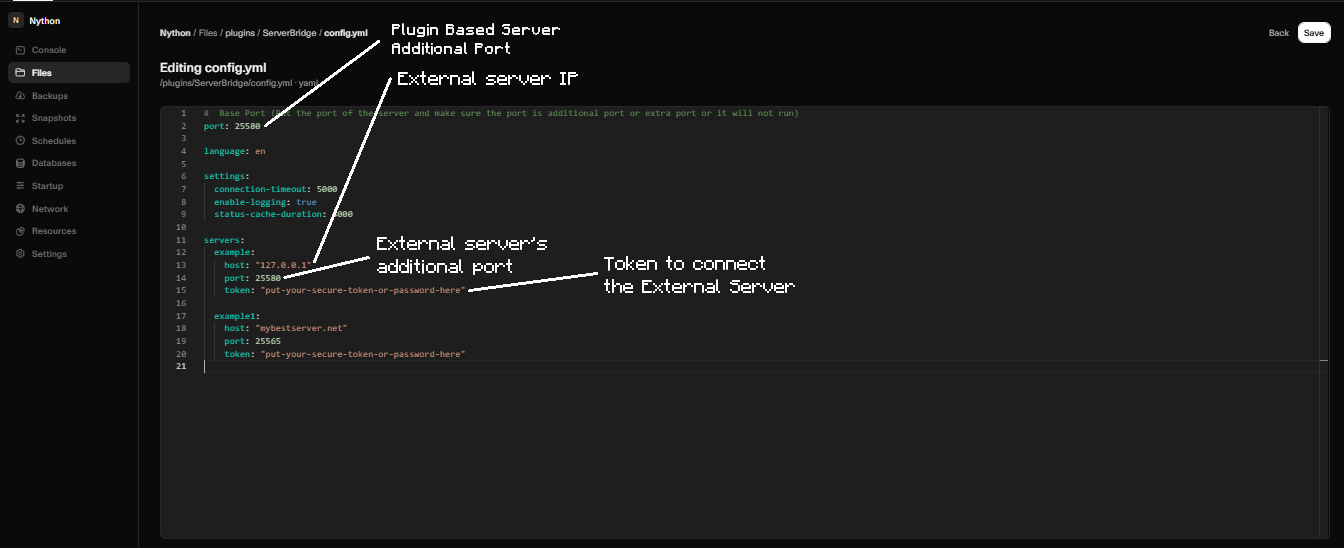
• Make sure you have to configure extra or new ports with both servers.
• And check both servers should have same token.
Dependency :
• It's mainly designed for 1.21.1 Paper.
• It's support viaversion (1.15.x - 1.21.x).
• It's support other pluginloader like spigot,purpur,pufferfish,paper.
Important :
• You also need a extra port for this or it will not work. Most of the hostings provide new port or port allowcation.
Ченджлог
1.0.5Релиз1.13, 1.13.1, 1.13.2 · 27 мая 2026 г.
<serverbridgecmd.strangled.net/changelog.yml>
1.0.4Релиз1.21.9, 1.21.10, 1.21.11 · 5 марта 2026 г.
• Added UDP protocol means if you don't have any additional port don't worry you can use UDP protocol to send commands.
• Added udp: true/false in the config.yml file. If udp: true it will disable the TCP protocol and it will use server's main port
• Added tcp-port: 25565. It only works when udp: is false. You can put additional port in tcp-port:. if you are using TCP protocol make sure do not use the server's main port (the port players use to join)
• If you enabled or disabled the udp setting in config.yml then make sure all the servers in config.yml must have same udp setting
• Permission serverbridge.use and serverbridge.admin mixed to serverbridge.admin
1.0.3Релиз1.21.9, 1.21.10, 1.21.11 · 23 февраля 2026 г.
• Added /servercmd help to show all the commands
• Added /servercmd status to see the info of the server
• Modified the config.yml (it doesn't effect on backward compatibility)
1.0.2Релиз1.21.9, 1.21.10, 1.21.11 · 28 января 2026 г.
• Changed the old command /servercmd <servername> <command>
to /servercmd servers <servername> <command>
• Added /servercmd add <serverip> <serverport> <servername> <token> and also /servercmd remove <servername>.
• Added /servercmd version.
• Added languages folder with the config.yml file.
• Added /servercmd reload(but it's only reload the lang and config files not new servers or old server connections).
• add serverbridge.admin permission
• And all the commands are synced with /scmd
1.0.1Релиз1.21.9, 1.21.10, 1.21.11 · 27 января 2026 г.
• Added Tab System
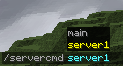
• Added Permission called serverbridge.use

• Added Shortcut /scmd of /servercmd
1.0.0Релиз1.21.9, 1.21.10, 1.21.11 · 27 января 2026 г.
Initial Upload
Комментарии
Загружаем…