 Mineforgian
Lumen
Effortless world lighting with torches and commands and optimized performance
- Загрузки
- 575
- Подписчики
- 8
- Обновлён
- 4 марта 2026 г.
- Лицензия
- All-Rights-Reserved
Опубликован 25 февраля 2025 г.
Lumen – Advanced Lighting for Minecraft
Lumen is a Minecraft plugin designed to enhance server quality of life by optimizing lighting. It allows efficient area illumination using commands and offers unique items:
- Lumen Torch – Automatically lights up the surroundings with custom light level.
- Lumen Guard – Prevents hostile mobs from spawning.
💡Attention: NO resource pack needed! Built exclusively for PaperMC.



⚡️ Features
- Smart Lighting Optimization: Automatically skips redundant light blocks based on light intensity, reducing block count while maintaining perfect illumination.
- Placement Safety: Intelligently avoids placing lights near sensitive blocks (saplings, redstone mechanisms, etc.) with a configurable safety margin.
- Dynamic lighting using commands and custom crafteable items (No resource pack needed).
- Auto-lighting torches with custom light level (Lumen Torch).
- Mob spawn prevention (Lumen Guard).
- Integration with CoreProtect & FAWE. (Recommended)
- Multilingual Support – Available translations: Spanish, Chinese, English, French, German, Italian and Brazilian Portuguese.
Usage
For Players
- The
Lumen Torchautomatically lights up nearby areas.- Players can right-click the air while holding a Lumen Torch and input a light level between 0 and 15 in the chat.
- The selected light level will be stored in the torch and applied when placed.
- The
Lumen Guardprevents mob spawning within its range. - Torches can be removed without being lost, and their effects disappear when removed.
- To craft them, you need
lumen.craft.torchandlumen.craft.guardpermissions.
Crafting Recipes
Lumen Torch
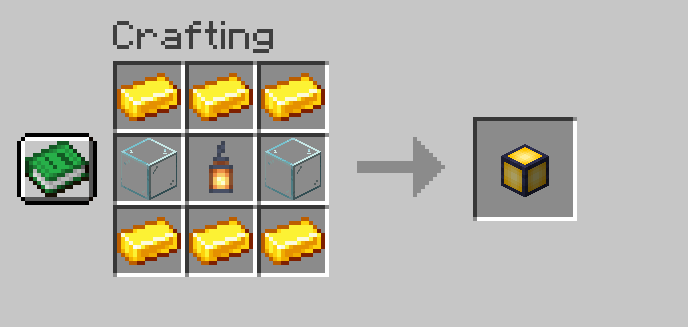
Lumen Guard
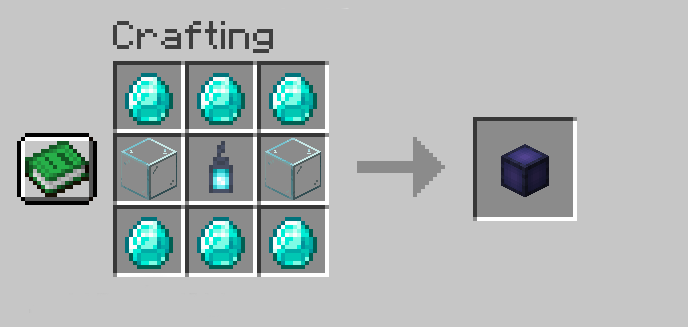

🛠️ Compatible Integrations
Lumen can leverage other tools to enhance performance and functionality:
- CoreProtect – Logs light placements and removals, allowing rollbacks and audits.
- FastAsyncWorldEdit (FAWE) – Optimizes light block placement through commands and the Lumen Torch, improving server performance.
🔐 Commands & Permissions
Commands
Lumen also provides a variety of aliases for each command /lumen, /lu, and /l.
/lumen light <range> <light_level> <include_skylight>– Places lights dynamically./lumen undo– Undoes previous light placements./lumen redo– Redoes removed lights./lumen remove area <range>– Removes lights in a specified area./lumen clear confirm– Clears all registered lights./lumen give <player/all> <torch_type> <quantity>– Gives torches to players./lumen reload– Reloads configuration and translations.
Permissions
- OP Permissions:
lumen.light– Permission to use/lumen light.lumen.cancel– Permission to cancel active tasks.lumen.undo– Permission to undo placements.lumen.redo– Permission to redo removed lights.lumen.remove– Permission to remove lights.lumen.clear– Permission to clear all lights.lumen.give– Permission to giveLumen TorchandLumen Guard.lumen.reload– Permission to reload configuration and translations.
- PLAYER Permissions:
lumen.craft.*– Permission to craft all Lumen items.lumen.craft.torch– Permission to craft theLumen Torch.lumen.craft.guard– Permission to craft theLumen Guard.
For Administrators
- Smart Spacing: Control the density of light blocks with
spacing_factor. - Safety Settings: Customize which blocks to avoid and the safety margin radius.
- Advanced light management using commands.
- Safe light removal with
/lumen remove. - Undo and redo light placements with
/lumen undoand/lumen redo. - Clear all lights with
/lumen clear(Dangerous). - Item distribution using
/lumen give. - Full customization through
config.ymland translation files inTranslations/. - Integration with CoreProtect and FAWE for enhanced performance and control.
- Reload configuration and translations with
/lumen reload.
📌 Installation Guide
Installation
Prerequisites
Before installing Lumen, make sure your server meets the following requirements:
- Minecraft Server: PaperMC 1.21.1 or higher.
- Java: Version 21 or higher.
- Optional Dependencies:
- CoreProtect (Optional): Enables tracking and rollback of placed or removed lights.
- FastAsyncWorldEdit (Optional): Optimizes performance for placing large amounts of lights.
Step 1: Download the Plugin
Download the latest version of Lumen from Modrinth.
Step 2: Installation
- Upload the file
Lumen.jarto theplugins/folder of your PaperMC server. - Restart the server to automatically generate the configuration files.
Step 3: Initial Configuration
- Navigate to the configuration folder:
plugins/Lumen/ - Edit
config.ymlto adjust performance and safety settings:
smart_lighting.spacing_factor: Control how many blocks are skipped during lighting.safety.margin: Radius of blocks to avoid around sensitive materials.safety.excluded_blocks: List of materials to avoid (saplings, redstone, etc.).command_lights_per_tick: Lights per tick when using commands.
- If using CoreProtect/FAWE, check the server console on startup for successful detection.
💬 Support & Contact
If you have any questions or encounter issues, feel free to contact us on Discord
Ченджлог
1.2.0Релиз1.21.11 · 4 марта 2026 г.
💡 Lumen 1.2.0 — Paper Native & Smart Lighting 💡
We’re releasing Lumen 1.2.0, a major update focusing on performance and intelligent lighting placement.
⚡️ Major Changes
- Full Paper API Integration: Removed Spigot compatibility layers to embrace PaperMC's native features and Adventure API, ensuring maximum performance and modern text handling.
🛡️ Safety & Optimization
- Smart Lighting Optimization: Intelligently skips redundant blocks based on light intensity, reducing the total block count while maintaining perfect illumination.
- Intelligent Placement Safety: Added a system to automatically avoid placing lights near sensitive blocks like saplings and redstone mechanisms.
- Configurable Safety Margin: New
safety.marginsetting inconfig.ymlto customize the protection radius around sensitive blocks.
👉 Download now | Join our Discord for support!
1.1.1Релиз1.21.6, 1.21.7, 1.21.8 · 1 июня 2025 г.
💡 Lumen 1.1.1 — Item support improved 💡
We’re releasing Lumen 1.1.1, a quality-of-life update that brings better item support.
⚙️ Improvements
- Updated the naming and lore system of Lumen items.
👉 Download now | Join our Discord for support!
1.1.0Релиз1.21.3, 1.21.4, 1.21.5 · 14 мая 2025 г.
💡 Lumen 1.1.0 — 1.21.5 Support & QoL 💡
We’re releasing Lumen 1.1.0, a quality-of-life update that brings full compatibility with the latest Minecraft version and improves performance across Spigot and Paper servers.
⚙️ Improvements
- Updated for Minecraft 1.21.5, ensuring full compatibility with the latest Paper and Spigot builds.
- Enhanced lighting logic for smoother execution on both Spigot and Paper, with improved tick handling for torch-based lighting.
🔔 New Features
- Added update notifications on startup when a new version is available.
- Translation files and configuration messages have been updated and clarified for easier understanding and customization.
🪲 What’s Fixed?
- Minor internal adjustments and consistency improvements across different server environments.
👉 Download now | Join our Discord for support!
1.0.0Релиз1.21.3, 1.21.4, 1.21.5 · 26 февраля 2025 г.
Lumen 1.0.0 - First Release! ✨
✨ Lumen revolutionizes lighting and mob protection in your server. Effortless lighting, optimized performance, and mob-free gameplay—designed for players, built for servers.
Features:
- Custom lighting with dynamic placement.
- Undo/Redo for easy light management.
- Effortless lightning and Mob protection with custom torches. (No resource pack needed)
- Customizable Light Levels: Players can right-click the air while holding a Lumen Torch to set a light level (0-15). The selected level is stored and applied when placed.
- CoreProtect & FAWE integration.
🔹 Optimized for Paper, Purpur, and Spigot (1.21+)
Комментарии
Загружаем…