 Mineforgian
EzBoost
The ultimate token-based booster system. Create custom speed, movement, and gameplay buffs for your players.
- Загрузки
- 587
- Подписчики
- 2
- Обновлён
- 29 мая 2026 г.
- Лицензия
- MIT
Опубликован 14 января 2026 г.
EzBoost is a feature-rich potion boost plugin for Spigot, Paper, Bukkit, and Folia (Minecraft 1.21+). It provides an inventory GUI for boost selection, per-boost cooldowns, Vault economy integration, WorldGuard region overrides, boost token items, PlaceholderAPI support, persistent storage (YAML, SQLite, MySQL, MariaDB, PostgreSQL), and a leaderboard for top boost buyers. Inspired by RedBull.

✨ Key Features
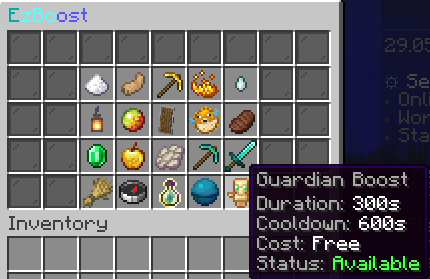
- GUI-first activation: Players can browse boosts with clear status, cooldown, and cost info.
- Admin GUI: Create and manage boosts through an intuitive admin interface.
- Folia support: Fully compatible with Folia servers – task scheduling routes through Folia's region schedulers automatically.
- Boost top leaderboard:
/boosttopdisplays the all-time top boost buyers, backed by persistent storage. - Fully configurable boosts: Define custom potion effects, amplifiers, durations, and permissions per boost.
- Multi-file configuration: Clean separation of settings, GUI, boosts, and more for easy management.
- Interactive GUI: Customizable inventory interface for boost activation.
- Per-boost cooldowns: Prevents abuse and enables balanced gameplay.
- World restrictions: Allow/deny boosts in specific worlds for tight gameplay tuning.
- Region-based overrides (WorldGuard): Apply different boost settings or disable boosts in specific WorldGuard regions using the override system. WorldGuard is detected automatically if present.
- Vault economy support: Optionally charge players for activating boosts.
- Boost token items: Give, trade, or reward boost tokens with
/ezboost give. Players redeem tokens by right-clicking them to activate the boost. - Live reload: Reload all configuration and messages at runtime with
/ezboost reload. - MiniMessage support: Rich formatting for all messages and GUI text.
- Internal message tags: Boost-specific tags (
<boost_display>,<boost_cost>,<boost_duration>, etc.) are available directly inmessages.yml– no PlaceholderAPI required. - PlaceholderAPI expansion: 18+ placeholders covering boost status, active boost, cooldowns, time remaining, XP multiplier, and economy formatting, usable in scoreboards, GUI plugins, and any PAPI-compatible plugin. See the PlaceholderAPI integration guide.
- Command hooks: Run console commands on enable/disable/toggle per boost.
- Player-friendly behavior: Reapply boosts on join, keep on death, and refund on failed activation.

⚡ Commands
| Command | Description | Permission |
|---|---|---|
/boost |
Open the boosts GUI or show usage. | ezboost.use |
/boost <boostKey> |
Activate a boost directly. | ezboost.use + boost permission |
/boosttop |
View the top boost buyers leaderboard. | ezboost.top |
/ezboost create |
Open the admin GUI to create boosts. | ezboost.admin |
/ezboost reload |
Reload configuration and messages. | ezboost.reload |
/ezboost give <player> <boostKey> [amount] |
Give boost token items. Players redeem by right-clicking. | ezboost.give |
For detailed command and permission documentation, see the Commands and Permissions pages.
🛡️ Permissions
ezboost.use– Use boosts (/boost).ezboost.top– View the boost leaderboard (/boosttop).ezboost.admin– Access admin commands.ezboost.reload– Reload configuration.ezboost.give– Give boost tokens.ezboost.cooldown.bypass– Bypass boost cooldowns.ezboost.boost.<key>– Per-boost permissions (example:ezboost.boost.speed).
🚀 Quick Start
- Place
EzBoost.jarin your server’splugins/folder. - Start the server to generate all config files in
plugins/EzBoost/(settings.yml,boosts.yml,gui.yml,messages.yml, etc.). - Use
/ezboost createto open the admin GUI and create boosts. - Configure boosts, cooldowns, costs, and GUI slots in
plugins/EzBoost/boosts.yml,gui.yml, and related config files. - Use
/boostto open the GUI or/boost <boostKey>for instant activation. - Use
/ezboost give <player> <boostKey> [amount]to give boost tokens. Players redeem tokens by right-clicking them. - Grant per-boost permissions (like
ezboost.boost.speed) to control access.
⚙️ Configuration Highlights
- Boost definitions: Add or edit boosts in
boosts.ymlwith effects, duration, cooldown, cost, and permissions. See the Boosts reference for a full reference. - Command hooks: Add
commands.enable,commands.disable, orcommands.toggleper boost to run console commands when boosts turn on/off (supports{player},{displayname}, and{boost}placeholders). - GUI layout: Customize title, size, filler, lore templates, and per-boost slot positions in
gui.yml. - Limits: Clamp amplifier and duration ranges for balance in
limits.yml. - World rules: Use
worlds.allow-list/worlds.deny-listto control where boosts apply inworlds.yml. - Storage backend: Choose YAML (default), SQLite, MySQL, MariaDB, or PostgreSQL in
storage.yml. - Region & World Overrides: Use
boosts.ymlto define per-world or per-region settings. If WorldGuard is installed, region overrides are applied automatically using region IDs. - Behavior toggles: Replace active boosts, reapply on join, keep on death, or refund failed activations in
settings.yml. - Economy: Enable Vault costs with
economy.enabledandeconomy.vaultineconomy.yml.
🌍 WorldGuard Integration & Region Overrides
- EzBoost automatically detects WorldGuard if present and applies region-based overrides for boosts.
- No hard dependency: If WorldGuard is not installed, region overrides are ignored.
- Use region IDs from WorldGuard in your
boosts.ymlto customize boost behavior per region. - See the Overrides documentation for syntax and examples.
✅ Recommended Use Cases
- Rank perks: Grant unique boosts per rank using per-boost permissions.
- Crates & events: Distribute boost tokens as rewards.
- Economy sinks: Add costs to balance late-game progression.
- World/region gating: Enable or disable boosts only in specific worlds or WorldGuard regions.
📚 Documentation & Support
Full documentation is available at ez-plugins.github.io/EzBoost.
| Page | What it covers |
|---|---|
| Commands | All /boost and /ezboost commands |
| Permissions | Permissions reference and defaults |
| Configuration | All config files explained |
| Boosts | boosts.yml schema – effects, duration, costs |
| GUI | gui.yml layout and slot configuration |
| Overrides | World and region override syntax |
| PlaceholderAPI | 18+ available placeholders |
Need help or want to chat? Join our Discord: https://discord.gg/yWP95XfmBS

Ченджлог
2.2.0Релиз26.1, 26.1.1, 26.1.2 · 29 мая 2026 г.
Added
- Guardian preset boost (
guardian): built-in totem-style defensive boost with default effects (DAMAGE_RESISTANCE,HEALTH_BOOST) and preconfigured GUI slot. - Per-boost revive options in
boosts.yml:revive-enabled(defaultfalse)revive-hearts(default4.0, clamped to safe bounds)
- Lethal-hit interception for revive-enabled boosts: when incoming damage would be fatal, death is prevented, configured health is restored, and the active boost is consumed immediately (single-use per activation).
- Guardian hover preview screenshot:
/boostGUI hover state for Guardian added to release/listing visuals.
2.1.0Релиз26.1, 26.1.1, 26.1.2 · 18 мая 2026 г.
Added
- Folia compatibility: EzBoost now supports Folia servers via a
FoliaSchedulerabstraction that routes task scheduling through Folia'sGlobalRegionScheduler/ entity schedulers when the Folia runtime is detected. - Boost top leaderboard (
/boosttop): tracks and displays the top boost buyers using a Jaloquent-backed persistent storage layer. - Jaloquent storage backend: replaced the previous
BoostStorageabstraction with a fully Jaloquent-backedEzBoostRepositoryfor consistent flat-file persistence across all storage operations. storage.debug-loggingoption (storage.yml, defaultfalse): suppresses verbose Jaloquent console output (Queried X rows,Saved model…). Set totrueto re-enable for debugging.- Paper 1.21 smoke-test: CI matrix now includes Paper 1.21.11 alongside Paper 26.1.2, Folia, Spigot, and Bukkit.
Changed
api-versionlowered from26.1.2to1.13so the plugin loads on any Spigot/Paper 1.13+ server without an api-version warning or rejection.- Java compiler target lowered from 25 to 17 for wider JDK compatibility.
AsyncChatEvent(Paper-only) replaced withAsyncPlayerChatEventfor Spigot compatibility.- Plugin version lookup changed from
getPluginMeta().getVersion()togetDescription().getVersion()for broader server compatibility. - CI smoke-test pass condition now also verifies
Enabling EzBoostappears in the server log, preventing a false pass when the server starts but rejects the plugin due to an incompatible api-version.
Fixed
YamlDataStore.query()corrected to handle Jaloquent's flat key format.storage.ymladded topom.xmlresource includes so it is correctly packaged.- Vault is now fully optional: economy class access and listener registration are guarded so the plugin loads cleanly without Vault present.
2.0.0Релиз26.1, 26.1.1, 26.1.2 · 15 апреля 2026 г.
Minecraft 26.1.2 & Java 25
The plugin has been updated to Minecraft 26.1.2 and Java 25
Placeholders & Messages
New internal message tags (no PlaceholderAPI required)
Boost-context messages in messages.yml now support additional tags automatically.
You can use these in any message that relates to a specific boost:
| Tag | Example output |
|---|---|
<boost> / <boost_display> |
Speed Boost |
<boost_key> |
speed |
<boost_cost> |
50,000 |
<boost_cost_compact> |
50K |
<boost_cost_raw> |
50000 |
<boost_duration> |
120 |
<boost_cooldown> |
60 |
Available in: boost-activated, boost-expired, boost-cooldown, boost-effect-cooldown, insufficient-funds, cost-charged, token-used.
Bug fix: <boost> now shows display name everywhere
Previously boost-expired, cost-charged, and token-used showed the internal config key (e.g. speed) instead of the configured display name (e.g. Speed Boost). This is now fixed. Use <boost_key> if you specifically need the raw config key.
9 new PlaceholderAPI placeholders
Requires PlaceholderAPI to be installed.
| Placeholder | Returns |
|---|---|
%ezboost_has_active_boost% |
true or false |
%ezboost_active_boost% |
Config key of the active boost, or empty |
%ezboost_active_boost_display% |
Display name of the active boost, or empty |
%ezboost_active_boost_time_remaining% |
Seconds remaining as a number |
%ezboost_active_boost_time_remaining_formatted% |
MM:SS or HH:MM:SS |
%ezboost_is_active_<boostkey>% |
true or false |
%ezboost_cooldown_remaining_<boostkey>% |
Cooldown seconds as a number |
%ezboost_cooldown_remaining_formatted_<boostkey>% |
MM:SS or HH:MM:SS |
%ezboost_xp_multiplier% |
Active XP multiplier (1 if no XP boost is running) |
Example uses:
- Scoreboard line:
Boost: %ezboost_active_boost_display% (%ezboost_active_boost_time_remaining_formatted%) - Condition check: show a button only when
%ezboost_has_active_boost%equalsfalse - XP display:
XP rate: %ezboost_xp_multiplier%x
1.6.0Релиз26.1, 26.1.1, 26.1.2 · 14 апреля 2026 г.
New Boosts
11 new preset boosts have been added and are available out of the box:
| Key | Display Name | Effects |
|---|---|---|
waterbreathing |
Water Breathing Boost | Water Breathing |
saturation |
Saturation Boost | Saturation |
luck |
Luck Boost | Luck |
absorption |
Absorption Boost | Absorption II |
slowfall |
Slow Falling Boost | Slow Falling |
miner |
Miner Boost | Haste III + Night Vision |
warrior |
Warrior Boost | Strength II + Absorption II |
farmer |
Farmer Boost | Saturation + Luck |
explorer |
Explorer Boost | Speed II + Jump Boost II |
xpboost |
XP Boost | 2× XP multiplier (custom effect) |
diver |
Diver Boost | Water Breathing + Dolphin's Grace + Conduit Power |
All new boosts are disabled by default. Enable them in boosts.yml and assign slots in gui.yml.
Each boost requires the corresponding permission node, e.g. ezboost.boost.waterbreathing.
Notes
- The XP Boost uses a custom effect (
xpboost) that multiplies experience gained. Amplifier 0 = 2× XP, amplifier 1 = 3× XP, and so on. - The Miner, Warrior, Farmer, Explorer, and Diver boosts are combo boosts that apply multiple effects simultaneously.
1.5.6Релиз1.21.9, 1.21.10, 1.21.11 · 1 апреля 2026 г.
- Fixed optional Placeholder registration, plugin did not start up when PlaceholderAPI was missing
- Fixed autocomplete of the
/boostcommand
1.5.5Релиз1.21.9, 1.21.10, 1.21.11 · 28 марта 2026 г.
What's Changed
- Added money formatting (
1k,2b,3t) by @ez-plugins in https://github.com/ez-plugins/EzBoost/pull/27 - Added
/ezboost aboutsubcommand by @ez-plugins in https://github.com/ez-plugins/EzBoost/pull/29 - feat: added PlaceholderAPI expansion by @ez-plugins in https://github.com/ez-plugins/EzBoost/pull/28
Full Changelog: https://github.com/ez-plugins/EzBoost/compare/1.5.4...1.5.5
1.5.4Релиз1.21.9, 1.21.10, 1.21.11 · 13 марта 2026 г.
- Added
show-effectsoption (defaultfalse) to hide potion effects
1.5.3Релиз1.21.9, 1.21.10, 1.21.11 · 21 января 2026 г.
- Removed parent from
pom.xml - Removed debug messages when no effects applied to custom effect
Комментарии
Загружаем…