 Mineforgian
EmakiCooking | World-Placed Cooking Stations with Persistence
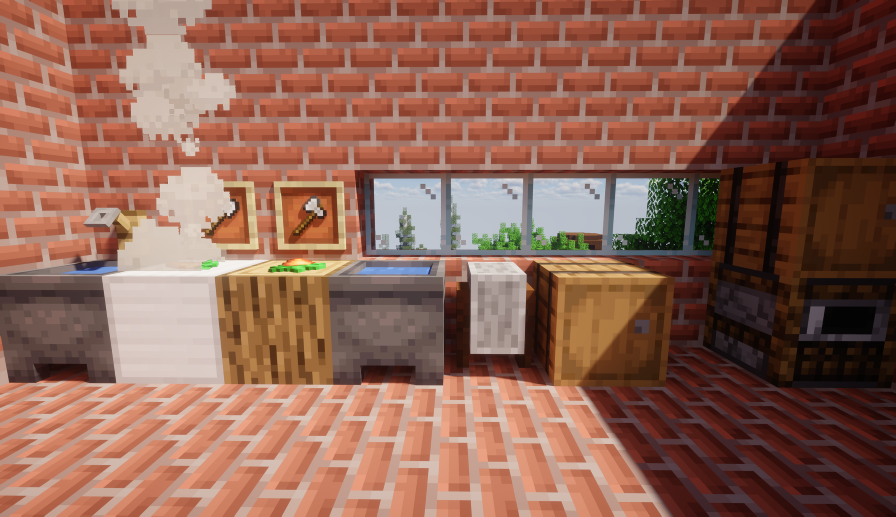
Seven distinct cooking stations placed as real blocks in the world — chopping board, wok, grinder, steamer, oven, juicer and fermentation barrel — each with its own mechanics, coordinate-persistent state, display entities, multi-branch outcomes, chained re
- Загрузки
- 936
- Подписчики
- 13
- Обновлён
- 29 июня 2026 г.
- Лицензия
- GPL-3.0-only
Опубликован 5 сентября 2025 г.
EmakiCooking makes cooking a real-world interaction instead of a reskinned crafting menu. Players place station blocks in the world and right-click (or sneak-click) to chop, stir-fry, grind, steam, bake, press and ferment. Each station has its own genuinely different mechanics — heat levels, stir timing, fuel and moisture, fluid capacity, fermentation windows — and every station's state is saved by world coordinates so it survives restarts.
Outcomes are not binary. A wok can produce success, undercooked, overcooked or invalid results; an oven can hit perfect or overbaked; a fermentation barrel can finish early, on time or over-fermented. Station blocks and ingredients can be vanilla or custom (CraftEngine / ItemsAdder / Nexo / Oraxen), display entities show ingredients floating on the block, and every action can be gated by its own permission.
Key Highlights
- Seven genuinely different stations — Not seven skins of one mechanic. The chopping board cuts in batches, the wok is a stir-timing challenge, the grinder runs on a timer, the steamer manages fuel and moisture, the oven controls heat windows, the juicer handles fluid capacity, and the fermentation barrel runs long fermentation cycles.
- Coordinate-persistent state — Ingredients, progress, cut count, steam, heat, burn time, fluid volume and fermentation progress are all saved per world coordinate and restored after a restart.
- Display entities on the block — Ingredients and outputs float on the station via PacketEvents virtual entities, or fall back to Bukkit ItemDisplay when PacketEvents is absent, with configurable offset, rotation (including random ranges) and scale per station and per item.
- Floating text guidance — A text display entity above a running station shows the result, progress or next-step hint, always facing the player, and disappears when the station finishes, clears or breaks.
- Multi-branch outcomes — The wok alone yields success / undercooked / overcooked / invalid; the oven yields success / perfect / overbaked; the fermentation barrel yields success / early / over — each branch with its own outputs and actions.
- Custom block and item sources — Station blocks can be vanilla, CraftEngine, ItemsAdder, Nexo or Oraxen; ingredients, outputs, fuel, containers and tools can reference any ItemSource.
- Chained production lines — A recipe can require the input to carry a previous station's processing history (e.g. chopped carrot → steamed carrot cake), enabling multi-station production chains.
- Per-action permissions — Use, cut, stir, serve, fuel, moisture, press and collect are each their own permission node per station, plus optional per-recipe permissions.
Feature Overview
Chopping board (no GUI, direct interaction)
- Configurable block source (sample oak log) and tool (sample iron axe / kitchen knife).
- Sneak-left-click to place input / process, right-click to return input.
- Accepts a whole main-hand stack at once and accumulates the count in state, while the display still shows a single item.
input.amountis consumed per cut round;cuts_requiredis the clicks needed per round (set to 1 for continuous batch cutting).- Tool durability loss per cut, an optional extra-damage chance, and a config-level chance to hurt the player.
- An interaction cooldown between clicks, with cut / complete / place action hooks.
Wok (no GUI, timing challenge)
- Configurable block (sample iron block) and spatula (sample iron shovel).
- Each ingredient has a stir rule (e.g. add on stir 1–3) and an amount; a required heat level set by the block beneath (campfire = 1, magma = 2, lava = 3).
- A valid stir-total range, a fault tolerance, a minimum delay between stirs and a timeout that treats overcooking.
- Optional bowl-in-hand requirement to serve, a stir animation (the food tosses and rotates 360°), scald damage, and a random failure chance with an invalid-result fallback.
- Four real outcome branches: success / undercooked / overcooked / invalid, with stir / add-ingredient / serve action hooks.
Grinder (no GUI, simplest)
- Configurable block (sample grindstone); sneak-left-click to start.
- Place and it auto-starts — no fuel, moisture or stirring; a grind-time and a background check interval.
- Can output multiple items (sample bone → 3 bone meal), with start / running / complete hooks.
Steamer (GUI, fuel + moisture)
- Configurable block (sample barrel) and a 1-row GUI with five ingredient slots.
- A heat-source block beneath provides ignition; fuels provide burning time; moisture rules add water (e.g. a water bucket returns the empty bucket and adds moisture).
- Fuel burns to convert moisture into steam, and steam drives the progress, with three efficiency parameters and an option to reset progress when steam runs out.
- A recipe's required steam, plus chained recipes that require the input to carry a previous step's processing history.
- Success branch (and chaining), with fuel / moisture action hooks.
Oven (GUI, temperature control)
- Configurable block (sample smoker) and a 1-row GUI with five ingredient slots.
- A heat range that only advances the timer while in range, with per-second heat decay; fuels add both burning time and heat at once.
- A bake time plus a perfect-heat window and required ratio, and an overbake threshold.
- Tracks current heat, remaining burn time, accumulated bake time and bake stage.
- Three outcome branches: success / perfect (perfect-heat ratio met) / overbaked (turns to charcoal), with a fuel action hook.
Juicer (GUI, fluid + capacity)
- Configurable block (sample cauldron) and a 1-row GUI with five ingredient slots.
- Multiple presses required; each press produces a configurable fluid volume; a container (e.g. glass bottle) serves a configurable volume, so several presses may be needed to fill one serving.
- Config-level options for requiring a container, a maximum fluid volume, a default serving size and whether to drop the completed result on break.
- Only one fluid type is stored per station at a time to avoid mixing, with press / complete / serve action hooks.
Fermentation barrel (GUI, long cycle)
- Configurable block (sample barrel) and a 3-row GUI with seven ingredient slots.
- Multiple inputs (sample 3 apples + 1 sugar), a normal fermentation time, an early-collect progress threshold and an over-ferment threshold.
- Config-level options to pause progress while the GUI is open, require sealing before progress, and restrict inputs to recipe items.
- Three outcome branches: success / early (half-finished) / over (over-fermented conversion), with start / collect action hooks; auto-completion and offline conditions are treated as satisfied.
Cross-station systems
- Coordinate persistence: station state is written to a stations data folder and restored on restart (cut count, grind remaining, steam, heat, burn time, fluid volume, fermentation progress).
- Display entities: an auto backend uses PacketEvents virtual entities when available and falls back to Bukkit ItemDisplay, with a view distance and refresh interval, and per-station/per-item display adjustments (offset, rotation with random ranges, scale).
- Floating text entities: result/progress/next-step text above a running station, always facing the player, configurable billboard, line width, background, shadow, see-through, offset and scale.
- Custom block sources: a block source list can mix vanilla, CraftEngine, ItemsAdder, Nexo and Oraxen, matching any of them.
- Recipe completion conditions: an all-of / any-of / none-of / at-least / exactly condition group with expression entries, pass/fail actions and a block-output flag on failure.
- Result branch structure: each branch has an outputs list (always a list) and actions, with the branches each station supports.
- Chained recipes: an input must carry a previous recipe's processing-history PDC marker, enabling multi-station chains.
- Strict input rules: an optional mode that only allows items which can continue matching the current station's recipe to enter, globally or per station.
- Item adjustments: per-item display tweaks (offset / rotation / scale) per station.
- JavaScript scripting: a
cookingmodule with a result rule (registerResultRule, replace/append outputs or actions, cancel, priority-ordered, limited by stations/recipes) and a complete hook (onComplete); a sample script grants a bonus cookie from the oven.
Commands
| Command | Description |
|---|---|
/ec help |
Show help |
/ec reload |
Reload config, language, stations, recipes, GUI and item adjustments |
/ec inspect hand |
Inspect the held item's source and matching |
/ec debug |
Runtime debug |
Main command /ecooking, alias /ec.
Permissions
Base permissions (default: op except use):
emakicooking.use(default: true),emakicooking.reload,emakicooking.inspect,emakicooking.admin,emakicooking.debug
Fine-grained station permissions (all default: true):
- Chopping board:
chopping_board.use,.cut - Wok:
wok.use,.stir,.serve - Grinder:
grinder.use - Steamer:
steamer.use,.fuel,.moisture - Oven:
oven.use,.fuel - Juicer:
juicer.use,.press,.collect - Fermentation barrel:
fermentation_barrel.use,.start,.collect
Plus per-recipe permissions via each recipe's permission field.
PlaceholderAPI
Expansion identifier emakicooking:
%emakicooking_recipe_count%— total loaded recipes%emakicooking_recipe_count_<station>%— loaded recipes per station (chopping_board / wok / grinder / steamer / oven / juicer / fermentation_barrel)
Compatibility & Dependencies
| Item | Details |
|---|---|
| Java | 25 |
| Bukkit API | 1.21 |
| Server | Spigot / Paper and downstream forks |
| Folia | Supported |
| Required | EmakiCoreLib |
| Optional | PlaceholderAPI, CraftEngine, ItemsAdder, Nexo, Oraxen, PacketEvents |
When an optional dependency is missing, the matching custom block / virtual display gracefully degrades and the vanilla path still works.
Installation & Quick Start
- Install
EmakiCoreLib.jarfirst (required dependency). - Place
EmakiCooking.jarintoplugins/. - Start the server to generate the default station configs, recipes, GUIs and item adjustments.
- Configure station blocks / recipes / display settings, then
/ec reloadand place a station to test.
Links
- Documentation: https://jiuwu02.github.io/Emaki_Series/
- Discord: https://discord.gg/FV4GFQbvCM
- QQ Group: https://qm.qq.com/q/GqGrzHp0wU
Ченджлог
3.4.0Релиз1.21.9, 1.21.10, 1.21.11 · 29 июня 2026 г.
Added
- Nutrition (diet-style) system, enabled by default: customizable nutrition types, food sources, and edge-triggered single/combo thresholds.
- Nutrition gain via vanilla, CraftEngine, ItemsAdder, Nexo, Oraxen foods, plus MMOItems and NeigeItems consumables.
- Nutrition actions,
/ecooking nutritioncommand, new permissions, and PlaceholderAPI placeholders; nutrition is persisted (configurable save interval). - Oraxen support for cooking station blocks and furniture.
- Public events:
PlayerNutritionConsumeEvent(cancellable),NutritionThresholdChangeEvent,CookingRecipeCompleteEvent(cancellable, result-editable). - JavaScript extensions for cooking result rules and completion hooks via
emaki.module("cooking"). - Config precheck on startup and reload.
Fixed
- Fixed potential lag when closing cooking station containers on Folia.
Notes
- Breaking: recipe conditions only read
availability_condition; migrate legacy root-level condition fields. - Nutrition adds optional softdepends (Oraxen, MMOItems + MythicLib, NeigeItems); missing ones are skipped.
- Nutrition is on by default; disable via
nutrition.enabled.
3.3.0Релиз1.21.9, 1.21.10, 1.21.11 · 16 июня 2026 г.
Added
- Cooking script module access through
emaki.module("cooking"). result.<branch>.outputs/actionsrecipe result structure.input.amountfor chopping board recipes.- Updated Web Console registration.
Fixed
- Fixed unclear chopping board amount semantics.
- Fixed custom block station matching consistency.
- Fixed legacy result output/action field confusion.
- Fixed Cooking GUI editor old slot fields.
Refactored
- Static facade + Bridge API model.
- Recipe result parsing.
- Station interaction and runtime item handling.
Improved
- Better default recipes.
- Better item return/drop handling.
- Better Web Console editing for Cooking configs.
3.2.0Релиз1.21.9, 1.21.10, 1.21.11 · 5 июня 2026 г.
Cooking v3.2.0 is a cleanup and integration update. It keeps Cooking aligned with the new CoreLib script and runtime model.
Highlights
- Cooking script module access through
emaki.module("cooking"). - Cooking-owned script examples.
Improved
- Better shared item source display behavior through CoreLib.
- CoreLib-aligned bStats, runtime dependency handling, and versioned resource notices.
3.1.0Релиз1.21.9, 1.21.10, 1.21.11 · 2 июня 2026 г.
EmakiCooking v3.1.0
Workstation text displays, wok stir-fry animation, configurable effects, and Web console support.
✨ New Features
Workstation Text Display
Cooking stations now support floating text displays above them, providing clear visual feedback on the current processing status. Choose between Bukkit and PacketEvents display backends depending on your server setup.
Wok Stir-fry Animation
The wok station now features a stir-fry animation effect, adding visual flair to the cooking process.
Station Effect System
A new configurable particle and sound effect system lets you add custom visual and audio feedback during station operation.
Cooking Animation Improvements
Cooking animations have been optimized to support arbitrary rotation angles, removing the previous fixed-direction limitation.
Recipe Completion Conditions
Cooking recipes now support the core library's recipe completion condition system, enabling post-completion logic and actions.
Web Console Integration
EmakiCooking is now accessible through the built-in Web management console, allowing you to edit recipes and configurations directly in your browser.
🐛 Bug Fixes
- Fixed ingredient source resolution during recipe matching, which could cause incorrect ingredient consumption.
- Fixed wok failure output using incorrect item source format.
♻️ Improvements
- All station GUI interfaces have been optimized and updated.
- Example recipe files have been improved for better clarity and ease of use.
- Language files have been significantly expanded with translations for all new features.
3.0.0Релиз1.21.9, 1.21.10, 1.21.11 · 11 мая 2026 г.
EmakiCooking 3.0.0 Release
This release adds three new cooking stations (Oven, Juicer, Fermentation Barrel), a virtual display entity system, and heat source ignition, significantly expanding cooking gameplay.
New Features
- Oven: Temperature-sensitive cooking station. Players control heat by adding fuel; supports perfect bake, normal bake, and burnt results based on temperature management.
- Juicer: Press-based cooking station. Players press multiple times to extract fluid (measured in ml), then collect with a container. Supports fluid mode and direct output mode.
- Fermentation Barrel: Long-duration fermentation station. Supports early collection (partial product), normal completion, and over-fermentation (spoiled product). Progress persists across server restarts.
- Display Entity System: Cooking stations show floating item display entities above them. Three backends:
auto,packet_events(virtual entities, no entity ID usage, better performance),bukkit(real ItemDisplay). Configurable view distance and refresh interval. - Heat Source Ignition: Wok and steamer support
ignite_heat_sourceto automatically light/extinguish heat source blocks when ingredients are added/removed. Works with CraftEngine, ItemsAdder, and Nexo custom blocks. - PAPI Placeholders:
%emakicooking_recipe_count%(total recipes) and%emakicooking_recipe_count_<station>%(per-station count).
Improvements
- Config and language files auto-merge new keys on upgrade.
- Fermentation barrel state uses dirty-flag batch persistence to reduce disk IO.
- All stations auto-drop contents when the block is broken.
Breaking Changes
- Station block sources changed from single
block_sourceto listblock_item_sources. - Tool/spatula/heat source fields unified to
*_item_sourceslist format. - Steamer moisture rules renamed from
moisture_sourcestomoisture_ruleswith updated sub-fields. - All recipe
input.source→input.item_sources(list),result.output.source→result.output.item_sources(list). - Old built-in recipes removed; each station directory now has
example_recipe.yml.
Upgrade Notes
- New station GUI templates and recipe directories are auto-created.
- PacketEvents display backend requires Minecraft 1.19.4+; auto-falls back to Bukkit on older versions.
- Config version updated to
4.0.0with new station anddisplay_entitiesconfiguration sections. - Existing recipes must migrate
sourcefields toitem_sourceslist format — refer to each station'sexample_recipe.yml.
2.3.0Релиз1.21.9, 1.21.10, 1.21.11 · 4 мая 2026 г.
EmakiCooking 2.3.0 Release
This release overhauls cooking station interactions and adds PlaceholderAPI support.
- Added unified station interaction handling for left/right/shift clicks.
- Added configurable interaction behavior for cooking stations.
- Improved wok, chopping board, steamer, and grinder runtime flows.
- Added
StoredItemCodecfor safer stored item serialization. - Improved recipe, item source, numeric, and default value parsing.
- Added PlaceholderAPI as a soft dependency.
- Removed deprecated conversion and cleanup language entries.
Upgrade Notes
- Review the new
config.ymlinteraction settings. - Retest custom stations and recipes after updating.
2.2.0Релиз1.21.9, 1.21.10, 1.21.11 · 28 апреля 2026 г.
EmakiCooking 2.2.0 Dev Update
This dev update adds ItemsAdder and Nexo custom block station support, and adds CraftEngine custom block event listeners.
- ItemsAdder custom block stations:
CookingBlockMatchernow supportsITEMSADDERsource type (itemsadder-namespace:id). - Nexo custom block stations: new
NEXOsource type (nexo-block_id). - CraftEngine event listener: new
CraftEngineCookingStationListenerforCustomBlockInteractEventandCustomBlockBreakEvent. - Soft dependency expansion:
ItemsAdderandNexoadded toplugin.yml. - Better steamer interaction: empty-hand interaction opens the steamer GUI.
- Heat source support: blast furnaces are now recognized.
- Permission cleanup: Cooking permission constants are centralized with no node rename.
Upgrade Notes
No upgrade notes.
2.1.0Релиз1.21.9, 1.21.10, 1.21.11 · 25 апреля 2026 г.
EmakiCooking 2.1.0
EmakiCooking 2.1.0 keeps the current world-station cooking model focused around chopping boards, woks, grinders, and steamers. The old conversion command path has been removed, while config and language files now follow the unified version field style used across the newer Emaki suite.
- Legacy import removal:
/ecooking convert old dryrun|applyand the old import service are no longer part of the current runtime. - Focused commands:
help,reload, andinspect handremain the current command surface. - Unified version fields: default config and language files use
version. - Current station resources: recipes continue using the current source, output, permission, and action structure.
- Steamer maintenance: GUI, moisture, fuel, steam rules, and sample resources were kept aligned with the active runtime.
- Runtime cleanup: settings, rewards, station state storage, utilities, and exception paths were refined.
Upgrade Notes
- Use Java 25.
- Remove old conversion instructions from admin-facing docs.
- Keep custom config on the
versionfield. - Keep item and block sources on the current shorthand syntax.
- Re-test each station type after upgrading.
Комментарии
Загружаем…