 Mineforgian
EmakiCoreLib | Shared Runtime Core for the Emaki Series
The single foundation behind every Emaki module: a composable action engine, GUI framework, in-browser Web Console, universal item-source resolution, PDC and item assembly, conditions, expressions, economy bridging, weighted pools, JavaScript scripting and
- Загрузки
- 384
- Подписчики
- 0
- Обновлён
- 29 июня 2026 г.
- Лицензия
- GPL-3.0-only
Опубликован 27 марта 2026 г.
EmakiCoreLib is the shared runtime core that every Emaki business plugin depends on. It does not ship a gameplay loop of its own; instead it provides the cross-plugin infrastructure that Attribute, Forge, Strengthen, Cooking, Gem, Skills, Item and Level all reuse. Install it once and the whole series speaks the same configuration language, references items the same way, schedules tasks the same way and renders item displays through one shared pipeline.
Because every module builds on the same core, a server owner learns one action syntax, one item-reference format, one condition system and one GUI model — and that knowledge carries across the entire suite. CoreLib must load first; if it fails to start, fix CoreLib before troubleshooting anything else.
Key Highlights
- One install powers the entire suite — Config parsing, action execution, item references, GUI rendering, display assembly and platform scheduling are all provided by CoreLib and shared by every Emaki plugin. No duplicated infrastructure per module.
- Composable action engine — Messages, sounds, particles, commands, economy, experience, temporary items, blocks, teleport, scripts and action templates all share one YAML syntax, with control prefixes for chance and conditions. Any module can register its own actions into the same registry.
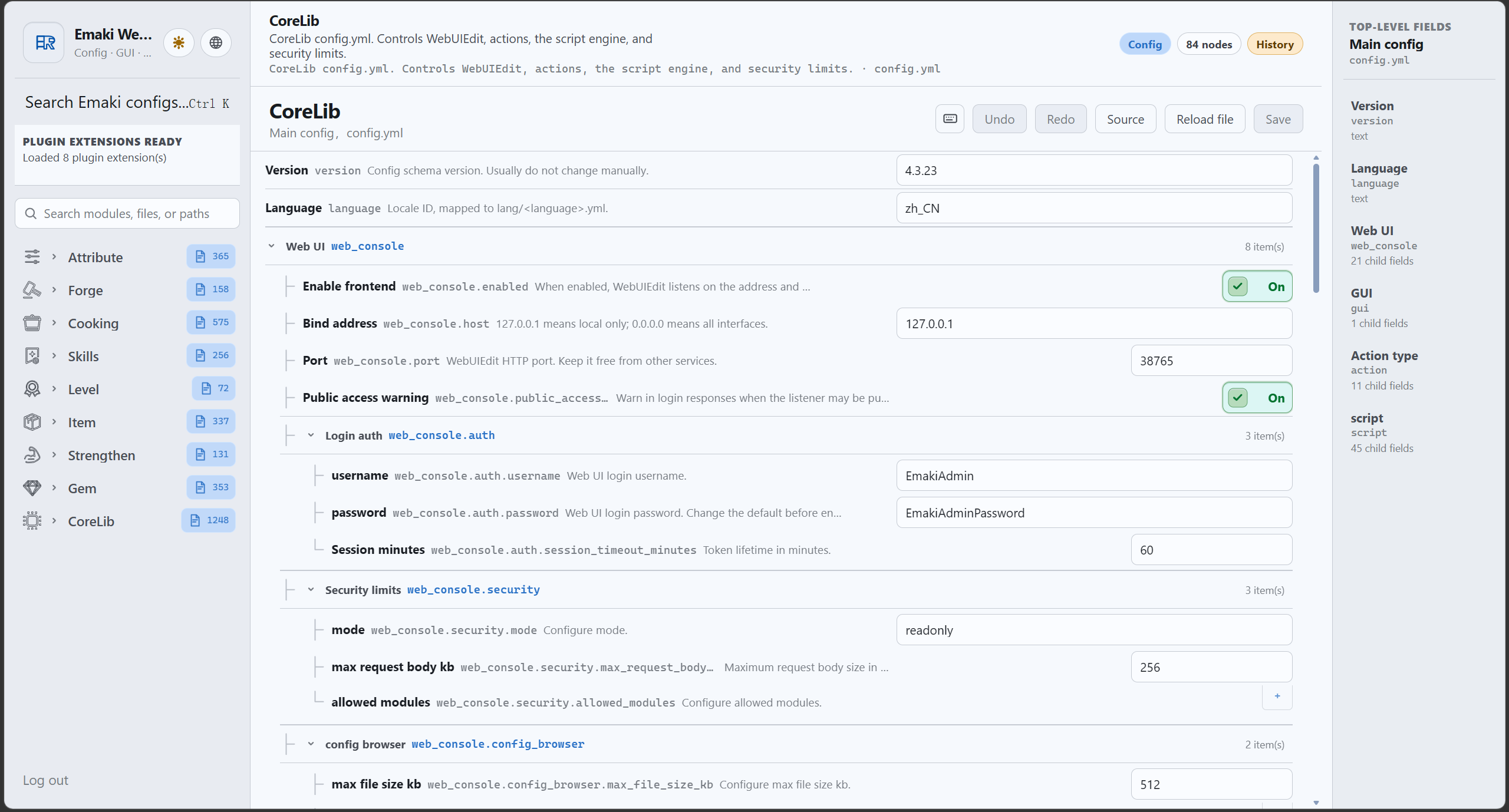
- Edit configs from a browser — A built-in Web Console offers authenticated file browsing, structured editors, history snapshots, Insight search, frontend extensions and per-plugin read-only APIs. No FTP or file-manager round trips.
- Universal item-source resolution — One syntax references vanilla items, CraftEngine, ItemsAdder, Nexo, Oraxen, MMOItems, NeigeItems and EmakiItem, so recipes, materials, rewards and GUI slots never depend on display names or lore.
- Layered item assembly — A PDC layer system lets Forge, Strengthen, Gem, Item and Attribute each write their own layer and have CoreLib rebuild the final name and lore without overwriting each other.
- Folia / Paper / Spigot transparency — Modules schedule async and timed tasks through one scheduler abstraction, with platform detection cached once and no per-task reflection.
- GraalJS scripting — A managed JavaScript runtime with a
runjsaction, global script extensions, a controlled server API and dynamic module entry points that business plugins register on enable.
Feature Overview
Action engine
- Execute messages, sounds, particles, commands, economy, experience, temporary items, blocks, teleport, scripts and templates from any module's YAML in one consistent syntax.
- Control prefixes such as a chance prefix and a conditional prefix gate whether each action line runs.
- Loop actions support repeated execution for countdowns, staged feedback and persistent effects.
- Business plugins append their own actions to the same registry — Level's experience actions, Attribute's stat actions, Skills' skill actions all live alongside the built-ins.
GUI framework
- Menu templates, slot parsing, buttons, click handling, session management, item-source resolution and dynamic rendering are all provided centrally.
- Business plugins only declare their own GUI files and flow logic; the heavy lifting (protecting input slots, returning items, handling clicks) is shared.
- Titles support MiniMessage, rows are configurable, and backgrounds/borders are template-driven.
Web Console
- A main Web Console service with authentication, directory-tree file browsing and in-browser editing.
- Structured editors for cross-plugin field types (action chains, effect lists, economy provider dropdowns) so modules reuse the same UI.
- History snapshots track configuration changes, with rollback through the existing save/permission pipeline.
- Insight search, reference tracking, dependency graphs and historical snapshots scoped to registered files.
- Plugin read-only/preview APIs are exposed under per-module routes; write-type capabilities still go through CoreLib's save, history, permission and rollback chain.
- Business plugins register their own pages and schema via
web-console.ymlandweb-extensions/*.js.
Item-source resolution
- One unified syntax resolves vanilla, CraftEngine, ItemsAdder, Nexo, Oraxen, MMOItems, NeigeItems and EmakiItem sources.
- Dash-style references (e.g.
minecraft-diamond,emakiitem-<id>) keep recipes, materials, rewards and GUI slots independent of display name or lore. - Provides item construction, component writing, PDC markers and final display for every business module.
PDC and item assembly
- Wraps Bukkit's PersistentDataContainer with a safe, source-isolated API: each module registers its own source and writes only its own data, so layers never overwrite each other.
- The assembly system merges the layers written by different modules into one final name and lore.
- Item operation ledgers record name/lore operations so they can be precisely reverted (e.g. when a gem is extracted) and replayed during rebuilds.
- PDC snapshots support versioned YAML, schema versions and signature validation.
Conditions, expressions, economy and weights
- A condition system with condition groups and expression entries for permission, item, state and numeric checks.
- An expression engine for costs, probabilities, levels, damage and any configuration formula, with
%variable%support. - An economy bridge for Vault and ExcellentEconomy providers, with dynamic provider enumeration in the Web Console.
- A weight system providing random pools, quality pools, reward pools and pity/guarantee pools as reusable tools.
JavaScript scripting
- A GraalJS runtime with a
runjsaction, global script extensions and a controlled, sandboxed server API. - Dynamic module entry points: business plugins register
emaki.module("...")capabilities on enable and remove them on disable. - A shared scripts directory with subfolders per module (global, forge, strengthen, cooking, gem, skills, item, attribute, templates, examples).
- Polyglot values are deep-copied to plain Java maps/lists before being handed to business plugins, so no script object leaks across the boundary.
Configuration prechecks and runtime
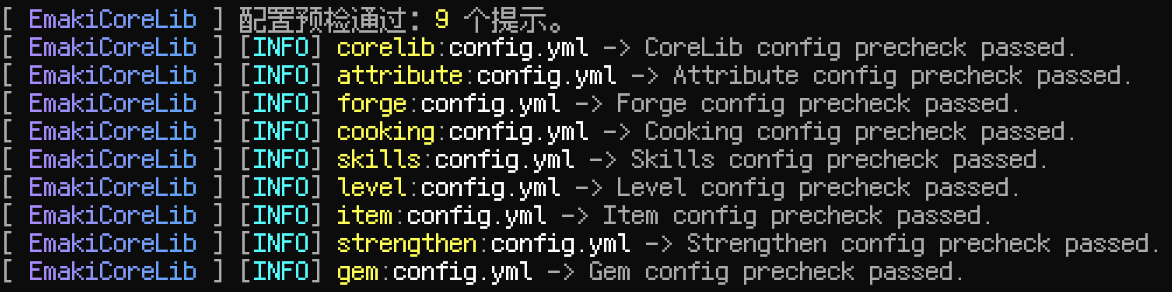
/corelib checksummarizes the configuration health of every registered module in one place.- Missing resources, format errors and unmet dependencies are reported together on reload.
- Web Console and scripting capabilities are gated by configurable security modes.
bStats hosting and runtime libraries
- A single runtime-library loader prepares shared libraries (Adventure, Gson, BoostedYAML, exp4j, Caffeine, GraalJS) during CoreLib load, so business plugins use them through CoreLib abstractions instead of shading their own copies.
- bStats is hosted centrally: CoreLib registers metrics for itself and each business plugin by id, and a failed metrics init only logs a warning instead of breaking plugin startup.
Commands
| Command | Description |
|---|---|
/corelib help |
Show help |
/corelib reload |
Reload configuration and the Web Console |
/corelib check |
Precheck the configuration of all registered modules |
/corelib web |
Get the clickable Web Console link |
/corelib debug |
Toggle debug mode |
Main command /emakicorelib, aliases /corelib, /emakicore.
Permissions
emakicorelib.admin— all administrative commands (default: op); includes the two belowemakicorelib.web— view the clickable Web Console link (default: op)emakicorelib.reload— reload CoreLib configuration and the Web Console (default: op)
Compatibility & Dependencies
| Item | Details |
|---|---|
| Java | 25 |
| Bukkit API | 1.21 |
| Server | Spigot / Paper and downstream forks |
| Folia | Supported |
| Required | None |
| Optional | Vault, ExcellentEconomy, PlaceholderAPI, MMOItems, MythicMobs, ItemsAdder, Nexo, Oraxen, NeigeItems, CraftEngine |
Installation & Quick Start
- Place
EmakiCoreLib.jarinto your serverplugins/folder. (Install only the plugin jar; theemaki-corelib-apijar is a compile-time dependency for developers, not for the server.) - Start the server to generate the default config, language files and scripts directory.
- Run
/corelib checkto verify configuration health. - Install the Emaki modules you need — every business module depends on CoreLib.
Links
- Documentation: https://jiuwu02.github.io/Emaki_Series/
- Discord: https://discord.gg/FV4GFQbvCM
- QQ Group: https://qm.qq.com/q/GqGrzHp0wU
Ченджлог
4.4.0Релиз1.21.9, 1.21.10, 1.21.11 · 29 июня 2026 г.
Added
- Config precheck on startup and reload, with a console report and
/emakicorelib check; failed prechecks cancel the reload and keep the previous config. - Loop actions (loop-sync / loop-async / cancel-loop) with interval, iteration, and concurrency limits.
- Packet GUI backend that reuses the same window across row changes, switchable via
gui.backend(bukkit / packet / auto); packet only needs PacketEvents. - Oraxen item source and block bridge support, shared by all modules.
- Public Bukkit event infrastructure with cancellable subscriptions and per-plugin cleanup.
- JavaScript extensions: custom conditions, expression functions, host object proxies, and script text APIs, plus
/emakicorelib script. checkanddebugsubcommands for/emakicorelib.
Fixed
- Fixed item rebuilds wiping Lore and custom names added by other plugins.
- Fixed huge values being zeroed out when output in scientific notation by the expression engine.
- Fixed enchanted/starred item names losing translatable text.
- Fixed low-frequency stability issues around action registry, PDC null inputs, cache diagnostics, and cached preview items.
Refactored
- Switchable GUI backend abstraction (bukkit / packet); default behavior unchanged.
- Packet GUI backend split out then merged back, now built-in (needs PacketEvents).
Improved
- Per-module debug log prefixes and externalized debug text.
- Centralized runtime library and bStats handling.
Notes
- Update CoreLib before other Emaki plugins.
- Breaking:
web_console.security.allow_config_write→web_console.security.mode(defaultreadonly). - Breaking: script action aliases
runscript/javascriptremoved; userunjs. - Breaking: legacy condition/GUI/Mythic-bridge fields removed; migrate to the new structure.
- New softdepends (Oraxen, PacketEvents) and new config keys; compare or regenerate your config.
4.3.0Релиз1.21.9, 1.21.10, 1.21.11 · 16 июня 2026 г.
Added
- Web Console Insight search, reference tracking, and dependency graph views.
- Web Console history snapshots, diffs, and confirmed rollback support.
- Plugin read-only/preview API routes.
- Layered item preview infrastructure.
- Shared condition blocks.
language: "zh_CN"in the default CoreLib config.
Fixed
- CoreLib config now includes and applies the
languagekey. - Fixed wildcard glob paths being used instead of concrete child files.
- Fixed custom editor surface path resolution.
- Fixed nested list editor layout issues.
- Fixed hex color preview support for MiniMessage.
- Fixed item operation replay during Assembly rebuilds.
Refactored
- Split Web Console styles into focused modules.
- Refactored document path resolution and extension host exports.
- Refactored shared condition and item preview pipelines.
Improved
- Better Web Console layout, responsive behavior, field outlines, and editors.
- Better localized file titles and descriptions.
- Centralized runtime library and bStats handling.
Notes
- Update CoreLib before other Emaki plugins.
- Change language in
plugins/EmakiCoreLib/config.yml.
4.2.0Релиз1.21.9, 1.21.10, 1.21.11 · 5 июня 2026 г.
CoreLib v4.2.0 is mainly a foundation update. Scripts are more modular, runtime libraries are cleaner, and shared Web Console behavior is more consistent across the Emaki series.
Highlights
- New
emaki.module("...")script access style. - Global JavaScript actions, placeholders, controlled Bukkit event scripting, and CoreLib MythicMobs JS mechanics.
- Versioned config/language update notices during startup.
Improved
- Centralized bStats and runtime library handling in CoreLib.
- Friendlier display names for managed item sources.
- More consistent shared Web Console editors.
Notes
- Review custom scripts before updating production servers.
- Update CoreLib before the other Emaki plugins.
4.1.0Релиз1.21.9, 1.21.10, 1.21.11 · 2 июня 2026 г.
EmakiCoreLib v4.1.0
Built-in Web Console, Folia scheduler support, unified placeholder syntax, and more.
✨ New Features
Built-in Web Console
Manage all Emaki plugin configurations directly from your browser. The web console provides:
- GUI Editor — visually edit YAML-based GUI configurations
- Item Editor — configure custom items with a structured interface
- Source Code Editor — CodeMirror-powered editor with syntax highlighting
- YAML Preview — real-time preview of parsed YAML output
- Multi-language I18n — full internationalization support
- Theme Switching — light and dark themes
- File Version Control & Search — track changes and find files quickly
- Extension System — sub-plugins can register their own editors declaratively
Folia Scheduler Support
EmakiCoreLib now fully supports Folia servers. All async task scheduling has been refactored to use a unified scheduler, ensuring compatibility and stability across both Paper and Folia environments.
Unified Placeholder Syntax
All placeholders now consistently use the %variable% wrapping format, eliminating the previous mix of different placeholder styles.
Random Character Variables
New support for random, weighted-random, and conditional character variables, enabling more dynamic and varied lore text and messages.
Equipment Slot Matching
New equipment slot matching logic with proper attribute and skill activation handling, ensuring equipment effects only apply to their intended slots.
Recipe Completion Conditions
A new condition system allows executing additional checks and actions after a recipe is completed.
Item Component Inspection
A new command for inspecting item persistent data, useful for debugging custom item configurations.
General Resource Files
Support for extracting resource files from JARs, making it easier to distribute templates and example configurations.
🐛 Bug Fixes
- Fixed Web Console incorrectly loading CONFIG files as structured YAML through glob paths.
- Fixed number input field issues and improved session management.
♻️ Improvements
- Refactored the condition system with unified variable and action naming conventions.
- Unified async task scheduling, replacing scattered task handles with a consistent interface.
- Refactored the item operation ledger and debug logging system with unified debug support.
- Cleaned up large amounts of redundant comments and deprecated code.
- Optimized cache usage and code reuse across modules.
4.0.0Релиз1.21.9, 1.21.10, 1.21.11 · 11 мая 2026 г.
EmakiCoreLib 4.0.0 Release
A major update introducing a JavaScript scripting engine, reversible item modification system, and new built-in actions for the Emaki plugin family.
New Features
- JavaScript Scripting Engine: Execute custom
.jsscripts via therunjsaction (aliases:runscript,javascript). Scripts access player data, trigger context, item info, random utilities, shared state, and action dispatch via the built-inemakiglobal object. Powered by GraalJS with configurable timeout (default 1000ms), content-hash caching, and security sandboxing. dropitemAction: Drop items at specified world coordinates with relative coordinate support and all item source types (vanilla / CraftEngine / ItemsAdder / Nexo).placeblockAction: Place blocks at specified coordinates, supporting vanilla and custom blocks. Properly firesBlockPlaceEventfor compatibility with other plugins.- Item Operation Ledger: Reversible item name/lore modification system stored in item PDC. Supports precise single-operation revert or batch revert by namespace. Provides unified text modification infrastructure for gem socketing, strengthening, forging, etc.
- EmakiAttribute Bridge API: Stable interface for soft-depending on EmakiAttribute — read resources, consume resources, query attribute values, and invoke the damage pipeline.
- Enhanced Condition System: New
none_ofcondition type and nested condition groups (type: group) for combiningall_of/any_of/none_ofin complex logic.
Improvements
- Config and language files auto-merge new keys on upgrade without manual editing.
- YAML loading errors now show specific error messages and file locations in console.
- Item text read/write uses legacy format for better compatibility with plugins using traditional color codes.
Upgrade Notes
- Config version updated to
4.0.0with newscriptsection (auto-merged on upgrade). - Script engine enabled by default; set
script.enabled: falseto disable. - Script files are placed in
plugins/EmakiCoreLib/scripts/— categorized subdirectories and example scripts are auto-created on first startup.
3.5.1Релиз1.21.9, 1.21.10, 1.21.11 · 4 мая 2026 г.
EmakiCoreLib 3.5.1 Release
This release fixes MiniMessage rendering for item display names and lore on standard Spigot API by improving the bridge between Adventure Components and Bukkit ItemMeta string fields.
- Fixed MiniMessage tags not rendering when item display names and lore are written through CoreLib
ItemTextBridge. - Converted Adventure Components to Spigot-compatible legacy section strings before writing to Bukkit
ItemMeta#setDisplayNameandItemMeta#setLore. - Read existing item display names and lore from legacy section strings back into Adventure Components for consistent CoreLib text handling.
- No Paper API is introduced; standard Spigot API compatibility is preserved.
Upgrade Notes
- Existing Emaki plugins built for EmakiCoreLib 3.5.0 generally do not need to be re-released; updating CoreLib to
3.5.1is recommended. - Plugins that directly inspect Bukkit
ItemMeta#getLore()withoutItemTextBridgemay now see legacy§color strings for newly written item lore instead of raw MiniMessage tags.
3.5.0Релиз1.21.9, 1.21.10, 1.21.11 · 4 мая 2026 г.
EmakiCoreLib 3.5.0 Release
This release improves the shared runtime used by the Emaki plugin family, with new MythicMobs action support, EmakiItem source integration, GUI item improvements, and expression parsing cleanup.
- Added
castmythicskillas a built-in CoreLib action. - Added MythicMobs as a soft dependency and fail-safe runtime provider.
- Added EmakiItem to the shared item source registry.
- Improved GUI item construction for custom item sources.
- Split and refined expression parsing rules.
- Removed deprecated resource cleanup behavior during default file synchronization.
Upgrade Notes
- MythicMobs is required only when using
castmythicskill. - Retest custom formulas and action scripts if they rely on complex numeric parsing.
3.4.0Релиз1.21.9, 1.21.10, 1.21.11 · 28 апреля 2026 г.
EmakiCoreLib 3.4.0 Dev Update
This dev update adds a custom block bridge system, refactors the PDC attribute API away from reflection, and replaces all reflection-based item source resolvers with direct plugin API calls.
- Custom block bridge: new
CustomBlockBridgeinterface shared by CraftEngine, ItemsAdder, and Nexo. Returns safe defaults when the plugin is not installed. - PDC attribute API refactor:
ReflectivePdcAttributeGateway→PdcAttributeGateway, now discoversPdcAttributeApivia BukkitServicesManager. - Item source resolver refactor: all
Reflective*resolvers replaced with direct API calls. CraftEngine resolver listens toCraftEngineReloadEventfor auto-refresh. - Skill PDC gateway rename:
ReflectiveSkillPdcGateway→SkillPdcGateway. - Caffeine library declaration: added to
plugin.ymllibraries for automatic download, fixingNoClassDefFoundErroron pure Spigot servers.
Upgrade Notes
No upgrade notes.
Комментарии
Загружаем…