 Mineforgian
Core Teams
CoreTeams is a lightweight, modern, and highly configurable team management plugin designed for Spigot/Paper servers (1.20+). It features unique gradient-based team visuals, string-based IDs for custom team names, and a comprehensive admin GUI.
- Загрузки
- 1K
- Подписчики
- 3
- Обновлён
- 10 июля 2026 г.
- Лицензия
- All-Rights-Reserved
Опубликован 3 февраля 2026 г.
CoreTeams (CoreSeries)
CoreTeams is a lightweight, modern, and highly configurable team management plugin designed for Spigot/Paper servers (1.20+). Built with a focus on professional aesthetics and performance, it provides a seamless experience for both players and administrators through its "Elegant Midnight" design language.
Features
CORETEAMS » VISUAL IDENTITY
Every team is assigned a unique, persistent RGB gradient based on their ID. These visuals are automatically applied to chat messages and tab-lists, ensuring your team stands out with a premium feel.
CORETEAMS » STRING-BASED IDS
Break away from generic numbering. Teams can use custom text IDs like Admins, Red-Rebels, or Pros. Perfect for roleplay or competitive environments.
CORETEAMS » ADMINISTRATIVE SUITE
Manage the entire server's team structure via /teamadmin. The intuitive GUI allows admins to monitor members, teleport to players, and disband teams with a single click.
CORETEAMS » TOGGLEABLE MODULES
- Global PVP: Toggle team-based PVP dynamics instantly.
- Creation Control: Restrict team creation to specific ranks or disable it globally.
CORETEAMS » COMMUNICATION & UTILITIES
- Invitation System: Professional click-to-accept chat prompts.
- Team Chat: Private channel for strategic coordination (
/tc). - Location Ping: Broadcast your coordinates to teammates with a resonant sound effect.
- Voice Integration: Native support for Simple Voice Chat group synchronization.
CORETEAMS » DATA & INTEGRATIONS
- Persistence: All data is saved securely to
teams.ymlor SQLite. - PlaceholderAPI: Full support for custom placeholders in scoreboards/tab-lists.
- Version Checker: Stay updated with automatic Modrinth version notifications.
Placeholders
- %coreteams_team% : The raw team name/ID (e.g.
12) - %coreteams_prefix% : The team prefix formatted with legacy color codes (e.g.
§x§f§f§5§5§5§5[12]§r) - %coreteams_prefix_modern% : The team prefix formatted with modern MiniMessage tags (e.g.
<gradient:#ff5555:#ffaa00>[12]</gradient><reset>) - %coreteams_color% : The team's raw color/gradient code (e.g.
<gradient:#ff5555:#ffaa00>) - %coreteams_members% : Number of players in the team (e.g.
3) - %coreteams_team_size% : Number of players in the team (e.g.
3) - %coreteams_is_leader% : Returns
YesorNodepending on if the player is team leader - %coreteams_sort% : Sorting key for TAB/scoreboard configurations (e.g.
01_0012_1)
Commands
Player Commands
/team create <name>» Establish a new team/team invite <player>» Invite a player to join/team join <id>» Join an existing team/team leave» Depart from your current team/team disband» Dissolve the team (Leader only)/team ping» Alert teammates to your location/tc <message>» Send a message to team chat
Admin Commands
/teamadmin» Open the Management GUI/teamadmin setid <p> <id>» Force player into a team/teamadmin pvp <on|off>» Toggle global PVP status
Configuration
# CoreTeams | Professional Configuration

# Generation: SEQUENTIAL (001) or RANDOM (842)
generation-mode: RANDOM

# Gameplay Dynamics
pvp-enabled: true
creation-enabled: true
allow-custom-names: true

# Visual Branding
visuals:
  prefix-mode: true # [ID] Name vs Name [ID]

# Messaging System (MiniMessage Supported)
messages:
  prefix: "<bold><#F8F9FA>CORETEAMS</#F8F9FA></bold> <#636E72>»</#636E72> "
  no-team: "<#D63031>You are not currently in a team."
  success: "<#55EFC4>Action completed successfully."
Ченджлог
3.7.2Релиз26.1.1, 26.1.2, 26.2 · 10 июля 2026 г.
3.7.2 PATCH
- Fixed Team Prefix Doubling
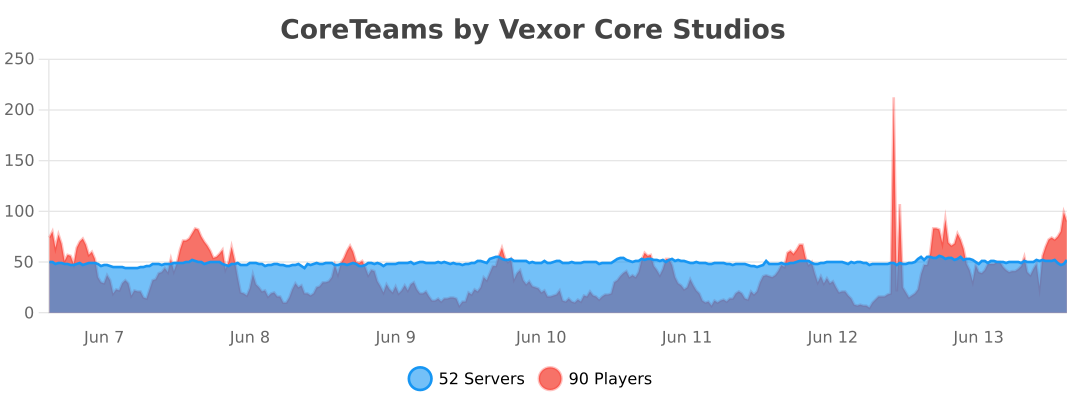
- Added VexorAnalytics
- fixed some minor bugs
3.7.1Релиз26.1.1, 26.1.2, 26.2 · 7 июля 2026 г.
CoreTeams v3.7.1 Changelog
Custom Team Names & Nametag Sync
CoreTeams v3.7.1 focuses on how teams look in-game: custom team names are now enabled by default, visible team labels support MiniMessage formatting and emojis, and scoreboard nametags now show team prefixes even without TAB.
Team Names Update
- Custom team names are now enabled by default. New teams use a visible display name instead of exposing the raw internal ID first.
- Team names now support MiniMessage formatting and emojis. Use colors, gradients, and symbols directly in the visible team name.
- Nametags now show team prefixes without TAB. CoreTeams now syncs Bukkit scoreboard teams so the above-head nametag matches the team style even on vanilla servers.
Support & Community
Need help or want to suggest a feature? Join our community Discord: discord.gg/zwj5sEbmDs
3.7.0Релиз26.1.1, 26.1.2, 26.2 · 29 июня 2026 г.
CoreTeams v3.7.0 Changelog
Administrative Powers & Vanilla Tab Overhaul!
We are excited to release CoreTeams v3.7.0! This release introduces powerful new administrative tools (Force Rename, Force Merge, and Admin Chat Spy), player transfer options, customizable timed invite lifetimes with expiration alerts, and native tablist prefixes for vanilla servers.
New Features & Enhancements
Administrative Control Commands
- Force Rename (
/teamadmin rename <team_id> <new_id>): Change a team's ID on the fly. Automatically updates active player mappings, SQLite/YAML databases, and rebuilds/re-associates the Simple Voice Chat group. - Force Merge (
/teamadmin merge <team1> <team2>): Consolidate two teams instantly. Mergesteam2's members intoteam1(keepingteam1's leader and demotingteam2's leader to a member), transfers voice chat links, and deletes the empty team. - Admin Chat Spy (
/teamadmin spy): Admins can toggle this in-memory mode to view all team chat (/tc) messages across the server with a prominent[SPY]identifier.
Player & Invitation Management
- Direct Transfer (
/team transfer <player>): Hand over team leadership to another member of your team instantly. - Customizable Timed Invites: You can now configure invite durations in
config.ymlunderinvite-expiration-seconds(defaults to 60s). Both the inviter and target player are notified via chat when an invite expires.
Vanilla Tablist Compatibility
- No Dependencies Needed: Team prefixes and suffixes will now render natively on the player list (tab list) even if the TAB plugin is not installed.
- Color Bleeding Reset: Formats are followed by a clean reset to prevent team colors from bleeding into player names.
- Smooth Integration: If the TAB plugin is installed, CoreTeams automatically yields to TAB as normal.
Support & Community
Need help or want to suggest a feature? Join our community Discord: discord.gg/zwj5sEbmDs
3.6.0Релиз26.1, 26.1.1, 26.1.2 · 29 мая 2026 г.
CoreTeams v3.6.0 Changelog
Massive UX & Aesthetic Redesign + Prefix/Suffix Toggles!
We are proud to release CoreTeams v3.6.0! This release brings highly requested visibility toggles, a complete aesthetic visual redesign with soft curated palettes and small caps typography, a beautiful new startup sequence, and a massive interactive help menu overhaul for ultimate ease-of-use.
New Features & Enhancements
Global & Per-Player Prefix/Suffix Toggles
- Highly Custom Visibility: Added advanced toggles allowing you to turn team prefixes and suffixes on or off completely, either one at a time or all at once, and globally (everyone) or for individual players.
- New Toggle Subcommands:
/teamadmin toggle prefix [everyone|player] [on|off]/teamadmin toggle suffix [everyone|player] [on|off]/teamadmin toggle all [everyone|player] [on|off]
- Persistent Storage: Per-player settings are saved in your plugin configuration (
disabled-prefixesanddisabled-suffixes) so settings survive server reloads. - Smart Backwards Compatibility: Seamlessly integrates with and falls back to your legacy
visuals.prefix-modeconfig state. - Keep Placeholders Working: All PlaceholderAPI placeholders (like
%coreteams_prefix%and%coreteams_prefix_modern%) continue to function normally, regardless of active toggle states!
Curated Soft Color Palettes
- Redesigned the entire color system to move away from generic bright/saturated colors. CoreTeams now utilizes a premium, professional soft palette:
- Mint Emerald (
#88D49E): A soft, premium success indicator. - Soft Coral Red (
#FF8080): An eye-pleasing, modern error/restriction highlight. - Steel Slate (
#94A3B8): Sleek accent/information color. - Cool Clean White (
#F1F5F9): High-end readable titles. - Sleek Separators (
#475569): Subtle dividers.
- Mint Emerald (
Interactive Help Menus (Massive UX Upgrade)
- Rebuilt
/team helpand/teamadmin helpto make the plugin incredibly easy and intuitive to use:- Descriptive Tooltips: Hovering over any command displays a sleek description card showing what it does.
- Dynamic Clicking: Click absolute commands (like
/ta reload,/team leave, or/ta gui) to execute them instantly. Click parameterized commands (like/team invite,/team join, or/ta setcolor) to automatically suggest and pre-fill them directly in your chat box!
Technical Improvements & Bug Fixes
- Refined Render Logic: Rebuilt
TeamManager.updateTaband chatAsyncChatEventrender pipelines to dynamically apply prefixes and suffixes selectively depending on toggle configuration. - Command Completer expansions: Full tab completions have been added for all new toggle variants, dynamically suggesting
prefix,suffix,all,everyone, online players, andon/offsettings.
Support & Community
Need help or want to suggest a feature? Join our community Discord: discord.gg/zwj5sEbmDs
3.4.3Релиз1.21.11, 26.1, 26.1.2 · 17 мая 2026 г.
CoreTeams v3.4.3 Changelog
New Features & Compatibility
- Broad Multi-Version Compatibility (1.21 -> 26.1.2):
- Standardized compile-time dependencies and builds to target JDK 21 (class version 65.0), ensuring the compiled jar can run flawlessly on Minecraft 1.21 and all newer releases up to Minecraft 26.1.2.
- Fully resolved JDK major version compilation mismatches (e.g., class version 69.0 / Java 25 conflicts).
- SQLite Storage Implementation:
- High-performance team storage utilizing HikariCP connection pooling for maximum reliability and speed.
- Professional Design System:
- Introduced the "Elegant Midnight" color palette and a modern
Title » Messagestructural format across the entire plugin.
- Introduced the "Elegant Midnight" color palette and a modern
- Admin GUI Total Overhaul:
- Completely redesigned management interface with professional icons, consistent styling, and a new Settings sub-menu for real-time configuration.
- Implemented PersistentDataContainer (PDC) for GUI item identification, making the interface immune to translation or branding changes in titles.
- Expanded PlaceholderAPI Support:
- Added
%coreteams_is_leader%and%coreteams_team_size%placeholders.
- Added
Technical Improvements
- Modular Command Architecture: Refactored monolithic command classes into clean, modular sub-command handlers.
- Invite Lifecycle Management: Implemented a 60-second expiration for team invites to reduce memory clutter and improve player experience.
- Codebase Stabilization: Removed legacy classes, resolved all compilation warnings, and standardized message handling via a centralized
Styleclass.
Bug Fixes
- Fixed a major compilation error in the Voice Chat handler.
- Resolved various visual inconsistencies between command feedback and GUI tooltips.
- Improved database connection lifecycle management to prevent SQLite file locking.
Support
If you need help or have questions, join our community Discord: discord.gg/zwj5sEbmDs
3.4.2Релиз1.21.9, 1.21.10, 1.21.11 · 22 апреля 2026 г.
Patch
- Fixed Intergrations
3.4.2Релиз1.21.9, 1.21.10, 1.21.11 · 21 апреля 2026 г.
PATCH
Fixed Voice chat intergration!
3.4.1Релиз26.1, 26.1.1, 26.1.2 · 20 апреля 2026 г.
PATCH!
- Added back old toggle commands etc
- Added V26.1.2 Support!
- Fixed a few bugs!
- Added more buttons and stuff to admin gui
Комментарии
Загружаем…