 Mineforgian
ChatFormatter
✔️ Beautify your chat with hover text, clickable messages and more!
- Загрузки
- 5K
- Подписчики
- 21
- Обновлён
- 6 ноября 2025 г.
- Лицензия
- GPL-3.0-only
Опубликован 28 декабря 2022 г.






⚠ This plugin requires PlaceholderAPI and Vault to run!
🌌 Preview:
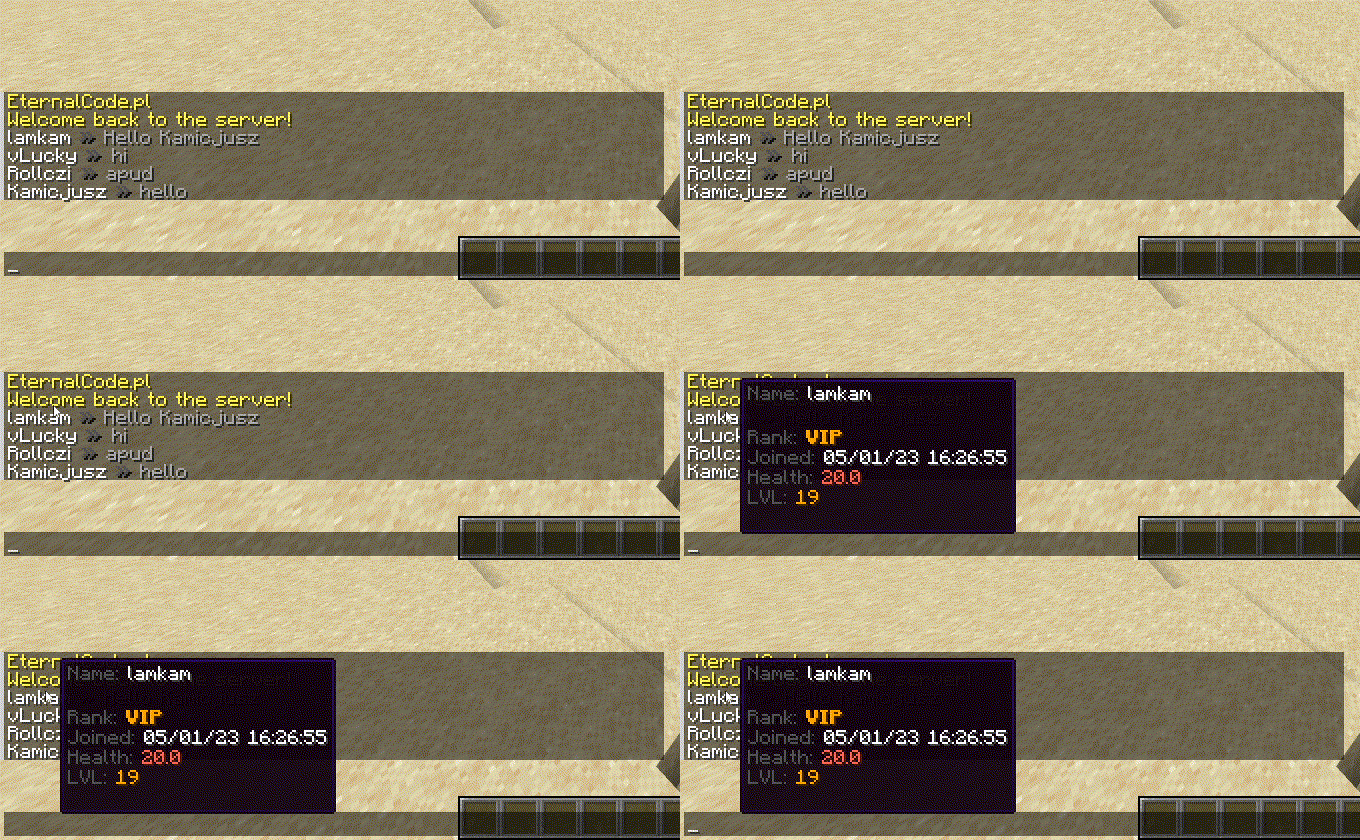
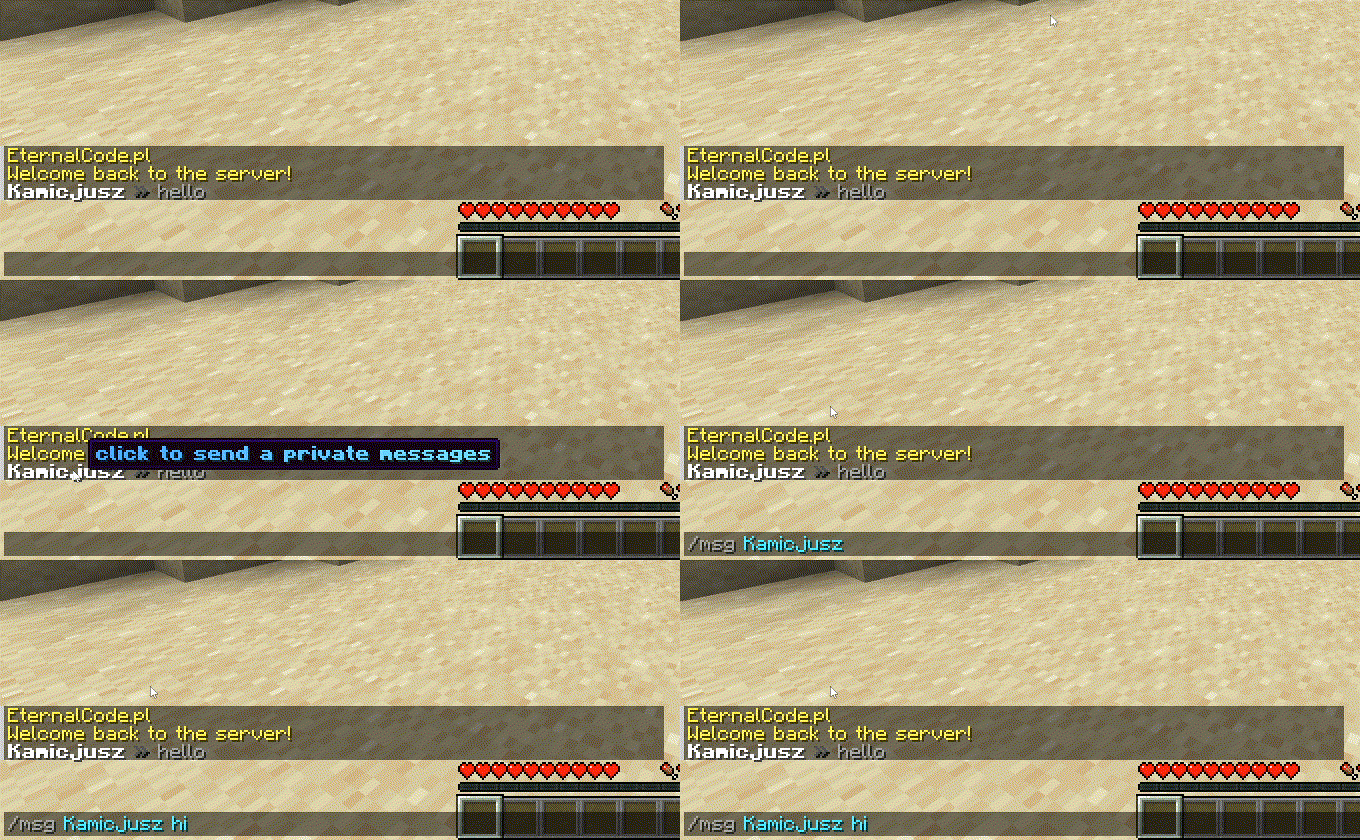
✨ Features:
- PlaceholderAPI Support
- MiniMessages Support with Legacy Colors Support!
- Template System
- Custom Placeholders System
- Per-permission miniMessages Tags (see permissions below)
🔗 Useful links:
🔑 Permissions:
Note: Each color and decoration permission (e.g.,
chatformatter.color.white,chatformatter.reset,chatformatter.decorations.bold) grants access to both the legacy code (e.g.,&f,&r,&l) and the MiniMessage tag (e.g.,<white>,<reset>,<bold>).
| Permission | Access |
|---|---|
chatformatter.decorations.* |
<bold>, <italic>, <underlined>, <strikethrough>, <obfuscated>, &l, &o, &n, &m, &k |
chatformatter.decorations.bold |
<bold>, <b>, &l |
chatformatter.decorations.italic |
<italic>, <i>, <em>, &o |
chatformatter.decorations.underlined |
<underlined>, &n |
chatformatter.decorations.strikethrough |
<strikethrough>, <st>, &m |
chatformatter.decorations.obfuscated |
<obfuscated>, <obf>, &k |
chatformatter.reset |
<reset>, &r |
chatformatter.newline |
<newline>, <br> |
chatformatter.shadow |
<shadow>, |
chatformatter.gradient |
<gradient> |
chatformatter.rainbow |
<rainbow> |
chatformatter.pride |
<pride> |
chatformatter.transition |
<transition> |
chatformatter.hover |
<hover> |
chatformatter.click |
<click> |
chatformatter.insertion |
<insertion> |
chatformatter.color.* |
All color codes: <red>, <blue>, <#a568a9>, &c, &#a568a9, etc. |
chatformatter.color.black |
<black>, &0 |
chatformatter.color.dark_blue |
<dark_blue>, &1 |
chatformatter.color.dark_green |
<dark_green>, &2 |
chatformatter.color.dark_aqua |
<dark_aqua>, &3 |
chatformatter.color.dark_red |
<dark_red>, &4 |
chatformatter.color.dark_purple |
<dark_purple>, &5 |
chatformatter.color.gold |
<gold>, &6 |
chatformatter.color.gray |
<gray>, &7 |
chatformatter.color.dark_gray |
<dark_gray>, &8 |
chatformatter.color.blue |
<blue>, &9 |
chatformatter.color.green |
<green>, &a |
chatformatter.color.aqua |
<aqua>, &b |
chatformatter.color.red |
<red>, &c |
chatformatter.color.light_purple |
<light_purple>, &d |
chatformatter.color.yellow |
<yellow>, &e |
chatformatter.color.white |
<white>, &f |
chatformatter.score |
<score> |
chatformatter.selector |
<selector> |
chatformatter.font |
<font> |
chatformatter.translatable |
<lang> |
chatformatter.keybind |
<key> |
chatformatter.nbt |
<nbt> |
chatformatter.reload |
/chatformatter reload |
chatformatter.receiveupdates |
receive update announcements for this plugin |
config.yml
#    ____ _           _   _____      ChatFormatter       _   _
#   / ___| |__   __ _| |_|  ___|__  _ __ _ __ ___   __ _| |_| |_ ___ _ __
#  | |   | '_ \ / _` | __| |_ / _ \| '__| '_ ` _ \ / _` | __| __/ _ \ '__|
#  | |___| | | | (_| | |_|  _| (_) | |  | | | | | | (_| | |_| ||  __/ |
#   \____|_| |_|\__,_|\__|_|  \___/|_|  |_| |_| |_|\__,_|\__|\__\___|_|


# Do you want to receive updates about new versions of ChatFormatter?
receiveUpdates: true

# Chat format for ranks (Vault) Support mini-messages and legacy colors

# We're recommending to use webui for mini-messages: https://webui.adventure.kyori.net/

# documentation is here: https://docs.adventure.kyori.net/minimessage/format.html

# You can check LuckPerms setup and placeholders here: https://luckperms.net/wiki/Placeholders
#
# Example usages:
#
# Hover message:
# One line: <hover:show_text:'<red>test'>TEST
# Multiple lines: <hover:show_text:'<red>test'>Test<newline>Test2</hover>
#
# Click message:
# Open URL: <click:open_url:'https://webui.adventure.kyori.net'>TEST</click>
# Run command: <click:run_command:/say hello>Click</click> to say hello
# Suggest command: <click:suggest_command:'/msg {displayname}'></click>
#
# RGB and gradient message usage:
# <color:#ff00ee>Example message</color>
# <gradient:#ff00ee:#f79459>Example message</gradient>
#
# You can use three more internal placeholders: <displayname> <name> <message>
#
defaultFormat: "{displayname} » {message}"

# Here you can set different formats for each rank.
# Remember! Rank name must be exactly the same as in you permission plugin configuration.
# If player have more than one rank remember to correctly setup rank weight configuration
format:
  default: "{member} &7$hoverName({displayname}) &8» <gradient:#d4d4d4:white>{message} "
  vip: "{vip} &f$hoverName({displayname}) <dark_gray>» <gradient:#ffd270:white>{message}"
  mod: "{mod} &f$hoverName({displayname}) <dark_gray>» <gradient:#a3ff9e:white>{message}"
  admin: "{admin} &f$hoverName({displayname}) <dark_gray>» <gradient:#bac8ff:white><b>{message}"
  owner: "{owner} &f$hoverName({displayname}) <dark_gray>» <gradient:#ff9195:white><b>{message}"

# Placeholders, it allows you to make a shorter text, you can use some prefixes, characters etc.
# You can use here PAPI placeholders.
placeholders:
  {displayname}: "<displayname>"
  {name}: "<name>"
  {message}: "<message>"
  {member}: "<#6e6764>Member"
  {vip}: "<gold>VIP"
  {mod}: "<b><#00c900>Mod</b>"
  {admin}: "<b><#6e86ff>Admin</b>"
  {owner}: "<b><gradient:#c40000:#e04b4b>Owner</b>"
  {rankDescription}: "<dark_gray>Rank: <white>%vault_group%"
  {joinDate}: "<dark_gray>Joined: <white>%player_first_join_date%"
  {health}: "<dark_gray>Health: <red>%player_health%"
  {lvl}: "<dark_gray>LVL: <gold>%player_level%"
  {privateMessage}: "<gradient:#36ff39:#75ff75><i>Click to send private message</i></gradient>"

# This section is made for experienced users
# It is used to shorten the text even more and keep the clean file!
templates:
  - "$hoverName($name) -> '<hover:show_text:'<dark_gray>Name: <white>$name<br><br>{rankDescription}<br>{joinDate}<br>{health}<br>{lvl}<br><br>{privateMessage}'><click:suggest_command:'/msg {displayname} '>{displayname}</click></hover>'"
Ченджлог
1.3.5Релиз1.21.8, 1.21.9, 1.21.10 · 6 ноября 2025 г.

✨ Enhancements
- Updated all dependencies and libraries to their latest stable versions
🐛 Bug Fixes
- Fixed Legacy formatting when user does not have permission
1.3.4Релиз1.21.7, 1.21.8, 1.21.9 · 6 октября 2025 г.
✨ Enhancements
- Add support for 1.21.9 versions.
- Updated all dependencies and libraries to their latest stable versions.
1.3.3Релиз1.21.6, 1.21.7, 1.21.8 · 23 августа 2025 г.
✨ Enhancements
- Updated all dependencies and libraries to their latest stable versions
🐛 Bug Fixes
- Fixed issue of message content displaying {message} after send
1.3.2Релиз1.21.6, 1.21.7, 1.21.8 · 23 июля 2025 г.
✨ Enhancements
- Added support for 1.21.6, 1.21.7, 1.21.8
1.3.1Релиз1.21.3, 1.21.4, 1.21.5 · 17 июля 2025 г.
✨ Enhancements
- Make url's clickable.
- Updated all libraries
1.3.0Релиз1.21.4, 1.21.5, 1.21.6 · 26 июня 2025 г.
✨ Enhancements
Added granular permissions for text decorations:
chatformatter.decorations.bold– now supports<bold>,<b>,&lchatformatter.decorations.italic– now supports<italic>,<i>,<em>,&ochatformatter.decorations.underlined– added support for&nchatformatter.decorations.strikethrough– added<st>,&mchatformatter.decorations.obfuscated– added<obf>,&k
chatformatter.color.*now covers:- Named colors (
<red>,<blue>, etc.) - Legacy codes (
&c,&4, etc.) - Hex codes (
<#a568a9>,&#a568a9>)
- Named colors (
New permissions added:
chatformatter.shadow– enables<shadow>chatformatter.pride– enables<pride>chatformatter.score,chatformatter.selector,chatformatter.nbt– advanced placeholder support
Added aliases for
chatformatter.reset,chatformatter.newlineRemoved deprecated
chatformatter.legacycolorin favor of fine-grained color permissionsAdded support for the latest Minecraft versions
Updated all dependencies and libraries to their latest stable versions
🐛 Bug Fixes
- Fixed a bug where applying gradient tags over placeholders would break the config
- Fixed an issue where players without permission to use a color had
&incorrectly shown as<ampersad>in chat
1.2.2Релиз1.21.3, 1.21.4, 1.21.5 · 14 июня 2025 г.
✨ Enhancements
- Updated all libraries
1.2.1Релиз1.21.2, 1.21.3, 1.21.4 · 10 марта 2025 г.
Enhancements
- Added missing permission for
<rainbow> - Support for all legacy hex color's. (Fixes most of bug's provided by the other plugin placeholders)
Комментарии
Загружаем…