 Mineforgian
Better Baby Pets
Minecraft's new baby mobs utilized pets with unique abilities. Collect Pet Eggs and hatch them in the Incubator!
- Загрузки
- 290
- Подписчики
- 3
- Обновлён
- 12 мая 2026 г.
- Лицензия
- MIT
Опубликован 13 апреля 2026 г.
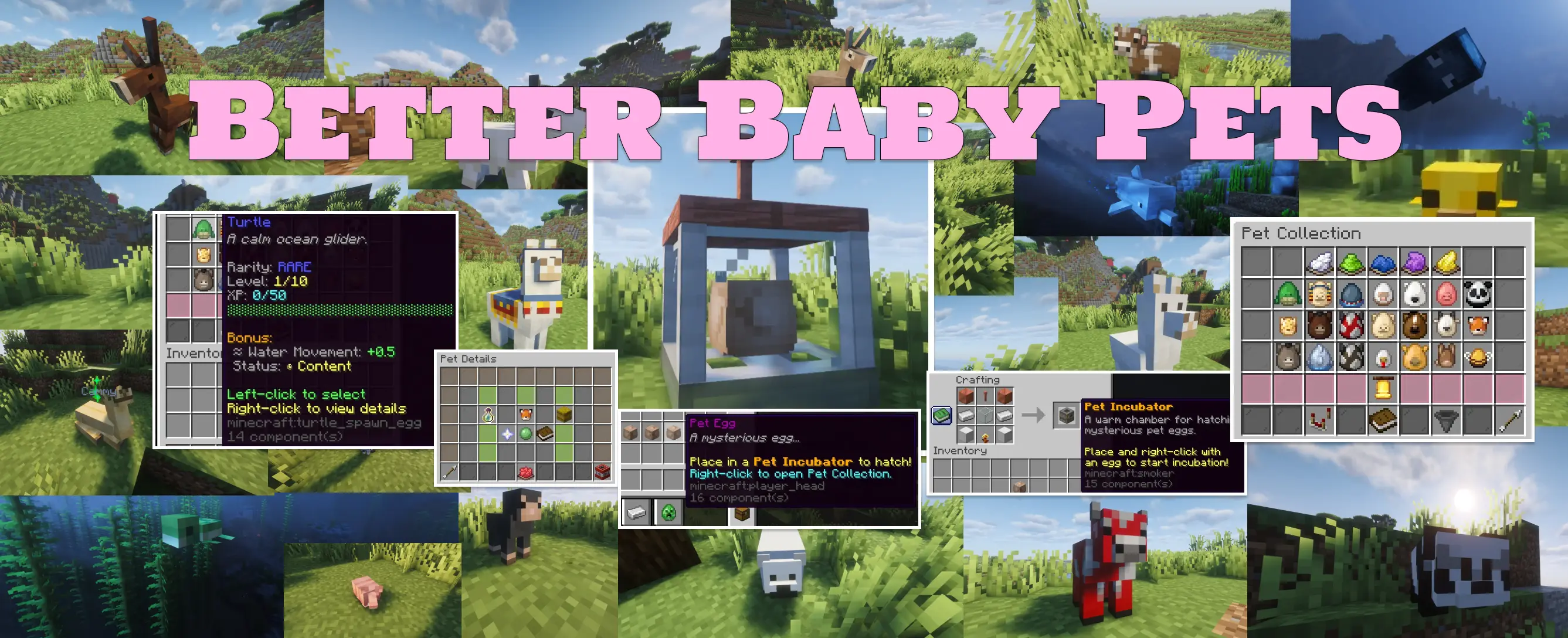
Collect and raise baby animal companions that follow you around and give scaling stat bonuses. 22 pets across 5 rarity tiers, egg hatching via a custom Pet Incubator, time-based leveling, a mood system, pet storage, and a full advancement tree — start with a single command /pets.
How it works
Get a pet egg — either from any vanilla structure chest loot, or via /pets give as an admin. Craft a Pet Incubator and right-click it with the egg to start incubation. After 20 minutes, your egg hatches into a random pet of that rarity.
Open your collection with /pets, click a pet to select it, and it'll spawn at your side. Feed it, pet it, level it up — its stat bonus scales with level up to level 10.
Features
Pets and rarities
- 22 pet types across 5 rarity tiers: Common, Uncommon, Rare, Epic, Legendary
- Every stat-boosting pet provides a unique player attribute bonus that scales linearly with level
- Storage pets (Horse, Donkey, Mule, Llama, Camel, Trader Llama) unlock inventory slots that scale with level instead
Pet leveling
- Time-based XP — pets gain XP passively while active, every 60 seconds
- Scaling XP curve up to level 10
- Attribute bonuses and storage slots increase every level
Mood and care
- 5 mood states: Ecstatic → Happy → Content → Hungry → Sad
- Mood drifts down over time; recover it by feeding or petting
- Food type depends on the pet's movement category (ground / flying / water)
Egg and incubation system
- Custom craftable Pet Incubator block
- Loot injection into vanilla structure chests (togglable, per-rarity thresholds configurable)
Pet storage
- Storage pets open a personal inventory GUI that scales slot count with pet level
- Separate storage groups: horse-tier (5 slots), llama (9), camel (14), trader llama (18)
GUIs
- Pet Collection: all owned pets with their level, rarity, mood, and stat info
- Pet Detail: per-pet stats, rename via name tag, delete
- Pet Settings: per-player toggles (follow/stay, hide others' pets, sounds, notifications)
- Pet Storage: inventory GUI for storage-ability pets
Advancement tree
- 12 advancements tracking the full progression arc — from first incubation to legendary hatch to completing the full collection
Everything else
- Follow and Stay modes
- Cross-dimension teleport when the player switches worlds
- Respawn on join — active pet re-appears when the player logs back in
- Hover name displayed above the pet entity
- Idle emote sounds
- Per-player toggles: hide other players' pets, pet sounds, chat notifications
- Rename pets with a name tag in-hand while right-clicking
- SQLite-backed persistence
Nearly everything is tunable in the YAML configs
Pet Roster
| Rarity | Pets | Bonus |
|---|---|---|
| Common | Chicken, Pig, Cow, Sheep, Squid | Fall resistance, Max health, Max absorption, Safe fall distance, Oxygen bonus |
| Uncommon | Bee, Bunny, Horse, Donkey, Mule | Knockback resistance, Jump height, Storage (5 slots) ×3 |
| Rare | Dolphin, Armadillo, Mooshroom, Turtle, Llama | Oxygen bonus, Armor, Gravity reduction, Water movement, Storage (9 slots) |
| Epic | Fox, Ocelot, Polar Bear, Camel | Movement speed, Block break speed, Sweep damage, Storage (14 slots) |
| Legendary | Goat, Panda, Trader Llama | Attack damage, Block reach, Storage (18 slots) |
Requirements
| Server software | Paper 26.1+ |
| Java | 25 |
| Hard dependencies | None |
Installation
- Drop the jar into your
/pluginsfolder - Start the server once to generate configs
- Tune
config.ymlandpets.ymlto your liking
Commands
| Command | What it does |
|---|---|
/pets |
Open your pet collection |
/pets info |
Show active pet stats |
/pets settings |
Open per-player settings GUI |
/pets follow |
Set active pet to follow mode |
/pets stay |
Set active pet to stay mode |
/pets hideothers [on|off|toggle] |
Hide other players' pets |
/pets sounds [on|off|toggle] |
Toggle pet sounds |
/pets notifications [on|off|toggle] |
Toggle pet chat notifications |
/pets select <id> |
Select a pet by DB ID |
/pets deselect |
Deselect current pet |
/pets help |
Full command list |
Admin commands (requires pets.admin):
| Command | What it does |
|---|---|
/pets give <player> <rarity> |
Give a pet egg of a specific rarity |
/pets givepet <pet_type> |
Add a pet directly to a player's collection |
/pets setlevel <level> |
Set the active pet's level |
/pets incubator |
Give yourself a Pet Incubator item |
/pets hatch |
Instantly hatch all incubating eggs |
/pets reload |
Reload config without restart |
Configuration
Two main config files:
config.yml— incubation time, leveling curve, XP intervals, follow/teleport distances, mood food lists, messages, loot injection settingspets.yml— full pet roster definitions: entity type, rarity, description, player attribute, storage size, and more
Individual systems (advancements, abilities, loot injection) can each be toggled independently.
Balance disclaimer
This plugin has not been heavily playtested. If something feels off, I'd genuinely like to know.
Feedback and support
Bug reports, balance feedback, and suggestions are all welcome.
Ченджлог
1.2.2Релиз1.21.9, 1.21.10, 1.21.11 · 12 мая 2026 г.
✨ New Features
- Pet Sounds Toggle — You can now toggle your pet's ambient sounds on or off with
/pets sounds [on|off|toggle]. - Pet Notifications Toggle — Control whether pet-related chat notifications show up for you with
/pets notifications [on|off|toggle].
🔧 Changes & Improvements
- Both new toggles support
on,off, ortoggleas arguments, and also flip automatically if you run the command with no argument. - Build system updated internally (Gradle config tweaks).
1.2.2Релиз26.1, 26.1.1, 26.1.2 · 12 мая 2026 г.
✨ New Features
- Pet Sounds Toggle — You can now toggle your pet's ambient sounds on or off with
/pets sounds [on|off|toggle]. - Pet Notifications Toggle — Control whether pet-related chat notifications show up for you with
/pets notifications [on|off|toggle].
🔧 Changes & Improvements
- Both new toggles support
on,off, ortoggleas arguments, and also flip automatically if you run the command with no argument. - Build system updated internally (Gradle config tweaks).
1.2.0Релиз26.1, 26.1.1, 26.1.2 · 24 апреля 2026 г.
FULL CONFIGURABLE TRANSLATION
Plugin Localization Guide
To fully translate this plugin into a new language (for example, Chinese zh or Spanish es), follow this step-by-step guide.
Step 1: Set the Locale in Config
Open the main config.yml file for the plugin and define the locale string you want to use. Add this property at the root level:
locale: "zh"
Step 2: Create the Language File
The plugin automatically extracts a default lang_en.yml file when the server starts.
- Navigate to the plugin's configuration folder (e.g.,
plugins/BabyPets/orplugins/FishRework/). - Make a duplicate of the existing
lang_en.ymlfile. - Rename the copy to match the locale you set in Step 1 (e.g., rename to
lang_zh.yml).
Step 3: Translate the System Text (The New File)
Open your newly created language file (lang_zh.yml) and translate the values on the right side of the colon.
Example Original:
gui.leftclick_to_select: "Left-click to select"
Example Translated:
gui.leftclick_to_select: "左键点击选择"
Recipe tweaks, Mob tweaks, Battle Totem
Whats next?
- Improving Sea creatures, balance changes, overall gameplay experience
1.2.0Релиз1.21.9, 1.21.10, 1.21.11 · 24 апреля 2026 г.
FULL CONFIGURABLE TRANSLATION
Plugin Localization Guide
To fully translate this plugin into a new language (for example, Chinese zh or Spanish es), follow this step-by-step guide.
Step 1: Set the Locale in Config
Open the main config.yml file for the plugin and define the locale string you want to use. Add this property at the root level:
locale: "zh"
Step 2: Create the Language File
The plugin automatically extracts a default lang_en.yml file when the server starts.
- Navigate to the plugin's configuration folder (e.g.,
plugins/BabyPets/orplugins/FishRework/). - Make a duplicate of the existing
lang_en.ymlfile. - Rename the copy to match the locale you set in Step 1 (e.g., rename to
lang_zh.yml).
Step 3: Translate the System Text (The New File)
Open your newly created language file (lang_zh.yml) and translate the values on the right side of the colon.
Example Original:
gui.leftclick_to_select: "Left-click to select"
Example Translated:
gui.leftclick_to_select: "左键点击选择"
1.1.1Релиз1.21.9, 1.21.10, 1.21.11 · 22 апреля 2026 г.
Added Configurable Language Support
- Added Spanish translation (LLM generated)
- To translate to your own language, read
LOCALIZATION_GUIDE.mdin the GitHub repo
1.1.1Релиз26.1, 26.1.1, 26.1.2 · 21 апреля 2026 г.
Added Configurable Language Support
- Added Spanish translation (LLM generated)
- To translate to your own language, read
LOCALIZATION_GUIDE.mdin the GitHub repo
1.1.0Релиз26.1, 26.1.1, 26.1.2 · 18 апреля 2026 г.
Fixes & Tweaks
Комментарии
Загружаем…