 Mineforgian
AxoProtectionBlock
AxoProtectionBlock is a modern protection plugin for Paper servers that allows players to create protected regions using special blocks, without depending on WorldGuard or other external systems.
- Загрузки
- 276
- Подписчики
- 2
- Обновлён
- 2 июля 2026 г.
- Лицензия
- All-Rights-Reserved
Опубликован 10 мая 2026 г.

AxoProtectionBlock
AxoProtectionBlock is a modern and highly optimized protection plugin for Paper and Folia servers that allows players to create protected regions simply by placing configurable protection blocks.
Unlike traditional protection plugins, AxoProtectionBlock includes its own independent region engine without depending on WorldGuard for normal protection handling.
The plugin includes advanced region management, visual menus, configurable flags, multilingual support, rent and tax systems, custom recipes, SQL storage, migrations, and optional integrations.

✨ Features
🛡️ Advanced Protection System
- Create protected regions by placing configurable protection blocks
- Independent region engine optimized by worlds and chunks
- No WorldGuard dependency required for normal protection handling
- Region overlap prevention
- Dynamic permission-based limits compatible with LuckPerms
- Region border visualization
- Cleanup tools for inactive protections
🧱 Fully Configurable Protection Blocks
Configure each protection block individually:
- Materials
- Display names
- Lore
- Custom heads
- CustomModelData
- Recipes
- Permissions
- Region sizes
- Limits
- Flags
- Enter/leave messages
- Prices
- Rent settings
- Tax settings
👥 Member & Ownership System
- Member system
- Co-owner system
- Ban/unban players
- Kick players from protections
- Shared access management
- Administrative bypass tools
🚩 Configurable Flags
Includes configurable flags such as:
- PvP
- Mob damage
- Entity damage
- Explosions
- Containers
- Interactions
- Liquids
- Pistons
- Fire
- Entry
- Block breaking
- Block placing
- And more
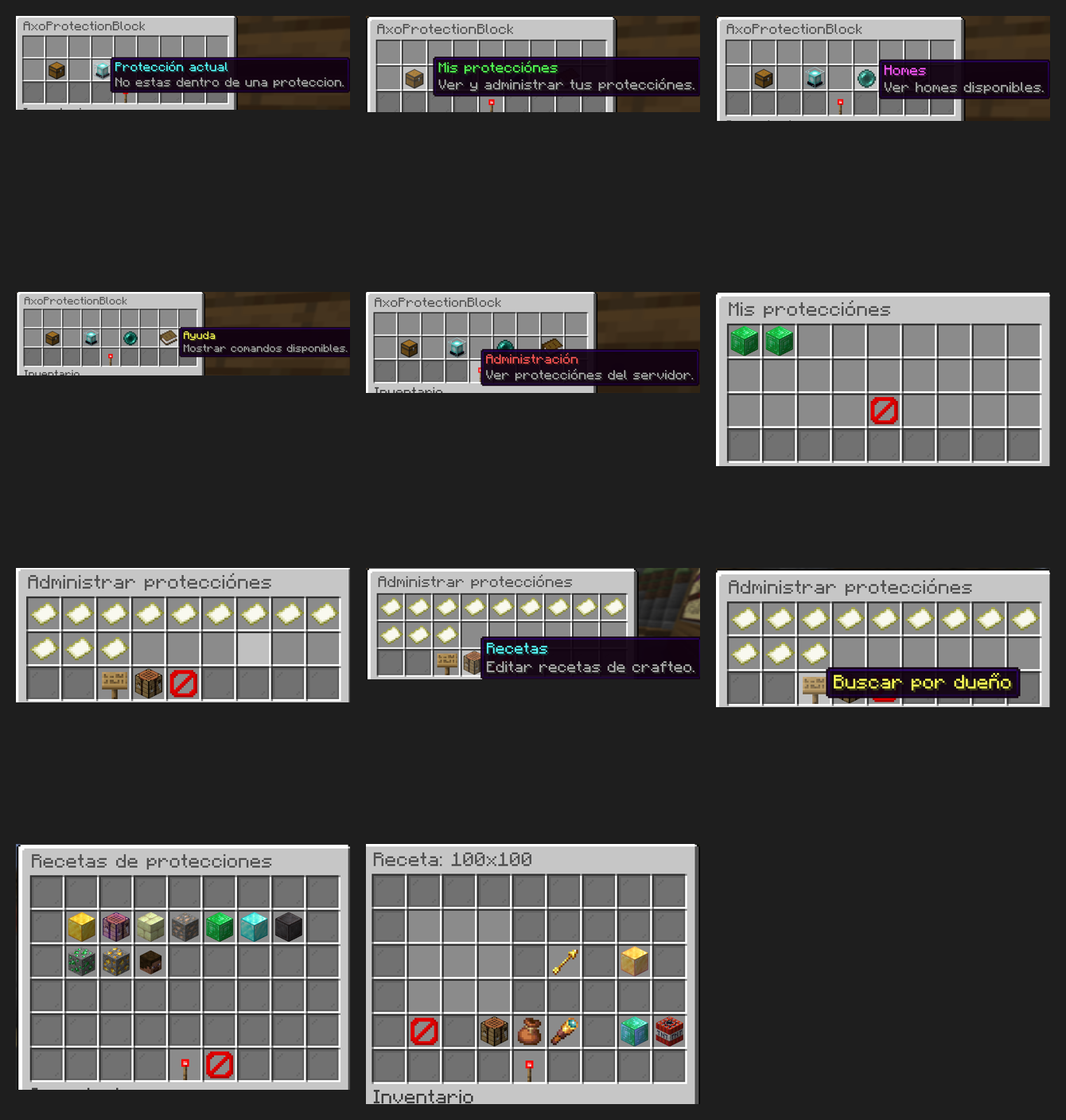
🖥️ Visual GUI Menus
Modern configurable menus for:
- Protections
- Members
- Homes
- Recipes
- Shops
- Rent system
- Tax system
- Administrative tools
🔨 Crafting & Shop System
- Custom crafting recipes for protection blocks
/apb recipes <block>menu to preview crafting recipes- Integrated protection shop
- Optional Vault economy support
🏠 Homes & Teleportation
- Homes inside protections
- Safe teleportation system
- Teleportation inside protected regions
- Configurable teleport settings
🏷️ Rent & Tax Systems
Optional systems for advanced servers:
- Protection rent system
- Tax system
- Automatic renewals
- Debt handling
- Automatic expiration
- Configurable actions and punishments
🌍 Multi-Language Support
Included languages:
- English
- Spanish
- Russian
Features:
- Automatic client language detection
- Configurable fallback language
- Easy language file customization
🗃️ Storage & Database Support
- YAML storage
- SQLite support
- Per-protection storage system
- Optimized data loading
🔁 Migration Tools
Migration support from:
- YAML
- ProtectionStones
- RoyaleProtectionBlocks
🧩 Optional Integrations
Compatible with:
- PlaceholderAPI
- Vault
- CraftEngine
- WorldGuard
- Discord webhooks
📦 Requirements
- ☕ Java 25+
- 📄 Paper/folia 1.21.11 / API 26.1.2+
- 🔐 Permissions plugin recommended (LuckPerms recommended)
Ченджлог
3.0.9Релиз26.1.1, 26.1.2, 26.2 · 2 июля 2026 г.
Español: Se corrigió un problema con las flags de los miembros.
English: Fixed an issue with member flags.
Русский: Исправлена проблема с флагами участников.
3.0.8Релиз26.1.1, 26.1.2, 26.2 · 2 июля 2026 г.
Español:
Se corrigió un problema menor con los permisos de /apb ver y /apb version.
English:
Fixed a minor issue with the permissions for /apb ver and /apb version.
Русский:
Исправлена небольшая проблема с правами для /apb ver и /apb version.
3.0.7Релиз26.1, 26.1.1, 26.1.2 · 2 июля 2026 г.
Español: Se agregó en la configuración la opción de activar o desactivar los mensajes de entrada y salida de las protecciones.
English: Added the option in the config to enable or disable protection entry and exit messages.
Русский: В конфигурацию была добавлена возможность включать или отключать сообщения о входе и выходе из защит.
3.0.6Релиз26.1, 26.1.1, 26.1.2 · 25 июня 2026 г.
Español: Se arregló un problema con los mensajes de entrada y salida que, al reiniciar el servidor, volvían a como estaban antes.
English: Fixed an issue with the join and leave messages where, after restarting the server, they would revert to their previous state.
Ruso: Исправлена проблема с сообщениями входа и выхода: после перезапуска сервера они возвращались к предыдущему состоянию.
3.0.5Релиз26.1, 26.1.1, 26.1.2 · 21 июня 2026 г.
🇪🇸 Español
Sistema de Invitados (Permisos Públicos)
- El rol "Invitados" deja de existir como miembro.
- Se convierte en una configuración de permisos públicos de la protección.
- Cualquier jugador externo podrá utilizar los permisos habilitados sin necesidad de ser agregado a la protección.
Ejemplos de permisos públicos:
- Volar
- Abrir puertas
- Abrir cofres
- Usar botones
- Usar palancas
- Interactuar
Si un permiso está desactivado, los jugadores externos no podrán utilizarlo.
Nuevo Menú de Gestión de Miembros
- Hacer clic en un miembro ya no lo eliminará automáticamente.
- Se abrirá un menú de administración de permisos individuales.
- Cada miembro podrá tener permisos personalizados.
Ejemplos de permisos:
- Construir
- Romper bloques
- Abrir cofres
- Abrir puertas
- Usar botones
- Usar palancas
- Volar
- PvP
- Interacciones
- Entidades
- Teletransporte al Home
Eliminación de miembros
- El botón de eliminar miembro estará dentro de este menú.
- Debe existir una confirmación antes de eliminar al miembro.
Comando de Distancia y Alineación de Protecciones
Nuevo comando para calcular dónde colocar otra protección correctamente.
Alias sugeridos:
/p distance/p calc/p align/p preview
Funcionalidades:
El sistema detectará la protección actual y calculará:
- Tamaño
- Distancia mínima requerida
- Posición válida
- Centro recomendado
Mostrará una guía visual mediante partículas.
Debe respetar:
- Distancias mínimas
- Sistema anti-overlap
- Permisos
- Mundos permitidos
- Límites de jugador
- Diferentes tamaños de protección
Sistema de Reembolso de Protecciones
Agregar una opción de reembolso dentro de /p shop.
Configuración:
- Cada tipo de protección tendrá un porcentaje de reembolso configurable.
Ejemplo:
- Precio:
$10,000 - Reembolso:
50% - Dinero devuelto:
$5,000
🇺🇸 English
Guest System (Public Permissions)
- The "Guests" role no longer exists as a member role.
- It is replaced by a public permissions configuration for each protection.
- Any external player can use enabled permissions without being added to the protection.
Examples of public permissions:
- Fly
- Open doors
- Open chests
- Use buttons
- Use levers
- Interact
If a permission is disabled, external players will not be able to use it.
New Member Management Menu
- Clicking a member will no longer remove them automatically.
- A dedicated individual permission management menu will open.
- Each member can have custom permissions.
Permission examples:
- Build
- Break Blocks
- Open Chests
- Open Doors
- Use Buttons
- Use Levers
- Fly
- PvP
- Interactions
- Entities
- Home Teleport
Member Removal
- The remove member button will be located inside this menu.
- A confirmation must be displayed before removing a member.
Protection Distance & Alignment Command
A new command to calculate the correct placement of another protection.
Suggested aliases:
/p distance/p calc/p align/p preview
Features:
The system will detect the current protection and calculate:
- Protection size
- Minimum required distance
- Valid placement position
- Recommended center position
A visual particle guide will be displayed.
Must respect:
- Minimum distances
- Anti-overlap system
- Permissions
- Allowed worlds
- Player limits
- Different protection sizes
Protection Refund System
Add a refund option inside /p shop.
Configuration:
- Each protection type can have a configurable refund percentage.
Example:
- Price:
$10,000 - Refund:
50% - Returned Money:
$5,000
🇷🇺 Русский
Система Гостей (Публичные Разрешения)
- Роль «Гости» больше не существует как роль участника.
- Она заменяется системой публичных разрешений для защиты.
- Любой внешний игрок сможет использовать включённые разрешения без добавления в защиту.
Примеры публичных разрешений:
- Полёт
- Открытие дверей
- Открытие сундуков
- Использование кнопок
- Использование рычагов
- Взаимодействие
Если разрешение отключено, внешние игроки не смогут его использовать.
Новое Меню Управления Участниками
- Нажатие на участника больше не удаляет его автоматически.
- Откроется меню управления индивидуальными разрешениями.
- Каждый участник сможет иметь собственные настройки разрешений.
Примеры разрешений:
- Строительство
- Ломание блоков
- Открытие сундуков
- Открытие дверей
- Использование кнопок
- Использование рычагов
- Полёт
- PvP
- Взаимодействия
- Сущности
- Телепортация домой
Удаление участника
- Кнопка удаления будет находиться внутри этого меню.
- Перед удалением должно отображаться подтверждение.
Команда Расстояния и Выравнивания Защит
Новая команда для расчёта правильного размещения другой защиты.
Предлагаемые алиасы:
/p distance/p calc/p align/p preview
Возможности:
Система определяет текущую защиту и рассчитывает:
- Размер защиты
- Минимально необходимое расстояние
- Допустимую позицию
- Рекомендуемый центр
Будет отображаться визуальная подсказка с помощью частиц.
Должна учитывать:
- Минимальные расстояния
- Систему предотвращения пересечений
- Разрешения
- Разрешённые миры
- Лимиты игрока
- Различные размеры защит
Система Возврата Средств за Защиты
Добавить возможность возврата средств в меню /p shop.
Настройка:
- Для каждого типа защиты можно настроить процент возврата.
Пример:
- Цена:
$10,000 - Возврат:
50% - Возвращается:
$5,000
3.0.4Релиз26.1, 26.1.1, 26.1.2 · 16 июня 2026 г.
🇪🇸 Español
Se modificó la configuración de la flag de vuelo:
fly-flag:
  enabled: true
  fly: false
Cambios
- Ahora se define si la flag de vuelo aparecerá o no en el menú de flags mediante
enabled: true/false. - Se agregó la opción
flypara establecer el estado predeterminado de la flag en nuevas protecciones. - Si
fly: true, la flag aparecerá como Activado en el menú. - Si
fly: false, la flag aparecerá como Desactivado en el menú.
🇺🇸 English
The flight flag configuration has been modified:
fly-flag:
  enabled: true
  fly: false
Changes
- You can now define whether the flight flag will appear in the flags menu using
enabled: true/false. - Added the
flyoption to set the default state of the flag for new protections. - If
fly: true, the flag will appear as Enabled in the menu. - If
fly: false, the flag will appear as Disabled in the menu.
🇷🇺 Русский
Изменена конфигурация флага полёта:
fly-flag:
  enabled: true
  fly: false
Изменения
- Теперь можно указать, будет ли флаг полёта отображаться в меню флагов с помощью
enabled: true/false. - Добавлена настройка
flyдля установки состояния флага по умолчанию для новых регионов. - Если
fly: true, флаг будет отображаться как Включено в меню. - Если
fly: false, флаг будет отображаться как Отключено в меню.
3.0.3Релиз26.1, 26.1.1, 26.1.2 · 11 июня 2026 г.
🇪🇸 Español
Se implementó un sistema de mejoras pagadas para flags.
Cambios principales:
• Nuevo archivo mejoras.yml con costo por flag y estado bloqueado/desbloqueado.
• En config.yml se agregó:
mejoras:
  enabled: false
• Las flags pagadas se desbloquean por protección, no globalmente.
🇺🇸 English
A paid upgrade system for flags has been implemented.
Main changes:
• New mejoras.yml file with cost per flag and locked/unlocked status.
• Added to config.yml:
mejoras:
  enabled: false
• Paid flags are unlocked per protection, not globally.
🇷🇺 Русский
Была реализована система платных улучшений для флагов.
Основные изменения:
• Новый файл mejoras.yml со стоимостью каждого флага и статусом заблокирован/разблокирован.
• В config.yml добавлено:
mejoras:
  enabled: false
• Платные флаги разблокируются для каждой защиты отдельно, а не глобально.
3.0.2Релиз26.1, 26.1.1, 26.1.2 · 11 июня 2026 г.
🇪🇸 Español
Se mejoró /apb logs.
Ahora permite filtros por: • Jugador • Tipo de acción: bloques, contenedores, miembros, flags y transferencias • Fecha
El menú de logs ahora tiene botones para: • Filtrar por jugador • Cambiar tipo de acción • Filtrar por fecha • Limpiar filtros
Se agregó rollback desde el menú de logs: • Clic derecho sobre un log compatible • Confirmación en menú • Revierte bloques rotos/colocados e ítems movidos en contenedores
Nuevos permisos:
• axoprotectionblock.logs.filter
• axoprotectionblock.admin.logs.filter
• axoprotectionblock.admin.rollback
/apb transfer <player> ahora tiene doble confirmación:
• Primero confirma el dueño si quiere enviar la transferencia
• Luego el receptor acepta o rechaza la transferencia
🇺🇸 English
/apb logs has been improved.
It now supports filters by: • Player • Action type: blocks, containers, members, flags, and transfers • Date
The logs menu now includes buttons to: • Filter by player • Change action type • Filter by date • Clear filters
Rollback has been added from the logs menu: • Right-click on a compatible log • Confirm through the menu • Reverts broken/placed blocks and items moved in containers
New permissions:
• axoprotectionblock.logs.filter
• axoprotectionblock.admin.logs.filter
• axoprotectionblock.admin.rollback
/apb transfer <player> now has double confirmation:
• First, the owner confirms if they want to send the transfer
• Then, the receiver accepts or rejects the transfer
🇷🇺 Русский
Команда /apb logs была улучшена.
Теперь доступны фильтры по: • Игроку • Типу действия: блоки, контейнеры, участники, флаги и передачи • Дате
В меню логов теперь есть кнопки для: • Фильтрации по игроку • Изменения типа действия • Фильтрации по дате • Очистки фильтров
Был добавлен rollback через меню логов: • Правый клик по совместимому логу • Подтверждение через меню • Откатывает сломанные/поставленные блоки и предметы, перемещённые в контейнерах
Новые права:
• axoprotectionblock.logs.filter
• axoprotectionblock.admin.logs.filter
• axoprotectionblock.admin.rollback
/apb transfer <player> теперь имеет двойное подтверждение:
• Сначала владелец подтверждает отправку передачи
• Затем получатель принимает или отклоняет передачу
Комментарии
Загружаем…