 Mineforgian
AdminToolbox
Effective Minecraft moderation tools designed to prevent cheating.
- Загрузки
- 433
- Подписчики
- 8
- Обновлён
- 2 апреля 2026 г.
- Лицензия
- GPL-3.0-only
Опубликован 26 мая 2025 г.
Effective Minecraft moderation tools designed to prevent cheating, maintaining staff integrity and community trust.
AdminToolbox supports Folia.
Features & Commands
Spectate
/spectate, /admin, /target
Enter admin mode, which creates a separate temporary inventory that is deleted when exiting. The player is placed in Spectator Mode until they reveal or exit admin mode.
While spectating, the player can use the command again to exit admin mode. The player will be teleported back to their original location, placed back into survival mode, and their original inventory will be restored.
Target Locations
/target- Enter admin mode at current location/target <player>- Enter admin mode at a specified player's location/target <x> <y> <z> [world]- Enter admin mode at specific coordinates/target <x> <z> [world]- Enter admin mode at specific coordinates (uses the highest Y-level block at that location)
Targeting Spawn
/spawn, /targetspawn
/spawn- Enter admin mode at the current world's spawn point/spawn <world>- Enter admin mode at the provided world's spawn point
Navigation
/back- Move to previous location in teleport history/forward- Move to next location in teleport history
Reveal
/reveal, /show
While spectating in admin mode, running this command places the player into survival mode at their current location. This makes the admin visible to players during confrontations while maintaining:
- Temporary inventory
- Immunity to damage
- No mob targeting
Fullbright
/fullbright, /nightvision
/fullbright- Toggle fullbright for the current admin session/fullbright <on|off>- Enable or disable fullbright for the current admin session
Yell
/yell <player> <message>
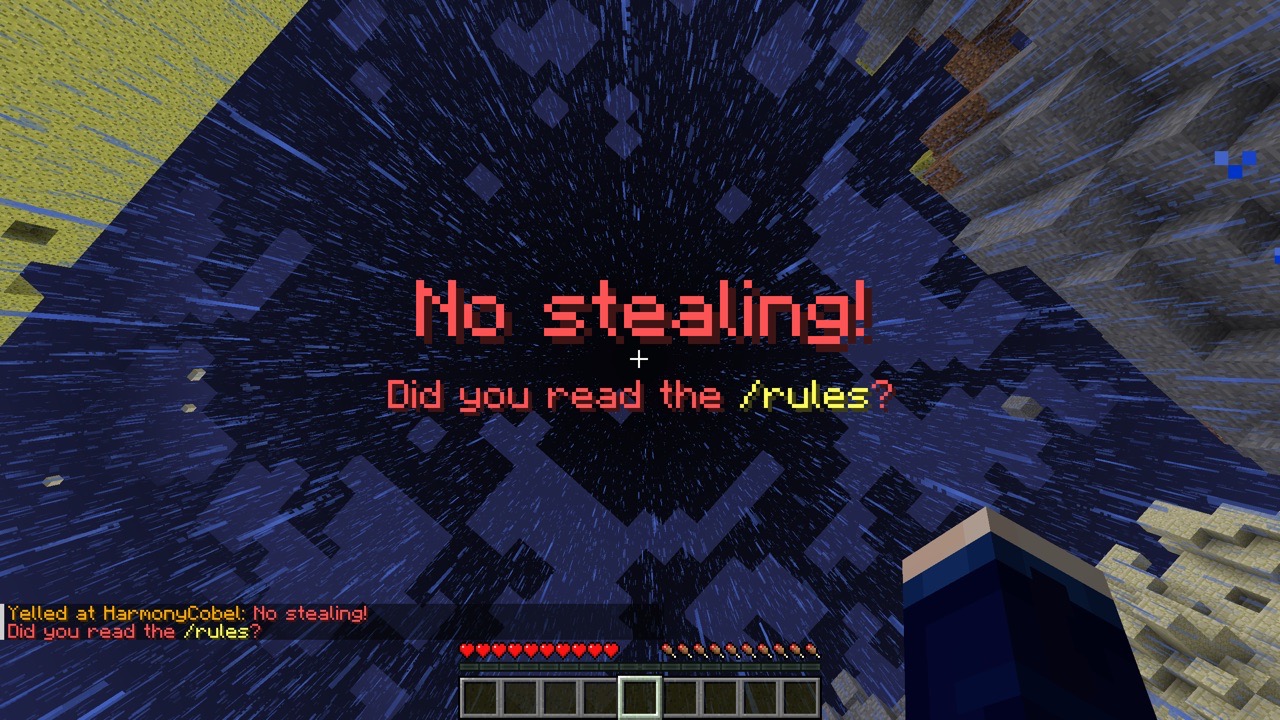
Forcibly displays a large red title on the targeted player's screen.
Use the pipe character (|) to separate title and subtitle: title | subtitle.
Legacy ampersand color codes are supported. (i.e. No stealing! | Did you read the &e/rules&r?)
Freeze
/freeze <player>
Stops the target player from moving until released.
Frozen players:
- can look around freely
- can fall downward
- can use containers
- cannot place or break blocks
- cannot take any damage
- cannot hurt other entities (including players)
- cannot be targeted by mobs
To release a frozen player, use /unfreeze <player>
Streamer Mode
Requires LuckPerms.
/streamermode <duration>, /pausealerts <duration>
Allows players to temporarily disable certain permissions (i.e. those that give them staff-only alerts), intended for use when screen sharing or live-streaming gameplay.
Placeholder
When PlaceholderAPI is available, a placeholder is made available to display when a player has streamer mode active.
%rel_streamermode_tag%: Displays a⬤tag in red when streamer mode is active.%rel_streamermode_prefix%: Displays the tag followed by a space when streamer mode is active.%rel_streamermode_suffix%: Displays the tag preceded by a space when streamer mode is active.
Permissions
| Permission | Description |
|---|---|
admintoolbox.target |
Use /target at current location |
admintoolbox.target.player |
Use /target <player> |
admintoolbox.target.location |
Use /target <x> [y] <z> [world] |
admintoolbox.reveal |
Use /reveal |
admintoolbox.yell |
Use /yell |
admintoolbox.freeze |
Use /freeze and /unfreeze |
admintoolbox.spawn |
Use /spawn in current world |
admintoolbox.spawn.all |
Use /spawn [world] |
admintoolbox.fullbright |
Use /fullbright while in admin mode |
admintoolbox.broadcast.receive |
Receive alerts about others' targets actions. |
admintoolbox.broadcast.exempt |
Do not send alerts to players with admintoolbox.broadcast.receive |
admintoolbox.streamermode |
Use streamer mode |
admintoolbox.streamermode.unlimited |
Bypass maximum streamer mode duration. (Set in config.yml) |
admintoolbox.streamermode.placeholder.wear |
Wear the streamer mode status placeholder. |
admintoolbox.streamermode.placeholder.view |
View other players' streamer mode status placeholders. |
Integrations
- LuckPerms
- Required for streamer mode.
- New in version 1.4.0: Custom context for conditionally applying permissions based on admin state.
admintoolbox:statecan be any ofspectating,revealed, ornormal(not in admin mode).
- BlueMap
- The plugin will hide admins who are revealed from the map.
- PlaceholderAPI
- The plugin provides a placeholder for players' streamer mode status.
- Players must have the appropriate permissions to wear and view the placeholder.
Analytics
Added in version 1.4.0.
For us to better understand how many servers are using AdminToolbox, by default we collect anonymized analytics via
bStats. Server administrators can disable this functionality on their servers by setting enabled: false in
plugins/bStats/config.yml.
The anonymized collected data is viewable publicly at https://bstats.org/plugin/bukkit/AdminToolbox/26406.
Ченджлог
1.5.2Релиз1.21.9, 1.21.10, 1.21.11 · 2 апреля 2026 г.
- Fixes an incompatibility where restoring an admin session on login may produce an exception if certain inventory-modifying plugins are installed (https://github.com/ModernBetaNetwork/AdminToolbox/pull/52)
Full Changelog: https://github.com/ModernBetaNetwork/AdminToolbox/compare/v1.5.1...v1.5.2
1.5.1Релиз1.21.9, 1.21.10, 1.21.11 · 5 февраля 2026 г.
Fixes
- Players in admin mode can no longer set their spawn point by right-clicking a bed or respawn anchor.
- By default, players in streamer mode can no longer see the streamer mode placeholder. This behavior is configurable in config.yml.
New: Update checker
On server startup, the plugin will now check the Modrinth API for updates to AdminToolbox and send an alert in the console if a new version is available.
Full Changelog: https://github.com/ModernBetaNetwork/AdminToolbox/compare/v1.5.0...v1.5.1
1.5.0Релиз1.21.9, 1.21.10, 1.21.11 · 3 января 2026 г.
New: Streamer mode placeholder
- Added a placeholder for indicating a player's streamer mode status when PlaceholderAPI is available (https://github.com/ModernBetaNetwork/AdminToolbox/pull/45)
Other changes
- Removed stats config toggle in favor of bStats global toggle (https://github.com/ModernBetaNetwork/AdminToolbox/pull/46)
Full Changelog: https://github.com/ModernBetaNetwork/AdminToolbox/compare/v1.4.1...v1.5.0
1.4.1Релиз1.21.9, 1.21.10, 1.21.11 · 22 декабря 2025 г.
Fixes:
/streamermodenow shows an explanatory message when LuckPerms is unavailable- Spectating at given coordinates now teleports to the center of the targeted block
Full Changelog: https://github.com/ModernBetaNetwork/AdminToolbox/compare/v1.4.0...v1.4.1
1.4.0Релиз1.21.9, 1.21.10, 1.21.11 · 20 декабря 2025 г.
New: LuckPerms context!
Allows permissions to be set conditionally based on admin state.
admintoolbox:state can be any of spectating, revealed, or normal.
New: bStats
New in this version, we collect anonymized analytics via bStats. Collected data is available publicly at https://bstats.org/plugin/bukkit/AdminToolbox/26406. Analytics can be disabled by setting enable-stats: false in config.yml.
1.3.0Релиз1.21.9, 1.21.10, 1.21.11 · 13 декабря 2025 г.
New: Fullbright!
Fullbright allows admins to activate a full-strength Night Vision effect for the duration of their active admin session.
Other changes
The plugin no longer throws errors when LuckPerms is unavailable. In this case, Streamer Mode is unavailable.
1.2.0Релиз1.21.5, 1.21.6, 1.21.7 · 9 июля 2025 г.
New: Streamer Mode!
Introducing Streamer Mode, a new way to allow players to self-restrict certain permissions for a provided time period. For instance, this can help by removing admin broadcats, anti-cheat alerts, private staff chats, and anything else that can be disabled by unsetting a permission node in LuckPerms.
This also introduces a config.yml file to AdminToolbox with options related to Streamer Mode.
Other changes
Various pieces of command feedback in the plugin got a slight refresh for the sake of consistency and clarity.
1.1.2Релиз1.21.3, 1.21.4, 1.21.5 · 26 мая 2025 г.
See release notes on GitHub: https://github.com/ModernBetaNetwork/AdminToolbox/releases/v1.1.2
The plugin is only tested on 1.20.4 & up, but should be compatible all the way back to 1.20.
Комментарии
Загружаем…