 Mineforgian
Wireless Redstone Lite
Wireless redstone for Minecraft 26.1.x. Pair transmitter and receiver blocks by channel + frequency — no wire, no spaghetti. Up to 128 blocks of range by default, configurable.
- Загрузки
- 1K
- Подписчики
- 6
- Обновлён
- 19 июля 2026 г.
- Лицензия
- MIT
Опубликован 18 мая 2026 г.

Wireless Redstone
Tired of running redstone wire through your whole base just to flip one lamp? Drop a transmitter next to your switch, a receiver next to your lamp, match the channel — done. No wire. No floor‑tile mazes. No accidentally powering the wrong piston.
Features
- Transmitter — takes a redstone input from any side, broadcasts on its channel.
- Receiver — outputs the strongest signal it sees on its channel, like a redstone block.
- Channel (1–128) and Frequency (0–65535) — pick any pair to keep your networks separate. Over 8 million combinations per dimension.
- Lock toggle — freezes the channel/frequency so you can't bump them by accident.
- Private toggle — binds the pair to your player, so two players can use the same channel without crossing wires on a multiplayer server.
- Item tooltips show the current config without placing the block — handy for sorting them in a chest.
- Configurable range — defaults to 128 blocks. Server admins can bump it up to 1024 or disable the limit entirely.
How it works
- Craft a transmitter and a receiver (recipes below).
- Place the transmitter and feed it redstone from any side — lever, button, comparator, whatever.
- Place the receiver anywhere in the same dimension within range.
- Right‑click either block to open the config screen. Match the channel + frequency.
- The receiver mirrors whatever signal strength the transmitter sees. Strength matters — comparator outputs travel intact.
Multiple transmitters on the same channel? The receiver picks the strongest. Multiple receivers? They all output the same. No cross‑dimension signalling (yet).
Recipes
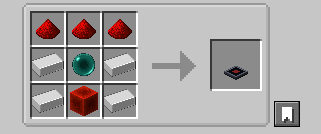
Transmitter — 4 iron + 3 redstone + 1 ender pearl + 1 redstone block
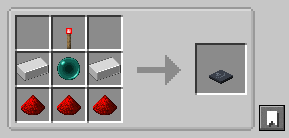
Receiver — 2 iron + 3 redstone + 1 ender pearl + 1 redstone torch
The ender pearl gates these behind your first enderman kill — far enough out that you've explored a bit, but accessible long before diamond or Nether tier.
Configuration
Config file lives at config/wirelessredstone.json (created on first launch):
{
  "rangeLocked": true,
  "maxRange": 128
}
| Key | Default | What it does |
|---|---|---|
rangeLocked |
true |
When true, receivers ignore transmitters farther than maxRange blocks. Set false for unlimited range within a dimension. |
maxRange |
128 |
Block distance. Clamped to [4, 1024]. |
Edit the file and restart Minecraft (or the dedicated server) for changes to take effect.
Requirements
- Minecraft 26.1.x
- Java 25
- Fabric Loader 0.18.4+ with Fabric API, or NeoForge 26.1+
Roadmap
Future versions may add: a "fixed strength" mode (transmitter always emits a chosen 1–15 instead of mirroring its input), Jade/WAILA tooltips for in‑world inspection, and an owner‑only Private gamerule.
Source
GitHub: kestalkayden/wireless-redstone — CC0‑1.0.
Ченджлог
0.1.4+mc26.1.2Релиз26.1, 26.1.1, 26.1.2 · 19 июля 2026 г.
Changed
- Internal packaging metadata (
pack.mcmeta) now declares the correct resource and data pack formats for Minecraft 26.1.2.
Notes
- Nothing changes for players — this build behaves identically to v0.1.3. No new features, no gameplay changes.
- The old values worked in practice, because Minecraft does not enforce pack formats for mod-bundled resources. This corrects them so the mod keeps working if that ever changes.
0.1.4+mc26.1.2Релиз26.1, 26.1.1, 26.1.2 · 19 июля 2026 г.
Changed
- Internal packaging metadata (
pack.mcmeta) now declares the correct resource and data pack formats for Minecraft 26.1.2.
Notes
- Nothing changes for players — this build behaves identically to v0.1.3. No new features, no gameplay changes.
- The old values worked in practice, because Minecraft does not enforce pack formats for mod-bundled resources. This corrects them so the mod keeps working if that ever changes.
0.2.5+mc26.2Релиз26.2 · 19 июля 2026 г.
Changed
- Internal packaging metadata (
pack.mcmeta) now declares the correct resource and data pack formats for Minecraft 26.2.
Notes
- Nothing changes for players — this build behaves identically to v0.2.4. No new features, no gameplay changes.
- The old values worked in practice, because Minecraft does not enforce pack formats for mod-bundled resources. This corrects them so the mod keeps working if that ever changes.
0.2.5+mc26.2Релиз26.2 · 19 июля 2026 г.
Changed
- Internal packaging metadata (
pack.mcmeta) now declares the correct resource and data pack formats for Minecraft 26.2.
Notes
- Nothing changes for players — this build behaves identically to v0.2.4. No new features, no gameplay changes.
- The old values worked in practice, because Minecraft does not enforce pack formats for mod-bundled resources. This corrects them so the mod keeps working if that ever changes.
0.1.3+mc26.1.2Релиз26.1, 26.1.1, 26.1.2 · 13 июля 2026 г.
Fixed
- Transmitters no longer get stuck on next to their own receiver. A transmitter placed within a block of a receiver on the same channel and frequency could latch on: once its redstone input (lever, comparator, etc.) switched it on, it stayed on even after that input turned off — or was removed entirely. Transmitters now ignore the signal from receivers on their own channel when reading their input, so they release correctly. Receivers driving a transmitter on a different channel are unaffected.
0.2.4+mc26.2Релиз26.2 · 13 июля 2026 г.
Fixed
- Transmitters no longer get stuck on next to their own receiver. A transmitter placed within a block of a receiver on the same channel and frequency could latch on: once its redstone input (lever, comparator, etc.) switched it on, it stayed on even after that input turned off — or was removed entirely. Transmitters now ignore the signal from receivers on their own channel when reading their input, so they release correctly. Receivers driving a transmitter on a different channel are unaffected.
0.1.3+mc26.1.2Релиз26.1, 26.1.1, 26.1.2 · 13 июля 2026 г.
Fixed
- Transmitters no longer get stuck on next to their own receiver. A transmitter placed within a block of a receiver on the same channel and frequency could latch on: once its redstone input (lever, comparator, etc.) switched it on, it stayed on even after that input turned off — or was removed entirely. Transmitters now ignore the signal from receivers on their own channel when reading their input, so they release correctly. Receivers driving a transmitter on a different channel are unaffected.
0.2.4+mc26.2Релиз26.2 · 13 июля 2026 г.
Fixed
- Transmitters no longer get stuck on next to their own receiver. A transmitter placed within a block of a receiver on the same channel and frequency could latch on: once its redstone input (lever, comparator, etc.) switched it on, it stayed on even after that input turned off — or was removed entirely. Transmitters now ignore the signal from receivers on their own channel when reading their input, so they release correctly. Receivers driving a transmitter on a different channel are unaffected.
Комментарии
Загружаем…