 Mineforgian
Wearable Quivers
Wearable Quivers adds equippable quivers that store multiple arrow types. Compatible with backpacks — the quiver automatically moves to your hip slot. Shoot directly from your quiver, switch arrow types with and upgrade through six tiers up to netherite.
- Загрузки
- 176
- Подписчики
- 1
- Обновлён
- 25 мая 2026 г.
- Лицензия
- MIT
Опубликован 18 мая 2026 г.
🏹 Wearable Quivers
Carry your arrows with style. Switch types on the fly. Never fumble with your inventory mid-fight again.
✦ What is this?
Wearable Quivers adds craftable, equippable quivers that sit on your back (or hip when wearing a backpack). Store multiple arrow types, shoot directly from the quiver, and cycle between them without ever opening your inventory.


✦ Features
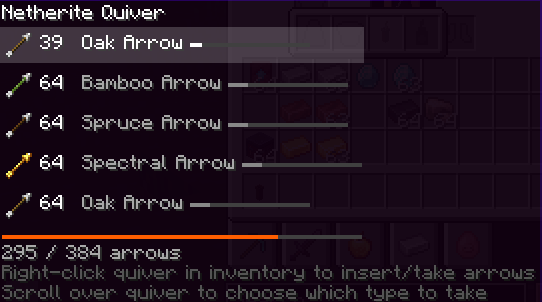
📦 Arrow Storage Store up to 6 different arrow types in one quiver. Fill it by right-clicking arrows onto it in your inventory.
🎯 Direct Shooting Bows and crossbows pull from your quiver automatically, prioritizing it over your inventory.
🔄 Quick Switching Scroll over the quiver slot in your inventory to cycle arrow types, or use Shift + Scroll while holding a bow — no inventory needed.
🖥️Arrow HUD A clean slot indicator appears next to your hotbar while holding a bow, showing your current arrow, count, and the next/previous types at a glance.
🎨 Dyeable Leather quivers can be dyed any color in a cauldron or a Crafting Table.
✦ Tiers
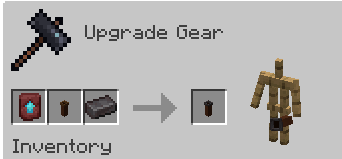
Craft a leather quiver to start, then upgrade it at the smithing table.
| Tier | Capacity |
|---|---|
| 🟤 Leather | 64 |
| 🟠 Copper | 128 |
| ⚪ Iron | 192 |
| 🟡 Gold | 256 |
| 🔵 Diamond | 320 |
| ⚫ Netherite | 384 |
✦ Backpack and Elytra Friendly
The quiver equips in the quiver slot. Equip a backpack or an Elytra and the quiver shifts to your hip automatically. Take the backpack off and it moves back. No fuss.
✦ Conservation Enchantment
Infinity is replaced with Conservation — a more balanced take on arrow preservation.
- Conservation I — 25% chance to save the arrow
- Conservation II — 50% chance to save the arrow
✦ Auto Refill Enchantment
Keep your quiver topped up without lifting a finger.
- Auto Refill — every second, arrows from your inventory are automatically moved into the quiver
- Pause and resume at any time: hover over the quiver and press T
- Status shown in the item tooltip — Active or Inactive
✦ Requirements
✦ Optional Compatibility
- Advanced Cauldron — dye quivers in cauldrons
- Advanced Fletching Table — trail colors displayed in the HUD
- EMI / REI / JEI — smithing recipes shown in recipe viewers
✦ Recipes
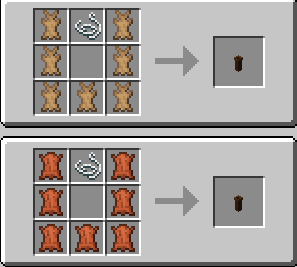
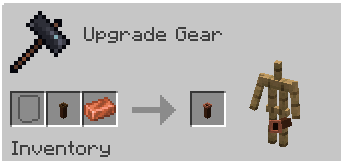
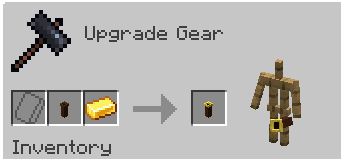
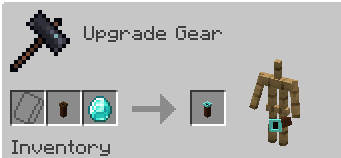
✦ Visuals

Ченджлог
1.0.1Релиз1.20.1 · 25 мая 2026 г.
Bug Fixes
- Fixed quiver trinket slot texture blinking every ~1 second between quiver and backpack icons
- Fixed right-clicking a quiver doing nothing (could not equip)
- Fixed arrows being automatically picked up into the quiver even when Auto Refill is toggled off (both shot arrows and dropped item entities)
Changes
- Auto Refill enchantment now starts inactive by default — press T while hovering the quiver in your inventory to enable it
- Quiver trinket slot moved to the chest group (appears near the chestplate slot in inventory)
New Features
- Quiver Position config option with three modes:
- Back — renders on back, automatically switches to hip if an elytra or backpack is detected
- Leg — always renders on hip/leg
- Force Back — always renders on back regardless of what else is equipped
- Auto Refill Enchantment can now be disabled in the config screen; disabling shows a warning and strips the enchantment from all quivers on the next /reload
- Edit Loot Tables button in the config screen — add or remove chest loot table IDs for both the quiver item and the Auto Refill enchanted book directly in-game
- Config screen toggle values now colored green (On/True) and red (Off/False)
Комментарии
Загружаем…