Перейти к содержимому
Mineforgian

Wavelength

An enhanced multiplayer experience for Minecraft.

Загрузки
438
Подписчики
24
Обновлён
7 июля 2026 г.
Лицензия
All-Rights-Reserved

Опубликован 18 февраля 2026 г.
Bring your SMP to life.


Nameplates, ranks, friends, projects, and live events, all synced through your own server.



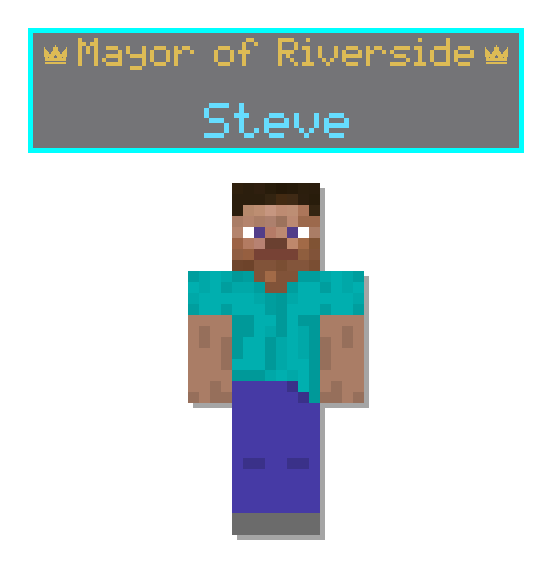
Cool Nameplates

Rank, town, live activity, and badges, shown above every player.


nameplate prev


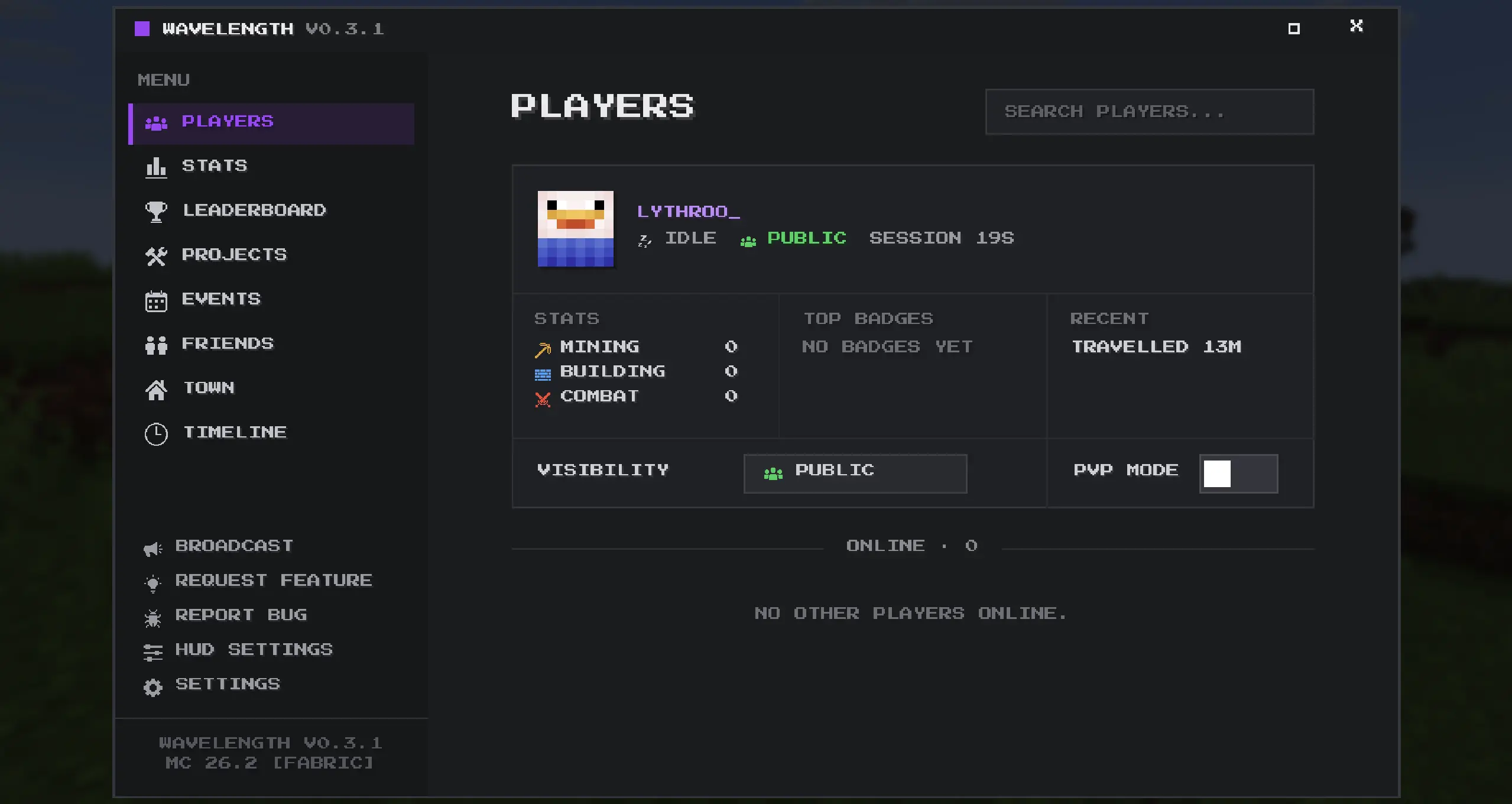
One menu, everything

Players, friends, stats, leaderboards, projects, and events.
Menu


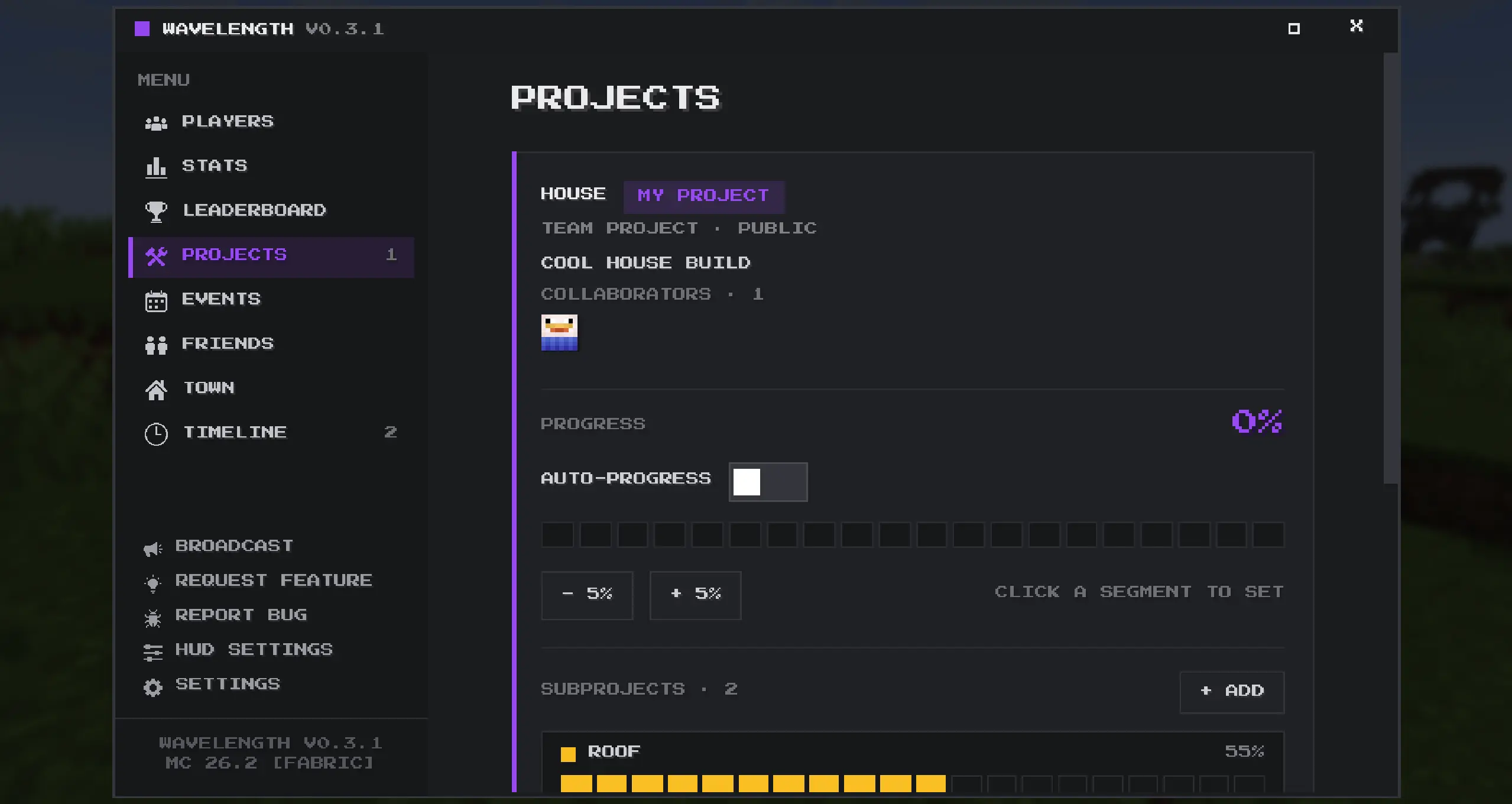
Build Together

Start projects, invite collaborators, and track progress as a team.
Projects


Events and dimension gates

Run live server events and open or close the Nether and End on a schedule.
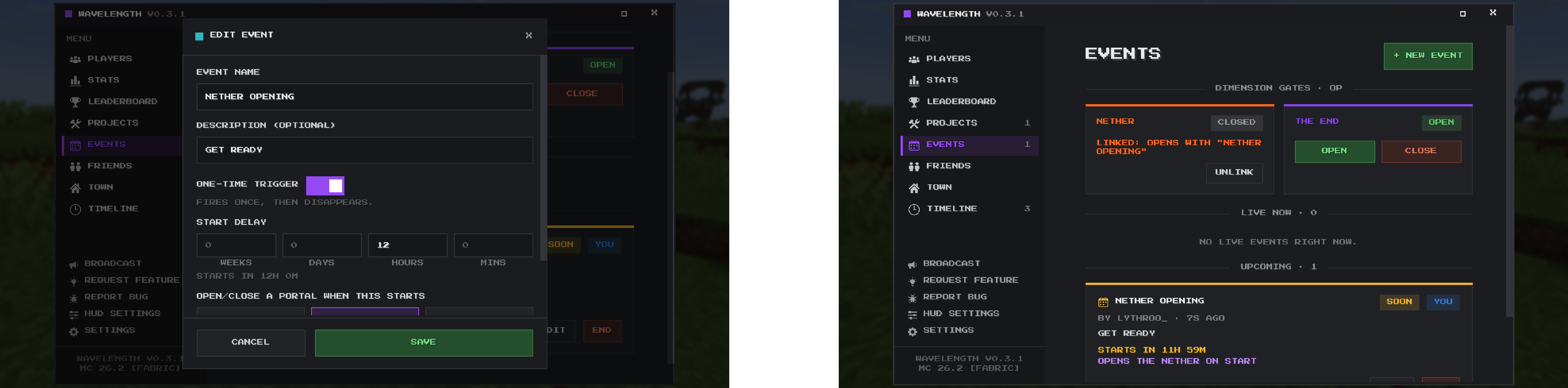
Events


Full feature list (click to expand)

Nameplates

  • Rank and town shown above each player (like Mayor of Riverside)
  • Live activity shown with an icon (Mining, Building, Fighting, Farming)
  • Achievement badge shown next to the name
  • Privacy shown as a small icon (Public, Friends, Ghost)
  • Fancier animated borders for higher ranks and badges, with a flourish when someone levels up
  • Can be turned off to fall back to vanilla nameplates

Your profile and identity

  • Set your own town name and pick a rank
  • 12 ranks: Founder, King, Queen, Mayor, Knight, Guard, Builder, Farmer, Miner, Citizen, Traveler, Developer
  • Three privacy modes: Public, Friends Only, and Ghost (hides your activity and location)
  • PVP mode toggle that hides your activity from others
  • Write a short description about yourself
  • Add playstyle tags (presets like PVP, Building, Redstone, Trading, or your own custom ones)

The menu (press H)

  • A resizable window you can maximize, with tabs for Players, Stats, Leaderboard, Projects, Events, Friends, Town, Timeline, and Settings
  • Pick your own accent color
  • Clean custom interface with a rotatable 3D skin view on profiles

Players

  • See everyone online, sorted by distance, with the direction and range to each player even when they are far away or in another dimension
  • See everyone who has ever joined the server in an offline list
  • Search the roster by name
  • Open any player to view their profile: skin, description, tags, stats, and badges
  • Privacy is respected (Friends Only and Ghost hide details from people who should not see them)

Friends

  • Send, accept, decline, and cancel friend requests, with alerts
  • A confirmed friends list you can remove people from
  • Friends are highlighted with a green outline in the player list

Stats and badges

  • Tracks blocks mined and placed, mobs killed, damage dealt, crops harvested, items crafted, distance travelled, and playtime
  • Total and current-session playtime
  • Bronze, Silver, Gold, and Diamond badges across mining, building, combat, farming, crafting, and exploring
  • Progress bars showing how close you are to the next tier

Leaderboard

  • Ranks players in each category, plus playtime
  • Trophies and highlights for the top three

Projects

  • Start a build project and share it on the server board
  • Solo or Team, with Public, Friends Only, or Private visibility
  • Break a project into subprojects, each with its own progress
  • Track progress by hand, or let it fill in automatically from subprojects
  • Others can request to join a Team project; you accept or decline, and can remove members
  • Mark a project complete for a server-wide celebration

Events and dimensions

  • Create server events with a name, description, optional start delay, and duration
  • Live and upcoming lists with countdowns, plus an optional event location
  • One-time events that fire once and disappear
  • Server operators can open or close the Nether and the End for everyone
  • An event can be linked to a dimension so it opens or closes when the event begins

Timeline

  • A server-wide feed of project and event milestones and badge unlocks
  • Each entry is clickable and jumps to the related page or player

In-game HUD

  • A top bar showing your identity (privacy and rank/town), nearby players, and the active event
  • A full editor to drag elements around, snap them, change their anchor, resize each one, adjust opacity, and hide the ones you do not want

Notifications

  • Pop-up toasts for feedback, friend requests, project updates, events, badge unlocks, and operator broadcasts
  • Adjustable size, position, duration, and sound, and each type can be turned off
  • Server operators can broadcast a message to everyone

Server and compatibility

  • Everything is saved on the server, so your profile, projects, and events survive restarts and follow you to a new computer
  • Update reminder when your version is behind the server, and an update check that matches your Minecraft version and mod loader
  • Players on a vanilla client still appear in the roster and receive key messages in chat

Copyright © 2026 Lythroo. All Rights Reserved.

Ченджлог

0.3.3+26.2-neoforgeБета26.2 · 7 июля 2026 г.

Fixes

  • Fixed your own playtime showing as broken or zero on the leaderboard. It now reads from the same source as everyone else's.
  • Fixed the 3D character preview showing a black model when you looked at a player who was in another dimension or far away. Skins now always load.
  • Fixed the character preview disappearing when you toggled certain F3 debug views (like F3+G chunk borders or F3+B hitboxes). It only hides now when the full debug screen is open.

Character preview

  • The 3D character now holds a clean idle pose. No walking, swinging, sneaking, swimming, or flying animations, and it never shows held items.

Text editing

  • Overhauled all the multiline text boxes (descriptions, bios, and so on) so they behave like normal text fields everywhere.
  • You can now click to place the cursor, click and drag to select, use shift plus arrow keys to select, highlight across multiple lines, move up and down with arrow keys, and jump with Home and End.

Look & feel

  • Replaced the last few text "X" close buttons with the proper crisp X icon (on the project, event, and broadcast popups and the main window title bar).
0.3.3+26.2-fabricБета26.2 · 7 июля 2026 г.

Fixes

  • Fixed your own playtime showing as broken or zero on the leaderboard. It now reads from the same source as everyone else's.
  • Fixed the 3D character preview showing a black model when you looked at a player who was in another dimension or far away. Skins now always load.
  • Fixed the character preview disappearing when you toggled certain F3 debug views (like F3+G chunk borders or F3+B hitboxes). It only hides now when the full debug screen is open.

Character preview

  • The 3D character now holds a clean idle pose. No walking, swinging, sneaking, swimming, or flying animations, and it never shows held items.

Text editing

  • Overhauled all the multiline text boxes (descriptions, bios, and so on) so they behave like normal text fields everywhere.
  • You can now click to place the cursor, click and drag to select, use shift plus arrow keys to select, highlight across multiple lines, move up and down with arrow keys, and jump with Home and End.

Look & feel

  • Replaced the last few text "X" close buttons with the proper crisp X icon (on the project, event, and broadcast popups and the main window title bar).
0.3.3+26.1.2-neoforgeБета26.1.2 · 7 июля 2026 г.

Fixes

  • Fixed your own playtime showing as broken or zero on the leaderboard. It now reads from the same source as everyone else's.
  • Fixed the 3D character preview showing a black model when you looked at a player who was in another dimension or far away. Skins now always load.
  • Fixed the character preview disappearing when you toggled certain F3 debug views (like F3+G chunk borders or F3+B hitboxes). It only hides now when the full debug screen is open.

Character preview

  • The 3D character now holds a clean idle pose. No walking, swinging, sneaking, swimming, or flying animations, and it never shows held items.

Text editing

  • Overhauled all the multiline text boxes (descriptions, bios, and so on) so they behave like normal text fields everywhere.
  • You can now click to place the cursor, click and drag to select, use shift plus arrow keys to select, highlight across multiple lines, move up and down with arrow keys, and jump with Home and End.

Look & feel

  • Replaced the last few text "X" close buttons with the proper crisp X icon (on the project, event, and broadcast popups and the main window title bar).
0.3.3+26.1.2-fabricБета26.1.2 · 7 июля 2026 г.

Fixes

  • Fixed your own playtime showing as broken or zero on the leaderboard. It now reads from the same source as everyone else's.
  • Fixed the 3D character preview showing a black model when you looked at a player who was in another dimension or far away. Skins now always load.
  • Fixed the character preview disappearing when you toggled certain F3 debug views (like F3+G chunk borders or F3+B hitboxes). It only hides now when the full debug screen is open.

Character preview

  • The 3D character now holds a clean idle pose. No walking, swinging, sneaking, swimming, or flying animations, and it never shows held items.

Text editing

  • Overhauled all the multiline text boxes (descriptions, bios, and so on) so they behave like normal text fields everywhere.
  • You can now click to place the cursor, click and drag to select, use shift plus arrow keys to select, highlight across multiple lines, move up and down with arrow keys, and jump with Home and End.

Look & feel

  • Replaced the last few text "X" close buttons with the proper crisp X icon (on the project, event, and broadcast popups and the main window title bar).
0.3.3+26.1.1-neoforgeБета26.1.1 · 7 июля 2026 г.

Fixes

  • Fixed your own playtime showing as broken or zero on the leaderboard. It now reads from the same source as everyone else's.
  • Fixed the 3D character preview showing a black model when you looked at a player who was in another dimension or far away. Skins now always load.
  • Fixed the character preview disappearing when you toggled certain F3 debug views (like F3+G chunk borders or F3+B hitboxes). It only hides now when the full debug screen is open.

Character preview

  • The 3D character now holds a clean idle pose. No walking, swinging, sneaking, swimming, or flying animations, and it never shows held items.

Text editing

  • Overhauled all the multiline text boxes (descriptions, bios, and so on) so they behave like normal text fields everywhere.
  • You can now click to place the cursor, click and drag to select, use shift plus arrow keys to select, highlight across multiple lines, move up and down with arrow keys, and jump with Home and End.

Look & feel

  • Replaced the last few text "X" close buttons with the proper crisp X icon (on the project, event, and broadcast popups and the main window title bar).
0.3.3+26.1.1-fabricБета26.1.1 · 7 июля 2026 г.

Fixes

  • Fixed your own playtime showing as broken or zero on the leaderboard. It now reads from the same source as everyone else's.
  • Fixed the 3D character preview showing a black model when you looked at a player who was in another dimension or far away. Skins now always load.
  • Fixed the character preview disappearing when you toggled certain F3 debug views (like F3+G chunk borders or F3+B hitboxes). It only hides now when the full debug screen is open.

Character preview

  • The 3D character now holds a clean idle pose. No walking, swinging, sneaking, swimming, or flying animations, and it never shows held items.

Text editing

  • Overhauled all the multiline text boxes (descriptions, bios, and so on) so they behave like normal text fields everywhere.
  • You can now click to place the cursor, click and drag to select, use shift plus arrow keys to select, highlight across multiple lines, move up and down with arrow keys, and jump with Home and End.

Look & feel

  • Replaced the last few text "X" close buttons with the proper crisp X icon (on the project, event, and broadcast popups and the main window title bar).
0.3.3+26.1-neoforgeБета26.1 · 7 июля 2026 г.

Fixes

  • Fixed your own playtime showing as broken or zero on the leaderboard. It now reads from the same source as everyone else's.
  • Fixed the 3D character preview showing a black model when you looked at a player who was in another dimension or far away. Skins now always load.
  • Fixed the character preview disappearing when you toggled certain F3 debug views (like F3+G chunk borders or F3+B hitboxes). It only hides now when the full debug screen is open.

Character preview

  • The 3D character now holds a clean idle pose. No walking, swinging, sneaking, swimming, or flying animations, and it never shows held items.

Text editing

  • Overhauled all the multiline text boxes (descriptions, bios, and so on) so they behave like normal text fields everywhere.
  • You can now click to place the cursor, click and drag to select, use shift plus arrow keys to select, highlight across multiple lines, move up and down with arrow keys, and jump with Home and End.

Look & feel

  • Replaced the last few text "X" close buttons with the proper crisp X icon (on the project, event, and broadcast popups and the main window title bar).
0.3.3+26.1-fabricБета26.1 · 7 июля 2026 г.

Fixes

  • Fixed your own playtime showing as broken or zero on the leaderboard. It now reads from the same source as everyone else's.
  • Fixed the 3D character preview showing a black model when you looked at a player who was in another dimension or far away. Skins now always load.
  • Fixed the character preview disappearing when you toggled certain F3 debug views (like F3+G chunk borders or F3+B hitboxes). It only hides now when the full debug screen is open.

Character preview

  • The 3D character now holds a clean idle pose. No walking, swinging, sneaking, swimming, or flying animations, and it never shows held items.

Text editing

  • Overhauled all the multiline text boxes (descriptions, bios, and so on) so they behave like normal text fields everywhere.
  • You can now click to place the cursor, click and drag to select, use shift plus arrow keys to select, highlight across multiple lines, move up and down with arrow keys, and jump with Home and End.

Look & feel

  • Replaced the last few text "X" close buttons with the proper crisp X icon (on the project, event, and broadcast popups and the main window title bar).

Комментарии

Загружаем…