 Mineforgian
Warping Wonders
This data pack is all about teleportation - making it more immersive and intuitive. No commands needed.
- Загрузки
- 16K
- Подписчики
- 66
- Обновлён
- 16 июня 2026 г.
- Лицензия
- GPL-3.0-or-later
Опубликован 3 июня 2024 г.
📖 Description
Warping Wonders allows for a more immersive player teleportation utilizing already existing items. Using a compass which is linked to a lodestone players can teleport back to the lodestone. A clock teleports players back to their spawnpoint (bed, respawn anchor) and the recovery compass can bring players back to their last death location. The latter two always get consumed when using them. In addition to that Portal Horns can be crafted which function as a TPA replacement. The latest addition to the data pack is a Waypoint Hub system which lets players set up a network of points of interest where they can teleport to. All teleport actions function across all dimensions. Ridden Entites (Camel, Strider, Donkey, Mule, Horse, Llama and Horses) as well as leashed Entities (including Boats) will be teleported alongside players.
With v2.5+ Admins/OPs can configure almost anything in-game using config menus.
Command to open the Config Menu
/function warping_wonders
Admin Tag
The Admin Tag allows for teleporting and editing any Waypoint regardless of being the owner or not.Will either be set automatically when opening the Config Menu or can be set with:
/tag <playername> add/remove wawo.admin
🧭 Item Overview
Compass
Compasses can teleport you to their linked Lodestones, and several additional variants can also be crafted.Recovery Compass
You can use a Recovery Compass to teleport to where you last died, and there are also a bunch of other variants you can craft.Clock
Using a Clock teleports you back to your respawn point — usually your Bed or Respawn Anchor.Portal Horn
Tooting a Portal Horn brings up a menu to invite another player to teleport to you. They’ll get a chat message where they can choose to accept.Waypoint Hub
Waypoint Hubs can be crafted and placed to create fixed teleport locations that connect to other Waypoint Hubs. Multiple variants are available, each crafted with a different base block so they can blend seamlessly into any build.- Menus only display destinations the player can access (public or their own private waypoints).
- Pickaxes are the default tool for mining/breaking Waypoint Hubs.
- Private Waypoints display a lock icon above their name.
- Left- or right-clicking the icon of a Waypoint Hub you placed with a renamed Name Tag changes its name.
- Left- or right-clicking with a renamed Book adds/changes a description for the Waypoint Hub to the menu tooltip lore.
- Left- or right-clicking with a renamed Paper grants/revokes access permission for a player to teleport to the Waypoint regardless of it being locked ("trust / "untrust ")
- Left- or right-clicking with a Dye changes the waypoint’s text color.
- Left- or right-clicking with a Waypoint Lock toggles its accessibility (private/public).
- Left-clicking the icon without an item (Name Tag, Dye, etc.) cycles through available icons/heads.
- Right-clicking the icon without an item opens the waypoint menu.
- Placing a Wool block beneath the hub disables teleportation announcements for that hub.
Waypoint Lock
Waypoint Locks can be crafted to switch a Waypoint Hub’s visibility between private and public.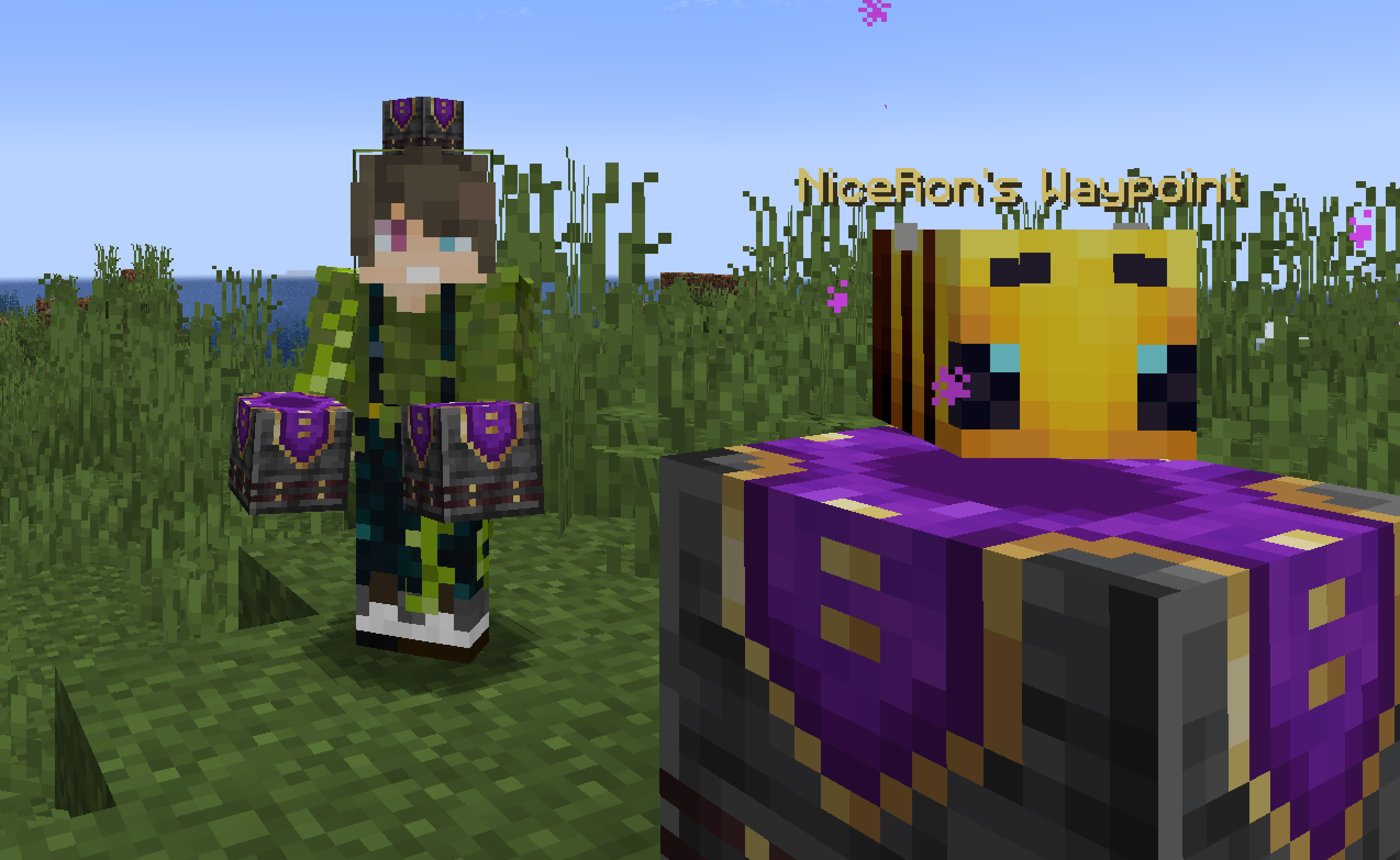
🛠️ How to, Instructions & Commands
The datapack usually just needs to be installed. There is nothing else you have to do. It just works out of the box.
For PaperMC users, it is recommended to set the paper.maxChatCommandInputSize property to a value between 512 and 1024. More information can be found in the PaperMC Docs. Also make sure to have allow-non-player-entities-on-scoreboards enabled in your paper configs.
The data pack version also double functions as a resource pack. So in order to be able to see them, just place the data pack .zip also in your resource folder and activate it like any other resource pack.
📝 Translations
Want to play in your own language? You can help us out by contributing on our Crowdin Page! Once a translation for a language is finished, it’ll be added to the data pack for you to enjoy.
✍️ Feedback, Questions & Suggestions
We're here to help! If you happen to have questions, suggestions or just encountered a bug, then feel free to hop on our discord server to ask for help in our Data Pack Section. Click to join the server
🎮 Explorer's Eden SMP
Join A Realm Recrafted, our Minecraft SMP! Enjoy a world featuring all of our (actively maintained) data packs, as well as some exclusive ones. It’s completely free without any microtransactions. Come build, explore, and craft with us today!

Ченджлог
3.7-modРелиз26.2 · 16 июня 2026 г.
Minecraft Version(s): 26.1.x
Changes:
- Lang Files are now getting automatically synced with crowdin with new releases
- Added Totem of Homecoming item:
- Can be crafted from 3 Echo Shards and 2 Amethyst Shards
- Saves a player from dying much like a Totem of Undying
- It teleports a player to the last waypoint hub a player used the item on when dying
- After Teleporting the saved Waypoint Hub will be forgotten
Fixes:
3.7Релиз26.2 · 16 июня 2026 г.
Minecraft Version(s): 26.1.x
Changes:
- Lang Files are now getting automatically synced with crowdin with new releases
- Added Totem of Homecoming item:
- Can be crafted from 3 Echo Shards and 2 Amethyst Shards
- Saves a player from dying much like a Totem of Undying
- It teleports a player to the last waypoint hub a player used the item on when dying
- After Teleporting the saved Waypoint Hub will be forgotten
Fixes:
3.6+modРелиз26.1, 26.1.1, 26.1.2 · 1 апреля 2026 г.
Changes:
- Waypoint Hubs now emit a block update whenever someone teleports to them
3.6Релиз26.1, 26.1.1, 26.1.2 · 1 апреля 2026 г.
Changes:
- Waypoint Hubs now emit a block update whenever someone teleports to them
3.5+modРелиз26.1, 26.1.1, 26.1.2 · 24 марта 2026 г.
Changes:
- Added Waypoint Lock as possible Villager Trade for Cartographers (Level 1)
- Added Portal Horn as possible Villager Trade for Cartographers (Level 5)
- Added some Waypoint Hubs as possible Trade for Cartographers (Level 2):
- Savanna Type: Acacia Waypoint Hub
- Jungle Type: Jungle Waypoint Hub
- Swamp Type: Mangrove Waypoint Hub
- Plains Type: Oak Waypoint Hub
- Desert Type: Sandstone Waypoint Hub
- Taiga & Snow Type: Spruce Waypoint Hub
3.5Релиз26.1, 26.1.1, 26.1.2 · 24 марта 2026 г.
Changes:
- Added Waypoint Lock as possible Villager Trade for Cartographers (Level 1)
- Added Portal Horn as possible Villager Trade for Cartographers (Level 5)
- Added some Waypoint Hubs as possible Trade for Cartographers (Level 2):
- Savanna Type: Acacia Waypoint Hub
- Jungle Type: Jungle Waypoint Hub
- Swamp Type: Mangrove Waypoint Hub
- Plains Type: Oak Waypoint Hub
- Desert Type: Sandstone Waypoint Hub
- Taiga & Snow Type: Spruce Waypoint Hub
3.4+modРелиз1.21.11 · 27 января 2026 г.
Changes:
- Waypoint Hub Menu entries now show the selected Head Icon from the block (shows owners head until Icon was changed for already placed onces)
- Added admin tag. Can be used by admins to modify or tp to any waypoint. Can be set with
/tag <playername> add wawo.admin; will also autmatically be assigned when openening the admin config mennu via/function warping_wonders - Changed item which is used to add/change Waypoint Lore to Book (was Paper)
- Waypoint Menus no longer show the current Waypoint in the list
- Using a renamed Paper on a Waypoint now can grant players permission to teleport to it regardless of it being locked or not:
- Text keys to grant permission
trust <playername>orTrust <playername> - Text keys to revoke permission
untrust <playername>orUntrust <playername>
- Text keys to grant permission
- Waypoints now show their access status in the Menu:
- Public: available for everyone
- Private: only the owner (and admins) can teleport to it
- List of Names: additional players that can teleport to the Waypoint if it's locked
Fixes:
- Mounts and Pets not being teleported to Waypoints in certain situations
3.4Релиз1.21.11 · 27 января 2026 г.
Changes:
- Waypoint Hub Menu entries now show the selected Head Icon from the block (shows owners head until Icon was changed for already placed onces)
- Added admin tag. Can be used by admins to modify or tp to any waypoint. Can be set with
/tag <playername> add wawo.admin; will also autmatically be assigned when openening the admin config mennu via/function warping_wonders - Changed item which is used to add/change Waypoint Lore to Book (was Paper)
- Waypoint Menus no longer show the current Waypoint in the list
- Using a renamed Paper on a Waypoint now can grant players permission to teleport to it regardless of it being locked or not:
- Text keys to grant permission
trust <playername>orTrust <playername> - Text keys to revoke permission
untrust <playername>orUntrust <playername>
- Text keys to grant permission
- Waypoints now show their access status in the Menu:
- Public: available for everyone
- Private: only the owner (and admins) can teleport to it
- List of Names: additional players that can teleport to the Waypoint if it's locked
Fixes:
- Mounts and Pets not being teleported to Waypoints in certain situations
Комментарии
Загружаем…