 Mineforgian
VartaPack
beta! A support report and diagnostics tool for Minecraft modpack authors.
- Загрузки
- 606
- Подписчики
- 4
- Обновлён
- 18 июня 2026 г.
- Лицензия
- MIT
Опубликован 24 мая 2026 г.
VartaPack
A lightweight diagnostics, integrity, and support-report tool for Minecraft modpacks.
VartaPack helps modpack authors understand whether a player's instance is clean, modified, unsupported, or broken. It validates the local environment, detects common setup problems, and generates structured reports that are easy to share when support is needed.
Purpose
VartaPack is not a performance mod.
It is a support layer for modpacks. It helps players see what is wrong and gives authors a clear overview before requesting full logs or crash reports.
Checks
VartaPack can validate:
- Minecraft version
- mod loader
- Java version
- allocated RAM
- required mods
- recommended mods
- blocked mods
- extra mods
- known conflicts
- selected file integrity
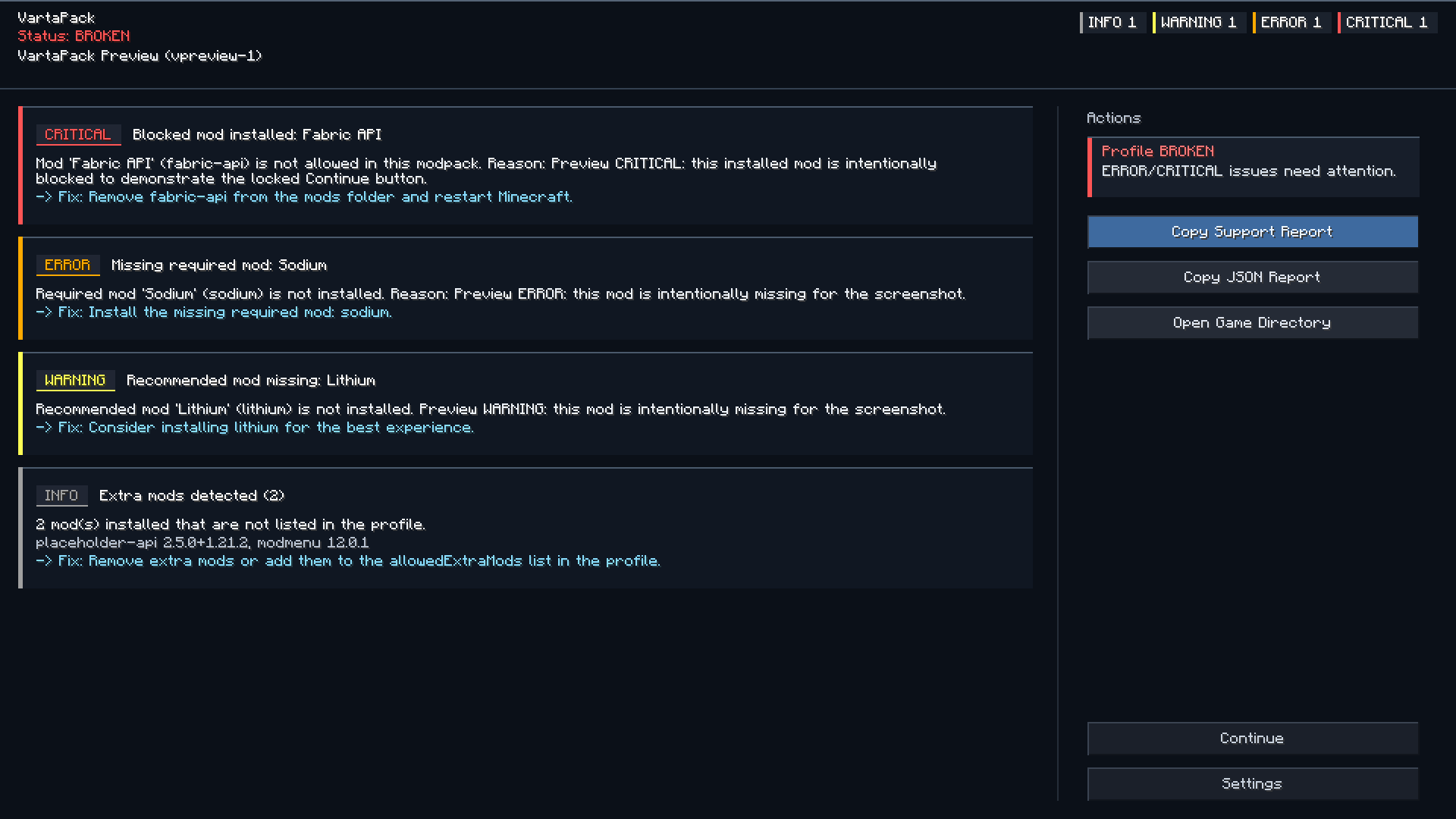
Detected issues can be shown through a startup notification and an in-game issues screen.
Pack status
VartaPack classifies the current instance as:
| Status | Meaning |
|---|---|
| Clean | The instance matches the expected profile. |
| Modified | The player changed something, but no critical issue was detected. |
| Unsupported | The instance may still run, but support should be limited. |
| Broken | A critical issue was detected. |
Support reports
Players can copy a generated support report with one click.
Reports may include:
- pack name and profile version
- Minecraft version
- loader and loader version
- Java version
- allocated RAM
- operating system
- detected issues
- missing required mods
- blocked mods
- extra mods
- installed mods
- suggested fixes
Reports are useful for GitHub issues, Discord support, CurseForge comments, and Modrinth support threads.
Crash analysis
VartaPack can scan local logs and crash reports for common patterns, such as:
- mixin failures
- missing dependencies
- incompatible mod sets
- duplicate mods
- wrong Java version
- out of memory errors
- renderer conflicts
Crash analysis is meant to help with debugging. It does not replace manual investigation.
Configuration
Modpack authors can configure VartaPack through:
config/vartapack/
Common files:
profile.json
rules.json
integrity.json
vartapack.json
These files define the expected environment, mod rules, conflict rules, integrity checks, support links, and report behavior.
Configuration examples and usage guide are available on GitHub.
Privacy
VartaPack does not collect telemetry.
Reports are generated locally. Logs, mod lists, usernames, file paths, and personal data are not uploaded automatically.
The player decides whether to copy and share a report.
Private paths and usernames are redacted where possible.
Limitations
VartaPack is a client-side diagnostics tool.
It cannot prevent every startup crash, because some crashes happen before any mod code can run. For those cases, use crash reports, doctor mode, and proper loader-level dependency or conflict rules.
Companion use
VartaPack can be used together with PackPing.
Recommended setup:
- VartaPack for diagnostics, integrity checks, and support reports
- PackPing for modpack update notifications
They can also be used separately.
Ченджлог
1.1.4-mc26.2-beta+neoforgeБета26.2 · 18 июня 2026 г.
- Added support for Minecraft 26.2.
- Updated release metadata and loader dependencies for the current beta support line.
- Updated client screen and toast integration for Minecraft 26.2 APIs.
- Fixed continue blocking so validation issues marked as blocking are respected.
- No config changes are required.
1.1.4-mc26.2-beta+fabricБета26.2 · 18 июня 2026 г.
- Added support for Minecraft 26.2.
- Updated release metadata and loader dependencies for the current beta support line.
- Updated client screen and toast integration for Minecraft 26.2 APIs.
- Fixed continue blocking so validation issues marked as blocking are respected.
- No config changes are required.
1.1.4-mc26.1.x-beta+neoforgeБета26.1, 26.1.1, 26.1.2 · 12 июня 2026 г.
- Fixed continue blocking so validation issues marked as blocking are respected.
- Updated release metadata for the Minecraft 26.1.x beta support line.
- Rebuilt release artifacts with unambiguous versioned file names.
- No config changes are required.
1.1.4-mc26.1.x-beta+fabricБета26.1, 26.1.1, 26.1.2 · 12 июня 2026 г.
- Fixed continue blocking so validation issues marked as blocking are respected.
- Updated release metadata for the Minecraft 26.1.x beta support line.
- Rebuilt release artifacts with unambiguous versioned file names.
- No config changes are required.
1.1.3+fabricБета26.1, 26.1.1, 26.1.2 · 10 июня 2026 г.
- Added the current 1.1.3 fixes to the Minecraft 26.1 release line.
- Limited the VartaPack keybind and startup toast actions to the main menu.
- Prevented the issues screen from opening over gameplay, inventory, chat, and other mod screens.
- Marked the 26.1 release artifacts as beta while keeping the mod version at 1.1.3.
- No config changes are required.
1.1.3-mc1.21.11+fabricБета1.21.11 · 10 июня 2026 г.
- Added support for Minecraft 1.21.11.
- Updated Fabric and NeoForge release metadata for the 1.21.11 backport line.
- Updated internal loader dependencies for Minecraft 1.21.11.
- Rebuilt the current keybind, startup screen, UI background, clipping, and resize fixes for Minecraft 1.21.11.
- No config changes are required.
1.1.3-mc1.21.8+fabricБета1.21.8 · 10 июня 2026 г.
- Added support for Minecraft 1.21.8.
- Updated Fabric and NeoForge release metadata for the 1.21.8 backport line.
- Updated internal loader dependencies for Minecraft 1.21.8.
- Rebuilt the current keybind, startup screen, UI background, clipping, and resize fixes for Minecraft 1.21.8.
- No config changes are required.
1.1.3-mc1.21.4+fabricБета1.21.4 · 10 июня 2026 г.
- Added support for Minecraft 1.21.4.
- Updated Fabric and NeoForge release metadata for the 1.21.4 backport line.
- Updated internal loader dependencies for Minecraft 1.21.4.
- Rebuilt the current keybind, startup screen, and UI background fixes for Minecraft 1.21.4.
- Fixed narrow/short-window UI spacing so status and wizard text stay inside their panels.
- Fixed issue screen clipping after resizing/fullscreen by using the Minecraft 1.21.4 GUI scissor stack and resetting stale scroll offsets.
- No config changes are required.
Комментарии
Загружаем…