 Mineforgian
Upgradable Backpack
Dyeable, renamable, wearable, and upgradeable backpacks (9-slots, 18-slots, 26-slots)
- Загрузки
- 117K
- Подписчики
- 141
- Обновлён
- 17 ноября 2025 г.
- Лицензия
- All-Rights-Reserved
Опубликован 23 апреля 2023 г.
I made the backpack, which is
- Dyeable through the crafting table.
- Easily renamable using an anvil.
- Wearable in your chest slot.
- Upgradable to get more slots (9 -> 18 -> 26 slots)
Demo Video
How to Use Backpacks
- To store or retrieve items, simply drop the backpack on the ground. It will transform into a barrel, allowing you to manage your items. Click the "Exit" button slot to revert it to a backpack item.
Crafting Recipes
Craft a Small Backpack:
(4 wools, 4 leathers, and a barrel)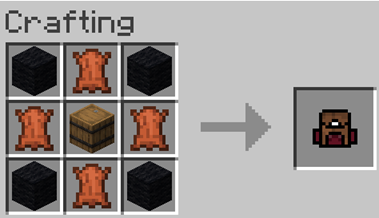
Craft a Backpack Upgrader:
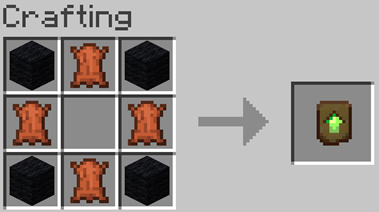
Upgrading to a 26-Slot Backpack:
Place the upgrader into your backpack block.
Ченджлог
11.3+modРелиз1.21.9, 1.21.10 · 17 ноября 2025 г.
Add min, max format for paper 1.21.10
11.3Релиз1.21.9, 1.21.10 · 17 ноября 2025 г.
Add min, max format for paper 1.21.10
11.1+modРелиз1.21.8, 1.21.9, 1.21.10 · 2 ноября 2025 г.
fix: backpack overrided the another at the same position.
fix: the backpack equipment didn't upgrade
11.1Релиз1.21.8, 1.21.9, 1.21.10 · 2 ноября 2025 г.
fix: backpack overrided the another at the same position.
fix: the backpack equipment didn't upgrade
11+modРелиз1.21.8, 1.21.9, 1.21.10 · 1 ноября 2025 г.
Upgrade to Minecraft 1.21
11Релиз1.21.8, 1.21.9, 1.21.10 · 1 ноября 2025 г.
Upgrade to Minecraft 1.21
v10+modРелиз1.20, 1.20.1, 1.20.2 · 22 сентября 2023 г.
- Fixed: Custom blocks can't be opened in caves.
- Improved: Dropped-type custom blocks can be created when there are no other items dropped within a 1-block range, instead of 5.
- Simplified: Removed the credit link display.
- Custom Craft Version: 5 (compatible with the same version)
v10Релиз1.20, 1.20.1, 1.20.2 · 22 сентября 2023 г.
- Fixed: Custom blocks can't be opened in caves.
- Improved: Dropped-type custom blocks can be created when there are no other items dropped within a 1-block range, instead of 5.
- Simplified: Removed the credit link display.
- Custom Craft Version: 5 (compatible with the same version)
README
I made the backpack, which is
- Craft a 9-slot backpack, upgradable to 18 and 26 slots.
- Dyeable through the crafting table.
- Easily renamable using an anvil.
How to Use Backpacks
- To store or retrieve items, simply drop the backpack on the ground. It will transform into a barrel, allowing you to manage your items. Click the "Exit" button slot to revert it to a backpack item.
These backpacks can be placed in your chest slot for decorative purposes.
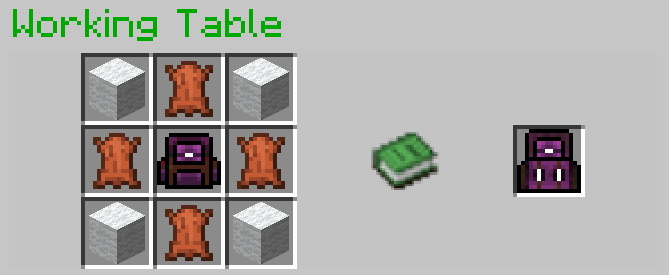
Crafting Recipes
Spawning a Working Table:
To craft the backpacks, start by creating the essential "Working Table". Simply drop a stone pickaxe onto a crafting table block.Crafting a 9-Slot Backpack:
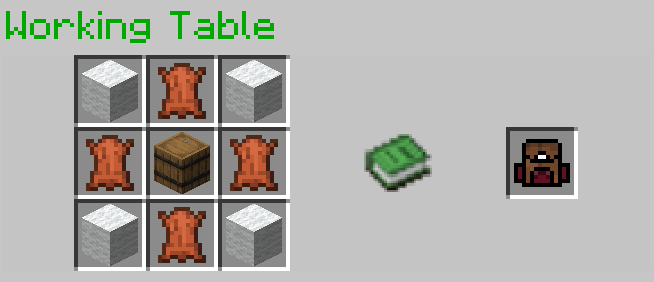
Upgrading to an 18-Slot Backpack:
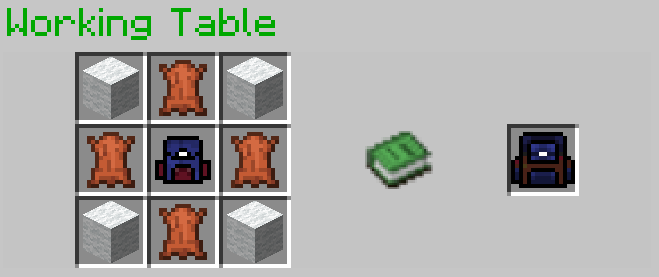
Upgrading to a 26-Slot Backpack:
Optional Installation
- To see the backpack on your character's back when placed in the chest slot, you may install Optifine; it's optional.
References
- GUI code is generated by Easy GUI
- The Working Table is a crafting block in Custom Craft.
- ChatGPT for gramma improving
Demo Video
Watch this video to see the backpacks in action!
Комментарии
Загружаем…