 Mineforgian
Universal Portals (Portals to anywhere)
Universal Portals adds 16 new colored portals to Minecraft. These portals can stand up (vertical) or lie down on the ground (horizontal).
- Загрузки
- 496
- Подписчики
- 2
- Обновлён
- 29 апреля 2026 г.
- Лицензия
- E-ML
Опубликован 5 апреля 2026 г.




FEATURES
- Colors: 16 different colors
- Orientation: Vertical or horizontal
- Activation Keys: Set portal color, ID, and exit name
- Universal Key: Copy portal ID and change name
- Hub Function: Connects 3+ portals, including different colors (toggle in config)
- Portal Bucket: Create portals on the ground
- Colored Obsidian: Blocks matching portal colors
- Cross-Color Linking: Link portals of different colors for flexible teleportation
INSTRUCTIONS: HOW TO LINK PORTALS
Activate the portal using the magic flint
Have two activation keys (any color)
- Right-click the portal → if you crafted an activation key, you'll receive two
- Do the same on the second portal
To link a portal of a different color
- Craft an activation key of the new color
- Right-click the already activated portal (this copies its ID)
- Repeat step 2 on the second portal
HUB option (3+ portals per ID)
- Enabled by default
- Can be disabled in the config
- Allows multiple portals to share a single ID
When you enter a portal and wait a moment, a selection menu will appear
Optional: teleportation can cost XP (config setting)
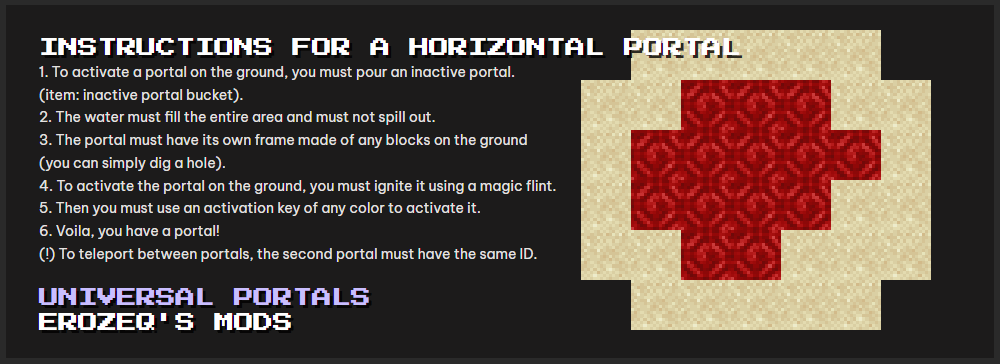
INSTRUCTIONS FOR A HORIZONTAL PORTAL
Pour an inactive portal using:
inactive portal bucketThe liquid must
- Fill the entire area
- Not spill outside
The portal needs a frame made of any blocks on the ground
- (you can simply dig a hole)
Ignite the portal using a magic flint
Use an activation key (any color)
Done — you have a portal
IMPORTANT
- To teleport between portals, the second portal must have the same ID
Ченджлог
v2.0.0Релиз1.21.1 · 14 апреля 2026 г.
New v2.0.0
Complete overhaul of item textures, 3 new items: pocket portal, portal vial, and a new key ingredient - portal powder.
UNIVERSAL PORTALS – EROZEQ'S MODS
FEATURES
- Colors: 16 different colors
- Orientation: Vertical or horizontal
- Activation Keys: Set portal color, ID, and exit name
- Universal Key: Copy portal ID and change name
- Hub Function: Connects 3+ portals, including different colors (toggle in config)
- Portal Bucket: Create portals on the ground
- Colored Obsidian: Blocks matching portal colors
- Cross-Color Linking: Link portals of different colors for flexible teleportation
INSTRUCTIONS: HOW TO LINK PORTALS
Activate the portal using the magic flint
Have two activation keys (any color)
- Right-click the portal → if you crafted an activation key, you'll receive two
- Do the same on the second portal
To link a portal of a different color
- Craft an activation key of the new color
- Right-click the already activated portal (this copies its ID)
- Repeat step 2 on the second portal
HUB option (3+ portals per ID)
- Enabled by default
- Can be disabled in the config
- Allows multiple portals to share a single ID
When you enter a portal and wait a moment, a selection menu will appear
Optional: teleportation can cost XP (config setting)
INSTRUCTIONS FOR A HORIZONTAL PORTAL
Pour an inactive portal using:
inactive portal bucketThe liquid must
- Fill the entire area
- Not spill outside
The portal needs a frame made of any blocks on the ground
- (you can simply dig a hole)
Ignite the portal using a magic flint
Use an activation key (any color)
Done — you have a portal
IMPORTANT
- To teleport between portals, the second portal must have the same ID
v2.0.0Релиз1.20.1 · 14 апреля 2026 г.
New v2.0.0
Complete overhaul of item textures, 3 new items: pocket portal, portal vial, and a new key ingredient - portal powder.
UNIVERSAL PORTALS – EROZEQ'S MODS
FEATURES
- Colors: 16 different colors
- Orientation: Vertical or horizontal
- Activation Keys: Set portal color, ID, and exit name
- Universal Key: Copy portal ID and change name
- Hub Function: Connects 3+ portals, including different colors (toggle in config)
- Portal Bucket: Create portals on the ground
- Colored Obsidian: Blocks matching portal colors
- Cross-Color Linking: Link portals of different colors for flexible teleportation
INSTRUCTIONS: HOW TO LINK PORTALS
Activate the portal using the magic flint
Have two activation keys (any color)
- Right-click the portal → if you crafted an activation key, you'll receive two
- Do the same on the second portal
To link a portal of a different color
- Craft an activation key of the new color
- Right-click the already activated portal (this copies its ID)
- Repeat step 2 on the second portal
HUB option (3+ portals per ID)
- Enabled by default
- Can be disabled in the config
- Allows multiple portals to share a single ID
When you enter a portal and wait a moment, a selection menu will appear
Optional: teleportation can cost XP (config setting)
INSTRUCTIONS FOR A HORIZONTAL PORTAL
Pour an inactive portal using:
inactive portal bucketThe liquid must
- Fill the entire area
- Not spill outside
The portal needs a frame made of any blocks on the ground
- (you can simply dig a hole)
Ignite the portal using a magic flint
Use an activation key (any color)
Done — you have a portal
IMPORTANT
- To teleport between portals, the second portal must have the same ID
v1.5.5Релиз1.21.1 · 9 апреля 2026 г.
Version 1.21.1 During teleportation, an animation in the color of the portal will appear
v1.5.0Релиз1.20.1 · 7 апреля 2026 г.
- Teleportation cost (can be enabled in the config)
- New activation key textures
- New portal textures (more polished and visually improved)
- Improved HUB UI
- Ability to teleport between portals of different colors using the activation key copy feature
- Particles flying into the portal (can be disabled in the client config)
- Universal Portals is now compatible with JEI
Комментарии
Загружаем…