 Mineforgian
Ultimate Hud
Have essential information on your HUD
- Загрузки
- 3K
- Подписчики
- 17
- Обновлён
- 11 августа 2024 г.
- Лицензия
- MIT
Опубликован 22 мая 2024 г.
Ultimate Hud
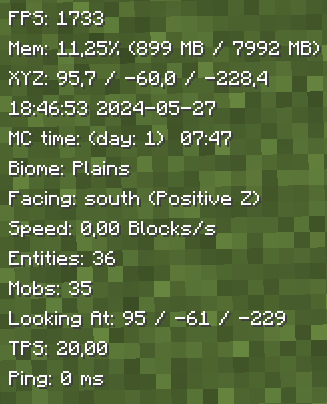
UltimateHud is a mod that displays essential information for each user in the HUD. Everything is configurable from the ultimatehud.json file inside your ./minecraft/config folder. In it, you will find a file similar to this:
Now, you can also change the options with the "Mod Menu" mod.
{
  "showFPS": true, // Displays the Frames Per Second (FPS) on the screen.
  "showRAM": true, // Displays the amount of RAM (memory) being used.
  "showCoordinates": true, // Shows the player's current coordinates in the game world.
  "showRealTime": true, // Displays the real-world current time.
  "showRealDate": true, // Displays the real-world current date.
  "showMinecraftTime": true, // Shows the in-game time.
  "showBiome": true, // Displays the current biome the player is in.
  "showFacing": true, // Shows the direction the player is facing.
  "showSpeed": true, // Displays the player's current speed.
  "showEntities": true, // Shows the number of entities around the player.
  "showMobs": true, // Displays the number of mobs around the player.
  "showLookingAt": true, // Shows information about the block or entity the player is currently looking at.
  "showTps": true, // Displays the server's Ticks Per Second (TPS).
  "showPing": true, // Shows the player's ping to the server.
  "textShadow": true, // Adds a shadow effect to the text for better readability.
  "showItemDurability": true, // Displays the durability of the item the player is currently holding.
  "hudPosition": "LEFT" // Positions the HUD (Heads-Up Display) on the left side of the screen.
}
Fabric Loader 0.15.11 or newer is needed.
All options are toggled by setting them to true (enabled) or false (disabled), except for the last option, which sets the HUD to the left (left) or to the right (right).
TO-DO:
Add integration with Mod Menu to modify the options from within the game.(Done)Update to 1.20.5/1.20.6.(Done)Add Mob Counter.(Done)Add Entity Counter.(Done)Add TPS.(Done)Add Tool Durability.(Done)- Add underline behind the HUD information.
- Add color change functionality.
- Add the ability to change the name and format in which the information appears.
- Add the option to individually move the parameters to the right or left.
- Add MSPT
Translated into the following languages:
- English
- Spanish
- French
- Japanese
- Portuguese
- Chinese
Ченджлог
0.6.1-B-1.21.1Релиз1.21, 1.21.1 · 11 августа 2024 г.
Update to 1.21.1
0.6-B-1.21Бета1.21 · 17 июня 2024 г.
Update to 1.21
There may be bugs; if so, it would be greatly appreciated if you could report them on GitHub :)
0.5.1-1.20.4-1.20.6Релиз1.20.4, 1.20.5, 1.20.6 · 29 мая 2024 г.
- Fixed a bug that did not correctly calculate the speed.
- Rewritten part of the code to make it more efficient.
0.5.0-1.20.4-1.20.6Релиз1.20.4, 1.20.5, 1.20.6 · 27 мая 2024 г.
- Added TPS.
- Added the option to hide the HUD which can be modified in the Minecraft controls, by default it is the H key.
- Added a durability parameter for tools that appears above the hotbar and turns red when it is about to break.
- Added all translations for the new options.
0.4.1-1.20.4-1.20.6Релиз1.20.4, 1.20.5, 1.20.6 · 23 мая 2024 г.
Added Entity counter Added Mob counter
0.4.0-1.20.4-1.20.6Релиз1.20.4, 1.20.5, 1.20.6 · 22 мая 2024 г.
Added integration with Mod Menu
Added Spanish, Chinese, Japanese, French, and Portuguese languages
0.1.1-1.20.4-1.20.5-1.20.6Бета1.20.4, 1.20.5, 1.20.6 · 22 мая 2024 г.
Update to 1.20.5 & 1.20.6
Комментарии
Загружаем…