 Mineforgian
TaTe's Inventory Enhancements
Various Inventory Improvements to Make it Easier to Use, Including New Items, Custom Enchantments, and Other Tweaks!
- Загрузки
- 1K
- Подписчики
- 11
- Обновлён
- 27 августа 2026 г.
- Лицензия
- MIT
Опубликован 20 августа 2024 г.

IMPORTANT - I (AverageTaTeMan) only share my content on Planet Minecraft, Modrinth, and CurseForge - If you see this project on any other site, IT IS NOT ME AND SHOULD NOT BE TRUSTED!
This pack aims to improve the inventory system to make it easier to use.
These changes include:
Increasing the stack sizes of many items (Cakes, Banner Patterns, Snowballs, etc...)
Hundreds of new recipes for the Stonecutter and Crafting Table, offering better value crafts and the ability to recycle niche resources (stairs, slabs, etc...)
Craftable Upgrades to Shulker Boxes:
- Pushing Variant - transfers items from the mainhand to the Shulker Box held in the offhand
- Pulling Variant - transfers items from the Shulker Box held in the offhand to the mainhand
Three new enchantments:
- Magnetism - Tool enchant to bring nearby items directly to you (Magnet items with the same functionality can be crafted)
- Extra Pockets - Chestplate enchant that allows it to store Bundles inside it (Treasure)
- Curse of Trashing - Chestplate curse that destroys the contents of held Bundles (Treasure)
If upgrading your pack and the Magnets are missing their textures, run the following command(s) with the items in your inventory - /function tateinventory:upgrade/magnet_to_item_model
Runs the previous command for all players - /function tateinventory:upgrade/magnet_to_item_model_all
Installation Instructions to Get the Data AND Resource Packs:
Click "Download".

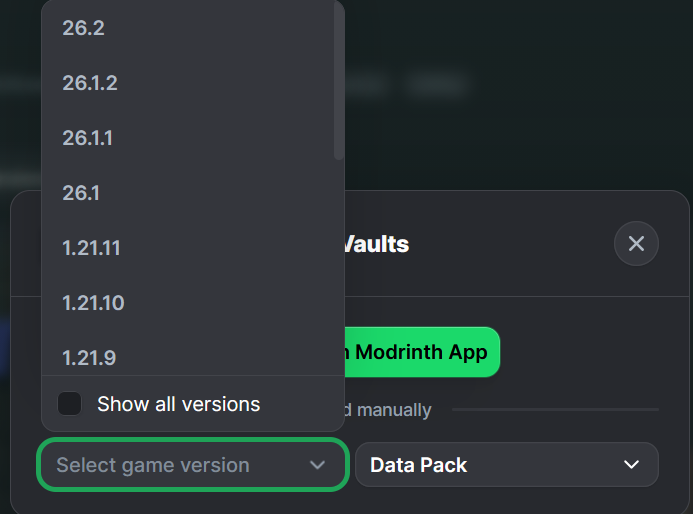
Click "Select game version".
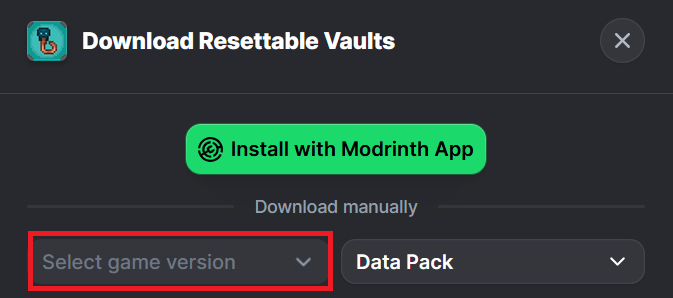
Select a Game Version.
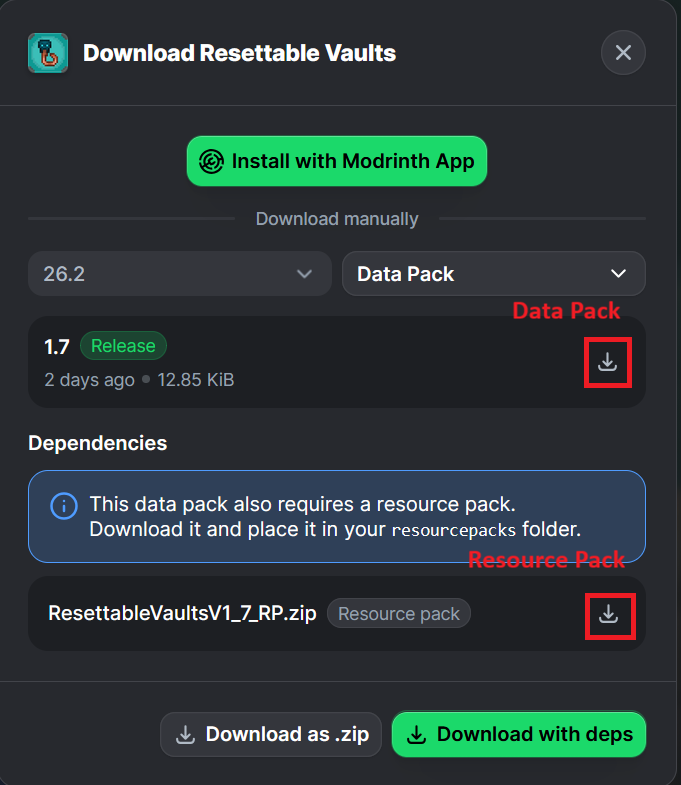
Click the download icon for both the data and resource pack files, as shown below.
Unzip the files (optional, but recommended as that's how I use/test them).
Add the resource pack to your Selected Packs (ideally at the top) in your Resource Packs menu.
Add the data pack to either your Selected Packs in the Data Packs menu (if adding at world creation) OR put it in your world's 'datapacks' folder (if adding afterwards. Recommended to either not have world open at the time or to close and reopen it afterwards).
You may get a prompt about experimental settings not being supported when opening the world. This can safely be ignored, but it's also never a bad idea to make a backup if it's a world you care about.
Ченджлог
3.1Релиз26.2 · 27 августа 2026 г.
- Addition of translatable strings
26.1_BP_1.1Релиз26.1, 26.1.1, 26.1.2 · 27 августа 2026 г.
- Backport for version 26.1
- Addition of translatable strings
1.21.11_BP_1.1Релиз1.21.11 · 27 августа 2026 г.
- Backport for version 1.21.11
- Addition of translatable strings
1.21.10_BP_1.1Релиз1.21.9, 1.21.10 · 27 августа 2026 г.
- Backport for versions 1.21.9 - 1.21.10
- Addition of translatable strings
1.21.8_BP_1.1Релиз1.21.7, 1.21.8 · 27 августа 2026 г.
- Backport for versions 1.21.7 - 1.21.8
- Addition of translatable strings
1.21.6_BP_1.1Релиз1.21.6 · 27 августа 2026 г.
- Backport for version 1.21.6
- Addition of translatable strings
1.21.5_BP_1.1Релиз1.21.5 · 27 августа 2026 г.
- Backport for version 1.21.5
- Addition of translatable strings
1.21.4_BP_1.1Релиз1.21.4 · 27 августа 2026 г.
- Backport for version 1.21.4
- Shulker Box Upgraded in the Smithing Table with Breeze/Blaze Rods in this version.
- Addition of translatable strings
Комментарии
Загружаем…