 Mineforgian
Structure Gel API
An API for simplifying the developer end of creating generated structures.
- Загрузки
- 4.4M
- Подписчики
- 106
- Обновлён
- 26 января 2025 г.
- Лицензия
- All-Rights-Reserved
Опубликован 21 мая 2023 г.







Structure Gel is an API mod designed to make creating structures easier on the developers, specifically ones using the jigsaw system. All code is open source and documented.
Some of its features include:
📚 Read the Structure Gel API Documentation Here
For an open source working example of this api, check out Dungeons PlusYou can find detailed information on how to develop and use this API by Minecraft version.
Latest Documentation
🧪 Latest Features
🛠️ Building Tools
The Building Tool is a new creative mode only item used to perform various large scale block alterations.- It can be found in the Structure Items creative mode tab.
- Right click the Building Tool in the air to open the GUI. Once open, you can select what mode you want to use, undo, redo, select your position, and more.

GUI
The GUI contains various buttons to modify the Building Tool's settings, as well as some convienent tools.- Pressing,
enter,e,escape, or clicking anywhere on the screen that isn't a button will close the GUI. - Hovering over any item on the GUI will display a tooltip on the right side to explain what it does and how to use it.
- Using the radial menu, you can select which mode you want to use.
- Some modes support positions. If they do, a button will appear on the top left to select a position based on your current location. This is mainly useful when right clicking a block isn't possible or is highly inconvenient.
- The Undo and Redo buttons on the left exist to do exactly what they say. They attempt to undo or redo the last action you performed with the Building Tool. Up to 32 actions are saved and can be undone.
- Some modes have additional settings, these settings will appear below the undo and redo buttons.
- The button in the middle is used to select what block you want to use. When you click it, a text box will open for you to type a block state. This can be done in game as well, but some blocks like water are more than difficult to click on.
Controls
- Middle Click: Selects the current block state you're looking at (also can be done in the GUI).
- Left Click: This is the general key for "do the thing" depending on what mode you're in.
- Right Click Air: Opens the GUI.
- Right Click Block: Some modes use this to set positions, but ones that don't also allow this to "do the thing" as well.
- Shift + Right Click: Clears the currently selected positions.
Modes
Building Tool Modes are different operations that the Building Tool can perform.-
Extend: Detects a pattern based on the side of the block you click, and attempts to place blocks in front of that to continue that pattern. If you're familiar with the old Builder's Wands mod, it's essentially the same idea.

-
Flood: Fills all air blocks within the y level slice that you click, until it hits a border, then continues to fill going downward. This is useful for filling a lake with water for example.
-
Fill: Very similar to the vanilla fill command. Select two corners and then left click to fill the area between with the currently selected block. Has options for replacing specific blocks and only placing a frame or hollow box.
-
Line: Places a line of blocks between the selected positions using the currently selected block.
-
Clone: Copies the selected region and pastes it where you click. Allows for rotating, mirroring, and cutting instead of copying.

-
Move: Moves the selected region in the direction that you punch.
-
Clear: Removes all blocks within the selected positions.
-
Shape: Places a shape where you click. The shape and what blocks will be replaced can be changed though the mode's properties in the GUI.

Mode Properties
Some modes support additional settings to modify their behavior. Some examples include:- Integrity: Determines how many blocks will actually place.
- Replace: Determines what the mode will replace when placing blocks. All replaces everything, Air replaces only air, and Clicked replaces the block you clicked on.
- Rotation and Mirror: Rotates or mirrors the cloned region. Allows for selecting a random value as well.
🍡 Structure Gel Block
This block is a creative tool to fill the insides of structures easily. The gel is replaced with air when your structure generates while all air is ignored when being placed. This ensures that your structures won't have natural terrain where it shouldn't be. The gel block behaves similarly to structure voids in that you can walk through it, while actually being visible.When placing gel while sneaking, you can trigger the spreading mechanic. Each gel spreads differently, and you can read how they work by hovering over the item.
🍮 Meet the Gels!
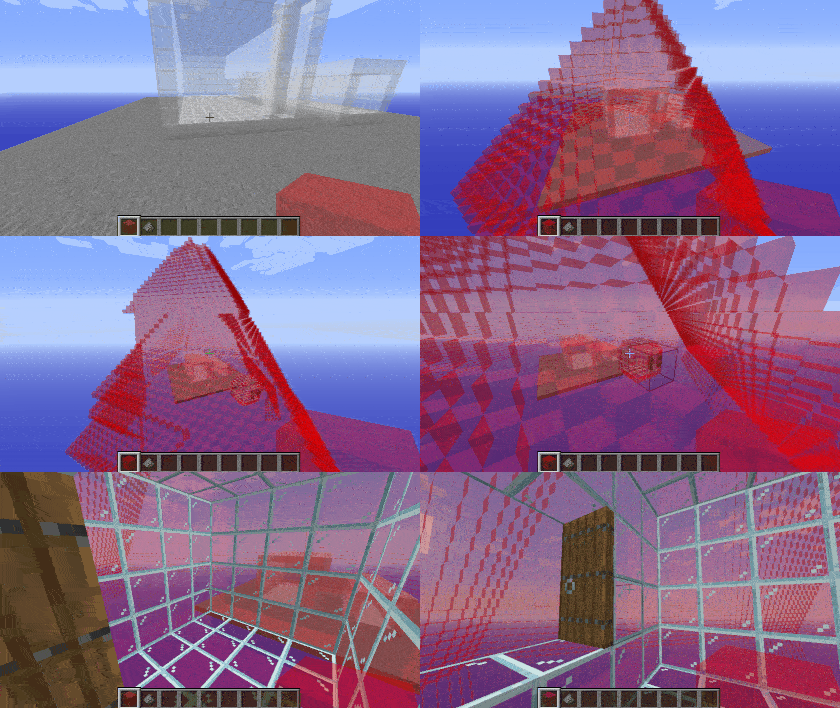
🟥 Red Gel
Red gel uses the default spreading mechanic, spreading along the cardinal directions, only replacing air.Spoiler
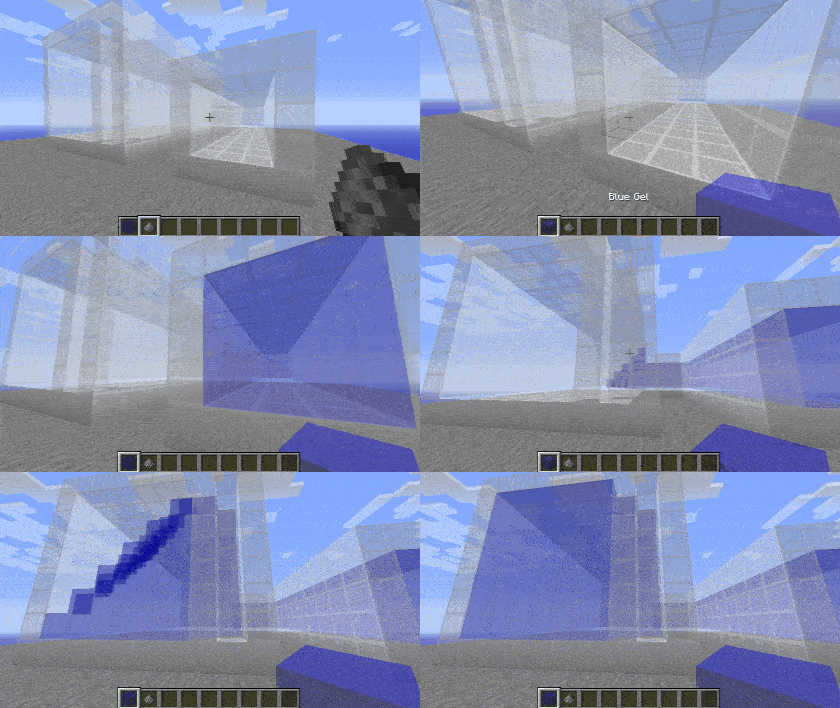
🟦 Blue Gel
Blue gel functions similarly to red, except it won't spread into locations where the sky can be seen.Spoiler
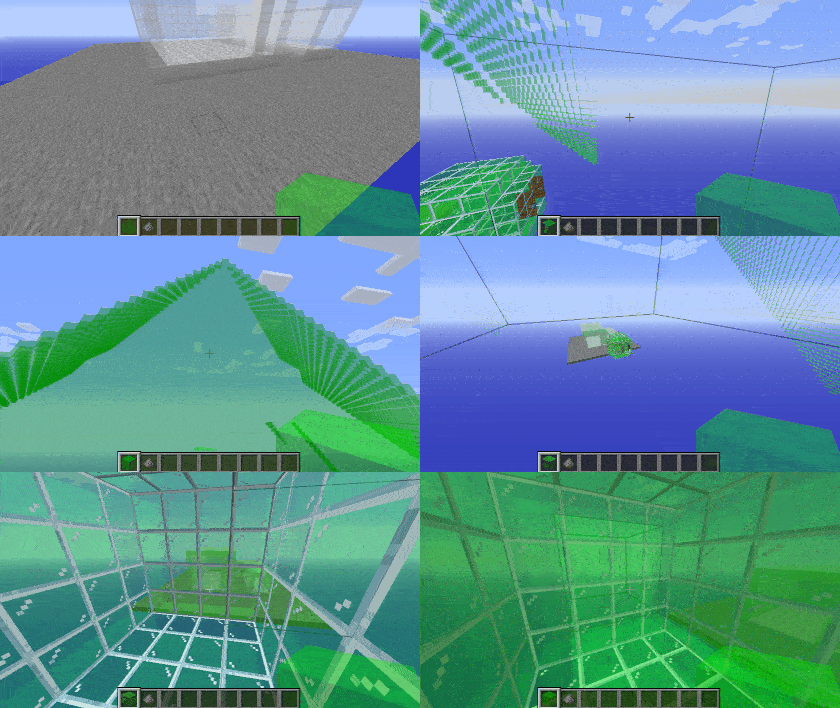
🟩 Green Gel
Green gel spreads the same as red gel, with the addition of also spreading diagonally. This allows it to get through corners created by vines or other complex builds. Be careful not to let it leak outside of your build.Spoiler
🟦 Cyan Gel
Cyan gel acts as a combination of green and blue gel, by both spreading diagonally and avoiding the sky.Spoiler
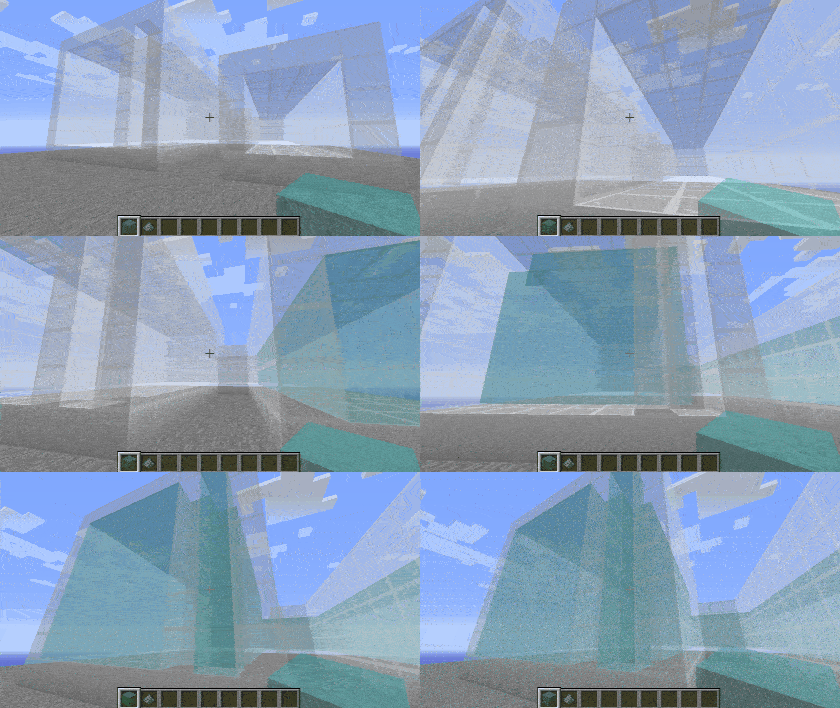
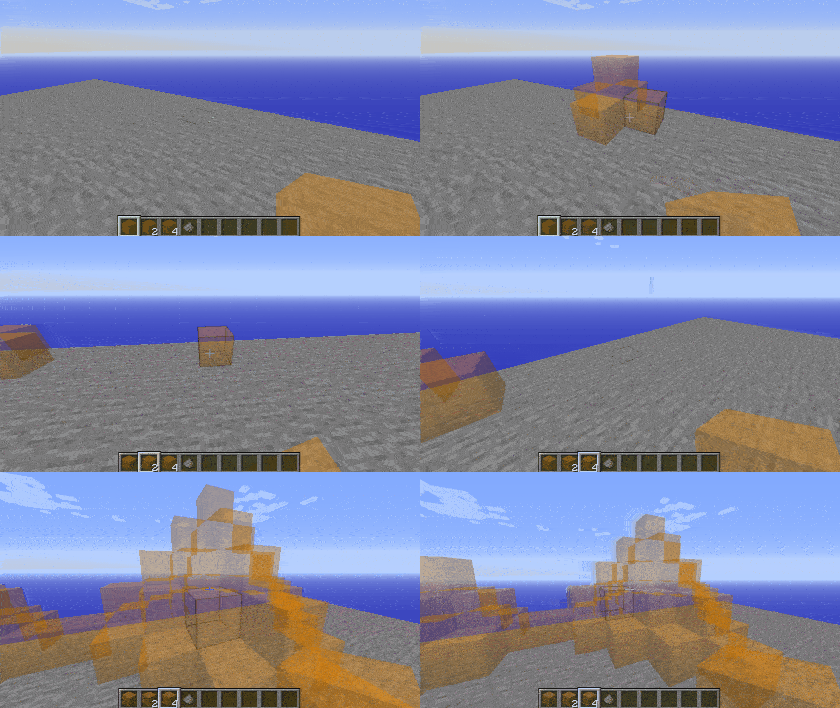
🟧 Orange Gel
Orange gel behaves the same as red gel, but the distance it spreads is determined by how many you're holding when you place it, making it handy for builds in open areas.Spoiler
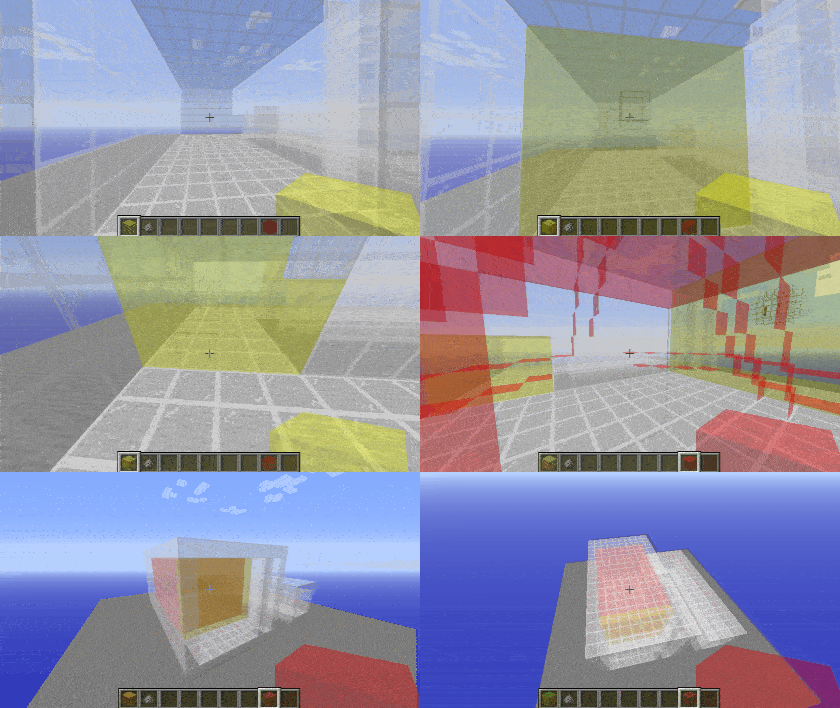
🟨 Yellow Gel
Yellow gel will only spread along the plane that you're facing when you place it, making it great for sealing off walls, windows, or other holes that the gel would otherwise go through.Spoiler
Removing Gels
Gel can be removed by using gunpowder on it. Doing this will trigger a chain reaction, removing all connected gels of the same type.Spoiler
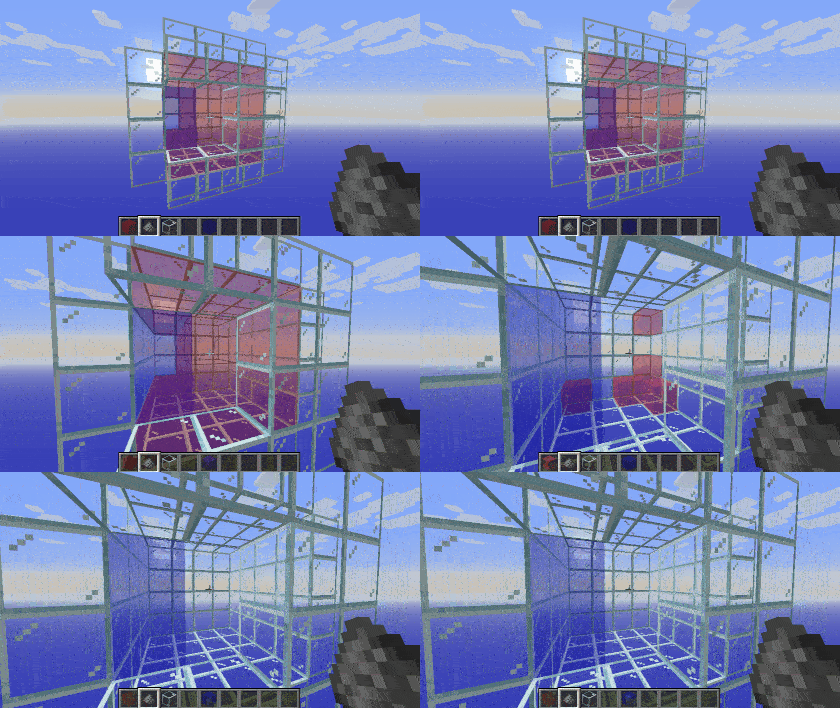
Examples
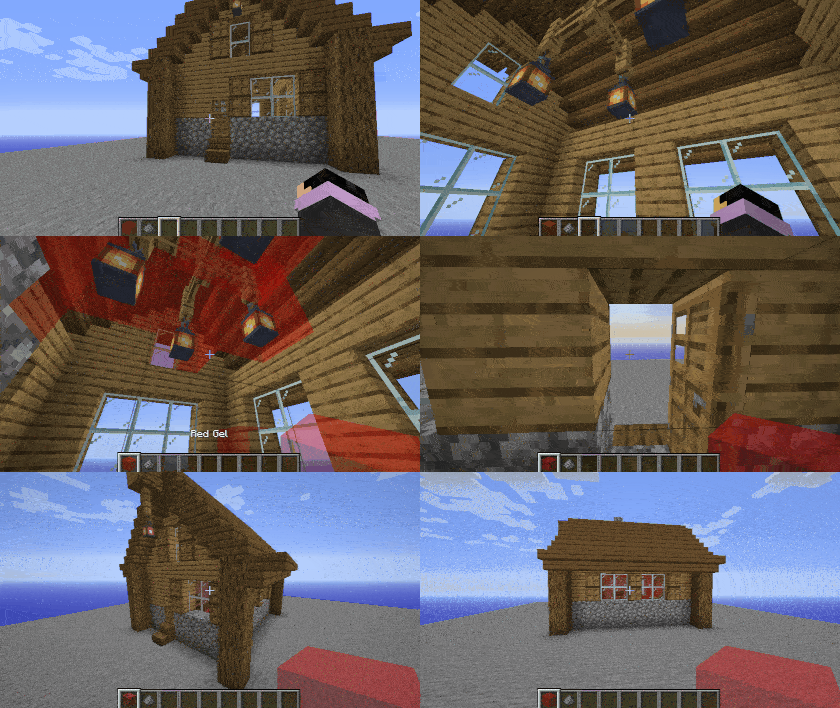
Here's an example of how it could be used in a build. If this structure were loaded into the game, the gel inside would be replaced with air, while the air outside would not be placed.Spoiler
🌐 Translate Structure Gel API - Help break the language barrier!
All translators are credited here. Thank you to everyone who helps make this mod accessible!| Flag | Language | Translators |
|---|---|---|
 |
Deutsch | A1403, Barion |
 |
Português (Brasil) | gabisaoo, simsgameboh |
 |
Nederlands (Nederland) | faas.mr |
 |
Español (España) | Minaderm , guillermojuegostablet, juggernogk |
 |
Українська (Ukrayins'ka) | Queez |
 |
Türkçe (Türkiye) | asimemir58, demirgokler406 |
 |
עברית ('Ivriyþ) | pecan1245 |
 |
Español (Argentina) | patriciofagetti |
 |
Italiano (Italia) | antonioauciello226 |
 |
Lietuvių | WaryRGMCA |
🤚 Support: If you have questions or any issues with our mods, read the FAQ! You can also either submit an issue on the issue tracker, or come into our Discord server where we can help you!

Ченджлог
2.20.0Релиз1.21.4 · 26 января 2025 г.
1.21.4-v2.20.0
General Changes
- We're on 1.21.4. With that comes the general expected changes, like item data components.
Building Tool
- Clone: Now works across dimensions and players. You can hand another player a building tool and access their cloned region regardless of what dimension it's from.
- Added a nifty animation when the GUI opens :D
Gel Blocks
- Gel blocks have had their back end rewritten from scratch.
- Previously, Gel Blocks implemented the
IStructureGelinterface to hook into the various spreading mechanics, used an enum of behaviors to determine the default spreading rules, and had a block state for how far it traveld. Most of this is gone. - Gel spreading behavior is now registered under
structure_gel:gel_spread_behavior.- This is how gel spreads along a specific axis, or along diagonals.
- Gel spreading restrictions can be registered under
structure_gel:gel_spread_restriction.- This is how blue gel knows not to spread into exposed areas, or how orange gel knows to stop based on the item stack count.
- The distance gel spreads is now an absolute distance to the initial source instead of traveling and counting how many were placed, and reaches a sphere shape if fully expanded.
- This allows gel to spread more effectively in twisting hallways, and more reliably hit the corners of large rooms.
- Any block can be used as gel in a structure as long as it's added to the
structure_gel:gelblock tag. If the block in the tag is actually aStructureGelBlock, it can customize what it places instead of defaulting to air.
Data Handler
- Changed how registry works so that a builder is what gets registered. See implemented data handlers for reference.
Dynamic Spawner
- Changed how registry works so that a builder is what gets registered.
GelPortalBlock
- Completely rewritten. Hopefully for the last time. The
GelPortalBlockclass is abstract and requires the implementation of various methods to make the portal function properly (with similar behavior to a nether portal).- Ignition of the portal is handled by calling
GelPortalBlock.tryIgnite. - The dimension transition screen must be registered manually.
- Ignition of the portal is handled by calling
Registries
- Added two new registries;
structure_gel:gel_spread_behaviorandstructure_gel:gel_spread_restriction.- Used to control the behavior of Gel blocks. Custom values can be registered and implemented on your own custom Gel block.
- Changed the registry process of
structure_gel:dynamic_spawner_typeandstructure_gel:data_handler_type.- The new registry approach instead works by registering a "factory" to create a Data Handler or Dynamic Spawner. Overall, the code is more builder-focused and simplified, with access to registry data to prepare for more registries moving to datapacks in vanilla.
- See
com.legacy.structure_gel.core.registry.SGRegistriesfor how to register the new data.
Registrar
- Internal changes to how data is stored. The basic rules of "don't get a value before it was registered" still applies.
Registrar.Staticnow contains aHolder.Referencefor the object registered.Registrar.Staticcan be created with a name only usingRegistrarHandler.named(String).- In this case, a value must be assigned later through
RegistrarHandler.addHandlerListener(Consumer<RegistrarHandler>). - An error will be thrown if a static registrar is created by name only and never assigned a value.
- In this case, a value must be assigned later through
- Added updated handling for block and item registry.
- See
com.legacy.structure_gel.core.registry.SGRegistriesfor usage.
2.19.1Релиз1.20.4 · 21 июня 2024 г.
1.20.4-v2.19.1
Data Handler
- Fixed cycle buttons in the GUI not starting at the correct default value
- Made adding
StringRepresentableenums to the parser easier
Building Tool
- Fixed the selection edit screen not hovering buttons correctly
2.19.0Релиз1.20.4 · 2 июня 2024 г.
1.20.4-v2.19.0
Building Tool
- Can now set if blocks placed will cause block updates or not
- This also supresses block and fluid ticks that occur when the block is placed (water won't flow, sand won't fall)
- Each mode shows up in the creative mode search tab
- The Building Tool palette screen no longer serializes default block state values when re-opening the screen
- If an oak log was set in the palette, it would previously display as
minecraft:oak_log[axis=y], even if theaxisproperty was left as the default. It will now displayminecraft:oak_login that case. This is especially visible with blocks that have a large number of states, such as fences
- If an oak log was set in the palette, it would previously display as
- Building Tool block palettes can be exported as a Block Palette item. This item can be dropped onto the Building Tool, like how you'd use a bundle, to set the palette.
Fill Tool
- Fixed the
Retain Stateproperty not functioning as expected Retain Statehas been renamed toCopy States- When True (default): Copies applicable block state values from the replaced block to the block being placed. This means stairs/slabs/fences/etc will have the same block states when replaced.
- When False: Places the block without any modifications. This is similar to the vanilla
fillcommand.
Replace Tool
- Added the
Copy Statesproperty- Defaults to true
Clone Tool
- Fixed pasted regions being hollowed out
- Can now also handle entities
- Improved the handling of internally saving captured regions for the Clone tool
- Regions with the same bounding box are not saved more than once. Only the latest copy will be saved
- This prevents multiple copies of the same selected region from completely filling your clipboard
- This breaks old clipboard data
- Pressing
ctrl + cin game while holding the clone tool will manually re-copy the selected region - Pressing
ctrl + vin game while holding the clone tool will paste the copied region- This does not replace left click, it's just an alternative button press
- Improved the compile time of the render-preview
- If a render preview takes longer than 8 seconds to compile (freezing the game client in the process), the preview will be aborted. This timer can be adjusted in the config.
Move Tool
- Can now also handle entities
Commands
- Dramatically optimized the time to find Structure Blocks when using
/structure_gel savestructures search - Added
/structure_gel debug- This will be used for miscellaneous commands that have a very specific function and won't need to be used often, if at all
- Currently used for
/structure_gel debug update_structures_to_structureto update the file location in a Structure Block to the 1.21 format where thestructuresfolder is renamed tostructure(if applicable). It does so by finding and replacing the first instance of:structures/with:structure/in the resource location. This uses the exact same syntax as/structure_gel savestructures
- Commands affecting Structure Blocks display a Redstone Torch particle above the affected blocks
- Added
/structure_gel ?to display the basic function of the other sub-commands
Structure Blocks
- The
Show Invisible Blocksoption allows selecting which blocks to show- The
Show Invisible Blocksoption can dramatically decrease your fps on large selections. This can help by only showing what you care about.
- The
Misc
- Made a number of GUI changes to improve mouse scrolling and hovering
- Some GUIs have tooltips when elements are hovered over
- Dynamic spawner labels give extra info
- The Building Tool palette screen gives info when hovering over the item icon for a block
2.18.1Релиз1.20.4 · 21 апреля 2024 г.
Added /structure_gel getfeatures command. Uses the same syntax as getstructures... but for features!
2.16.2Релиз1.20.1 · 21 апреля 2024 г.
Added /structure_gel getfeatures command. Uses the same syntax as getstructures... but for features!
2.18.0Релиз1.20.4 · 17 марта 2024 г.
1.20.4-v2.18.0
RegisterArmorTrimTexturesEvent
- Added
registerSprite(ResourceLocation)for registering a direct texture that isn't standard armor with a_leggingssuffix.
Building Tool
- Added more replace options to more tool modes.
- Added
Replaceableas a replace option. Replaces blocks that could be replaced by a player when placing a block, such as short grass and blocks in the#minecraft:replaceabletag.
Fixes
- The Building Tool and Data Handler no longer allow objects disabled through feature flags.
2.16.1Релиз1.20.1 · 17 марта 2024 г.
1.20.1-v2.16.1
RegisterArmorTrimTexturesEvent
- Added
registerSprite(ResourceLocation)for registering a direct texture that isn't standard armor with a_leggingssuffix.
2.17.2Релиз1.20.4 · 4 февраля 2024 г.
1.20.4-v2.17.2
Fixes
Fixed a crash when connecting to servers
Комментарии
Загружаем…