 Mineforgian
Spiky Spikes
Don't step on it! Hurts almost as much as stepping on LEGO... ouch
- Загрузки
- 1.5M
- Подписчики
- 113
- Обновлён
- 18 июня 2026 г.
- Лицензия
- MPL-2.0
Опубликован 1 сентября 2022 г.




📖 About:
Spiky Spikes adds some really spikey spikes. There are a bunch of tiers, all with unique abilities. So what are you waiting for? Let's go and improve your mob farms!
📚 Contents:
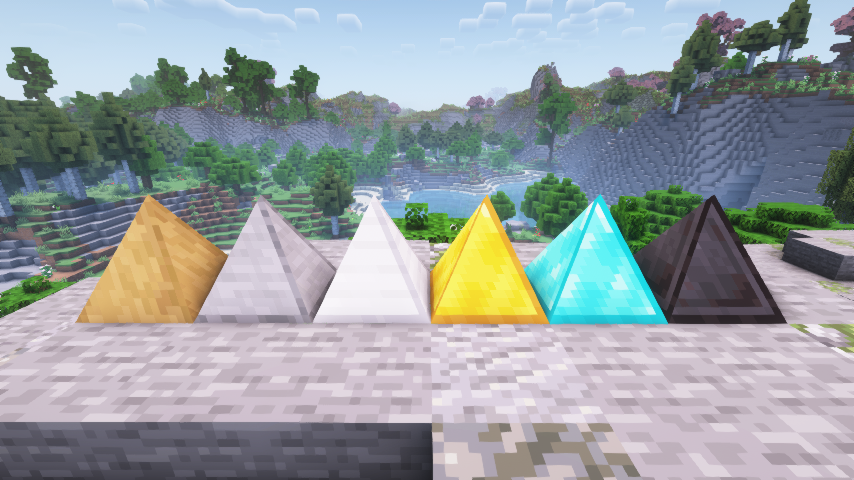
Spiky Spikes brings you 6 Tiers of spikes, all of them are unique.
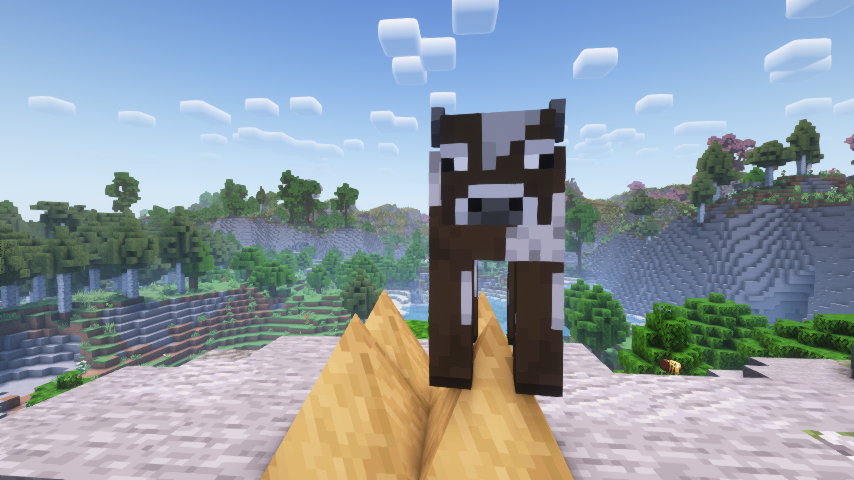
- Wooden: Slowly damages mobs, but does not deal a killing blow.
- Stone: Damages and kills mobs, but does not drop any loot or experience.
- Iron: Damages and kills mobs, only drops normal loot without experience.
- Golden: Damages and kills mobs, only drops experience without any loot.
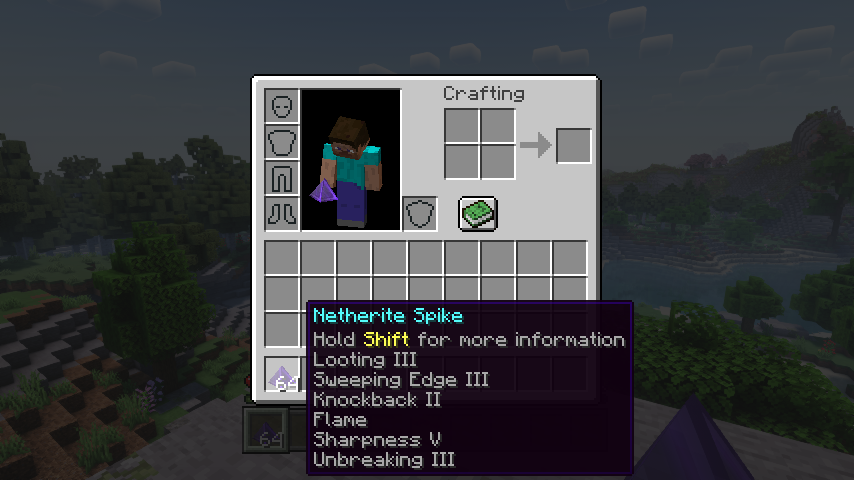
- Diamond: Deals a lot of damage, mobs drop all loot like when killed by a player. Can use most sword enchantments, apply via an anvil.
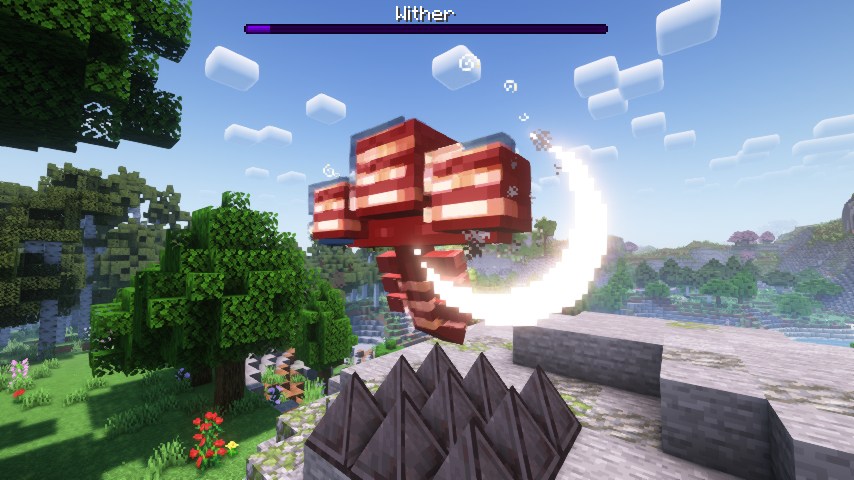
- Netherite: Deals a lot of damage, mobs drop all loot like when killed by a player. Can use most sword enchantments, apply via an anvil. Is resistant to explosions and cannot be destroyed by the wither boss. Deals no damage to players.
Note: Make sure when adding enchantments to diamond and netherite spikes to have all the spikes you want to enchant ready at once. You can apply enchanted books To The Whole Stack, so enchanting more spikes later will needlessly consume more of your precious books.
📷 Media:
 |
 |
|
| Spiky spikes are spikey | Wooden spikes bring mobs down to half a heart | |
 |
 |
|
| Even the wither boss isn't safe from netherite spikes | All the enchantments you can put on spikes | |
💡 FAQ:
Q: How do I configure this mod on Forge?
A: Install my Config Menus for Forge mod and do it directly in-game!
Q: How do I configure this mod on Fabric?
A: Editing configs directly in-game has not yet been implemented. Instead when in a world run the /config showfile <modid> command by choosing either CLIENT or SERVER (depending on the mod), then click the file name (ending with .toml) that appears in chat to be able to manually edit the config file in a separate editor. After saving the file, the config will automatically reload in-game after a couple of seconds, so no game restart required.
🏆 Credits:
Developing Spiky Spikes was helped and inspired by:
- RWTema for inspiring this mod from the spike blocks found in old versions of their Extra Utilities mod
- XFactHD for introducing me to the dark arts of rendering non-cube shapes in Minecraft







 |
 |
|
 |
 |
|
 |
 |
|
 |
 |
|
 |
 |
|
Ченджлог
26.2.0Релиз26.2 · 18 июня 2026 г.
Changelog
All notable changes to this project will be documented in this file.
The format is based on Keep a Changelog, and this project adheres to Semantic Versioning.
[v26.2.0-mc26.2.x] - 2026-06-18
Changed
- Update to Minecraft 26.2.x
26.2.0Релиз26.2 · 18 июня 2026 г.
Changelog
All notable changes to this project will be documented in this file.
The format is based on Keep a Changelog, and this project adheres to Semantic Versioning.
[v26.2.0-mc26.2.x] - 2026-06-18
Changed
- Update to Minecraft 26.2.x
26.1.0Релиз26.1, 26.1.1, 26.1.2 · 29 апреля 2026 г.
Changelog
All notable changes to this project will be documented in this file.
The format is based on Keep a Changelog, and this project adheres to Semantic Versioning.
[v26.1.0-mc26.1.x] - 2026-04-29
Changed
- Update to Minecraft 26.1.x
26.1.0Релиз26.1, 26.1.1, 26.1.2 · 29 апреля 2026 г.
Changelog
All notable changes to this project will be documented in this file.
The format is based on Keep a Changelog, and this project adheres to Semantic Versioning.
[v26.1.0-mc26.1.x] - 2026-04-29
Changed
- Update to Minecraft 26.1.x
21.11.0Релиз1.21.11 · 17 декабря 2025 г.
Changelog
All notable changes to this project will be documented in this file.
The format is based on Keep a Changelog, and this project adheres to Semantic Versioning.
[v21.11.0-1.21.11] - 2025-12-17
Changed
- Update to Minecraft 1.21.11
21.11.0Релиз1.21.11 · 17 декабря 2025 г.
Changelog
All notable changes to this project will be documented in this file.
The format is based on Keep a Changelog, and this project adheres to Semantic Versioning.
[v21.11.0-1.21.11] - 2025-12-17
Changed
- Update to Minecraft 1.21.11
21.10.0Релиз1.21.10 · 8 октября 2025 г.
Changelog
All notable changes to this project will be documented in this file.
The format is based on Keep a Changelog, and this project adheres to Semantic Versioning.
[v21.10.0-1.21.10] - 2025-10-08
Changed
- Update to Minecraft 1.21.10
21.10.0Релиз1.21.10 · 8 октября 2025 г.
Changelog
All notable changes to this project will be documented in this file.
The format is based on Keep a Changelog, and this project adheres to Semantic Versioning.
[v21.10.0-1.21.10] - 2025-10-08
Changed
- Update to Minecraft 1.21.10
Комментарии
Загружаем…