 Mineforgian
SoundboardPlus
A Soundboard for Simple Voice Chat. Supports mp3 format, inbuild yt-dlp, and categories.
- Загрузки
- 2K
- Подписчики
- 9
- Обновлён
- 13 августа 2026 г.
- Лицензия
- GPL-3.0-only
Опубликован 8 апреля 2026 г.
SoundboardPlus
🔀 This is a fork of Simple Soundboard by kvxd, extended with additional features and improvements.
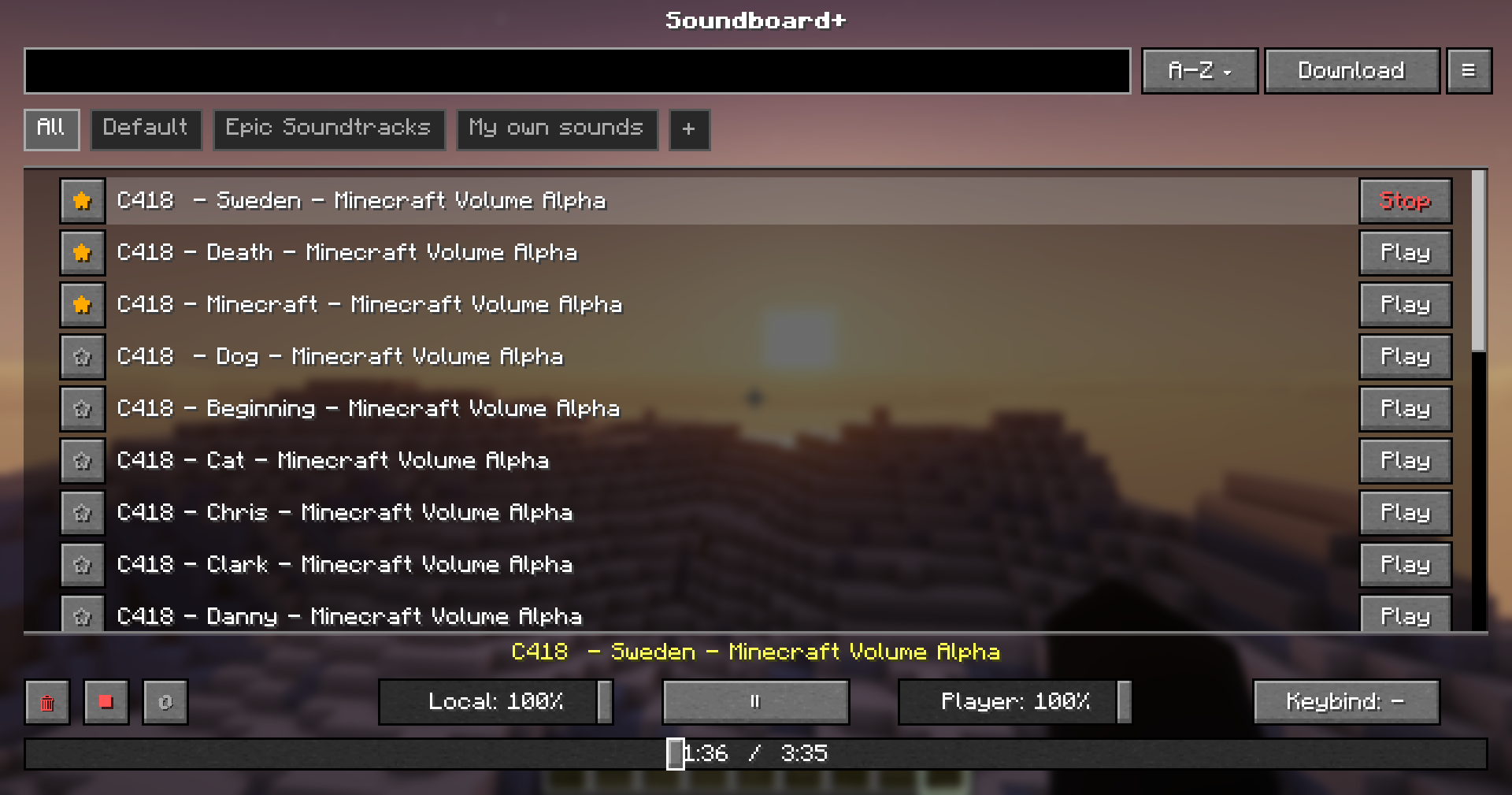
SoundboardPlus is an enhanced soundboard mod for Simple Voice Chat. Play audio files directly into your voice stream — perfect for servers, fun moments, or just vibing with friends.
Features
- Audio File Support — Play sound files directly into your microphone stream
- Dual Volume Control — Separate sliders for what you hear vs. what others hear
- Sound Management GUI — Browse, organize, and play your sounds from an in-game interface
- Categories — Create and manage categories
- YouTube Downloading — Supports downloading from YouTube, TikTok & multiple other sources — uses yt-dlp + ffmpeg
- Hotkeys — Create hotkeys for specific sounds
Dependencies
| Dependency | Required |
|---|---|
| Fabric Loader | ✅ Required |
| Fabric API | ✅ Required |
| Simple Voice Chat | ✅ Required |
| Fabric Language Kotlin | ✅ Required |
Note: This mod downloads yt-dlp and ffmpeg automatically.
Installation
- Download all required dependencies above
- Drop
SoundboardPlus.jarinto your.minecraft/mods/folder - Launch the game — the
soundboard/folder will be generated automatically
Usage
- Place your audio files into the
.minecraft/soundboard/folder or download them via the ingame downloading tab - Join a world or server
- Press the keybind (default:
J) to open the Soundboard GUI - Click Play on any sound to broadcast it through your voice chat
Changes from the Original
- Category support — Organize your sounds into categories for easier navigation
- Fixed yt-dlp downloading — Audio downloads via yt-dlp now work reliably
- Global Volume Slider — Adjust playback volume globally without per-sound configuration
- Progress Bar — Visual playback progress so you always know where a sound is at
- Play / Pause & Loop — Full playback controls, including looping sounds on repeat
- Toast Notifications — On-screen notifications for downloading events
- Additional Settings — More configuration options for a customized experience
- Refreshed UI — Cleaner and improved interface compared to the original
Issues & Contributions
Found a bug, want to contribute, or want to suggest changes? Head over to the GitHub repository and open an issue or pull request!
Licensed under GPL-3.0
Ченджлог
1.21.11-1.0.3Релиз1.21.11 · 13 августа 2026 г.
New Soundboard+ update! (1.0.3)
New Features
- Added the ability to rename sounds
- Added the ability to delete categories
- Added a new Debug screen for managing yt-dlp and ffmpeg
- Added a new sorting system for organizing your sounds
Bug Fixes
- Fixed #3: Categories going off the screen
- Fixed several issues with the "Stop All" button
- Fixed several issues with the Scroll Bar
If you have any questions, create an issue on Github or message me on Discord!
26.2-1.0.2Релиз26.2 · 17 июня 2026 г.
Added support for 26.2!
1.21.11-1.0.2Релиз1.21.11 · 7 июня 2026 г.
New SoundboardPlus update (1.0.2)!
Changes:
- Introduced JLayer to all versions. With JLayer, it is now possible to play large MP3 files without long loading times or high RAM usage.
- Fixed #2: MP3 files are now automatically resampled to 48 kHz if they use a different sample rate.
- Added a "Stop All" button for sounds.
If you have any questions, create an issue on Github or message me on Discord.
1.1-1.21.11Релиз1.21.11 · 4 мая 2026 г.
Minor GUI changes
26.1.2-1.0.1Релиз26.1.2 · 4 мая 2026 г.
New Release for the newest versions of Minecraft!
1.0-1.21.11Релиз1.21.11 · 11 апреля 2026 г.
First version of SoundboardPlus!
Комментарии
Загружаем…