 Mineforgian
Spice of Life: Fabric Flavor
A spice of life for FABRIC. 为 fabric 带来生活风味
- Загрузки
- 59K
- Подписчики
- 11
- Обновлён
- 20 августа 2026 г.
- Лицензия
- AGPL-3.0-or-later
Опубликован 23 августа 2025 г.
Switch Language:
Click the link to go to the English version
概述
我chovy,spice of fabric还不更新?(终于更新了)————咸味闲鱼
mod 食用 指南
该指南的config和GUI说明部分为最新版本(3.2.0)维护,其他版本呢详情请参考游戏内配置页面提示。
关于配置
服务端配置
这些配置存放于 /config/spice-of-life-fabric-flavor.json。
这些配置在服务端生效,本地游戏版本的配置影响本地游戏存档。
生命增益系统
所有配置项以health计算,2health=1heart(红心)
maxHealth | 最大血量
- 类型: int
- 默认值: 5000
- 取值范围: 2~5000
- 说明: 设置本 Mod 能提供的最大额外生命值(玩家最终血量 = 原版血量 + 其他 Mod 增益 + 本 Mod 增益。此选项仅限制“本 Mod 增益”的上限,防止数值无限膨胀)
healthGain | 生命值增益
- 类型: int
- 默认值: 2
- 取值范围: 0~20
- 说明: 每发现一个食物的生命值增益(设置此为0则等于禁用)
resetOnDeath | 死亡重置
- 类型: boolean
- 默认值: false
- 说明: 启用后,玩家死亡时血量将重置为默认值,且删除所有已发现记录
healthToMaxOnIncrease | 增益时恢复血量
- 类型: int
- 默认值: 0
- 取值范围: 任意
- 说明: 每次生命值增益时恢复血量数值,若大于上限则恢复到上限
healthIncreaseOnIncrease | 增益时恢复满血
- 类型: boolean
- 默认值: false
- 说明: 每次生命值增益时恢复血量至上限
Expression | 生命值增益计算函数
- 类型: string
- 默认值: 0
- 说明: 写法详见下文函数编写指南
可用变量:uniqueFoods食用过的食物数
blacklist | 黑名单
- 类型: List
- 默认值:
[
  "minecraft:rotten_flesh",
  "minecraft:spider_eye"
],
- 说明:列表中的食物不再会被记录(在黑名单修改后,玩家已发现的食物不受影响,未发现的食物不再计入统计)
相关机制和操作说明:
客户端的tooltip会显示所有已发现食物(不管是否存在于黑名单,机制应用于保存黑名单前已发现某一食物),未发现且处于黑名单内的食物不显示.修改后使用 /sol2f sync AllFoodList 同步数据以确保tooltip显示正常
客户端的GUI在修改配置后需要使用sync命令同步数据.包括: 在修改了血量增益计算相关配置后,血量概述在执行sync后会重新计算并显示在客户端;在重设黑名单后,执行同步以同步客户端GUI的食物概述.
客户端的食物概述显示的是所有已发现食物/非黑名单食物,而不是所有已发现食物/所有已发现食物+非黑名单食物的并集
whitelist | 白名单
- 类型: List
- 默认值:
[],
- 说明:列表存在大于等于1项时,启用白名单,启用后则只有白名单内食物可提供增益,同时黑名单也会阻止白名单的项目,所以如果希望启用白名单建议同时删除所有黑名单项目(在黑白名单修改后,玩家已发现的食物不受影响,未发现的食物不再计入统计)
相关机制和操作说明:
客户端的tooltip会显示所有已发现食物(不管是否存在于黑名单,机制应用于保存黑名单前已发现某一食物),未发现且处于黑名单内的食物不显示.修改后使用 /sol2f sync AllFoodList 同步数据以确保tooltip显示正常
客户端的GUI在修改配置后需要使用sync命令同步数据.包括: 在修改了血量增益计算相关配置后,血量概述在执行sync后会重新计算并显示在客户端;在重设黑名单后,执行同步以同步客户端GUI的食物概述.
客户端的食物概述显示的是所有已发现食物/非黑名单食物,而不是所有已发现食物/所有已发现食物+非黑名单食物的并集
在修改血量配置后,食用未发现食物,或重生(未开启死亡重置配置)以重新计算血量增益值
机制: 在每次食用新食物、死亡重生时会按照最新配置计算血量增益值
饱食度衰减系统
所有配置项以FoodLevel(饱食度)计算,2 FoodLevel=1 小鸡腿图标
EnableNaturalHunger | 启用自然饥饿
- 类型: boolean
- 默认值: false
- 说明: 启用后,玩家会随时间损失饥饿值
NaturalHungerPeriod | 自然饥饿周期
- 类型: int
- 默认值: 1200
- 说明: 配置值代表tick(游戏刻 ↗ 游戏刻-Minecraft Wiki),每达到一定配置的游戏刻,按照函数计算衰减
NaturalHungerExpression | 自然饥饿衰减计算函数
- 类型: string
- 默认值: "1"
- 说明: 用于计算每次自然衰减值的函数(将玩家的饱食度减少此函数的结果,而非设置为此函数的结果),写法详见下文函数编写指南
可用变量 (Variables):- 动作:
isSprinting(疾跑),isSwimming(游泳),isSneaking(潜行),isCrawling(爬行) - 环境:
isTouchingWater(接触水),isBeingRainedOn(淋雨),isWet(潮湿(接触水或淋雨或接触气泡柱)),BrightnessAtEyes(玩家眼镜坐标的渲染亮度(0.0-1.0) ↗ 渲染亮度|Minecraft Wiki) - 状态:
FoodLevel(当前饥饿值),Saturation(饱食度),Exhaustion(消耗度) ↗ 饥饿机制详解-Minecraft Wiki
注:所有布尔变量在公式中为1.0(真) 或0.0(假)
配方示例:
- 基础固定消耗: 每周期扣 0.5 点。
"NaturalHungerExpression": "0.5"- 环境动态消耗: 疾跑或游泳:扣 4 点,淋雨或站在水中:扣 2 点,其他情况:扣 1 点
"NaturalHungerExpression": "if(or(isSprinting, isSwimming), 4, if(or(isBeingRainedOn, isTouchingWater), 2, 1))"- 黑暗生存挑战: 在黑暗处 (
BrightnessAtEyes< 0.1) 消耗加倍。
"NaturalHungerExpression": "if(lt(BrightnessAtEyes, 0.1), 2, 1)" - 动作:
EnableSleepHunger | 启用睡眠饥饿
- 类型: boolean
- 默认值: false
- 说明: 启用后,玩家睡醒时会根据函数扣除一定饥饿值
SleepHungerExpression | 睡眠饥饿衰减计算函数
- 类型: string
- 默认值: "SleepDuration / 3000"
- 说明: 用于计算每次睡醒时衰减的饱食度的值(将玩家的饱食度减少此函数的结果,而非设置为此函数的结果),指南详见下文函数编写指南
可用变量:- 睡眠:
SleepDuration(睡眠时长(tick),按照游戏内时间而非睡眠经历的绝对tick ↗ "24小时制"下的Minecraft-Minecraft Wiki) - 状态:
FoodLevel(当前饥饿值),Saturation(饱食度),Exhaustion(消耗度) ↗ 饥饿机制详解-Minecraft Wiki
- 睡眠:
MinFoodLevel | 饥饿衰减下限
- 类型: int
- 默认值: 1
- 说明: 本mod的饥饿衰减(包括自然饥饿衰减和睡眠饥饿衰减)所能扣除到的最小值,若小于该值则不再扣除,若扣除后小于该值则扣除至该值,否则按照函数默认扣除
函数使用指南:
函数编写指南
- 你可以使用
e和pi代表e和π运算
- 普通四则运算(加+减-乘*除/),用括号表示的优先级(例如
( 1 + 2 ) * 3)- 幂运算
pow(底数, 指数)- 约数:
- 向下取整数:
floor(num)- 四舍五入数:
round(num)- 向上取整数:
ceil(num)- 取大小值
- 取大值:
max(num1, num2)- 取小值:
min(num1, num2)- 对数:
log(底数, 真数)逻辑
- 判断:
if(condition, A, B),如果 condition > 0 返回 A ,否则返回 B- 逻辑与:
and(A, B),两者都大于 0 返回 1 ,否则返回 0- 逻辑或:
or(A, B),A或B任意一个超过 0 返回 1 ,否则返回 0- 逻辑非:
not(A),大于 0 返回 0 ,否则返回 1比较逻辑
- 大于:
gt(A, B),如果 A > B ,返回 1 ,否则返回 0- 小于:
lt(A, B),如果 A < B ,返回 1 ,否则返回 0- 等于:
eq(A, B),如果 A = B ,返回 1 ,否则返回 0- 不等于:
neq(A, B),如果A ≠ B ,返回 1 ,否则返回 0
客户端配置
这些配置存放于 /config/spice-of-life-fabric-flavor-client.json。
这些配置仅影响本地客户端显示,服务端的该配置无效。
ShowConsumedTooltips | 显示已发现食物tooltip
- 类型: boolean
- 默认值: true
- 说明: 控制客户端的tooltip显示。
ShowUnconsumedTooltips | 显示未发现食物tooltip
- 类型: boolean
- 默认值: true
- 说明: 控制客户端的tooltip显示。
关于命令
CleanHealth | 重置玩家数据
/sol2f clearhealthy
重置当前玩家的生命值上限与所有食物摄入记录,需管理员权限。(版本:2.0+)
GetPlayerData | 获取玩已发现列表
/sol2f getlist <player>
获取玩家已发现食物列表。
Sync | 同步数据
/sol2f sync
同步所有数据。
/sol2f sync PlayerData同步玩家数据。主要用于GUI显示和tooltip显示控制。/sol2f sunc AllFoodList同步食物数据:最新的非黑名单食物数据,玩家最大血量上限数据。主要用于GUI显示和tooltip显示控制。
关于食物簿
在修改配置后请使用命令同步数据以确保GUI显示的数据为最新数据。
食物簿页面

- 4.0.0之前的版本,使用鼠标滚轮翻页。
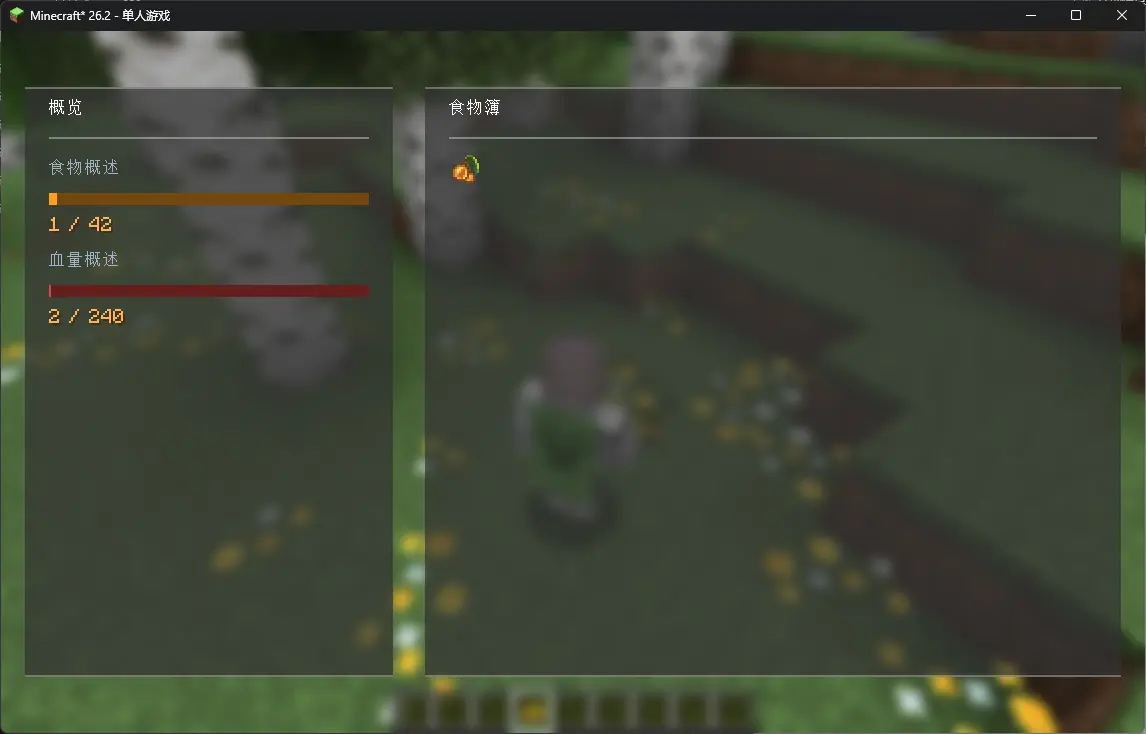
- 4.0.0之后的版本,支持动态布局,平滑滚动。
概述页面

- 血量概述:当前获得的mod增益 / 最大可获得的mod增益。
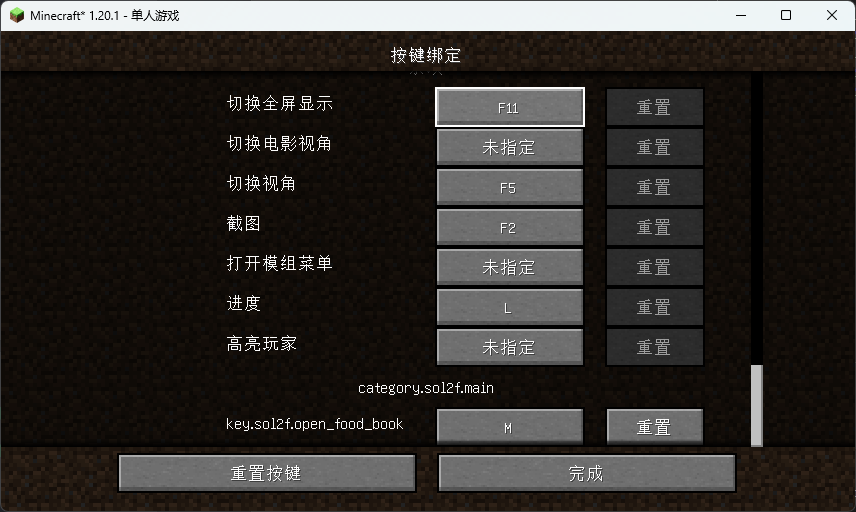
按键绑定
打开GUI的快捷键在minecraft的按键绑定中配置
物品
食物簿
通过合成"食物簿"打开食物簿:

依赖
- Mod Menu (v2.2.0+ 可选)配置页面入口
- Cloth Config API (v2.2.0+ 必装)
- Fabric API (必装)
该模组根据 Apache 2.0 协议 重新分发了 exp4j 。
Switch Language:
Notice: The translation is completed by AI and may be not correct.
Overview
This mod encourages players to try a variety of foods by rewarding them with a permanent maximum health bonus for each new food they eat. It's designed to give mod packs a reason to expand their food systems and provides a new way to balance game difficulty.
Mod Guide
Note: The configuration and GUI sections below are accurate for mod version 3.2.0. For other versions, please refer to in-game tooltips and config screens.
Configuration
Important: Health Values
All health-related values are in health points. 2 health points = 1 heart.
Server-Side Configuration (/config/spice-of-life-fabric-flavor.json)
These settings are controlled by the server. In a single-player world, they affect your local save.
Health Gain System
maxHealth - Maximum Bonus Cap
- Type:
int - Default:
5000 - Range:
2~5000 - What it does: Sets the absolute maximum bonus this mod can add to a player's health.
- Final player health = (Base Health + Bonuses from other mods) + This Mod's Bonus.
- This setting only caps "This Mod's Bonus" to prevent runaway scaling.
healthGain - Bonus per New Food
- Type:
int - Default:
2 - Range:
0~20 - What it does: The amount of health (in HP) granted for each new food discovered. Set to
0to disable the base gain.
resetOnDeath - Reset on Death
- Type:
boolean - Default:
false - What it does: If
true, dying resets your bonus to zero and erases your entire food discovery history. This is a hardcore option.
healthToMaxOnIncrease - Heal to Max on Gain
- Type:
boolean - Default:
false - What it does: If
true, whenever you gain a health bonus (by eating a new food), your current health is instantly filled to your new maximum. - Note: If this is
true, thehealthIncreaseOnIncreasesetting below is ignored.
healthIncreaseOnIncrease - Heal Amount on Gain
- Type:
int - Default:
0 - Range: Any positive integer
- What it does: Heals you by a specific amount whenever you gain a health bonus. If the heal amount would exceed your new max, it heals you to full instead.
- Note: This only applies if
healthToMaxOnIncreaseis set tofalse.
Expression - Custom Bonus Formula
- Type:
string - Default:
"0" - What it does: A custom formula for calculating your health bonus. The result is added to the
healthGainvalue. - Variable:
uniqueFoods(the total number of unique foods you've eaten). - Syntax: See the Function Guide below.
blacklist - Food Blacklist
- Type:
List - Default:
["minecraft:rotten_flesh", "minecraft:spider_eye"]
- What it does: Foods in this list will not be counted towards your discovery progress.
- How it works:
- Existing data: Foods you already ate before they were added to the blacklist remain in your history (the mod doesn't erase your past meals).
- New data: Foods on the blacklist that you haven't eaten yet will never count.
- After changing the list: You must run
/sol2f sync AllFoodListto update the client GUI and tooltips. This ensures the display matches the new blacklist.
- GUI Display: The overview screen shows
Discovered Foods / Total Non-Blacklisted Foods.
whitelist - Food Whitelist
- Type:
List - Default:
[]
- What it does: When the list contains 1 or more items, the whitelist is enabled. Only foods on the whitelist can grant health bonuses. Note that the blacklist can still block items on the whitelist, so if you want to use the whitelist, it's recommended to clear all items from the blacklist. (After changing the blacklist/whitelist, foods already discovered by players are not affected; undiscovered foods will no longer be counted.)
- How it works:
- Tooltips: Client-side tooltips show all discovered foods (even if they are now on the blacklist—this only applies if you discovered them before they were blacklisted). Undiscovered foods on the blacklist are not shown. After making changes, run
/sol2f sync AllFoodListto ensure tooltips display correctly. - GUI Sync: After changing configs, you must use the sync command to update the client GUI. For example, if you modify health gain calculation settings, the health overview will be recalculated and updated on the client after running the sync command. If you reset the blacklist/whitelist, sync to update the food overview in the client GUI.
- Food Overview Display: The client's food overview shows
All Discovered Foods / Non-Blacklisted Foods. It does not show the union of all discovered foods and all non-blacklisted foods.
- Tooltips: Client-side tooltips show all discovered foods (even if they are now on the blacklist—this only applies if you discovered them before they were blacklisted). Undiscovered foods on the blacklist are not shown. After making changes, run
Applying config changes: After changing health-related settings, the new values will apply the next time you eat a new food or respawn (if
resetOnDeathisfalse). The mod recalculates your bonus whenever youruniqueFoodscount changes or on death/respawn.
Hunger Decay System
Note: Values here use the vanilla Food Level, where 2 Food Level = 1 chicken drumstick.
EnableNaturalHunger - Time-Based Hunger
- Type:
boolean - Default:
false - What it does: If
true, the player will passively lose hunger over time.
NaturalHungerPeriod - Decay Interval
- Type:
int - Default:
1200 - What it does: How often (in game ticks, 20 ticks = 1 second) the "Natural Hunger" decay triggers. Each time it triggers, it subtracts the amount calculated by
NaturalHungerExpression.
NaturalHungerExpression - Decay Formula (Time-Based)
- Type:
string - Default:
"1" - What it does: A custom formula that determines how much hunger (Food Level) is subtracted each decay interval.
- Variables:
- Actions:
isSprinting,isSwimming,isSneaking,isCrawling - Environment:
isTouchingWater,isBeingRainedOn,isWet,BrightnessAtEyes(render brightness at eye level,0.0-1.0) - Status:
FoodLevel(current hunger),Saturation,Exhaustion - Note: Boolean variables return
1.0(true) or0.0(false).
- Actions:
- Syntax: See the Function Guide below.
- Example:
- Basic fixed cost: Lose 0.5 hunger every period.
"NaturalHungerExpression": "0.5" - Dynamic cost: Lose 4 if sprinting/swimming, 2 if in rain/water, otherwise 1.
"NaturalHungerExpression": "if(or(isSprinting, isSwimming), 4, if(or(isBeingRainedOn, isTouchingWater), 2, 1))"
- Basic fixed cost: Lose 0.5 hunger every period.
EnableSleepHunger - Wake-Up Hunger
- Type:
boolean - Default:
false - What it does: If
true, the player loses hunger upon waking up after sleeping.
SleepHungerExpression - Decay Formula (Wake-Up)
- Type:
string - Default:
"SleepDuration / 3000" - What it does: A custom formula that determines how much hunger (Food Level) is subtracted when you wake up.
- Variables:
- Sleep:
SleepDuration(time skipped in ticks) - Status:
FoodLevel,Saturation,Exhaustion
- Sleep:
- Syntax: See the Function Guide below.
MinFoodLevel - Minimum Hunger Floor
- Type:
int - Default:
1 - What it does: The lowest your food level can be reduced to by this mod's hunger systems (both time-based and wake-up). Decay will stop when you hit this value.
Function Syntax Guide
Click to expand
Constants: You can use
eandpi.Arithmetic:
- Basic:
+,-,*,/, and parentheses(). - Power:
pow(base, exponent) - Rounding:
floor(num),round(num),ceil(num) - Min/Max:
min(a, b),max(a, b) - Logarithm:
log(base, argument)
- Basic:
Logic:
- Conditional:
if(condition, value_if_true, value_if_false)(condition > 0 is true) - AND:
and(a, b)(returns1if both > 0, else0) - OR:
or(a, b)(returns1if either > 0, else0) - NOT:
not(a)(returns1if a <= 0, else0)
- Conditional:
Comparisons:
- Greater Than:
gt(a, b)(1if a > b, else0) - Less Than:
lt(a, b)(1if a < b, else0) - Equal:
eq(a, b)(1if a == b, else0) - Not Equal:
neq(a, b)(1if a != b, else0)
- Greater Than:
Client-Side Configuration (/config/spice-of-life-fabric-flavor-client.json)
These settings only affect your local display. The server doesn't care about them.
ShowConsumedTooltips - Show "Eaten" Tooltips
- Type:
boolean - Default:
true - What it does: Shows a tooltip on foods you've already discovered.
ShowUnconsumedTooltips - Show "New" Tooltips
- Type:
boolean - Default:
true - What it does: Shows a tooltip on foods you haven't discovered yet.
Commands
/sol2f clearhealthy - Reset Player
- Usage:
/sol2f clearhealthy - What it does: Resets your health bonus and food discovery list. Requires operator privileges. (Added in v2.0+)
/sol2f getlist - View Discovered Foods
- Usage:
/sol2f getlist <player> - What it does: Shows the list of foods a specific player has discovered.
/sol2f sync - Sync Data
- Usage:
/sol2f sync PlayerData- Syncs player discovery lists. Use this if GUI tooltips seem wrong./sol2f sync AllFoodList- Syncs the global food list. You must run this after changing the blacklist to update the GUI and client displays.
The Food Book
After changing any config, run the appropriate /sol2f sync command to make sure the GUI shows the correct information.
Food Book Page
- Browse your discoveries. Use the scroll wheel to flip pages.
Overview Page
- Health Summary: Shows
Current Mod Bonus / Maximum Possible Bonus.
Keybind
You can set a hotkey to open the Food Book in Minecraft's Controls menu.
The Food Book Item
Crafting Recipe
Craft the "Food Book" to access the interface without using the keybind.
Dependencies
- Fabric API (Required)
- Cloth Config API (Required)
- Mod Menu (Optional) - Provides a config screen entry point.
This mod redistributes exp4j under the Apache 2.0 LICENSE.
Ченджлог
4.0.0-Alpha.dev1Альфа26.2 · 20 августа 2026 г.
- 适配了26.2
- 使用
FluentUI-MC重构了GUI - 使用
XianConfig重构了配置系统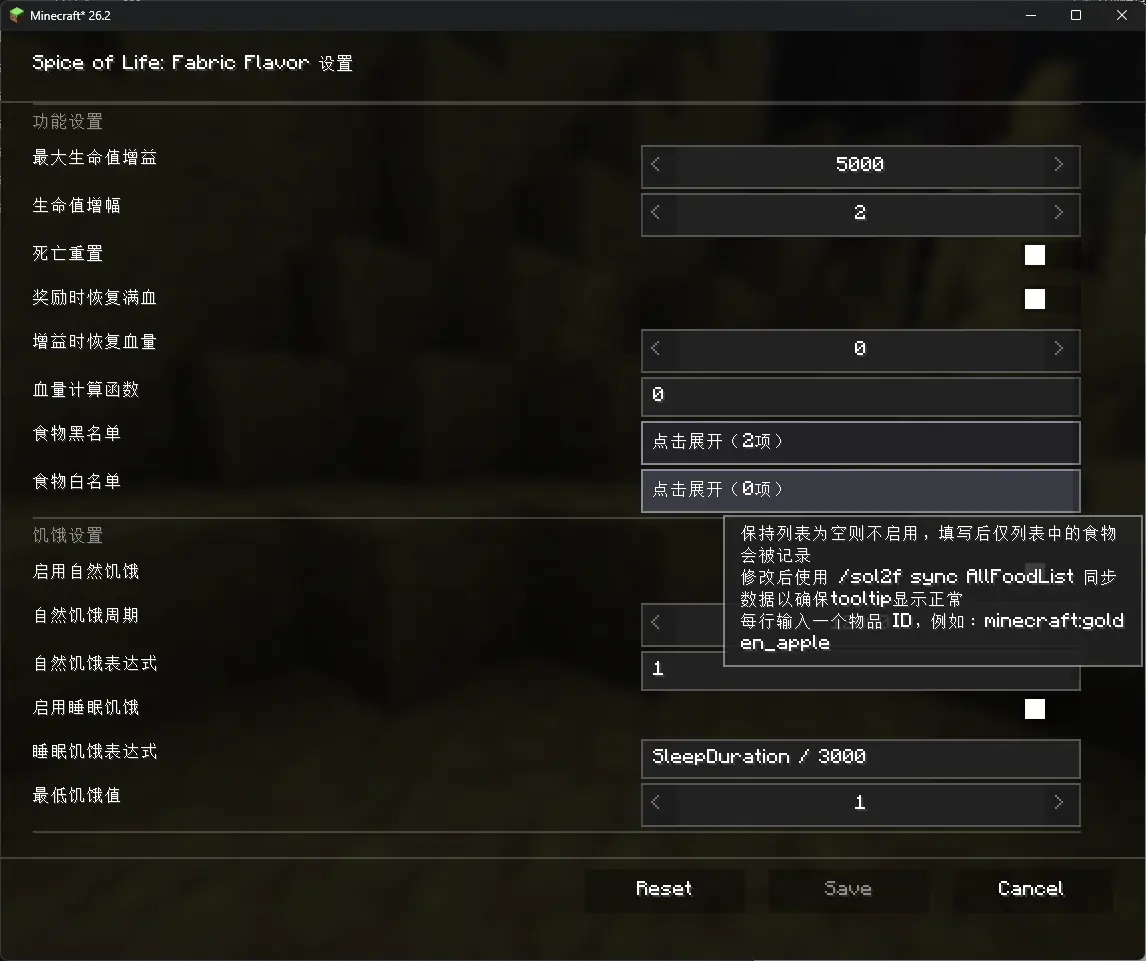
English(AI-Translate)
- Adapted for 26.2
- Refactored the GUI using
FluentUI-MC - Refactored the configuration system using
XianConfig
- 反馈:[email protected]
- FeedBack: [email protected]
3.3.0Релиз1.21.1 · 19 июня 2026 г.
功能更新
- 增加了白名单功能
2.7.1Релиз1.20.1 · 10 мая 2026 г.
功能改进
本次更新修改了食物使用的检测方案,以增加兼容性。现在对《农夫乐事》《Adorable Hamster Pets》的支持更进一步。
3.2.1Релиз1.21.1 · 8 мая 2026 г.
功能改进
本次更新修改了食物使用的检测方案,以增加兼容性。现在对《农夫乐事》《Adorable Hamster Pets》的支持更进一步。
3.3.0-Alpha.dev1Альфа1.21.1 · 14 марта 2026 г.
Warning: Test Version
重要:该版本为预览版,功能尚不完善,可能出现bug。
更新
增加了食物动态属性功能,现在每个玩家每次食用都允许按照最近食用记录来动态调整营养度(饱食度回复量),饱和度按照原版算法基于食物的默认系数,随着营养度调整。 增加了五个配置:
EnableNutritionModification
是否启用动态属性。RecentShortListSize
短期记录列表长度。计算函数可获取短期列表内,玩家食用下的食物的数量计数。超过计数后每次记录食物食用会删除最后一项(最早记录,距离现在最久的一项)。RecentLongListSize
短期记录列表长度。计算函数可获取长期列表内,玩家食用下的食物的数量计数。超过计数后每次记录食物食用会删除最后一项(最早记录,距离现在最久的一项)。Blacklist
在该列表内的食物不会被修改(针对所有玩家)。NutritionExpression
默认为mutrition,你可以使用nutrition代表物品堆本身的食物组件原本的营养度,你可以使用shortCount获取短期列表内该食物的计数(每一次玩家食用回复的饱食度和饱和度都会被拦截为函数结果,你可以获取玩家原本食用的食物的这些数据,这一项不是表总的长度哦),longCount获取长期列表内该食物的计数,streakCount获取重复计数,玩家最后一次食用的食物一共连续食用了几次(例如玩家已经食用了A B B C,下一次食用A则该值为2,食用B则为0)。函数用法参考指南。
3.2.0Бета1.21.1 · 7 марта 2026 г.
该版本带来了多个重大更新。 该版本的全新mod介绍
展开查看
Switch Language:
概述
本mod旨在通过增加血量上限奖励玩家食用新的食物,以加强玩家对整合包食物系统的动力,并平衡整合包的游戏难度。
mod 食用 指南
该指南的config和GUI说明部分为最新版本(3.2.0)维护,其他版本呢详情请参考游戏内配置页面提示。
关于配置
服务端配置
这些配置存放于 /config/spice-of-life-fabric-flavor.json。
这些配置在服务端生效,本地游戏版本的配置影响本地游戏存档。
生命增益系统
所有配置项以health计算,2health=1heart(红心)
maxHealth | 最大血量
- 类型: int
- 默认值: 5000
- 取值范围: 2~5000
- 说明: 设置本 Mod 能提供的最大额外生命值(玩家最终血量 = 原版血量 + 其他 Mod 增益 + 本 Mod 增益。此选项仅限制“本 Mod 增益”的上限,防止数值无限膨胀)
healthGain | 生命值增益
- 类型: int
- 默认值: 2
- 取值范围: 0~20
- 说明: 每发现一个食物的生命值增益(设置此为0则等于禁用)
resetOnDeath | 死亡重置
- 类型: boolean
- 默认值: false
- 说明: 启用后,玩家死亡时血量将重置为默认值,且删除所有已发现记录
healthToMaxOnIncrease | 增益时恢复血量
- 类型: int
- 默认值: 0
- 取值范围: 任意
- 说明: 每次生命值增益时恢复血量数值,若大于上限则恢复到上限
healthIncreaseOnIncrease | 增益时恢复满血
- 类型: boolean
- 默认值: false
- 说明: 每次生命值增益时恢复血量至上限
Expression | 生命值增益计算函数
- 类型: string
- 默认值: 0
- 说明: 写法详见下文函数编写指南
可用变量:uniqueFoods食用过的食物数
blacklist | 黑名单
- 类型: List
- 默认值:
[
  "minecraft:rotten_flesh",
  "minecraft:spider_eye"
],
- 说明:列表中的食物不再会被记录(在黑名单修改后,玩家已发现的食物不受影响,未发现的食物不再计入统计)
相关机制和操作说明:
客户端的tooltip会显示所有已发现食物(不管是否存在于黑名单,机制应用于保存黑名单前已发现某一食物),未发现且处于黑名单内的食物不显示.修改后使用 /sol2f sync AllFoodList 同步数据以确保tooltip显示正常
客户端的GUI在修改配置后需要使用sync命令同步数据.包括: 在修改了血量增益计算相关配置后,血量概述在执行sync后会重新计算并显示在客户端;在重设黑名单后,执行同步以同步客户端GUI的食物概述.
客户端的食物概述显示的是所有已发现食物/非黑名单食物,而不是所有已发现食物/所有已发现食物+非黑名单食物的并集
在修改血量配置后,食用未发现食物,或重生(未开启死亡重置配置)以重新计算血量增益值
机制: 在每次食用新食物、死亡重生时会按照最新配置计算血量增益值
饱食度衰减系统
所有配置项以FoodLevel(饱食度)计算,2 FoodLevel=1 小鸡腿图标
EnableNaturalHunger | 启用自然饥饿
- 类型: boolean
- 默认值: false
- 说明: 启用后,玩家会随时间损失饥饿值
NaturalHungerPeriod | 自然饥饿周期
- 类型: int
- 默认值: 1200
- 说明: 配置值代表tick(游戏刻 ↗ 游戏刻-Minecraft Wiki),每达到一定配置的游戏刻,按照函数计算衰减
NaturalHungerExpression | 自然饥饿衰减计算函数
- 类型: string
- 默认值: "1"
- 说明: 用于计算每次自然衰减值的函数(将玩家的饱食度减少此函数的结果,而非设置为此函数的结果),写法详见下文函数编写指南
可用变量 (Variables):- 动作:
isSprinting(疾跑),isSwimming(游泳),isSneaking(潜行),isCrawling(爬行) - 环境:
isTouchingWater(接触水),isBeingRainedOn(淋雨),isWet(潮湿(接触水或淋雨或接触气泡柱)),BrightnessAtEyes(玩家眼镜坐标的渲染亮度(0.0-1.0) ↗ 渲染亮度|Minecraft Wiki) - 状态:
FoodLevel(当前饥饿值),Saturation(饱食度),Exhaustion(消耗度) ↗ 饥饿机制详解-Minecraft Wiki
注:所有布尔变量在公式中为1.0(真) 或0.0(假)
配方示例:
- 基础固定消耗: 每周期扣 0.5 点。
"NaturalHungerExpression": "0.5"- 环境动态消耗: 疾跑或游泳:扣 4 点,淋雨或站在水中:扣 2 点,其他情况:扣 1 点
"NaturalHungerExpression": "if(or(isSprinting, isSwimming), 4, if(or(isBeingRainedOn, isTouchingWater), 2, 1))"- 黑暗生存挑战: 在黑暗处 (
BrightnessAtEyes< 0.1) 消耗加倍。
"NaturalHungerExpression": "if(lt(BrightnessAtEyes, 0.1), 2, 1)" - 动作:
EnableSleepHunger | 启用睡眠饥饿
- 类型: boolean
- 默认值: false
- 说明: 启用后,玩家睡醒时会根据函数扣除一定饥饿值
SleepHungerExpression | 睡眠饥饿衰减计算函数
- 类型: string
- 默认值: "SleepDuration / 3000"
- 说明: 用于计算每次睡醒时衰减的饱食度的值(将玩家的饱食度减少此函数的结果,而非设置为此函数的结果),指南详见下文函数编写指南
可用变量:- 睡眠:
SleepDuration(睡眠时长(tick),按照游戏内时间而非睡眠经历的绝对tick ↗ "24小时制"下的Minecraft-Minecraft Wiki) - 状态:
FoodLevel(当前饥饿值),Saturation(饱食度),Exhaustion(消耗度) ↗ 饥饿机制详解-Minecraft Wiki
- 睡眠:
MinFoodLevel | 饥饿衰减下限
- 类型: int
- 默认值: 1
- 说明: 本mod的饥饿衰减(包括自然饥饿衰减和睡眠饥饿衰减)所能扣除到的最小值,若小于该值则不再扣除,若扣除后小于该值则扣除至该值,否则按照函数默认扣除
函数使用指南:
函数编写指南
- 你可以使用
e和pi代表e和π运算
- 普通四则运算(加+减-乘*除/),用括号表示的优先级(例如
( 1 + 2 ) * 3)- 幂运算
pow(底数, 指数)- 约数:
- 向下取整数:
floor(num)- 四舍五入数:
round(num)- 向上取整数:
ceil(num)- 取大小值
- 取大值:
max(num1, num2)- 取小值:
min(num1, num2)- 对数:
log(底数, 真数)逻辑
- 判断:
if(condition, A, B),如果 condition > 0 返回 A ,否则返回 B- 逻辑与:
and(A, B),两者都大于 0 返回 1 ,否则返回 0- 逻辑或:
or(A, B),A或B任意一个超过 0 返回 1 ,否则返回 0- 逻辑非:
not(A),大于 0 返回 0 ,否则返回 1比较逻辑
- 大于:
gt(A, B),如果 A > B ,返回 1 ,否则返回 0- 小于:
lt(A, B),如果 A < B ,返回 1 ,否则返回 0- 等于:
eq(A, B),如果 A = B ,返回 1 ,否则返回 0- 不等于:
neq(A, B),如果A ≠ B ,返回 1 ,否则返回 0
客户端配置
这些配置存放于 /config/spice-of-life-fabric-flavor-client.json。
这些配置仅影响本地客户端显示,服务端的该配置无效。
ShowConsumedTooltips | 显示已发现食物tooltip
- 类型: boolean
- 默认值: true
- 说明: 控制客户端的tooltip显示。
ShowUnconsumedTooltips | 显示未发现食物tooltip
- 类型: boolean
- 默认值: true
- 说明: 控制客户端的tooltip显示。
关于命令
CleanHealth | 重置玩家数据
/sol2f clearhealthy
重置当前玩家的生命值上限与所有食物摄入记录,需管理员权限。(版本:2.0+)
GetPlayerData | 获取玩已发现列表
/sol2f getlist <player>
获取玩家已发现食物列表。
Sync | 同步数据
/sol2f sync
同步所有数据。
/sol2f sync PlayerData同步玩家数据。主要用于GUI显示和tooltip显示控制。/sol2f sunc AllFoodList同步食物数据:最新的非黑名单食物数据,玩家最大血量上限数据。主要用于GUI显示和tooltip显示控制。
关于食物簿
在修改配置后请使用命令同步数据以确保GUI显示的数据为最新数据。
食物簿页面
- 使用鼠标滚轮翻页。
概述页面
- 血量概述:当前获得的mod增益 / 最大可获得的mod增益。
按键绑定
打开GUI的快捷键在minecraft的按键绑定中配置
物品
食物簿
通过合成"食物簿"打开食物簿:
常见问题和许可声明
总则
本mod(Spice of Life: Fabric Flavor)默认状态下由作者保留所有权力。 任何用户拥有自由的获取和使用mod的权利,任何机构或个人对mod的权利由以下细则约束。
关于在整合包和对外分发的Minecraft游戏(以下简称游戏)版本或基于游戏作品的二次创作(以下统称为整合包)、以及在公开的服务器或在线游戏(以下统称在线游戏)中引用本mod
本mod被允许在任何公开或私人分发的整合包、在线游戏中被引用。
- 禁止使用整合包盈利或损害用户权利;
- 不允许利用本mod进行任何直接或间接的商业化行为,包括但不限于:整合包或在线游戏客户端下载前需要打赏赞助、整合包或在线游戏客户端限制下载;
- 不允许对未打赏或赞助或付费的用户限制玩法或用户权限;
- 对于对外分发的整合包:必须提供直接且无限制的下载通道。
关于分发本mod和二次创作分发
分发是被允许的。二次创作中,mod的元数据和代码收到保护。
- 分发任何原始版本或二次创作不允许付费下载、限制下载;
- 任何分发原始版本和分发二次创作必须提供直接且无限制的下载通道,请标注modrinth页面链接。
关于二次创作(即基于本mod的任何版本进行任何形式的修改)
任何修改基于不修改mod元数据。
- 如有需要,mod的本地化文件允许修改,但不允许在中文和英文的翻译中进行署名(例如“由xxx翻译”“由xxx优化”),其他语言的翻译允许社区贡献和署名。
- 二次创作不允许修改mod元数据,你可以为mod增加额外本地化或修改GUI材质,为mod创作的额外材质包由其作者对所有内容负责,材质包作者对其材质包关于本mod的修改部分进行任何创作和本mod无关。
*限制的定义:包括但不限于下载前看广告、下载需要积分或代币、下载需要登陆或用户分级和等级等。
依赖
- Mod Menu (v2.2.0+ 可选)配置页面入口
- Cloth Config API (v2.2.0+ 必装)
- Fabric API (必装)
Switch Language:
Notice: The translation is completed by AI and may be not correct.
Spice of Life: Fabric Flavor
Overview
This mod encourages players to try a variety of foods by rewarding them with a permanent maximum health bonus for each new food they eat. It's designed to give mod packs a reason to expand their food systems and provides a new way to balance game difficulty.
Mod Guide
Note: The configuration and GUI sections below are accurate for mod version 3.2.0. For other versions, please refer to in-game tooltips and config screens.
Configuration
Important: Health Values
All health-related values are in health points. 2 health points = 1 heart.
Server-Side Configuration (/config/spice-of-life-fabric-flavor.json)
These settings are controlled by the server. In a single-player world, they affect your local save.
Health Gain System
maxHealth - Maximum Bonus Cap
- Type:
int - Default:
5000 - Range:
2~5000 - What it does: Sets the absolute maximum bonus this mod can add to a player's health.
- Final player health = (Base Health + Bonuses from other mods) + This Mod's Bonus.
- This setting only caps "This Mod's Bonus" to prevent runaway scaling.
healthGain - Bonus per New Food
- Type:
int - Default:
2 - Range:
0~20 - What it does: The amount of health (in HP) granted for each new food discovered. Set to
0to disable the base gain.
resetOnDeath - Reset on Death
- Type:
boolean - Default:
false - What it does: If
true, dying resets your bonus to zero and erases your entire food discovery history. This is a hardcore option.
healthToMaxOnIncrease - Heal to Max on Gain
- Type:
boolean - Default:
false - What it does: If
true, whenever you gain a health bonus (by eating a new food), your current health is instantly filled to your new maximum. - Note: If this is
true, thehealthIncreaseOnIncreasesetting below is ignored.
healthIncreaseOnIncrease - Heal Amount on Gain
- Type:
int - Default:
0 - Range: Any positive integer
- What it does: Heals you by a specific amount whenever you gain a health bonus. If the heal amount would exceed your new max, it heals you to full instead.
- Note: This only applies if
healthToMaxOnIncreaseis set tofalse.
Expression - Custom Bonus Formula
- Type:
string - Default:
"0" - What it does: A custom formula for calculating your health bonus. The result is added to the
healthGainvalue. - Variable:
uniqueFoods(the total number of unique foods you've eaten). - Syntax: See the Function Guide below.
blacklist - Food Blacklist
- Type:
List - Default:
["minecraft:rotten_flesh", "minecraft:spider_eye"]
- What it does: Foods in this list will not be counted towards your discovery progress.
- How it works:
- Existing data: Foods you already ate before they were added to the blacklist remain in your history (the mod doesn't erase your past meals).
- New data: Foods on the blacklist that you haven't eaten yet will never count.
- After changing the list: You must run
/sol2f sync AllFoodListto update the client GUI and tooltips. This ensures the display matches the new blacklist.
- GUI Display: The overview screen shows
Discovered Foods / Total Non-Blacklisted Foods.
Applying config changes: After changing health-related settings, the new values will apply the next time you eat a new food or respawn (if
resetOnDeathisfalse). The mod recalculates your bonus whenever youruniqueFoodscount changes or on death/respawn.
Hunger Decay System
Note: Values here use the vanilla Food Level, where 2 Food Level = 1 chicken drumstick.
EnableNaturalHunger - Time-Based Hunger
- Type:
boolean - Default:
false - What it does: If
true, the player will passively lose hunger over time.
NaturalHungerPeriod - Decay Interval
- Type:
int - Default:
1200 - What it does: How often (in game ticks, 20 ticks = 1 second) the "Natural Hunger" decay triggers. Each time it triggers, it subtracts the amount calculated by
NaturalHungerExpression.
NaturalHungerExpression - Decay Formula (Time-Based)
- Type:
string - Default:
"1" - What it does: A custom formula that determines how much hunger (Food Level) is subtracted each decay interval.
- Variables:
- Actions:
isSprinting,isSwimming,isSneaking,isCrawling - Environment:
isTouchingWater,isBeingRainedOn,isWet,BrightnessAtEyes(render brightness at eye level,0.0-1.0) - Status:
FoodLevel(current hunger),Saturation,Exhaustion - Note: Boolean variables return
1.0(true) or0.0(false).
- Actions:
- Syntax: See the Function Guide below.
- Example:
- Basic fixed cost: Lose 0.5 hunger every period.
"NaturalHungerExpression": "0.5" - Dynamic cost: Lose 4 if sprinting/swimming, 2 if in rain/water, otherwise 1.
"NaturalHungerExpression": "if(or(isSprinting, isSwimming), 4, if(or(isBeingRainedOn, isTouchingWater), 2, 1))"
- Basic fixed cost: Lose 0.5 hunger every period.
EnableSleepHunger - Wake-Up Hunger
- Type:
boolean - Default:
false - What it does: If
true, the player loses hunger upon waking up after sleeping.
SleepHungerExpression - Decay Formula (Wake-Up)
- Type:
string - Default:
"SleepDuration / 3000" - What it does: A custom formula that determines how much hunger (Food Level) is subtracted when you wake up.
- Variables:
- Sleep:
SleepDuration(time skipped in ticks) - Status:
FoodLevel,Saturation,Exhaustion
- Sleep:
- Syntax: See the Function Guide below.
MinFoodLevel - Minimum Hunger Floor
- Type:
int - Default:
1 - What it does: The lowest your food level can be reduced to by this mod's hunger systems (both time-based and wake-up). Decay will stop when you hit this value.
Function Syntax Guide
Click to expand
Constants: You can use
eandpi.Arithmetic:
- Basic:
+,-,*,/, and parentheses(). - Power:
pow(base, exponent) - Rounding:
floor(num),round(num),ceil(num) - Min/Max:
min(a, b),max(a, b) - Logarithm:
log(base, argument)
- Basic:
Logic:
- Conditional:
if(condition, value_if_true, value_if_false)(condition > 0 is true) - AND:
and(a, b)(returns1if both > 0, else0) - OR:
or(a, b)(returns1if either > 0, else0) - NOT:
not(a)(returns1if a <= 0, else0)
- Conditional:
Comparisons:
- Greater Than:
gt(a, b)(1if a > b, else0) - Less Than:
lt(a, b)(1if a < b, else0) - Equal:
eq(a, b)(1if a == b, else0) - Not Equal:
neq(a, b)(1if a != b, else0)
- Greater Than:
Client-Side Configuration (/config/spice-of-life-fabric-flavor-client.json)
These settings only affect your local display. The server doesn't care about them.
ShowConsumedTooltips - Show "Eaten" Tooltips
- Type:
boolean - Default:
true - What it does: Shows a tooltip on foods you've already discovered.
ShowUnconsumedTooltips - Show "New" Tooltips
- Type:
boolean - Default:
true - What it does: Shows a tooltip on foods you haven't discovered yet.
Commands
/sol2f clearhealthy - Reset Player
- Usage:
/sol2f clearhealthy - What it does: Resets your health bonus and food discovery list. Requires operator privileges. (Added in v2.0+)
/sol2f getlist - View Discovered Foods
- Usage:
/sol2f getlist <player> - What it does: Shows the list of foods a specific player has discovered.
/sol2f sync - Sync Data
- Usage:
/sol2f sync PlayerData- Syncs player discovery lists. Use this if GUI tooltips seem wrong./sol2f sync AllFoodList- Syncs the global food list. You must run this after changing the blacklist to update the GUI and client displays.
The Food Book
After changing any config, run the appropriate /sol2f sync command to make sure the GUI shows the correct information.
Food Book Page
- Browse your discoveries. Use the scroll wheel to flip pages.
Overview Page
- Health Summary: Shows
Current Mod Bonus / Maximum Possible Bonus.
Keybind
You can set a hotkey to open the Food Book in Minecraft's Controls menu.
The Food Book Item
Crafting Recipe
Craft the "Food Book" to access the interface without using the keybind.
License & Usage
In a Nutshell
This mod (Spice of Life: Fabric Flavor) is All Rights Reserved by default, but the following specific permissions are granted:
You ARE allowed to:
- Include this mod in any mod pack (public or private).
- Use this mod on any public or private Minecraft server.
- Modify this mod for personal use.
- Distribute modified versions of this mod, provided you follow the rules below.
You ARE NOT allowed to:
- Sell the mod. You cannot charge users to download this mod, a mod pack containing it, or access to a server using it.
- Paywall the mod. This includes: forcing users to watch ads, pay a subscription, or jump through hoops (like accumulating forum points) to download the mod or a pack containing it.
- Lock features behind a paywall. Server owners cannot restrict this mod's features to paying "donors" only.
If you distribute a modified version:
- Keep it free: Your modified version must also be completely free to download, with no restrictions.
- Give credit: You must clearly state that your work is based on this mod and provide a link back to the original Modrinth page.
- Don't touch the metadata. You can change textures or add translations, but do not alter the mod's ID or core identifying information.
- Translations: You may improve translations. If you do great work, consider submitting it back to the original project! Please do not add "Translated by [Your Name]" watermarks to the built-in English or Chinese translations; credit yourselves in the commit or pull request instead.
Dependencies
- Fabric API (Required)
- Cloth Config API (Required)
- Mod Menu (Optional) - Provides a config screen entry point.
更新日志
新的机制:食物衰减
- 自然衰减:详见mod介绍
- 睡眠衰减:详见mod介绍
新的配置
- 删除了两个特殊奖励,重构了配置层级,服务端划分为了生命值和食物板块
新的函数解析器
- 支持了多种的判断条件,便于高度个性化的配置,详见mod介绍
优化和重构
- 优化了配置页面的表达
- 重构了项目,删除了过时代码,重新合理划分了功能模块
3.1.0Бета1.21.1 · 21 февраля 2026 г.
- 增加“已发现”tooltip。支持客户端控制tooltip显示(增加客户端专属配置文件,增加客户端配置项:显示"已发现"tooltip和显示"未发现"tooltip),优化了配置页面的i18n。
- 增加黑名单,不参与统计和增益(在保存配置前已发现食物不会从已发现食物中删除,已食用的食物tooltip任然显示,在执行同步命令后即可对其客户端tooltip显示,未食用且在黑名单中的食物将不显示tooltip)
- 增加命令:
/sol2f sync同步所有数据/sol2f sync AllFoodList同步食物数据(在修改配置后建议执行)/sol2f sync PlayerData同步玩家数据(仅影响GUI显示,显示错误时执行)
- 修改UI,现在概述页面显示的是 已获得的增益/最大增益 (不包含初始血量和别的mod的修改)
- 删除函数配置中currentHealth变量支持(该变量原代表不包含本mod的血量增益的血量,包含别的mod+默认血量)。重新定义最大血量增益配置,现在代表mod增加的血量的最大值,详情见描述题。优化了一些逻辑。
现在,描述页面的指南基于3.1.0版本,旧版本移除的内容和不同的逻辑已不再标明,详见对于版本的配置页面
该版本的mod描述页面存档
Switch Language:
概述
本mod旨在通过增加血量上限奖励玩家食用新的食物,以加强玩家对整合包食物系统的动力,并平衡整合包的游戏难度。
mod食用指南
该指南的config和GUI说明部分为最新版本(3.1.0)维护,其他版本呢详情请参考游戏内配置页面提示。
关于配置
所有配置项以health计算,2health=1heart(红心)
服务端配置
这些配置存放于/config/spice-of-life-fabric-flavor.json。
这些配置在服务端生效,本地游戏版本的配置影响本地游戏存档。
maxHealthy | 血量增益上限
"maxHealthy": 5000,
配置本mod的增益上限,无关玩家默认血量和其他mod的修改,仅影响本mod的增益上限。 玩家血量=初始血量+其他mod的修改(若存在其他mod修改)+本mod增益。该选项控制最后一项。
healthGain | 单次生命值奖励幅度
"healthGain": 2,
每次奖励血量数
resetOnDeath | 死亡时重置
resetOnDeath: false,
死亡后是否重置生命值上限与所有食物记录。
developerMode | 调试模式
"developerMode": false,
开发者模式,输出log记录玩家变更记录,建议不开启。
healthToMaxOnIncrease | 奖励时将生命增益至上限
"healthToMaxOnIncrease": false
是否在增加生命上限时恢复满血。
Increasefrequency | 自定义奖励进度频率
"Increasefrequency": 4,
食用X种食物而增加N点血量,该配置项作为X(区别于与前面的healthyGain,且共存)
frequencyGain | 自定义奖进度幅度
"frequencyGain": 4,
食用X种食物后增加N点血量,该配置项作为N(区别于与前面的healthyGain,且共存)
healthIncreaseOnIncrease | 奖励时增益的血量
"healthIncreaseOnIncrease": 2,
每次血量上限增益时回复的血量,若超过上限则回复至上限
Expression | 自定义奖励计算表达式
"Expression": 0,
字符串类型,增益计算函数,与旧版本设置并存。
函数使用文档:
uniqueFoods食用过的食物数- 你可以使用
e和pi代表e和π
运算:
- 普通四则运算(加+减-乘*除/),用括号表示的优先级(例如( 1 + 2 ) * 3)
- 幂运算
pow(底数, 指数) - 约数:
- 向下取整数:
floor(num) - 四舍五入数:
round(num) - 向上取整数:
ceil(num)
- 向下取整数:
- 比较大小
- 取大值:
max(num1, num2) - 取小值:
min(num1, num2)
- 取大值:
- 对数:
log(底数, 真数)
blacklist | 黑名单食物
"blacklist": [
  "minecraft:rotten_flesh",
  "minecraft:spider_eye"
]
列表类型。列表中的食物不会被记录,已经食用的物品不会从统计中移除。在修改后,使用/sol2f sync AllFoodList 同步数据以确保tooltip显示正常,已经食用的食物tooltip仍然显示。
每行输入一个物品ID,例如:minecraft:golden_apple
客户端配置
这些配置存放于/config/spice-of-life-fabric-flavor-client.json。
这些配置仅影响本地客户端显示,服务端的该配置无效。
ShowConsumedTooltips | 显示已发现食物tooltip
"ShowConsumedTooltips": true,
控制客户端的tooltip显示。
ShowUnconsumedTooltips | 显示未发现食物tooltip
"ShowUnconsumedTooltips": true,
控制客户端的tooltip显示。
关于命令
CleanHealth | 重置玩家数据
/sol2f clearhealthy
重置当前玩家的生命值上限与所有食物摄入记录,需管理员权限。(版本:2.0+)
GetPlayerData | 获取玩已发现列表
/sol2f getlist <player>
获取玩家已发现食物列表。
Sync | 同步数据
/sol2f sync
同步所有数据。
/sol2f sync PlayerData同步玩家数据。主要用于GUI显示和tooltip显示控制。/sol2f sunc AllFoodList同步食物数据:最新的非黑名单食物数据,玩家最大血量上限数据。主要用于GUI显示和tooltip显示控制。
关于食物簿
在修改配置后请使用命令同步数据以确保GUI显示的数据为最新数据。
食物簿页面
- 使用鼠标滚轮翻页。
概述页面
- 血量概述:当前获得的mod增益 / 最大可获得的mod增益。
按键绑定
打开GUI的快捷键在minecraft的按键绑定中配置
物品
食物簿
通过合成"食物簿"打开食物簿:
关于同步和配置的一些问题和机制汇总
- 客户端tooltip:客户端的tooltip会显示所有已发现食物(不管是否存在于黑名单,机制应用于保存黑名单前已发现某一食物),未发现且处于黑名单内的食物不显示。
- 服务端统计和增益机制:在黑名单修改后,玩家已发现的食物不受影响,未发现的食物不再计入统计。
- 客户端GUI数据显示:客户端的GUI在修改配置后需要使用sync命令同步数据。包括:在修改了血量增益计算相关配置后,血量概述在执行sync后会重新计算并显示在客户端;在重设黑名单后,执行同步以同步客户端GUI的食物概述。客户端的食物概述显示的是所有已发现食物/非黑名单食物而不是所有已发现食物/所有已发现食物+非黑名单食物的并集
- 服务端应用血量增益:在修改血量配置后,食用未发现食物或重生(未开启死亡重置配置)以重新计算血量增益值。机制:在每次食用新食物、死亡重生时会按照最新配置计算血量增益值。
常见问题和许可声明
总则
本mod(Spice of Life: Fabric Flavor)默认状态下由作者保留所有权力。 任何用户拥有自由的获取和使用mod的权利,任何机构或个人对mod的权利由以下细则约束。
关于在整合包和对外分发的Minecraft游戏(以下简称游戏)版本或基于游戏作品的二次创作(以下统称为整合包)、以及在公开的服务器或在线游戏(以下统称在线游戏)中引用本mod
本mod被允许在任何公开或私人分发的整合包、在线游戏中被引用。
- 禁止使用整合包盈利或损害用户权利;
- 不允许利用本mod进行任何直接或间接的商业化行为,包括但不限于:整合包或在线游戏客户端下载前需要打赏赞助、整合包或在线游戏客户端限制下载;
- 不允许对未打赏或赞助或付费的用户限制玩法或用户权限;
- 对于对外分发的整合包:必须提供直接且无限制的下载通道。
关于分发本mod和二次创作分发
分发是被允许的。二次创作中,mod的元数据和代码收到保护。
- 分发任何原始版本或二次创作不允许付费下载、限制下载;
- 任何分发原始版本和分发二次创作必须提供直接且无限制的下载通道,请标注modrinth页面链接。
关于二次创作(即基于本mod的任何版本进行任何形式的修改)
任何修改基于不修改mod元数据。
- 如有需要,mod的本地化文件允许修改,但不允许在中文和英文的翻译中进行署名(例如“由xxx翻译”“由xxx优化”),其他语言的翻译允许社区贡献和署名。
- 二次创作不允许修改mod元数据,你可以为mod增加额外本地化或修改GUI材质,为mod创作的额外材质包由其作者对所有内容负责,材质包作者对其材质包关于本mod的修改部分进行任何创作和本mod无关。
*限制的定义:包括但不限于下载前看广告、下载需要积分或代币、下载需要登陆或用户分级和等级等。
反馈和改进
- 发送至作者的邮箱:[email protected]
欢迎一切功能建议和问题反馈,您可以使用任何形式、格式及语言发送。
依赖
- Mod Menu (v2.2.0+ 可选)配置页面入口
- Cloth Config API (v2.2.0+ 必装)
- Fabric API (必装)
切换语言:
English
Note: This translation was generated with AI assistance. While efforts were made to ensure accuracy, please refer to the original Chinese text for the most precise technical details.
Overview
This mod aims to incentivize players to try new foods by rewarding them with increased maximum health, thereby strengthening engagement with the mod pack's food system and balancing gameplay difficulty.
Mod Usage Guide
The configuration and GUI sections of this guide are maintained for the latest version (3.1.0+). For details on older versions, please refer to the in-game configuration prompts.
About Configuration
All health-related values are expressed in health points, where 2 health = 1 heart (❤).
Server-Side Configuration
These settings are stored in /config/spice-of-life-fabric-flavor.json.
These configurations take effect on the server. In a single-player local game, they affect the local save file.
maxHealthy | Maximum Health Bonus Cap
"maxHealthy": 5000,
Sets the upper limit for health bonuses granted by this mod. This value is independent of the player's default health or modifications from other mods; it strictly caps the bonus provided by this mod.
Formula: Player Max Health = Base Health + Other Mod Modifications (if any) + This Mod's Bonus. This option controls the final term.
healthyGain | Health Gain per New Food
"healthyGain": 2,
The amount of health points awarded for each unique food consumed.
resetOnDeath | Reset on Death
"resetOnDeath": false,
Whether to reset the maximum health bonus and all food consumption records upon player death.
developerMode | Debug Mode
"developerMode": false,
Enables developer mode, which outputs detailed logs regarding player record changes. Recommended to be kept disabled for normal gameplay.
healthToMaxOnIncrease | Full Heal on Health Increase
"healthToMaxOnIncrease": false
Whether to fully restore the player's current health whenever their maximum health increases.
Increasefrequency | Special Reward Frequency
"Increasefrequency": 4,
Defines the frequency threshold (X) for special rewards. Instead of gaining health for every single new food, the player gains a bonus only after consuming X unique foods. This works alongside healthyGain.
frequencyGain | Special Reward Amount
"frequencyGain": 4,
Defines the health amount (N) awarded when the frequency threshold (Increasefrequency) is reached. This works alongside healthyGain.
healthIncreaseOnIncrease | Heal Amount on Health Increase
"healthIncreaseOnIncrease": 2,
The amount of health restored to the player whenever their maximum health increases. If the healing amount exceeds the new maximum, health is capped at the new limit.
Expression | Custom Health Calculation Expression
"Expression": "0",
A string type field for a custom gain calculation function. This coexists with the standard settings above. If set to "0", this feature is disabled.
Function Documentation:
uniqueFoods: The number of unique foods consumed.currentHealth: The current health value (excluding bonuses from this mod, but including base health and other mod modifications).- You can use
eandpito represent Euler's number and π.
Supported Operations:
- Basic Arithmetic: Addition (+), Subtraction (-), Multiplication (*), Division (/). Use parentheses
()for precedence (e.g.,(1 + 2) * 3). - Power:
pow(base, exponent) - Rounding:
- Round Down:
floor(num) - Round Nearest:
round(num) - Round Up:
ceil(num)
- Round Down:
- Comparison:
- Maximum:
max(num1, num2) - Minimum:
min(num1, num2)
- Maximum:
- Logarithm:
log(base, argument)
blacklist | Food Blacklist
"blacklist": [
  "minecraft:rotten_flesh",
  "minecraft:spider_eye"
]
A list type configuration. Foods listed here will not be recorded in statistics. Note that foods already consumed before adding them to the blacklist will not be removed from existing statistics.
Important: After modifying this list, use the command /sol2f sync AllFoodList to synchronize data. This ensures tooltips display correctly. Tooltips for already consumed foods will remain visible until re-evaluated.
Enter one Item ID per line. Example: minecraft:golden_apple
Client-Side Configuration
These settings are stored in /config/spice-of-life-fabric-flavor-client.json.
These configurations only affect the local client display. Settings on the server do not override these client-side visual preferences.
ShowConsumedTooltips | Show Consumed Food Tooltip
"ShowConsumedTooltips": true,
Controls whether the tooltip indicator for "Consumed" foods is displayed on the client.
ShowUnconsumedTooltips | Show Unconsumed Food Tooltip
"ShowUnconsumedTooltips": true,
Controls whether the tooltip indicator for "Not yet consumed" foods is displayed on the client.
About Commands
CleanHealth | Reset Player Data
/sol2f clearhealthy
Resets the current player's maximum health bonus and all food consumption records. Requires operator permissions. (Version: 2.0+)
GetPlayerData | Get Consumed List
/sol2f getlist <player>
Retrieves the list of consumed foods for the specified <player>.
Sync | Synchronize Data
/sol2f sync
Synchronizes all data.
/sol2f sync PlayerData: Synchronizes player-specific data. Primarily used to update GUI displays and tooltip states./sol2f sync AllFoodList: Synchronizes food data (latest non-blacklisted food list and player max health cap). Primarily used to ensure GUI and tooltip displays are current after config changes.
About the Food Book
After modifying configurations, please use the sync commands to ensure the GUI displays the latest data.
Food Book Page
- Use the mouse scroll wheel to flip pages.
Overview Page
- Health Summary: Displays (Current Mod Bonus / Maximum Possible Mod Bonus).
Key Bindings
The shortcut key to open the GUI can be configured in Minecraft's Controls menu.
Items
Food Book
Craft the "Food Book" to open the food journal interface:
Synchronization and Configuration Mechanics
- Client Tooltips: Client tooltips will display all discovered foods (even if they are later added to the blacklist, as long as they were discovered before the blacklist change). Undiscovered foods that are on the blacklist will not show tooltips.
- Server Statistics & Gain Mechanism: After modifying the blacklist, previously discovered foods remain unaffected. Undiscovered foods on the blacklist will no longer count towards statistics.
- Client GUI Data Display: After modifying configurations, you must use the
synccommand to update the client GUI.- After changing health gain calculations, executing
syncwill recalculate and display the updated health overview on the client. - After resetting the blacklist, execute
syncto update the food overview in the client GUI. - The client's food overview displays: (Discovered Foods) / (Non-Blacklisted Foods). It does not include blacklisted items in the denominator total if they were never discovered.
- After changing health gain calculations, executing
- Server Health Application: After modifying health configurations, the health gain is recalculated when the player eats a new undiscovered food or respawns (if "Reset on Death" is disabled).
- Mechanism: Health gain is calculated based on the latest configuration every time a new food is eaten or upon death/respawn.
Dependencies
- Mod Menu (v2.2.0+, Optional) – Provides the entry point for the configuration screen.
- Cloth Config API (v2.2.0+, Required) – Required for configuration handling.
- Fabric API (Required)
3.0.0-Alpha.dev1Альфа1.21.1 · 27 января 2026 г.
版本移植
- 现已将mod适配至1.21.1
该版本可能并不稳定,请谨慎使用
Комментарии
Загружаем…