 Mineforgian
SlideAway
SlideAway automatically hides your hotbar and shifts your health, hunger, XP, and armor bars down when you're fully safe full health, full hunger, not sprinting, no recent damage. The moment danger hits or you start moving fast, everything snaps back ins
- Загрузки
- 399
- Подписчики
- 8
- Обновлён
- 29 июня 2026 г.
- Лицензия
- All-Rights-Reserved
Опубликован 7 июня 2026 г.
SlideAway
SlideAway automatically hides your hotbar and shifts your health, hunger, XP, and armor bars down when you're fully safe. Full health, full hunger, no recent damage it quietly steps aside. The moment danger hits, everything snaps back instantly.
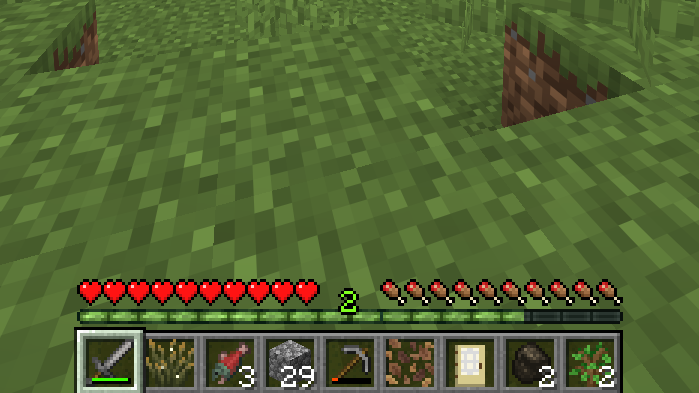
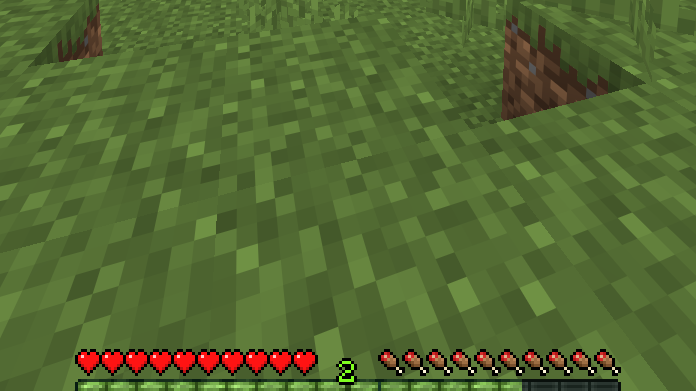
How it works
The hotbar slides off screen when all of the following are true at the same time: full health, full hunger, and no recent damage. Your status bars shift down to fill the space and stay visible the whole time. The moment you take damage or start sprinting, or scroll through your hotbar everything comes back.
Features
- Fully configurable through a built in config screen
Ченджлог
1.3+fabricРелиз26.2 · 29 июня 2026 г.
SlideAway 1.3 {Release}
Five new additions, all optional. Old configurations remain unchanged.
- Individual element visibility: each element has its own visibility option (auto, always shown, or always hidden), rather than one for the entire HUD.
- Reverse mode: switches the sliding mechanics such that the HUD slides out when you are safe and is hidden in combat.
- On change visibility: hidden status elements appear briefly whenever there is an update, and disappear after.
- Manual toggle: a keybinding that locks the HUD in either state of being always visible or always hidden.
- Compatibility with Tough As Nails: visibility of thirst and heat overlays is the same, provided it's installed.
1.3+fabricБета26.2 · 23 июня 2026 г.
SlideAway 1.3-beta Five new features, all opt-in. Existing configs are unaffected nothing changes unless you go looking for the new settings. Per-element visibility
Every HUD element hotbar, health, hunger, armor, air, XP bar, status effects now has its own setting: auto (default, same as before), always visible, or always hidden. Reverse mode
A toggle that flips the core behavior: the HUD stays visible while you're idle, and hides during combat instead of showing. Show on change
When a hidden status bar changes taking damage, hunger dropping it pops back into view for a couple of seconds before hiding again. Manual lock
A second keybind that force-locks the whole HUD visible or hidden, overriding every other setting until pressed again. Confirms with an on-screen message.
Fixed hearts and hotbar overlapping when reverse mode was enabled with multiple elements set to always visible Fixed the HUD briefly flickering back into view for a moment after manually locking it hidden, if a status bar had just changed
1.2Релиз26.1.2 · 10 июня 2026 г.
[1.2] - 2026-06-10
Added
- Interactive Config Screen via YACL (open with
Hor through ModMenu) - Configurable Hide Delay integer slider, 1–10 seconds (default: 10)
- Restore Triggers toggle hotbar restore on sprint, damage, scroll, or slot keys (all on by default)
- Suppress Conditions keep hotbar visible when health ≤ 6 hearts or hunger ≤ 3 bars (both on by default)
- Persistent Config settings saved to
config/slideaway.json
Technical
- Dependencies: YACL 3.9.4+26.1-fabric, ModMenu 18.0.0-beta.1
- Fixed MC 26.1.2 API compatibility:
KeyMappingHelper,KeyMapping.Category.register(),keyHotbarSlots
1.0Бета26.1.2 · 7 июня 2026 г.
SlideAway 1.0
Features
- Automatic hotbar slide-out after standing still and being safe for 10 seconds, the hotbar smoothly slides off the bottom of the screen
- Smooth bidirectional animation ease-out lerp in both directions; slide-out (~300 ms) and slide-back (~250 ms) feel natural and fluid
- Status bars shift down hearts, hunger, armor, and air-bubble bars slide down into the vacated hotbar space and remain fully visible
- XP bar stays aligned the experience bar moves down with the status bars, keeping the correct visual hierarchy
- Sprinting freezes the countdown running neither starts nor cancels the slide; the HUD stays hidden while you sprint and reappears only on real danger
- Scroll wheel & number keys bring the HUD back any hotbar slot change (mouse scroll or keys 1–9) immediately slides the HUD back up and restarts the 10-second countdown
- Danger auto-restore taking damage, losing health, or losing hunger instantly slides the HUD back up regardless of sprint state
Technical
- Built against the 26.1.x unobfuscated Mojang mapping set no
officialMojangMappings()needed - Uses Fabric Loom 1.16
splitEnvironmentSourceSets()all code lives insrc/client/ - Mixin targets confirmed via
javapbytecode analysis of the 26.1.2 client jar:Gui#extractHotbarAndDecorationsouter translate covering items + health bars + XP barGui#extractItemHotbarinner extra translate to push item slots fully off screen
- JOML
Matrix3x2fStack(pushMatrix/translate/popMatrix) replaces the legacyPoseStackAPI - Zero keybinds · Zero config files · Zero dependencies beyond Fabric API
Compatibility
| Dependency | Version |
|---|---|
| Minecraft | 26.1.2 |
| Fabric Loader | >= 0.19.2 |
| Fabric API | 0.145.4+26.1.2 |
| Java | >= 25 |
Комментарии
Загружаем…