 Mineforgian
Simple Info Display
A simple, yet customizable, mod that can display some useful infos on the HUD, similar to the one in Lunar Client.
- Загрузки
- 3K
- Подписчики
- 14
- Обновлён
- 13 августа 2026 г.
- Лицензия
- GPL-3.0-or-later
Опубликован 3 сентября 2024 г.
Minecraft Info Display
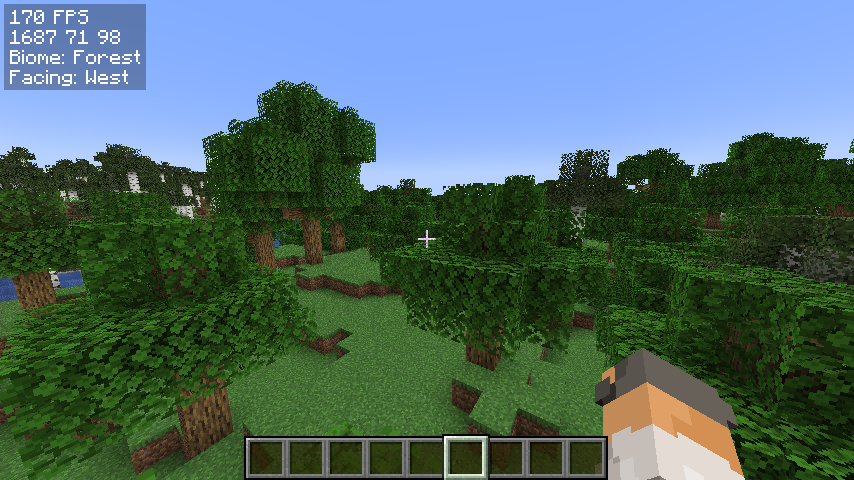
A simple, yet customizable, mod that can display some useful infos on the hud, similar to the one in Lunar Client.
I am very new to fabric modding, so if you have suggestions or find any bugs, DM me on Discord: @jamicah or open an issue on GitHub.
Features
Info Display:
- FPS
- Coordinates
- Biome
- Facing Direction
- Real Time
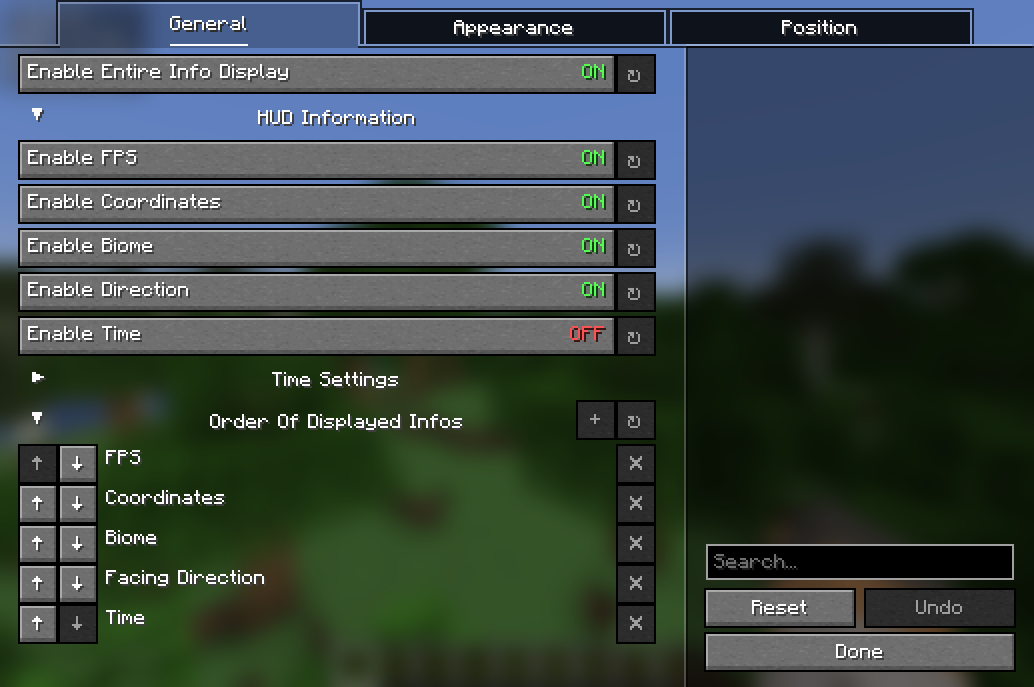
Toggle all of them on/off using a keybind or in the config menu.
Customization:
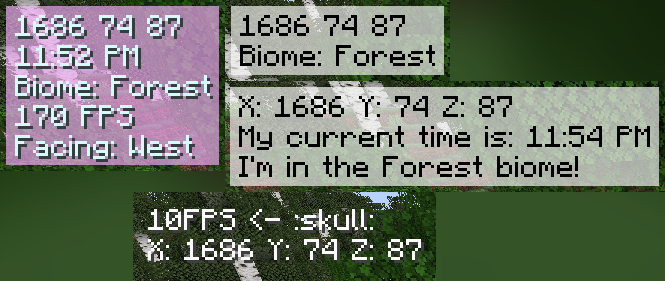
- Change the display order
- Change the (absolute) position of the HUD
- Change the color of the text
- Change the background color
- Customize the HUD text
- and more!
TODO:
- more customization options
- more info to display
- relative HUD position
Requirements
- Fabric API
- YetAnotherConfigLib
- Mod Menu (optional)
How to install
- Download the latest release on modrinth or from the releases page
- Put the downloaded jar file into your mods folder
- Launch the game
How to use
Open the configuration menu by either:
- running the command
/infodisplay - opening it using Mod Menu
- setting a keybind for it in the controls menu
Contribute
Feel free to open an issue or a pull request on GitHub!
How to add localization for a new language:
- Create a new file in
src/main/resources/assets/coords_mod/lang/ - Name it
xx_XX.json, wherexx_XXis the language code (e.g.en_usfor English (US),de_defor German (DE)) - Copy the contents of
en_us.jsoninto the new file - Translate the values on the right side of the colons into the new language
- Create a pull request
Ченджлог
1.5.0+26.2Релиз26.1.1, 26.1.2, 26.2 · 13 августа 2026 г.
Support for the latest 26.2 version added
1.5.0+1.21.9Релиз1.21.9 · 4 октября 2025 г.
Added Ping Display
You can now see your own ping on servers!
Localization
Added full localization support - new translations can now be added easily for every Minecraft-supported language!
Current languages:
- English (US)
- Deutsch (Deutschland)
Feel free to contribute and help add more languages! View README to see how.
Support for the latest version (1.21.9)
It is now possible to use Info Display on version 1.21.9!
Less noticeable changes
I actually rewrote the entire internal render function of this mod, so it should now be more optimized than before. (It is also now much more easier for me to implement more Info Displays)
1.5.0+1.21.6Релиз1.21.6 · 4 октября 2025 г.
v1.5.0 for 1.21.6
View the full changelog in v1.5.0-1.21.9
1.4.1+1.21Релиз1.21.1, 1.21.2, 1.21.3 · 30 ноября 2024 г.
Small bug fix update
Fixed the crash when using /infodisplay
1.4+1.21Релиз1.21.1, 1.21.2, 1.21.3 · 27 октября 2024 г.
Added relative position
You can now either set the position mode to relative or absolute!
Added text alignment for absolute position
It is now possible to change the text alignment when using the absolute position mode!
1.3.1+1.21Релиз1.21, 1.21.1 · 23 сентября 2024 г.
Small bug fix update
- Fixed info display configuration not loading correctly
1.3.0+1.21Релиз1.21, 1.21.1 · 22 сентября 2024 г.
Updated the entire backend of the configuration
The mod now uses (and requires) YetAnotherConfigLib, since I realized that making my own config screen just didn't look good for the effort I put in, so that wasn't really worth it. Not only that, the mod now uses the included Config library for easier maintainability (so I can now add features more easily).
More customization options
- Toggle text shadow
- Customizable HUD text
- Made it easier to change the info HUD order
Some minor bugs were also fixed
1.2.1+1.21Релиз1.21, 1.21.1 · 5 сентября 2024 г.
Minor update:
- Small bug fixes
- Custom order won't get resetted after toggling the infos
- Centered the config menu
- Custom keybinds now work again
Комментарии
Загружаем…