 Mineforgian
🌏 ShadowCrates
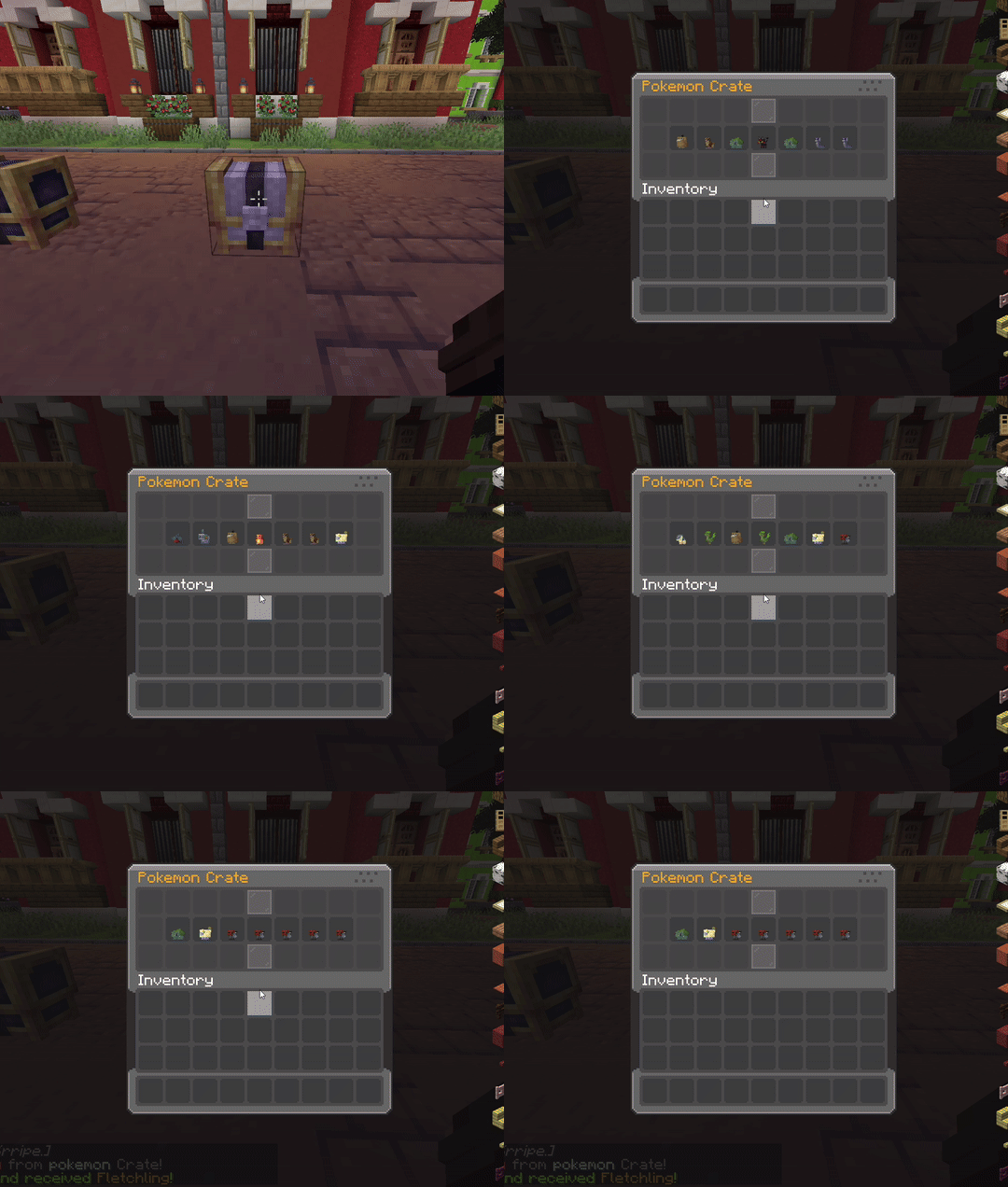
ShadowCrates is a fully customizable Crate System for Minecraft Fabric servers. It allows server administrators to create, configure, and manage crates that players can open using special crate keys. With customizable animations, sounds, and rewards!
📜 Features:
- ✅️ Fully Configurable Crates - Define crates in JSON format, including rewards, animations, sounds, particle effects, and key items.
- ✅️ Custom Enchantment & NBT Support - Rewards retain all item properties, including enchantments, custom model data, and atributes.
- ✅️ Configurable Animations - Set the number of animation steps and intervals for crate opening effects.
- ✅️ Particle Effects - Choose different particle effects per crate for a visually appealing opening sequence.
- ✅️ Permission-Based Access - Restrict specific crates using LuckPerms or any permission plugin.
- ✅️ Command Execution - Run custom commands when a player wins a reward.
- ✅️ Custom Sounds - Play unique sounds when opening a crate or winning a reward.
- ✅️ Language & Message Customization - Edit all messages, GUI titles, and lore with full RGB color support.
- ✅️ Crate Location System - Assign crates to specific blocks in the world, allowing physical crate locations.
- ✅️ Backup System – Automatic & manual backup creation in
/config/shadowcrates/backups/, with JSON restore support. - ✅️ Database Support – Use SQLite or MySQL to store all crate data (keys, prizes, crate blocks). Auto migration + backup included.
- ✅️ Powerful GUI System – Preview crates, claim stored prizes, and view virtual keys with fully customizable menus.
- ✅️ Virtual Key System – Players can store keys virtually, preventing duplication exploits.
- ✅️ Support for Cobblemon Items – Render Pokémon items (e.g. pokemon:abra) as prize icons and display items in GUIs.
⚙️ Commands:
Spoiler
/crate create <name>➜ Create a new crate./crate delete <name>➜ Delete an existing crate./crate reload➜ Reload all config files./crate set <name>➜ Set crate on targeted block./crate unset <name>➜ Remove crate from block./crate key give <crate> <amt> <player>➜ Give virtual or physical keys./crate key storage➜ View your stored keys./crate storage➜ Claim prizes stored items./crate clearstorage <player>➜ Deleting items from storage./crate backup now➜ Manually create a backup./crate backup restore➜ Restore from the latest backup./crate key clear <player>➜ Clear keys for player./crate key count <player> <crate>➜ See stored key count./crate key giveall <amount> <player>➜ Give all keys to a player.
🔒 Permissions:
Spoiler
crate.create➜ for /crate createcrate.delete➜ for /crate deletecrate.reload➜ for /crate reloadcrate.set➜ for /crate setcrate.unset➜ for /crate unsetcrate.storage➜ for /crate storagecrate.clearstorage➜ for /crate clearstoragecrate.key.give➜ for /crate key givecrate.key.storage➜ for /crate key storagecrate.key.clear➜ for /crate key clearcrate.key.count➜ for /crate key countcrate.key.giveall➜ for /crate key giveallcrate.backup➜ for /crate backup now & /crate backup restore
🎞 Animations:
List of animation formats for opening crate:
Spoiler
defaultinstantcsgoslotsvortexwheelpickmeteor
List of animation formaats for idle particles:
Spoiler
orbitdual_orbitringpulsespiralspringflowerstarraysrainstacksparklemeteor_rainring_verticalburstcomet
📂 Configuration Files:
📁
/config/shadowcrates/config.json– General settings, messages, and toggles.📁
/config/shadowcrates/crates/*.json– Crate definitions including items, commands, probabilities, and keys.📁
/config/shadowcrates/menu_preview.json– Preview GUI configuration.📁
/config/shadowcrates/menu_storage.json– Crate reward storage GUI.📁
/config/shadowcrates/menu_key_storage.json– Virtual key storage GUI.📁
/config/shadowcrates/data/– Stores crate block locations.📁
/config/shadowcrates/backups/– Auto/manual backup folders
Ченджлог
2.3Релиз1.21.1, 1.21.2, 1.21.3 · 3 января 2026 г.
Changelog for 2.3
- added setting in the config for fillers to be turn false/true.
- added support for NBT on the material of the formats on Items formats or on the ItemDisplays Materials.
"material": "cobblemon:pokemon_model[cobblemon:pokemon_item={species:\"cobblemon:bulbasaur\",aspects:[\"shiny\"]}]",
- Fix Databases Reconnects.
- I added a new value for the tooltips to enable/disable in displayitems and items format.
- I updated the GUI's to the new System.
- I change the commands to fix the
/crate key clear - I added Idle Animation for the Crates.
- added setting for Tooltips to be turn off/on
"hideTooltip": false
- added a new Animation system for the particles on the crate:
{
  "enabled": true, // - Enable | Disable the animation idle.
  "particleType": "minecraft:end_rod", // - Particle minecraft/mods ID
  "animation": "ring", // - Animation ID
  "speed": 1.0, // - Particle speed.
  "radius": 1.0, // - How close to be to the crate.
  "yOffset": 0.50, // - How close to be to the ground.
  "count": 24 // - how many particle to be in the animation.
}
Animations Idle List
Animation:
orbitAnimation:
dual_orbitAnimation:
ringAnimation:
pulseAnimation:
spiralAnimation:
springAnimation:
flowerAnimation:
starAnimation:
raysAnimation:
rainAnimation:
stackAnimation:
sparkleAnimation:
meteor_rainAnimation:
ring_verticalAnimation:
burstAnimation:
cometadded setting in the crate config to set the permission on false/true
"requirePermission": true,
- added 2 new databases mongodb and mariadb (PS: is in testing phase plase feedback)
- i ramake the crate item key protection if the key is a item u can place on ground now u can interact with that item if that item key is in the hand and if the item is a placeable item the key is full protection and no interactible.
- i added a new setting for the chance placeholder now can be editable in
config/shadowcrate/menu_preview.json - i added a new function for DECIMALS for the chances.
- i fix the spanish diacritics in the databases.
- i added a new animation for the crates the id is
meteor
Chances settings:
-Formats: FOUR_DECIMALS , TWO_DECIMALS , ONE_DECIMAL , INTEGER , HIDDEN
"chanceFormat": "TWO_DECIMALS""chanceText": "&7Chance: &f%value%%"
MongoDB
"database": {
  "enabled": true,
  "type": "mongodb",
  "mongodb": {
    "host": "127.0.0.1",
    "port": 27017,
    "database": "shadowcrates",
    "username": "user",
    "password": "pass",
    "authDb": "admin"
  }
}
or
"connectionString": "mongodb://user:[email protected]:27017/shadowcrates?authSource=admin"
MariaDB
"database": {
  "enabled": true,
  "type": "mariadb",
  "mysql": {
    "host": "localhost",
    "port": 3306,
    "database": "shadowcrates",
    "username": "root",
    "password": "password"
  }
}
- added 2 new formats for rewords.
- added formats for opening the crate.
Random Items Formats
item_random -> This format allows you to make a reword that gives you a random item from a list of items that are based on weights, and which can be customized like the items in the rest of the formats, i.e. modeldata, displayname and many others.
{
  "type": "item_random",
      "weight": 10.0,
      "randomList": [
        {
          "material": "",
          "amount": 2,
          "displayname": "",
          "weight": 40.0
        },
        {
          "material": "",
          "amount": 2,
          "displayname": "",
          "weight": 20.0
        },
        {
          "material": "",
          "amount": 2,
          "displayname": "",
          "weight": 10.0
        },
      ],
      "displayItem": {
        "material": "",
        "amount": 1,
        "displayname": "",
        "lore": [
          ""
        ],
        "enchantEffect": false
      },
      "messageGlobal": true,
      "messagePlayer": true,
      "messageCustom": false,
      "broadcastGlobal": "",
      "broadcastPlayer": ""
    },
command_random -> This format allows you to make a reword that gives you a reword command from a list of commands with weights.
{
      "type": "command_random",
      "weight": 10.0,
      "randomList": [
        {
          "command": "",
          "weight": 40.0
        },
        {
          "command": "",
          "weight": 20.0
        },
        {
          "command": "",
          "weight": 10.0
        }
      ],
      "displayItem": {
        "material": "",
        "amount": 1,
        "displayname": "",
        "lore": [
          ""
        ],
        "enchantEffect": false
      },
      "messageGlobal": true,
      "messagePlayer": true,
      "messageCustom": false,
      "broadcastGlobal": "",
      "broadcastPlayer": ""
    }
Opening Crates Formats
- I have added 3 formats to be able to customize crates so they can be opened as you wish, these formats are of three types:
key,money,item.
"openCost": {
    "mode": "key", // Formats | key | money | item |
    "moneyPrice": "2500", // Price for the crate. (only if the mode is "money"
    "moneyCurrency": "CobbleCoins", // Currency type for the price.
    "moneyProvider": "beconomy", // Provider of economy | auto | beconomy | impactor |
    "itemMaterial": "minecraft:diamond", // ex: "minecraft:diamond" or with NBT ("minecraft:paper[minecraft:custom_model_data=1]")
    "itemAmount": 1, // The ammount of items needed for opening the crate ("item" mode only)
    "itemDetectByMaterialOnly": false // If u want to ignore all the nbt and to detect only the item set "false" if u want to work with NBT set to "true"
  },
- OpenCost tab must be added after the IdleParticle tab, if it is missing or you don't want it, it will ignore everything and use the direct key which is the default for crates if this tab is missing.
- fix aspects for cobblemon items.
- updated for Cobblemon 1.7
Aspects Formats for the Material for DisplayItem
cobblemon:item:<pokemon>:form=<form>
cobblemon:item:<pokemon>:aspect=<aspect>
cobblemon:item:<pokemon>:aspects=<aspect>,<aspect>
cobblemon:item:<pokemon>:shiny=<true/false>
2.2Релиз1.21.1, 1.21.2, 1.21.3 · 20 июня 2025 г.
Changelog for v2.2
- fixed the issue with consuming 2 keys at the same time during GUI animations.
- I fixed the problem with adding items to the GUI from storages.
- Fixed the issue with the keys where you could no longer put them down if they were a placeable item.
- I fixed the
pickanimation so it wouldn't crash anymore. - I made 3 important changes to the crates configs!
Very important changes in the configs from crates!
- You need to change the following values to the new values in the configs!
Remove
"name": "",
"previewName": "",
and replace with:
"crateID": "",
"screenName": "",
"crateName": "",
crateIDit's the crate id, i.e. it used to be callednamebut i decided to change it because it was too confusing.screenNameis the name of the preview crate GUI, it used to be calledpreviewNamebut i decided to change it to this value to make it easier to recognize.screenNameis the name from the crate that is used in all messages and animations etc..
2.1Релиз1.21.1, 1.21.2, 1.21.3 · 5 июня 2025 г.
Changelog for v2.1
- I fixed the problem with
@a, which doesn't let you use it to give all players keys etc.. - I added support for FTB-Ranks mod.
- I added a logging system to crates that is done per day of activity and saves important information about crates and players.
- I added support for multiple crates opening, this only works with GUI animations, if the crate uses an animation with items etc.. that crate can only be used by one player at a time.
- I added 2 new animations in GUI format, one animation is normal, and the second animation is more special because it is in minigame format
Log System
This system is found in config.json and can be enabled or disabled as desired.
"logSystems": {
  "logCrates": true
}
Animations
I have added 2 new animations in GUI format that can be used in the config for crates, the animations are called "wheel" and "pick"
- The "
pick" animation brings a new format to crate mode, this animation works like a minigame.
2.0Релиз1.21.1, 1.21.2, 1.21.3 · 1 мая 2025 г.
ShadowCrates 2.0 Update
Changes
- I fixed exploit bugs.
- I fixed the Prizes Storage bugs.
- I modified some commands.
- I added a new animation.
- I fixed the issues with Key Storages.
- I fixed some database issues.
- I added new values to the mod configs.
- I have added 2 new formats for item prizes.
- I added a new form of message broadcast to use commands for multiservers.
- I added a way in config to set autobackup true/false.
- I added a new command so you can open Crates without having to set up a Crate.
- Now messages use the name from the "PrivewName" value for "CrateName".
Commands Chenges
I added a new command with which you can open crates without needing to use a block from a set crate, the command still requires you to have the key for that crate in order to open the crate, currently only GUI crates work.
- Command:
/crate open <player> <crate> - Permission:
crate.open
I modified the /crate clearstorage command so that it is now two different commands with different permissions so that it can be used for players/admins.
- Command:
/crate storage clear - Permission:
crate.storage.clear - Command:
/crate storage clear <player> - Permission:
crate.storage.clear.other
I modified the /crate key clear command so it now comes in two different formats with unique permissions.
- Command:
/crate key clear <player> all - Permission:
crate.key.clear.all - Command:
/crate key clear <player> <crate> - Permission:
crate.key.clear
I added support for vanilla minecraft formats for: @p @r etc..
Animations
We have added a new animation for GUI formats, the new animation is called slots and it is very easy to use.
New Broadcast Message
I added a new broadcast message format so you can use commands from other mods that are for server or multiserver announcements.
"messageCustom": true,
"broadcastCustom": "tell @p &e[ShadowCrates] &a%player% &7won &b%prizes% &7from &6%cratename%"
%player%- Is for player name.%prizes%- Is for prizes opened by the player.%cratename%- Is for crate name.
Prizes Storage Save
I added a new value in the configs for Storage to know how many slots the player needs in their inventory to be able to claim prizes from storage, this value is only used in commands formats prizes for items formats there is no need to use it because the calculation is automatic.
// added after "weight" in config to the "command" and "command_pack" formats.
"storageClaimFreeSlots": (slots),
Auto BackUP Save
I added a method to set autobackups on server shutdown (crash/restarts/etc..), from now on you can set the value to true/false in shadowcrate/config.json
"autoBackUPs": true/false
Prizes New Formats
I have added two new formats for prizes from crates. Now you can make prizes with multiple rewards of one, using the following formats:
- Format:
item_pack
{
      "type": "item_pack",
      "weight": 100.0,
      "pack": [
        {
          "material": "",
          "amount": 1,
          "displayname": ""
        },
        {
          "material": "",
          "amount": 1,
          "displayname": ""
        }
      ],
      "displayItem": {
        "material": "",
        "amount": 1,
        "displayname": "",
        "lore": [
          ""
        ],
        "enchantEffect": true,
        "customModelData": 1
      },
      "messageGlobal": false,
      "messagePlayer": false,
      "messageCustom": false,
      "broadcastGlobal": "",
      "broadcastPlayer": "",
      "broadcastCustom": ""
    }
- Format:
command_pack
{
      "type": "command_pack",
      "weight": 100.0,
      "storageClaimFreeSlots": 2,
      "pack": [
        {
          "command": ""
        },
        {
          "command": ""
        }
      ],
      "displayItem": {
        "material": "",
        "amount": 1,
        "displayname": "",
        "lore": [
          ""
        ],
        "enchantEffect": true,
        "customModelData": 1
      },
      "messageGlobal": false,
      "messagePlayer": false,
      "messageCustom": false,
      "broadcastGlobal": "",
      "broadcastPlayer": "",
      "broadcastCustom": ""
    }
EXZEMPLE CRATE FOR PACKS FORMATS
{
  "name": "packcrate",
  "previewName": "&bPack Crate",
  "permission": "crate.pack",
  "openSound": "minecraft:block.chest.open",
  "rewardSound": "minecraft:entity.player.levelup",
  "movingItemSound": "minecraft:entity.item.pickup",
  "particleType": "minecraft:happy_villager",
  "animationType": "slots",
  "animationSteps": 40,
  "animationInterval": 200,
  "lidModelData": 1,
  "bodyModelData": 1,
  "animationMaterial": "",
  "keyItem": {
    "isVirtualKey": false,
    "material": "minecraft:tripwire_hook",
    "customModelData": 1,
    "amount": 1,
    "displayname": "&bPack Crate Key",
    "lore": [
      "&7Use this key to open Pack Crate!"
    ],
    "enchantEffect": true
  },
  "prizes": [
    {
      "type": "item_pack",
      "weight": 30.0,
      "pack": [
        {
          "material": "minecraft:diamond",
          "amount": 5,
          "displayname": "&bShiny Diamond"
        },
        {
          "material": "minecraft:gold_ingot",
          "amount": 10,
          "displayname": "&6Golden Ingot"
        }
      ],
      "displayItem": {
        "material": "minecraft:diamond",
        "amount": 5,
        "displayname": "&bDiamond & Gold Pack",
        "lore": [
          "&7Get 5 Diamonds and 10 Gold Ingots!"
        ],
        "enchantEffect": true,
        "customModelData": 1001
      },
      "messageGlobal": true,
      "messagePlayer": true,
      "messageCustom": false,
      "broadcastGlobal": "&e%player% &7won &bDiamond & Gold Pack&7!",
      "broadcastPlayer": "&aYou received a &bDiamond & Gold Pack!",
      "broadcastCustom": "tell @p &e[ShadowCrates] &a%player% &7won &b%prizes% &7from &6%cratename%"
    },
    {
      "type": "item_pack",
      "weight": 20.0,
      "pack": [
        {
          "material": "minecraft:emerald",
          "amount": 15,
          "displayname": "&aRich Emerald"
        },
        {
          "material": "minecraft:experience_bottle",
          "amount": 32,
          "displayname": "&aXP Bottles"
        }
      ],
      "displayItem": {
        "material": "minecraft:emerald",
        "amount": 15,
        "displayname": "&aEmerald & XP Pack",
        "lore": [
          "&7Earn 15 Emeralds and 32 XP bottles!"
        ],
        "enchantEffect": true,
        "customModelData": 1002
      },
      "messageGlobal": true,
      "messagePlayer": true,
      "messageCustom": false,
      "broadcastGlobal": "&e%player% &7won &aEmerald & XP Pack&7!",
      "broadcastPlayer": "&aYou received an &aEmerald & XP Pack!",
      "broadcastCustom": "tell @p &e[ShadowCrates] &a%player% &7won &b%prizes% &7from &6%cratename%"
    },
    {
      "type": "item_pack",
      "weight": 25.0,
      "pack": [
        {
          "material": "minecraft:netherite_ingot",
          "amount": 2,
          "displayname": "&8Ancient Netherite"
        }
      ],
      "displayItem": {
        "material": "minecraft:netherite_ingot",
        "amount": 2,
        "displayname": "&8Netherite Pack",
        "lore": [
          "&7Get 2 Netherite Ingots!"
        ],
        "enchantEffect": true,
        "customModelData": 1003
      },
      "messageGlobal": true,
      "messagePlayer": true,
      "messageCustom": false,
      "broadcastGlobal": "&e%player% &7won a &8Netherite Pack&7!",
      "broadcastPlayer": "&aYou received a &8Netherite Pack!",
      "broadcastCustom": "tell @p &e[ShadowCrates] &a%player% &7won &b%prizes% &7from &6%cratename%"
    },
    {
      "type": "command_pack",
      "weight": 40.0,
      "storageClaimFreeSlots": 3,
      "pack": [
        {
          "command": "give %player% minecraft:diamond_sword 1"
        },
        {
          "command": "give %player% minecraft:shield 1"
        }
      ],
      "displayItem": {
        "material": "minecraft:diamond_sword",
        "amount": 1,
        "displayname": "&bSword & Shield Pack",
        "lore": [
          "&7Receive a Diamond Sword and a Shield!"
        ],
        "enchantEffect": true,
        "customModelData": 2001
      },
      "messageGlobal": true,
      "messagePlayer": true,
      "messageCustom": false,
      "broadcastGlobal": "&e%player% &7won a &bSword & Shield Pack&7!",
      "broadcastPlayer": "&aYou received a &bSword & Shield Pack!",
      "broadcastCustom": "tell @p &e[ShadowCrates] &a%player% &7won &b%prizes% &7from &6%cratename%"
    },
    {
      "type": "command_pack",
      "weight": 35.0,
      "storageClaimFreeSlots": 3,
      "pack": [
        {
          "command": "give %player% minecraft:golden_apple 5"
        },
        {
          "command": "give %player% minecraft:enchanted_golden_apple 1"
        }
      ],
      "displayItem": {
        "material": "minecraft:golden_apple",
        "amount": 5,
        "displayname": "&6Golden Apple Pack",
        "lore": [
          "&7Receive 5 Golden Apples and 1 Enchanted Apple!"
        ],
        "enchantEffect": true,
        "customModelData": 2002
      },
      "messageGlobal": true,
      "messagePlayer": true,
      "messageCustom": false,
      "broadcastGlobal": "&e%player% &7won a &6Golden Apple Pack&7!",
      "broadcastPlayer": "&aYou received a &6Golden Apple Pack!",
      "broadcastCustom": "tell @p &e[ShadowCrates] &a%player% &7won &b%prizes% &7from &6%cratename%"
    },
    {
      "type": "command_pack",
      "weight": 15.0,
      "storageClaimFreeSlots": 2,
      "pack": [
        {
          "command": "crate key give epic 1 %player%"
        },
        {
          "command": "crate key give epic 1 %player%"
        }
      ],
      "displayItem": {
        "material": "minecraft:tripwire_hook",
        "amount": 2,
        "displayname": "&dEpic Crate Keys",
        "lore": [
          "&7Receive 2 Epic Crate Keys!"
        ],
        "enchantEffect": true,
        "customModelData": 2003
      },
      "messageGlobal": true,
      "messagePlayer": true,
      "messageCustom": false,
      "broadcastGlobal": "&e%player% &7won 2 &dEpic Crate Keys&7!",
      "broadcastPlayer": "&aYou received 2 &dEpic Crate Keys!",
      "broadcastCustom": "tell @p &e[ShadowCrates] &a%player% &7won &b%prizes% &7from &6%cratename%"
    }
  ]
}
1.0Релиз1.21.1, 1.21.2, 1.21.3 · 18 апреля 2025 г.
Shadow Crate Release Changelog
- i fixed the database issue, where it wouldn't let you withdraw prizes from storage.
- I fixed the problems with keys permissions.
- I modified the global and private message announcement system to be per prizes and can be disabled enabled.
- I added placeholders that can be used in any mod that uses
PlaceholderAPI-Text
New Format for Prizes:
Item:
    {
      "type": "item",
      "weight": 29.0,
      "material": "minecraft:anvil",
      "amount": 1,
      "displayname": "&8Forge of Champions",
      "lore": [
        "&7Enhance your gear with ease",
        "&bA must-have for any warrior"
      ],
      "enchantEffect": false,
      "messageGlobal": true,
      "messagePlayer": true,
      "broadcastGlobal": "&6[Crate] &e%player% &7won &6%prizes% &7from &b%cratename%&7!",
      "broadcastPlayer": "&aYou opened &b%cratename% Crate &aand received &6%prizes%&a!"
    }
Commands:
{
      "type": "command",
      "weight": 5.0,
      "command": "pokegiveother %player% bulbasaur",
      "messageGlobal": true,
      "messagePlayer": true,
      "broadcastGlobal": "&6[Crate] &e%player% &7won &6%prizes% &7from &b%cratename%&7 Crate!",
      "broadcastPlayer": "&aYou opened &b%cratename% Crate &aand received &6Bulbasaur&a!",
      "displayItem": {
        "material": "cobblemon:item:bulbasaur",
        "amount": 1,
        "displayname": "&aBulbasaur",
        "lore": ["&7A classic starter!"],
        "enchantEffect": true,
        "customModelData": 1001
      }
    }
- Remove the lines at the beginning of the config from each crate.
"broadcastMessage": "",
"broadcastPlayer": "",
Placeholders
%shadowcrates:total_opened%
➜ Displays the total number of crates the player has opened across all crate types.
%shadowcrates:opened_<crate>%
➜ Shows how many times the player has opened a specific crate.
Example: %shadowcrates:opened_pokemon%
%shadowcrates:last_opened_crate%
➜ Displays the name of the last crate the player opened.
%shadowcrates:last_won_prize%
➜ Shows the name of the last prize the player received (without formatting or colors).
%shadowcrates:last_crate_time%
➜ Returns the exact date and time of the last crate the player opened.
Format: YYYY-MM-DD HH:mm:ss
%shadowcrates:storage_count%
➜ Shows how many unclaimed rewards the player currently has stored.
%shadowcrates:prizes_won%
➜ Displays the total number of prizes the player has won from crates.
%shadowcrates:virtual_keys_<crate>%
➜ Returns how many virtual keys the player owns for a specific crate.
Example: %shadowcrates:virtual_keys_pokemon%
Комментарии
Загружаем…