 Mineforgian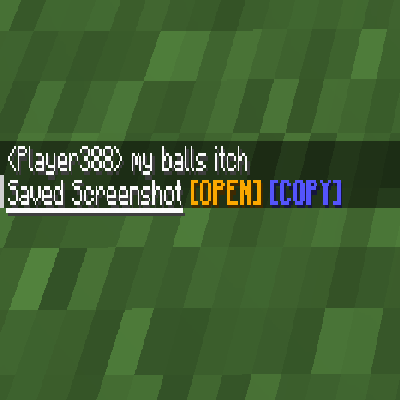
Screenshot Uploader
Making screenshotting a bit easier
- Загрузки
- 7K
- Подписчики
- 14
- Обновлён
- 6 августа 2023 г.
- Лицензия
- MIT
Опубликован 17 апреля 2023 г.
This mod adds a better method of using screenshots, with options like opening the image and copying it to the clipboard.
This is a Fabric mod, and requires Fabric API.
THIS IS A CLIENT-SIDE MOD, SO IT WILL NOT WORK ON SERVERS
Credits:
Screenshot To Clipboard: Most methods for copying an image to the clipboard
Lunar Client: The model for the screenshot message, main reason this mod was made
Ченджлог
1.1.0Релиз1.19.4, 1.20, 1.20.1 · 6 августа 2023 г.
- Allow to screenshot on servers
- Added Mac support (code by Screenshot to Clipboard)
1.1.0Релиз1.19, 1.19.1, 1.19.2 · 6 августа 2023 г.
- Allow to screenshot on servers
- Added Mac support (code by Screenshot to Clipboard)
1.0Релиз1.19.3, 1.19.4 · 17 апреля 2023 г.
This is the first Release, thus there isn't new additions, so the features will be listed:
- Using F2 now display a new custom message
- Clicking the [OPEN] button opens the image, and hovering shows the image name
- Clicking the [COPY] button copies the image to the clipboard
1.0Релиз1.19, 1.19.1, 1.19.2 · 17 апреля 2023 г.
This is the first Release, thus there isn't new additions, so the features will be listed:
- Using F2 now display a new custom message
- Clicking the [OPEN] button opens the image, and hovering shows the image name
- Clicking the [COPY] button copies the image to the clipboard
Комментарии
Загружаем…