 Mineforgian
Screenshot Pro
A polished in-game screenshot manager: gallery, albums, tags, favorites, trash, search and a fullscreen viewer.
Обновлён 30 июня 2026 г. · опубликован 30 июня 2026 г.
Screenshot Pro
Screenshot Pro is a polished, client-side screenshot manager for Minecraft that lives inside the game. Browse, search, organize, and view your screenshots without ever alt-tabbing to a file explorer.
It is built for Minecraft 26.1, 26.1.2, and 26.2 on the Fabric loader and feels like a native part of the game.
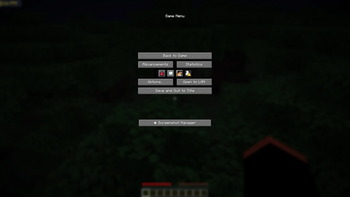
Press M in game to open the manager, or use the button added to the pause menu.
Screenshots
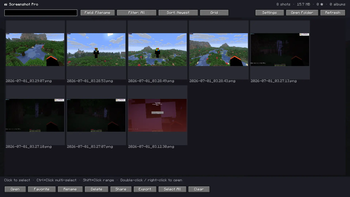
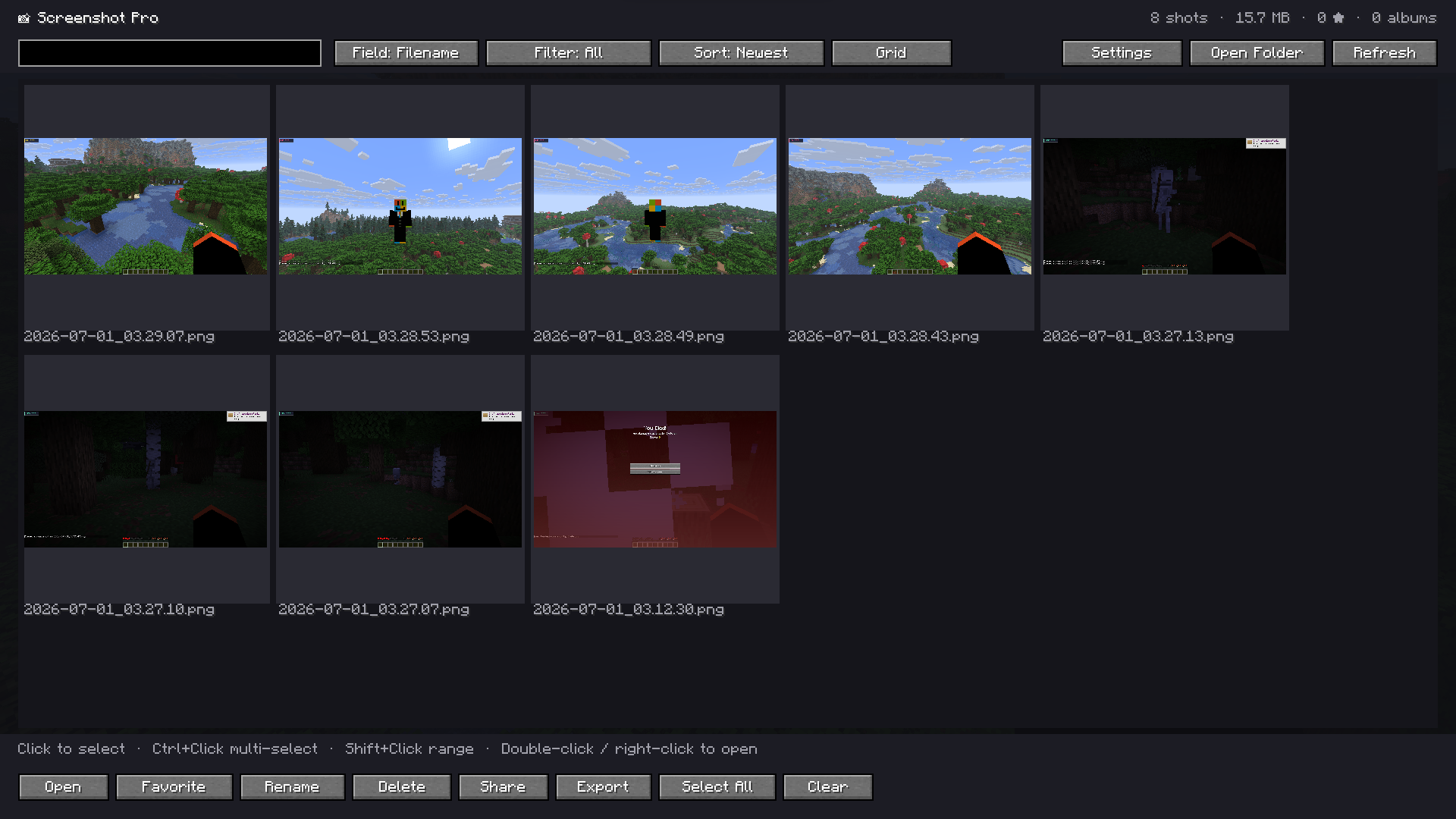 The Gallery: a scrollable grid of thumbnails with a live dashboard showing total screenshots, storage used, favorites, and albums.
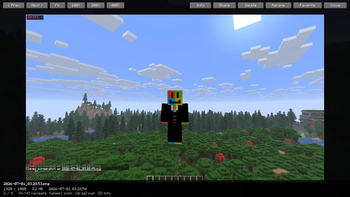
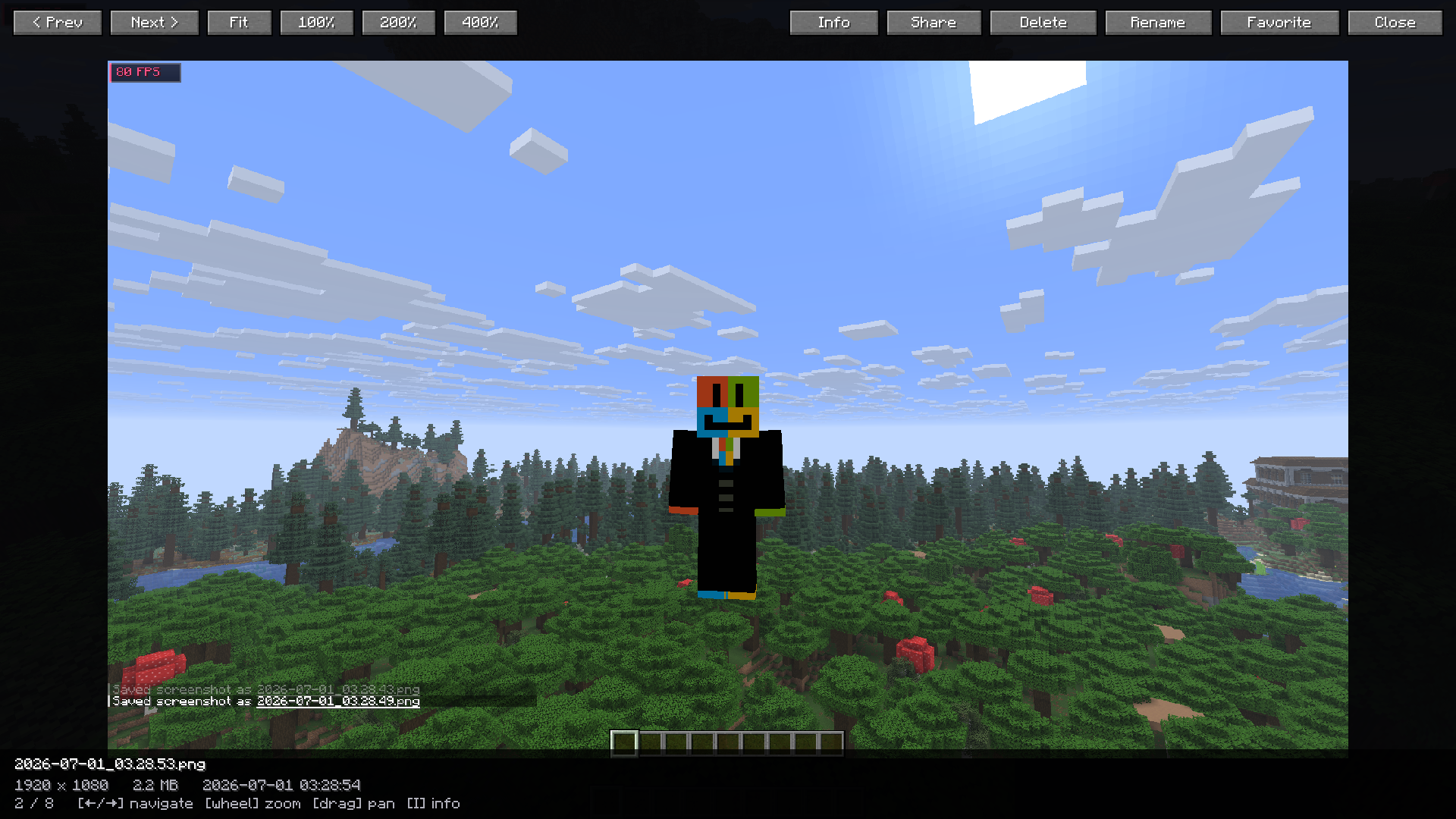 Fullscreen Viewer: mouse-wheel zoom, drag-to-pan, next and previous navigation, and an information overlay.
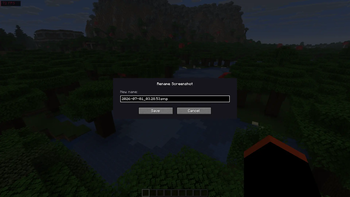
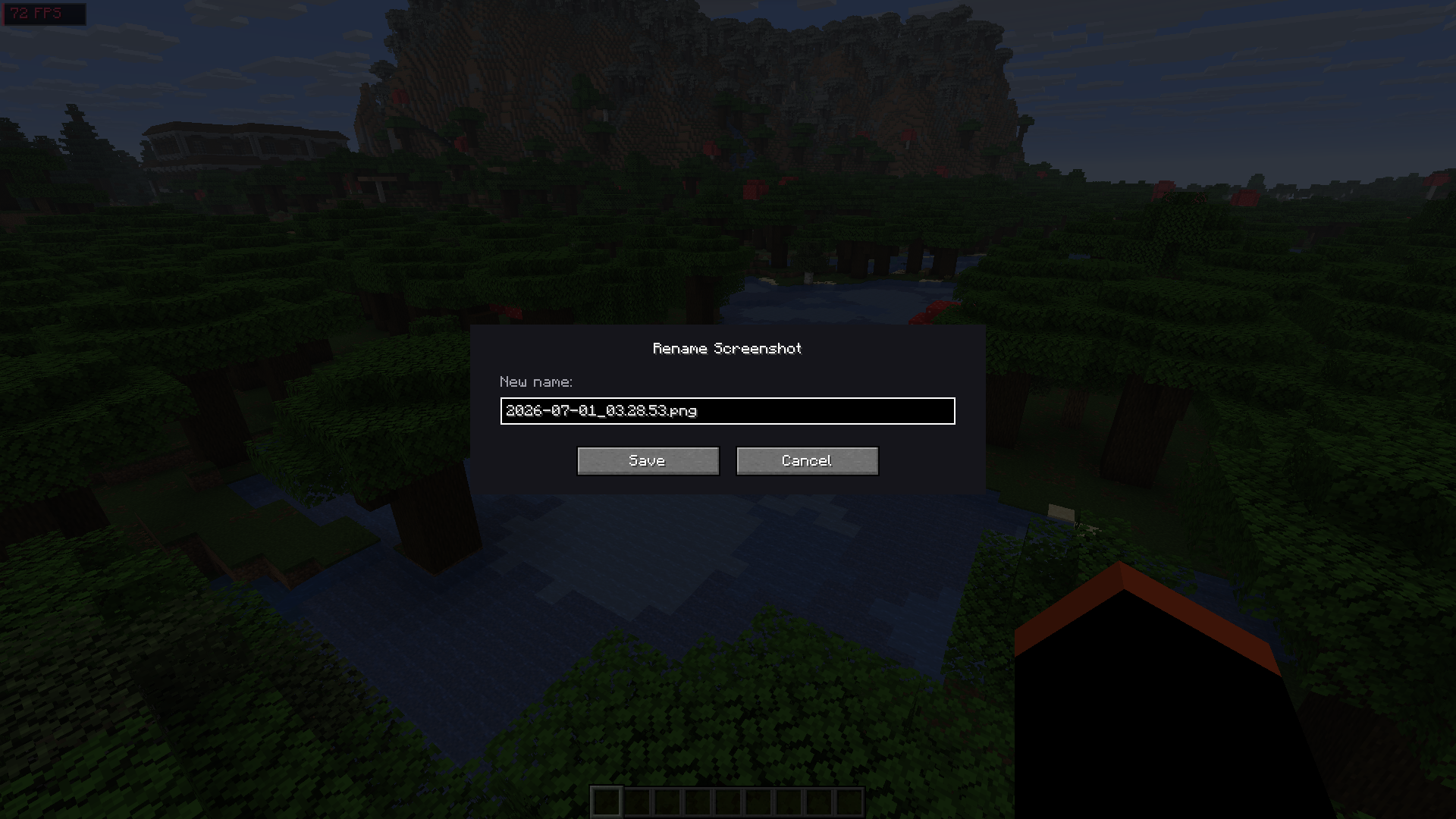 Rename: change a screenshot's name in place from a simple in-game dialog.
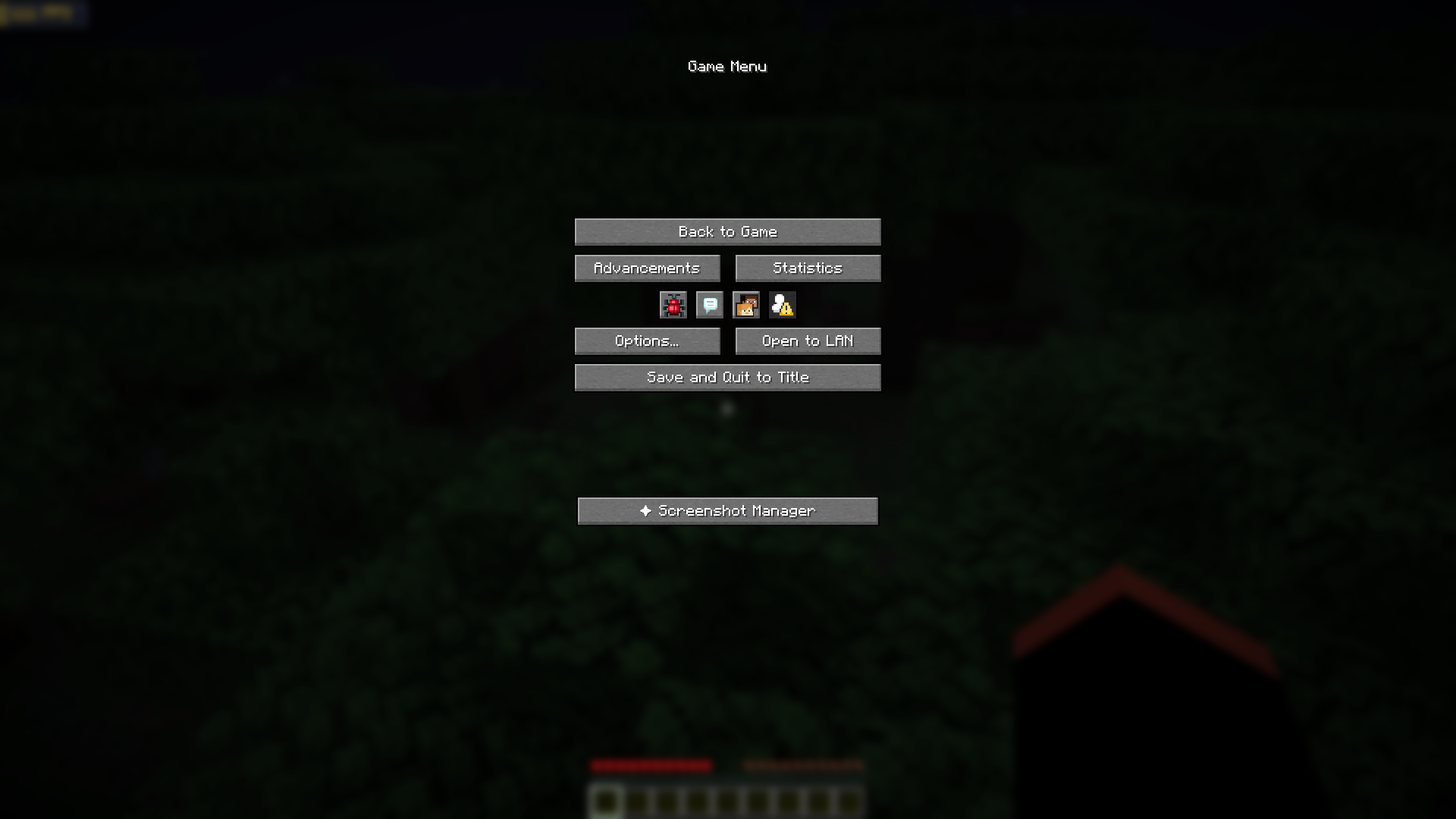 Pause Menu Access: open the manager straight from the in-game pause menu.
Overview
Screenshot Pro reads your existing screenshots folder and presents it as a fast, organized gallery. Nothing is moved or modified until you ask for it. All metadata such as favorites, tags, and albums is stored alongside your screenshots, and deleting is non-destructive by default through a built-in trash.
Features
Gallery
- Grid and list views with smooth scrolling
- Asynchronous thumbnail loading that keeps the game responsive
- A dashboard showing total screenshots, storage used, favorite count, and albums
- Sorting by newest, oldest, name, or file size
Search and Filters
- Search by filename, date, tags, or album with instant filtering
- Quick date filters: Today, Yesterday, Last 7 Days, This Month, This Year
- A Favorites filter and a dedicated Trash view
Organization
- One-click favorites
- Tags and custom albums per screenshot
- A trash system with restore and configurable auto-empty, so a misclick never means a permanent loss
Fullscreen Viewer
- Next and previous navigation
- Mouse-wheel zoom and drag to pan
- Fit, 100 percent, 200 percent, and 400 percent presets
- An information overlay with resolution, file size, and date
- Full keyboard control
Bulk Tools
- Multi-select with Ctrl+Click, range select with Shift+Click, plus Select All and Clear
- Delete, favorite, share, and export all operate on the current selection
- Export any selection, or your favorites, to a ZIP archive
- Copy file paths to the clipboard
- Rename screenshots in place
- Open the screenshots folder in your operating system file browser
Settings
Thumbnail size, grid columns, cache size, background and lazy loading, custom screenshot and trash directories, theme, and trash auto-empty are all adjustable from an in-game settings screen.
Controls
- Open the Screenshot Manager —
M(rebindable in Options, then Controls) - Select an item — Click
- Multi-select —
Ctrl+ Click - Range select —
Shift+ Click - Open in viewer — Double-click or right-click
- Viewer: navigate — Left and right arrow keys
- Viewer: zoom — Mouse wheel
- Viewer: pan — Drag
- Viewer: fit to screen —
F - Viewer: toggle info —
I - Viewer: rename —
R - Viewer: trash —
Delete - Viewer: close —
Escape
Requirements
- Minecraft 26.1 or newer (tested on 26.1.2 and 26.2)
- Fabric Loader 0.19.3 or newer
- Fabric API
- Java 25 or newer
This is a client-side mod. It is not required on servers.
Links
License
All Rights Reserved, Copyright 2026 devxkamlesh.
This mod is not affiliated with or endorsed by Mojang Studios or Microsoft. Minecraft is a trademark of Mojang Studios.
Версии
| Версия | Канал | Игра | Загрузчики | Дата | Скачать |
|---|---|---|---|---|---|
| 1.0.0 | Релиз | 26.1, 26.1.1, 26.1.2, 26.2 | fabric | 30 июня 2026 г. | Скачать (161 КБ) |
Ченджлог
1.0.0Релиз26.1.1, 26.1.2, 26.2 · 30 июня 2026 г.
Changelog
All notable changes to Screenshot Pro are documented in this file.
The format is based on Keep a Changelog, and this project uses Semantic Versioning.
1.0.0 - 2026-07-01
First public release. A complete, client-side in-game screenshot manager for Minecraft 26.1 / 26.1.2 / 26.2 on the Fabric loader.
Added
- Gallery with grid and list views, async background thumbnail loading, and smooth scrolling.
- Fullscreen viewer with next/previous navigation, mouse-wheel zoom, drag-to-pan, fit/100%/200%/400% presets, and an image info overlay.
- Search by filename, date, tags, or album with instant filtering.
- Filters: All, Today, Yesterday, Last 7 Days, This Month, This Year, Favorites, and Trash.
- Favorites: one-click toggle (right-click a tile or the Favorite button) with a dedicated filter.
- Trash system: soft-delete with restore and configurable auto-empty, instead of permanent deletion.
- Tags & albums metadata stored per screenshot.
- Bulk selection: Ctrl+Click to multi-select, Shift+Click for ranges, plus Select All / Clear. Delete, Favorite, Share, and Export all act on the selection.
- Rename screenshots in-game without leaving Minecraft.
- Share: copy file path(s) to the clipboard with on-screen confirmation.
- Export: zip the current selection (or favorites) to
screenshots/exportsand open the folder. - Open Folder: reveal the screenshots directory in the OS file explorer.
- Settings screen: thumbnail size, grid columns, cache size, background/lazy loading, directories, theme, and trash auto-empty.
- Keybinding: open the manager with M (rebindable in Options → Controls).
- Pause-menu button ("✦ Screenshot Manager") injected into the Game Menu via mixin.
- Mod icon, in-game name, and full metadata for mod-list integration.
Notes
- Client-side only — not required on servers.
- Requires Fabric API and Java 25+.
- Licensed under All Rights Reserved © 2026 devxkamlesh.
Комментарии
Загружаем…