Перейти к содержимому
Mineforgian

Screenshot Gallery

in game gallery to see your screenshots

19K загрузок62 подписчиковLicenseRef-All-Rights-Reservedfabricforgeneoforge

Обновлён 2 июля 2026 г. · опубликован 2 января 2026 г.

  • v1.8
  • V1.5
  • V1.5
  • v1.7
  • in game

Screenshot Gallery

Downloads Version Loader: Fabric Loader: NeoForge Loader: Forge

Hichamdev | ScreenshotGallery Mod


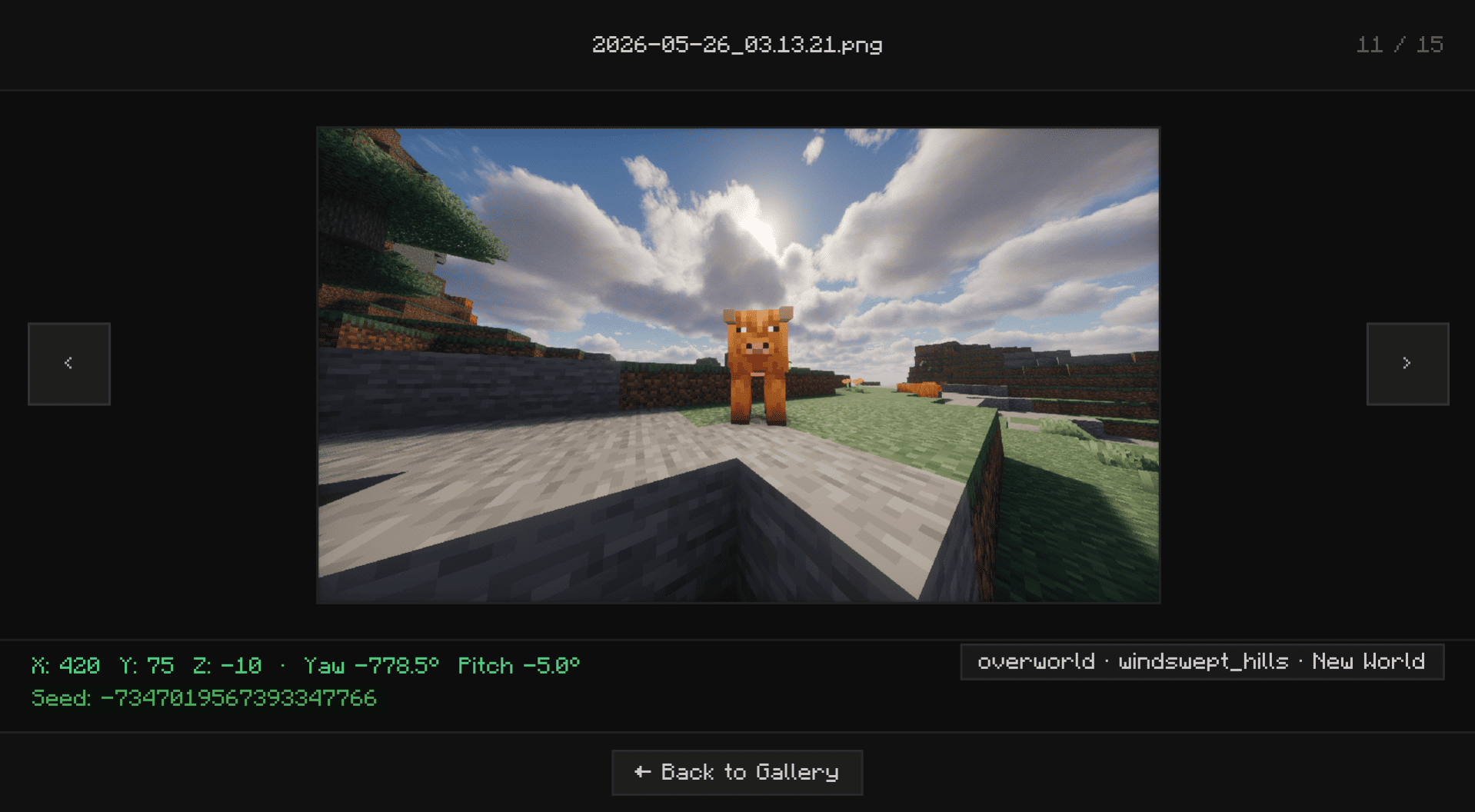
Adds a gallery screen to your pause menu so you can browse, delete, and locate screenshots without ever alt-tabbing out.

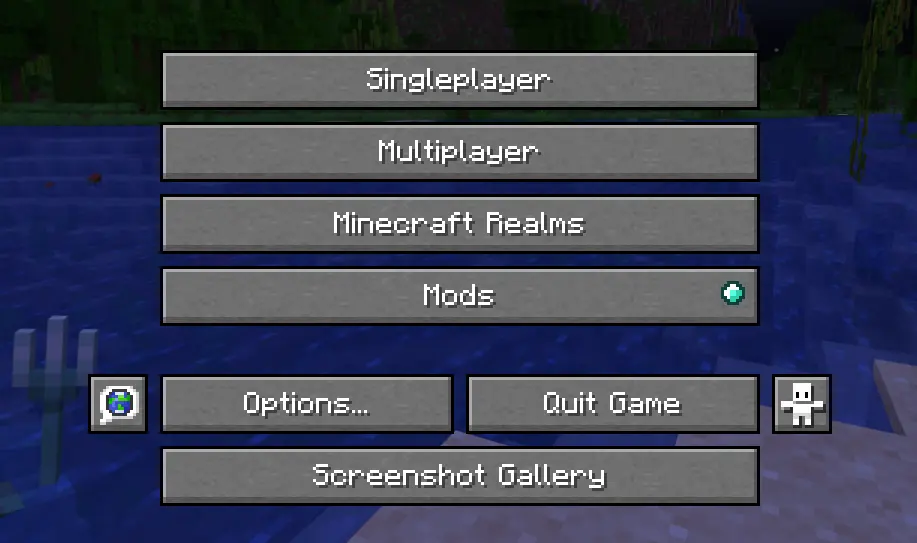
Hit Escape, click Gallery, and you're in. From there you can view shots fullscreen, delete the ones you don't want, or hit "Go To" to open File Explorer with the exact file already highlighted useful when you want to drag it into Discord or post it somewhere.


Features

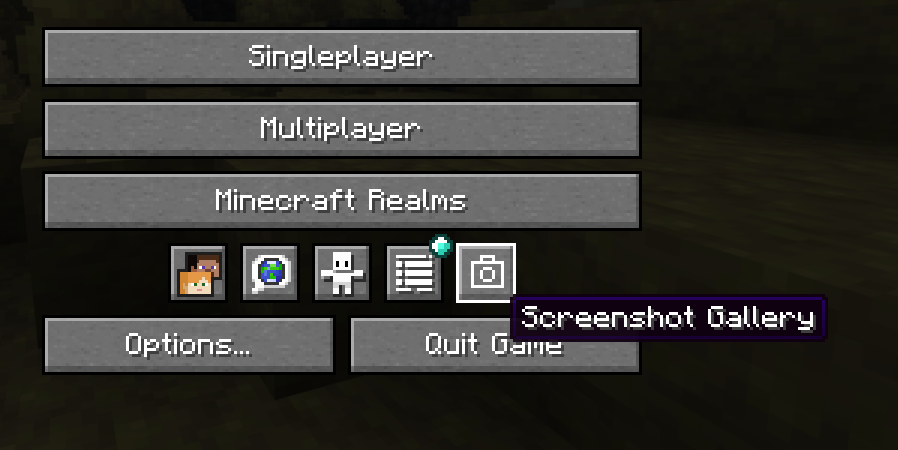
  • Gallery button in the pause menu (Esc)
  • Fullscreen viewer

in game

  • Delete screenshots directly from the UI without touching your folders
  • "Open Folder" opens File Explorer with the screenshot selected and ready to grab
  • Lazy-loads images holds up fine even with large screenshot folders

Installation

Supports Fabric, Forge, and NeoForge.

Fabric: Grab the mod and Fabric API, then drop both into .minecraft/mods.

Forge / NeoForge: Download the version that matches your loader and drop it into .minecraft/mods. No extra mods needed.

Версии

ВерсияКаналИграЗагрузчикиДатаСкачать
1.9+neoforgeРелиз1.21.1neoforge2 июля 2026 г..jar (91 КБ)
1.9.1+fabricРелиз26.2fabric24 июня 2026 г..jar (115 КБ)
1.9+fabricРелиз26.2fabric19 июня 2026 г..jar (114 КБ)
1.9+fabricРелиз1.21.11fabric19 июня 2026 г..jar (114 КБ)
1.8+fabricРелиз1.21.11fabric18 июня 2026 г..jar (109 КБ)
1.8+neoforgeРелиз1.21.1neoforge15 июня 2026 г..jar (85 КБ)
1.8+neoforgeРелиз26.1.2neoforge3 июня 2026 г..jar (83 КБ)
1.8+forgeРелиз1.21.11forge30 мая 2026 г..jar (83 КБ)
1.8+neoforgeРелиз1.21.11neoforge30 мая 2026 г..jar (85 КБ)
1.8+forgeРелиз1.20.1forge28 мая 2026 г..jar (80 КБ)
1.8+fabricРелиз26.1.1fabric28 мая 2026 г..jar (109 КБ)
1.8+fabricРелиз1.20.1fabric28 мая 2026 г..jar (30 КБ)
1.8+fabricРелиз26.1.2fabric28 мая 2026 г..jar (109 КБ)
1.7+fabricРелиз26.1.1fabric25 мая 2026 г..jar (105 КБ)
1.7+fabricРелиз26.1fabric22 мая 2026 г..jar (105 КБ)

Показаны последние 15 из 37 версий. Все версии — на Modrinth.

Ченджлог

1.9+neoforgeРелиз1.21.1 · 2 июля 2026 г.

[1.9] — July 2, 2026 FOR 1.21.1 NeoForge

Bug Fixes

Copy Image fix on Windows Copy Image has been fixed on Windows in Fabric, Forge, and NeoForge versions:

  • This function used to have issues due to some specificities in the way the clipboard is handled by Java. Now, instead, it copies an image using the clipboard on Windows.
  • Simply copy a screenshot and paste it into the Discord chat or any other image editing program.
  • Nothing external needed here it all happens inside the game.
  • Notice that this only works by copying the actual image, and not by copying a file. So it can't be pasted into a File Explorer folder.
1.9.1+fabricРелиз26.2 · 24 июня 2026 г.

Moved the Gallery button into the pause menu's icon row

1.9+fabricРелиз26.2 · 19 июня 2026 г.

[1.9] — June 19, 2026

Bug Fixes

Copy Image fix on Windows Copy Image has been fixed on Windows in Fabric, Forge, and NeoForge versions:

  • This function used to have issues due to some specificities in the way the clipboard is handled by Java. Now, instead, it copies an image using the clipboard on Windows.
  • Simply copy a screenshot and paste it into the Discord chat or any other image editing program.
  • Nothing external needed here it all happens inside the game.
  • Notice that this only works by copying the actual image, and not by copying a file. So it can't be pasted into a File Explorer folder.
1.9+fabricРелиз1.21.11 · 19 июня 2026 г.

[1.9] — June 19, 2026

Bug Fixes

Copy Image fix on Windows Copy Image has been fixed on Windows in Fabric, Forge, and NeoForge versions:

  • This function used to have issues due to some specificities in the way the clipboard is handled by Java. Now, instead, it copies an image using the clipboard on Windows.
  • Simply copy a screenshot and paste it into the Discord chat or any other image editing program.
  • Nothing external needed here it all happens inside the game.
  • Notice that this only works by copying the actual image, and not by copying a file. So it can't be pasted into a File Explorer folder.
1.8+fabricРелиз1.21.11 · 18 июня 2026 г.

[1.8] — June 18, 2026

Big stability update with thread safety fixes, coordinate precision improvements, and a new 1.21.11 Fabric backport.


New Features

Precise Coordinates — Coordinates are now stored and displayed as full decimals instead of rounded integers. Your copied /tp commands will land exactly where you clicked, and the format is now consistent across Fabric and Forge.


Bug Fixes

Thread Safety (Critical) — Fixed silent metadata corruption caused by the render and background threads hitting the cache at the same time.

Race Condition on Load — Metadata was sometimes finishing out of order. Moved async operations back onto the main thread so screenshots load correctly every time.

Memory Leak — Closing the gallery mid-load could leave orphaned textures on the GPU. Lifecycle checks now clean them up.

Text Overflow — Filenames and info cards were occasionally rendering outside thumbnail boundaries. Fixed with GL scissoring.

Search + Navigation Desync — Fullscreen navigation now correctly steps through only your filtered results instead of jumping to hidden ones.

Search Performance — Rewrote text truncation using binary search. Faster typing response and proper handling of special/RTL characters.

Thumbnail Animation — Was allocating a new object every frame for idle thumbnails. Replaced with a shared static instance.

Delete/Rename Modal — Dismissing the context menu could drop the active file target mid-operation. Now properly isolated.

F2 Spam Safeguard — Rapid screenshots could spawn multiple parallel polling tasks. An atomic lock now ensures only one runs at a time.


1.8+neoforgeРелиз1.21.1 · 15 июня 2026 г.

Changelog

[1.8] — June 15, 2026

Big stability update with thread safety fixes, coordinate precision improvements, and a new 1.21.1 NeoForge backport.


New Features

Precise Coordinates — Coordinates are now stored and displayed as full decimals instead of rounded integers. Your copied /tp commands will land exactly where you clicked, and the format is now consistent across Fabric and Forge.


Bug Fixes

Thread Safety (Critical) — Fixed silent metadata corruption caused by the render and background threads hitting the cache at the same time.

Race Condition on Load — Metadata was sometimes finishing out of order. Moved async operations back onto the main thread so screenshots load correctly every time.

Memory Leak — Closing the gallery mid-load could leave orphaned textures on the GPU. Lifecycle checks now clean them up.

Text Overflow — Filenames and info cards were occasionally rendering outside thumbnail boundaries. Fixed with GL scissoring.

Search + Navigation Desync — Fullscreen navigation now correctly steps through only your filtered results instead of jumping to hidden ones.

Search Performance — Rewrote text truncation using binary search. Faster typing response and proper handling of special/RTL characters.

Thumbnail Animation — Was allocating a new object every frame for idle thumbnails. Replaced with a shared static instance.

Delete/Rename Modal — Dismissing the context menu could drop the active file target mid-operation. Now properly isolated.

F2 Spam Safeguard — Rapid screenshots could spawn multiple parallel polling tasks. An atomic lock now ensures only one runs at a time.

1.8+neoforgeРелиз26.1.2 · 3 июня 2026 г.

Changelog

[1.8] — June 3, 2026 Support for 26.1.2 NeoForge

Big stability update with thread safety fixes, coordinate precision improvements, and a new 1.20.1 Fabric backport.


New Features

Precise Coordinates — Coordinates are now stored and displayed as full decimals instead of rounded integers. Your copied /tp commands will land exactly where you clicked, and the format is now consistent across Fabric and Forge.


Bug Fixes

Thread Safety (Critical) — Fixed silent metadata corruption caused by the render and background threads hitting the cache at the same time.

Race Condition on Load — Metadata was sometimes finishing out of order. Moved async operations back onto the main thread so screenshots load correctly every time.

Memory Leak — Closing the gallery mid-load could leave orphaned textures on the GPU. Lifecycle checks now clean them up.

Text Overflow — Filenames and info cards were occasionally rendering outside thumbnail boundaries. Fixed with GL scissoring.

Search + Navigation Desync — Fullscreen navigation now correctly steps through only your filtered results instead of jumping to hidden ones.

Search Performance — Rewrote text truncation using binary search. Faster typing response and proper handling of special/RTL characters.

Thumbnail Animation — Was allocating a new object every frame for idle thumbnails. Replaced with a shared static instance.

Delete/Rename Modal — Dismissing the context menu could drop the active file target mid-operation. Now properly isolated.

F2 Spam Safeguard — Rapid screenshots could spawn multiple parallel polling tasks. An atomic lock now ensures only one runs at a time.

1.8+forgeРелиз1.21.11 · 30 мая 2026 г.

Changelog

[1.8] — May 30, 2026

Big stability update with thread safety fixes, coordinate precision improvements, and a new 1.20.1 Fabric backport.


New Features

Precise Coordinates — Coordinates are now stored and displayed as full decimals instead of rounded integers. Your copied /tp commands will land exactly where you clicked, and the format is now consistent across Fabric and Forge.


Bug Fixes

Thread Safety (Critical) — Fixed silent metadata corruption caused by the render and background threads hitting the cache at the same time.

Race Condition on Load — Metadata was sometimes finishing out of order. Moved async operations back onto the main thread so screenshots load correctly every time.

Memory Leak — Closing the gallery mid-load could leave orphaned textures on the GPU. Lifecycle checks now clean them up.

Text Overflow — Filenames and info cards were occasionally rendering outside thumbnail boundaries. Fixed with GL scissoring.

Search + Navigation Desync — Fullscreen navigation now correctly steps through only your filtered results instead of jumping to hidden ones.

Search Performance — Rewrote text truncation using binary search. Faster typing response and proper handling of special/RTL characters.

Thumbnail Animation — Was allocating a new object every frame for idle thumbnails. Replaced with a shared static instance.

Delete/Rename Modal — Dismissing the context menu could drop the active file target mid-operation. Now properly isolated.

F2 Spam Safeguard — Rapid screenshots could spawn multiple parallel polling tasks. An atomic lock now ensures only one runs at a time.

Полная история изменений — на Modrinth.

Комментарии

Загружаем…