 Mineforgian
Scatha-Pro
A mod for improved Scatha farming on Hypixel SkyBlock
- Загрузки
- 202K
- Подписчики
- 28
- Обновлён
- 18 августа 2026 г.
- Лицензия
- All-Rights-Reserved
Опубликован 21 января 2024 г.
Scatha-Pro
A mod that aims to make Scatha farming on Hypixel SkyBlock both easier and more enjoyable by adding several alerts, a UI overlay, Scatha related achievements and more!
Requirements:
- Fabric Loader
- Fabric API
- Hypixel Mod API (is included in this mod's jar file)
Import settings & data from MC 1.8.9
The v2 mod versions use new save file formats for the settings and the persistent data (= tracker number etc.) but should automatically import all the data from the old files!
If you're using a different installation directory for Fabric than you used for Forge 1.8.9 you can just copy the save folder from "/config/scathapro" to "/config/scathapro" and everything should carry over (make sure no [...]v2 files already exist, if they do, delete them so they can regenerate with the old data!).
Features
I heavily suggest going through all the settings after first installing the mod to customize it to your liking! (also because bunch of options/features are disabled by default to prevent cluttering the game)
-> See section "Settings"
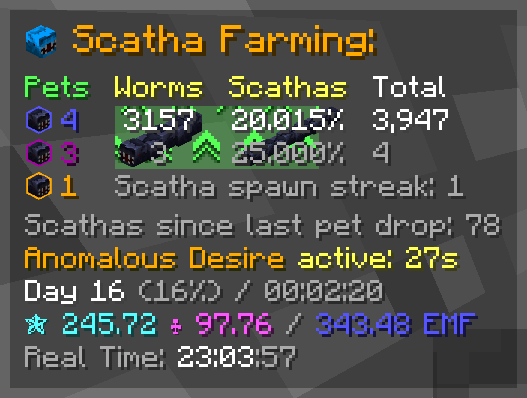
Scatha farming UI overlay
Shows up after spawning a worm in the Crystal Hollows (can be set to show immediately or be entirely disabled as well).
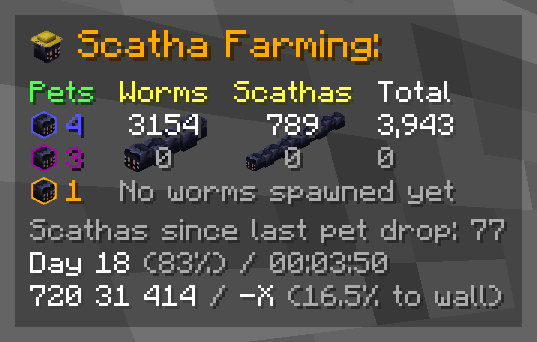
The overlay can be repositioned and scaled in the settings!
Components:
Each component can be individually enabled/disabled
- Darkened background
- Title (= the icon and the "Scatha Farming:" text)
- Scatha pet drops counters
You can use/scathapro setPetDrops <rare> <epic> <legendary>to add pets you dropped before installing the mod to the counters (NOTE: the according achievements get unlocked on either the next game start or Scatha pet drop) - Worm stats
- Regular worm, Scatha and total worm kills
Scatha kills periodically cycle between the kills amount and the percentage that is of the total worm kills - the cycling timings can be changed in the settings, along with moving the percentage behind the total kills for constant visibility - Secondary kill counters
Can be set to track either lobby, game session or daily kills in the settings (default: per lobby) - Worm/Scatha spawn streak
- Worm spawn cooldown bar (shows up behind kill counters once a worm is spawned)
- Anomalous Desire effect bar (shows up behind kill counters while the ability is active)
- Regular worm, Scatha and total worm kills
- Regular worm or Scatha spawn streak
- Scatha kills since last pet drop
- Anomalous Desire status (disabled by default)
- Time since last worm spawn (disabled by default)
- Lobby time
- Day number
- Time spent in lobby
- Coordinates / orientation
- Coords
- View direction axis
- Percentage to bedrock wall
- Scatha farming profile stats (disabled by default)
Displays your Scatha farming Magic Find, Pet Luck and their resulting Effective Magic Find (= sum of the former two) - Real time clock (disabled by default)
Alerts
Alerts pop up some text in the center of the screen and play a sound when certain things happen
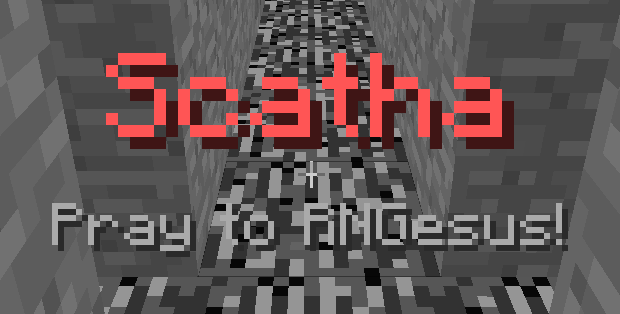
All alerts:
- Bedrock wall alert (configurable trigger distance; 0-50 blocks, default: 15)
- Worm pre-spawn alert
- Worm spawn alert (regular worms only)
- Scatha spawn alert
- Worm spawn cooldown alert (triggers when cooldown ends)
- Scatha pet drop alert (shows rarity of dropped pet)
- High heat alert (configurable trigger value; 90-100, default: 98)
- Anomalous Desire ready alert
- Goblin spawn alert (golden and diamond goblins)
- Jerry spawn alert (hidden Jerrys from mayor perk)
Modes:
Alert modes play different alert sounds (+ the Scatha head in the overlay changes to represent the selected mode)
- Vanilla (Minecraft inbuilt sounds)
- Meme mode
- Anime mode
- Custom mode
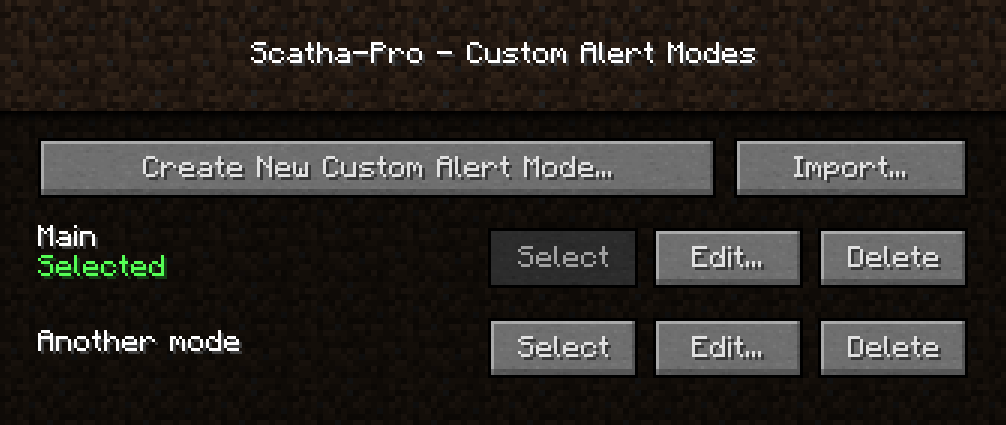
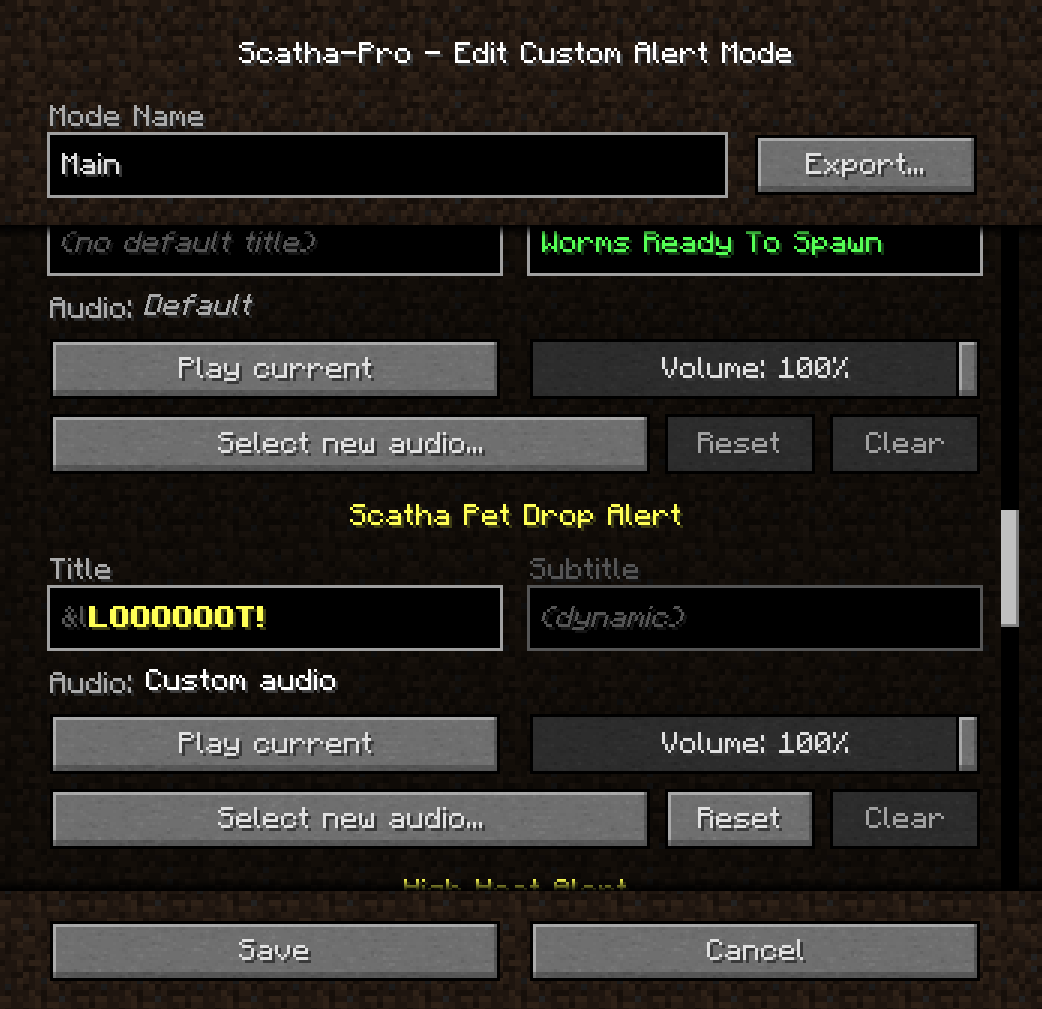
Custom Mode
Lets you create as many custom modes as you want which you can set custom alert audios and title texts in (the titles support Minecraft's color/formatting codes, using "&" instead of "§")

NOTE: Audio files used have to be in *.ogg format due to Minecraft's sound engine, but the mod supports installing FFmpeg to automatically convert mp3 and wav files to ogg. It looks for an FFmpeg installation either in the mod folder with the name "scathapro-ffmpeg[.exe]" or in your environment's PATH variable (".../ffmpeg[.exe]"). The installation you use has to include the libvorbis encoder to work!
You can also export and import custom modes as .zip files.
(Reminder not to download files you don't trust!)
Achievements
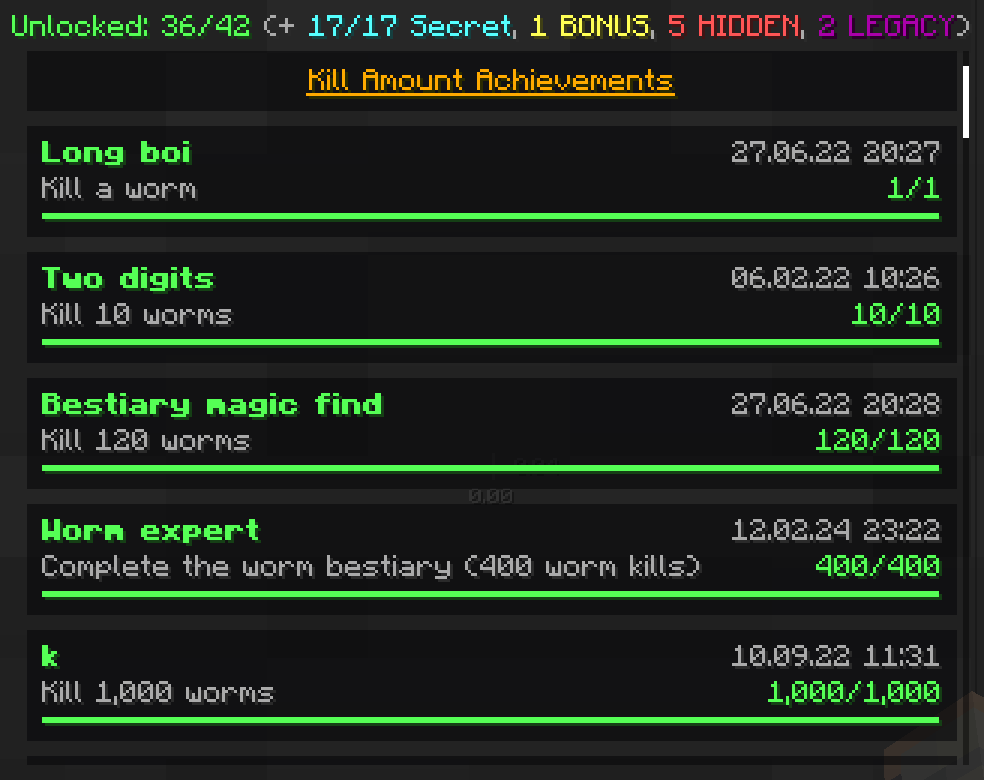
The achievements menu is accessible through a button next to the vanilla Minecraft achievements menu button or by using /scathapro achievements
Achievement categories:
- Regular
- Secret: Description and count obfuscated if not unlocked
- BONUS: Category for harder achievements that can be hidden from the list
- HIDDEN: Completely hidden from the list and achievement counters unless unlocked
- LEGACY: Same as HIDDEN but can't be unlocked anymore
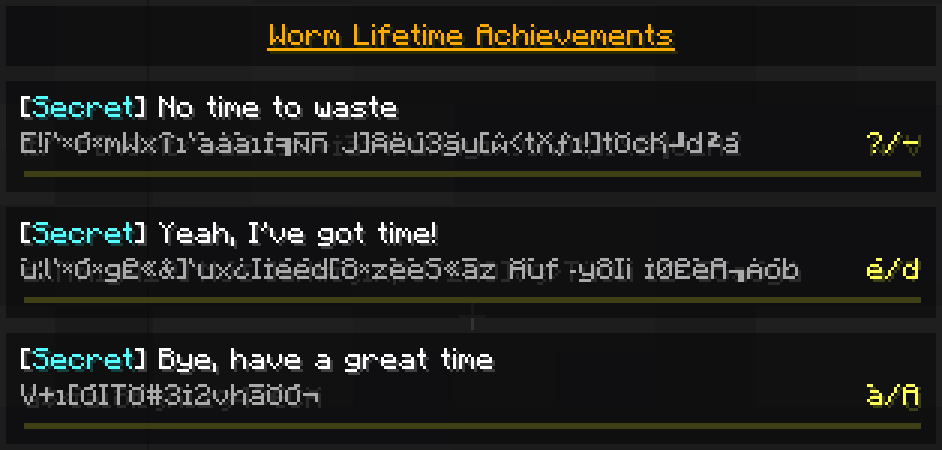
Some achievements are repeatable, with a counter showing how many times you have unlocked them:

Player rotation utilities
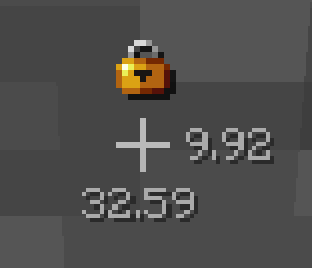
- Display pitch/yaw next to crosshair (disabled by default)
- Lock rotation (key binding, unassigned by default)
Daily Scatha farming streak
Tracks how many days in a row you've farmed Scathas for - also saves a highscore.
You can check your current streak using /scathapro dailyStreak
How many days can you reach?


(The notifications when you increase/break your streak can be disabled!)
Chat copy button

(The red square is just to highlight the icon on the screenshot, this is not how it looks in-game)
(disabled by default)
Adds a clickable symbol behind all chat messages that copies their text into the chat input field so you can copy and paste those Scatha drop messages
Commands
Use /scathapro help for a list of all commands
Main command:
/scathapro <sub-command> (<arguments...>) (shortcut: /sp)
Has several sub-commands, see /scathapro help
Scatha pet drop chances calculator:
/scathachances (<EMF/Magic Find>) (<Pet Luck>) (<Scatha kills>) (shortcut: /scacha ...)
If no arguments are entered, shows the base chances, otherwise calculates the specific drop chances.
When a kills value is entered, calculates the chances for dropping at least 1 Scatha pet during the process of killing that many Scathas.
Scatha farming money calculator:
/scathamoney
Opens a GUI that lets you calculate the average money you can make from dropped Scatha pets depending on your stats.
Settings
Accessible either via -> "Options..." -> "Scatha-Pro Settings...", the Forge mod list "Config" button, or using /scathapro settings
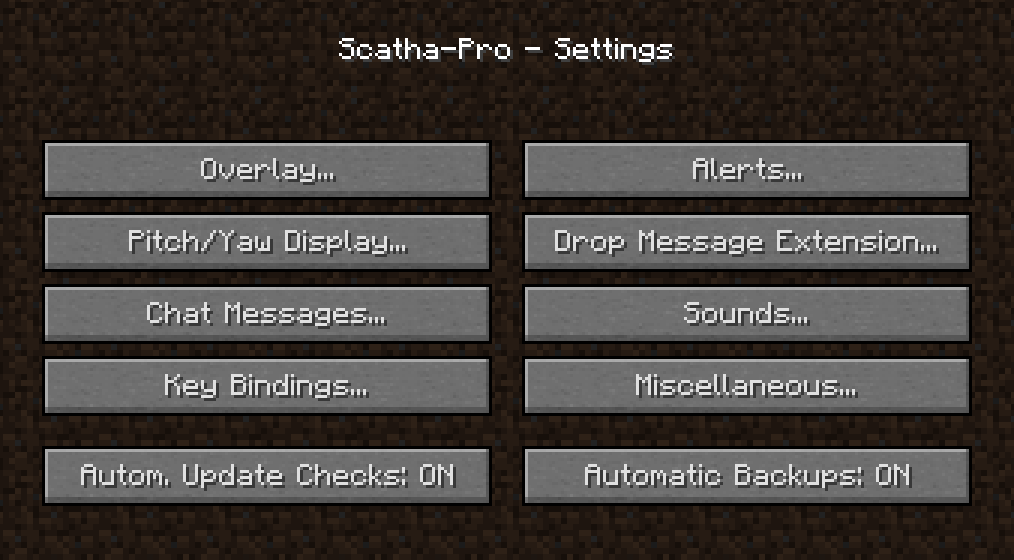
Backups
The mod automatically creates a backup for it's whole save folder when you install a new mod version (can be disabled in the settings -> "Automatic Backups").
You can also manually create backups using /scathapro backup or /scathapro backupPersistentData (the former compresses the folder as a zip; the latter only backups the persistent data file = how the mod remembers your worm kill amounts, unlocked achievements, etc. but not settings or custom alert modes).
Backups are stored in %appdata%/.minecraft/config/scathapro_backups, to load one replace .../scathapro/ or .../scathapro/persistentData.json (depending on the backup type) with the folder/file.
...and more
You can find all features in either /scathapro help or the settings
Known Issues
- opening chat while the Scatha drops slot machine is rolling crashes the game
Feedback
You can leave any feedback (bug reports, feature suggestions, ...) on the Scatha Farmers Discord server in the #scatha-pro-feedback channel or create a GitHub issue.
On the Discord server you can also get pinged when new versions release.
Source Code
This mod's code is publicly available on GitHub: https://github.com/NamelessJu/Scatha-Pro
Please do not redistribute the mod on it's own, modified or not!
You may however include the mod files (unedited) in mod packs.
Ченджлог
2.2.2Релиз26.1, 26.1.1, 26.1.2 · 18 августа 2026 г.
Since I skipped a few updates for MC 26.1.x, here's the full changelog since v2.1.5:
Worm Settings
- added a worm lifetime display that shows the seconds remaining until a worm despawns above their nametag (can be disabled)
- added a setting to revert Stoneworms to their original texture (= the Scatha texture)
- added settings to replace the Stoneworm and/or Scatha heads with player skins
Scatha Drops Slot Machine
- added a slot machine visual that rolls for the drops you get from a Scatha (shows the actual drops you get; disabled by default)
- has a few options to customize how it looks/behaves
Achievements
- added several new Secret achievements
- reworked some of the achievement categories
- made "Return to sender" achievement support one more thing that was missing (yeah this description is cryptic but no spoilers here! lol)
- turned "One for each segment" into a legacy achievement as it was too similar to another achievement and the less interesting of both
- slightly adjusted/changed some achievement names
Overlay
- added new content: block bran counter (disabled by default)
- replaced the simple ON/OFF overlay background setting with an opacity slider
Miscellaneous Changes
- attributes are now parsed for mob type specific Magic Find sources
--> these are now included in the overlay and drop message extension MF - Obstacle Alert is now disabled by default
- overlay does not get hidden on warp anymore (was too confusing and can still be done manually)
- added more mod chat message prefix options
- added setting to disable Scatha-Pro buttons being added to vanilla menus
- re-added the custom key bindings screen, showing only this mod's bindings
Fixes
- bestiary parsing now works again after Hypixel renamed it to "Stoneworm"
- improved black hole kill detection
- improved bow/arrow & fishing rod hit detection
- fixed potential issue where worm hits & kills might not get detected
- fixed shuriken tag detection
- changed "regular worm" texts to "Stoneworm"
- Overlay googly eyes now update when changing the setting
- re-implemented the custom alert mode titles edit box formatting preview
- fixed Witches Stew parser trying to parse some incorrect slots
2.2.2Релиз26.2 · 18 августа 2026 г.
Improvements
- added a setting to hide the rarity of Scatha pets in the Scatha drops slot machine
- replaced the simple ON/OFF overlay background setting with an opacity slider
- attributes are now parsed for mob type specific Magic Find sources
--> these are now included in the overlay and drop message extension MF
Fixes
- "Two birds with one stone" achievement should now be possible to unlock
- worm despawn timer now reappears again after a worm gets far away and returns
- more menu screens now get hidden when the Scatha drops slot machine is rolling
- fixed Witches Stew parser trying to parse some incorrect slots
2.2.1Релиз26.2 · 14 августа 2026 г.
v2.2.1:
fixed the mod requiring Java 26 (now back to 25, same as Minecraft itself)
v2.2:
Worm Settings
- added a worm lifetime display that shows the seconds remaining until a worm despawns above their nametag (can be disabled)
- added a setting to revert Stoneworms to their original texture (= the Scatha texture)
- added settings to replace the Stoneworm and/or Scatha heads with player skins
Scatha Drops Slot Machine
- added a slot machine visual that rolls for the drops you get from a Scatha (shows the actual drops you get; disabled by default)
- has a few options to customize how it looks/behaves
Achievements
- added several new Secret achievements
- reworked some of the achievement categories
- made "Return to sender" achievement support one more thing that was missing (yeah this description is cryptic but no spoilers here! lol)
- turned "One for each segment" into a legacy achievement as it was too similar to another achievement and the less interesting of both
- slightly adjusted/changed some achievement names
Miscellaneous Changes
- added new overlay content: block bran counter (disabled by default)
- Obstacle Alert is now disabled by default
- overlay does not get hidden on warp anymore (was too confusing and can still be done manually)
- added more mod chat message prefix options
- added setting to disable Scatha-Pro buttons being added to vanilla menus
- re-added the custom key bindings screen, showing only this mod's bindings
Fixes
- bestiary parsing now works again after Hypixel renamed it to "Stoneworm"
- improved black hole kill detection
- improved bow/arrow & fishing rod hit detection
- fixed potential issue where worm hits & kills might not get detected
- fixed shuriken tag detection
- changed "regular worm" texts to "Stoneworm"
- Overlay googly eyes now update when changing the setting
- re-implemented the custom alert mode titles edit box formatting preview
2.2Релиз26.2 · 14 августа 2026 г.
Worm Settings
- added a worm lifetime display that shows the seconds remaining until a worm despawns above their nametag (can be disabled)
- added a setting to revert Stoneworms to their original texture (= the Scatha texture)
- added settings to replace the Stoneworm and/or Scatha heads with player skins
Scatha Drops Slot Machine
- added a slot machine visual that rolls for the drops you get from a Scatha (shows the actual drops you get; disabled by default)
- has a few options to customize how it looks/behaves
Achievements
- added several new Secret achievements
- reworked some of the achievement categories
- made "Return to sender" achievement support one more thing that was missing (yeah this description is cryptic but no spoilers here! lol)
- turned "One for each segment" into a legacy achievement as it was too similar to another achievement and the less interesting of both
- slightly adjusted/changed some achievement names
Miscellaneous Changes
- added new overlay content: block bran counter (disabled by default)
- Obstacle Alert is now disabled by default
- overlay does not get hidden on warp anymore (was too confusing and can still be done manually)
- added more mod chat message prefix options
- added setting to disable Scatha-Pro buttons being added to vanilla menus
- re-added the custom key bindings screen, showing only this mod's bindings
Fixes
- bestiary parsing now works again after Hypixel renamed it to "Stoneworm"
- improved black hole kill detection
- improved bow/arrow & fishing rod hit detection
- fixed potential issue where worm hits & kills might not get detected
- fixed shuriken tag detection
- changed "regular worm" texts to "Stoneworm"
- Overlay googly eyes now update when changing the setting
- re-implemented the custom alert mode titles edit box formatting preview
2.1.5Релиз26.1, 26.1.1, 26.1.2 · 6 августа 2026 г.
- worm hole kills now get correctly detected (& in turn pet drops as well)
- adjusted kill counts of bestiary related achievements (+ legacy achievement for old max bestiary)
- replaced regular worm render in overlay with new one using the updated texture
- prepared mod for Hypixel potentially renaming the "Worm" entity to "Stoneworm" (as this was mentioned in the patch notes but isn't actually the case as of now)
2.1.4Релиз26.1, 26.1.1, 26.1.2 · 24 июля 2026 г.
- updated profile stats menu parser to new chest GUI title
--> "/sp profileStats updateGlobal" now works again - fixed the mod thinking it's still on version 2.1.2
--> this also fixes the inbuilt update checker complaining about a new mod version when the latest version was installed - inbuilt update checker now only checks for new mod versions for the currently running Minecraft version
2.1.3Релиз26.1, 26.1.1, 26.1.2 · 12 июля 2026 г.
- prepared the mod for upcoming worm changes (new regular worm texture & mob type icons in nametag)
- adjusted some textures & icons to match the new official resource pack
- fixed legacy config & persistent data files being imported from the wrong directory (now looks for them again in config/scathapro/ instead of config/)
- fixed incorrect formatting for automatic time format
2.1.2Релиз26.1.1, 26.1.2 · 7 апреля 2026 г.
Fixed crash on game start when a custom mode didn't have all files set up
Комментарии
Загружаем…